云函数及云对象是运行在云端的一段独立的后端逻辑代码。前端应用(如小程序、App、H5)可以直接调用它,就像调用一个 API 接口。这种方式省去了传统后端(如自建 Node.js、PHP或Java服务器)的繁琐部署与管理过程,让你只需专注于编写核心的云端业务逻辑。
一、创建与调用云函数/云对象
1. 创建云函数或云对象
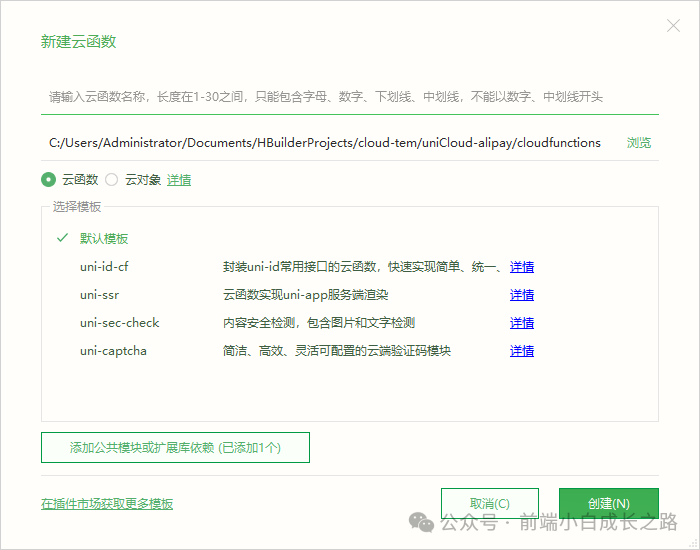
在项目根目录下找到 uniCloud 目录,其下的 cloudfunctions 目录用于存放云端逻辑。右键点击该目录,选择新建云函数或云对象,并输入名称即可完成创建。
2. 云函数参数与调用
云函数接收两个核心参数 event 和 context。
- event:调用时传入的业务参数。
- context:包含客户端上下文信息,如IP、应用ID、设备ID等。云函数内部需自行处理逻辑并返回结果。
// 云函数示例 index.js
‘use strict‘;
exports.main = async (event, context) => {
    // 从context中获取信息
    let clientIP = context.CLIENTIP;
    let appid = context.appId;

    // event为客户端调用时传入的参数
    console.log(‘event : ‘, event);

    // 处理业务逻辑并返回
    return {
        errCode: 1,
        errMsg: “参数a不能为空”
    };
};
前端通过 uniCloud.callFunction 进行调用:
// uniapp前端调用云函数
uniCloud.callFunction({
    name: ‘cloudfunction-name‘, // 云函数目录名称
    data: { a: 1 } // 传递参数
})
3. 云对象简介与调用
云对象提供了一种面向对象的云端逻辑封装方式,允许你像调用前端本地对象方法一样调用后端函数。它内置了 _before、_after 等生命周期钩子,简化了通用逻辑的处理。
// 云对象示例 todo/index.obj.js
module.exports = {
    _before: function() {
        this.startTime = Date.now(); // 在before钩子中记录开始时间
    },
    // 业务方法
    add: function(title = ‘‘, content = ‘‘) {
        if(title === ‘abc‘) {
            throw new Error(‘abc不是一个合法的todo标题‘);
        }
        return {
            errCode: 0,
            errMsg: ‘创建成功‘
        };
    },
    _after(error, result) {
        if(error) {
            throw error;
        }
        result.timeCost = Date.now() - this.startTime;
        return result;
    }
}
云对象内部可以通过 this.getUniIdToken() 等API获取请求相关信息。
前端调用云对象非常简洁:
const todo = uniCloud.importObject(‘todo‘); // 导入云对象
const res = await todo.add(‘学习UniApp‘, ‘完成云函数章节‘); // 调用方法
uni-app框架会自动处理云对象的响应。若结果中包含真值 errCode,则会抛出错误,因此前端调用需使用 try...catch 或 .catch 进行捕获。后续我们将封装统一的响应体来简化此过程。
二、封装前端通用请求方法
为了在项目中统一、便捷地调用云端逻辑,并处理加载状态、错误码等通用逻辑,我们需要封装一个通用的请求方法。
在项目根目录下创建 utils/request.js 文件。
/**
 * 通用云服务请求封装
 * @param {Object} config
 * @param {‘fn‘|‘obj‘} config.type 调用类型(fn=云函数 / obj=云对象)
 * @param {string} config.name 云函数名或云对象名
 * @param {string} [config.method] 云对象方法名(type=‘obj‘时必填)
 * @param {Object} [config.data={}] 请求参数
 * @param {Object} [config.option={ showLoading: true }] 配置项
 */
export default ({
    type = ‘fn‘,
    name,
    method,
    data = {},
    option = { showLoading: true }
}) => {
    if (option.showLoading) showFullScreenLoading() // 显示加载动画

    return new Promise((resolve, reject) => {
        const uid = user_store.userId
        // 根据需求自动附带用户ID
        if (methodsUid.includes(method || name)) {
            data.uid = uid
        } else if (uid) {
            data.uid = uid
        }

        if (type === ‘fn‘) {
            // 调用云函数
            uniCloud
                .callFunction({ name, data })
                .then(res => {
                    if (option.showLoading) tryHideFullScreenLoading()
                    const result = res?.result || {}
                    if (result.code && result.code > 10) {
                        errHandle(result.code, result.message || result.msg || ‘系统错误‘)
                        reject(result)
                        return
                    }
                    resolve(result)
                })
                .catch(err => {
                    if (option.showLoading) tryHideFullScreenLoading()
                    console.error(‘云函数调用错误:‘, err)
                    reject(err)
                })
        } else if (type === ‘obj‘) {
            // 调用云对象
            const obj = uniCloud.importObject(name, { customUI: true })
            if (!obj || !obj[method]) {
                console.error(`云对象 ${name} 不存在方法:${method}`)
                if (option.showLoading) tryHideFullScreenLoading()
                reject(new Error(‘方法不存在‘))
                return
            }
            obj[method](data)
                .then(res => {
                    if (option.showLoading) tryHideFullScreenLoading()
                    if (res && res.code && res.code > 10) {
                        errHandle(res.code, res.message || res.msg || ‘系统错误‘)
                        reject(res)
                        return
                    }
                    resolve(res)
                })
                .catch(err => {
                    if (option.showLoading) tryHideFullScreenLoading()
                    console.error(‘云对象调用错误:‘, err)
                    reject(err)
                })
        } else {
            if (option.showLoading) tryHideFullScreenLoading()
            reject(new Error(‘无效的调用类型‘))
        }
    })
}

// 统一错误处理
const errHandle = (code, msg) => {
    switch (code) {
        case 401:
            uni.showToast({
                title: ‘登录失效,请重新登录‘,
                icon: ‘none‘,
                duration: 1200
            })
            setTimeout(() => { logout() }, 2000) // 跳转登录页
            break
        default:
            uni.showToast({
                title: msg || ‘系统错误‘,
                icon: ‘none‘,
                duration: 1200
            })
            break
    }
}
使用示例
封装完成后,在业务页面中可以非常清晰地进行调用。
import request from ‘@/utils/request.js‘

// 1. 调用云函数示例
export const wxLogin = (code) => request({
    name: ‘comLogin‘,
    data: {
        action: ‘loginByWeixin‘,
        params: { code },
    },
})

// 2. 调用云对象示例
export const getUserInfo = () => request({
    type: ‘obj‘,
    name: ‘userHandle‘, // 云对象名称
    method: ‘getUserInfo‘, // 云对象方法名
})

// 在页面或组件中使用
async function fetchData() {
    try {
        const userInfo = await getUserInfo()
        console.log(‘用户信息:‘, userInfo)
    } catch (e) {
        console.error(‘请求失败:‘, e)
    }
}
通过本章的学习,你已经掌握了 uniCloud 云函数与云对象的核心概念、创建调用方法,并完成了一个兼顾云函数与云对象的前端通用请求封装。这将为后续实际业务开发,尤其是与 数据库 的交互打下坚实的基础。下一章我们将介绍 uniCloud 公共模块的使用,并定义统一的响应体规范,随后正式进入项目实战开发环节。
 发表于 2025-12-4 00:20:34
|
查看: 300|
回复: 0
发表于 2025-12-4 00:20:34
|
查看: 300|
回复: 0

