你有没有遇到过这种情况:让 Agent 跑一个 npm install,然后整个对话就卡住了——光标闪烁,什么也不做,静静等着命令结束。三分钟后终端吐出一堆包的安装日志,Agent 才如梦初醒,继续下一步。
这三分钟里,LLM 什么也没做。而 LLM 是按 token 计费的。
问题不是“等待”本身,而是等待的方式。
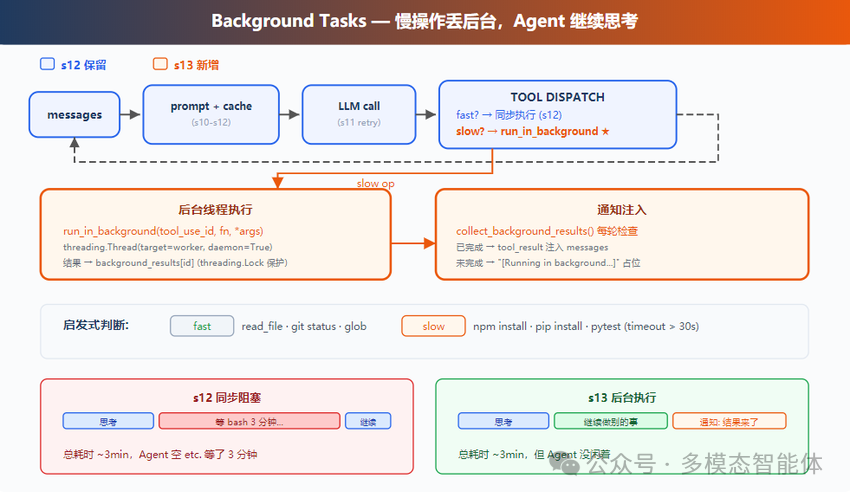
前面一个版本的执行模型
前面一个版本的工具执行是完全串行的:LLM 决定调用 bash,agent_loop 就同步调用 run_bash,等命令返回,把结果打包进 tool_result,再发给 LLM,才进入下一轮。
for tool_call in response.choices[0].message.tool_calls:
    output = execute_tool(tool_call)
    results.append({
        "role": "tool",
        "tool_call_id": tool_call.id,
        "content": str(output)
    })
messages.append({"role": "user", "content": results})
execute_tool 是阻塞调用。npm install 跑三分钟,这三分钟里 agent_loop 就停在那一行,什么也做不了。
这在命令都是快操作(读文件、git status、ls)的时候没问题。但现实中 Agent 经常需要跑慢操作:安装依赖、跑测试、编译项目、拉镜像。这些命令动辄几分钟。全部串行,就是在白白烧 LLM 的上下文时间。
当前版本:慢操作异步化
当前版本的核心改动是把“判断—分发—注入”拆成三个独立环节。慢操作不再阻塞 agent_loop,而是丢进后台线程执行,主循环继续跑。后台任务完成后,结果以通知的形式注入进对话。
这一套机制由三个问题驱动:
- 谁来判断一个操作该不该放后台?
- 后台任务怎么管理生命周期?
- 结果怎么回到对话里?
第一个问题:判断逻辑
最直接的思路是写一个关键词列表:命令里有 install、build、test,就扔后台。
slow_keywords = ["install", "build", "test", "deploy", "compile",
                "docker build", "pip install", "npm install",
                "cargo build", "pytest", "make"]

def is_slow_operation(tool_name: str, tool_input: dict) -> bool:
    if tool_name != "bash":
        return False
    cmd = tool_input.get("command", "").lower()
    return any(kw in cmd for kw in slow_keywords)
这能覆盖大多数场景,但有明显缺陷:make clean 通常很快,test 在某些项目里也是秒级,关键词猜不准。
更好的方式是让模型自己决定。在 bash 工具的 schema 里加一个 run_in_background 布尔参数,让 LLM 在调用工具时显式标注这个命令需不需要异步执行:
{
  "type": "function",
  "function": {
    "name": "bash",
    "description": "Run a shell command.",
    "parameters": {
      "type": "object",
      "properties": {
        "command": {"type": "string"},
        "run_in_background": {"type": "boolean"}
      },
      "required": ["command"]
    }
  }
}
LLM 读过工具描述、见过命令、有上下文判断,它比关键词列表更清楚哪个命令会跑很久。
最终判断逻辑是优先级叠加:模型显式请求优先,没有显式指定的走启发式兜底。
def should_run_background(tool_name: str, tool_input: dict) -> bool:
    if tool_input.get("run_in_background"):
        return True
    return is_slow_operation(tool_name, tool_input)
Claude Code 的 BashTool.tsx 第 241 行里也有这个参数,生产实现里模型是主路径,关键词是辅助。
第二个问题:生命周期管理
后台任务需要有状态追踪。一个任务从启动到完成,经历 running → completed 两个阶段,过程中可能有多个任务并发跑。
当前版本用两个字典加一把锁来管理:
_bg_counter = 0
background_tasks: dict[str, dict] = {}   # bg_id → {tool_use_id, command, status}
background_results: dict[str, str] = {}  # bg_id → 输出内容
background_lock = threading.Lock()
background_tasks 追踪生命周期,background_results 存输出,background_lock 保证多线程写入时不出数据竞争。
启动一个后台任务的完整逻辑:
def start_background_task(tool_call) -> str:
    global _bg_counter
    _bg_counter += 1
    bg_id = f"bg_{_bg_counter:04d}"
    cmd = json.loads(tool_call.function.arguments).get("command", "")

    def worker():
        result = execute_tool(tool_call)
        with background_lock:
            background_tasks[bg_id]["status"] = "completed"
            background_results[bg_id] = result

    with background_lock:
        background_tasks[bg_id] = {
            "tool_use_id": tool_call.id,
            "command": cmd,
            "status": "running",
        }
    thread = threading.Thread(target=worker, daemon=True)
    thread.start()
    return bg_id
几个细节值得注意:
daemon=True:守护线程。主进程退出时,所有守护线程跟着退出,不需要手动 join。如果不设这个,后台任务还在跑的时候用户 Ctrl+C,进程会卡住等线程结束。- 返回
bg_id 而不是直接返回结果:bg_id 是任务的句柄,后续收集通知、检查状态都靠它定位。同时这个 ID 会作为占位符写进 tool_result 返回给 LLM,让 LLM 知道这个命令已经在跑了,不需要重复调用。
- 写入顺序:先注册任务(
background_tasks[bg_id] = ...),再启动线程。顺序反了的话,worker 线程可能在任务注册之前就尝试写入 background_tasks,导致 KeyError。
Claude Code 的实现复杂得多:LocalShellTaskState 把输出重定向到临时文件,支持流式读取后续输出,还有一个看门狗定时检查输出是否停滞——45 秒无新输出就扫描 (y/n)、password: 这类交互式提示,防止后台任务卡在无人应答的对话框里。当前版本省掉了这些,但核心结构是一致的。
第三个问题:结果怎么回到对话
后台任务完成后,结果要注入进对话。这里有一个 Messages API 的约束需要绕开。
OpenAI 的 Messages API 要求每个 tool_use 对应唯一一个 tool_result,而且这个配对必须在同一轮完成——发出 tool_use 的那轮,必须在下一条 user 消息里附上对应的 tool_result。
后台任务破坏了这个时序:LLM 在 Turn 1 调用了 bash npm install,Turn 1 的 tool_result 只能是占位符(任务还在跑),Turn 2 或更晚才能拿到真实结果。如果这时候用原始 tool_use_id 再发一个 tool_result,会破坏 API 的配对语义,大概率报错或产生混乱。
解决办法是不复用 tool_use_id,改用独立的通知格式:
def collect_background_results() -> list[str]:
    with background_lock:
        ready_ids = [bid for bid, task in background_tasks.items()
                     if task["status"] == "completed"]
    notifications = []
    for bg_id in ready_ids:
        with background_lock:
            task = background_tasks.pop(bg_id)
            output = background_results.pop(bg_id, "")
        summary = output[:200]
        notifications.append(
            f"<task_notification>\n"
            f"  <task_id>{bg_id}</task_id>\n"
            f"  <status>completed</status>\n"
            f"  <command>{task['command']}</command>\n"
            f"  <summary>{summary}</summary>\n"
            f"</task_notification>"
        )
    return notifications
通知是普通的 text block,不是 tool_result。它的语义是“这是一个事件通知”,而不是“这是某个工具调用的返回值”。LLM 读到 <task_notification> 知道之前发出去的后台任务完成了,可以根据里面的 summary 决定下一步。
Claude Code 里也是这套思路:enqueueTaskNotification(utils/task/framework.ts:267)把通知推进命令队列,通知有优先级区分——next 比 later 先处理,后台任务默认走 later,不阻塞用户输入。
循环里的集成:两条路汇成一条消息
agent_loop 里的改动集中在工具执行那一段。原来只有一条路(同步执行),现在分叉成两条,但最后汇成同一条 user 消息:
results = []
for tool_call in response.choices[0].message.tool_calls:
    tool_input = json.loads(tool_call.function.arguments)

    if should_run_background(tool_call.function.name, tool_input):
        # 慢操作:启动后台线程,返回占位 tool_result
        bg_id = start_background_task(tool_call)
        results.append({
            "role": "tool",
            "tool_call_id": tool_call.id,
            "content": f"[Background task {bg_id} started] "
                       f"Command: {tool_input.get('command', '')}. "
                       f"Result will be available when complete."
        })
    else:
        # 快操作:同步执行,立即返回
        output = execute_tool(tool_call)
        results.append({
            "role": "tool",
            "tool_call_id": tool_call.id,
            "content": str(output)
        })

# 收集本轮已完成的后台任务通知
bg_notifications = collect_background_results()

# 通知 + 工具结果合入同一条 user 消息
user_content = list(results)
for notif in bg_notifications:
    user_content.append({"type": "text", "text": notif})

messages.append({"role": "user", "content": user_content})
通知和 tool_result 打包进同一条 user 消息,是因为 Messages API 不允许连续两条 user 消息。合并是唯一合法的选择。
走一遍完整的两轮对话,可以看清楚各部分的时序:
Turn 1:
  LLM → 调用 bash "npm install" (run_in_background=true)
       → start_background_task → bg_0001,线程启动
       → tool_result: "[Background task bg_0001 started]..."
  LLM → "好的,安装在后台跑,我先读一下 package.json"
       → 调用 read_file "package.json"(同步,快)
       → tool_result: { ...package.json 内容... }

Turn 2:
  collect_background_results → bg_0001 完成了
  user 消息 = [
    tool_result(read_file),
    text(<task_notification> bg_0001 completed: ... </task_notification>)
  ]
  LLM → 读到配置内容 + 安装完成通知,决定下一步
npm install 跑后台的那三分钟,Agent 读完了配置文件,可能还做了别的事。
前后对比
| 维度 |
前面一个版本 |
当前版本 |
| 执行模型 |
全部串行阻塞 |
慢操作后台线程,快操作同步 |
| 判断标准 |
— |
模型显式 run_in_background 优先,关键词兜底 |
| 工具结果时序 |
同轮立即返回 |
慢操作先返回占位符,完成后注入通知 |
| 通知格式 |
— |
<task_notification> 独立 text block |
| tool_use_id 复用 |
— |
不复用,通知是独立事件而非 tool_result |
| 生命周期追踪 |
— |
background_tasks + background_results + Lock |
与 Claude Code 的完整实现相比,当前版本省掉了几个生产级组件:输出不会重定向到文件(内存存储,重启丢失)、没有停滞看门狗、没有优先级队列。但核心设计是一脉相承的——显式参数优先于启发式、通知不复用 tool_use_id、daemon 线程对应 Node.js 的“不 await”。Claude Code 用 Node.js 单线程事件循环实现“后台”,本质是把 shell 进程的 stdout/stderr 重定向到文件,让进程独立运行;当前版本用 Python 的 daemon 线程,机制不同,语义等价。
还缺什么
当前版本有两个明显的遗留问题。
第一个是内存不持久。background_tasks 和 background_results 都是运行时字典,进程重启就丢了。生产实现里这些状态需要落盘——要么写文件,要么存 SQLite,至少能在重启后告诉用户“上次有个任务没跑完”。
第二个是没有停滞检测。如果后台命令卡在 Enter passphrase for key: 或 Proceed? (y/n) 这类交互式提示上,当前版本会永远等下去,没有任何告警。Claude Code 的看门狗每隔一段时间扫描一次输出,检测到停滞就发通知提醒用户。
这两个问题都是工程健壮性的问题,不影响核心机制的正确性。核心已经在这里了:判断权交给模型,通知不复用 tool_use_id,daemon 线程跑慢操作,每轮轮询一次收集结果。
后台任务解决了“慢操作不阻塞”。但如果需求不是“完成了告诉我”,而是“每天早上九点自动跑一次”?下一篇讲 Cron Scheduler:给 Agent 装一个闹钟。
本文为云栈社区 Agent 架构实操系列的一部分,更多交流请访问 云栈社区。
 发表于 2026-7-12 00:21:40
|
查看: 228|
回复: 0
发表于 2026-7-12 00:21:40
|
查看: 228|
回复: 0

