之前分享过 嵌入式Linux之wifi配网脚本分析,里面通过 shell 脚本调用 wpa_supplicant 等工具完成开发板配网。这次换一种实现方式:用 C++ 把同样的流程写一遍。
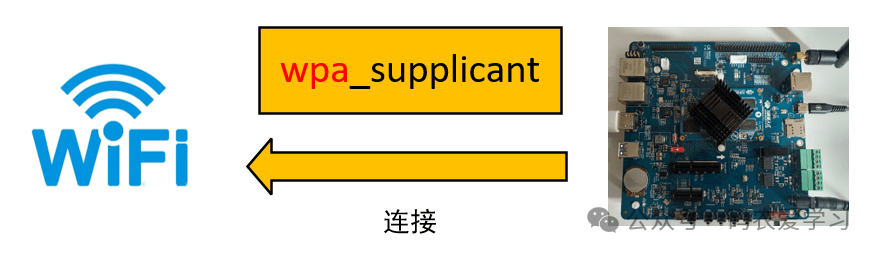
先看整体连接关系:
1 准备工作
我这个开发板之前配置了开机自动启动配网脚本。为了方便调试 C++ 程序,需要先把开机自启的配网脚本关掉。
打开 /etc/init.d 目录下的 S99myinit,把启动配网脚本那行注释掉:
#!/bin/sh

#fltest_wifi.sh -i wlan0 -s "wifi_name" -p wifi_password
如果临时需要联网,可以手动执行:
fltest_wifi.sh -i mlan0 -s "MERCURY_3394" -p "2H2+O2=2H2O"
另外,之前在飞凌开发板上已经搭好了 Ubuntu 下的交叉编译环境。编译时我习惯通过下面的方式指定交叉编译工具链,进行交叉编译:
export PATH=/home/xxpcb/myTest/OK3568/gcc_aarch64/gcc-linaro-7.5.0-2019.12-x86_64_aarch64-linux-gnu/bin:$PATH
aarch64-linux-gnu-g++ test_wifi.cpp -o test_wifi
2 编写代码
2.1 主函数
参考之前 shell 脚本的配网流程,C++ 版的主函数如下:
#include <unistd.h>
#include <cstdlib> // 用于调用系统命令
#include <fstream>
#include <iostream>
#include <string>

#define NET_PORT "mlan0"

int main(int argc, char *argv[])
{
    std::string ssid = "MERCURY_3394";
    std::string password = "2H2+O2=2H2O";
    printf("[%s] argc:%d\n", __func__, argc);
    if (argc > 1)
    {
        if (argc == 3)
        {
            ssid = argv[1];
            password = argv[2];
        }
        else
        {
            printf("[%s] please input para: ssid password\n", __func__);
            return -1;
        }
    }
    printf("[%s] ssid:%s password:%s\n", __func__, ssid.c_str(), password.c_str());

    SYS_CMD(std::string("/etc/init.d/S80dnsmasq stop > /dev/null"));
    CreateWpaConfig(ssid, password);
    ConnectWiFi();

    return 0;
}
主函数里做了几件事:
- 内置一个默认 WiFi 名称和密码,也支持通过命令行参数传入新的 SSID 和密码。
- 先执行
S80dnsmasq stop,关闭可能影响连接的服务。
- 然后创建
wpa_supplicant 配置文件。
- 最后执行完整的连接流程。
2.2 执行 Linux 指令
在 C++ 中执行 Linux 命令,最直接的方式就是 std::system。为了方便观察程序执行到哪一步、具体调用了哪条命令,这里做了一层函数封装和宏定义:
#define SYS_CMD(cmd) SysCmd(__func__, cmd)

int SysCmd(const char *funcName, std::string cmd)
{
    printf("[%s] do %s\n", funcName, cmd.c_str());
    return std::system(cmd.c_str());
}
这样每次执行系统命令时,都能在终端里看到是哪个函数发起了这条命令。
2.3 创建 wpa 配置文件
CreateWpaConfig() 的作用是打开 /etc/wpa_supplicant.conf,并写入对应的连接参数:
#define WPA_CONF_FILE "/etc/wpa_supplicant.conf"

void CreateWpaConfig(const std::string &ssid, const std::string &password)
{
    printf("[%s] in\n", __func__);
    std::ofstream configFile(WPA_CONF_FILE);
    if (configFile.is_open())
    {
        configFile << "ctrl_interface=/var/run/wpa_supplicant" << std::endl;
        configFile << "ctrl_interface_group=0" << std::endl;
        configFile << "update_config=1" << std::endl;

        configFile << "network={" << std::endl;
        configFile << "    ssid=\"" << ssid << "\"" << std::endl;
        configFile << "    psk=\"" << password << "\"" << std::endl;
        configFile << "key_mgmt=WPA-EAP WPA-PSK IEEE8021X NONE" << std::endl;
        configFile << "group=CCMP TKIP WEP104 WEP40" << std::endl;
        configFile << "}" << std::endl;

        configFile.close();
    }
    else
    {
        printf("write config file err\n");
    }
    printf("[%s] out\n", __func__);
}
主要逻辑就是写入 ctrl_interface 等全局参数,再把 network={...} 段拼出来,其中 SSID 和密码用传入的参数填充。
2.4 配网处理
ConnectWiFi() 负责逐步执行 ifconfig、wpa_supplicant、wpa_cli 和 udhcpc 等命令:
void ConnectWiFi()
{
    printf("[%s] in\n", __func__);
    std::string tmpCmd;
    // down NET_PORT
    tmpCmd = "ifconfig " + std::string(NET_PORT) + " down > /dev/null";
    if (-1 == SYS_CMD(tmpCmd.c_str()))
    {
        printf("[%s] do %s failed!\n", __func__, tmpCmd.c_str());
        goto END;
    }

    // stop wpa_supplication
    tmpCmd = "ps -fe|grep wpa_supplicant |grep -v grep > /dev/null";
    if (0 == SYS_CMD(tmpCmd.c_str()))
    {
        tmpCmd = "kill -9 $(pidof wpa_supplicant)";
        if (-1 == SYS_CMD(tmpCmd.c_str()))
        {
            printf("[%s] do %s failed!\n", __func__, tmpCmd.c_str());
            goto END;
        }
    }

    // up NET_PORT
    tmpCmd = "ifconfig " + std::string(NET_PORT) + " up > /dev/null";
    if (-1 == SYS_CMD(tmpCmd.c_str()))
    {
        printf("[%s] do %s failed!\n", __func__, tmpCmd.c_str());
        goto END;
    }

    // start wpa_supplication
    tmpCmd = "(wpa_supplicant -Dnl80211,wext -i" + std::string(NET_PORT) + " -c " +
             std::string(WPA_CONF_FILE) + " >/dev/null) &";
    if (-1 == SYS_CMD(tmpCmd.c_str()))
    {
        printf("[%s] do %s failed!\n", __func__, tmpCmd.c_str());
        goto END;
    }
    sleep(3);

    // check status
    tmpCmd =
        "wpa_cli -i" + std::string(NET_PORT) + " status |grep COMPLETED |grep -v grep >/dev/null";
    if (-1 == SYS_CMD(tmpCmd.c_str()))
    {
        printf("[%s] do %s failed!\n", __func__, tmpCmd.c_str());
        goto END;
    }

    // udhcpc
    tmpCmd = "udhcpc -i" + std::string(NET_PORT);
    if (-1 == SYS_CMD(tmpCmd.c_str()))
    {
        printf("[%s] do %s failed!\n", __func__, tmpCmd.c_str());
        goto END;
    }

END:
    printf("[%s] out\n", __func__);
}
整体处理流程可以整理成下面的流程图:
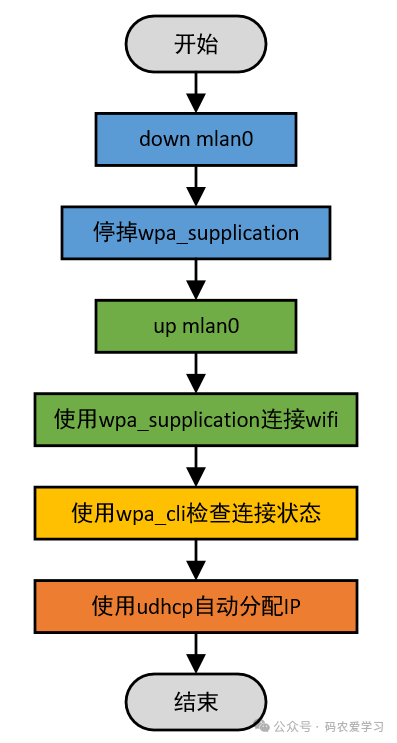
这里只展示了正常情况下的流程,中间任意一个环节出错,都需要异常退出。
3 实测验证
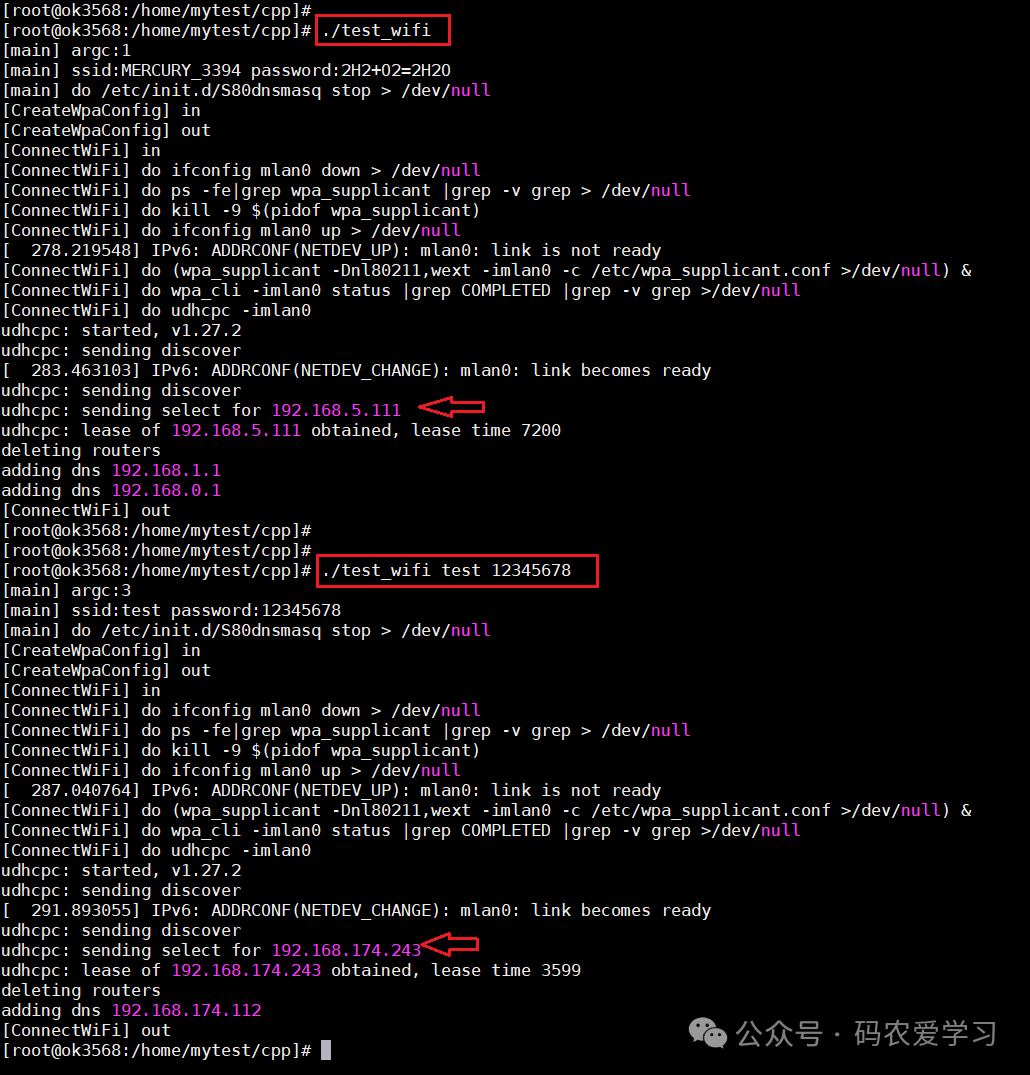
先不加参数运行测试程序,程序会使用默认的 WiFi 名称和密码进行连接。从日志可以看到,最终拿到的 IP 是 192.168.5.111。
接着用手机开一个热点,模拟另一个 WiFi 网络,然后把手机热点的名称和密码作为参数传给程序再次运行。这次实际分配到的 IP 是 192.168.174.243:
4 总结
本篇介绍了如何使用 C++ 编程,来实现嵌入式Linux开发中,调用wpa_supplicant等工具进行wifi配网,通过编写测试例程,并进行实际测试,验证代码功能。
整体来看,C++ 版本和 shell 脚本版本的思路是一致的,只是把命令拼装和执行过程交给 C++ 来完成。如果后续要集成到自己的应用程序里,可以进一步把 CreateWpaConfig() 和 ConnectWiFi() 封装成接口使用。
 发表于 昨天 23:23
|
查看: 1|
回复: 0
发表于 昨天 23:23
|
查看: 1|
回复: 0

