本文将详细介绍如何使用原生 JavaScript 结合 HTML5 Canvas 开发一个功能完整的贪吃蛇小游戏。您只需将代码复制到一个HTML文件中,即可在浏览器中直接运行。
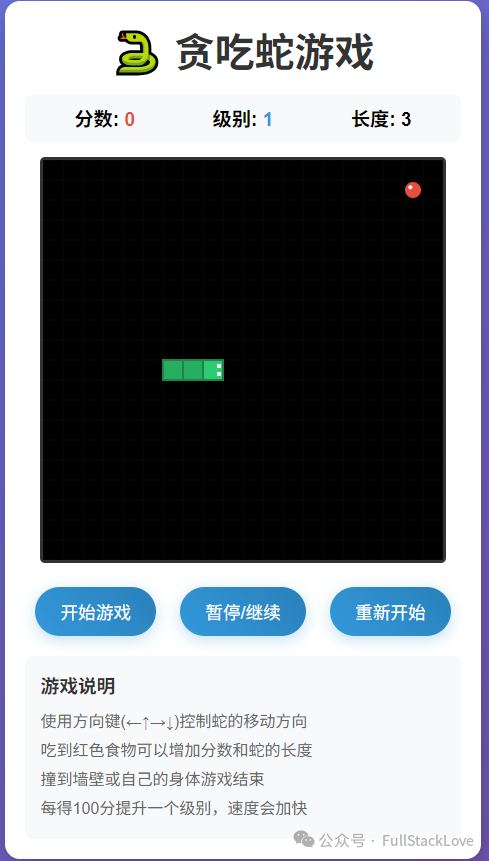
游戏实现效果
游戏界面美观,包含分数、级别和蛇身长度显示,并提供开始、暂停、重新开始等控制功能。
完整HTML代码
以下是游戏的完整实现代码,集成了HTML结构、CSS样式和JavaScript逻辑。
<!DOCTYPE html>
<html lang="zh-CN">
<head>
<meta charset="UTF-8">
<meta name="viewport" content="width=device-width, initial-scale=1.0">
<title>贪吃蛇游戏</title>
<style>
* {
margin: 0;
padding: 0;
box-sizing: border-box;
}
body {
font-family: 'Arial', sans-serif;
display: flex;
justify-content: center;
align-items: center;
min-height: 100vh;
background: linear-gradient(135deg, #667eea 0%, #764ba2 100%);
padding: 20px;
}
.game-container {
background: white;
border-radius: 15px;
box-shadow: 0 10px 30px rgba(0, 0, 0, 0.3);
padding: 20px;
text-align: center;
}
h1 {
color: #333;
margin-bottom: 10px;
font-size: 2.5em;
}
.game-info {
display: flex;
justify-content: space-around;
margin: 15px 0;
background: #f8f9fa;
padding: 10px;
border-radius: 8px;
}
.info-item {
font-size: 1.2em;
font-weight: bold;
}
.score {
color: #e74c3c;
}
.level {
color: #3498db;
}
.game-board {
border: 3px solid #333;
border-radius: 5px;
background: #000;
}
.controls {
margin: 20px 0;
}
button {
background: linear-gradient(45deg, #3498db, #2980b9);
color: white;
border: none;
padding: 12px 25px;
margin: 0 10px;
border-radius: 25px;
font-size: 1.1em;
cursor: pointer;
transition: all 0.3s ease;
box-shadow: 0 4px 15px rgba(52, 152, 219, 0.3);
}
button:hover {
transform: translateY(-2px);
box-shadow: 0 6px 20px rgba(52, 152, 219, 0.4);
}
button:active {
transform: translateY(0);
}
#gameOver {
color: #e74c3c;
font-size: 1.5em;
font-weight: bold;
margin: 10px 0;
display: none;
}
.instructions {
background: #f8f9fa;
padding: 15px;
border-radius: 8px;
margin-top: 15px;
text-align: left;
}
.instructions h3 {
color: #333;
margin-bottom: 10px;
}
.instructions ul {
list-style-type: none;
padding-left: 0;
}
.instructions li {
margin: 5px 0;
color: #666;
}
.mobile-controls {
display: none;
margin-top: 20px;
}
.control-row {
display: flex;
justify-content: center;
margin: 5px 0;
}
.control-btn {
width: 60px;
height: 60px;
margin: 0 10px;
background: rgba(52, 152, 219, 0.8);
border-radius: 50%;
display: flex;
align-items: center;
justify-content: center;
font-size: 1.5em;
color: white;
user-select: none;
}
@media (max-width: 600px) {
.mobile-controls {
display: block;
}
.game-board {
width: 100%;
height: auto;
}
}
</style>
</head>
<body>
<div class="game-container">
<h1>🐍 贪吃蛇游戏</h1>
<div class="game-info">
<div class="info-item">分数: <span id="score" class="score">0</span></div>
<div class="info-item">级别: <span id="level" class="level">1</span></div>
<div class="info-item">长度: <span id="length">3</span></div>
</div>
<canvas id="gameCanvas" class="game-board" width="400" height="400"></canvas>
<div id="gameOver">游戏结束! 按重新开始按钮继续游戏</div>
<div class="controls">
<button onclick="startGame()">开始游戏</button>
<button onclick="pauseGame()">暂停/继续</button>
<button onclick="resetGame()">重新开始</button>
</div>
<div class="mobile-controls">
<div class="control-row">
<div class="control-btn" onclick="changeDirection('UP')">↑</div>
</div>
<div class="control-row">
<div class="control-btn" onclick="changeDirection('LEFT')">←</div>
<div class="control-btn" onclick="changeDirection('DOWN')">↓</div>
<div class="control-btn" onclick="changeDirection('RIGHT')">→</div>
</div>
</div>
<div class="instructions">
<h3>游戏说明</h3>
<ul>
<li>使用方向键(←↑→↓)控制蛇的移动方向</li>
<li>吃到红色食物可以增加分数和蛇的长度</li>
<li>撞到墙壁或自己的身体游戏结束</li>
<li>每得100分提升一个级别,速度会加快</li>
</ul>
</div>
</div>
<script>
// 游戏常量
const GRID_SIZE = 20;
const CANVAS_SIZE = 400;
const INITIAL_SPEED = 150; // 初始速度(毫秒)
// 游戏状态
let snake = [];
let food = {};
let direction = 'RIGHT';
let nextDirection = 'RIGHT';
let gameInterval;
let score = 0;
let level = 1;
let isPaused = false;
let isGameOver = false;
let speed = INITIAL_SPEED;
// 获取Canvas上下文
const canvas = document.getElementById('gameCanvas');
const ctx = canvas.getContext('2d');
// 初始化游戏
function initGame() {
// 初始化蛇(长度为3)
snake = [
{x: 8, y: 10},
{x: 7, y: 10},
{x: 6, y: 10}
];
// 生成食物
generateFood();
// 重置游戏状态
direction = 'RIGHT';
nextDirection = 'RIGHT';
score = 0;
level = 1;
speed = INITIAL_SPEED;
isGameOver = false;
isPaused = false;
// 更新显示
updateDisplay();
// 隐藏游戏结束提示
document.getElementById('gameOver').style.display = 'none';
}
// 生成食物
function generateFood() {
let newFood;
let onSnake;
do {
onSnake = false;
newFood = {
x: Math.floor(Math.random() * (CANVAS_SIZE / GRID_SIZE)),
y: Math.floor(Math.random() * (CANVAS_SIZE / GRID_SIZE))
};
// 检查食物是否生成在蛇身上
for (let segment of snake) {
if (segment.x === newFood.x && segment.y === newFood.y) {
onSnake = true;
break;
}
}
} while (onSnake);
food = newFood;
}
// 绘制游戏
function drawGame() {
// 清空画布
ctx.fillStyle = '#000';
ctx.fillRect(0, 0, CANVAS_SIZE, CANVAS_SIZE);
// 绘制网格(可选,增加视觉效果)
ctx.strokeStyle = '#111';
ctx.lineWidth = 0.5;
for (let x = 0; x <= CANVAS_SIZE; x += GRID_SIZE) {
ctx.beginPath();
ctx.moveTo(x, 0);
ctx.lineTo(x, CANVAS_SIZE);
ctx.stroke();
}
for (let y = 0; y <= CANVAS_SIZE; y += GRID_SIZE) {
ctx.beginPath();
ctx.moveTo(0, y);
ctx.lineTo(CANVAS_SIZE, y);
ctx.stroke();
}
// 绘制蛇
snake.forEach((segment, index) => {
if (index === 0) {
// 蛇头
ctx.fillStyle = '#2ecc71'; // 绿色
} else {
// 蛇身
ctx.fillStyle = '#27ae60'; // 深绿色
}
ctx.fillRect(segment.x * GRID_SIZE, segment.y * GRID_SIZE, GRID_SIZE, GRID_SIZE);
// 蛇身边框
ctx.strokeStyle = '#1e8449';
ctx.lineWidth = 2;
ctx.strokeRect(segment.x * GRID_SIZE, segment.y * GRID_SIZE, GRID_SIZE, GRID_SIZE);
// 蛇眼睛(只在蛇头上绘制)
if (index === 0) {
ctx.fillStyle = '#fff';
const eyeSize = GRID_SIZE / 5;
// 根据方向确定眼睛位置
if (direction === 'RIGHT') {
ctx.fillRect((segment.x + 0.7) * GRID_SIZE, (segment.y + 0.2) * GRID_SIZE, eyeSize, eyeSize);
ctx.fillRect((segment.x + 0.7) * GRID_SIZE, (segment.y + 0.6) * GRID_SIZE, eyeSize, eyeSize);
} else if (direction === 'LEFT') {
ctx.fillRect((segment.x + 0.2) * GRID_SIZE, (segment.y + 0.2) * GRID_SIZE, eyeSize, eyeSize);
ctx.fillRect((segment.x + 0.2) * GRID_SIZE, (segment.y + 0.6) * GRID_SIZE, eyeSize, eyeSize);
} else if (direction === 'UP') {
ctx.fillRect((segment.x + 0.2) * GRID_SIZE, (segment.y + 0.2) * GRID_SIZE, eyeSize, eyeSize);
ctx.fillRect((segment.x + 0.6) * GRID_SIZE, (segment.y + 0.2) * GRID_SIZE, eyeSize, eyeSize);
} else if (direction === 'DOWN') {
ctx.fillRect((segment.x + 0.2) * GRID_SIZE, (segment.y + 0.7) * GRID_SIZE, eyeSize, eyeSize);
ctx.fillRect((segment.x + 0.6) * GRID_SIZE, (segment.y + 0.7) * GRID_SIZE, eyeSize, eyeSize);
}
}
});
// 绘制食物
ctx.fillStyle = '#e74c3c'; // 红色
ctx.beginPath();
const centerX = food.x * GRID_SIZE + GRID_SIZE / 2;
const centerY = food.y * GRID_SIZE + GRID_SIZE / 2;
const radius = GRID_SIZE / 2 - 2;
ctx.arc(centerX, centerY, radius, 0, Math.PI * 2);
ctx.fill();
// 食物高光效果
ctx.fillStyle = '#fff';
ctx.beginPath();
ctx.arc(centerX - radius/3, centerY - radius/3, radius/4, 0, Math.PI * 2);
ctx.fill();
}
// 更新游戏状态
function updateGame() {
if (isPaused || isGameOver) return;
// 更新方向
direction = nextDirection;
// 计算新的蛇头位置
const head = {...snake[0]};
switch(direction) {
case 'UP':
head.y -= 1;
break;
case 'DOWN':
head.y += 1;
break;
case 'LEFT':
head.x -= 1;
break;
case 'RIGHT':
head.x += 1;
break;
}
// 检查碰撞
if (checkCollision(head)) {
gameOver();
return;
}
// 添加新的蛇头
snake.unshift(head);
// 检查是否吃到食物
if (head.x === food.x && head.y === food.y) {
// 吃到食物,增加分数
score += 10;
// 每100分升一级
level = Math.floor(score / 100) + 1;
// 提高速度(最高级别时速度不再增加)
speed = Math.max(50, INITIAL_SPEED - (level - 1) * 10);
// 生成新食物
generateFood();
// 更新显示
updateDisplay();
// 重新设置游戏间隔以应用新速度
clearInterval(gameInterval);
gameInterval = setInterval(updateGame, speed);
} else {
// 没吃到食物,移除蛇尾
snake.pop();
}
// 重绘游戏
drawGame();
}
// 检查碰撞
function checkCollision(head) {
// 检查墙壁碰撞
if (head.x < 0 || head.x >= CANVAS_SIZE/GRID_SIZE ||
head.y < 0 || head.y >= CANVAS_SIZE/GRID_SIZE) {
return true;
}
// 检查自身碰撞(从第二个段开始检查,因为第一个是新的头部)
for (let i = 1; i < snake.length; i++) {
if (head.x === snake[i].x && head.y === snake[i].y) {
return true;
}
}
return false;
}
// 改变方向
function changeDirection(newDirection) {
// 防止直接反向移动(例如从右直接向左)
if ((newDirection === 'LEFT' && direction !== 'RIGHT') ||
(newDirection === 'RIGHT' && direction !== 'LEFT') ||
(newDirection === 'UP' && direction !== 'DOWN') ||
(newDirection === 'DOWN' && direction !== 'UP')) {
nextDirection = newDirection;
}
}
// 游戏结束
function gameOver() {
isGameOver = true;
clearInterval(gameInterval);
document.getElementById('gameOver').style.display = 'block';
}
// 更新显示
function updateDisplay() {
document.getElementById('score').textContent = score;
document.getElementById('level').textContent = level;
document.getElementById('length').textContent = snake.length;
}
// 开始游戏
function startGame() {
if (isGameOver) {
initGame();
}
if (!gameInterval && !isGameOver) {
isPaused = false;
gameInterval = setInterval(updateGame, speed);
drawGame();
}
}
// 暂停/继续游戏
function pauseGame() {
if (isGameOver) return;
isPaused = !isPaused;
if (isPaused) {
clearInterval(gameInterval);
gameInterval = null;
} else {
gameInterval = setInterval(updateGame, speed);
}
}
// 重新开始游戏
function resetGame() {
clearInterval(gameInterval);
initGame();
startGame();
}
// 键盘控制
document.addEventListener('keydown', (event) => {
switch(event.key) {
case 'ArrowUp':
case 'w':
case 'W':
changeDirection('UP');
break;
case 'ArrowDown':
case 's':
case 'S':
changeDirection('DOWN');
break;
case 'ArrowLeft':
case 'a':
case 'A':
changeDirection('LEFT');
break;
case 'ArrowRight':
case 'd':
case 'D':
changeDirection('RIGHT');
break;
case ' ': // 空格键暂停
pauseGame();
break;
}
});
// 触摸控制(移动设备)
let touchStartX = 0;
let touchStartY = 0;
canvas.addEventListener('touchstart', (event) => {
touchStartX = event.touches[0].clientX;
touchStartY = event.touches[0].clientY;
event.preventDefault();
});
canvas.addEventListener('touchend', (event) => {
const touchEndX = event.changedTouches[0].clientX;
const touchEndY = event.changedTouches[0].clientY;
const diffX = touchEndX - touchStartX;
const diffY = touchEndY - touchStartY;
// 判断滑动方向
if (Math.abs(diffX) > Math.abs(diffY)) {
// 水平滑动
if (diffX > 0) {
changeDirection('RIGHT');
} else {
changeDirection('LEFT');
}
} else {
// 垂直滑动
if (diffY > 0) {
changeDirection('DOWN');
} else {
changeDirection('UP');
}
}
event.preventDefault();
});
// 初始化游戏
initGame();
drawGame();
// 自动显示移动控制按钮(如果是移动设备)
if (/Android|webOS|iPhone|iPad|iPod|BlackBerry|IEMobile|Opera Mini/i.test(navigator.userAgent)) {
document.querySelector('.mobile-controls').style.display = 'block';
}
</script>
</body>
</html>
核心实现要点解析
- 游戏架构:整个游戏基于HTML5 Canvas进行图形渲染,游戏世界被划分为20x20的网格系统,以此精准管理贪吃蛇与食物的位置。
- 核心游戏逻辑:JavaScript代码完整实现了贪吃蛇的移动控制、随机食物生成、墙壁与自身碰撞检测以及动态分数系统。
- 交互控制:为提升用户体验,同时支持桌面端的键盘控制(方向键和WASD键)与移动端的触摸屏手势滑动操作,并提供了适配移动设备的虚拟方向按钮。
- 游戏机制:引入了经典的分数累积与级别提升机制,随着级别提高,游戏速度会相应增加,挑战性逐步升级。
- 视觉效果:通过CSS和Canvas绘图API,实现了蛇身的渐变色彩、食物的高光效果以及网格背景等细节,增强了视觉表现力。
- 响应式布局:利用CSS媒体查询,游戏界面能够自适应不同屏幕尺寸,在移动设备上自动优化布局并显示触摸控件,确保了跨平台的游玩体验。
此实现将所有代码集成于单个HTML文件,复制并保存后,直接在浏览器中打开即可运行,包含了从初始化、游玩到结束的完整游戏流程。
 发表于 2025-12-16 21:27:46
|
查看: 573|
回复: 0
发表于 2025-12-16 21:27:46
|
查看: 573|
回复: 0

