在之前的文章中,我们探讨了通过QueueUserAPC向目标进程注入APC,从而加载指定DLL的注入方法。然而,这种方法存在一个显著的局限性:它依赖于目标进程中的线程能够进入可警告的(Alertable)状态。这通常要求程序调用了SleepEx、WaitForSingleObjectEx等函数,并设置了bAlertable参数为TRUE,否则注入难以成功。
近来有技术社区的朋友提到,可以利用NtQueueApcThreadEx函数注入特殊用户模式APC,这种APC无需线程进入Alertable状态即可立即执行。经过实践验证,该方法确实有效,为我们提供了一种更为强大的DLL注入手段。

NtQueueApcThreadEx并非微软官方公开的Windows API,因此在MSDN上找不到其文档。幸运的是,我们可以借助一些开源项目来了解这些未公开的接口,例如基于System Informer(原Process Hacker)项目整理的在线文档:ntdoc.m417z.com。该网站提供了大量Windows Native API的详细信息。
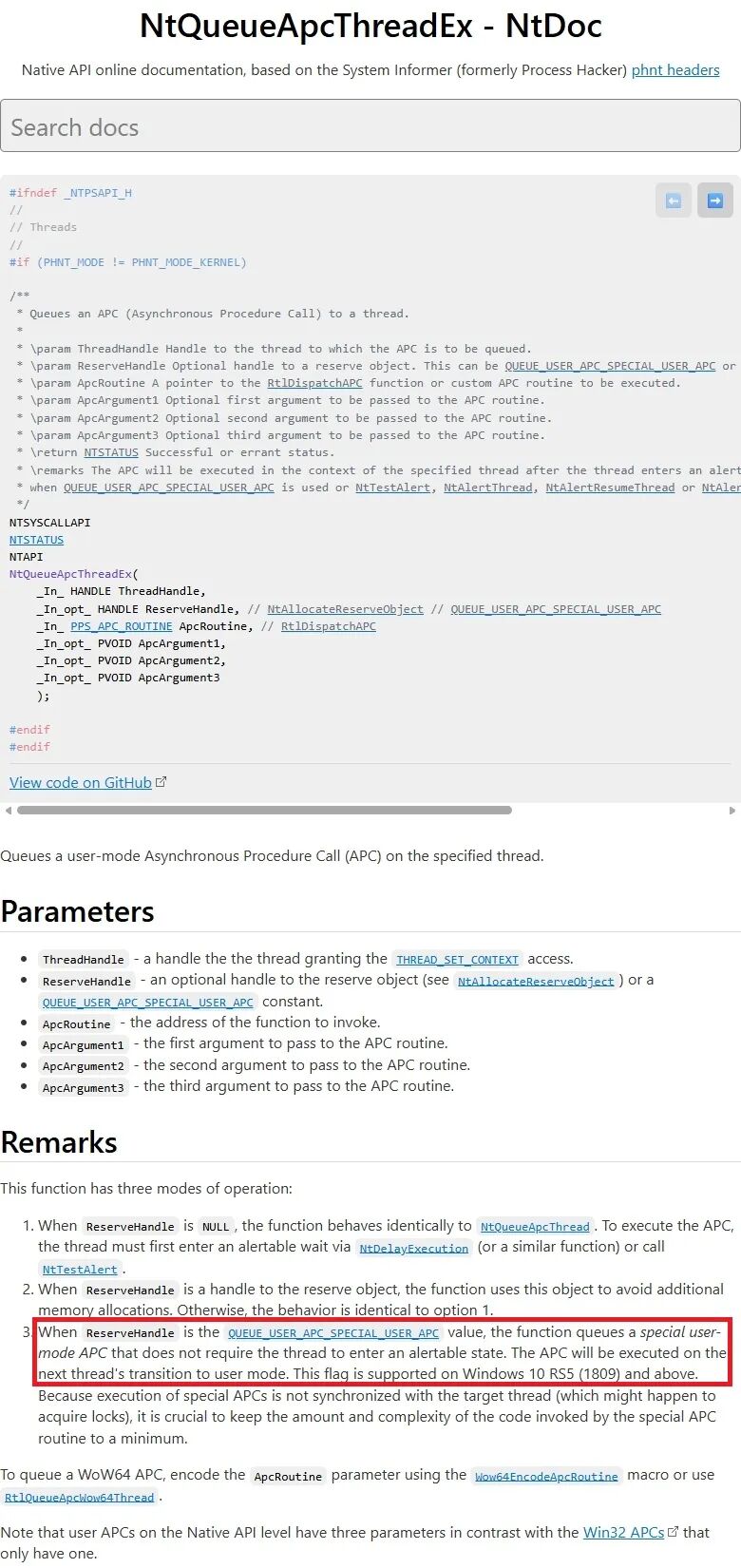
上图中的注释是关键信息,这里将其摘录并强调重点:“The APC will be executed... immediately when QUEUE_USER_APC_SPECIAL_USER_APC is used...”。即,当第二个参数ReserveHandle被指定为QUEUE_USER_APC_SPECIAL_USER_APC时,这个特殊的APC会立即执行。备注部分第三条也明确指出,此类APC无需线程进入Alertable等待状态。
下面是该函数的原型定义:
/**
 * Queues an APC (Asynchronous Procedure Call) to a thread.
 *
 * \param ThreadHandle Handle to the thread to which the APC is to be queued.
 * \param ReserveHandle Optional handle to a reserve object. This can be QUEUE_USER_APC_SPECIAL_USER_APC or a handle returned by NtAllocateReserveObject.
 * \param ApcRoutine A pointer to the RtlDispatchAPC function or custom APC routine to be executed.
 * \param ApcArgument1 Optional first argument to be passed to the APC routine.
 * \param ApcArgument2 Optional second argument to be passed to the APC routine.
 * \param ApcArgument3 Optional third argument to be passed to the APC routine.
 * \return NTSTATUS Successful or errant status.
 * \remarks The APC will be executed in the context of the specified thread after the thread enters an alertable wait state or immediately
 * when QUEUE_USER_APC_SPECIAL_USER_APC is used or NtTestAlert, NtAlertThread, NtAlertResumeThread or NtAlertThreadByThreadId are called.
 */
NTSYSCALLAPI
NTSTATUS
NTAPI
NtQueueApcThreadEx(
    _In_ HANDLE ThreadHandle,
    _In_opt_ HANDLE ReserveHandle, // NtAllocateReserveObject // QUEUE_USER_APC_SPECIAL_USER_APC
    _In_ PPS_APC_ROUTINE ApcRoutine, // RtlDispatchAPC
    _In_opt_ PVOID ApcArgument1,
    _In_opt_ PVOID ApcArgument2,
    _In_opt_ PVOID ApcArgument3
    );
接下来,我们将动手实践如何使用NtQueueApcThreadEx进行DLL注入。由于这是未公开的函数,我们需要在代码中自行声明其类型。首先定义所需的常量、APC例程类型以及函数指针类型。
#define QUEUE_USER_APC_SPECIAL_USER_APC ((HANDLE)0x1)

typedef _Function_class_(PS_APC_ROUTINE)
VOID NTAPI PS_APC_ROUTINE(
    _In_opt_ PVOID ApcArgument1,
    _In_opt_ PVOID ApcArgument2,
    _In_opt_ PVOID ApcArgument3);
typedef PS_APC_ROUTINE *PPS_APC_ROUTINE;

typedef NTSTATUS(*NtQueueApcThreadExFunc)(
    _In_ HANDLE ThreadHandle,
    _In_opt_ HANDLE ReserveHandle,
    _In_ PPS_APC_ROUTINE ApcRoutine,
    _In_opt_ PVOID ApcArgument1,
    _In_opt_ PVOID ApcArgument2,
    _In_opt_ PVOID ApcArgument3);
尽管NtQueueApcThreadEx未公开,但它实际导出在ntdll.dll中。因此,我们可以通过GetProcAddress动态获取其地址。
hModuleNtdll = GetModuleHandleA("ntdll.dll");
if (hModuleNtdll == NULL)
{
    printf("GetModuleHandleA failed, error: %u\n", GetLastError());
    ret = -1;
    goto exit;
}
NtQueueApcThreadExFunc NtQueueApcThreadExFuncPtr =
    (NtQueueApcThreadExFunc)GetProcAddress(hModuleNtdll, "NtQueueApcThreadEx");
if (NtQueueApcThreadExFuncPtr == NULL)
{
    printf("GetProcAddress NtQueueApcThreadEx failed, error: %u\n",
        GetLastError());
    ret = -1;
    goto exit;
}
获取到函数指针后,还需要一个合适的APC执行函数。之前使用QueueUserAPC时,我们选用参数匹配的LoadLibraryA。现在NtQueueApcThreadEx要求的PS_APC_ROUTINE类型有三个参数,为了更稳妥,我们可以使用同样有三个参数的LoadLibraryExA作为APC执行函数。
以下是完整的实现源代码。其核心逻辑与之前的QueueUserAPC注入类似,主要区别在于使用了NtQueueApcThreadEx配合QUEUE_USER_APC_SPECIAL_USER_APC标志,并将APC执行函数替换为LoadLibraryExA。这种进程注入技术在某些高级场景中具有应用价值。
#include <Windows.h>
#include <tlhelp32.h>
#include <stdio.h>

#define QUEUE_USER_APC_SPECIAL_USER_APC ((HANDLE)0x1)

typedef _Function_class_(PS_APC_ROUTINE)
VOID NTAPI PS_APC_ROUTINE(
    _In_opt_ PVOID ApcArgument1,
    _In_opt_ PVOID ApcArgument2,
    _In_opt_ PVOID ApcArgument3);
typedef PS_APC_ROUTINE *PPS_APC_ROUTINE;

typedef NTSTATUS(*NtQueueApcThreadExFunc)(
    _In_ HANDLE ThreadHandle,
    _In_opt_ HANDLE ReserveHandle,
    _In_ PPS_APC_ROUTINE ApcRoutine,
    _In_opt_ PVOID ApcArgument1,
    _In_opt_ PVOID ApcArgument2,
    _In_opt_ PVOID ApcArgument3);

int main(int argc, char *argv[])
{
    int ret = 0;
    unsigned long pid = 0;
    HANDLE hProcess = NULL;
    HANDLE hThreadSnap = NULL;
    HANDLE hThread = NULL;
    THREADENTRY32 te32;
    HMODULE hModuleKernel32 = NULL, hModuleNtdll = NULL;
    LPVOID remoteBuffer = NULL;
    char *dllPath = NULL;

    if (argc < 3)
    {
        printf("Usage: InjectDll <PID> <DllPath>\n");
        goto exit;
    }

    pid = strtoul(argv[1], NULL, 0);
    dllPath = argv[2];

    hProcess = OpenProcess(PROCESS_ALL_ACCESS, FALSE, pid);
    if (hProcess == NULL)
    {
        printf("OpenProcess failed, error: %u\n", GetLastError());
        ret = -1;
        goto exit;
    }

    remoteBuffer = VirtualAllocEx(hProcess, NULL, strlen(dllPath) + 1,
        MEM_COMMIT | MEM_RESERVE, PAGE_READWRITE);
    if (remoteBuffer == NULL)
    {
        printf("VirtualAllocEx failed, error: %u\n", GetLastError());
        ret = -1;
        goto exit;
    }

    if (!WriteProcessMemory(hProcess, remoteBuffer, dllPath,
        strlen(dllPath) + 1, NULL))
    {
        printf("WriteProcessMemory failed, error: %u\n", GetLastError());
        ret = -1;
        goto exit;
    }

    hModuleKernel32 = GetModuleHandleA("kernel32.dll");
    if (hModuleKernel32 == NULL)
    {
        printf("GetModuleHandleA failed, error: %u\n", GetLastError());
        ret = -1;
        goto exit;
    }
    PPS_APC_ROUTINE loadDll = (PPS_APC_ROUTINE)GetProcAddress(
        hModuleKernel32, "LoadLibraryExA");
    if (loadDll == NULL)
    {
        printf("GetProcAddress LoadLibraryExA failed, error: %u\n",
            GetLastError());
        ret = -1;
        goto exit;
    }

    hModuleNtdll = GetModuleHandleA("ntdll.dll");
    if (hModuleNtdll == NULL)
    {
        printf("GetModuleHandleA failed, error: %u\n", GetLastError());
        ret = -1;
        goto exit;
    }
    NtQueueApcThreadExFunc NtQueueApcThreadExFuncPtr =
        (NtQueueApcThreadExFunc)GetProcAddress(hModuleNtdll, "NtQueueApcThreadEx");
    if (NtQueueApcThreadExFuncPtr == NULL)
    {
        printf("GetProcAddress NtQueueApcThreadEx failed, error: %u\n",
            GetLastError());
        ret = -1;
        goto exit;
    }

    hThreadSnap = CreateToolhelp32Snapshot(TH32CS_SNAPTHREAD, 0);
    if (hThreadSnap == INVALID_HANDLE_VALUE)
    {
        printf("CreateToolhelp32Snapshot failed, error: %u\n", GetLastError());
        ret = -1;
        goto exit;
    }

    te32.dwSize = sizeof(THREADENTRY32);
    if (!Thread32First(hThreadSnap, &te32))
    {
        printf("can‘t find thread, error: %u\n", GetLastError());
        ret = -1;
        goto exit;
    }

    do
    {
        if (te32.th32OwnerProcessID != pid)
        {
            continue;
        }
        printf("find thread (tid: %u) on process (pid: %u)\n",
            te32.th32ThreadID, pid);

        hThread = OpenThread(THREAD_SET_CONTEXT | THREAD_SUSPEND_RESUME, FALSE,
            te32.th32ThreadID);
        if (hThread == NULL)
        {
            printf("OpenThread failed, error: %u\n", GetLastError());
            continue;
        }

        NTSTATUS status = NtQueueApcThreadExFuncPtr(
            hThread,
            QUEUE_USER_APC_SPECIAL_USER_APC,
            loadDll,
            remoteBuffer,
            NULL,
            (PVOID)LOAD_WITH_ALTERED_SEARCH_PATH
        );
        CloseHandle(hThread);
        if (status == 0)
        {
            break;
        }
    } while (Thread32Next(hThreadSnap, &te32));

exit:
    if (hThreadSnap)
    {
        CloseHandle(hThreadSnap);
    }
    if (hProcess)
    {
        CloseHandle(hProcess);
    }
    return ret;
}
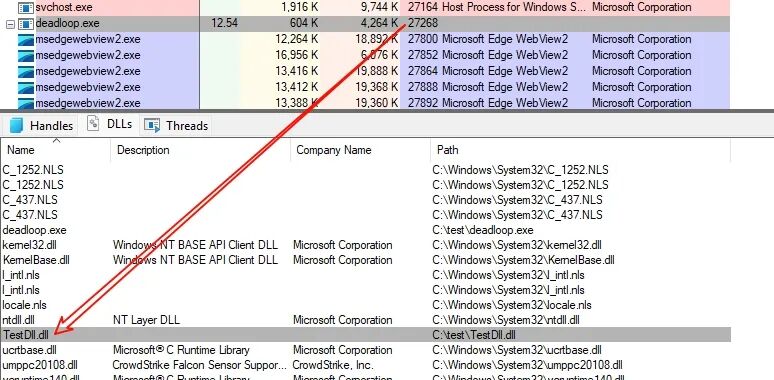
在之前的测试中,我们尝试向一个简单的死循环程序注入DLL,由于该程序永不进入Alertable状态,导致基于QueueUserAPC的注入失败。如今采用这种不依赖Alertable状态的新方法后,实验取得了成功。

通过Process Explorer可以清楚地看到,TestDll.dll已被成功注入到目标死循环进程中。
 发表于 2025-12-25 02:55:40
|
查看: 372|
回复: 0
发表于 2025-12-25 02:55:40
|
查看: 372|
回复: 0

