微信支付作为小程序生态中最核心的闭环能力,其后台实现是开发者必须掌握的关键技能。本文将基于SpringBoot框架,详细介绍如何集成微信支付APIv3,完成从配置、下单到签名的完整后端支付流程。
项目结构与核心依赖
首先,我们来看项目的整体目录结构,这有助于理解代码的组织方式:
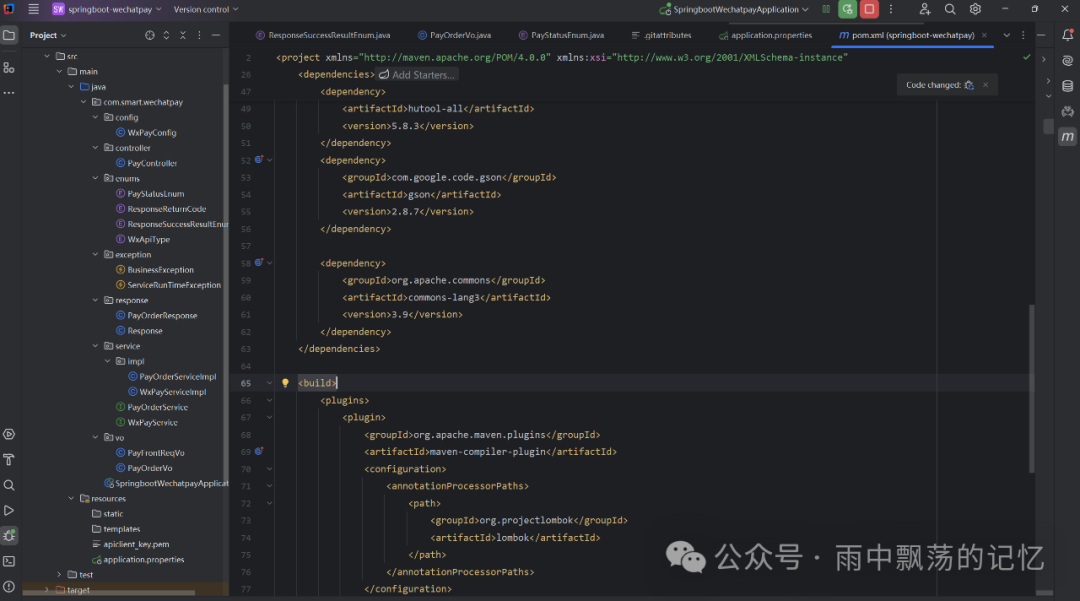
项目采用Maven构建,核心依赖如下,主要引入了SpringBoot Web、微信支付官方HTTP客户端以及一些常用的工具库:
<dependencies>
    <dependency>
        <groupId>org.springframework.boot</groupId>
        <artifactId>spring-boot-starter-web</artifactId>
    </dependency>
    <dependency>
        <groupId>org.projectlombok</groupId>
        <artifactId>lombok</artifactId>
        <optional>true</optional>
    </dependency>
    <!--微信支付SDK-->
    <dependency>
        <groupId>com.github.wechatpay-apiv3</groupId>
        <artifactId>wechatpay-apache-httpclient</artifactId>
        <version>0.3.0</version>
    </dependency>
    <dependency>
        <groupId>com.alibaba</groupId>
        <artifactId>fastjson</artifactId>
        <version>1.2.83</version>
    </dependency>
    <dependency>
        <groupId>cn.hutool</groupId>
        <artifactId>hutool-all</artifactId>
        <version>5.8.3</version>
    </dependency>
</dependencies>
微信支付配置类
接下来是关键的配置类,它负责加载商户证书、API密钥并初始化微信支付所需的HTTP客户端与验签器。良好的配置管理与依赖注入是构建健壮后端服务的基础。
package com.smart.wechatpay.config;

import com.wechat.pay.contrib.apache.httpclient.WechatPayHttpClientBuilder;
import com.wechat.pay.contrib.apache.httpclient.auth.PrivateKeySigner;
import com.wechat.pay.contrib.apache.httpclient.auth.ScheduledUpdateCertificatesVerifier;
import com.wechat.pay.contrib.apache.httpclient.auth.WechatPay2Credentials;
import com.wechat.pay.contrib.apache.httpclient.auth.WechatPay2Validator;
import com.wechat.pay.contrib.apache.httpclient.util.PemUtil;
import lombok.Data;
import lombok.extern.slf4j.Slf4j;
import org.apache.http.impl.client.CloseableHttpClient;
import org.springframework.beans.factory.annotation.Value;
import org.springframework.boot.context.properties.ConfigurationProperties;
import org.springframework.context.annotation.Bean;
import org.springframework.stereotype.Component;
import java.io.InputStream;
import java.nio.charset.StandardCharsets;
import java.security.PrivateKey;

@Slf4j
@Data
@ConfigurationProperties(prefix = "com.smart.wechatpay")
@Component
public class WxPayConfig {
    @Value("${com.smart.wechatpay.mchId}")
    private String mchId;
    @Value("${com.smart.wechatpay.mchSerialNo}")
    private String mchSerialNo;
    @Value("${com.smart.wechatpay.privateKeyPath}")
    private String privateKeyPath;
    @Value("${com.smart.wechatpay.apiV3Key}")
    private String apiV3Key;
    @Value("${com.smart.wechatpay.appid}")
    private String appid;
    @Value("${com.smart.wechatpay.domain}")
    private String domain;
    @Value("${com.smart.wechatpay.notifyUrl}")
    private String notifyUrl;

    // 加载商户私钥
    public PrivateKey getPrivateKey(String filename){
        try {
            InputStream inputStream = Thread.currentThread().getContextClassLoader().getResourceAsStream(privateKeyPath);
            assert inputStream != null;
            return PemUtil.loadPrivateKey(inputStream);
        } catch (Exception e) {
            throw new RuntimeException("私钥文件不存在", e);
        }
    }

    // 初始化证书验签器
    @Bean("verifier")
    public ScheduledUpdateCertificatesVerifier getVerifier(){
        PrivateKey privateKey = getPrivateKey(privateKeyPath);
        PrivateKeySigner privateKeySigner = new PrivateKeySigner(mchSerialNo, privateKey);
        WechatPay2Credentials wechatPay2Credentials = new WechatPay2Credentials(mchId, privateKeySigner);
        return new ScheduledUpdateCertificatesVerifier(
                wechatPay2Credentials,
                apiV3Key.getBytes(StandardCharsets.UTF_8));
    }

    // 初始化微信支付专用HTTP Client
    @Bean(name = "wxPayClient")
    public CloseableHttpClient getWxPayClient(ScheduledUpdateCertificatesVerifier verifier){
        PrivateKey privateKey = getPrivateKey(privateKeyPath);
        WechatPayHttpClientBuilder builder = WechatPayHttpClientBuilder.create()
                .withMerchant(mchId, mchSerialNo, privateKey)
                .withValidator(new WechatPay2Validator(verifier));
        return builder.build();
    }
}
控制器层
支付请求的入口由Controller提供,它接收前端传入的支付参数。
package com.smart.wechatpay.controller;

import com.smart.wechatpay.response.Response;
import com.smart.wechatpay.service.PayOrderService;
import com.smart.wechatpay.vo.PayFrontReqVo;
import lombok.RequiredArgsConstructor;
import org.springframework.web.bind.annotation.*;

@RestController
@RequiredArgsConstructor
public class PayController {
    private final PayOrderService payOrderService;

    @PostMapping("/pay")
    public Response<?> pay(@RequestBody PayFrontReqVo reqDTO) {
        try {
            return payOrderService.pay(reqDTO);
        } catch (Exception e) {
            return Response.buildFailed(e.getMessage());
        }
    }
}
业务逻辑层
Service层负责校验订单状态,并组装数据调用微信支付服务。
package com.smart.wechatpay.service.impl;

import com.smart.wechatpay.config.WxPayConfig;
import com.smart.wechatpay.enums.PayStatusEnum;
import com.smart.wechatpay.response.Response;
import com.smart.wechatpay.service.PayOrderService;
import com.smart.wechatpay.service.WxPayService;
import com.smart.wechatpay.vo.PayFrontReqVo;
import com.smart.wechatpay.vo.PayOrderVo;
import lombok.RequiredArgsConstructor;
import org.springframework.stereotype.Service;
import org.springframework.util.StringUtils;
import java.math.BigDecimal;

@Service
@RequiredArgsConstructor
public class PayOrderServiceImpl implements PayOrderService {
    private final WxPayService wxPayService;
    private final WxPayConfig wxPayConfig;

    @Override
    public Response<?> pay(PayFrontReqVo reqDTO) throws Exception {
        if (StringUtils.isEmpty(reqDTO.getOpenId())) {
            return Response.buildFailed("微信登录号不能为空");
        }
        // 模拟查询数据库订单
        PayOrderVo order = this.findOrderDetailByTradeNo(reqDTO.getTradeNo());
        if (!PayStatusEnum.PAY_ING.getCode().equals(order.getStatus())) {
            return Response.buildFailed("支付订单无效不能支付");
        }
        // 调用微信支付服务
        return Response.buildSuccessed(wxPayService.wxMinPay(order,
                wxPayConfig.getWxPayClient(wxPayConfig.getVerifier()),
                wxPayConfig));
    }

    // 模拟从数据库查询订单
    private PayOrderVo findOrderDetailByTradeNo(String tradeNo) {
        return PayOrderVo.builder()
                .orderNo(RandomUtil.randomNumbers(9))
                .tradeNo(RandomUtil.randomNumbers(12))
                .title("测试支付")
                .totalAmount(new BigDecimal("0.01"))
                .status(PayStatusEnum.PAY_ING.getCode())
                .openId("oA_zr44MfgEzyM9yZX222Vbha00")
                .build();
    }
}
微信支付服务层
这是最核心的部分,负责与微信支付APIv3直接交互,构造请求参数、调用下单接口并生成小程序端调起支付所需的签名。
/**
 * 微信小程序支付
 */
@Override
public Map<String, Object> wxMinPay(PayOrderVo order, CloseableHttpClient wxPayClient, WxPayConfig config) throws Exception {
    Map<String, Object> resultMap = new HashMap<>();
    // 1. 组装请求参数
    Map<String, Object> wxRequestParam = MapUtil.ofEntries(
            entry("out_trade_no", order.getTradeNo()),
            entry("mchid", config.getMchId()),
            entry("appid", config.getAppid()),
            entry("notify_url", config.getNotifyUrl()),
            entry("attach", order.getOrderNo()),
            entry("description", "测试支付"),
            entry("payer", MapUtil.of("openid", order.getOpenId()))
    );
    // 设置金额参数(单位:分)
    wxRequestParam.put("amount", MapUtil.ofEntries(
            entry("total", order.getTotalAmount().multiply(new BigDecimal(100)).intValue()),
            entry("currency", "CNY")
    ));

    String jsonParams = gson.toJson(wxRequestParam);
    HttpPost httpPost = new HttpPost(config.getDomain().concat(WxApiType.NATIVE_JSAPI.getType()));
    StringEntity entity = new StringEntity(jsonParams, "utf-8");
    entity.setContentType("application/json");
    httpPost.setEntity(entity);
    httpPost.setHeader("Accept", "application/json");

    // 2. 执行HTTP请求,调用微信支付下单API
    try (CloseableHttpResponse response = wxPayClient.execute(httpPost)) {
        String bodyAsString = EntityUtils.toString(response.getEntity());
        int statusCode = response.getStatusLine().getStatusCode();
        if (!(statusCode == SUCCESS_RESULT_CODE_200.getCode() || statusCode == SUCCESS_RESULT_CODE_204.getCode())) {
            throw new BusinessException(bodyAsString, String.valueOf(statusCode));
        }

        // 3. 解析响应,生成小程序调起支付所需参数
        HashMap hashMap = gson.fromJson(bodyAsString, HashMap.class);
        String time = String.valueOf(System.currentTimeMillis() / 1000);
        String randomAlphabetic = RandomStringUtils.randomAlphabetic(32);

        resultMap.put("timeStamp", time);
        resultMap.put("nonceStr", randomAlphabetic);
        resultMap.put("packag", "prepay_id=" + hashMap.get("prepay_id"));
        resultMap.put("signType", "HMAC-SHA256");
        // 生成支付签名
        String message = buildMessage(config.getAppid(), Long.valueOf(time), randomAlphabetic, "prepay_id=" + hashMap.get("prepay_id"));
        resultMap.put("paySign", sign(message.getBytes("utf-8")));
    }
    return resultMap;
}

// 构造签名字符串
private String buildMessage(String appid, long timestamp, String nonceStr, String prepay_id) {
    return appid + "\n"
            + timestamp + "\n"
            + nonceStr + "\n"
            + prepay_id + "\n";
}

// 使用商户私钥进行SHA256 with RSA签名
private String sign(byte[] message) throws NoSuchAlgorithmException, SignatureException, InvalidKeyException {
    Signature sign = Signature.getInstance("SHA256withRSA");
    PrivateKey merchantPrivateKey = wxPayConfig.getPrivateKey(null);
    sign.initSign(merchantPrivateKey);
    sign.update(message);
    return Base64.getEncoder().encodeToString(sign.sign());
}
配置与测试
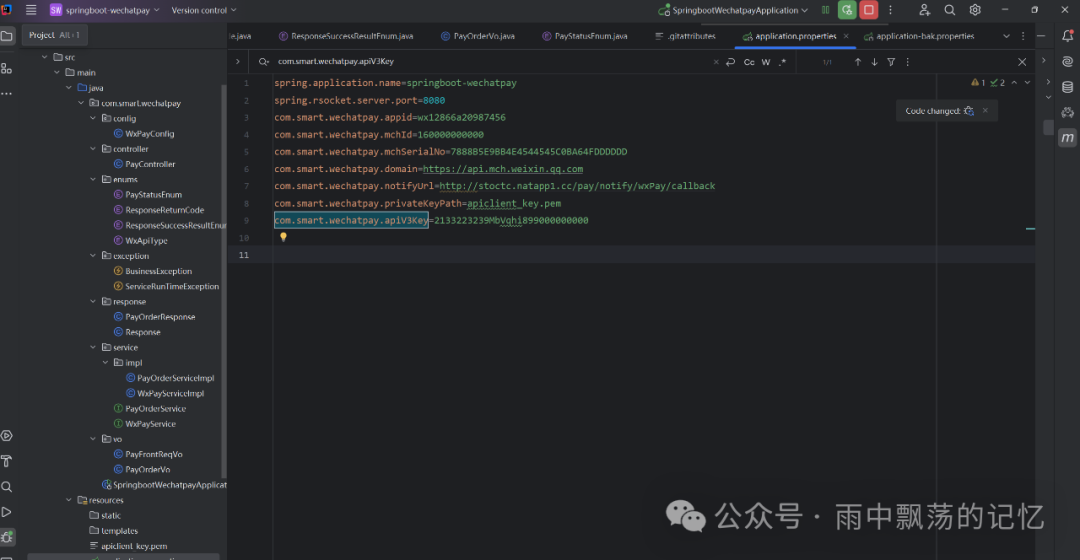
需要在application.yml中配置商户信息,具体路径和密钥需根据实际情况填写:
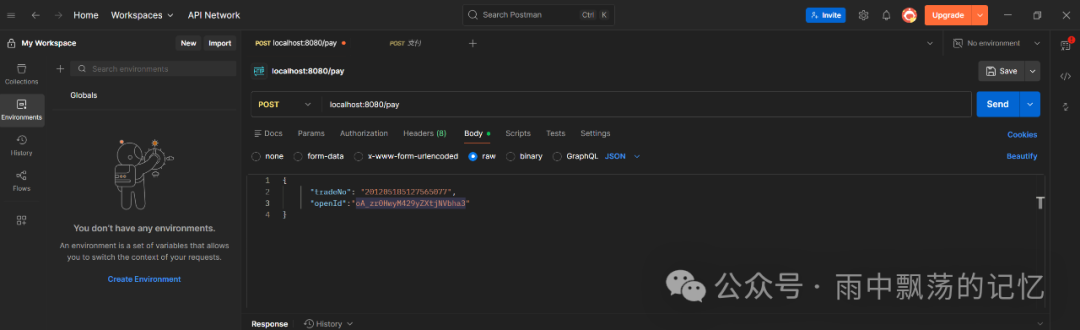
使用Postman测试支付接口,请求Body需要包含交易单号和用户OpenID:
接口成功调用后,将返回小程序调起支付所需的五个核心参数:
{
    "code": "000",
    "data": {
        "timeStamp": "1763220706",
        "paySign": "WEE3P9OoOUmiFGFwWSV0ohVmhfETPltNLr1PBYGG5T1Wk6pJG+OGvlrEI+aUxlX154TC2W6P/0lhhGMtaE/xhhmjGcO7jB0feWeyBtbfh5C+39khM1UVQtaATMO3H8WeF2LXveX2i/yaiYMa/lrG2UL/gKGRW4ynWExCPqEynPlRI35BNFx6LTaPKuarUhaRouaiPCILENiyvqIoFZ65dBO+IT2FktFgW5Lduw14pXpox/YkP4ZPxbWejTuhXvW0S/PUm7/khoohKhOb9NU/f0pCpowRLhSxrcKtnEwUrRwyJMtAINeQxQn+I3W+Ujwyzyw==",
        "signType": "HMAC-SHA256",
        "packag": "prepay_id=wx1532333033562601399dc24655612e40001",
        "nonceStr": "yzsgDIPqKSXFVynZweYYiuFGafMXjvzlT"
    }
}
小程序端调起支付
最后,将后端返回的五个参数填入微信小程序的wx.requestPayment接口,即可唤起支付界面。
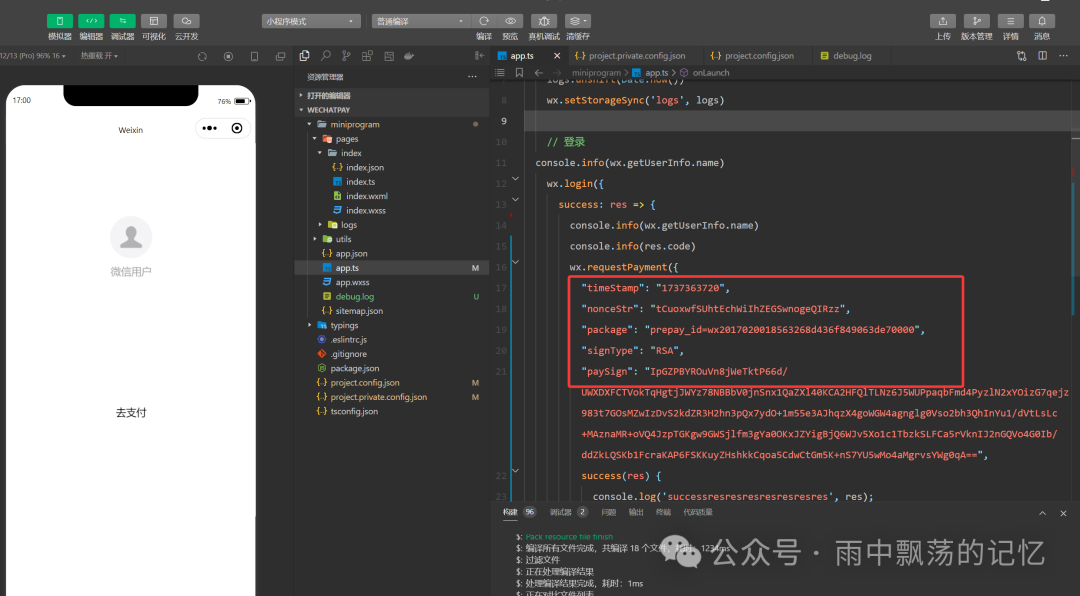
通过以上步骤,一个完整的、安全的微信小程序支付后端就搭建完成了。重点在于理解APIv3的签名验证流程、证书的管理以及如何生成符合小程序端要求的支付参数。
 发表于 2025-12-25 03:20:34
|
查看: 436|
回复: 0
发表于 2025-12-25 03:20:34
|
查看: 436|
回复: 0

