从源码层面深入理解MyBatis Mapper的设计与实现
一、MyBatis整体架构与映射器模块
在深入探讨映射器模块之前,我们有必要先了解MyBatis的整体架构,以及映射器模块在其中的重要地位。
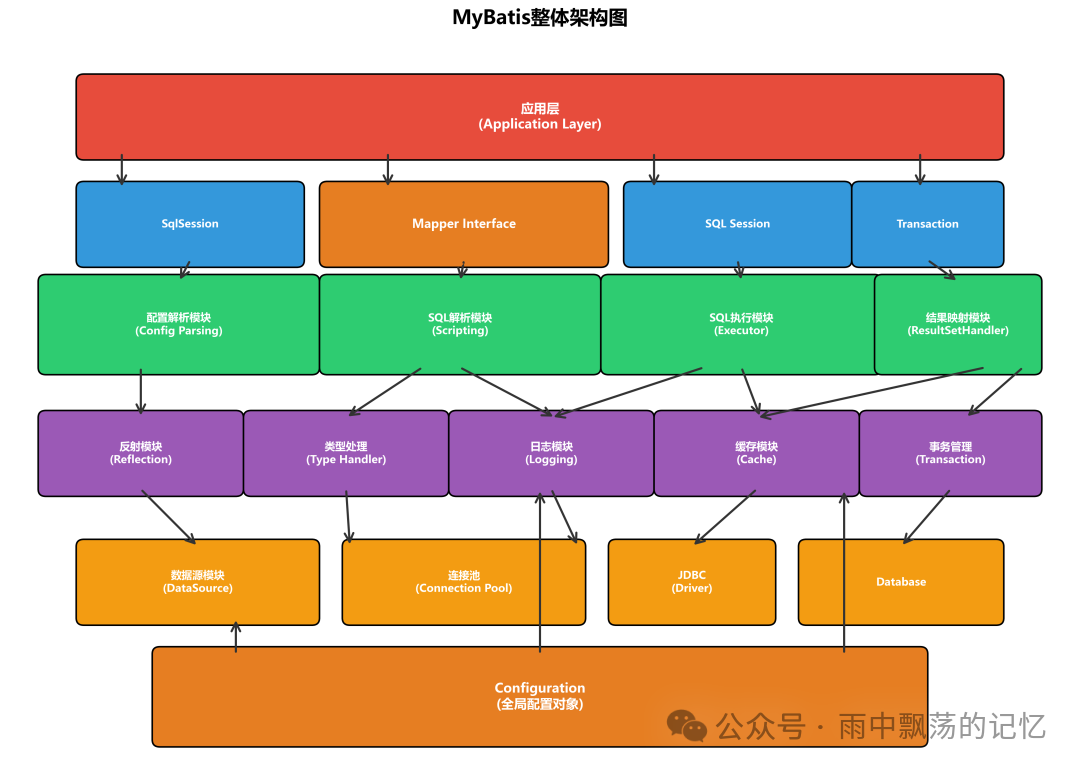
从架构图可以看出,MyBatis采用了清晰的分层架构设计。而映射器模块(Mapper Interface)恰恰位于应用层,是开发者与MyBatis框架交互的主要入口。它通过Java接口定义数据库操作,结合XML或注解来配置具体的SQL语句,并利用JDK动态代理技术自动实现这些接口。这种设计使得开发者能够以完全面向对象的方式来操作数据库,极大地提升了开发效率和代码的可维护性。
1.1 映射器模块的核心职责
映射器模块主要承担以下核心职责:
✅ 定义数据库操作接口 - 通过Java接口定义CRUD操作
✅ SQL语句映射 - 将接口方法与SQL语句关联
✅ 参数映射 - 将方法参数转换为SQL参数
✅ 结果映射 - 将查询结果映射为Java对象
✅ 动态代理实现 - 自动生成接口实现类
1.2 为什么需要Mapper?
让我们回顾一下传统的JDBC编程方式存在的问题:
//传统JDBC方式
String sql = "SELECT * FROM t_user WHERE id = ?";
PreparedStatement stmt = conn.prepareStatement(sql);
stmt.setInt(1, userId);
ResultSet rs = stmt.executeQuery();
// 手动解析ResultSet并映射为对象...
这种方式带来了一系列问题:
1、SQL分散在代码中,难以维护
2、参数设置和结果映射都是手工操作
3、容易出现类型转换错误
4、代码重复度高
而使用MyBatis的Mapper之后,一切都变得简洁明了:
//Mapper方式
@Select("SELECT * FROM t_user WHERE id = #{id}")
User selectById(Long id);

// 使用
User user = userMapper.selectById(1L);
优势显而易见:
✅ SQL与代码分离,易于维护
✅ 自动参数映射和结果映射
✅ 类型安全
✅ 代码简洁
1.3 Mapper的使用方式
MyBatis支持两种主要的Mapper配置方式,开发者可以根据场景灵活选择:
| 配置方式 |
说明 |
适用场景 |
| XML配置 |
SQL语句定义在独立的XML文件中 |
复杂SQL、需要使用动态SQL |
| 注解配置 |
SQL语句直接写在Java注解中 |
简单SQL、追求快速开发 |
二、Mapper接口架构
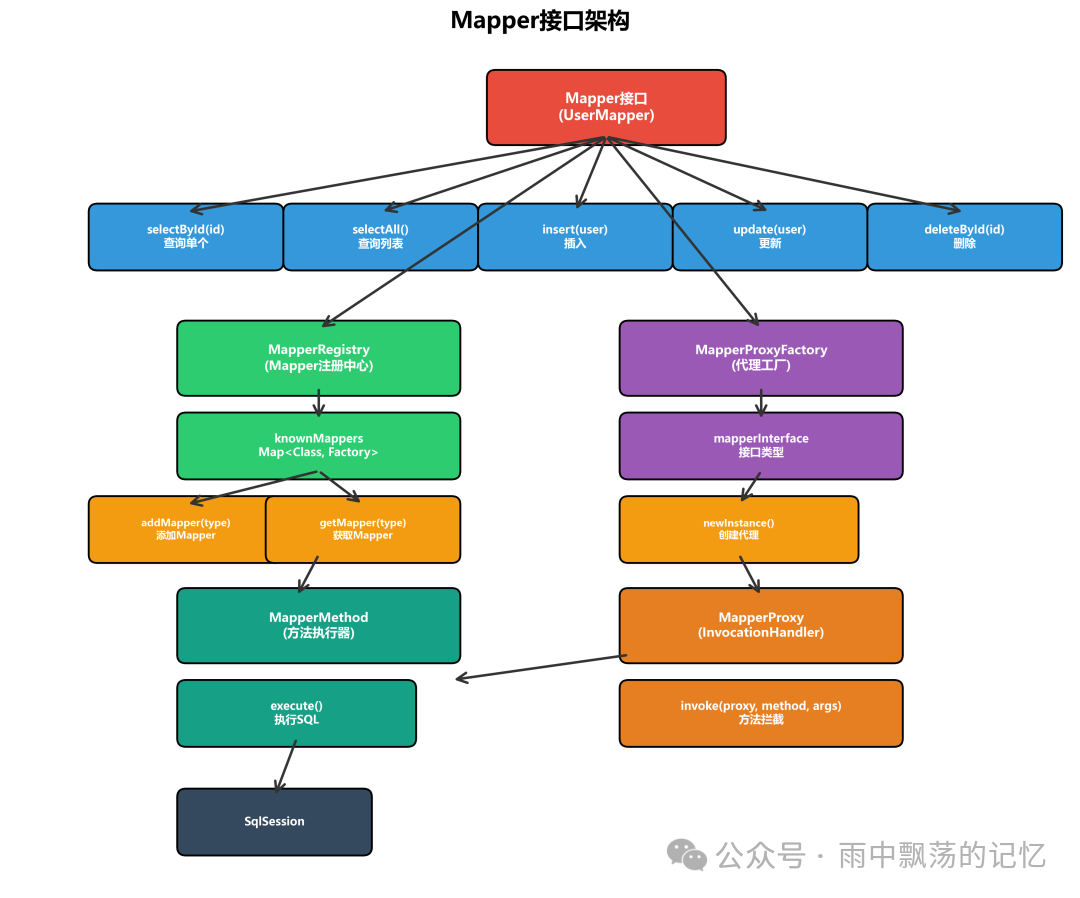
MyBatis的映射器模块巧妙地采用了“接口+配置”的设计模式,这也是其核心魅力所在。
2.1 Mapper接口定义
一个Mapper接口就是一个普通的Java接口,它不需要任何实现类,这是怎么做到的呢?
public interface UserMapper {
    // 查询单个对象
    User selectById(Long id);

    // 查询列表
    List<User> selectAll();

    // 插入
    int insert(User user);

    // 更新
    int update(User user);

    // 删除
    int deleteById(Long id);

    // 复杂查询
    List<User> selectByCondition(@Param("name") String name,
                                 @Param("age") Integer age);
}
2.2 Mapper接口特点
1️⃣ 无需实现类 - MyBatis通过动态代理自动生成实现
2️⃣ 方法名与SQL ID对应 - 接口方法名即为MappedStatement的ID
3️⃣ 参数灵活 - 支持单参数、多参数、对象参数
4️⃣ 返回值多样 - 支持单对象、集合、Map等
2.3 MapperRegistry注册中心
MyBatis内部维护了一个Mapper接口的注册中心——MapperRegistry,它负责管理所有已知的Mapper接口及其对应的代理工厂。
public class MapperRegistry {
    // Configuration对象
    private final Configuration config;
    // Mapper接口与代理工厂的映射
    private final Map<Class<?>, MapperProxyFactory<?>> knownMappers =
        new HashMap<>();

    public MapperRegistry(Configuration config) {
        this.config = config;
    }

    // 添加Mapper接口
    public <T> void addMapper(Class<T> type) {
        if (type.isInterface()) {
            if (hasMapper(type)) {
                throw new BindingException(
                    "Type " + type + " is already known to the MapperRegistry."
                );
            }
            boolean loadCompleted = false;
            try {
                // 1. 创建MapperProxyFactory
                knownMappers.put(type, new MapperProxyFactory<>(type));
                // 2. 解析Mapper注解
                MapperAnnotationBuilder parser =
                    new MapperAnnotationBuilder(config, type);
                parser.parse();
                loadCompleted = true;
            } finally {
                if (!loadCompleted) {
                    knownMappers.remove(type);
                }
            }
        }
    }

    // 获取Mapper实例
    public <T> T getMapper(Class<T> type, SqlSession sqlSession) {
        final MapperProxyFactory<T> mapperProxyFactory =
            (MapperProxyFactory<T>) knownMappers.get(type);
        if (mapperProxyFactory == null) {
            throw new BindingException(
                "Type " + type + " is not known to the MapperRegistry."
            );
        }
        try {
            return mapperProxyFactory.newInstance(sqlSession);
        } catch (Exception e) {
            throw new BindingException(
                "Error getting mapper instance. Cause: " + e, e
            );
        }
    }

    // 检查是否已注册
    public <T> boolean hasMapper(Class<T> type) {
        return knownMappers.containsKey(type);
    }

    // 获取所有Mapper接口
    public Collection<Class<?>> getMappers() {
        return Collections.unmodifiableCollection(knownMappers.keySet());
    }
}
三、SQL语句映射
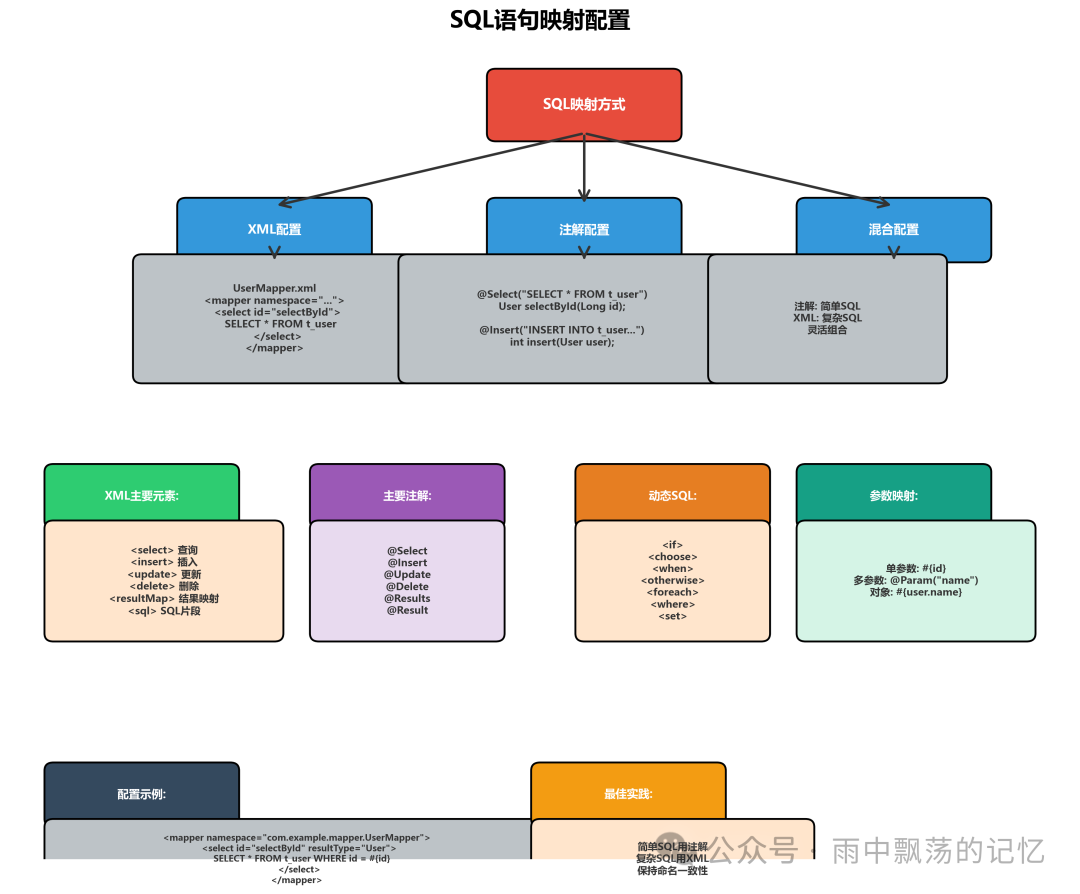
MyBatis提供了非常灵活的SQL映射方式,无论是偏好XML的清晰分离,还是青睐注解的简洁直观,都能得到良好支持。
3.1 XML配置方式
XML配置是MyBatis的传统强项,特别适合编写复杂的SQL语句和动态SQL。
<?xml version="1.0" encoding="UTF-8" ?>
<!DOCTYPE mapper
        PUBLIC "-//mybatis.org//DTD Mapper 3.0//EN"
        "http://mybatis.org/dtd/mybatis-3-mapper.dtd">
<mapper namespace="com.example.mapper.UserMapper">

    <!--结果映射 -->
    <resultMap id="BaseResultMap" type="com.example.entity.User">
        <id column="id" property="id" jdbcType="BIGINT"/>
        <result column="name" property="name" jdbcType="VARCHAR"/>
        <result column="email" property="email" jdbcType="VARCHAR"/>
        <result column="age" property="age" jdbcType="INTEGER"/>
        <result column="create_time" property="createTime"
                jdbcType="TIMESTAMP"/>
    </resultMap>

    <!--查询单个用户 -->
    <select id="selectById" resultMap="BaseResultMap">
        SELECT id, name, email, age, create_time
        FROM t_user
        WHERE id = #{id}
    </select>

    <!-- 查询所有用户 -->
    <select id="selectAll" resultMap="BaseResultMap">
        SELECT id, name, email, age, create_time
        FROM t_user
        ORDER BY id
    </select>

    <!-- 插入用户 -->
    <insert id="insert" parameterType="com.example.entity.User"
            useGeneratedKeys="true" keyProperty="id">
        INSERT INTO t_user (name, email, age, create_time)
        VALUES (#{name}, #{email}, #{age}, NOW())
    </insert>

    <!--更新用户 -->
    <update id="update" parameterType="com.example.entity.User">
        UPDATE t_user
        SET name = #{name},
            email = #{email},
            age = #{age}
        WHERE id = #{id}
    </update>

    <!--删除用户 -->
    <delete id="deleteById">
        DELETE FROM t_user
        WHERE id = #{id}
    </delete>

    <!--动态SQL查询 -->
    <select id="selectByCondition" resultMap="BaseResultMap">
        SELECT id, name, email, age, create_time
        FROM t_user
        <where>
            <if test="name != null and name != ''">
                AND name LIKE CONCAT('%', #{name}, '%')
            </if>
            <if test="age != null">
                AND age = #{age}
            </if>
        </where>
        ORDER BY id
    </select>

</mapper>
| 元素 |
说明 |
示例 |
| select |
查询语句 |
<select id="selectById">...</select> |
| insert |
插入语句 |
<insert id="insert">...</insert> |
| update |
更新语句 |
<update id="update">...</update> |
| delete |
删除语句 |
<delete id="deleteById">...</delete> |
| resultMap |
结果映射 |
<resultMap id="BaseResultMap">...</resultMap> |
| sql |
可重用的SQL片段 |
<sql id="BaseColumn">...</sql> |
| cache |
缓存配置 |
<cache/> |
| cache-ref |
引用缓存 |
<cache-ref/> |
3.2 注解配置方式
对于简单的SQL操作,使用注解可以让我们避免编写XML文件,使代码更加紧凑。
public interface UserMapper {

    @Select("SELECT * FROM t_user WHERE id = #{id}")
    @Results(id = "userResult", value = {
        @Result(property = "id", column = "id", id = true),
        @Result(property = "name", column = "name"),
        @Result(property = "email", column = "email"),
        @Result(property = "age", column = "age"),
        @Result(property = "createTime", column = "create_time")
    })
    User selectById(Long id);

    @Select("SELECT * FROM t_user ORDER BY id")
    List<User> selectAll();

    @Insert("INSERT INTO t_user (name, email, age, create_time) " +
            "VALUES (#{name}, #{email}, #{age}, NOW())")
    @Options(useGeneratedKeys = true, keyProperty = "id")
    int insert(User user);

    @Update("UPDATE t_user SET name = #{name}, email = #{email}, " +
            "age = #{age} WHERE id = #{id}")
    int update(User user);

    @Delete("DELETE FROM t_user WHERE id = #{id}")
    int deleteById(Long id);

    @Select("<script>" +
            "SELECT * FROM t_user " +
            "<where>" +
            "<if test='name != null'>" +
            "AND name LIKE CONCAT('%', #{name}, '%')" +
            "</if>" +
            "<if test='age != null'>AND age = #{age}</if>" +
            "</where>" +
            "</script>")
    List<User> selectByCondition(@Param("name") String name,
                                 @Param("age") Integer age);
}
3.3 混合配置方式
在实际项目中,我们完全可以混合使用XML和注解,取长补短。通常的实践是:简单的查询使用注解,复杂的SQL和动态SQL则交给XML。
接口定义:
public interface UserMapper {
    //注解方式:简单查询
    @Select("SELECT * FROM t_user WHERE id = #{id}")
    User selectById(Long id);

    //XML方式:复杂查询
    List<User> selectByCondition(UserQuery query);
}
对应的XML配置:
<mapper namespace="com.example.mapper.UserMapper">
    <!-- 复杂查询使用XML -->
    <select id="selectByCondition" resultMap="BaseResultMap">
        SELECT * FROM t_user
        <where>
            <if test="name != null">
                AND name LIKE CONCAT('%', #{name}, '%')
            </if>
            <if test="age != null">
                AND age = #{age}
            </if>
        </where>
    </select>
</mapper>
四、动态代理实现
MyBatis最精妙的设计之一,就是通过JDK动态代理技术自动实现我们定义的Mapper接口。这个机制是如何运作的呢?
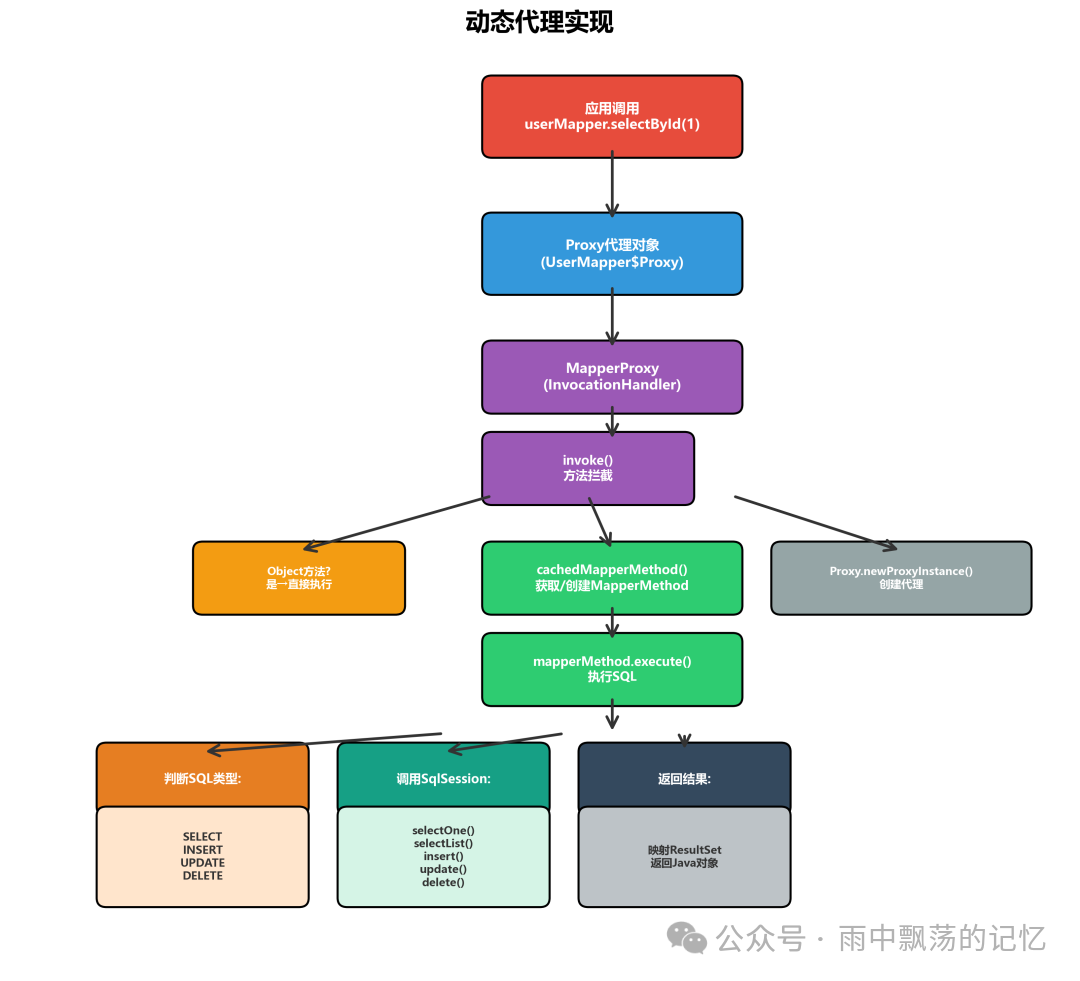
4.1 MapperProxyFactory代理工厂
MapperProxyFactory 是负责创建Mapper代理对象的工厂类。
public class MapperProxyFactory<T> {
    // Mapper接口类型
    private final Class<T> mapperInterface;
    // 方法缓存
    private final Map<Method, MapperMethod> methodCache =
        new ConcurrentHashMap<>();

    public MapperProxyFactory(Class<T> mapperInterface) {
        this.mapperInterface = mapperInterface;
    }

    //创建代理实例
    public T newInstance(SqlSession sqlSession) {
        final MapperProxy<T> mapperProxy = new MapperProxy<>(
            sqlSession, mapperInterface, methodCache
        );
        return newInstance(mapperProxy);
    }

    @SuppressWarnings("unchecked")
    protected T newInstance(MapperProxy<T> mapperProxy) {
        // 使用JDK动态代理创建代理对象
        return (T) Proxy.newProxyInstance(
            mapperInterface.getClassLoader(),
            new Class[]{mapperInterface},
            mapperProxy
        );
    }

    public Class<T> getMapperInterface() {
        return mapperInterface;
    }

    public Map<Method, MapperMethod> getMethodCache() {
        return methodCache;
    }
}
4.2 MapperProxy代理类
MapperProxy 实现了 InvocationHandler 接口,是实际拦截方法调用的处理器。
public class MapperProxy<T> implements InvocationHandler {
    private final SqlSession sqlSession;
    private final Class<T> mapperInterface;
    private final Map<Method, MapperMethod> methodCache;

    public MapperProxy(SqlSession sqlSession, Class<T> mapperInterface,
                       Map<Method, MapperMethod> methodCache) {
        this.sqlSession = sqlSession;
        this.mapperInterface = mapperInterface;
        this.methodCache = methodCache;
    }

    @Override
    public Object invoke(Object proxy, Method method, Object[] args)
        throws Throwable {
        // 1.如果是Object类的方法(如toString, hashCode),直接执行
        if (Object.class.equals(method.getDeclaringClass())) {
            try {
                return method.invoke(this, args);
            } catch (Throwable t) {
                throw ExceptionUtil.unwrapThrowable(t);
            }
        }

        //2.获取MapperMethod并执行
        final MapperMethod mapperMethod = cachedMapperMethod(method);
        return mapperMethod.execute(sqlSession, args);
    }

    //缓存MapperMethod
    private MapperMethod cachedMapperMethod(Method method) {
        return methodCache.computeIfAbsent(method,
            k -> new MapperMethod(mapperInterface, method,
                                 sqlSession.getConfiguration())
        );
    }
}
4.3 MapperMethod方法执行器
MapperMethod 是核心的方法执行器,它封装了SQL命令信息和方法签名,并负责将方法调用路由到正确的 SqlSession 方法。
public class MapperMethod {
    // SqlCommand封装了SQL命令信息
    private final SqlCommand command;
    // MethodSignature封装了方法签名信息
    private final MethodSignature method;

    public MapperMethod(Class<?> mapperInterface, Method method,
                       Configuration config) {
        this.command = new SqlCommand(config, mapperInterface, method);
        this.method = new MethodSignature(config, mapperInterface, method);
    }

    public Object execute(SqlSession sqlSession, Object[] args) {
        Object result;

        switch (command.getType()) {
            case INSERT: {
                //插入操作
                Object param = method.convertArgsToSqlCommandParam(args);
                result = rowCountResult(
                    sqlSession.insert(command.getName(), param)
                );
                break;
            }
            case UPDATE: {
                //更新操作
                Object param = method.convertArgsToSqlCommandParam(args);
                result = rowCountResult(
                    sqlSession.update(command.getName(), param)
                );
                break;
            }
            case DELETE: {
                //删除操作
                Object param = method.convertArgsToSqlCommandParam(args);
                result = rowCountResult(
                    sqlSession.delete(command.getName(), param)
                );
                break;
            }
            case SELECT:
                if (method.returnsVoid() && method.hasResultHandler()) {
                    // 有ResultHandler的查询
                    executeWithResultHandler(sqlSession, args);
                    result = null;
                } else if (method.returnsMany()) {
                    //返回集合
                    result = executeForMany(sqlSession, args);
                } else if (method.returnsMap()) {
                    //返回Map
                    result = executeForMap(sqlSession, args);
                } else if (method.returnsCursor()) {
                    //返回Cursor
                    result = executeForCursor(sqlSession, args);
                } else {
                    //返回单个对象
                    Object param = method.convertArgsToSqlCommandParam(args);
                    result = sqlSession.selectOne(command.getName(), param);
                    if (method.returnsOptional() &&
                        (result == null ||
                         !method.getReturnType().equals(result.getClass()))) {
                        result = Optional.ofNullable(result);
                    }
                }
                break;
            case FLUSH:
                result = sqlSession.flushStatements();
                break;
            default:
                throw new BindingException(
                    "Unknown execution method for: " + command.getName()
                );
        }

        if (result == null && method.getReturnType().isPrimitive() &&
            !method.returnsVoid()) {
            throw new BindingException(
                "Mapper method '" + command.getName() +
                "' attempted to return null from a method with " +
                "a primitive return type (" + method.getReturnType() + ")."
            );
        }
        return result;
    }

    // 执行返回多条的查询
    private <E> Object executeForMany(SqlSession sqlSession, Object[] args) {
        List<E> result;
        Object param = method.convertArgsToSqlCommandParam(args);
        if (method.hasRowBounds()) {
            RowBounds rowBounds = method.extractRowBounds(args);
            result = sqlSession.selectList(
                command.getName(), param, rowBounds
            );
        } else {
            result = sqlSession.selectList(command.getName(), param);
        }
        return result;
    }

    // 处理行数结果
    private Object rowCountResult(int rowCount) {
        final Object result;
        if (method.returnsVoid()) {
            result = null;
        } else if (Integer.TYPE.equals(method.getReturnType()) ||
                   Integer.class.equals(method.getReturnType())) {
            result = rowCount;
        } else if (Long.TYPE.equals(method.getReturnType()) ||
                   Long.class.equals(method.getReturnType())) {
            result = (long) rowCount;
        } else if (Boolean.TYPE.equals(method.getReturnType()) ||
                   Boolean.class.equals(method.getReturnType())) {
            result = rowCount > 0;
        } else {
            throw new BindingException(
                "Mapper method '" + command.getName() +
                "' has an unsupported return type: " +
                method.getReturnType()
            );
        }
        return result;
    }

    //内部类:SqlCommand
    public static class SqlCommand {
        private final String name;
        private final SqlCommandType type;

        public SqlCommand(Configuration configuration,
                         Class<?> mapperInterface, Method method) {
            final String methodName = method.getName();
            final Class<?> declaringClass = method.getDeclaringClass();

            // 解析MappedStatement
            MappedStatement ms = resolveMappedStatement(
                mapperInterface, methodName, declaringClass, configuration
            );

            if (ms == null) {
                if (method.getAnnotation(Flush.class) != null) {
                    name = null;
                    type = SqlCommandType.FLUSH;
                } else {
                    throw new BindingException(
                        "Invalid bound statement (not found): " +
                        mapperInterface.getName() + "." + methodName
                    );
                }
            } else {
                name = ms.getId();
                type = ms.getSqlCommandType();
                if (type == SqlCommandType.UNKNOWN) {
                    throw new BindingException(
                        "Unknown execution method for: " + name
                    );
                }
            }
        }

        private MappedStatement resolveMappedStatement(
            Class<?> mapperInterface, String methodName,
            Class<?> declaringClass, Configuration configuration) {
            String statementId = mapperInterface.getName() + "." + methodName;
            if (configuration.hasStatement(statementId)) {
                return configuration.getMappedStatement(statementId);
            }
            return null;
        }

        public String getName() {
            return name;
        }

        public SqlCommandType getType() {
            return type;
        }
    }

    //内部类:MethodSignature
    public static class MethodSignature {
        private final boolean returnsMany;
        private final boolean returnsMap;
        private final boolean returnsVoid;
        private final boolean returnsCursor;
        private final boolean returnsOptional;
        private final Class<?> returnType;
        private final String mapKey;
        private final Integer resultHandlerIndex;
        private final Integer rowBoundsIndex;
        private final ParamNameResolver paramNameResolver;

        public MethodSignature(Configuration configuration,
                             Class<?> mapperInterface, Method method) {
            // ... 解析方法返回类型、参数等详细信息
        }

        public Object convertArgsToSqlCommandParam(Object[] args) {
            return paramNameResolver.getNamedParams(args);
        }

        public boolean hasRowBounds() {
            return rowBoundsIndex != null;
        }
    }
}
4.4 代理执行流程
整个动态代理的执行流程可以概括为以下清晰步骤:
1. 调用Mapper接口方法
   ↓
2. 触发MapperProxy.invoke()
   ↓
3. 获取或创建MapperMethod
   ↓
4. 执行MapperMethod.execute()
   ↓
5. 根据SQL类型调用SqlSession方法
   ↓
6. Executor执行SQL
   ↓
7. 返回结果
五、Mapper注册流程
在使用Mapper之前,必须先将接口注册到MyBatis的配置中。理解注册流程对于排查“找不到Mapper”这类问题很有帮助。
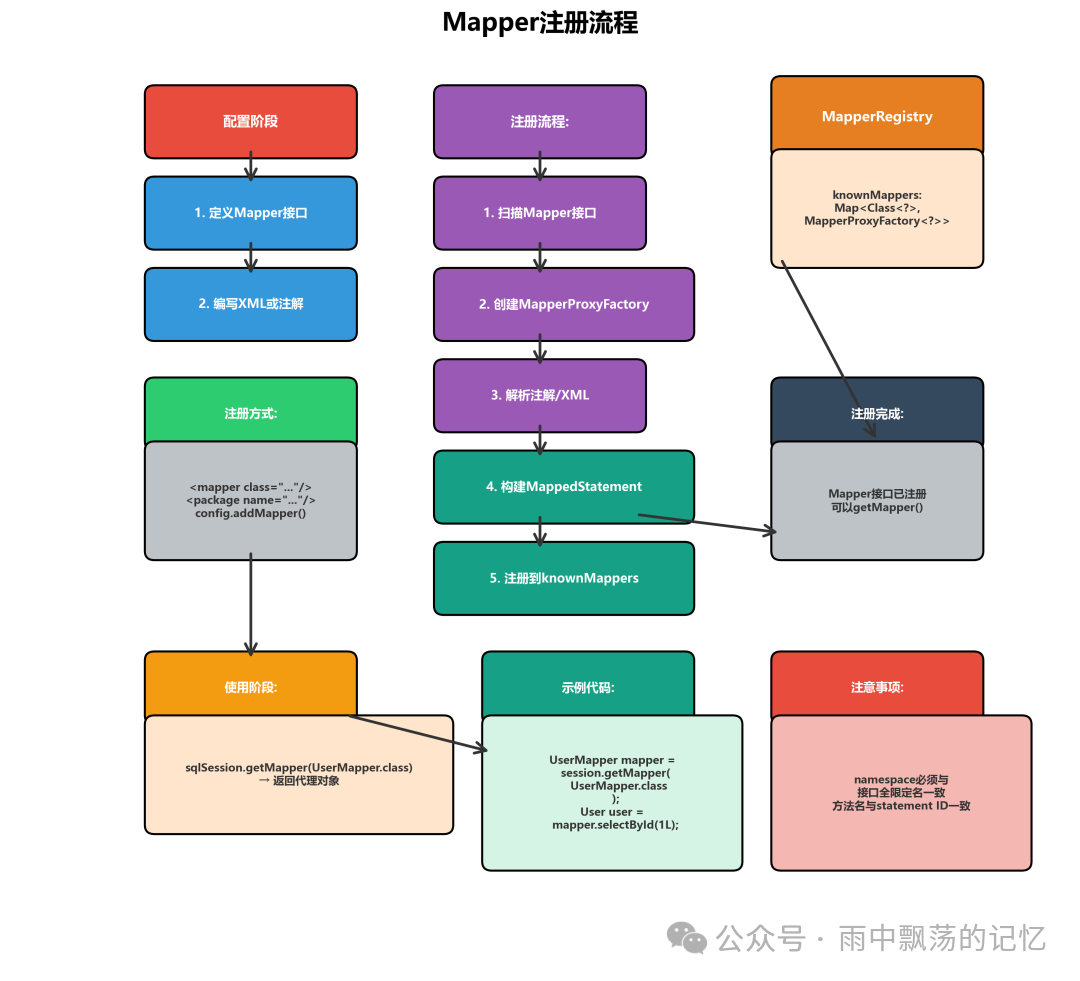
5.1 注册方式
在MyBatis的核心配置文件(mybatis-config.xml)中,我们可以通过多种方式注册Mapper:
<configuration>
    <!-- 注册Mapper接口 -->
    <mappers>
        <!--使用类路径 -->
        <mapper class="com.example.mapper.UserMapper"/>

        <!--使用包扫描 -->
        <package name="com.example.mapper"/>

        <!--使用XML资源路径 -->
        <mapper resource="com/example/mapper/UserMapper.xml"/>
    </mappers>
</configuration>
在纯Java代码配置中,注册方式如下:
// 创建Configuration
Configuration configuration = new Configuration();

// 注册Mapper接口
configuration.addMapper(UserMapper.class);
configuration.addMapper(OrderMapper.class);

// 或者通过MapperRegistry
MapperRegistry mapperRegistry = configuration.getMapperRegistry();
mapperRegistry.addMapper(UserMapper.class);
构建 SqlSessionFactory 时注册:
SqlSessionFactoryBuilder builder = new SqlSessionFactoryBuilder();

// 通过InputStream
SqlSessionFactory factory = builder.build(inputStream);

// 通过Configuration
Environment environment = new Environment("development", ...);
Configuration configuration = new Configuration(environment);
configuration.addMapper(UserMapper.class);
SqlSessionFactory factory =
    new SqlSessionFactoryBuilder().build(configuration);
在Spring集成环境中,通常使用 @MapperScan 注解或配置 MapperScannerConfigurer 进行自动扫描和注册。
六、Mapper执行流程
理解了Mapper的注册和代理机制后,我们来看看一个完整的Mapper方法调用是如何一步步执行到数据库并返回结果的。掌握这个流程对于性能调优和问题排查至关重要。

6.1 完整执行流程
一个典型的使用示例如下,它清晰地展示了从获取会话到关闭资源的完整生命周期:
//1.获取SqlSession
SqlSession session = sqlSessionFactory.openSession();
try {
    //2.获取Mapper代理对象
    UserMapper userMapper = session.getMapper(UserMapper.class);
    //3.调用Mapper方法
    User user = userMapper.selectById(1L);
    //4.使用结果
    System.out.println(user);
    //5.提交事务
    session.commit();
} finally {
    //6.关闭Session
    session.close();
}
6.2 详细执行步骤
让我们将上述代码背后的复杂过程分解开来看:
步骤1: 获取Mapper代理对象
    session.getMapper(UserMapper.class)
    ↓
    configuration.getMapper(UserMapper.class, this)
    ↓
    mapperRegistry.getMapper(UserMapper.class, this)
    ↓
    mapperProxyFactory.newInstance(this)
    ↓
    Proxy.newProxyInstance(...) → 创建代理对象
步骤2: 调用Mapper方法
    userMapper.selectById(1L)
    ↓
    MapperProxy.invoke(proxy, method, args)
    ↓
    cachedMapperMethod(method)
    ↓
    mapperMethod.execute(sqlSession, args)
步骤3: 执行SQL
    SqlCommandType.SELECT
    ↓
    sqlSession.selectOne(statementId, param)
    ↓
    executor.query(ms, param, rowBounds, resultHandler)
    ↓
    创建CacheKey
    ↓
    查询缓存
    ↓
    查询数据库
    ↓
    映射结果
步骤4: 返回结果
    处理ResultSet
    ↓
    ObjectFactory创建对象
    ↓
    ResultHandler映射
    ↓
    返回User对象
6.3 执行时序图
从宏观视角看,一次Mapper方法调用的时序可以简化为:
应用 → MapperProxy → MapperMethod → SqlSession →
Executor → StatementHandler → Database
6.4 异常处理
在使用Mapper时,合理的异常处理能帮助我们快速定位问题。
try {
    User user = userMapper.selectById(1L);
} catch (PersistenceException e) {
    // 持久化异常
    Throwable cause = e.getCause();
    if (cause instanceof SQLException) {
        // 处理SQL异常
        SQLException sqlEx = (SQLException) cause;
        System.out.println("SQL Error: " + sqlEx.getMessage());
    }
} catch (BindingException e) {
    // 绑定异常:Mapper方法未找到
    System.out.println("Mapper method not found: " + e.getMessage());
}
七、最佳实践
了解了原理之后,让我们来看看在实际项目中使用MyBatis Mapper时有哪些值得遵循的最佳实践。这些实践能帮助你构建出更健壮、更易维护的数据访问层。
7.1 Mapper设计建议
1️⃣ 单一职责 - 每个Mapper接口最好只对应一张数据库表,职责清晰。
2️⃣ 命名规范 - 接口名建议与实体名对应,如 User 实体对应 UserMapper。
3️⃣ 方法命名 - 使用语义化的方法名,如 selectById, insert, updateByCondition。
4️⃣ 参数设计 - 当方法参数超过一个时,务必使用 @Param 注解明确参数名。
7.2 性能优化建议
1️⃣ 合理使用缓存 - 根据业务场景启用一级/二级缓存,特别是读多写少的场景。
2️⃣ 避免N+1查询 - 使用关联查询(如<association>, <collection>)代替多次单表查询。
3️⃣ 分页查询 - 对于大数据集,使用 RowBounds 或 PageHelper 等分页插件,避免内存溢出。
4️⃣ 批量操作 - 进行大批量插入或更新时,考虑使用 BatchExecutor。
7.3 常见问题解决
问题1:多参数未使用 @Param 注解导致绑定失败。
//错误:多参数未使用@Param
List<User> select(String name, Integer age);

//正确:使用@Param
List<User> select(@Param("name") String name,
                 @Param("age") Integer age);
问题2:数据库列名与Java对象属性名不一致导致映射失败。
解决方法是使用 resultMap 进行显式映射。
<!--正确:使用resultMap -->
<resultMap id="BaseResultMap" type="User">
    <id column="id" property="id"/>
    <result column="user_name" property="name"/>
</resultMap>

<select id="selectById" resultMap="BaseResultMap">
    SELECT id, user_name FROM t_user WHERE id = #{id}
</select>
八、总结
MyBatis的映射器模块通过“接口+配置”和动态代理的巧妙结合,为Java开发者提供了一种优雅、灵活的数据库操作方式。它成功地将SQL与Java代码解耦,同时保持了强大的表达能力和对复杂SQL及数据库特性的深度支持。
回顾其核心机制:
1️⃣ Mapper接口 - 定义数据库操作方法契约。
2️⃣ SQL映射 - 通过XML或注解将接口方法与SQL语句绑定。
3️⃣ 动态代理 - 利用JDK动态代理在运行时自动生成接口实现。
4️⃣ MapperProxy - 作为调用处理器,拦截方法调用并路由。
5️⃣ MapperMethod - 封装了方法执行的具体逻辑,是真正的执行引擎。
从架构设计的角度看,MyBatis映射器模块是一个经典的应用桥接模式和代理模式的范例。它将稳定的接口定义与可能变化的SQL实现分离,并通过动态代理填补了接口与实现之间的鸿沟,这种设计非常值得我们在构建自己的系统架构时借鉴。
希望这篇从MyBatis官方文档和源码角度出发的解析,能帮助你更深入地理解这一强大工具的内在工作原理,从而更高效、更自信地使用它。如果你想了解更多关于Java持久层框架的深度讨论或技术文档,欢迎持续关注云栈社区的技术分享。
 发表于 2026-1-5 22:14:52
|
查看: 322|
回复: 0
发表于 2026-1-5 22:14:52
|
查看: 322|
回复: 0

