
Caffeine Cache 是一个基于 Java 的高性能本地缓存库。它站在巨人 Guava Cache 的肩膀上,借鉴其思想并针对缓存淘汰算法进行了显著优化,提供了接近最佳的命中率。
1. Caffeine Cache 的核心算法优势:W-TinyLFU
传统的缓存淘汰算法主要有 FIFO、LRU 和 LFU,它们各有优劣:
- FIFO(先进先出):先进入缓存的先被淘汰,命中率通常较低。
- LRU(最近最少使用):将最近访问的数据移至队列尾部,淘汰队首数据。但它可能淘汰掉短期内访问频繁但最近未被访问的热点数据。
- LFU(最不经常使用):统计数据访问频率,淘汰频率最低的数据。它能避免 LRU 的问题,但需要维护昂贵的频率信息,且难以适应访问模式随时间变化的情况。
Caffeine 采用了W-TinyLFU回收策略,巧妙地结合了 LRU 和 LFU 的优势。
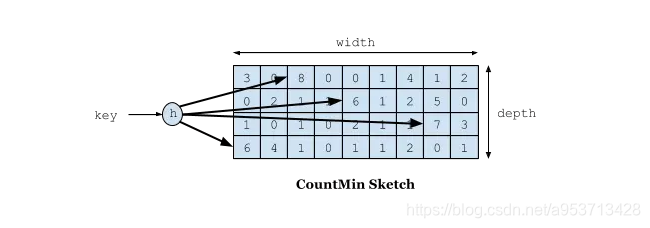
- TinyLFU:用于应对大多数访问场景,它使用 Count-Min Sketch 数据结构以较小的空间开销维护近期访问频率,作为新数据能否进入缓存的过滤器。
- Window:一个小的 LRU 窗口,用于处理稀疏的突发访问流量,避免新来的突发访问元素因频率不够而被立即淘汰。
这种组合使得 Caffeine 在各种负载模式下都能获得近乎最佳的命中率。
Count-Min Sketch 是布隆过滤器的一种变种,用于高效、节省空间地记录访问频率。如下图所示,它通过多个哈希函数将键映射到一个二维计数数组,获取频率时取所有哈希位置中的最小值,有效降低了哈希冲突带来的误差。
2. Caffeine Cache 使用指南
Caffeine 的最新版本可通过 Maven 引入:
<dependency>
    <groupId>com.github.ben-manes.caffeine</groupId>
    <artifactId>caffeine</artifactId>
    <version>2.6.2</version>
</dependency>
2.1 缓存填充策略
Caffeine 提供了三种填充策略:手动加载、同步加载和异步加载。
1. 手动加载
手动控制缓存的存入与获取。
public Object manualOperator(String key) {
    Cache<String, Object> cache = Caffeine.newBuilder()
        .expireAfterWrite(1, TimeUnit.SECONDS)
        .maximumSize(10)
        .build();
    // 如果key不存在,则调用函数生成value并加载
    Object value = cache.get(key, t -> setValue(key).apply(key));
    cache.put(\"hello\", value);
    // 获取值,若不存在则返回null
    Object ifPresent = cache.getIfPresent(key);
    // 移除一个key
    cache.invalidate(key);
    return value;
}
public Function<String, Object> setValue(String key){
    return t -> key + \"value\";
}
2. 同步加载
通过 CacheLoader 实现加载逻辑,get 操作会自动加载缓存。
public Object syncOperator(String key){
    LoadingCache<String, Object> cache = Caffeine.newBuilder()
        .maximumSize(100)
        .expireAfterWrite(1, TimeUnit.MINUTES)
        .build(k -> setValue(key).apply(key));
    return cache.get(key);
}
3. 异步加载
返回 CompletableFuture,适用于响应式编程模型。
public Object asyncOperator(String key){
    AsyncLoadingCache<String, Object> cache = Caffeine.newBuilder()
        .maximumSize(100)
        .expireAfterWrite(1, TimeUnit.MINUTES)
        .buildAsync(k -> setAsyncValue(key).get());
    return cache.get(key);
}
public CompletableFuture<Object> setAsyncValue(String key){
    return CompletableFuture.supplyAsync(() -> key + \"value\");
}
2.2 回收策略
Caffeine 支持基于大小、时间和引用的回收策略。
1. 基于大小回收
// 基于缓存条目数量
LoadingCache<String, Object> cache = Caffeine.newBuilder()
    .maximumSize(10000)
    .build(key -> function(key));

// 基于权重(需实现Weigher接口)
LoadingCache<String, Object> cache1 = Caffeine.newBuilder()
    .maximumWeight(10000)
    .weigher((key, value) -> ((String)value).length()) // 示例权重计算
    .build(key -> function(key));
// 注意:maximumSize 与 maximumWeight 不可同时使用
2. 基于时间回收
// 最后一次访问后过期
LoadingCache<String, Object> cache = Caffeine.newBuilder()
    .expireAfterAccess(5, TimeUnit.MINUTES)
    .build(key -> function(key));
// 最后一次写入后过期
LoadingCache<String, Object> cache1 = Caffeine.newBuilder()
    .expireAfterWrite(10, TimeUnit.MINUTES)
    .build(key -> function(key));
// 自定义过期策略
LoadingCache<String, Object> cache2 = Caffeine.newBuilder()
    .expireAfter(new Expiry<String, Object>() {
        @Override
        public long expireAfterCreate(String key, Object value, long currentTime) {
            return TimeUnit.SECONDS.toNanos(60); // 创建60秒后过期
        }
        @Override
        public long expireAfterUpdate(String key, Object value, long currentTime, long currentDuration) {
            return currentDuration; // 更新不改变过期时间
        }
        @Override
        public long expireAfterRead(String key, Object value, long currentTime, long currentDuration) {
            return currentDuration; // 读取不改变过期时间
        }
    }).build(key -> function(key));
3. 基于引用回收
利用 Java 的软引用、弱引用辅助 GC 进行回收。
// 使用弱引用存储Key和Value
LoadingCache<String, Object> cache = Caffeine.newBuilder()
    .weakKeys()
    .weakValues()
    .build(key -> function(key));
// 使用软引用存储Value (内存不足时回收)
LoadingCache<String, Object> cache1 = Caffeine.newBuilder()
    .softValues()
    .build(key -> function(key));
// 注意:weakValues()和softValues()不可同时使用。AsyncLoadingCache不支持弱引用和软引用。
2.3 移除事件监听
可以监听缓存条目被移除的原因(如过期、被替换、手动删除等)。
Cache<String, Object> cache = Caffeine.newBuilder()
    .removalListener((String key, Object value, RemovalCause cause) ->
        System.out.printf(\"Key %s was removed (%s)%n\", key, cause))
    .build();
2.4 写入外部存储
通过 CacheWriter 可以实现写穿透模式,将缓存的所有写操作同步到外部存储(如数据库),适用于多级缓存场景。
LoadingCache<String, Object> cache2 = Caffeine.newBuilder()
    .writer(new CacheWriter<String, Object>() {
        @Override public void write(String key, Object value) {
            // 写入到外部存储
            externalStorage.save(key, value);
        }
        @Override public void delete(String key, Object value, RemovalCause cause) {
            // 从外部存储删除
            externalStorage.delete(key);
        }
    })
    .build(key -> function(key));
// 注意:CacheWriter不能与弱键或AsyncLoadingCache一起使用。
2.5 统计功能
开启统计后,可以获取缓存命中等多项指标。
Cache<String, Object> cache = Caffeine.newBuilder()
    .maximumSize(10_000)
    .recordStats()
    .build();
CacheStats stats = cache.stats();
System.out.println(\"命中率: \" + stats.hitRate());
System.out.println(\"回收总数: \" + stats.evictionCount());
System.out.println(\"平均加载耗时[纳秒]: \" + stats.averageLoadPenalty());
3. 在 Spring Boot 中集成 Caffeine Cache
Spring Boot 2.x 开始,默认的本地缓存实现已从 Guava Cache 替换为 Caffeine Cache。
3.1 引入依赖
<dependency>
    <groupId>org.springframework.boot</groupId>
    <artifactId>spring-boot-starter-cache</artifactId>
</dependency>
<dependency>
    <groupId>com.github.ben-manes.caffeine</groupId>
    <artifactId>caffeine</artifactId>
    <version>2.6.2</version>
</dependency>
3.2 启用缓存
在启动类上添加 @EnableCaching 注解。
@SpringBootApplication
@EnableCaching
public class Application {
    public static void main(String[] args) {
        SpringApplication.run(Application.class, args);
    }
}
3.3 配置缓存
有两种主要配置方式:配置文件或 Java Config Bean。
方式一:application.yml 配置文件
spring:
  cache:
    type: caffeine
    cache-names: userCache, productCache
    caffeine:
      spec: maximumSize=1024,expireAfterWrite=60s
如果配置了 refreshAfterWrite,则必须定义一个 CacheLoader Bean:
@Bean
public CacheLoader<Object, Object> cacheLoader() {
    return new CacheLoader<Object, Object>() {
        @Override
        public Object load(Object key) { return null; }
        @Override
        public Object reload(Object key, Object oldValue) {
            // 刷新逻辑,这里直接返回旧值,通常应重新加载
            return oldValue;
        }
    };
}
方式二:Java Config 方式(更灵活)
通过 CacheManager Bean 自定义多个具有不同配置的缓存。
@Configuration
public class CacheConfig {
    @Bean
    @Primary
    public CacheManager caffeineCacheManager() {
        SimpleCacheManager cacheManager = new SimpleCacheManager();
        List<CaffeineCache> caches = new ArrayList<>();
        // 创建用户缓存:最大10000条,60秒过期
        caches.add(new CaffeineCache(\"userCache\",
                Caffeine.newBuilder()
                        .recordStats()
                        .expireAfterWrite(60, TimeUnit.SECONDS)
                        .maximumSize(10000)
                        .build()));
        // 创建部门缓存:最大500条,120秒过期
        caches.add(new CaffeineCache(\"deptCache\",
                Caffeine.newBuilder()
                        .expireAfterWrite(120, TimeUnit.SECONDS)
                        .maximumSize(500)
                        .build()));
        cacheManager.setCaches(caches);
        return cacheManager;
    }
}
3.4 使用缓存注解
Spring 提供了简洁的注解来操作缓存。
常用注解:
@Cacheable:方法执行前检查缓存,存在则返回,不存在则执行方法并缓存结果。适合查询方法。@CachePut:总是执行方法,并用结果更新缓存。适合更新/保存方法。@CacheEvict:删除缓存。适合删除方法。@Caching:组合多个缓存操作。@CacheConfig:在类级别共享缓存配置。
使用示例:
@Service
public class UserService {
    // 查询:缓存名为userCache,key为参数id,支持同步(防止缓存击穿)
    @Cacheable(value = \"userCache\", key = \"#id\", sync = true)
    public User getUserById(Long id) {
        // ... 从数据库查询
        return user;
    }
    // 更新:总是执行,并用返回值更新缓存中key为#user.id的条目
    @CachePut(value = \"userCache\", key = \"#user.id\")
    public User saveUser(User user) {
        // ... 保存到数据库
        return user;
    }
    // 删除:删除对应key的缓存
    @CacheEvict(value = \"userCache\", key = \"#id\")
    public void deleteUser(Long id) {
        // ... 从数据库删除
    }
}
SpEL 表达式在缓存注解中的使用:
在注解的 key、condition 等属性中,可以使用 SpEL 表达式引用方法参数、返回值等上下文数据。 |
表达式 |
描述 |
示例 |
#root.methodName |
当前方法名 |
#root.methodName |
#id 或 #p0 |
方法的第一个参数(参数名为id) |
key = \"#id\" |
#result |
方法的返回值(仅限@CachePut, @CacheEvict的condition等) |
unless = \"#result == null\" |
#a0 / #p0 |
第一个参数 |
key = \"#p0\" |
Caffeine Cache 凭借其先进的 W-TinyLFU 算法,在命中率上表现卓越,同时提供了丰富而灵活的配置选项。通过与 Spring Boot 无缝集成,开发者可以轻松构建高效的本地缓存层,显著提升应用性能,尤其在处理高并发读场景时优势明显。
 发表于 2025-12-2 04:50:07
|
查看: 387|
回复: 0
发表于 2025-12-2 04:50:07
|
查看: 387|
回复: 0

