“你永远无法精通一种编程语言,除非两种!” 或许,对于智能体之间的通信协议如 MCP 和 A2A 也是如此。
A2A (Agent-to-Agent) 协议致力于成为实现 AI Agent 间无缝通信与协作的关键技术。这个由谷歌开发的开放协议,旨在标准化人工智能 Agent 之间的交互。无论 Agent 建立在何种框架上,它们都能基于此协议交换信息、协同工作,以完成复杂目标。A2A 的一个核心组成部分是 Agent Card,它包含了关于 Agent 能力的重要元数据。这些卡片在 Agent 之间共享,使它们能够为特定任务发现并选择最合适的协作者,并按协议格式将任务委派出去。
通过建立共同的语言和架构,A2A 旨在推动能够应对日益复杂挑战的、复杂的多智能体人工智能系统的发展。
现在,让我们动手为 A2A 协议创建一个简单的 Java 实现。
Agent Card 控制器
首先,我们需要实现一个提供 Agent Card 的端点。在 A2A 协议中,Agent Card 通过特定的已知路径提供,通常为 /.well-known/agent.json。
package io.github.vishalmysore;

import org.springframework.http.MediaType;
import org.springframework.http.ResponseEntity;
import org.springframework.web.bind.annotation.GetMapping;
import org.springframework.web.bind.annotation.RequestMapping;
import org.springframework.web.bind.annotation.RestController;

@RestController
@RequestMapping("/.well-known")
public class AgentCardController {
    @GetMapping(value = "/agent.json", produces = MediaType.APPLICATION_JSON_VALUE)
    public ResponseEntity<AgentCard> getAgentCard() {
        AgentCard agentCard = new AgentCard();
        agentCard.setName("Tools4AI : Airline Ticket Booker");
        agentCard.setDescription("Helps users book airline tickets");
        agentCard.setUrl("http://localhost:8080"); //  Replace with actual URL
        agentCard.setProvider(new Provider("Tools4AI Corp", "https://github.com/vishalmysore/Tools4AI")); // Replace
        agentCard.setVersion("1.0.0");
        agentCard.setDocumentationUrl("https://github.com/vishalmysore/Tools4AI");  // Replace
        agentCard.setCapabilities(new Capabilities(true, false, false)); // Corrected
        agentCard.setAuthentication(new Authentication(new String[]{"Bearer"}));
        agentCard.setDefaultInputModes(new String[]{"text/plain"});
        agentCard.setDefaultOutputModes(new String[]{"application/json"});

        Skill bookTicketSkill = new Skill();
        bookTicketSkill.setId("book-ticket");
        bookTicketSkill.setName("Book Ticket");
        bookTicketSkill.setDescription("Book an airline ticket");
        bookTicketSkill.setTags(new String[]{"travel", "airline", "booking"});
        bookTicketSkill.setExamples(new String[]{"Book a flight from New York to Los Angeles on 2024-05-10"});
        bookTicketSkill.setInputModes(new String[]{"application/json"}); //override
        bookTicketSkill.setOutputModes(new String[]{"application/json"});

        agentCard.setSkills(new Skill[]{bookTicketSkill});

        return ResponseEntity.ok(agentCard);
    }
}
这个 Spring Boot REST 控制器 AgentCardController 负责为 AI Agent 提供其服务能力卡片。@RestController 和 @RequestMapping("/.well-known") 注解将其定义为 REST 控制器,并将请求映射到 A2A 协议要求的已知路径。getAgentCard() 方法处理对 /agent.json 端点的 GET 请求,并返回 JSON 格式的 AgentCard 对象。这张卡片包含了 Agent 的名称、描述、URL、提供者、版本、文档链接、支持的能力、身份验证方法、默认输入/输出模式以及技能列表等信息。在实际应用中,可以进一步优化此设计,例如从配置文件或数据库动态加载卡片数据。
Task 控制器
智能体协作的核心是任务处理。下面是一个处理任务创建、状态查询和事件推送的控制器。
package io.github.vishalmysore;

import org.springframework.http.HttpStatus;
import org.springframework.http.MediaType;
import org.springframework.http.ResponseEntity;
import org.springframework.web.bind.annotation.*;
import org.springframework.web.server.ResponseStatusException;
import org.springframework.web.servlet.mvc.method.annotation.SseEmitter;

import java.io.IOException;
import java.util.ArrayList;
import java.util.List;
import java.util.Map;
import java.util.UUID;
import java.util.concurrent.ConcurrentHashMap;
import java.util.concurrent.ExecutorService;
import java.util.concurrent.Executors;

@RestController
@RequestMapping("/tasks")
class TaskController {

   private final Map<String, Task> tasks = new ConcurrentHashMap<>();
    private final Map<String, SseEmitter> emitters = new ConcurrentHashMap<>();
    private final ExecutorService nonBlockingService = Executors.newCachedThreadPool();

    // Helper method to send SSE events
    private void sendSseEvent(String taskId, Object event) {
        SseEmitter emitter = emitters.get(taskId);
        if (emitter != null) {
            try {
                emitter.send(SseEmitter.event().name("message").data(event));
            } catch (IOException e) {
                // Handle client disconnection or error
                emitters.remove(taskId);
                emitter.completeWithError(e);
                System.err.println("Error sending SSE event: " + e.getMessage()); // Log
            }        }
    }

    @PostMapping("/send")
  public ResponseEntity<Task> sendTask(@RequestBody TaskSendParams taskSendParams) {
        String taskId = taskSendParams.getId();
        Task task;
        if (tasks.containsKey(taskId)) {
            task = tasks.get(taskId);
            // In a real implementation, you would check the task's status
            // and determine if a new message can be added.  For this example,
            // we'll just add the message.
            List<Message> history = task.getHistory();
            if (history == null) {
                history = new ArrayList<>();
            }
            List<Message> mutableHistory = new ArrayList<>(history);
            mutableHistory.add(taskSendParams.getMessage());
            task.setHistory(mutableHistory);

        } else {
            //creates a new task
            task = new Task();
            task.setId(taskId);
            String sessionId = taskSendParams.getSessionId();
            if (sessionId == null || sessionId.isEmpty()) {
                sessionId = UUID.randomUUID().toString();
            }
            task.setSessionId(sessionId);
            task.setStatus(new TaskStatus("submitted")); // Initial status
            task.setHistory(List.of(taskSendParams.getMessage())); //adds the first message
            tasks.put(taskId, task);
        }

        // Simulate ticket booking (long-running)
        nonBlockingService.execute(() -> {
            try {
                // Simulate processing time
                Thread.sleep(3000);
                TextPart part1 = (TextPart) taskSendParams.getMessage().getParts().get(0);
                //check for input required.
        if (part1.getText().toLowerCase().contains("change")) {
              TaskStatus inputRequiredStatus = new TaskStatus("input-required");
                    Message agentMessage = new Message();
                    agentMessage.setRole("agent");
                    TextPart textPart = new TextPart();
                    textPart.setType("text");
                    textPart.setText("Please provide the new date for your ticket");
                    agentMessage.setParts(List.of(textPart));
                    inputRequiredStatus.setMessage(agentMessage);
                    task.setStatus(inputRequiredStatus);
                    tasks.put(taskId, task);
          sendSseEvent(taskId, new TaskStatusUpdateEvent(taskId, inputRequiredStatus, false));
                }
                else {
                    TaskStatus workingStatus = new TaskStatus("working");
                    Message agentWorkingMessage = new Message();
                    agentWorkingMessage.setRole("agent");
                    TextPart workingTextPart = new TextPart();
                    workingTextPart.setType("text");
            workingTextPart.setText("Booking your ticket...");
                    workingStatus.setMessage(agentWorkingMessage);
                    task.setStatus(workingStatus);
                    tasks.put(taskId, task);
                    sendSseEvent(taskId, new TaskStatusUpdateEvent(taskId, workingStatus, false));
                    Thread.sleep(2000);  // Simulate booking process

                    //create a success status
                    TaskStatus completedStatus = new TaskStatus("completed");
                    Message agentMessage = new Message();
                    agentMessage.setRole("agent");
                    TextPart textPart = new TextPart();
                    textPart.setType("text");
                    textPart.setText("Ticket booked successfully! Confirmation number: " + UUID.randomUUID());
                    agentMessage.setParts(List.of(textPart));
                    completedStatus.setMessage(agentMessage);

                    // Create an artifact.
                    Artifact artifact = new Artifact();
                    artifact.setName("Ticket Confirmation");
                    artifact.setDescription("Your airline ticket confirmation");
                    TextPart artifactTextPart = new TextPart();
                    artifactTextPart.setType("text");
                    artifactTextPart.setText("Your ticket is confirmed.  Details will be sent to your email.");
                    artifact.setParts(List.of(artifactTextPart));
                    artifact.setIndex(0);
                    artifact.setAppend(false);
                    artifact.setLastChunk(true);

                    task.setArtifacts(List.of(artifact));
                    task.setStatus(completedStatus);
                    tasks.put(taskId, task);
                    sendSseEvent(taskId, new TaskStatusUpdateEvent(taskId, completedStatus, true)); //send final
                    sendSseEvent(taskId, new TaskArtifactUpdateEvent(taskId, artifact));

                    // Complete the SSE emitter if it exists
                    SseEmitter emitter = emitters.get(taskId);
                    if (emitter != null) {
                        emitter.complete();
                        emitters.remove(taskId);
                    }
                }

            } catch (InterruptedException e) {
           Thread.currentThread().interrupt(); // Restore the interrupted status
              TaskStatus failedStatus = new TaskStatus("failed");
                Message agentErrorMessage = new Message();
                agentErrorMessage.setRole("agent");
                TextPart errorPart = new TextPart();
                errorPart.setType("text");
                errorPart.setText("Ticket booking failed: " + e.getMessage());
                failedStatus.setMessage(agentErrorMessage);
                task.setStatus(failedStatus);
                tasks.put(taskId, task);
                sendSseEvent(taskId, new TaskStatusUpdateEvent(taskId, failedStatus, true)); //send final
                SseEmitter emitter = emitters.get(taskId);
                if (emitter != null) {
                    emitter.completeWithError(e);
                    emitters.remove(taskId);
                }
            }
        });

        return ResponseEntity.ok(task);
    }

    @GetMapping("/get")
    public ResponseEntity<Task> getTask(@RequestParam String id, @RequestParam(defaultValue = "0") int historyLength) {
        Task task = tasks.get(id);
        if (task == null) {
            throw new ResponseStatusException(HttpStatus.NOT_FOUND, "Task not found");
        }
        //basic get
        if (historyLength == 0) {
            return ResponseEntity.ok(task);
        }
        else {
            //return history
            Task taskWithHistory = new Task();
            taskWithHistory.setId(task.getId());
            taskWithHistory.setSessionId(task.getSessionId());
            taskWithHistory.setStatus(task.getStatus());
            //get artifacts
            taskWithHistory.setArtifacts(task.getArtifacts());
            //get history
            List<Message> history = task.getHistory();
            if (history != null) {
                int start = Math.max(0, history.size() - historyLength);
                taskWithHistory.setHistory(history.subList(start, history.size()));
            }
            return ResponseEntity.ok(taskWithHistory);
        }
    }

    @PostMapping("/cancel")
  public ResponseEntity<Task> cancelTask(@RequestBody Map<String, String> body) {
        String id = body.get("id");
        Task task = tasks.get(id);
        if (task == null) {
            throw new ResponseStatusException(HttpStatus.NOT_FOUND, "Task not found");
        }
        task.setStatus(new TaskStatus("canceled"));
        tasks.put(id, task); //update
        return ResponseEntity.ok(task);
    }

    @PostMapping("/pushNotification/set")
    public ResponseEntity<TaskPushNotificationConfig> setTaskPushNotificationConfig(
            @RequestBody TaskPushNotificationConfigRequest request) {
        String id = request.getId();
        Task task = tasks.get(id);
        if (task == null) {
            throw new ResponseStatusException(HttpStatus.NOT_FOUND, "Task not found");
        }
        // In a real application, you would store this configuration
        // and use it when sending push notifications.  For this
        // example, we just store it in the Task object.
        task.setPushNotificationConfig(request.getPushNotificationConfig());
        tasks.put(id, task);
        return ResponseEntity.ok(request.getPushNotificationConfig());
    }

    @GetMapping("/pushNotification/get")
    public ResponseEntity<TaskPushNotificationConfig> getTaskPushNotificationConfig(@RequestParam String id) {
        Task task = tasks.get(id);
        if (task == null) {
            throw new ResponseStatusException(HttpStatus.NOT_FOUND, "Task not found");
        }
        TaskPushNotificationConfig config = task.getPushNotificationConfig();
        if (config == null) {
            return ResponseEntity.notFound().build();
        }
        return ResponseEntity.ok(config);
    }

    @GetMapping(value = "/sendSubscribe/{id}", produces = MediaType.TEXT_EVENT_STREAM_VALUE)
    public SseEmitter sendSubscribe(@PathVariable String id) {
        SseEmitter emitter = new SseEmitter(Long.MAX_VALUE); //timeout
        emitters.put(id, emitter);

        //handle client disconnects
        emitter.onCompletion(() -> {
            emitters.remove(id);
            System.out.println("Client disconnected for task: " + id);
        });
        emitter.onError((throwable) -> {
            emitters.remove(id);
            System.err.println("Error occurred for task " + id + ": " + throwable.getMessage());
        });
        emitter.onTimeout(() -> {
            emitters.remove(id);
            emitter.complete();
            System.out.println("Timeout occurred for task: " + id);
        });
        return emitter;
    }

    @GetMapping(value = "/resubscribe/{id}", produces = MediaType.TEXT_EVENT_STREAM_VALUE)
    public SseEmitter resubscribe(@PathVariable String id) {
        SseEmitter emitter = new SseEmitter(Long.MAX_VALUE);
        emitters.put(id, emitter);

        Task task = tasks.get(id);
        if (task != null) {
            //send current status
            try {
                emitter.send(SseEmitter.event().name("message").data(new TaskStatusUpdateEvent(id, task.getStatus(), false)));
                //send all artifacts
                if (task.getArtifacts() != null) {
                    for (Artifact artifact : task.getArtifacts()) {
                        emitter.send(SseEmitter.event().name("message").data(new TaskArtifactUpdateEvent(id, artifact)));
                    }
                }

            } catch (IOException e) {
                emitters.remove(id);
                emitter.completeWithError(e);
                System.err.println("Error re-subscribing" + e.getMessage());
            }
        }
        else {
            try {
                emitter.send(SseEmitter.event().name("message").data("Task does not exist"));
                emitter.complete();
                emitters.remove(id);
            } catch (IOException e) {
                System.err.println("Error sending task несуществует message" + e.getMessage());
            }

        }

        emitter.onCompletion(() -> {
            emitters.remove(id);
            System.out.println("Client disconnected on resubscribe: " + id);
        });
        emitter.onError((throwable) -> {
            emitters.remove(id);
            System.err.println("Error on resubscribe for task " + id + ": " + throwable.getMessage());
        });
        emitter.onTimeout(() -> {
            emitters.remove(id);
            emitter.complete();
            System.out.println("Timeout on resubscribe for task: " + id);
        });
        return emitter;
    }
}
TaskController 是一个处理 A2A 任务生命周期的核心控制器。它定义了以下关键端点:
- 发送任务 (
/tasks/send):接收并处理新任务或向现有任务追加消息。它会异步模拟长时间运行的操作(如订票),并根据处理结果更新任务状态、生成产出物(Artifact),并通过 Server-Sent Events (SSE) 推送状态更新。
- 检索任务 (
/tasks/get):根据任务 ID 查询任务详情,可选择指定返回历史消息的长度。
- 取消任务 (
/tasks/cancel):将指定任务的状态标记为“已取消”。
- 推送通知配置 (
/pushNotification/set, /pushNotification/get):设置和获取任务的状态推送通知配置(Webhook 等)。
- SSE 订阅 (
/sendSubscribe/{id}, /resubscribe/{id}):为特定任务创建 SSE 连接,客户端可通过此流实时接收任务状态更新和产出物信息。/resubscribe 允许断线重连并获取最新状态。
控制器内部使用 ConcurrentHashMap 来存储任务和管理 SSE 连接,并使用 ExecutorService 来异步处理耗时操作,避免阻塞 HTTP 请求线程。

一旦服务器启动运行,就可以将其添加到 A2A 协议的 Demo 客户端中,观察整个服务发现、任务创建、执行与事件推送的完整流程。
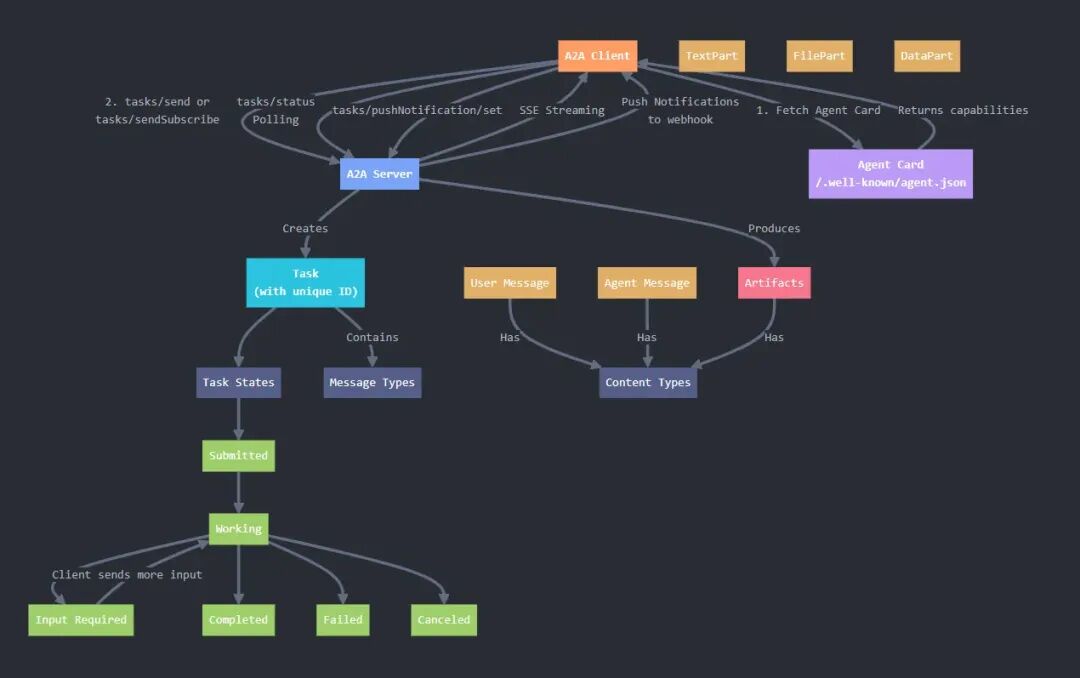
A2A 与 MCP 的核心差异解析
在构建现代 人工智能 系统时,A2A 和 MCP 是两种重要的通信范式,它们服务于不同的层次和目标。
1. 设计目的
- A2A:专注于多个智能体(Agent)之间的互操作与协作。它解决的是如何在分布式生态中,让不同专长、可能由不同团队开发的 Agent 能够自主发现彼此、安全通信并协同完成一个复杂任务。
- MCP:专注于增强单个模型(Model)的能力。它解决的是如何让一个大语言模型(或其它 AI 模型)能够安全、规范地调用外部工具、函数或资源,从而突破其固有知识或计算限制。
2. 架构模式
- A2A:采用去中心化或对等网络思想。每个 Agent 都是一个独立的服务,通过标准的 HTTP 接口和发现机制(Agent Card)相互连接,形成协作网络。
- MCP:通常是以模型为中心的星型结构。模型作为客户端,通过 MCP 协议与一个或多个提供工具能力的服务器(MCP Server)通信。
3. 服务发现
- A2A:内置动态服务发现。通过查询
/.well-known/agent.json 获取 Agent Card,从而了解其他 Agent 的能力和接入方式。
- MCP:无内置发现机制。模型客户端需要预先配置好它所能连接的所有 MCP Server 的地址和可用工具列表。
4. 交互模式
- A2A:任务/会话驱动。交互围绕“任务”进行,包含状态流转、历史消息和最终产出物,适合多步骤、有状态的复杂协作。
- MCP:函数/工具调用驱动。交互是相对原子化的“请求-响应”模式,模型请求执行某个工具函数并立即获取结果。
简单来说,MCP 让一个 AI 变得更强大,而 A2A 让一群 AI 学会一起工作。它们并非竞争关系,而是可以互补。例如,在一个 A2A 网络中,每个 Agent 自身都可以利用 MCP 来扩展其内部模型的能力,从而成为一个功能更强大的协作节点。
对这类多智能体通信和 后端 架构实现感兴趣?欢迎在 云栈社区 交流讨论更多实战细节和架构思考。
 发表于 2026-2-2 06:26:55
|
查看: 358|
回复: 0
发表于 2026-2-2 06:26:55
|
查看: 358|
回复: 0

