概述
你是否也想为你的 PHP 应用快速集成一个能实时对话的 AI 助手?本文将带你一步步使用 Webman 高性能 PHP 框架,集成 Neuron AI Agent 框架,并接入阿里云百炼大模型(兼容 OpenAI 接口),最终实现一个支持 Server-Sent Events(SSE)流式输出的智能聊天应用。教程包含完整的服务端与前端代码,方便你直接上手实践。
Step.1 安装 Webman
首先,我们通过 Composer 创建 Webman 项目。
composer create-project workerman/webman:~2.0
Step.2 安装 Neuron Agent 框架
接下来,在项目中安装 Neuron AI Agent 框架,它是构建 AI 智能体的强大工具。
composer require neuron-core/neuron-ai
Step.3 创建阿里云百炼模型提供商
由于阿里云百炼大模型服务提供了兼容 OpenAI 的接口,我们可以基于此创建一个自定义的 Provider。创建文件 app/common/agent/provider/BaiLianAI.php。
<?php
/**
 * @desc 阿里云百炼大模型服务提供
 * @author Tinywan(ShaoBo Wan)
 */
declare(strict_types=1);

namespace app\common\agent\provider;

use GuzzleHttp\Client;
use NeuronAI\Providers\HttpClientOptions;
use NeuronAI\Providers\OpenAI\OpenAI;

class BaiLianAI extends OpenAI
{
    protected string $baseUri = 'https://api.openai.com/v1';
    /**
     * @param array<string, mixed> $parameters
     */
    public function __construct(
        protected string            $key,
        protected string            $model,
        protected array             $parameters = [],
        protected bool              $strict_response = false,
        protected ?HttpClientOptions $httpOptions = null,
        ?string                     $baseUri = null // 新增参数:自定义 API 地址
    )
    {
        if($baseUri !== null) {
            $this->baseUri = $baseUri;
        }
        $config = [
            // https://dashscope.aliyuncs.com/compatible-mode/v1
            'base_uri' => rtrim($this->baseUri, '/') . '/',
            'headers' => [
                'Accept' => 'application/json',
                'Content-Type' => 'application/json',
                'Authorization' => 'Bearer ' . $this->key,
            ]
        ];
        if($this->httpOptions instanceof HttpClientOptions) {
            $config = $this->mergeHttpOptions($config, $this->httpOptions);
        }
        $this->client = new Client($config);
    }
}
这里我们使用的是阿里云百炼大模型服务,你可以前往 https://bailian.console.aliyun.com 获取 API Key。
Step.4 创建 AssistantAgent
现在,创建一个属于我们自己的 AI 助手 Agent。创建文件 app/common/agent/AssistantAgent.php。
<?php
/**
 * @desc 阿里云百炼大模型服务提供
 * @author Tinywan(ShaoBo Wan)
 */
declare(strict_types=1);
namespace app\common\agent;

use app\common\agent\provider\BaiLianAI;
use NeuronAI\Agent;
use NeuronAI\Providers\AIProviderInterface;
use NeuronAI\SystemPrompt;

class AssistantAgent extends Agent
{
    /**
     * @desc provider
     * @author Tinywan(ShaoBo Wan)
     */
    protected function provider(): AIProviderInterface
    {
        // 这里的apiKey和model需要替换成自己的
        $apiKey = 'sk-xxxxxxxxxxxxxxx';
        $model = 'qwen-max';
        return new BaiLianAI(
            key: $apiKey,
            model: $model,
            baseUri: 'https://dashscope.aliyuncs.com/compatible-mode/v1',
        );
    }
    /**
     * @desc instructions
     * @author Tinywan(ShaoBo Wan)
     */
    public function instructions(): string
    {
        return (string) new SystemPrompt(
            background: [
                “你是通义千问,由阿里云开发的 AI 助手。“,
                “你擅长回答各种问题,提供有用的建议和信息。“,
                “请用中文回复用户的问题。“
            ],
        );
    }
}
Step.5 助手控制器
控制器负责处理聊天请求,并实现 SSE 流式输出。你可以参考 Webman 在控制器中完成 SSE 实时流式输出 了解更多细节。
服务端
使用服务器发送事件(SSE)时,从服务器发送到客户端的数据必须是 UTF-8 编码的,返回的内容类型是 text/event-stream。
创建控制器文件 app/controller/AssistantController.php。
<?php
/**
 * @desc AssistantController.php 描述信息
 * @author Tinywan(ShaoBo Wan)
 */
declare(strict_types=1);

namespace app\controller;

use app\common\agent\AssistantAgent;
use support\Request;
use Webman\Http\Response;
use Workerman\Connection\TcpConnection;
use Workerman\Protocols\Http\ServerSentEvents;
use Workerman\Timer;
use NeuronAI\Chat\Messages\UserMessage;

class AssistantController
{
    public function index(): Response
    {
        return view('assistant/index', ['name' => 'webman']);
    }
    /**
     * @desc
     * 1. stream
     * 2. See
     * @author Tinywan(ShaoBo Wan)
     */
    public function chat(Request $request): Response
    {
        $message = $request->input(‘message’, ‘介绍一下webman’);
        $connection = $request->connection;
        $id = Timer::add(0.1, function () use ($connection, &$id, $message) {
            if ($connection->getStatus() !== TcpConnection::STATUS_ESTABLISHED) {
                Timer::del($id);
            }
            $stream = AssistantAgent::make()->stream(
                new UserMessage($message)
            );
            foreach($stream as $chunk) {
                $content = is_string($chunk) ? $chunk : $chunk->getContent();
                if(!empty($content)) {
                    $connection->send(new ServerSentEvents([
                        ‘event’ => ‘message’,
                        ‘data’ => $content,
                    ]));
                }
            }
            // 发送完成事件
            $connection->send(new ServerSentEvents([
                ‘event’ => ‘completed’,
                ‘data’ => ‘done’,
            ]));
            Timer::del($id);
            $connection->close();
        }, [], false);
        return response('', 200, [
            ‘Content-Type’ => ‘text/event-stream’,
            ‘Cache-Control’ => ‘no-cache’,
            ‘Connection’ => ‘keep-alive’,
            ‘X-Accel-Buffering’ => ‘no’,
        ]);
    }
}
客户端
这里为了直接解决跨域问题,我们使用 Webman 的视图功能来渲染前端页面。模板引擎使用的是 think-template,使用方法可以参考 官方文档。
创建视图文件 view/assistant/index.html。
<!DOCTYPE html>
<html lang=“zh”>
<head>
    <meta charset=“UTF-8”>
    <title>开源技术小栈 - AI 聊天</title>
    <style>
        * {
            margin: 0;
            padding: 0;
            box-sizing: border-box;
        }
        body {
            font-family: -apple-system, BlinkMacSystemFont, “Segoe UI”, Roboto, “Helvetica Neue”, Arial, sans-serif;
            background: #fafafa;
            height: 100vh;
            display: flex;
            align-items: center;
            justify-content: center;
        }
        .chat-wrapper {
            width: 100%;
            max-width: 800px;
            height: 100vh;
            background: white;
            display: flex;
            flex-direction: column;
            box-shadow: 0 0 1px rgba(0,0,0,0.1);
        }
        .header {
            background: white;
            padding: 18px 24px;
            border-bottom: 1px solid #f3f4f6;
        }
        .header h3 {
            font-size: 15px;
            font-weight: 500;
            color: #111827;
            margin: 0;
        }
        .chat-container {
            flex: 1;
            overflow-y: auto;
            padding: 24px;
            background: #f9fafb;
            display: flex;
            flex-direction: column;
            gap: 16px;
        }
        .chat-container::-webkit-scrollbar {
            width: 6px;
        }
        .chat-container::-webkit-scrollbar-track {
            background: transparent;
        }
        .chat-container::-webkit-scrollbar-thumb {
            background: #d1d5db;
            border-radius: 3px;
        }
        .message {
            display: flex;
            gap: 10px;
            max-width: 70%;
            animation: fadeIn 0.2s ease;
        }
        @keyframes fadeIn {
            from { opacity: 0; transform: translateY(4px); }
            to { opacity: 1; transform: translateY(0); }
        }
        .message.user {
            align-self: flex-end;
            flex-direction: row-reverse;
        }
        .message.assistant {
            align-self: flex-start;
        }
        .message-avatar {
            width: 28px;
            height: 28px;
            border-radius: 50%;
            background: #f3f4f6;
            color: #6b7280;
            display: flex;
            align-items: center;
            justify-content: center;
            font-size: 11px;
            font-weight: 500;
            flex-shrink: 0;
            border: 1px solid #f3f4f6;
        }
        .message.user .message-avatar {
            background: #111827;
            color: white;
            border: none;
        }
        .message-content {
            background: white;
            padding: 10px 14px;
            border-radius: 10px;
            border: 1px solid #f3f4f6;
            word-wrap: break-word;
            line-height: 1.6;
            font-size: 13px;
            color: #374151;
        }
        /* Markdown 样式 */
        .message-content h1,
        .message-content h2,
        .message-content h3,
        .message-content h4,
        .message-content h5,
        .message-content h6 {
            margin: 12px 0 8px 0;
            font-weight: 600;
            line-height: 1.3;
        }
        .message-content h1 { font-size: 16px; }
        .message-content h2 { font-size: 15px; }
        .message-content h3 { font-size: 14px; }
        .message-content h4 { font-size: 13px; }
        .message-content h5 { font-size: 13px; }
        .message-content h6 { font-size: 13px; }
        .message-content p {
            margin: 8px 0;
        }
        .message-content ul,
        .message-content ol {
            margin: 8px 0;
            padding-left: 24px;
        }
        .message-content li {
            margin: 4px 0;
        }
        .message-content code {
            background: #f3f4f6;
            padding: 2px 6px;
            border-radius: 4px;
            font-family: ‘Consolas’, ‘Monaco’, ‘Courier New’, monospace;
            font-size: 12px;
        }
        .message-content pre {
            background: #f3f4f6;
            padding: 12px;
            border-radius: 6px;
            overflow-x: auto;
            margin: 8px 0;
        }
        .message-content pre code {
            background: none;
            padding: 0;
        }
        .message-content blockquote {
            border-left: 3px solid #d1d5db;
            padding-left: 12px;
            margin: 8px 0;
            color: #6b7280;
        }
        .message-content strong {
            font-weight: 600;
        }
        .message-content a {
            color: #111827;
            text-decoration: underline;
        }
        .message.user .message-content {
            background: #111827;
            color: white;
            border: none;
        }
        .input-container {
            background: white;
            padding: 16px 24px;
            border-top: 1px solid #f3f4f6;
            display: flex;
            gap: 10px;
        }
        #messageInput {
            flex: 1;
            padding: 10px 14px;
            border: 1px solid #e5e7eb;
            border-radius: 8px;
            font-size: 13px;
            outline: none;
            font-family: inherit;
            transition: border-color 0.15s;
        }
        #messageInput:focus {
            border-color: #d1d5db;
        }
        #sendBtn {
            padding: 10px 18px;
            background: #111827;
            color: white;
            border: none;
            border-radius: 8px;
            cursor: pointer;
            font-size: 13px;
            font-weight: 500;
            transition: background 0.15s;
        }
        #sendBtn:hover:not(:disabled) {
            background: #1f2937;
        }
        #sendBtn:disabled {
            background: #d1d5db;
            cursor: not-allowed;
        }
        .typing-indicator {
            display: none;
            padding: 10px 14px;
            background: white;
            border-radius: 10px;
            border: 1px solid #f3f4f6;
        }
        .typing-indicator.active {
            display: block;
        }
        .typing-indicator span {
            display: inline-block;
            width: 5px;
            height: 5px;
            border-radius: 50%;
            background: #9ca3af;
            margin: 0 2px;
            animation: typing 1.4s infinite;
        }
        .typing-indicator span:nth-child(2) {
            animation-delay: 0.2s;
        }
        .typing-indicator span:nth-child(3) {
            animation-delay: 0.4s;
        }
        @keyframes typing {
            0%, 60%, 100% { transform: translateY(0); opacity: 0.4; }
            30% { transform: translateY(-6px); opacity: 1; }
        }
        @media (max-width: 768px) {
            .chat-wrapper {
                max-width: 100%;
            }
            .message {
                max-width: 80%;
            }
        }
    </style>
</head>
<body>
    <div class=“chat-wrapper”>
        <div class=“header”>
            <h3>开源技术小栈 - AI 聊天助手</h3>
        </div>
        <div class=“chat-container” id=“chatContainer”>
            <div class=“message assistant”>
                <div class=“message-avatar”>AI</div>
                <div class=“message-content”>你好!我是 AI 助手,有什么可以帮你的吗?</div>
            </div>
        </div>
        <div class=“input-container”>
            <input type=“text” id=“messageInput” placeholder=“输入消息...” />
            <button id=“sendBtn”>发送</button>
        </div>
    </div>
    <script>
        const chatContainer = document.getElementById('chatContainer');
        const messageInput = document.getElementById('messageInput');
        const sendBtn = document.getElementById('sendBtn');
        let currentEventSource = null;
        let isStreaming = false;
        // Markdown 解析函数
        function parseMarkdown(text) {
            text = text.replace(/&/g, ‘&’).replace(/</g, ‘<’).replace(/>/g, ‘>’);
            // 代码块
            text = text.replace(/```(\w+)?\n([\s\S]*?)```/g, (match, lang, code) => {
                return ‘<pre><code>’ + code.trim() + ‘</code></pre>’;
            });
            // 行内代码
            text = text.replace(/`([^`]+)`/g, ‘<code>$1</code>’);
            // 标题
            text = text.replace(/^######\s+(.*)$/gm, ‘<h6>$1</h6>’);
            text = text.replace(/^#####\s+(.*)$/gm, ‘<h5>$1</h5>’);
            text = text.replace(/^####\s+(.*)$/gm, ‘<h4>$1</h4>’);
            text = text.replace(/^###\s+(.*)$/gm, ‘<h3>$1</h3>’);
            text = text.replace(/^##\s+(.*)$/gm, ‘<h2>$1</h2>’);
            text = text.replace(/^#\s+(.*)$/gm, ‘<h1>$1</h1>’);
            // 粗体
            text = text.replace(/\*\*([^*]+)\*\*/g, ‘<strong>$1</strong>’);
            // 斜体
            text = text.replace(/\*([^*]+)\*/g, ‘<em>$1</em>’);
            // 无序列表
            text = text.replace(/^\*\s+(.+)$/gm, ‘<li>$1</li>’);
            text = text.replace(/(<li>.*?<\/li>\n?)+/g, ‘<ul>$&</ul>’);
            // 有序列表
            text = text.replace(/^\d+\.\s+(.+)$/gm, ‘<li>$1</li>’);
            // 链接
            text = text.replace(/\[([^\]]+)\]\(([^)]+)\)/g, ‘<a href=“$2”>$1</a>’);
            // 换行
            text = text.replace(/\n\n/g, ‘</p><p>’);
            text = text.replace(/\n/g, ‘<br>’);
            // 包装段落
            if (!text.startsWith('<')) {
                text = ‘<p>’ + text + ‘</p>’;
            }
            // 清理
            text = text.replace(/<p>(<[huploc])/g, ‘$1’);
            text = text.replace(/(<\/[huploc][^>]*>)<\/p>/g, ‘$1’);
            text = text.replace(/<p><\/p>/g, ‘’);
            return text;
        }
        function addMessage(role, content, isHtml = false) {
            const messageDiv = document.createElement('div');
            messageDiv.className = `message ${role}`;
            const avatar = document.createElement('div');
            avatar.className = ‘message-avatar’;
            avatar.textContent = role === ‘user’ ? ‘我’ : ‘AI’;
            const contentDiv = document.createElement('div');
            contentDiv.className = ‘message-content’;
            if (isHtml) {
                contentDiv.innerHTML = content;
            } else {
                contentDiv.textContent = content;
            }
            messageDiv.appendChild(avatar);
            messageDiv.appendChild(contentDiv);
            chatContainer.appendChild(messageDiv);
            chatContainer.scrollTop = chatContainer.scrollHeight;
            return contentDiv;
        }
        function addTypingIndicator() {
            const messageDiv = document.createElement('div');
            messageDiv.className = ‘message assistant’;
            messageDiv.id = ‘typingIndicator’;
            const avatar = document.createElement('div');
            avatar.className = ‘message-avatar’;
            avatar.textContent = ‘AI’;
            const indicator = document.createElement('div');
            indicator.className = ‘typing-indicator active’;
            indicator.innerHTML = ‘<span></span><span></span><span></span>’;
            messageDiv.appendChild(avatar);
            messageDiv.appendChild(indicator);
            chatContainer.appendChild(messageDiv);
            chatContainer.scrollTop = chatContainer.scrollHeight;
        }
        function removeTypingIndicator() {
            const indicator = document.getElementById('typingIndicator');
            if (indicator) {
                indicator.remove();
            }
        }
        function sendMessage() {
            const message = messageInput.value.trim();
            console.log('[sendMessage] Called with:', { message, isStreaming });
            if (!message || isStreaming) {
                console.log('[sendMessage] Blocked:', { hasMessage: !!message, isStreaming });
                return;
            }
            addMessage('user', message, false);
            messageInput.value = ‘’;
            addTypingIndicator();
            isStreaming = true;
            sendBtn.disabled = true;
            console.log('[sendMessage] Started streaming');
            const assistantContentDiv = document.createElement('div');
            assistantContentDiv.className = ‘message-content’;
            let assistantText = ‘’;
            let messageAdded = false;
            currentEventSource = new EventSource(`http://127.0.0.1:8787/assistant/chat?message=${encodeURIComponent(message)}`);
            currentEventSource.onopen = function(e) {
                console.log('[SSE] Connection opened');
            };
            currentEventSource.onmessage = function(e) {
                console.log('[SSE] Message received');
                removeTypingIndicator();
                if (!messageAdded) {
                    const messageDiv = document.createElement('div');
                    messageDiv.className = ‘message assistant’;
                    const avatar = document.createElement('div');
                    avatar.className = ‘message-avatar’;
                    avatar.textContent = ‘AI’;
                    messageDiv.appendChild(avatar);
                    messageDiv.appendChild(assistantContentDiv);
                    chatContainer.appendChild(messageDiv);
                    messageAdded = true;
                }
                try {
                    const data = JSON.parse(e.data);
                    assistantText += data.content || ‘’;
                } catch (err) {
                    assistantText += e.data;
                }
                assistantContentDiv.innerHTML = parseMarkdown(assistantText);
                chatContainer.scrollTop = chatContainer.scrollHeight;
            };
            currentEventSource.addEventListener('completed', function(e) {
                console.log('[SSE] Completed event received');
                cleanup();
            });
            currentEventSource.onerror = function(e) {
                console.log('[SSE] Error event:', e);
                removeTypingIndicator();
                if (isStreaming && !assistantText) {
                    addMessage('assistant', ‘抱歉,发生了错误,请重试。’, false);
                }
                cleanup();
            };
        }
        function cleanup() {
            console.log('[cleanup] Called, isStreaming before:', isStreaming);
            if (currentEventSource) {
                currentEventSource.close();
                currentEventSource = null;
            }
            removeTypingIndicator();
            isStreaming = false;
            sendBtn.disabled = false;
            messageInput.focus();
            console.log('[cleanup] Done, isStreaming after:', isStreaming);
        }
        sendBtn.addEventListener('click', sendMessage);
        messageInput.addEventListener('keypress', function(e) {
            if (e.key === ‘Enter’ && !e.shiftKey) {
                e.preventDefault();
                sendMessage();
            }
        });
        messageInput.focus();
    </script>
</body>
</html>
浏览器在建立 SSE 连接时会自动发送携带特殊头信息的 HTTP 请求(例如:Accept: text/event-stream)。
Step.6 访问预览
启动你的 Webman 项目后,访问 http://127.0.0.1:8787/assistant/index 即可看到聊天界面并进行对话。
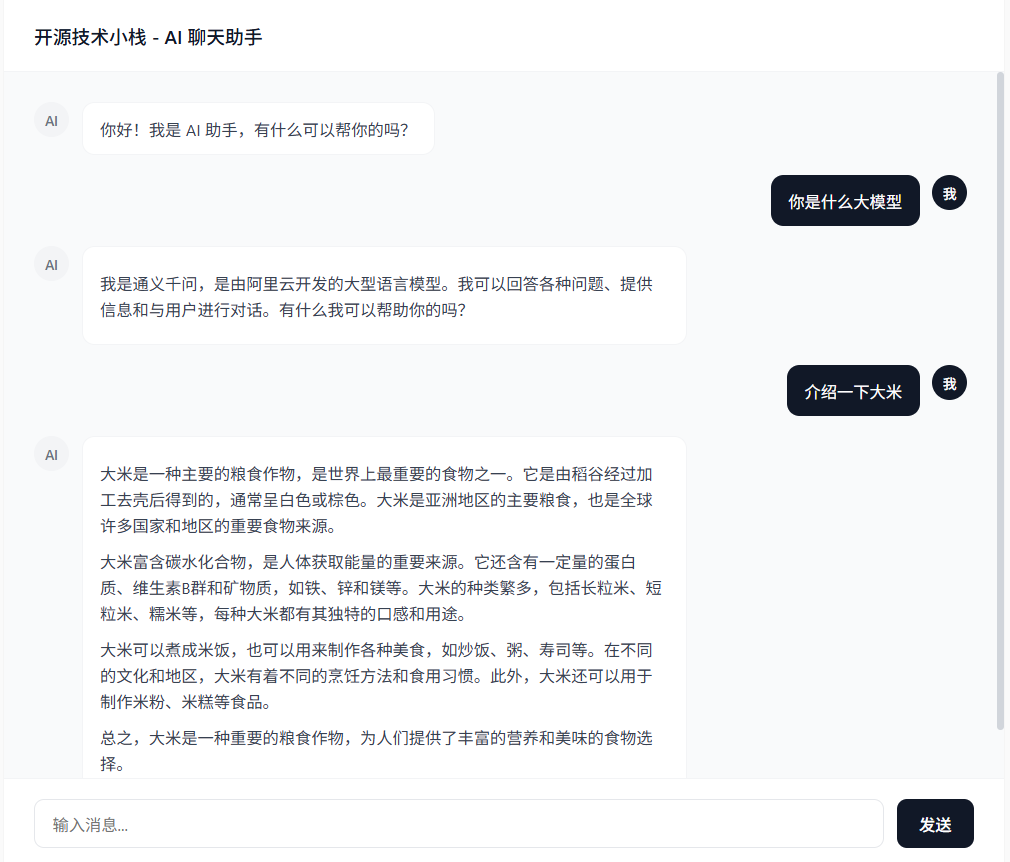
至此,一个基于 PHP Webman 框架、集成 AI Agent 并支持流式输出的聊天助手就搭建完成了。这个项目展示了如何在现代 PHP 项目中高效地集成大模型能力,希望能为你自己的应用开发带来启发。如果你在实践过程中有任何问题,欢迎在 云栈社区 与大家交流讨论。
 发表于 2026-2-14 05:53:42
|
查看: 586|
回复: 0
发表于 2026-2-14 05:53:42
|
查看: 586|
回复: 0

