在企业级AI应用开发中,经常面临这样的场景:需要将多个独立的AI任务组织成一个有序的工作流,既要保证任务之间的协调,又要充分利用并行处理的优势来提升性能。最近,在研究Spring AI Alibaba的图编排能力时,我通过两个实际项目深入体验了这个框架的强大之处,并将这段探索过程分享出来。
一、从一个电商场景说起
想象你在运营一个电商平台,每天都有大量新商品上架。运营同事会提供一段商品描述,比如:“一款高品质、舒适的纯棉T恤,有蓝、红、绿三种颜色可选,适合夏季穿着。”
传统做法是人工编写营销文案、整理规格参数,费时费力。能否让AI自动完成这些工作?更进一步,这两个任务(生成营销文案和提取规格参数)其实是独立的,能否并行处理来提升效率?这正是我用Spring AI Alibaba Graph解决的第一个实际问题——智能商品信息增强系统。
1.1 架构设计思路
这个系统的核心诉求很清晰:
- 输入:一段商品原始描述文本
- 输出:结构化的商品信息(营销口号 + 完整规格参数)
- 约束:两个AI任务互不依赖,必须并行执行
我设计了一个包含三个节点的有向无环图:
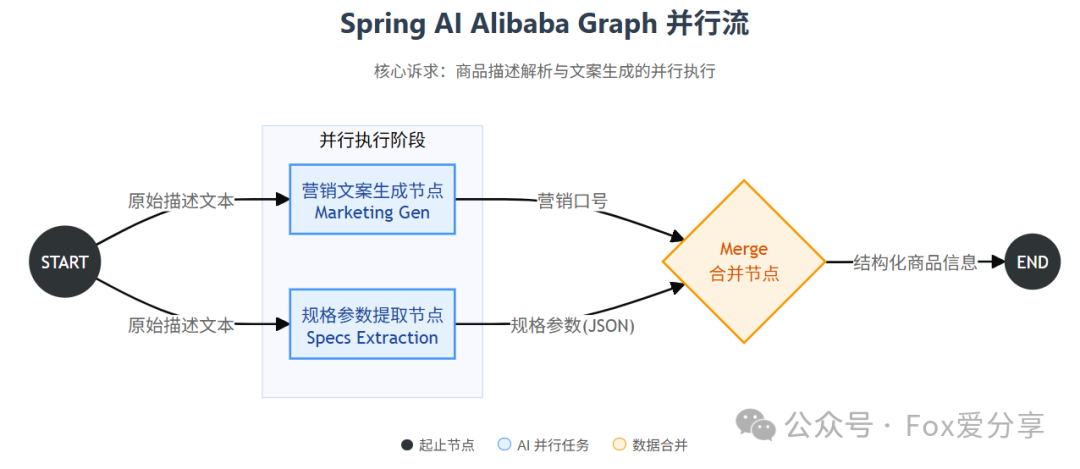
关键点在于利用Spring AI Alibaba Graph的并行节点能力。从START节点同时触发两个独立的AI任务,它们各自调用大模型完成工作,最后在merge节点汇总结果。
完整的系统架构流程:
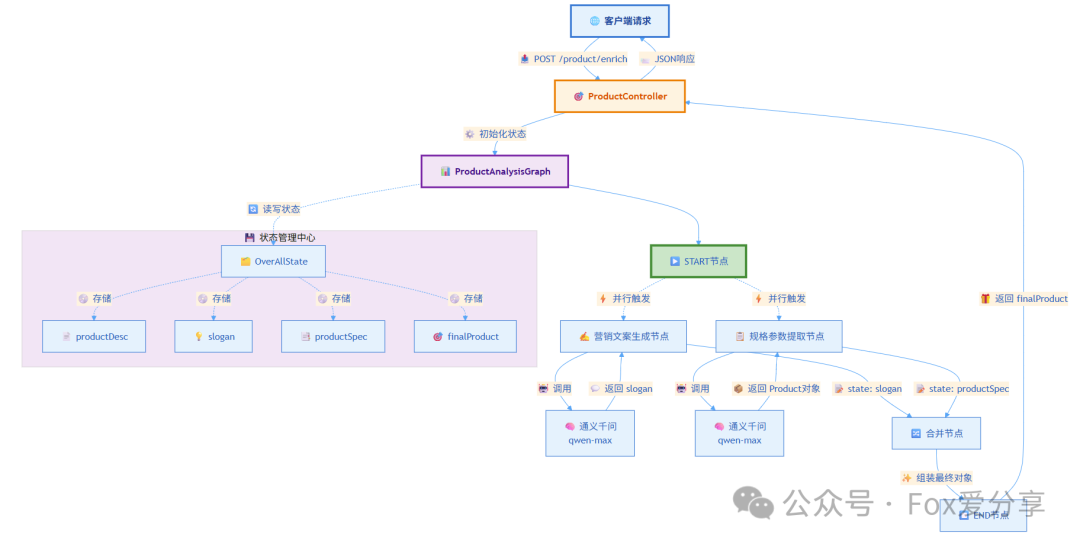
数据流转细节:
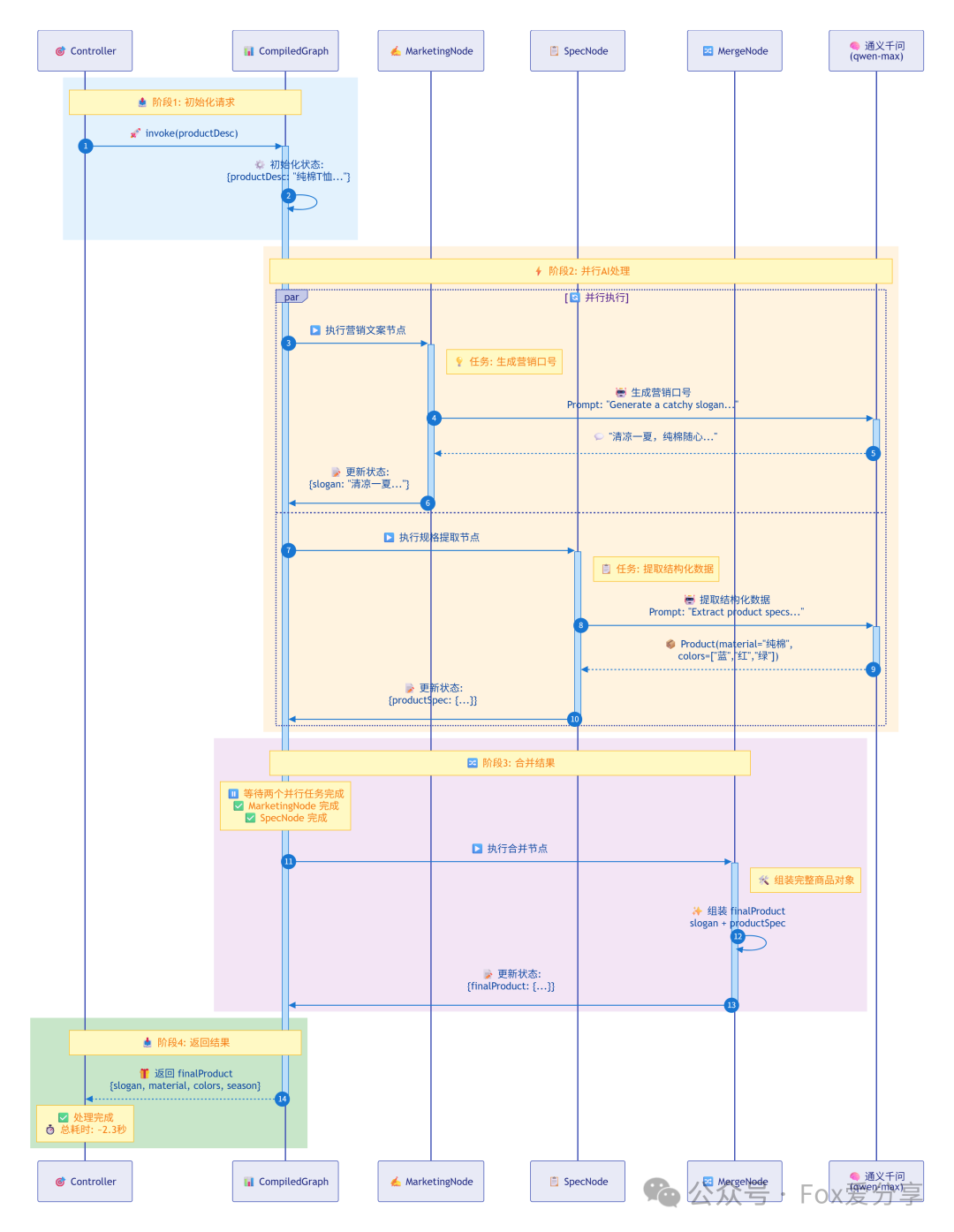
1.2 核心代码实现
先看数据模型的定义。我用Java 17的record类型来表示商品信息,简洁明了。在 Java 生态中,这是表示数据载体的好方法:
public record Product(String slogan, String material, List<String> colors, String season) {}
这个record会在整个流程中流转。slogan由营销文案节点生成,其他字段由规格提取节点提取,最后在合并节点组装完整对象。
接下来是图的配置核心。在ProductGraphConfiguration中,我定义了三个关键节点:
@Bean
public StateGraph productAnalysisGraph(ChatClient.Builder chatClientBuilder) throws GraphStateException {
    ChatClient client = chatClientBuilder.build();
    // 定义状态键的更新策略
    KeyStrategyFactory keyStrategyFactory = new KeyStrategyFactoryBuilder()
            .addPatternStrategy("productDesc", new ReplaceStrategy())
            .addPatternStrategy("slogan", new ReplaceStrategy())
            .addPatternStrategy("productSpec", new ReplaceStrategy())
            .addPatternStrategy("finalProduct", new ReplaceStrategy())
            .build();
    // 营销文案生成节点
    NodeAction marketingCopyNode = state -> {
        String productDesc = (String) state.value("productDesc").orElseThrow();
        String slogan = client.prompt()
                .user(“Generate a catchy slogan for a product with the following description: “ + productDesc)
                .call()
                .content();
        return Map.of(“slogan”, slogan);
    };
    // 规格参数提取节点
    NodeAction specificationExtractionNode = state -> {
        String productDesc = (String) state.value(“productDesc”).orElseThrow();
        Product productSpec = client.prompt()
                .user(“Extract product specifications from the following description: “ + productDesc)
                .call()
                .entity(Product.class);
        return Map.of(“productSpec”, productSpec);
    };
    // 合并节点
    NodeAction mergeNode = state -> {
        String slogan = (String) state.value(“slogan”).orElseThrow();
        Product productSpec = (Product) state.value(“productSpec”).orElseThrow();
        Product finalProduct = new Product(slogan, productSpec.material(),
                                           productSpec.colors(), productSpec.season());
        return Map.of(“finalProduct”, finalProduct);
    };
    // 构建图结构
    StateGraph graph = new StateGraph(keyStrategyFactory, serializer);
    graph.addNode(“marketingCopy”, node_async(marketingCopyNode))
            .addNode(“specificationExtraction”, node_async(specificationExtractionNode))
            .addNode(“merge”, node_async(mergeNode))
            .addEdge(START, “marketingCopy”)
            .addEdge(START, “specificationExtraction”)
            .addEdge(“marketingCopy”, “merge”)
            .addEdge(“specificationExtraction”, “merge”)
            .addEdge(“merge”, END);
    return graph;
}
这段代码值得细品几个地方:
1. 状态管理的巧妙设计
KeyStrategyFactory定义了每个状态键的更新策略。我这里用的是ReplaceStrategy,意味着每次更新都是完全替换。在复杂场景下,也可以用AppendStrategy来累积历史状态。
2. 异步节点的使用
注意到node_async()这个包装器了吗?它让每个节点都异步执行。当两条边同时从START指向营销文案和规格提取节点时,这两个任务会真正并行运行,而不是串行等待。
3. 类型安全的实体提取
在specificationExtractionNode中,.entity(Product.class)这个调用直接让大模型输出结构化数据。Spring AI会自动处理JSON到Java对象的映射,省去了手动解析的麻烦。
1.3 状态序列化的坑
开发过程中遇到一个棘手问题:图在执行过程中需要持久化状态,但默认的序列化器无法处理自定义的Product对象。解决方案是实现一个自定义的ProductStateSerializer:
public class ProductStateSerializer extends PlainTextStateSerializer {
    private final ObjectMapper mapper;
    public ProductStateSerializer(AgentStateFactory<OverAllState> stateFactory) {
        super(stateFactory);
        this.mapper = new ObjectMapper();
        // 启用类型信息,处理自定义对象
        this.mapper.activateDefaultTyping(
                this.mapper.getPolymorphicTypeValidator(),
                ObjectMapper.DefaultTyping.NON_FINAL,
                JsonTypeInfo.As.PROPERTY
        );
        this.mapper.setSerializationInclusion(JsonInclude.Include.NON_NULL);
    }
    @Override
    public void writeData(Map<String, Object> data, ObjectOutput out) throws IOException {
        String json = mapper.writeValueAsString(data);
        out.writeUTF(json);
    }
    @Override
    public Map<String, Object> readData(ObjectInput in) throws IOException {
        String json = in.readUTF();
        return mapper.readValue(json, new TypeReference<Map<String, Object>>() {});
    }
}
关键在于activateDefaultTyping,它会在序列化时保存类型信息,反序列化时才能正确还原对象。这在涉及复杂状态流转时特别重要。它本质上处理的是JSON数据的序列化与反序列化。
1.4 API层的简洁封装
Controller层的代码异常简洁:
@RestController
public class ProductController {
    private final CompiledGraph compiledGraph;
    public ProductController(@Qualifier(“productAnalysisGraph”) StateGraph productAnalysisGraph)
            throws GraphStateException {
        SaverConfig saverConfig = SaverConfig.builder()
                .register(SaverEnum.MEMORY.getValue(), new MemorySaver())
                .build();
        this.compiledGraph = productAnalysisGraph.compile(
                CompileConfig.builder().saverConfig(saverConfig).build());
    }
    @PostMapping(“/product/enrich”)
    public Product enrichProduct(@RequestBody String productDesc) throws GraphRunnerException {
        Map<String, Object> initialState = Map.of(“productDesc”, productDesc);
        RunnableConfig runnableConfig = RunnableConfig.builder().build();
        Optional<OverAllState> invoke = compiledGraph.invoke(initialState, runnableConfig);
        return (Product) invoke.get().value(“finalProduct”).orElseThrow();
    }
}
在构造函数中编译图,然后在请求处理时直接调用。整个流程对外就是一个简单的HTTP接口,但内部却在高效地协调多个AI任务。
1.5 实际效果
启动应用后,发送一个POST请求:
curl -X POST http://localhost:8080/product/enrich \
-H “Content-Type: text/plain” \
-d “一款高品质、舒适的纯棉T恤,有蓝、红、绿三种颜色可选,适合夏季穿着。”
大约2-3秒后,返回:
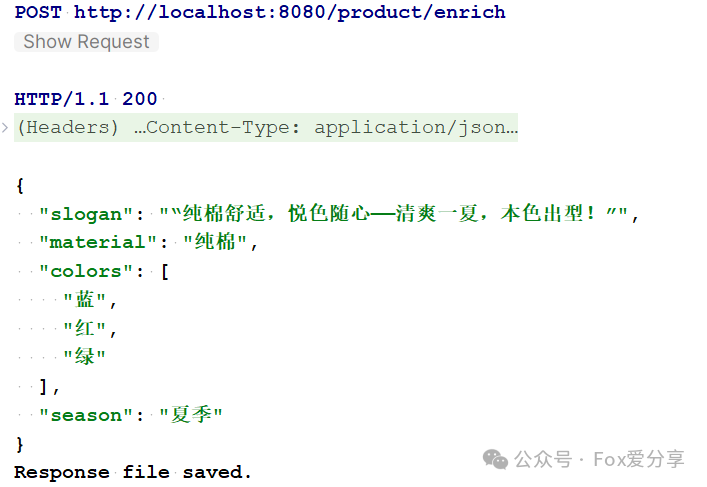
如果串行执行,两个大模型调用至少需要4秒。并行处理直接砍掉一半时间,在批量处理场景下优势更明显。
二、更复杂的场景:大规模工具调度系统
商品增强系统解决了并行任务的编排问题,但实际业务场景往往更复杂。假设你有成百上千个工具(APIs、数据库查询、外部服务等),用户提出一个自然语言需求,系统需要:
- 理解用户意图,提取关键词
- 从海量工具中匹配最相关的几个
- 调用这些工具完成任务
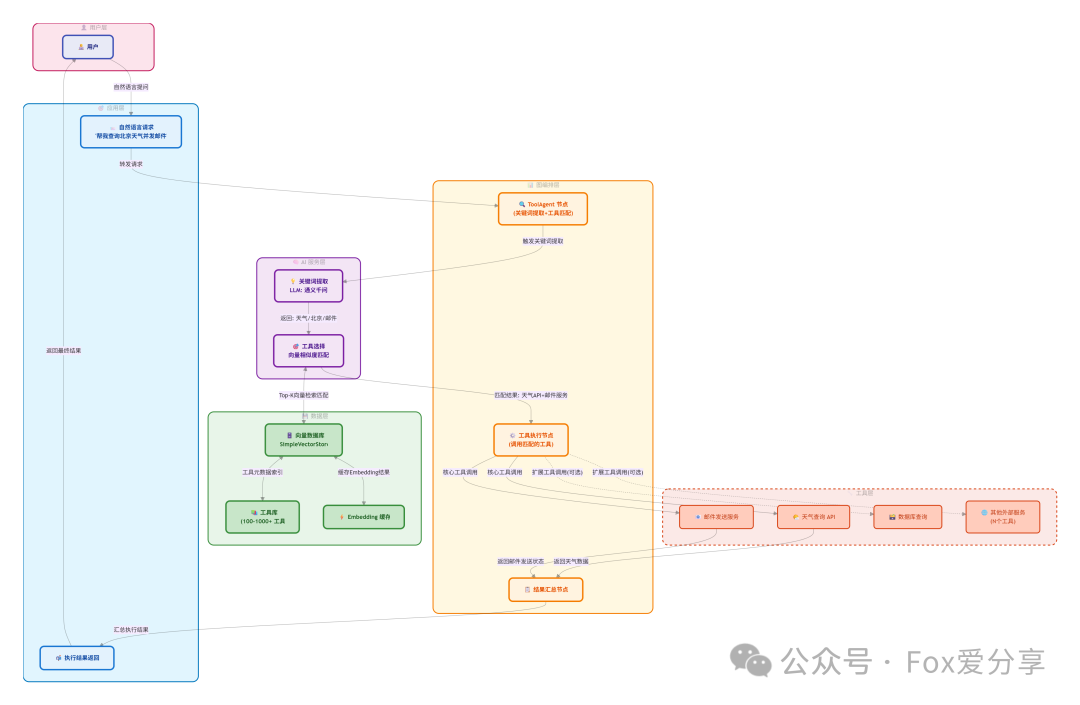
这就是我研究的第二个项目——基于向量检索的智能工具代理(ToolAgent)。
系统整体架构图:
2.1 工具选择的挑战
传统的Function Calling方法是把所有工具的schema都塞进prompt。当工具数量少于10个时还能应付,但一旦规模上百,token消耗爆炸,推理速度也会显著下降。更好的方案是先用向量检索做粗筛,从几百个工具中选出最相关的3-5个,再交给大模型精确调用。这需要两个步骤:
- 关键词提取:用大模型分析用户问题,提取核心关键词
- 向量检索:基于关键词在工具库中做相似度搜索
ToolAgent实现了NodeAction接口,可以作为图中的一个节点:
public class ToolAgent implements NodeAction {
    private List<Document> documents;
    private ChatClient chatClient;
    private String inputTextKey;
    private String inputText;
    private VectorStoreService vectorStoreService;
    private static final String CLASSIFIER_PROMPT_TEMPLATE = “””
    ### Job Description
    You are a text keyword extraction engine that can analyze the questions
    passed in by users and extract the main keywords of this sentence.
    ### Task
    You need to extract one or more keywords from this sentence, without
    missing the main body of the user description
    ### Constraint
    Multiple keywords returned, separated by spaces
    ”“”;
    @Override
    public Map<String, Object> apply(OverAllState state) throws Exception {
        // 从状态中获取工具列表(如果未预加载)
        if (documents == null) {
            this.documents = (List<Document>) state.value(Constant.TOOL_LIST).orElseThrow();
        }
        // 获取用户输入
        if (StringUtils.hasLength(inputTextKey)) {
            this.inputText = (String) state.value(inputTextKey).orElse(this.inputText);
        }
        // 步骤1: 提取关键词
        ChatResponse response = chatClient.prompt()
        .system(CLASSIFIER_PROMPT_TEMPLATE)
        .user(inputText)
        .call()
        .chatResponse();
        // 步骤2: 向量检索匹配工具
        List<Document> hitTool = vectorStoreService.search(
            response.getResult().getOutput().getText(), 3);
        // 更新状态,传递命中的工具
        Map<String, Object> updatedState = new HashMap<>();
        updatedState.put(Constant.HIT_TOOL, hitTool);
        if (state.value(inputTextKey).isPresent()) {
            updatedState.put(inputTextKey, response.getResult().getOutput().getText());
        }
        return updatedState;
    }
}
2.3 向量检索服务的封装
VectorStoreService是工具匹配的核心组件:
@Service
public class VectorStoreService {
    private final EmbeddingModel embeddingModel;
    private final VectorStore vectorStore;
    public VectorStoreService(EmbeddingModel embeddingModel) {
        this.embeddingModel = embeddingModel;
        this.vectorStore = SimpleVectorStore.builder(embeddingModel).build();
    }
    public void addDocuments(List<Document> documents) {
        vectorStore.add(documents);
    }
    public List<Document> search(String query, int topK) {
        return vectorStore.similaritySearch(
                SearchRequest.builder().query(query).topK(topK).build());
    }
}
这里用的是Spring AI内置的SimpleVectorStore,适合中小规模场景。在人工智能应用的向量检索场景中,如果工具库达到万级以上,可以考虑换成Milvus、Elasticsearch等专业向量数据库。
2.4 工作流程解析
假设用户输入:“帮我查询今天北京的天气,然后发送一封邮件给张三”
Step 1: 关键词提取
输入:“帮我查询今天北京的天气,然后发送一封邮件给张三”
大模型提取:“天气 北京 邮件 发送”
Step 2: 向量检索
从预加载的工具库(每个工具都被embedding成向量)中搜索,返回:
1. 天气查询API (相似度: 0.92)
2. 邮件发送服务 (相似度: 0.88)
3. 地理位置服务 (相似度: 0.75)
Step 3: 状态更新
把命中的工具列表写入HIT_TOOL状态键,供下游节点(比如实际的工具调用节点)使用。
2.5 灵活的初始化方式
注意到ToolAgent有两个构造函数:
// 方式1: 使用预加载的工具列表
public ToolAgent(ChatClient chatClient, String inputTextKey, List<Document> documents) {
    this.documents = documents;
    this.chatClient = chatClient;
    this.inputTextKey = inputTextKey;
}
// 方式2: 从状态中动态获取工具列表
public ToolAgent(ChatClient chatClient, String inputTextKey, VectorStoreService vectorStoreService) {
    this.chatClient = chatClient;
    this.inputTextKey = inputTextKey;
    this.vectorStoreService = vectorStoreService;
}
- 方式1:适合工具列表固定的场景,在初始化时就确定。
- 方式2:更灵活,允许上游节点动态决定可用工具范围,适合多租户或权限隔离的场景。
三、两个项目的共性思考
通过这两个项目,总结出几个使用Spring AI Alibaba Graph的最佳实践:
3.1 状态设计是关键
图的本质是状态机,每个节点都在读取和修改共享状态。状态设计要遵循几个原则:
- 最小化原则:只在状态中保存必要的数据,避免冗余
- 类型明确:用强类型对象(如Product)而非Map<String, Object>
- 更新策略:根据场景选择Replace、Append等策略
3.2 并行与串行的权衡
不是所有任务都适合并行。判断标准:
- 数据依赖:B任务需要A任务的输出 → 串行
- 资源竞争:两个任务访问同一外部资源(如数据库写操作) → 串行
- 成本考量:并行意味着同时占用多个大模型API配额,成本敏感场景要慎重
3.3 错误处理不能忽视
生产环境中,大模型调用可能失败(限流、超时、格式错误)。图执行框架需要配合重试和降级策略:
NodeAction robustNode = state -> {
    try {
        return executeTask(state);
    } catch (Exception e) {
        logger.error(“Node execution failed”, e);
        // 降级逻辑:返回默认值或触发补偿流程
        return Map.of(“error”, e.getMessage());
    }
};
3.4 可观测性是必需品
复杂图的调试很困难。Spring AI Alibaba Graph提供了PlantUML的可视化能力:
GraphRepresentation representation = graph.getGraph(
        GraphRepresentation.Type.PLANTUML, “Product Analysis Graph”);
System.out.println(representation.content());
这会输出图的UML结构,可以直接用PlantUML工具渲染成流程图。在开发阶段,这个功能能快速验证图的拓扑是否符合预期。
四、性能数据与优化
4.1 商品增强系统的基准测试
测试环境:
- 模型:qwen-max
- 并发度:单请求
- 测试样本:100条商品描述
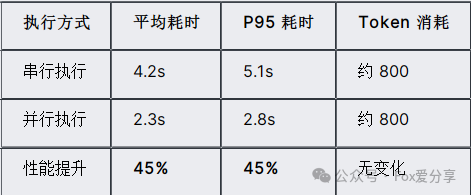
并行执行在保持token消耗不变的情况下,显著降低了响应延迟。在批处理场景下,这个优势会更明显。
4.2 工具检索的优化
向量检索的性能取决于工具库规模和embedding维度:
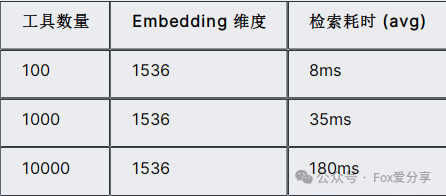
当工具数量突破1000后,建议:
- 使用专业向量数据库(Milvus、Weaviate)
- 分片策略:按工具类别预先分组
- 缓存热点工具的embedding
五、可扩展的方向
基于这两个项目的基础,还可以延伸很多有趣的功能:
5.1 多模态商品增强
目前的商品增强只处理文本。可以扩展到:
- 图片理解:上传商品图片,自动生成描述
- 视频分析:从商品展示视频中提取卖点
5.2 工具学习与推荐
ToolAgent可以记录每次工具调用的反馈,逐步优化工具选择策略:
用户问题 → 召回工具 → 实际使用工具 → 效果反馈
5.3 人机协同的审核节点
在商品信息发布前,可以插入一个人工审核节点:
生成结果 → 人工审核 → 确认/修改 → 发布
Spring AI Alibaba Graph支持中断和恢复,可以暂停等待人工输入。
六、总结
Spring AI Alibaba Graph为构建复杂AI工作流提供了一套清晰的编程模型。通过商品增强和工具调度这两个实战项目,可以体会到几个核心价值:
- 声明式编排:用有向图描述业务逻辑,比命令式代码更直观。
- 并行能力:充分利用现代硬件和云服务的并发特性。
- 状态管理:统一的状态抽象简化了复杂流程的数据传递。
- 可扩展性:从简单的两节点流程到几十个节点的复杂图,架构保持一致。
对于正在探索AI应用落地的团队,建议从小规模场景入手(比如本文的商品增强),逐步积累对状态设计、节点划分、错误处理的经验,再向更复杂的场景延伸。
 发表于 2025-12-10 01:53:08
|
查看: 308|
回复: 0
发表于 2025-12-10 01:53:08
|
查看: 308|
回复: 0

