最近,为了解当前GPT生成的代码通常如何被执行,我翻阅了几个相关的开源项目。这不仅仅是一个简单的调用问题,还涉及到代码安全与执行环境的隔离,值得我们深入探讨。
使用IPython执行代码
在搜索引擎中查找,很容易找到 https://e2b.dev/ 这个服务。它提供API,允许在其云沙箱中执行Python或JavaScript代码。起初我以为它是完全开源的,但查阅仓库 https://github.com/e2b-dev/code-interpreter.git 后发现,开源的其实只是一个SDK。你需要提供API Key,然后调用e2b的云端沙箱来执行代码。该项目的关键代码如下:
try:
    with self._client.stream(
        "POST",
        f"{self._jupyter_url}/execute",
        json={
            "code": code,
            "context_id": context_id,
            "language": language,
            "env_vars": envs,
        },
        timeout=(request_timeout, timeout, request_timeout, request_timeout),
    ) as response:
        err = extract_exception(response)
        if err:
            raise err

            execution = Execution()

        for line in response.iter_lines():
            parse_output(
                execution,
                line,
                on_stdout=on_stdout,
                on_stderr=on_stderr,
                on_result=on_result,
                on_error=on_error,
            )

        return execution
except httpx.ReadTimeout:
    raise format_execution_timeout_error()
except httpx.TimeoutException:
    raise format_request_timeout_error()
其中,变量名 jupyter_url 引起了我的注意。熟悉 Python 生态的开发者都知道,Jupyter 常被用于数据分析和算法相关的Notebook编写,它本身就可以执行代码。通过进一步调研,我们发现可以利用 ipython 来执行代码。
随后,我找到了另一个项目:https://github.com/chapyter/chapyter.git。Jupyter Notebook基于IPython内核,因此可以使用IPython包中的 InteractiveShell 来执行代码,用法示例如下:
from IPython.core.interactiveshell import InteractiveShell

# 创建一个 InteractiveShell 实例
shell = InteractiveShell.instance()

# 要执行的代码
code = """
def greet(name):
    return f\"Hello, {name}!\"

result = greet(\"Lindee\")
print(result)
"""

# 执行代码
shell.run_cell(code)
我猜测,e2b可能也采用了类似的方式来执行代码。然而,仅凭这种方式是不够的,因为用户(或GPT模型)可能会提交恶意代码,例如包含 rm -rf / 等危险指令的自毁代码。因此,我们需要对执行环境进行限制。
由于无法从e2b的代码中获得更多关于安全隔离的信息,我们转而研究其他开源项目。
使用subprocess.Popen
我又找到了另一个名为 code-interpreter 的项目:https://github.com/haseeb-heaven/code-interpreter.git。
阅读其代码,可以发现其核心执行逻辑如下:
# libs/code_interpreter.py

def execute_code(self, code, language):
    try:
        language = language.lower()
        self.logger.info(f\"Running code: {code[:100]} in language: {language}\")

        # Check for code and language validity
        if not code or len(code.strip()) == 0:
            return \"Code is empty. Cannot execute an empty code.\"

        # Check for compilers on the system
        compilers_status = self._check_compilers(language)
        if not compilers_status:
            raise Exception(\"Compilers not found. Please install compilers on your system.\")

        if language == \"python\":
            process = subprocess.Popen([\"python\", \"-c\", code], stdout=subprocess.PIPE, stderr=subprocess.PIPE)
            stdout, stderr = process.communicate()
            stdout_output = stdout.decode(\"utf-8\")
            stderr_output = stderr.decode(\"utf-8\")
            self.logger.info(f\"Python Output execution: {stdout_output}, Errors: {stderr_output}\")
            return stdout_output, stderr_output

        elif language == \"javascript\":
            process = subprocess.Popen([\"node\", \"-e\", code], stdout=subprocess.PIPE, stderr=subprocess.PIPE)
            stdout, stderr = process.communicate()
            stdout_output = stdout.decode(\"utf-8\")
            stderr_output = stderr.decode(\"utf-8\")
            self.logger.info(f\"JavaScript Output execution: {stdout_output}, Errors: {stderr_output}\")
            return stdout_output, stderr_output

        else:
            self.logger.info(\"Unsupported language.\")
            raise Exception(\"Unsupported language.\")

    except Exception as exception:
        self.logger.error(f\"Exception in running code: {str(exception)}\")
        raise exception
该方法通过 subprocess.Popen 来执行Python或JavaScript代码。但和直接使用IPython一样,它同样面临着严重的安全性问题。
为了寻找解决方案,我使用Cursor(一个基于代码上下文的AI编程助手)生成了以下思路:
- 沙箱执行
- Docker
- firejail(也是一个沙箱工具)
- 使用
RestrictedPython 执行受限的Python代码(即定义Python语法的一个安全子集,所有有风险的操作都不允许执行)。
- 对代码进行白名单审查(例如,检测到
os.remove 等危险调用时,直接删除相关代码行)。
思路是有了,但我更倾向于借鉴成熟的代码实现,而不是从头开始编写。直接用AI生成的代码,可能会因为我对某些细节研究不深而引入未知问题。
Autogen的方案
这时,微软的 autogen 项目进入了视野,这是一个知名的多智能体(Multi-AI-Agent)框架。
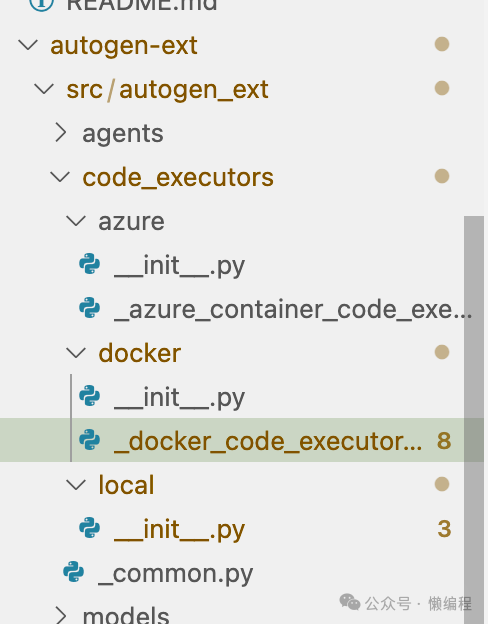
它提供了三种代码执行方式,其实现位于 code_executors 目录下,是很好的开源实战参考案例:
- azure:使用Azure提供的Python容器执行,限制较多,仅支持有限的Python库。
- docker:使用Docker容器执行,默认使用
python:3-slim 镜像,提供了较好的隔离性。
- local:使用
subprocess 本地执行,但在执行前会进行一层代码过滤,以规避危险的自毁代码。
Autogen的代码结构清晰,安全措施相对完善,非常适合直接借鉴和使用。
总结
目前比较标准的解决方案是使用 Docker。通过构建临时容器来执行代码,可以做到很好的环境隔离,容器启动速度也很快。当然,这会引入一些额外的时间开销。
如果你追求极致的执行速度,并且能接受一定程度的风险,可以考虑使用 subprocess 方案。像Autogen那样,在执行前加入一层严格的代码过滤逻辑,可以在一定程度上提升安全性。
无论选择哪种方案,在构建GPT Code Interpreter时,代码安全都是必须严肃对待的核心问题。希望本次对几个开源项目的调研,能为你实现自己的代码执行器提供清晰的思路和可靠的代码参考。技术探索永无止境,欢迎在云栈社区分享你的实践与见解。
 发表于 2026-4-7 06:36:30
|
查看: 431|
回复: 0
发表于 2026-4-7 06:36:30
|
查看: 431|
回复: 0

