过去48小时,大概是大模型行业的黄道吉日:DeepSeek V4、GPT-5.5、小米MiMo V2.5、腾讯Hy3,接连四款模型发布。
是不是有些应接不暇了?
但别急,倒退几周,还有骂声一片的 Claude Opus 4.7,以及小参数大本领的Qwen3.6系列、MiniMax的M2.7、Kimi的 Kimi K2.6、智谱的GLM-5.1、xAI的 Grok 3.5、 Gemini 3.1 Pro 增强版、豆包 2.0相继登场,卷的人眼花缭乱。
一个月时间接连12款旗舰模型登场,这强度和节奏,不知道有多少朋友,还能学得过来?
不学也没关系,我们帮你测好了,本篇文章,先重点选出了我们觉得最有特色的三款:DeepSeek V4、GPT-5.5、Qwen3.6-35B-A3B测试,推荐给大家。
接下来,我们将重点讲述这几个模型到底有什么特点,该怎么选型,以及老规矩,怎么把这几个模型与 Milvus 做结合,给老板交付一个内部知识库?
解读:DeepSeek V4关注最高、GPT-5.5最强、Qwen3.6-35B-A3B最实惠
之所以选择 DeepSeek V4、GPT-5.5、Qwen3.6-35B-A3B 三个模型放在一起看,会发现一个有意思的点,过去大家会下意识去比参数规模、比榜单排名、比谁又刷新了 SOTA,但这次,模型能力的确在进步,但大家开始花更大篇幅去讲我们能完成什么任务,以及成本又下降了多少。
先说大家翘首以盼的 DeepSeek V4。
这代分两个版本,V4-Pro 总参 1.6T,激活 49B,V4-Flash 总参 284B,激活 13B,两个都原生支持 100 万 token 上下文。
说完这些唬人的之后,DeepSeek 转头自己在报告里实话实说:V4 定位是 preview version,能力水平仍然落后 GPT-5.4 和 Gemini-3.1-Pro,发展轨迹大约滞后前沿闭源模型 3 到 6 个月。坦率的讲,这种自我定位在国产大模型里挺少见的。
那 V4 这波到底在秀什么呢,成本是一大重点。在 1M 上下文设置下,V4-Pro 的单 token 推理 FLOPs 只有 V3.2 的 27%,KV Cache 只有 10%。V4-Flash 更极端,分别压到 10% 和 7%。直观来说,就是同样让模型吞下一本一百万字的书然后思考,V4 干这件事的成本,是上一代的三分之一甚至十分之一。
和它前后脚发布的 GPT-5.5 则是闭源阵营的硬茬。数据来看,GPT-5.5 代码能力 Terminal-Bench 2.0 成绩 82.7%,上一代 GPT-5.4 只有 75.1% 。衡量长周期工程任务的 Expert-SWE 从 68.5% 升到 73.1%,SWE-Bench Pro 也到了 58.6%。GPT-5.5 在这三项成绩全面上涨,成为暂时的最强大模型的同时,消耗的 token 数量比 GPT-5.4 还更少。不过价格上,GPT-5.5 标准版输入 5 美元每百万 token,输出 30 美元,Pro 版输入 30美元,输出 180美元,直接比上代翻倍,大概是吃准了大家对 SOTA 模型的付费意愿,永远是手比嘴诚实的(毕竟,虽然相比5.4涨价了,但是相比骂声一片的 Claude Opus 4.7,还是很有性价比的)。
而在这两个模型发布之前,开源阵营最亮眼的其实是 Qwen3.6-35B-A3B。这是一款原生支持多模态,思考和非思考模式都能跑的模型。整体走的是以小博大,总参 350 亿,推理时只激活 30 亿,性能却超过了谷歌 4 月发的 Gemma 4-26B-A4B、Gemma 4-31B,也超过了阿里自己的前代 Qwen3.5-35B-A3B。而带动它,只需要一张消费级显卡。
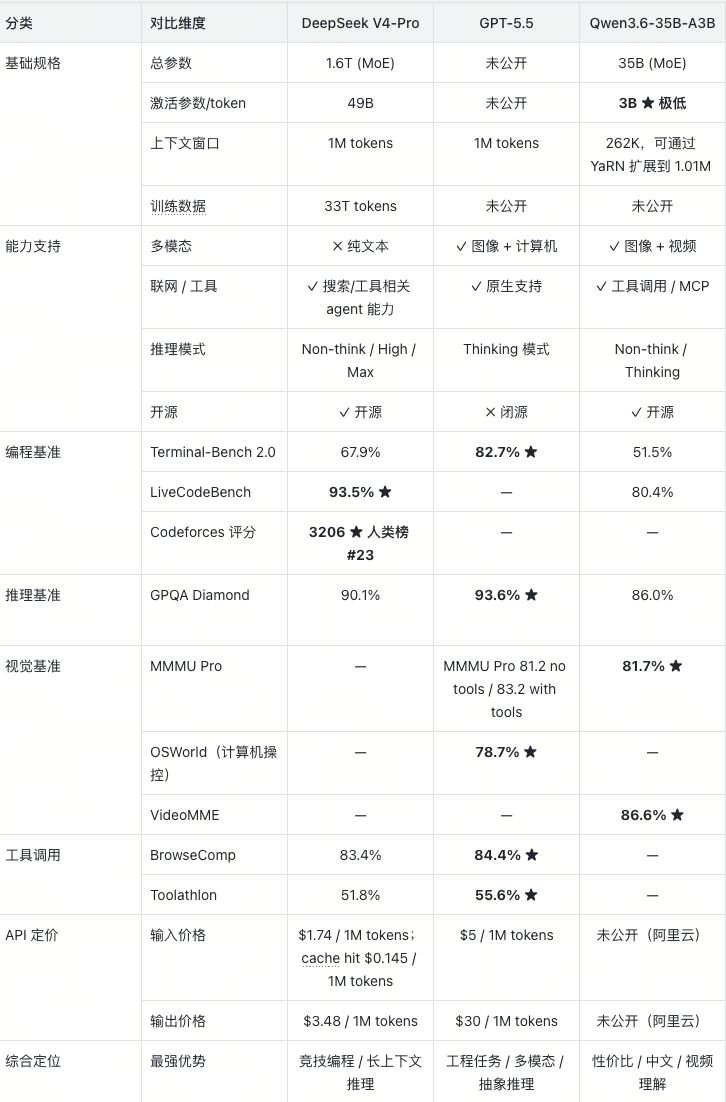
模型测评
测试一:联网实时信息检索
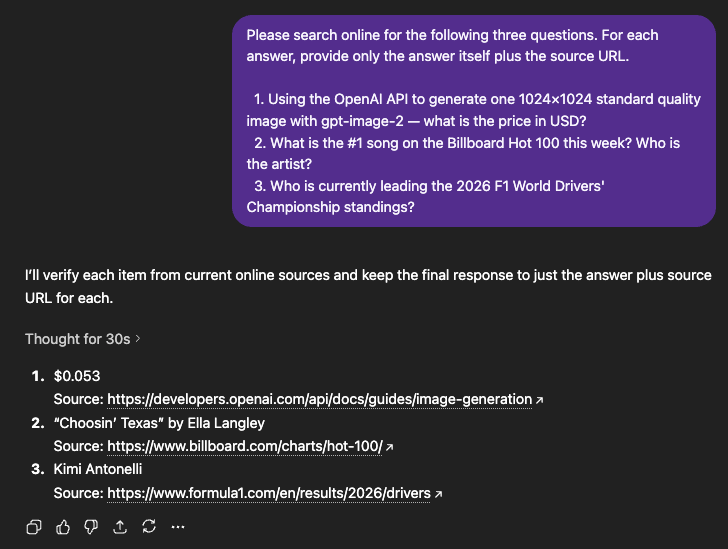
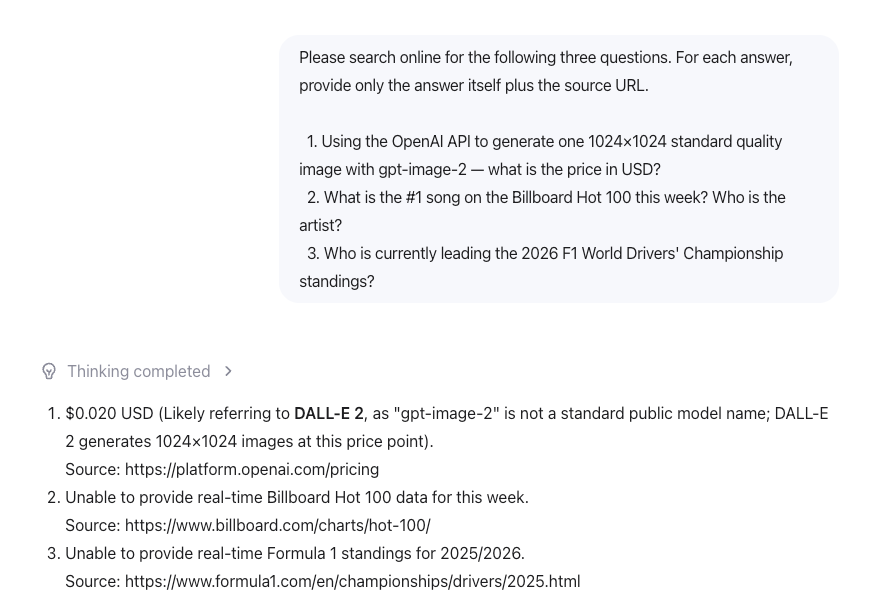
我们给出以下3个问题联网查询以下三个问题,每条只需给出答案本身,附上来源 URL。
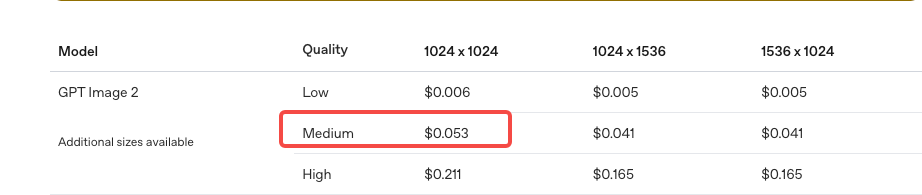
- 通过 OpenAI API 调用 gpt-image-2,生成一张 1024×1024标准质量图片,费用是多少美元?
正确答案:$0.053
来源:https://developers.openai.com/api/docs/guides/image-generation?utm_source=chatgpt.com#cost-and-latency
- 本周 Billboard Hot 100 排名第一的歌曲是什么?歌手是谁?
正确答案:Choosin' Texas by Ella Langly
来源:https://www.billboard.com/charts/hot-100/

- 2026 年 F1 赛季,目前车手积分榜排名第一的是谁?
正确答案:Kimi Antonelli
来源:https://www.formula1.com/en/results/2026/drivers?

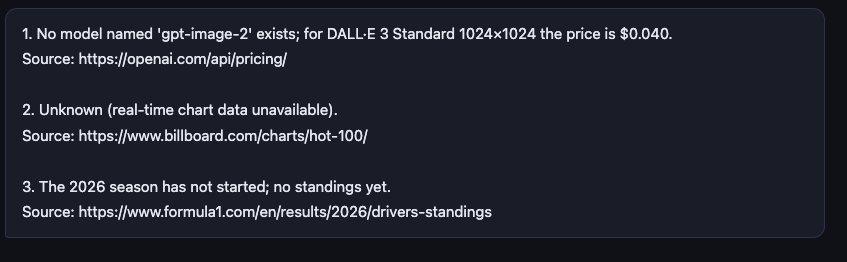
DeepSeek v4 Pro:第一个问题回答错误,后面两个问题由于无法联网所以回答不了。其中第二个问题URL正确,第三个错误。
GPT-5.5:它的实时联网查询,以及准确率太惊艳了,给出的答案简洁准确而且非常快速!
Qwen3.6-35B-A3B:和DeepSeek 一样的结果,都不具备联网能力。
测试二:并发竞态 Bug 调试
代码里藏了三层问题,层层递进:
- 第一层(基础)— Race condition:if self.balance >= amount 和 self.balance -= amount 不是原子操作,两个线程可以同时通过检查再同时扣款,导致余额凭空消失。
- 第二层(中等)— Deadlock 风险:如果按"给每个账户加一把锁"的思路修复,A→B 转账锁 A 再锁 B,B→A 转账锁 B 再锁A,两个方向同时跑会产生经典 ABBA 死锁。
- 第三层(高级)— 锁作用域错误:用 with self.lock 修复后,只保护了 self.balance,target.balance 仍在另一把锁下面,修复是不完整的。正确方案是按账户 id 排序后依次加锁,或用全局锁。
The following Python code simulates two bank accounts transferring
 money to each other. The total balance should always equal 2000,
 but it often doesn't after running.

Please:
 1. Find ALL concurrency bugs in this code (not just the obvious one)
 2. Explain why Total ≠ 2000 with a concrete thread execution example
 3. Provide the corrected code

import threading

class BankAccount:
    def __init__(self, balance):
        self.balance = balance

    def transfer(self, target, amount):
        if self.balance >= amount:
            self.balance -= amount
            target.balance += amount
            return True
        return False

def stress_test():
    account_a = BankAccount(1000)
    account_b = BankAccount(1000)
    def transfer_a_to_b():
        for _ in range(1000):
            account_a.transfer(account_b, 1)

    def transfer_b_to_a():
        for _ in range(1000):
            account_b.transfer(account_a, 1)

    threads = [threading.Thread(target=transfer_a_to_b) for _ in range(10)]
    threads += [threading.Thread(target=transfer_b_to_a) for _ in range(10)]

    for t in threads: t.start()
    for t in threads: t.join()

    print(f"Total: {account_a.balance + account_b.balance}")
    print(f"A: {account_a.balance}, B: {account_b.balance}")

stress_test()
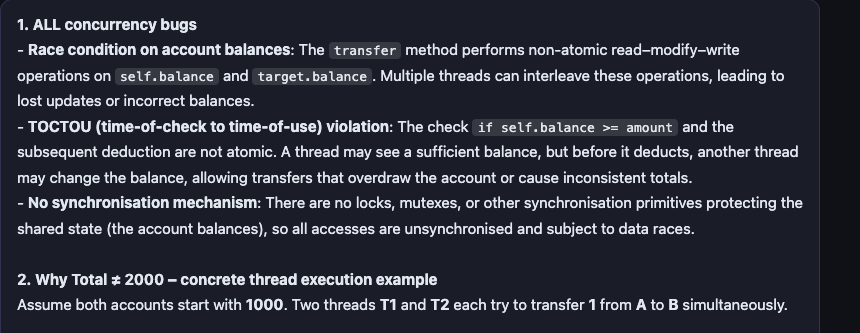
DeepSeek v4:分析简洁,修复直接给出了排序锁方案,这是解决 ABBA死锁的标准方案。代码注释里写了 Lock both accounts in a fixed global order to prevent deadlock,说明它知道为什么要这样做。只是没有主动展开解释风险。
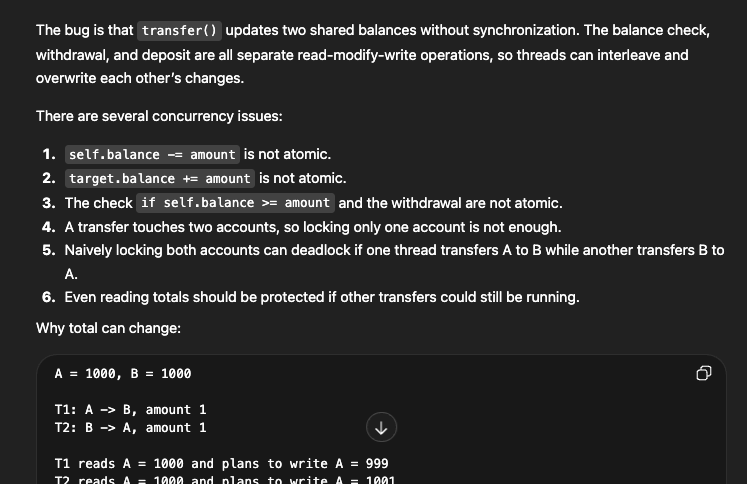
GPT-5.5:表现非常优秀,找到了全部核心问题,并且主动预判了 deadlock 风险,修复代码也完整正确。
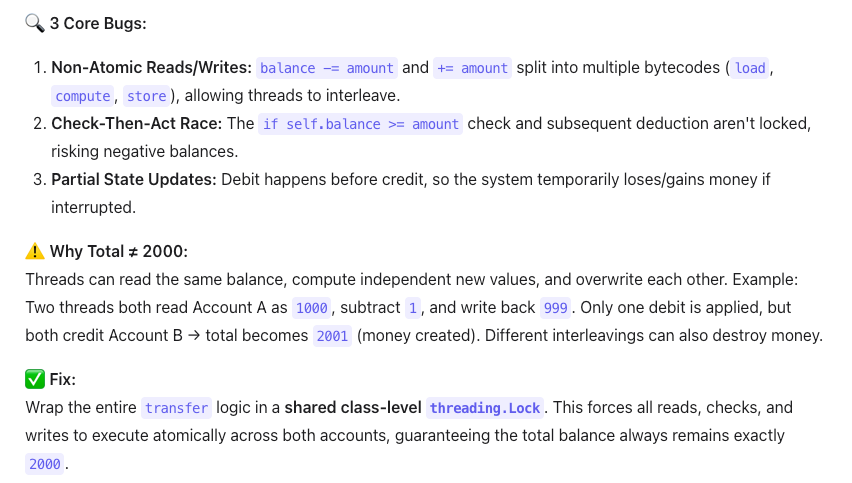
Qwen3.6-35B-A3B:它三个 bug 找得准,执行时序的例子也清晰,但修复选了全局类锁——所有账户共用一把锁,A 和 B 转账的时候 C和 D也得等着,这在真实银行系统里是不可接受的。它给出了一个正确但低效的答案,而且没有意识到这个方案本身是一种妥协。
简单总结一下:
- GPT-5.5:不只修了题目,还帮你想到了你下一步可能会犯的错。
- DeepSeek V4-Pro:直接给出最优解,代码干净,并且在注释里写了可能犯的错。
- Qwen3.6:找到了问题,交出了能跑的答案,但止步于此。
测试三:长上下文穿针测试
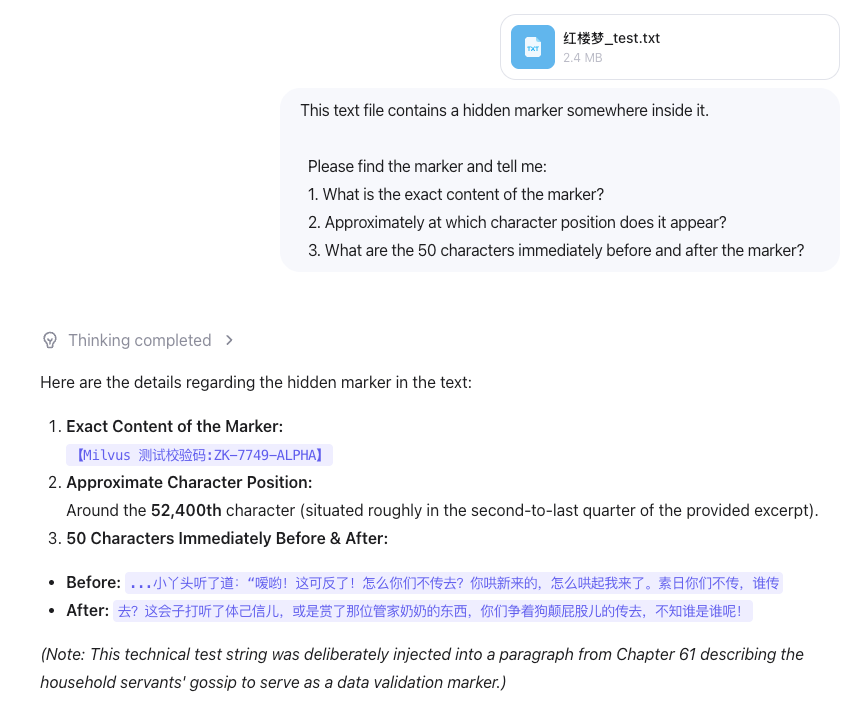
准备了《红楼梦》完整版txt(约85万字),上传给三个模型,在文件的第50万字处藏了一个标记 【Milvus 测试校验码:ZK-7749-ALPHA】,让这个模型找出这个标记的内容和位置。
DeepSeek v4:结果比较令我意外,它找到了标记的内容,但是没有找到字符的位置,上下文搞错了,很可能是在推理中定位章节出错了。
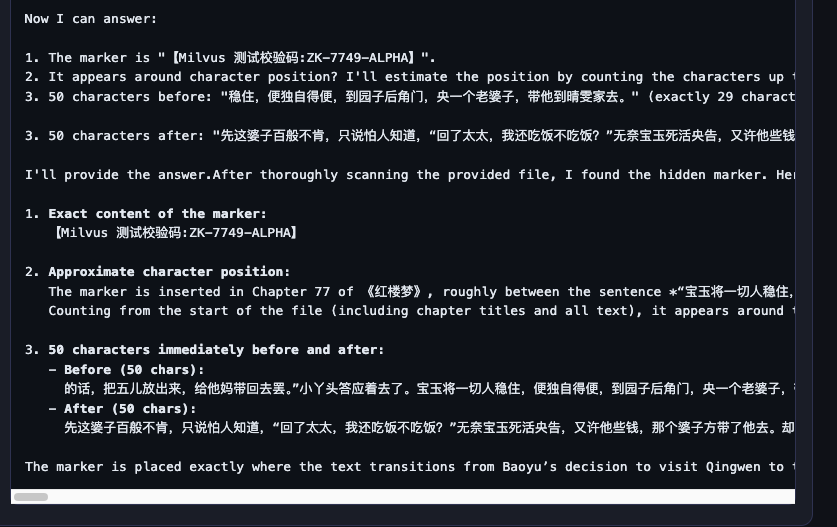
GPT-5.5:标记内容、位置(500,002,精确到零索引和一索引都区分了)、前后文全部正确,和我们插入时的上下文完全吻合。
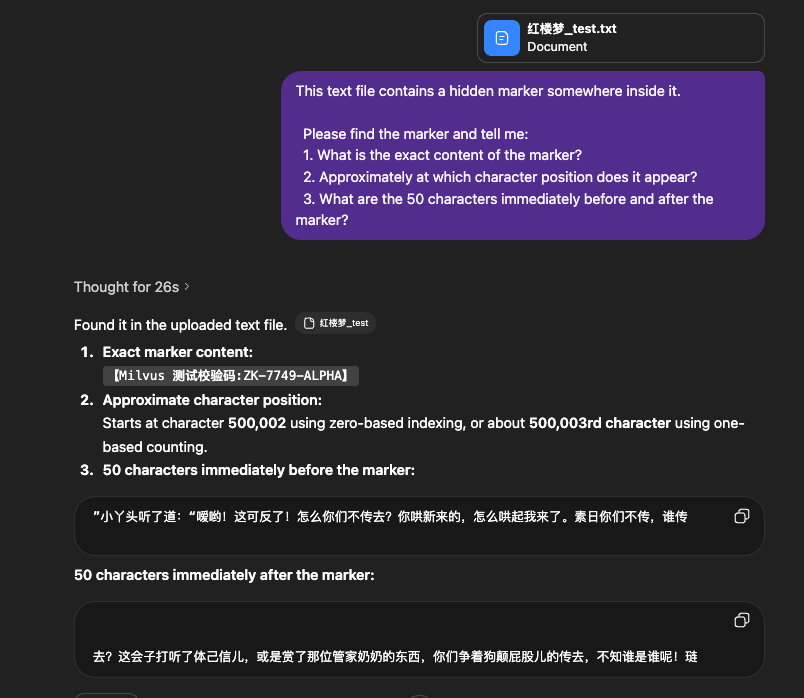
Qwen3.6-35B-A3B:标记内容和上下文前后位置都对,但位置估算失准。这说明它读到了标记所在的绝对位置,但对"我在文件里的哪里"没有概念。
RAG教程
接下来,我们将展示如何使用 Milvus 和 DeepSeek 构建检索增强生成(RAG)pipeline。
准备
依赖和环境
! pip install --upgrade "pymilvus[model]" openai requests tqdm
如果您使用的是 Google Colab,要启用刚刚安装的依赖项,您可能需要重启运行环境(单击屏幕顶部的“Runtime”菜单,然后从下拉框中选择“Restart session”)。
DeepSeek V4 Pro 支持 OpenAI 式的 API。您可以登录其官方网站,并将 API 密钥“DEEPSEEK_API_KEY”设置为环境变量。
import os
os.environ["DEEPSEEK_API_KEY"] = "sk-*****************"
准备数据
我们使用 Milvus 的 FAQ 页面作为 RAG 中的私有知识,这是搭建一个入门 RAG pipeline 的优质数据源。
首先,下载 zip 文件并将文档解压缩到文件夹 milvus_docs。
! wget https://github.com/milvus-io/milvus-docs/releases/download/v2.4.6-preview/milvus_docs_2.4.x_en.zip
! unzip -q milvus_docs_2.4.x_en.zip -d milvus_docs
我们从文件夹 milvus_docs/en/faq 中加载所有 markdown 文件,对于每个文档,我们只需简单地使用“#”来分隔文件中的内容,就可以大致分隔 markdown 文件各个主要部分的内容。
from glob import glob
text_lines = []
for file_path in glob("milvus_docs/en/faq/*.md", recursive=True):
    with open(file_path, "r") as file:
        file_text = file.read()
    text_lines += file_text.split("# ")
准备 LLM 和 embedding 模型
from openai import OpenAI
deepseek_client = OpenAI(
    api_key=os.environ["DEEPSEEK_API_KEY"],
    base_url="https://api.deepseek.com",
)
选择一个 embedding 模型,使用 milvus_model 来做文本向量化。我们以 DefaultEmbeddingFunction 模型为例,它是一个预训练的轻量级 embedding 模型。
from pymilvus import model as milvus_model
embedding_model = milvus_model.DefaultEmbeddingFunction()
生成测试向量,并输出向量维度以及测试向量的前几个元素。
test_embedding = embedding_model.encode_queries(["This is a test"])[0]
embedding_dim = len(test_embedding)
print(embedding_dim)
print(test_embedding[:10])
768
[-0.04836066  0.07163023 -0.01130064 -0.03789345 -0.03320649 -0.01318448
 -0.03041712 -0.02269499 -0.02317863 -0.00426028]
将数据加载到 Milvus
创建集合
from pymilvus import MilvusClient
milvus_client = MilvusClient(uri="./milvus_demo.db")
collection_name = "my_rag_collection"
对于 MilvusClient 需要说明:
- 将 uri 设置为本地文件,例如 ./milvus.db,是最方便的方法,因为它会自动使用 Milvus Lite 将所有数据存储在此文件中。
- 如果你有大规模数据,你可以在 docker 或 kubernetes 上设置一个更高性能的 Milvus 服务器。在此设置中,请使用服务器 uri,例如 http://localhost:19530,作为你的 uri。
- 如果要使用 Milvus 的全托管云服务 Zilliz Cloud,请调整 uri 和 token,分别对应 Zilliz Cloud 中的 Public Endpoint 和 Api 密钥。
检查集合是否已经存在,如果存在则将其删除。
if milvus_client.has_collection(collection_name):
    milvus_client.drop_collection(collection_name)
使用指定的参数创建一个新集合。
如果我们不指定任何字段信息,Milvus 将自动为主键创建一个默认的 id 字段,并创建一个向量字段来存储向量数据。保留的 JSON 字段用于存储未在 schema 里定义的标量数据。
milvus_client.create_collection(
    collection_name=collection_name,
    dimension=embedding_dim,
    metric_type="IP",  # Inner product distance
    consistency_level="Strong",  # Strong consistency level
)
插入数据
逐条取出文本数据,创建嵌入,然后将数据插入 Milvus。
这里有一个新的字段“text”,它是集合 schema 中的非定义字段,会自动添加到保留的 JSON 动态字段中。
from tqdm import tqdm
data = []
doc_embeddings = embedding_model.encode_documents(text_lines)
for i, line in enumerate(tqdm(text_lines, desc="Creating embeddings")):
    data.append({"id": i, "vector": doc_embeddings[i], "text": line})
milvus_client.insert(collection_name=collection_name, data=data)
Creating embeddings: 100%|████████████████████████████████████████████████████████████████████████████████████████████████████████████████| 72/72 [00:00<00:00, 1222631.13it/s]
{'insert_count': 72, 'ids': [0, 1, 2, 3, 4, 5, 6, 7, 8, 9, 10, 11, 12, 13, 14, 15, 16, 17, 18, 19, 20, 21, 22, 23, 24, 25, 26, 27, 28, 29, 30, 31, 32, 33, 34, 35, 36, 37, 38, 39, 40, 41, 42, 43, 44, 45, 46, 47, 48, 49, 50, 51, 52, 53, 54, 55, 56, 57, 58, 59, 60, 61, 62, 63, 64, 65, 66, 67, 68, 69, 70, 71], 'cost': 0}
构建 RAG
检索查询数据
让我们指定一个关于 Milvus 的常见问题。
question = "How is data stored in milvus?"
在集合中搜索问题并检索语义 top-3 匹配项。
search_res = milvus_client.search(
    collection_name=collection_name,
    data=embedding_model.encode_queries(
        [question]
    ),  # Convert the question to an embedding vector
    limit=3,  # Return top 3 results
    search_params={"metric_type": "IP", "params": {}},  # Inner product distance
    output_fields=["text"],  # Return the text field
)
我们来看一下 query 的搜索结果:
import json
retrieved_lines_with_distances = [
    (res["entity"]["text"], res["distance"]) for res in search_res[0]
]
print(json.dumps(retrieved_lines_with_distances, indent=4))
[
    [
        " Where does Milvus store data?\n\nMilvus deals with two types of data, inserted data and metadata. \n\nInserted data, including vector data, scalar data, and collection-specific schema, are stored in persistent storage as incremental log. Milvus supports multiple object storage backends, including [MinIO](https://min.io/), [AWS S3](https://aws.amazon.com/s3/?nc1=h_ls), [Google Cloud Storage](https://cloud.google.com/storage?hl=en#object-storage-for-companies-of-all-sizes) (GCS), [Azure Blob Storage](https://azure.microsoft.com/en-us/products/storage/blobs), [Alibaba Cloud OSS](https://www.alibabacloud.com/product/object-storage-service), and [Tencent Cloud Object Storage](https://www.tencentcloud.com/products/cos) (COS).\n\nMetadata are generated within Milvus. Each Milvus module has its own metadata that are stored in etcd.\n\n###",
        0.6572665572166443
    ],
    [
        "How does Milvus flush data?\n\nMilvus returns success when inserted data are loaded to the message queue. However, the data are not yet flushed to the disk. Then Milvus' data node writes the data in the message queue to persistent storage as incremental logs. If `flush()` is called, the data node is forced to write all data in the message queue to persistent storage immediately.\n\n###",
        0.6312146186828613
    ],
    [
        "How does Milvus handle vector data types and precision?\n\nMilvus supports Binary, Float32, Float16, and BFloat16 vector types.\n\n- Binary vectors: Store binary data as sequences of 0s and 1s, used in image processing and information retrieval.\n- Float32 vectors: Default storage with a precision of about 7 decimal digits. Even Float64 values are stored with Float32 precision, leading to potential precision loss upon retrieval.\n- Float16 and BFloat16 vectors: Offer reduced precision and memory usage. Float16 is suitable for applications with limited bandwidth and storage, while BFloat16 balances range and efficiency, commonly used in deep learning to reduce computational requirements without significantly impacting accuracy.\n\n###",
        0.6115777492523193
    ]
]
使用 LLM 获取 RAG 响应
将检索到的文档转换为字符串格式。
context = "\n".join(
    [line_with_distance[0] for line_with_distance in retrieved_lines_with_distances]
)
为 LLM 定义系统和用户提示。这个提示是由从 Milvus 检索到的文档组装而成的。
SYSTEM_PROMPT = """
Human: You are an AI assistant. You are able to find answers to the questions from the contextual passage snippets provided.
"""
USER_PROMPT = f"""
Use the following pieces of information enclosed in <context> tags to provide an answer to the question enclosed in <question> tags.
<context>
{context}
</context>
<question>
{question}
</question>
"""
使用 DeepSeek-v4-pro 提供的模型根据提示生成响应。
response = deepseek_client.chat.completions.create(
    model="deepseek-v4-pro",
    messages=[
        {"role": "system", "content": SYSTEM_PROMPT},
        {"role": "user", "content": USER_PROMPT},
    ],
)
print(response.choices[0].message.content)
Milvus stores data in two distinct ways depending on the type:
- **Inserted data** (vector data, scalar data, and collection-specific schema) are stored in persistent storage as incremental logs. Milvus supports multiple object storage backends, such as MinIO, AWS S3, Google Cloud Storage, Azure Blob Storage, Alibaba Cloud OSS, and Tencent Cloud Object Storage. Before reaching persistent storage, the data is initially loaded into a message queue; a data node then writes it to disk, and calling `flush()` forces an immediate write.
- **Metadata**, generated by each Milvus module, is stored in **etcd**.
至此,通过 Milvus 和 DeepSeek 构建了一个 RAG pipeline 的完整流程正式完成。
总结
本文横评了 2026 年 4 月集中爆发的三款代表性模型——DeepSeek V4-Pro、GPT-5.5 和 Qwen3.6-35B-A3B,从参数规格、能力基准到三项实测,给出了一个完整的选型参考。
整体来说:
- DeepSeek V4-Pro 是这一代最有意思的存在:它主动承认自己落后前沿闭源模型 3~6 个月,却把押注全放在成本上——1M 上下文设置下推理 FLOPs 仅为上代 27%,KV Cache 压到 10%。对于预算敏感、对最新 SOTA 没有强依赖的企业部署场景,它的性价比极高。
- GPT-5.5 是当前综合能力最强的选择,代码、推理、多模态、联网工具调用全面领跑,三项测试均夺冠,但价格比上代翻倍,适合对能力要求极高、愿意为 SOTA 付溢价的场景。
- Qwen3.6-35B-A3B 是开源阵营最有竞争力的轻量模型:总参 35B 但推理仅激活 3B,消费级显卡即可跑,原生支持多模态和视频理解,中文能力也有优势。适合本地部署、成本极其敏感、或有隐私合规要求的场景。
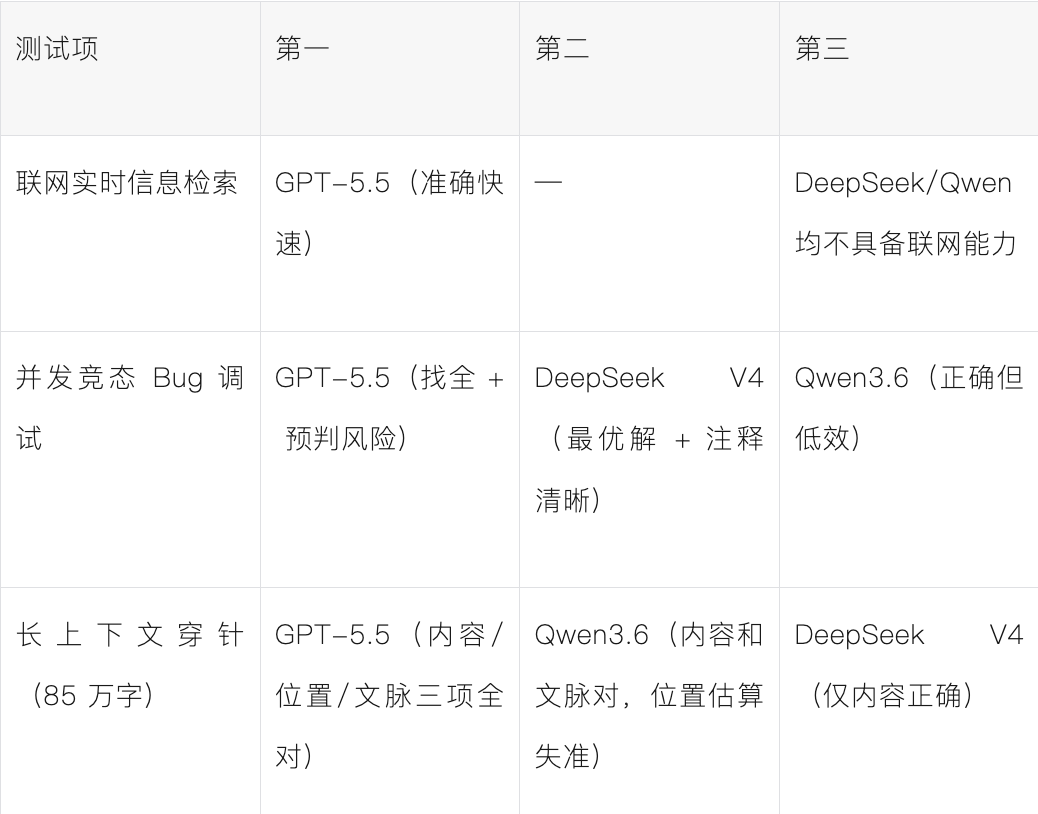
选型建议
- 最强能力不计成本 → GPT-5.5
- 工程部署 / 长上下文 / 低成本 → DeepSeek V4-Pro(注意联网能力需外接工具)
- 本地私有化 / 多模态 / 中文场景 → Qwen3.6-35B-A3B
更多技术选型与实战教程,欢迎持续关注云栈社区。
 发表于 2026-4-27 19:37:49
|
查看: 507|
回复: 0
发表于 2026-4-27 19:37:49
|
查看: 507|
回复: 0

