由于安装 Hermes 通常需要从 GitHub 拉取资源,对网络环境有一定要求。如果你的服务器能正常访问,直接运行下面的自动脚本即可。如果不能,请跳至手动安装部分。
一、自动安装
- 执行一键安装脚本:
curl -fsSL https://raw.githubusercontent.com/NousResearch/hermes-agent/main/scripts/install.sh | bash
- 等待脚本执行完毕。完成后,运行配置命令来初始化你的 Agent:
hermes setup
- 配置成功后,启动 Hermes:
hermes
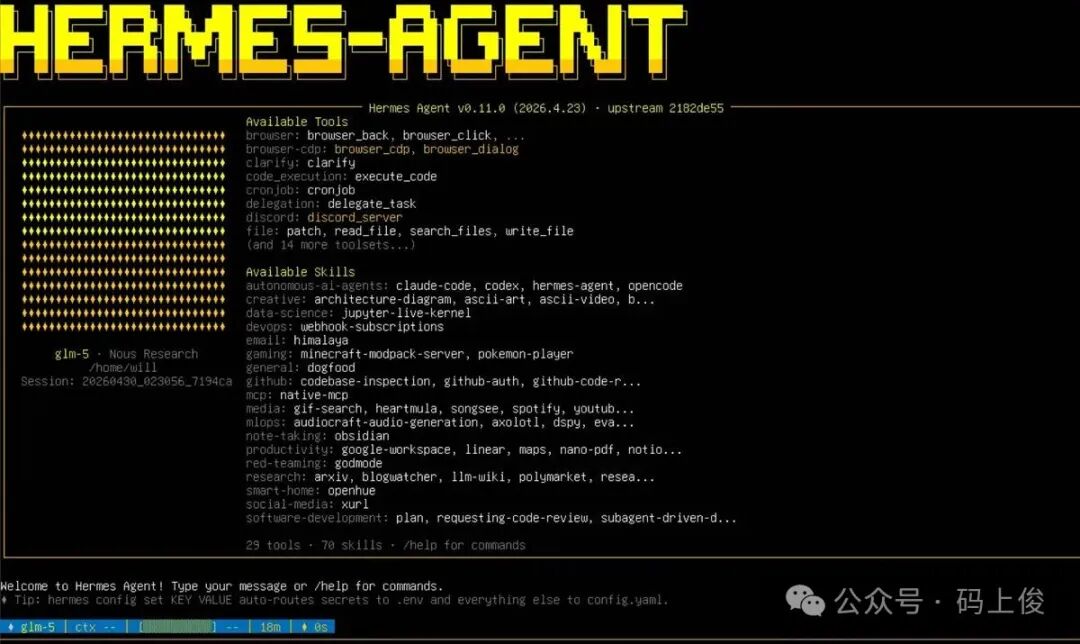
启动成功后的界面如上图所示,它会列出当前版本支持的所有工具和技能。
二、手动安装
部分场景下,自动脚本可能因网络策略或环境差异而失败。这时我们只能手动完成安装。
在开始前,请确保服务器已具备 Python 环境。确认系统版本后,安装 Python 3 以及必要的依赖:
sudo apt update
sudo apt install python3 python3-venv python3-dev -y

# 安装完毕后,设置虚拟环境
sudo python3 -m venv venv
# 激活环境
source venv/bin/activate
# 升级 pip 到最新版
(venv) will@will:~/.hermes$ pip install --upgrade pip setuptools wheel
-
下载 hermes-agent 包并解压。
如果无法从 GitHub 下载,可以通过网盘获取源码包:
链接: https://pan.baidu.com/s/15BqcvprvyjIkHxTUNezjBA?pwd=2is9 提取码: 2is9
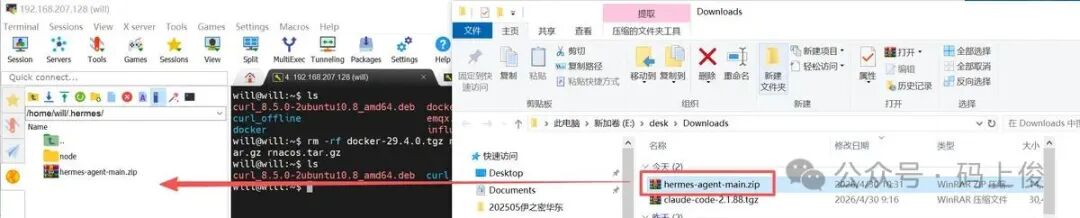
将压缩包传输到服务器后,继续后续步骤。
- 解压安装包:
will@will:~/.hermes$ sudo unzip hermes-agent-main.zip
Archive:  hermes-agent-main.zip
8cce85b8191ca24afd07cd996dcecf7fe2625c88
   creating: hermes-agent-main/
  inflating: hermes-agent-main/.dockerignore
  inflating: hermes-agent-main/.env.example
  inflating: hermes-agent-main/.envrc
- 为了方便管理,重命名解压后的文件夹:
will@will:~/.hermes$ mv hermes-agent-main hermes-agent
will@will:~/.hermes$ ls
hermes-agent  hermes-agent-main.zip  node
- 进入
hermes-agent 目录,并安装项目所需的所有依赖:
cd hermes-agent
# 安装 hermes 项目(包含所有功能依赖)
pip install -e .
- 配置环境变量和系统命令。这一步是为了让系统能全局识别
hermes 指令,并将 API 密钥写入配置文件:
# 创建配置目录
mkdir -p ~/.hermes

# 创建 .env 文件,填入你的 API 密钥
touch  ~/.hermes/.env

# 创建命令快捷方式
mkdir -p ~/.local/bin
ln -s $(pwd)/venv/bin/hermes ~/.local/bin/hermes

# 确保 ~/.local/bin 在 PATH 中
echo 'export PATH="$HOME/.local/bin:$PATH"' >> ~/.bashrc
source ~/.bashrc
- 验证是否安装成功:
will@will:~/.hermes/hermes-agent$ hermes --version
Hermes Agent v0.11.0(2026.4.23)
Project:/home/will/.hermes/hermes-agent
Python:3.12.3
OpenAI SDK:2.33.0
出现上述版本号、Python 路径及 SDK 信息,说明手动安装已经正确完成。之后使用 hermes setup 命令配置 Hermes 即可。
will@will:~/.hermes/hermes-agent$ hermes setup

┌─────────────────────────────────────────────────────────┐
│             Hermes Agent Setup Wizard                 │
├─────────────────────────────────────────────────────────┤
│  Let's configure your Hermes Agent installation.       │
│  Press Ctrl+C at any time to exit.                     │
└─────────────────────────────────────────────────────────┘
...
看到这个配置向导界面,意味着一切准备就绪,你可以开始按照提示填入模型 API 等信息来定制你的专属 Agent 了。
 发表于 2026-5-1 18:27:44
|
查看: 415|
回复: 0
发表于 2026-5-1 18:27:44
|
查看: 415|
回复: 0

