1. printf命令简介
Bash提供了两种用于终端输出的命令:echo(简单输出)和printf(格式化输出)。
printf命令与C语言中的printf()函数类似,但拥有自己的一套功能特性。它和echo的主要区别在于:printf支持格式化输出和更丰富的功能。
# 查看printf命令类型(是内建还是外部)
[root@yyzcdb81 ~]# type -a printf
printf is a shell builtin
printf is /usr/bin/printf
[root@yyzcdb81 ~]#
提示:
内建命令优先级高于外部命令。如需调用外部版本的printf,需要使用完整路径:/usr/bin/printf "Hello\n"
2. 查看printf帮助
方法一:通过Bash手册查看
$ man bash
# 然后输入 /printf 并回车
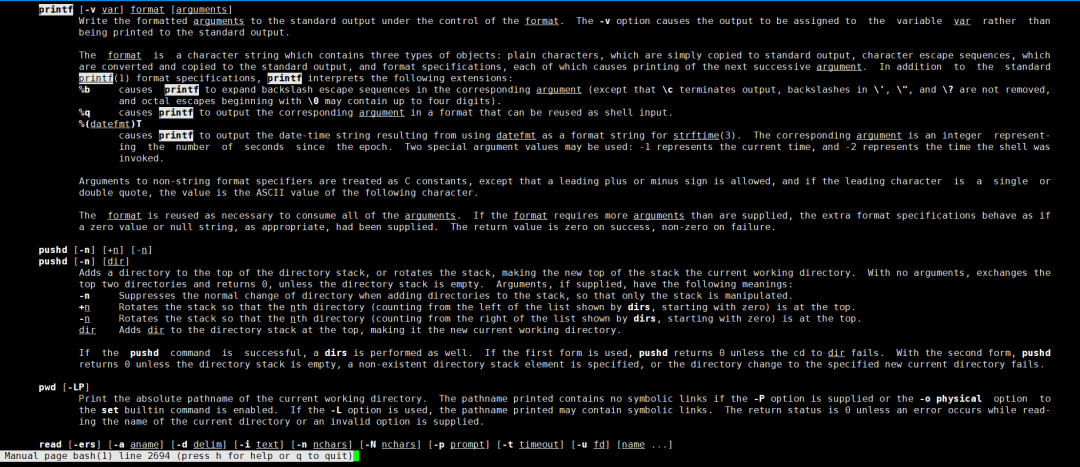
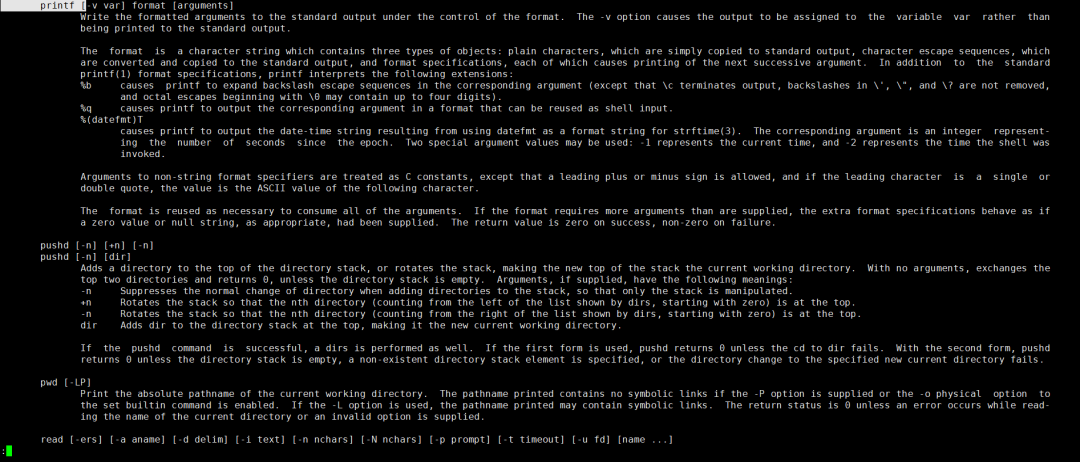
方法二:一行命令查看
$ man bash | less --pattern='^ *printf +\['
3. printf的基本格式
printf [-v var] format [arguments]
| 选项 |
说明 |
-v var |
将输出存储到变量中,而不是打印到终端 |
3.1 无参数时报错
与echo不同,printf没有参数时会失败:
[root@yyzcdb81 ~]# printf
printf: usage: printf [-v var] format [arguments]
[root@yyzcdb81 ~]# echo $?
2                               # 退出状态为非0(失败)
[root@yyzcdb81 ~]#
3.2 基本使用(注意换行符)
echo默认自动添加换行符,而printf不会,需要显式添加\n:
# 添加换行符
$ printf "Linux is fun to work with\n"
Linux is fun to work with
$                                  # 提示符在新行
4. 变量和命令解释
与echo类似,printf会在双引号中解释变量和命令:
$ VAR1="Linux"
$ printf "$VAR1 is fun to work with\n"
Linux is fun to work with
5. 单引号 vs 双引号
| 引号类型 |
行为 |
示例 |
双引号 " |
允许变量扩展和命令替换 |
printf "$VAR1 is fun\n" |
单引号 ' |
禁止扩展,视为纯文本 |
printf '$VAR1 is fun\n' |
# 双引号:变量被解释
$ printf "$VAR1 is fun to work with\n"
Linux is fun to work with

# 单引号:变量作为纯文本
$ printf '$VAR1 is fun to work with\n'
$VAR1 is fun to work with

# 命令替换同理
$ printf 'Today date = $(date)\n'
Today date = $(date)

[root@yyzcdb81 ~]# printf "Today date = $(date)\n"
Today date = Tue May 12 13:36:37 CST 2026
[root@yyzcdb81 ~]#
最佳实践: 始终使用引号包裹printf的参数。
6. 重定向与管道
6.1 重定向到文件
# 覆盖写入
[root@yyzcdb81 ~]# printf "Today date = $(date)\n" > /tmp/tdy.txt
[root@yyzcdb81 ~]# cat /tmp/tdy.txt
Today date = Tue May 12 13:38:54 CST 2026
[root@yyzcdb81 ~]#

# 追加写入
$ printf "Another line\n" >> /tmp/tdy.txt
6.2 管道传递
$ printf "Today date = $(date)\n" | grep -i -o CST
CST
7. 将输出赋值给变量
7.1 使用命令替换 $()
$ ZONE=$(printf "Today date = $(date)\n" | grep -i -o CST)
$ printf "$ZONE\n"
CST
7.2 使用 -v 选项
$ printf -v TIME "Today date = $(date)\n"
$ echo "$TIME"
Today date = Tue May 12 13:42:56 CST 2026
8. 多行printf语句
8.1 直接包含换行
$ printf "\nI am running PoP_OS
It is a great OS
With Great features\n"

I am running PoP_OS
It is a great OS
With Great features
8.2 使用反斜杠续行(\)
当需要将一行长代码分成多行以提高可读性时,可以在行尾使用\:
$ printf "I am running pop_os \
It is a great OS \
With Great features\n"
I am running pop_os It is a great OS With Great features
9. 反斜杠转义字符
printf支持以下常用的转义字符(与echo -e类似):
| 转义字符 |
说明 |
示例 |
\n |
换行符 |
添加新行 |
\t |
水平制表符 |
添加Tab空格 |
\v |
垂直制表符 |
垂直制表 |
\b |
退格字符 |
删除前一个字符 |
\r |
回车符 |
光标回到行首 |
\\ |
反斜杠本身 |
输出\ |
9.1 换行符(\n)
$ printf "Today date = $(date)\n"
Today date = Tue May 12 13:44:41 CST 2026
9.2 水平制表符(\t)和垂直制表符(\v)
$ printf "Today date \t $(date)\n"
Today date     Tue May 12 13:45:09 CST 2026

$ printf "Today date \v $(date)\n"
Today date
            Tue May 12 13:45:30 CST 2026
9.3 退格字符(\b)
$ printf "It's a rain\by day..\n"
It's a rain day..        # 'y'被删除了
9.4 回车符(\r)
回车符将光标重置到行首,后面的字符会覆盖前面的字符:
$ printf "It's a rain\by\r day..\n"
 day..  rain             # 'It's a'被覆盖了
9.5 转义反斜杠本身(\\)
如果需要输出\n、\t等字符本身(而不是解释它们),可以使用双反斜杠。
格式说明符用于在printf中动态替换值,而不是硬编码。使用时需以%符号开头。
| 格式符 |
说明 |
示例 |
%s |
字符串 |
printf "%s\n" "Hello" |
%d |
有符号十进制整数 |
printf "%d\n" 100 |
%u |
无符号十进制整数 |
printf "%u\n" 100 |
%f |
浮点数 |
printf "%f\n" 3.14 |
%b |
解释反斜杠转义序列 |
printf "%b\n" "Hello\nWorld" |
10.1 字符串格式符(%s)
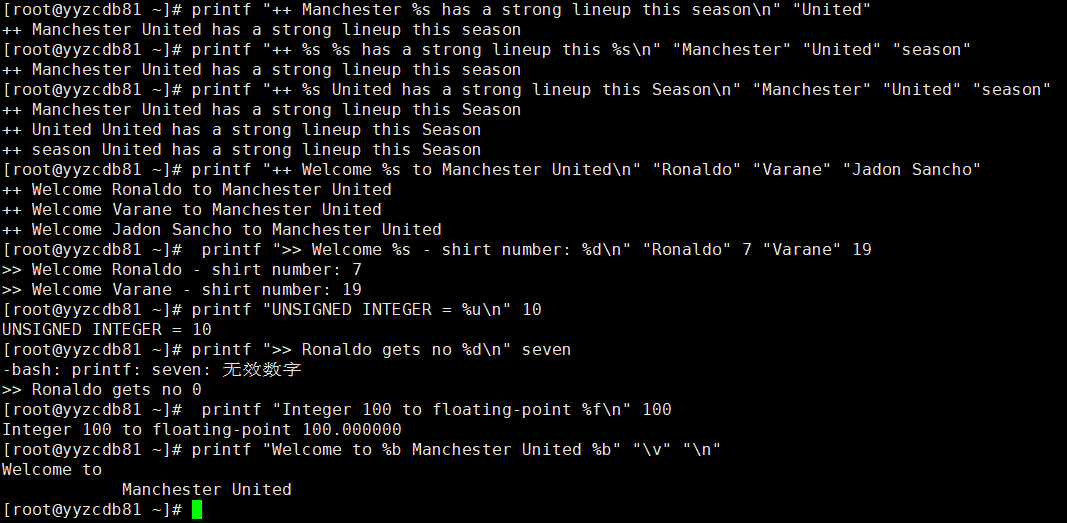
$ printf "++ Manchester %s has a strong lineup this season\n" "United"
++ Manchester United has a strong lineup this season
10.2 多个参数替换
使用与格式符相同数量的参数:
$ printf "++ %s %s has a strong lineup this %s\n" "Manchester" "United" "season"
++ Manchester United has a strong lineup this season
10.3 格式符少于参数时
当格式符数量少于参数时,printf会循环使用格式符:
$ printf "++ %s United has a strong lineup this Season\n" "Manchester" "United" "season"
++ Manchester United has a strong lineup this Season
++ United United has a strong lineup this Season
++ season United has a strong lineup this Season
实用场景: 这个特性可以用来避免循环。例如,打印多个玩家的欢迎信息:
$ printf "++ Welcome %s to Manchester United\n" "Ronaldo" "Varane" "Jadon Sancho"
++ Welcome Ronaldo to Manchester United
++ Welcome Varane to Manchester United
++ Welcome Jadon Sancho to Manchester United
10.4 有符号整数(%d)和无符号整数(%u)
$ printf ">> Welcome %s - shirt number: %d\n" "Ronaldo" 7 "Varane" 19
>> Welcome Ronaldo - shirt number: 7
>> Welcome Varane - shirt number: 19

$ printf "UNSIGNED INTEGER = %u\n" 10
UNSIGNED INTEGER = 10
错误示例: 传入非整数时会报错:
$ printf ">> Ronaldo gets no %d\n" seven
bash: printf: seven: invalid number
>> Ronaldo gets no 0
10.5 浮点数(%f)
$ printf "Integer 100 to floating-point %f\n" 100
Integer 100 to floating-point 100.000000
10.6 解释转义序列(%b)
如果需要将转义序列作为参数传入,使用%b进行解释:
$ printf "Welcome to %b Manchester United %b" "\v" "\n"
Welcome to
          Manchester United
11. printf转换修饰符
转换修饰符用于格式化输出,格式为:
%[flags][width][.precision]specifier
11.1 宽度修饰符(width)
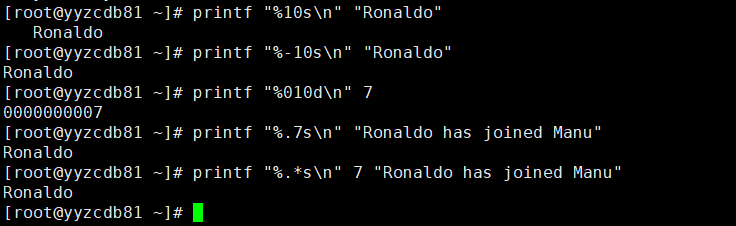
指定转换的最小字符数。如果实际字符数不足,会用空格填充:
# 宽度为10,字符串"Ronaldo"只有7个字符,前面加3个空格
$ printf "%10s\n" "Ronaldo"
   Ronaldo
11.2 标志修饰符(flags)
| 标志 |
说明 |
示例 |
- |
左对齐(默认右对齐) |
%-10s |
0 |
用0填充空格(数值类型) |
%010d |
# 左对齐
$ printf "%-10s\n" "Ronaldo"
Ronaldo

# 用0填充空格
$ printf "%010d\n" 7
0000000007
11.3 精度修饰符(precision)
使用点号.后跟整数,指定要打印的字符/数字位数:
# 字符串:只打印前7个字符
$ printf "%.7s\n" "Ronaldo has joined Manu"
Ronaldo
11.4 使用星号(*)动态指定精度
可以用*代替精度值,从参数中读取:
$ printf "%.*s\n" 7 "Ronaldo has joined Manu"
Ronaldo
12. 小结
| 知识点 |
要点总结 |
| 基本用法 |
printf "格式" 参数 |
| 换行符 |
必须显式添加 \n |
| 格式符 |
%s(字符串)、%d(整数)、%f(浮点数) |
| 转义字符 |
\n、\t、\v、\b、\r、\\ |
| 宽度修饰 |
%10s(右对齐)、%-10s(左对齐) |
| 精度修饰 |
%.2f(2位小数)、%.5s(前5个字符) |
| 存储到变量 |
printf -v var "格式" 参数 |
| 与echo的区别 |
printf不自动添加换行,支持格式化 |
快速对照表:echo vs printf
| 特性 |
echo |
printf |
| 自动换行 |
✅ 默认添加 \n |
❌ 需要显式添加 \n |
| 格式化输出 |
有限 |
✅ 功能强大 |
| 格式符 |
❌ 不支持 |
✅ 支持 %s、%d、%f等 |
| 宽度/精度控制 |
❌ 不支持 |
✅ 支持 |
| 跨平台一致性 |
略有差异 |
✅ 行为一致 |
 发表于 2026-5-13 19:17:36
|
查看: 349|
回复: 0
发表于 2026-5-13 19:17:36
|
查看: 349|
回复: 0

