有时候,最好的工具就是那种不会妨碍你的工具。
我曾经为了写代码,同时开着 47 个 Chrome 标签页:Jira 处理 ticket,Confluence 查文档,Postman 测 API,Slack 对接三个不同团队,Figma 看设计规范,DataDog 做监控,GitHub 做 code review。
笔记本风扇听起来像喷气发动机,内存长期徘徊在 95%。开一个新标签页,就得关一个旧标签页。
后来笔记本坏了。在等新机器到货期间,我 SSH 到一台远程服务器,只靠 vim、curl 和 terminal 工作。没有 Electron 应用,没有 web app,只有工具。
那三天里,我交付的东西比前两周加起来还多。
就在那时我意识到:很多开发工具并没有让我们更高效,它们只是更高效地消耗资源。于是我开始寻找真正轻量、不挡路的替代方案。
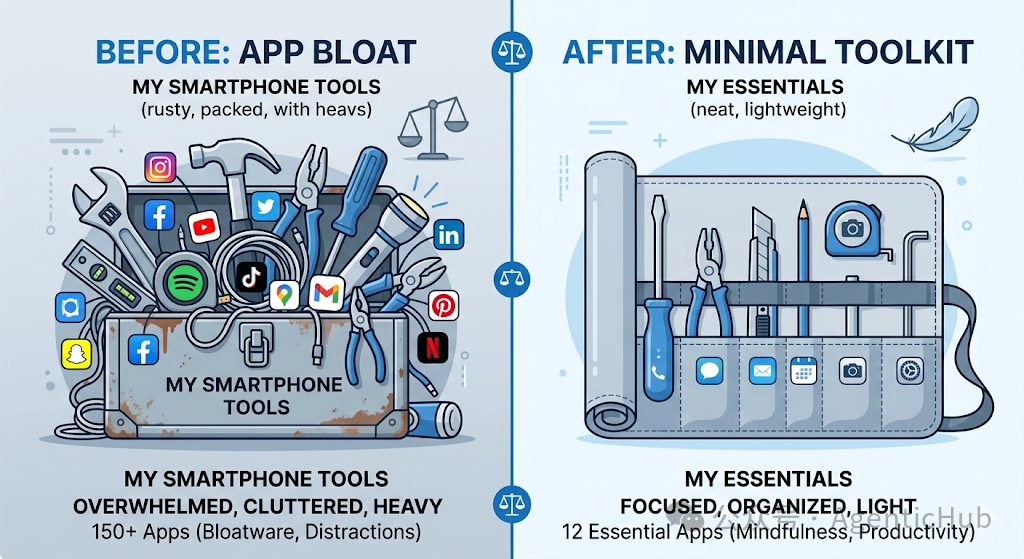
下面这六个工具,取代了我那套臃肿配置。笔记本感谢我,专注力更感谢我。
1. jq 取代了 Postman(以及我一半的自定义脚本)
Postman 要占用 500MB 内存,才能发送 HTTP 请求并格式化 JSON。
你知道还有什么也能做到吗?curl 和 jq。而且它们加起来只用 5MB。
下面是我以前在 Postman 里会做的事:
- 发送 request
- 等 UI 加载
- 点击各个 tab 查看 response
- 复制 JSON
- 粘贴到另一个工具里过滤
- 重复以上步骤
现在我这样做:
# Get user data, extract just the email and subscription status
curl -s https://api.example.com/users/123 \
  -H "Authorization: Bearer $TOKEN" \
  | jq '{email: .email, subscribed: .subscription.active}'

# Output:
{
  "email": "user@example.com",
  "subscribed": true
}
需要测试多个 endpoint?把它写进 bash script:
#!/bin/bash
# test_api.sh

BASE_URL="https://api.example.com"
TOKEN="your-token-here"
endpoints=(
  "/users/123"
  "/users/123/orders"
  "/users/123/preferences"
)
for endpoint in "${endpoints[@]}"; do
  echo "Testing $endpoint"
  response=$(curl -s -w "\n%{http_code}" "$BASE_URL$endpoint" \
    -H "Authorization: Bearer $TOKEN")

  http_code=$(echo "$response" | tail -n1)
  body=$(echo "$response" | sed '$d')

  if [ "$http_code" -eq 200 ]; then
    echo "✓ Success"
    echo "$body" | jq '.' # Pretty print the response
  else
    echo "✗ Failed with status $http_code"
  fi
  echo "---"
done
这个 script 就放在我的项目 repo 里,受 version control 管理,可以在 CI 里运行。它不会在我做别的事时占用 500MB RAM。
真正厉害的是用 jq 做 JSON manipulation:
# Get all user emails from an array
curl -s https://api.example.com/users | jq '.[].email'

# Filter users by subscription status
curl -s https://api.example.com/users \
  | jq '[.[] | select(.subscription.active == true)]'
# Transform the shape of the data
curl -s https://api.example.com/orders \
  | jq 'map({id: .order_id, total: .amount, date: .created_at})'
我仍然保留着 Postman,用于复杂的 authentication flow,或者需要与非技术人员共享 request 的场景。但对于 90% 的 API testing 来说,curl + jq 更快、更轻,也更适合 scripting。
2. fzf 取代了我的文件搜索工具
我以前用 Sublime Text 的 “Go to Anything” 或 VS Code 的 fuzzy finder 导航代码库。它们都不错,但也都运行在 200MB 以上的 text editor 里。
后来我发现了 fzf。这是一个 command-line fuzzy finder,体积大约只有 3MB。
# Find and open a file
vim $(fzf)

# Search file contents and open to that line
rg "TODO" --line-number | fzf | awk -F: '{print "+"$2" "$1}' | xargs vim
# Find and cd into a directory
cd $(find . -type d | fzf)
不过它真正强大的地方在这里——可以绑定到 shell shortcut 上:
# In your .bashrc or .zshrc

# Ctrl-T to fuzzy find files and paste into command line
export FZF_CTRL_T_OPTS="--preview 'bat --color=always --line-range :50 {}'"
# Ctrl-R for better history search
export FZF_CTRL_R_OPTS="--preview 'echo {}' --preview-window down:3:hidden:wrap"
# Alt-C to cd into subdirectories
export FZF_ALT_C_OPTS="--preview 'tree -C {} | head -50'"
现在 Ctrl-R 不只是搜索 bash history,还会带预览地进行 fuzzy find。Ctrl-T 让我能瞬间找到项目里的任意文件。
我还会把它和 ripgrep 配合起来做 code search:
# Search for a function definition and open it
rg "^function.*exportReport" --line-number \
  | fzf \
  | cut -d: -f1-2 \
  | xargs -I {} sh -c 'vim +$(echo {} | cut -d: -f2) $(echo {} | cut -d: -f1)'
看起来复杂,但我已经把它做成 alias 了。重点是:它能比 VS Code search 更快地搜索整个 codebase,而且只用了大约 1% 的内存。
3. tmux 取代了我所有的 terminal multiplexers
我以前用 iTerm2 开很多 tab 和 split。它一直很好用,直到我需要 SSH 到远程服务器时,才发现自己完全失去了切换上下文的肌肉记忆。
后来我学会了 tmux。它是一个 terminal multiplexing 工具,哪里都能用——本地、远程,都一样。
# Create a new session for each project
tmux new -s api-service
tmux new -s frontend
tmux new -s infrastructure

# Split into panes
# Ctrl-b % for vertical split
# Ctrl-b " for horizontal split
# Switch between sessions
# Ctrl-b s (shows session list)
# Detach and reattach
tmux detach  # or Ctrl-b d
tmux attach -t api-service
但它最厉害的特性是:断开连接后,session 仍然会保留。
我 SSH 到远程开发服务器,启动 tmux,在一个 pane 里运行开发服务器,在另一个 pane 里跑测试,在第三个 pane 里监控日志。然后合上笔记本回家。
第二天早上再 SSH 回去,执行 tmux attach。一切都还在我离开时的样子:开发服务器还在运行,日志还在滚动,vim session 还开着。
我的配置承担了大部分工作:
# ~/.tmux.conf

# Better prefix key (Ctrl-a instead of Ctrl-b)
unbind C-b
set-option -g prefix C-a
# Split panes using | and -
bind | split-window -h
bind - split-window -v
# Vim-like pane switching
bind h select-pane -L
bind j select-pane -D
bind k select-pane -U
bind l select-pane -R
# Mouse support
set -g mouse on
# Don't rename windows automatically
set-option -g allow-rename off
# Increase scrollback buffer
set-option -g history-limit 10000
iTerm2 很适合本地工作,但 tmux 到处都能用,占用资源极少,而且我的肌肉记忆可以无缝迁移到任何 Unix 系统。
4. entr 取代了我的文件 watcher
Nodemon、Webpack dev server、Parcel……那些热重载工具为了监视文件变化并运行命令,常常要消耗数百 MB 内存。
entr 用 2MB 就能做同样的事:
# Watch Python files and run tests
find . -name "*.py" | entr pytest

# Watch Markdown files and rebuild docs
ls docs/*.md | entr make docs
# Watch source files and rebuild
find src -name "*.ts" | entr -c npm run build
-c 标志会在每次运行前清屏,-r 标志则用于重启长时间运行的进程:
# Auto-restart your dev server when files change
find . -name "*.py" | entr -r python app.py
我给每个项目都写了一个 script:
#!/bin/bash
# watch.sh

case "$1" in
  "test")
    find . -name "*.py" -not -path "./venv/*" | entr pytest
    ;;
  "lint")
    find . -name "*.py" -not -path "./venv/*" | entr -c pylint src/
    ;;
  "server")
    find . -name "*.py" -not -path "./venv/*" | entr -r python -m uvicorn main:app
    ;;
  *)
    echo "Usage: ./watch.sh [test|lint|server]"
    ;;
esac
没有配置文件,没有 plugin 生态。就是监视文件,运行命令。它很朴素,但确实好用。
5. bat 和 ripgrep 取代了我的文本搜索 UI
Sublime Text 的文本搜索非常强大,但它运行在一个 100MB 的 editor 里,还得索引整个项目。
ripgrep 搜索更快,内存占用只是一小部分:
# Basic search
rg "function handleSubmit"

# Search with context
rg -C 3 "handleSubmit"  # Show 3 lines before and after
# Search specific file types
rg "TODO" -t python  # Only .py files
rg "FIXME" -t js -t ts  # .js and .ts files
# Search with file names only
rg -l "import React"  # Just list files that match
# Case insensitive search
rg -i "error"
再配上 bat,一个带语法高亮的更好的 cat:
# View a file with syntax highlighting
bat src/main.py

# Show specific line ranges
bat -r 50:100 src/main.py
# Show git diff information in the gutter
bat --diff src/main.py
我最常用的组合是:
# Find files containing a pattern and preview them
rg -l "handleSubmit" | fzf --preview 'bat --color=always {}'
这会找出所有包含 “handleSubmit” 的文件,让我继续 fuzzy filter,并显示带语法高亮的预览。比我用过的任何 GUI 工具都快。
6. 纯文本文件取代了我的笔记应用
我试过 Notion,试过 Evernote,也试过 Obsidian。它们都很重,都有专有格式。笔记一多,运行就会变慢。
现在我在一个 git repo 里使用纯 Markdown 文件:
~/notes/
├── work/
│   ├── 2024-03-01-api-redesign.md
│   ├── 2024-03-08-performance-investigation.md
│   └── meeting-notes/
├── learning/
│   ├── postgres-performance.md
│   ├── rust-ownership.md
│   └── distributed-systems.md
└── personal/
    ├── ideas.md
    └── reading-list.md
我的工作流:
# Create a new note
note() {
  local date=$(date +%Y-%m-%d)
  local title="$1"
  local file="$HOME/notes/work/${date}-${title}.md"

  echo "# ${title}" > "$file"
  echo "" >> "$file"
  echo "Date: $(date +%Y-%m-%d)" >> "$file"
  echo "" >> "$file"

  vim "$file"
}

# Search notes
search_notes() {
  rg "$1" ~/notes/ | fzf --preview 'bat --color=always $(echo {} | cut -d: -f1)'
}
# Daily work log
log() {
  local date=$(date +%Y-%m-%d)
  local file="$HOME/notes/work/daily-${date}.md"

  if [ ! -f "$file" ]; then
    echo "# Work Log - ${date}" > "$file"
    echo "" >> "$file"
  fi

  echo "$(date +%H:%M) - $*" >> "$file"
}
用法:
# Create a new note
note "api-redesign"

# Add to daily log
log "Fixed bug in payment processor"
log "Meeting with frontend team about new API"
# Search all notes
search_notes "postgres performance"
优点:
- 文件是纯文本的,面向未来
- 一切都受 version control 管理,git 会跟踪变更
- 可以离线工作,没有同步问题
- 搜索速度快,ripgrep 是瞬时的
- 没有 vendor lock-in,它只是 Markdown
- 内存开销为零,按需打开文件
我用 git 在多台机器之间同步这个文件夹。需要分享内容时,直接复制 Markdown 即可。不需要导出功能——它本来就已经是可移植的。
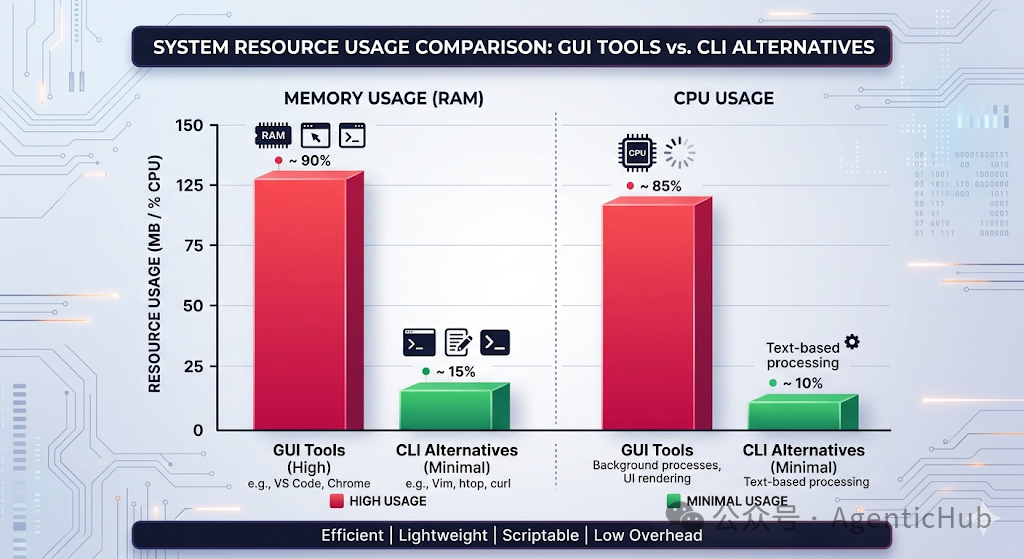
我注意到的模式
这些工具有一个共同点:它们只把一件事做好,然后就不再打扰你。
它们不试图成为 platform,也不试图构建 ecosystem。它们只是能高效解决特定问题的工具。
把这和现代开发工具对比一下:
- Slack:500MB,用来发消息
- VS Code:200MB,用来编辑文本
- Postman:500MB,用来发送 HTTP 请求
- Docker Desktop:2GB,用来运行 container
轻量级替代方案:
- IRC/terminal chat:5MB
- vim/neovim:30MB
- curl + jq:5MB
- Docker CLI:50MB
臃肿来自于你并不需要的功能。GUI、telemetry、自动更新、“integrations”。
大多数时候,你只需要核心功能。其余都是噪音。
什么时候重工具才有意义
我并不是说要抛弃所有 GUI 工具。有时候,它们才是正确选择。
我仍然会使用:
- VS Code 做跨多个文件的 refactoring,language server integration 很有价值
- 与非技术人员协作时用 Postman,shared collection 比 bash script 更容易
- 用标准浏览器调试前端问题,DevTools 不可替代
关键是:当额外的重量确实能带来价值时,再使用重工具。不要因为熟悉,就默认选重工具。
最好的工具,通常是那个能解决你的问题、又不会变成问题本身的最简单工具。
你的轻量级工具箱
想试试这种方式吗?从小处开始:
这周:
- 找一个任务,用 CLI 等价工具替换一个 GUI 工具
- 记录它到底快了多少、轻了多少
- 留意它是否改变了你的工作流
可以尝试的轻量级替代方案:
- 用
curl + jq 替代 Postman,处理 API testing
- 用
ripgrep + fzf 替代 IDE search,做 code search
- 用
entr 替代 file watcher,自动运行命令
- 用
tmux 替代 terminal tabs,管理 session
- 用纯文本替代笔记应用,写 documentation
测试标准:
- 如果这个工具让你更高效,就保留它
- 如果它只是看起来更好,但增加了 friction,就放弃它
- 如果你分辨不出差别,就用更轻的那个
目标不是成为 terminal purist,而是使用那些不会妨碍你的工具,这样你就能专注于真正的工作。
你曾经把哪个重工具换成更轻的方案,而且再也回不去了?欢迎来云栈社区聊聊你的轻量工具箱。
 发表于 2026-9-11 19:24:59
|
查看: 147|
回复: 0
发表于 2026-9-11 19:24:59
|
查看: 147|
回复: 0 /1
/1 


