虽然没有进决赛,还是记录一下吧。相比去年用 UE 的题目,这次推进得已经深入很多了。
1. dump libsec2026
拿到手是一个 Godot 引擎加 godot-cpp 扩展的游戏。引擎版本是 4.5.1,这个版本号很关键——它直接决定后面要对应哪一版源码做 Android逆向 分析,虽然不同版本之间改动通常不大。

assets 目录下可以看到 .gdc 脚本,主要逻辑大概率写在 trigger.gdc、token.gdc 等文件里。但这些 .gdc 被加密了,没法直接用 GDRE 工具解开。
观察两个 so 文件:libgodot-android.so 和 libsec2026.so。libsec2026.so 套了壳,先写个 Frida 脚本 dump 一下:
function dump_so(libName) {
    Java.perform(() => {
        // // 1. 更可靠地获取模块信息
        var libso = Process.getModuleByName(libName);
        if (!libso) {
            var modules = Process.enumerateModules();
            console.log("[+] 已加载的 SO 文件列表 (" + modules.length + " 个):");
            modules.forEach(function(m, i) {
                console.log("  [" + i + "] " + m.name + "  base=" + m.base + "  size=" + m.size + "  path=" + m.path);
            });
            console.error("[!] 错误:未找到模块 libil2cpp.so");
            return;
        }

        // 2. 验证基地址和大小是否合理
        console.log("[+] 模块基址: " + libso.base);
        console.log("[+] 模块大小: " + libso.size);
        if (libso.size <= 0 || libso.size > 0x10000000) { // 大小合理性检查,例如大于256MB则可疑
            console.error("[!] 模块大小异常,可能获取失败");
            return;
        }

        // 3. 安全地设置内存权限并读取
        try {
            // 修改内存权限为可读
            // var originProtection =
            Memory.protect(libso.base, libso.size, 'r--');

            // 关键改进:分块读取内存,避免不连续映射区域导致崩溃
            var chunkSize = 0x1000; // 每次读取4KB
            var totalSize = libso.size;
            var file_path = "/sdcard/download/" + libso.name + "_" + libso.base + "_" + ptr(totalSize) + ".so";
            var file_handle = new File(file_path, "wb");

            if (file_handle) {
                for (var offset = 0; offset < totalSize; offset += chunkSize) {
                    var bytesToRead = Math.min(chunkSize, totalSize - offset);
                    try {
                        // 读取内存块
                        var chunk = libso.base.add(offset).readByteArray(bytesToRead);
                        if (chunk !== null) {
                            file_handle.write(chunk);
                        } else {
                            console.warn("[!] 读取的内存块为空,跳过写入");
                        }
                    } catch (e) {
                        // 如果某一块读取失败,用0填充并继续
                        console.warn("[!] 偏移 0x" + offset.toString(16) + " 处读取失败,用0填充");
                        var zeroBuffer = new ArrayBuffer(bytesToRead);
                        file_handle.write(zeroBuffer);
                    }
                }
                file_handle.flush();
                file_handle.close();
                console.log("[dump] 成功: " + file_path);
            }
        } catch (e) {
            console.error("[!] dump_so 过程中发生异常: " + e.message);
        }
    });
}

console.log("[+] 脚本加载时间: " + new Date().toLocaleTimeString());

setTimeout(() => {
    console.log("[+] 回调执行时间: " + new Date().toLocaleTimeString());
    console.log("[+] 延迟后开始 dump...");
    dump_so("libsec2026.so");
}, 10000); // 延迟500毫秒,可根据实际情况调整
从 so 文件的大小和字符串信息可以判断出:libgodot_android.so 是 Godot 引擎库,libsec2026.so 是 godot-cpp 扩展部分和 native 方法实现。
2. 找到 godot-key
查找 Godot 相关加解密,应该是要找一个 32 位的 AES 密钥,加密模式是 CFB。之前看教程说关键函数是 core/io/file_access_pack.cpp。
相关教程都是通过字符串定位这个构造函数,从而拿到 script_encryption_key:
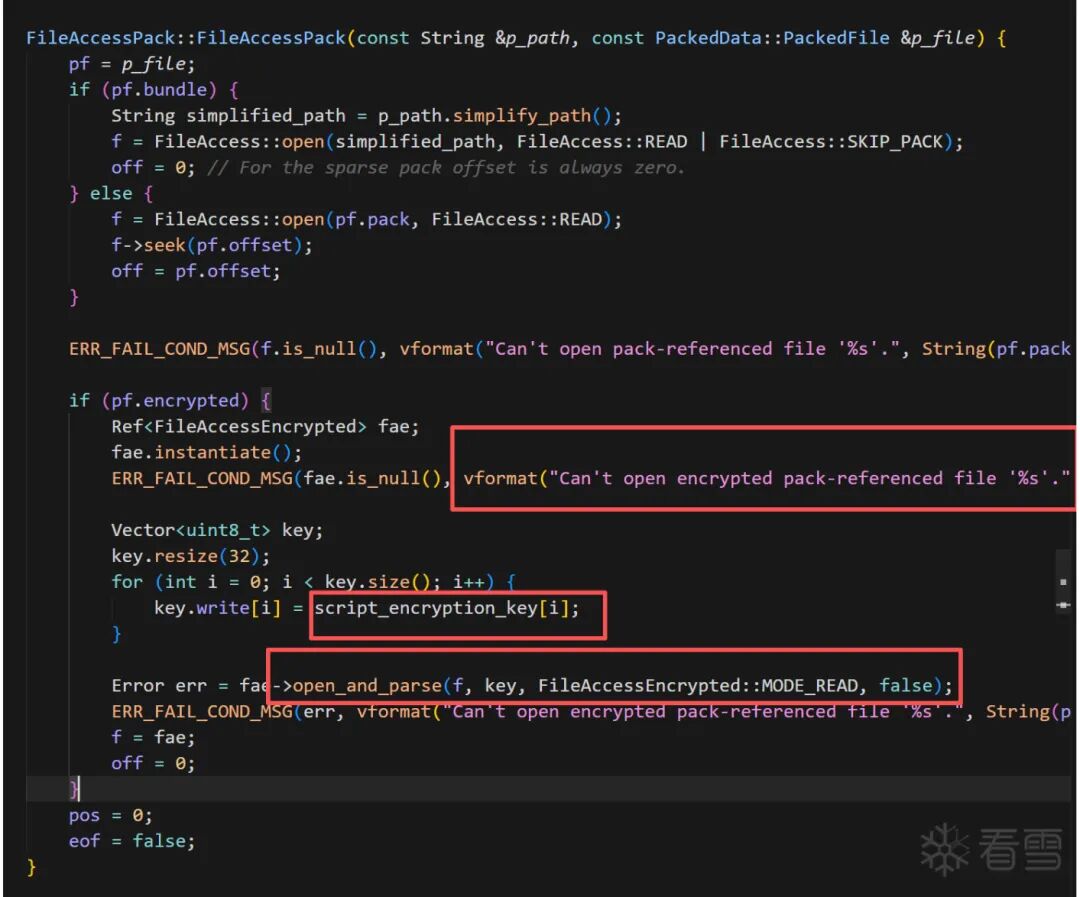
但出题人肯定不能出这么简单,已经把这种字符串信息抹去了。
不过本人虽笨却非常勤快,决定照着源码硬推。这种字符串没有,总有别的字符串——而且秉持着一个信念:源码里在一起的函数和文件,汇编也会在附近。
一番搜索下定位到了 pck_packer.cpp:
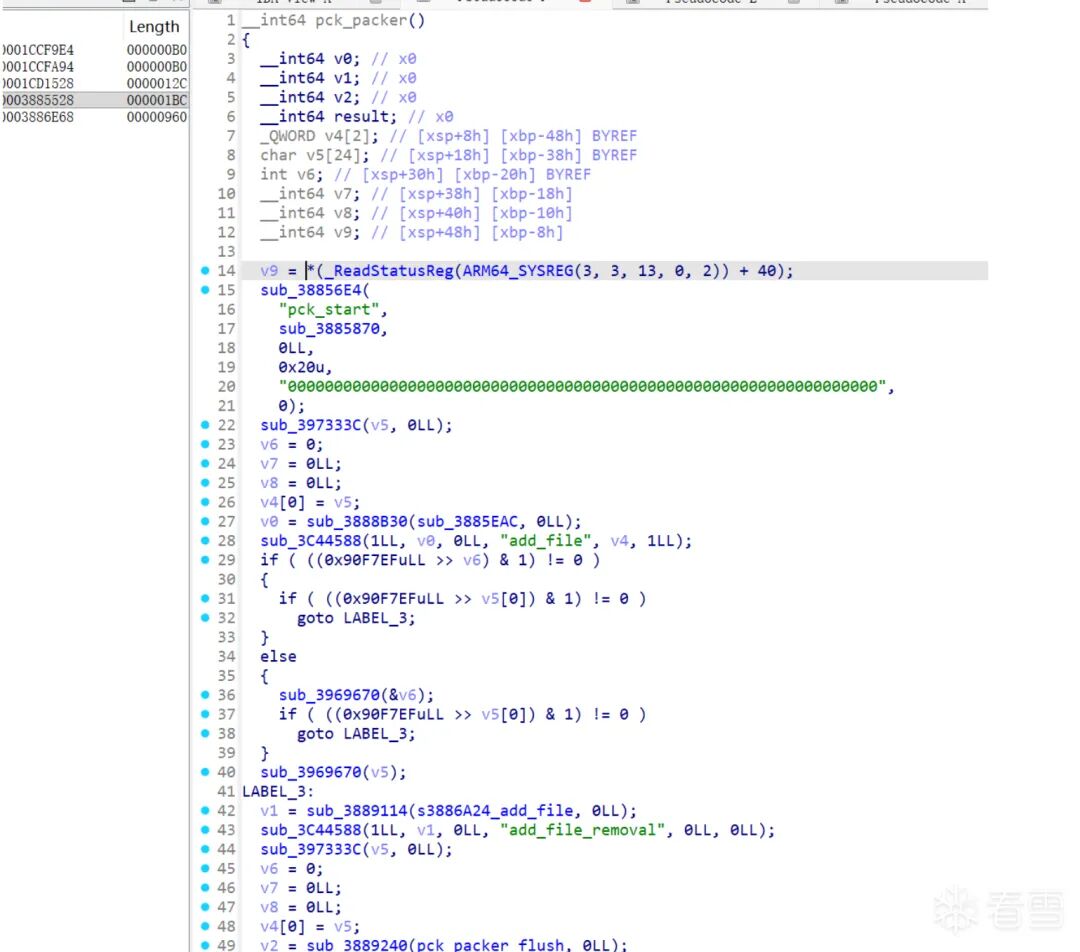
file_access_pack.cpp 是解包部分逻辑,而 pck_packer.cpp 是打包部分逻辑,二者一定有关联:它们都跟 FileAccessEncrypted::open_and_parse 有关,这就缩小了查找范围。可以直接把 pck_packer 的地址和源码给 AI 让它帮我们找这个构造函数。
后面发现还有一些办法:
- 用魔术头
"GDPC" 定位 try_and_open 函数
- 用
"res://" 的交叉引用定位排查等等(不太推荐,很多地方引用)
总之在 AI 强大的能力和努力下,成功获得一系列相关函数地址:
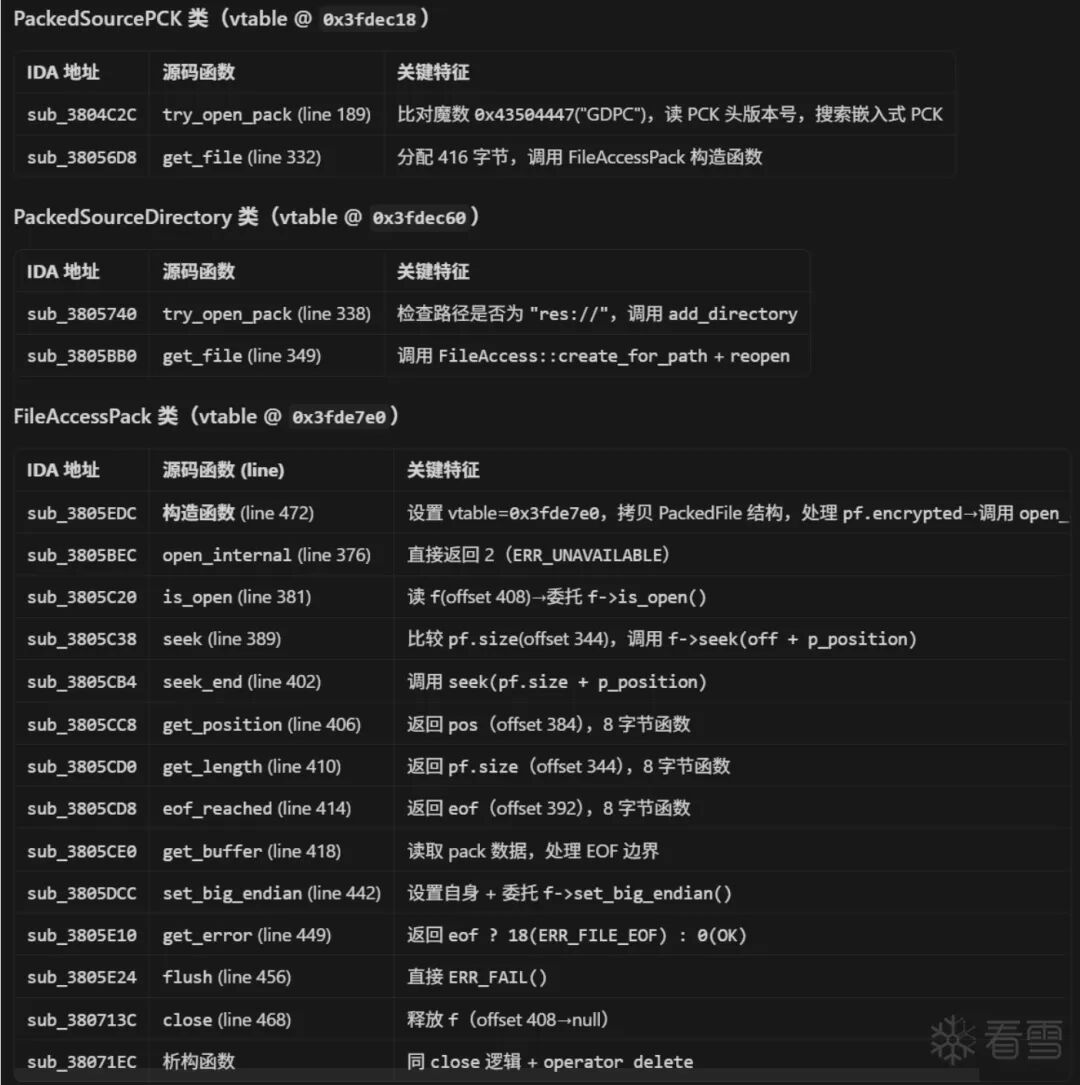
也自然可以直接定位到我们要的 key。这里出题人非常非常善良啊,key 不是动态生成的,直接就给了:

3. 拿到 gd 脚本
但是把 key 输入 GDRE 还是解密失败了,于是再次利用 AI 分析加解密流程,肯定是中间有地方魔改了:
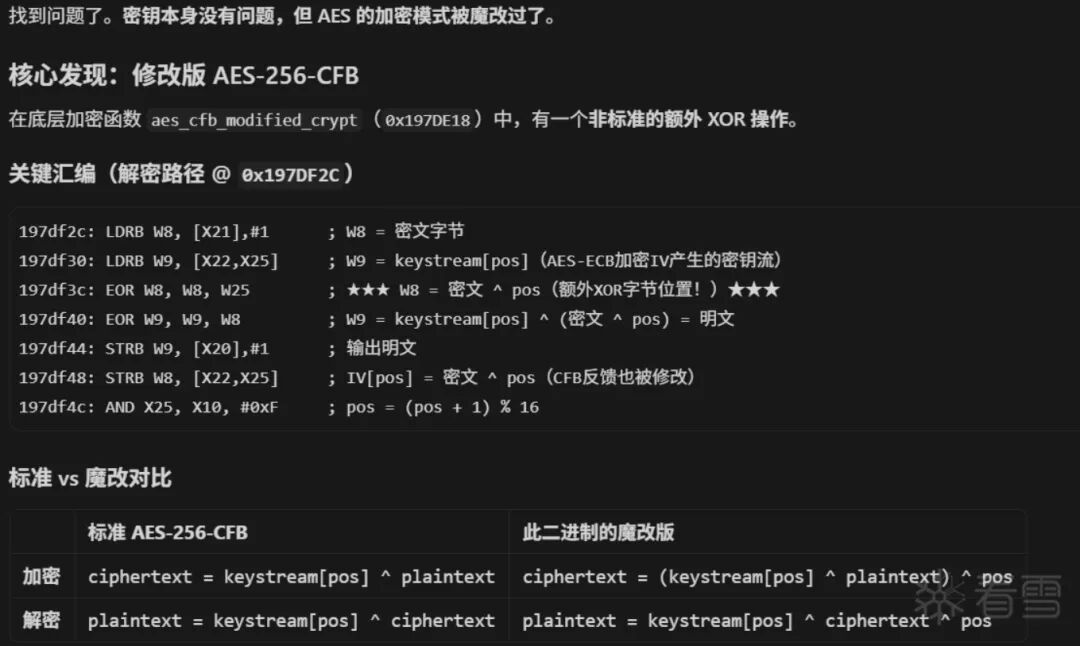
于是再让 AI 搓了一个解密脚本:
#!/usr/bin/env python3
"""Godot 4.x 单文件解密 (修改版 AES-256-CFB)"""

import struct, sys, hashlib
from Crypto.Cipher import AES

KEY = bytes.fromhex("ce4df8753b59a5a39ade58ac07ef947a3da39f2af75e3284d51217c04d49a061")

def decrypt_modified_cfb(key: bytes, iv: bytes, ciphertext: bytes) -> bytes:
    """修改版 CFB: plain[i] = keystream[pos] ^ (cipher[i] ^ pos), pos = i % 16"""
    aes = AES.new(key, AES.MODE_ECB)
    iv_block = bytearray(iv)
    plaintext = bytearray(len(ciphertext))
    pos = 0
    for i in range(len(ciphertext)):
        if pos == 0:
            keystream = bytearray(aes.encrypt(bytes(iv_block)))
        c = ciphertext[i]
        modified = c ^ pos
        plaintext[i] = keystream[pos] ^ modified
        iv_block[pos] = modified
        pos = (pos + 1) & 0xF
    return bytes(plaintext)

def decrypt_file(data: bytes, key: bytes) -> bytes:
    """解密 FileAccessEncrypted 格式: [16B md5][8B length][16B iv][ciphertext]"""
    md5_exp = data[:16]
    length = struct.unpack_from('<Q', data, 16)[0]
    iv = data[24:40]
    ds = length + (16 - length % 16) if length % 16 else length
    plain = decrypt_modified_cfb(key, iv, data[40:40 + ds])[:length]
    if hashlib.md5(plain).digest() != md5_exp:
        raise ValueError("MD5 校验失败 — 密钥错误或数据损坏")
    return plain
解密后的 .gdc 文件头就正常了,放进 GDRE 工具里就可以反编译了。
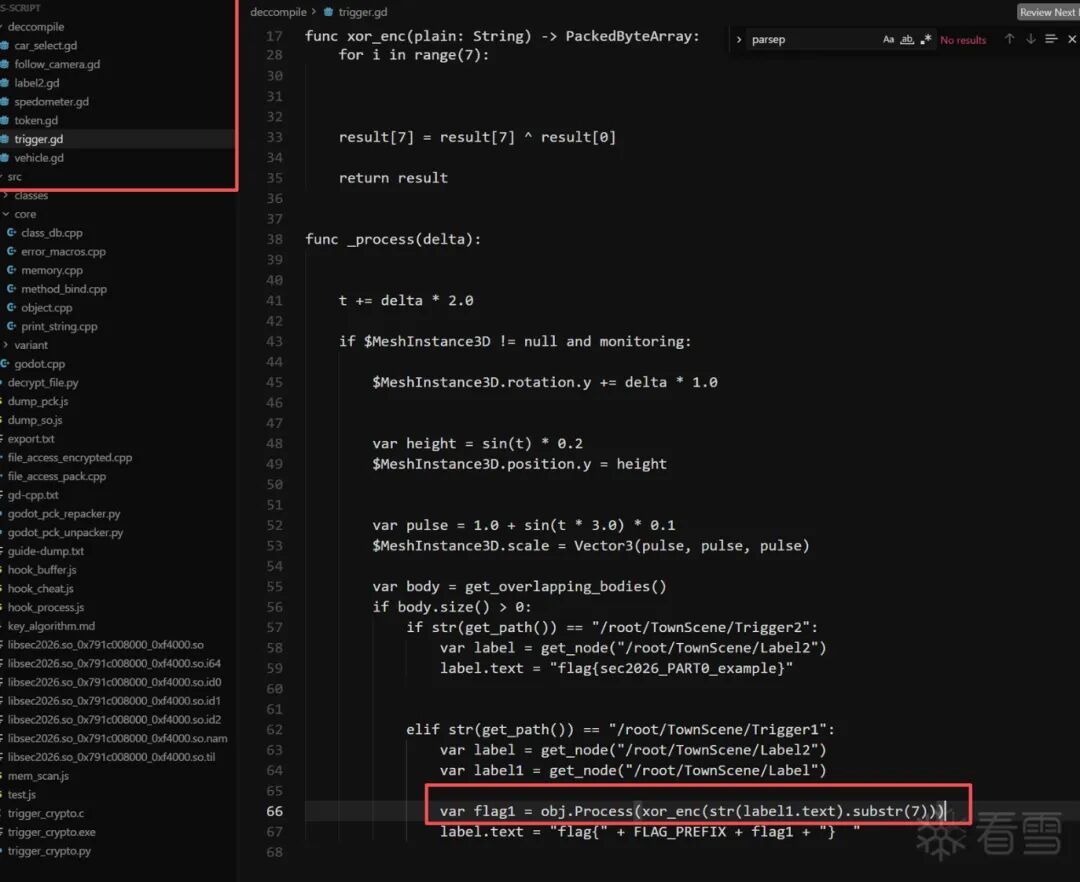
flag 生成逻辑就是先异或一下然后传进 native 层加密:
4. 重打包游戏
但拿到 flag 这一步,其实根本不需要去看 native 层加密逻辑。
这里有了 godotscript 脚本,虽然因为有 cpp 扩展的缘故不能直接放回引擎运行修改,但可以修改 gd 脚本重打包。而且我只是修改,连 parsepck 索引文件都不用重新生成,只用把 trigger.gd 改一下,再用 GDRE 编译一下 .gdc,最后套上刚才那套魔改 AES 加密回去就行了!
这里其实还想了一种更难的方法:如果能找到 godot 引擎 load → call 一个 gd 函数的调用链,然后找到对应地址,就能构造出一个任意 gd 代码注入执行器。太复杂了,没尝试。
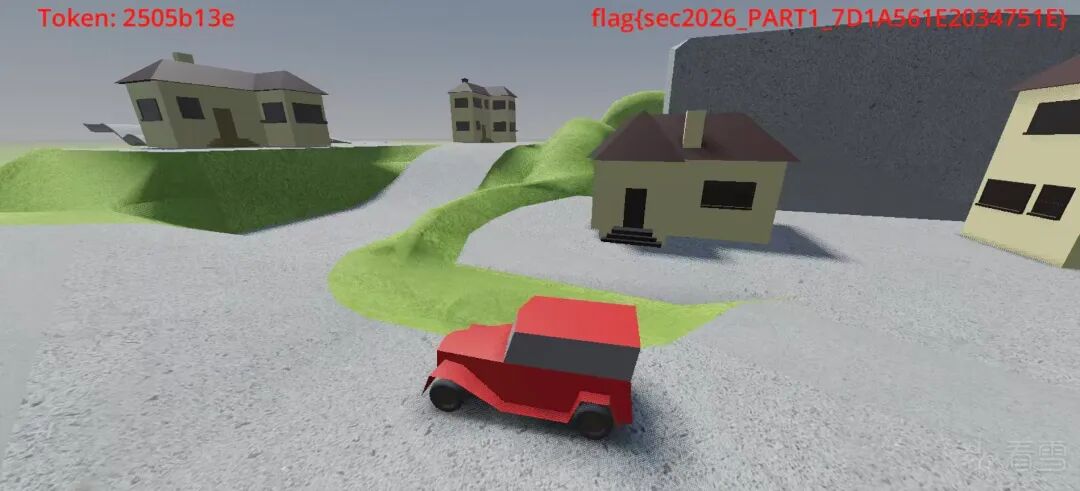
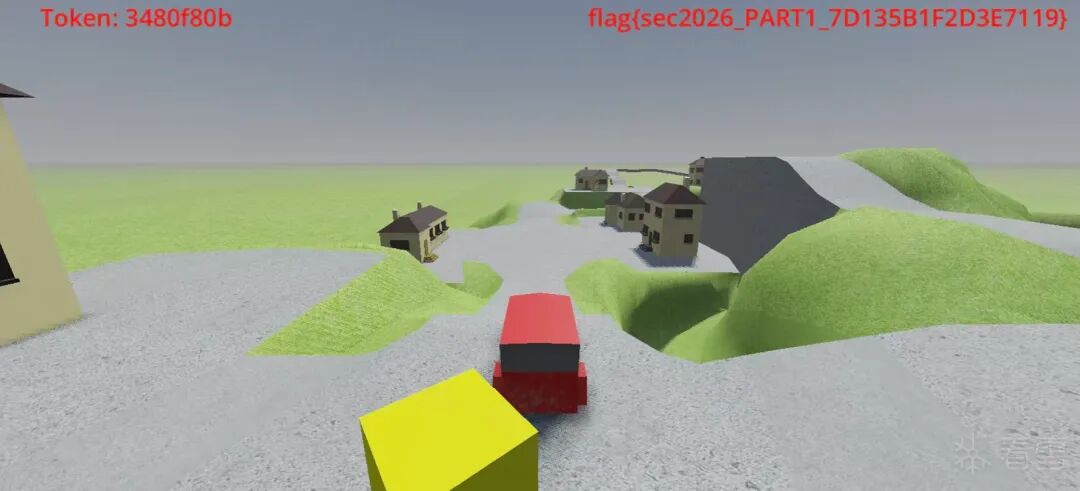
回到 trigger.gd,真的非常好改,连文件大小都不用变。只用把两个碰撞判断的对象调换一下,1 改成 2,这样碰到黄色方块就是拿到 flag,碰到绿色才是示例 flag。改完重打包签名,得到"开挂版"。
下载链接:重打包 apk
5. 找加密函数地址
接下来就是在 libsec2026.so 里找加密函数了。
从字符信息里已经知道 godot-cpp 扩展部分也在这个 so 里,所以再次对应源码分析函数。
之前研究过 unity,感觉 godot 挺像的:gd 脚本去调 cpp 肯定是有个调用链的,比如有一个表存了所有函数地址,然后通过一个接口找到对应地址等等。
所以就是要 hook 这个调用链去拿到函数地址,然后就能看加密逻辑了。
大概就是 classdb 是一个关键的类,最关键的注册方法函数是 classdb_register_extension_class_method(ClassDB::bind_method_godot 会调用)。
定位 godot.cpp 简单,然后根据 godot.cpp 里有引用 ClassDB::deinitialize,推到 classdb 的范围,再从函数特征定位到 ClassDB::bind_method_godot,再让 AI 分析这个函数:
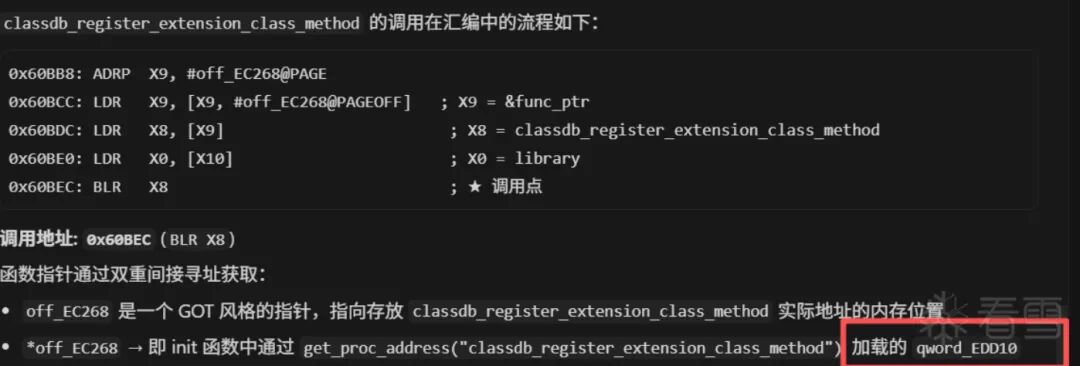
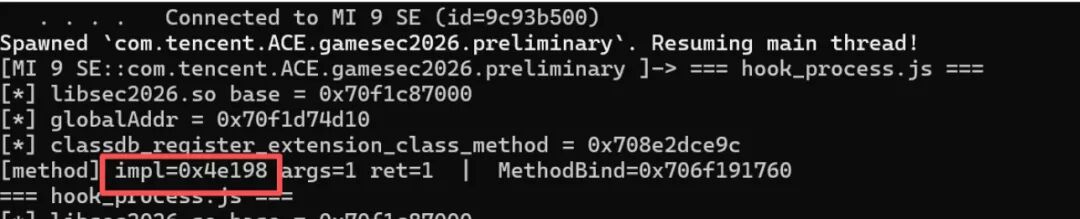
就拿到了 classdb_register_extension_class_method 的偏移,然后就可以 hook 这个函数拿到调用的加密函数地址,减去 base 基址获得加密函数的偏移。
我这里 hook 都写一起了,最后再放完整版。这个版本也是几次拿到回显然后让 AI 调整后的:
const CLASSDB_REG_METHOD_GLOBAL = 0xEDD10;

// GDExtensionClassMethodInfo 结构体布局 (ARM64):
//   +0x00  name              (StringName*)
//   +0x08  method_userdata   (MethodBind*)
//   +0x10  call_func         (bind_call)
//   +0x18  ptrcall_func      (bind_ptrcall)
//   +0x20  method_flags      (u32)
//   +0x24  has_return_value   (u8)
//   +0x28  return_value_info  (ptr)
//   +0x30  return_value_metadata (i32)
//   +0x34  argument_count    (u32)

function readPtrAt(addr) {
    var lo = addr.readU32() >>> 0;
    var hi = addr.add(4).readU32() >>> 0;
    return ptr("0x" + hi.toString(16) + ("00000000" + lo.toString(16)).slice(-8));
}

function off(p) {
    return "0x" + p.sub(base).toString(16);
}

var base;

function hookRegistration() {
    var globalAddr = base.add(CLASSDB_REG_METHOD_GLOBAL);
    var funcPtr = globalAddr.readPointer();
    console.log(" globalAddr = " + globalAddr);
    console.log(" classdb_register_extension_class_method = " + funcPtr);

    Interceptor.attach(funcPtr, {
        onEnter: function (args) {
            var info       = args[2];
            var methodBind = readPtrAt(info.add(0x08));
            var argCount   = info.add(0x34).readU32();
            var hasReturn  = info.add(0x24).readU8();

            // MethodBind+0x50 = 实际方法函数指针 (ptrcall path 从这里 LDP)
            var realFunc = readPtrAt(methodBind.add(0x50));

            console.log("[method] impl=" + off(realFunc) +
                        " args=" + argCount + " ret=" + hasReturn +
                        "  |  MethodBind=" + methodBind);
        },
        onLeave: function (retval) {
            var keyAddr = base.add(0xED5D2);
            var nonceAddr = base.add(0xED5F3);
            console.log("[key]   " + hexdump(keyAddr, { length: 32, ansi: false }));
            console.log("[nonce] " + hexdump(nonceAddr, { length: 12, ansi: false }));
        }
    });
}
运行一下拿到这个地址:
6. 分析复现加密函数
这里有个混淆跳转,反正最后加密逻辑在 0x4E548:
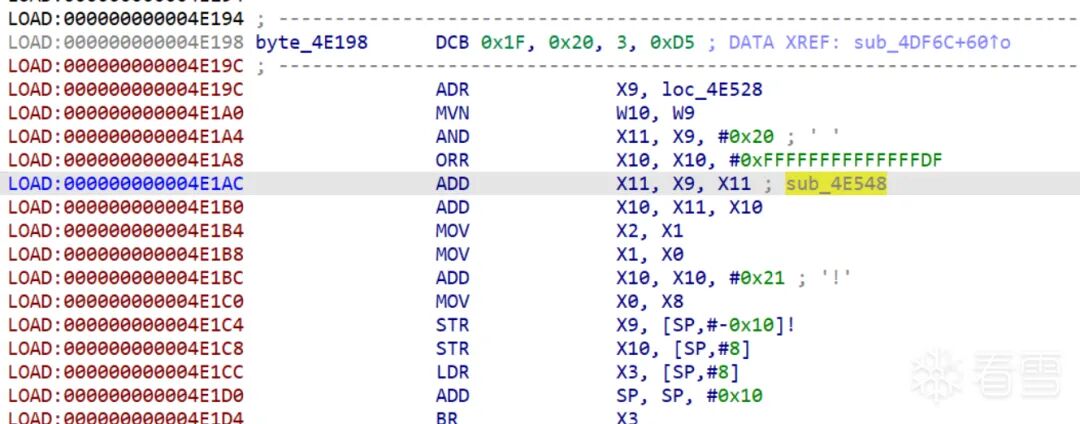
实话说,拿到加密函数地址以后就全依靠 AI 了。AI 分析出是 chacha20 流密码加密,还有 key 和 nonce 的地址(0xED5D2,0xED5F3)。
但第一次复现加密结果对不上,就动态去看 key、nonce 有没有更改——都已经触发 flag 生成以后还是没有变。
所以认为这个 "Th1s ls n0t a rea1 key!!@sec2026" 是个烟雾弹。这确实就是 key,只是加密算法又被动过手脚了(不知道是不是这里做错了,但确实复现出来的 flag 跟游戏里显示的对上了,当时就觉得应该没问题)。
// 标准 ChaCha20 的 16 个 u32 state 布局是:
// state[0..3]  = "expand 32-byte k"  (常量 0x61707865, 0x3320646e, 0x79622d32, 0x6b206574)
// state[4..11] = key (8 个 u32)
// state[12]    = counter
// state[13..15]= nonce (3 个 u32)
所以直接把这块内存都打印出来:
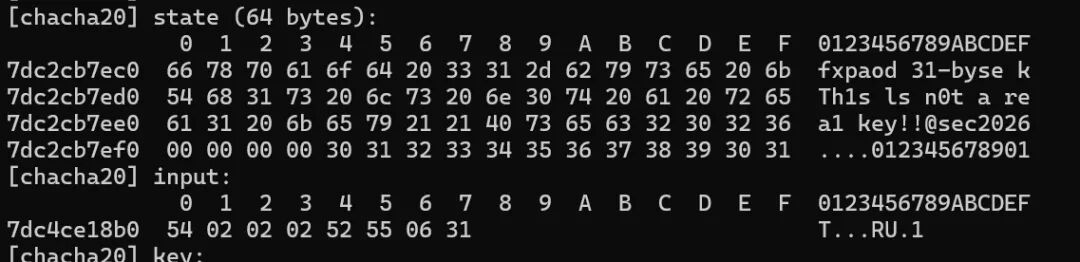
发现魔改的地方:
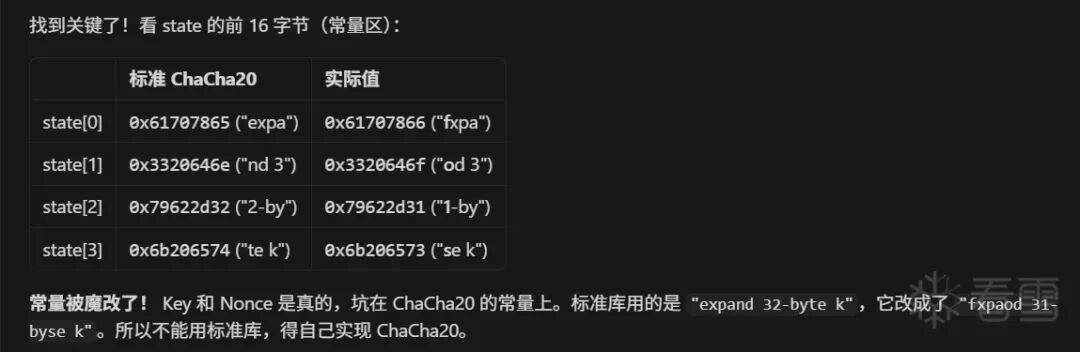
然后让 AI 复现加解密过程就可以了。
hook 脚本:
"use strict";

// classdb_register_extension_class_method 函数指针的存储地址 (IDA中的 qword_EDD10)
// 注意: qword_EDD08 是 classdb_register_extension_class5 (不同的函数)
// off_EC268 (GOT) → qword_EDD10 → 实际函数地址
const CLASSDB_REG_METHOD_GLOBAL = 0xEDD10;

// GDExtensionClassMethodInfo 结构体布局 (ARM64):
//   +0x00  name              (StringName*)
//   +0x08  method_userdata   (MethodBind*)
//   +0x10  call_func         (bind_call)
//   +0x18  ptrcall_func      (bind_ptrcall)
//   +0x20  method_flags      (u32)
//   +0x24  has_return_value   (u8)
//   +0x28  return_value_info  (ptr)
//   +0x30  return_value_metadata (i32)
//   +0x34  argument_count    (u32)

function readPtrAt(addr) {
    var lo = addr.readU32() >>> 0;
    var hi = addr.add(4).readU32() >>> 0;
    return ptr("0x" + hi.toString(16) + ("00000000" + lo.toString(16)).slice(-8));
}

function off(p) {
    return "0x" + p.sub(base).toString(16);
}

var base;

function hookRegistration() {
    var globalAddr = base.add(CLASSDB_REG_METHOD_GLOBAL);
    var funcPtr = globalAddr.readPointer();
    console.log(" globalAddr = " + globalAddr);
    console.log(" classdb_register_extension_class_method = " + funcPtr);

    Interceptor.attach(funcPtr, {
        onEnter: function (args) {
            var info       = args[2];
            var methodBind = readPtrAt(info.add(0x08));
            var argCount   = info.add(0x34).readU32();
            var hasReturn  = info.add(0x24).readU8();

            // MethodBind+0x50 = 实际方法函数指针 (ptrcall path 从这里 LDP)
            var realFunc = readPtrAt(methodBind.add(0x50));

            console.log("[method] impl=" + off(realFunc) +
                        " args=" + argCount + " ret=" + hasReturn +
                        "  |  MethodBind=" + methodBind);
        },
        onLeave: function (retval) {
            var keyAddr = base.add(0xED5D2);
            var nonceAddr = base.add(0xED5F3);
            console.log("[key]   " + hexdump(keyAddr, { length: 32, ansi: false }));
            console.log("[nonce] " + hexdump(nonceAddr, { length: 12, ansi: false }));
        }
    });
}

function hookChaCha20XOR() {
    // sub_5B950 = ChaCha20_XOR(state, input, output, size)
    // 混淆跳板: 实际入口 = 0x5B950 + 0x20
    var xorFunc = base.add(0x5B950);
    console.log(" hooking ChaCha20_XOR at " + xorFunc);

    Interceptor.attach(xorFunc, {
        onEnter: function (args) {
            var statePtr = args[0];
            var inputPtr = args[1];
            var size = args[3].toInt32();

            // ChaCha20 state: 16 x uint32 = 64 bytes
            // [0..3]   = "expand 32-byte k" constants
            // [4..11]  = key (32 bytes)
            // [12]     = counter
            // [13..15] = nonce (12 bytes)
            console.log("[chacha20] size=" + size);
            console.log("[chacha20] state (64 bytes):\n" +
                        hexdump(statePtr, { length: 64, ansi: false }));
            console.log("[chacha20] input:\n" +
                        hexdump(inputPtr, { length: size, ansi: false }));

            // 解析 state 中的 key 和 nonce
            var key = statePtr.add(16).readByteArray(32);   // state[4..11]
            var nonce = statePtr.add(52).readByteArray(12);  // state[13..15]
            var counter = statePtr.add(48).readU32();        // state[12]
            console.log("[chacha20] key:\n" + hexdump(key, { ansi: false }));
            console.log("[chacha20] nonce:\n" + hexdump(nonce, { ansi: false }));
            console.log("[chacha20] counter=" + counter);

            this.outputPtr = args[2];
            this.size = size;
        },
        onLeave: function (retval) {
            if (this.size > 0) {
                console.log("[chacha20] output:\n" +
                            hexdump(this.outputPtr, { length: this.size, ansi: false }));
            }
        }
    });
}

function main() {
    console.log("=== hook_process.js ===");
    base = Process.getModuleByName("libsec2026.so").base;
    console.log(" libsec2026.so base = " + base);
    hookRegistration();
    hookChaCha20XOR();
}

setTimeout(main, 1000);
复现 flag 算法脚本:
#include <stdio.h>
#include <stdint.h>
#include <string.h>
#include <stdlib.h>

static const uint8_t KEY[32]   = "Th1s ls n0t a rea1 key!!@sec2026";
static const uint8_t NONCE[12] = "012345678901";
static const char FLAG_PREFIX[] = "sec2026_PART1_";

static const uint32_t CONSTANTS[4] = {
    0x61707866, 0x3320646f, 0x79622d31, 0x6b206573
};

static inline uint32_t rotl32(uint32_t v, int n){
    return (v << n) | (v >> (32 - n));
}

static void quarter_round(uint32_t s[16], int a, int b, int c, int d){
    s[a] += s[b]; s[d] ^= s[a]; s[d] = rotl32(s[d], 16);
    s[c] += s[d]; s[b] ^= s[c]; s[b] = rotl32(s[b], 12);
    s[a] += s[b]; s[d] ^= s[a]; s[d] = rotl32(s[d],  8);
    s[c] += s[d]; s[b] ^= s[c]; s[b] = rotl32(s[b],  7);
}

static void chacha20_block(const uint8_t key[32], uint32_t counter,
                           const uint8_t nonce[12], uint8_t out[64]){
    uint32_t state[16], work[16];

    state[0] = CONSTANTS[0];
    state[1] = CONSTANTS[1];
    state[2] = CONSTANTS[2];
    state[3] = CONSTANTS[3];

    for (int i = 0; i < 8; i++)
        memcpy(&state[4 + i], key + i * 4, 4);

    state[12] = counter;

    for (int i = 0; i < 3; i++)
        memcpy(&state[13 + i], nonce + i * 4, 4);

    memcpy(work, state, sizeof(state));

    for (int i = 0; i < 10; i++) {
        quarter_round(work, 0, 4,  8, 12);
        quarter_round(work, 1, 5,  9, 13);
        quarter_round(work, 2, 6, 10, 14);
        quarter_round(work, 3, 7, 11, 15);
        quarter_round(work, 0, 5, 10, 15);
        quarter_round(work, 1, 6, 11, 12);
        quarter_round(work, 2, 7,  8, 13);
        quarter_round(work, 3, 4,  9, 14);
    }

    for (int i = 0; i < 16; i++) {
        uint32_t val = work[i] + state[i];
        memcpy(out + i * 4, &val, 4);
    }
}

static void chacha20(const uint8_t *data, size_t len, uint8_t *out,
                     const uint8_t key[32], const uint8_t nonce[12],
                     uint32_t counter){
    uint8_t block[64];
    for (size_t off = 0; off < len; off += 64) {
        chacha20_block(key, counter + (uint32_t)(off / 64), nonce, block);
        size_t chunk = (len - off < 64) ? (len - off) : 64;
        for (size_t j = 0; j < chunk; j++)
            out[off + j] = data[off + j] ^ block[j];
    }
}

static void xor_enc(const char *plain, uint8_t buf[8]){
    memset(buf, 0, 8);
    size_t slen = strlen(plain);
    if (slen > 8) slen = 8;
    memcpy(buf, plain, slen);

    for (int i = 0; i < 7; i++)
        buf[i] ^= buf[i + 1];
    buf[7] ^= buf[0];
}

static void xor_dec(uint8_t buf[8]){
    buf[7] ^= buf[0];
    for (int i = 6; i >= 0; i--)
        buf[i] ^= buf[i + 1];
}

static void print_hex(const char *label, const uint8_t *data, size_t len){
    printf("%s", label);
    for (size_t i = 0; i < len; i++)
        printf("%02x%s", data[i], i + 1 < len ? " " : "");
    printf("\n");
}

int main(int argc, char *argv[]){
    if (argc < 2) {
        printf("Usage: %s <plaintext>\n", argv[0]);
        return 1;
    }
    const char *test_input = argv[1];
    printf("plaintext:     %s\n", test_input);

    uint8_t xored[8];
    xor_enc(test_input, xored);
    print_hex("xor_enc:  ", xored, 8);

    uint8_t encrypted[8];
    chacha20(xored, 8, encrypted, KEY, NONCE, 0);
    print_hex("ChaCha20: ", encrypted, 8);

    uint8_t decrypted[8];
    chacha20(encrypted, 8, decrypted, KEY, NONCE, 0);
    print_hex("decrypted:     ", decrypted, 8);

    uint8_t recovered[8];
    memcpy(recovered, decrypted, 8);
    xor_dec(recovered);

    size_t end = 8;
    while (end > 0 && recovered[end - 1] == 0) end--;
    printf("recovered: %.*s\n", (int)end, recovered);

    return 0;
}
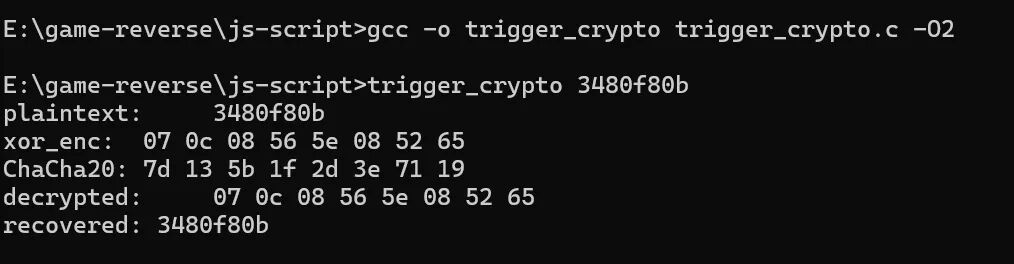
看样子是复现成功了吧:
 发表于 2 小时前
|
查看: 5|
回复: 0
发表于 2 小时前
|
查看: 5|
回复: 0

