你是否梦想过用手势操控动态的粒子星云,就像《奇异博士》中的魔法场景?本教程将展示如何利用Three.js的3D图形能力和MediaPipe的AI视觉技术,在网页端实现一个实时交互的3D手势粒子系统。
效果预览
系统构建了一个实时交互的3D粒子环境:
- 视觉表现:由20,000个粒子组成的动态模型,支持爱心、土星、佛像等多种形状。
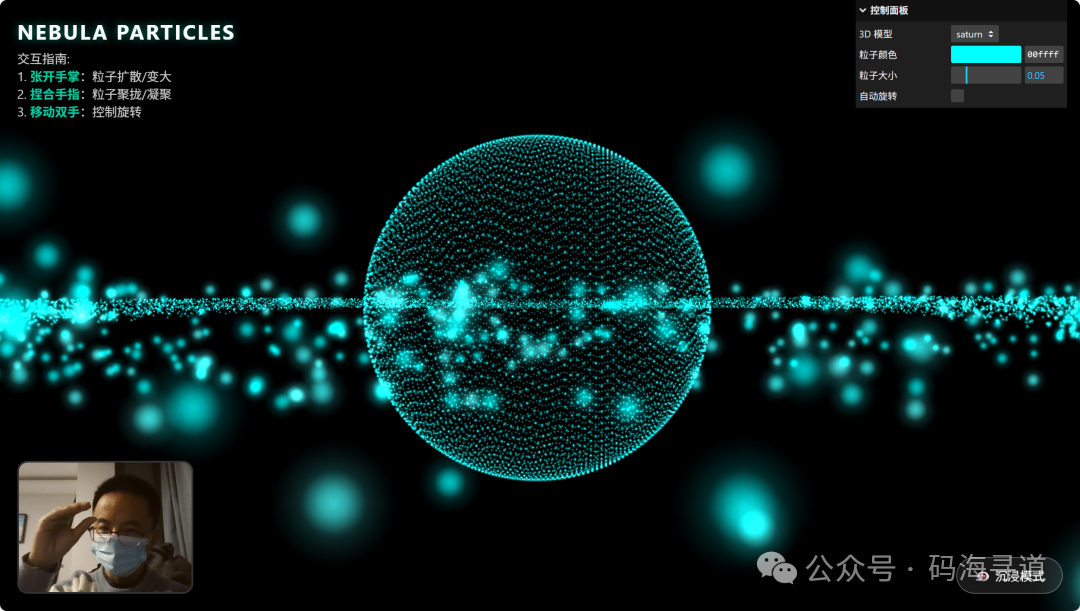
- 交互方式:通过摄像头捕捉手势,张开手掌使粒子扩散,捏合手指让粒子凝聚。
- 技术栈:Three.js + Google MediaPipe + Lil-GUI。
效果演示如下:
手指捏合:粒子凝聚
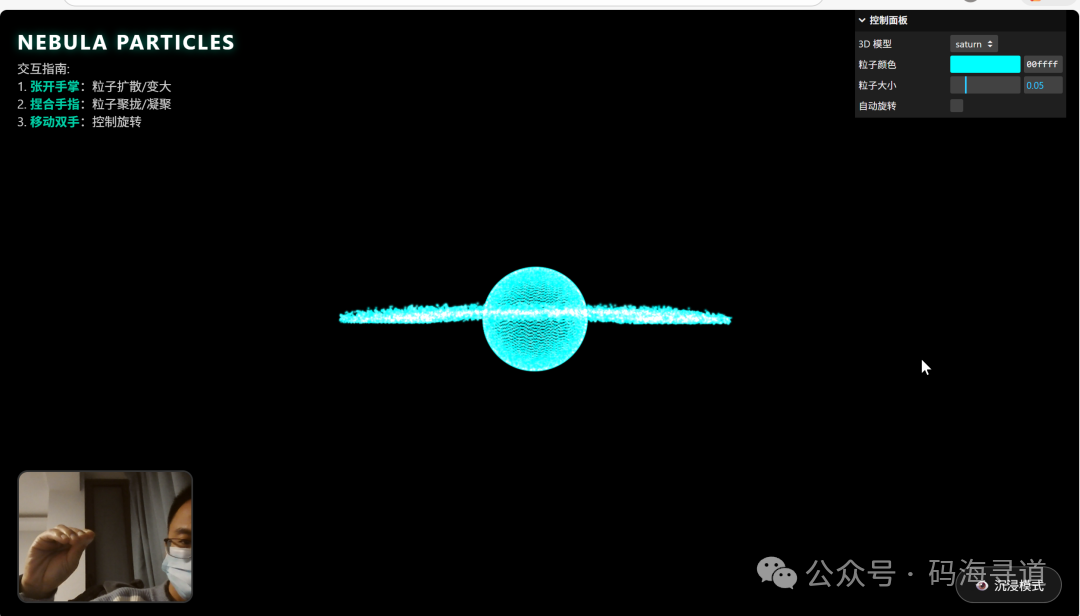
张开手掌:粒子扩散
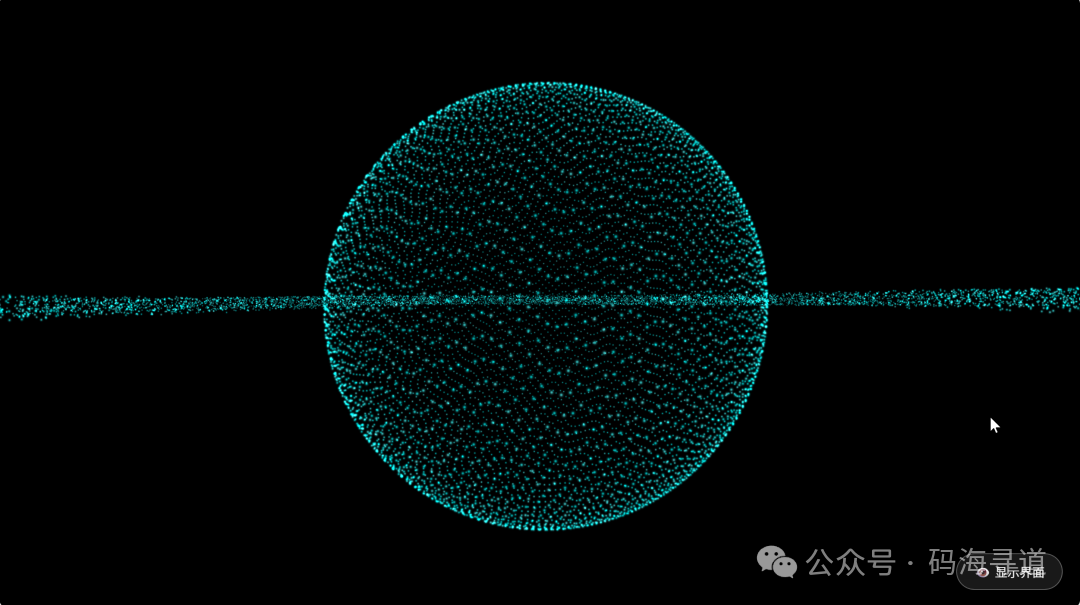
沉浸模式:隐藏参数界面
核心技术拆解
1. 粒子系统的构建:数学驱动的高效渲染
直接创建大量Mesh对象会导致性能崩溃。高效方案是使用THREE.Points和BufferGeometry,通过数学公式动态生成粒子坐标。
所有形状均基于参数方程生成,例如3D爱心的坐标计算:
const Shapes = {
  heart: (i, count) => {
    const t = (i / count) * Math.PI * 2 * 10;
    const x = 16 * Math.pow(Math.sin(t), 3);
    const y = 13 * Math.cos(t) - 5 * Math.cos(2*t) - 2 * Math.cos(3*t) - Math.cos(4*t);
    const z = (Math.random() - 0.5) * 10; // 增加厚度
    return new THREE.Vector3(x * 0.1, y * 0.1, z * 0.1);
  },
  // 其他形状...
};
关键技巧:使用Canvas动态生成的径向渐变贴图作为粒子纹理,并启用AdditiveBlending混合模式,使粒子重叠处产生发光效果。
系统通过Google MediaPipe精准识别手部的21个关键点骨架,取代传统的色彩追踪方法。
初始化配置需注意GPU加速:
const handLandmarker = await HandLandmarker.createFromOptions(vision, {
  baseOptions: {
    modelAssetPath: `.../hand_landmarker.task`,
    delegate: "GPU" // 启用GPU加速
  },
  runningMode: "VIDEO",
  numHands: 2
});
避坑指南:务必确保视频流已初始化(video.videoWidth > 0),否则MediaPipe可能因内部错误而崩溃。
3. 交互逻辑:从手势到粒子运动的映射
核心是计算手势的交互强度因子,将食指与拇指指尖的距离映射到粒子扩散系数。
计算示例:
// 获取指尖坐标(索引8为食指,4为拇指)
const distance = Math.sqrt(
  Math.pow(thumb.x - index.x, 2) + Math.pow(thumb.y - index.y, 2)
);

// 归一化处理:距离越大(张开),因子越接近1;距离越小(捏合),因子越接近0
let factor = Math.min(Math.max((distance - 0.02) / 0.15, 0), 1);

// 使用线性插值平滑过渡,避免突变
CONFIG.interactionStrength = THREE.MathUtils.lerp(CONFIG.interactionStrength, factor, 0.1);
4. 渲染循环:基于目标位置的粒子动画
在requestAnimationFrame循环中,采用“目标位置混合”策略高效模拟粒子运动:
- Target Position:粒子的原始形状坐标。
- Current Position:粒子的当前位置。
- Spread:由手势控制的扩散系数。
更新逻辑:
let targetSpread = 0.5; // 默认松散度

if (isHandDetected) {
  targetSpread = 0.2 + (interactionStrength * 2.5); // 手势控制扩散
}

// 逐个更新粒子位置,0.05为阻尼系数
pos[ix] += ((tx * targetSpread + noise) - pos[ix]) * 0.05;
这种方法以极小计算量模拟出带有弹性和阻尼的物理手感。
性能优化关键点
- 几何体复用:切换模型时仅更新
position属性数组,避免频繁垃圾回收。
- GPU加速:MediaPipe运行在GPU上,不阻塞JavaScript主线程。
- 动态纹理:使用Canvas生成粒子贴图,无需外部图片加载。
完整实现代码
以下为完整的HTML代码,可直接运行体验:
<!DOCTYPE html>
<html lang="zh-CN">
<head>
    <meta charset="UTF-8">
    <meta name="viewport" content="width=device-width, initial-scale=1.0">
    <title>3D 手势粒子交互系统</title>
    <style>
        body { margin: 0; overflow: hidden; background: #000; font-family: 'Segoe UI', sans-serif; }
        #loader {
            position: absolute; top: 0; left: 0; width: 100%; height: 100%;
            background: #000; display: flex; flex-direction: column;
            justify-content: center; align-items: center; z-index: 999;
            color: #00ffcc; transition: opacity 0.5s;
        }
        .spinner {
            width: 50px; height: 50px; border: 3px solid rgba(0,255,204,0.3);
            border-radius: 50%; border-top-color: #00ffcc;
            animation: spin 1s ease-in-out infinite; margin-bottom: 20px;
        }
        @keyframes spin { to { transform: rotate(360deg); } }
        #webcam-container {
            position: absolute; bottom: 20px; left: 20px; width: 200px; height: 150px;
            border-radius: 12px; overflow: hidden; border: 2px solid rgba(255,255,255,0.2);
            box-shadow: 0 0 20px rgba(0,0,0,0.5); z-index: 10; transform: scaleX(-1);
        }
        video { width: 100%; height: 100%; object-fit: cover; }
        #ui-layer {
            position: absolute; top: 20px; left: 20px; color: white; z-index: 5;
            pointer-events: none; transition: opacity 0.3s;
        }
        #toggle-ui-btn {
            position: absolute; bottom: 20px; right: 20px;
            background: rgba(255,255,255,0.1); border: 1px solid rgba(255,255,255,0.3);
            color: white; padding: 10px 20px; border-radius: 30px; cursor: pointer;
            backdrop-filter: blur(5px); transition: all 0.3s; z-index: 10;
        }
        #toggle-ui-btn:hover { background: rgba(0,255,204,0.3); border-color: #00ffcc; }
        .ui-hidden #ui-layer, .ui-hidden #webcam-container, .ui-hidden .lil-gui {
            opacity: 0; pointer-events: none;
        }
    </style>
</head>
<body>
    <div id="loader">
        <div class="spinner"></div>
        <div id="loading-text">正在初始化 AI 视觉引擎...</div>
    </div>
    <div id="webcam-container">
        <video id="webcam" autoplay playsinline muted></video>
    </div>
    <div id="ui-layer">
        <h1>NEBULA PARTICLES</h1>
        <p>交互指南: <br>
        1. <span class="highlight">张开手掌</span>:粒子扩散/变大<br>
        2. <span class="highlight">捏合手指</span>:粒子聚拢/凝聚<br>
        3. <span class="highlight">移动双手</span>:控制旋转</p>
    </div>
    <button id="toggle-ui-btn" onclick="toggleUI()">👁️ 沉浸模式</button>
    <script type="importmap">
        {
            "imports": {
                "three": "https://cdn.jsdelivr.net/npm/three@0.160.0/build/three.module.js",
                "three/addons/": "https://cdn.jsdelivr.net/npm/three@0.160.0/examples/jsm/",
                "@mediapipe/tasks-vision": "https://cdn.jsdelivr.net/npm/@mediapipe/tasks-vision@0.10.9/+esm",
                "lil-gui": "https://unpkg.com/lil-gui@0.19.1/dist/lil-gui.esm.min.js"
            }
        }
    </script>
    <script type="module">
        import * as THREE from 'three';
        import { OrbitControls } from 'three/addons/controls/OrbitControls.js';
        import { FilesetResolver, HandLandmarker } from '@mediapipe/tasks-vision';
        import GUI from 'lil-gui';

        const CONFIG = {
            particleCount: 20000,
            particleSize: 0.05,
            color: '#00ffff',
            model: 'heart',
            interactionStrength: 0.0,
            handDetected: false,
            rotationSpeed: 0.001
        };

        let scene, camera, renderer, particles, geometry, material;
        let handLandmarker, webcam;
        let positionsOriginal = [];
        let currentPositions = [];
        const clock = new THREE.Clock();

        const Shapes = {
            heart: (i, count) => {
                const t = (i / count) * Math.PI * 2 * 10;
                const x = 16 * Math.pow(Math.sin(t), 3);
                const y = 13 * Math.cos(t) - 5 * Math.cos(2*t) - 2 * Math.cos(3*t) - Math.cos(4*t);
                const z = (Math.random() - 0.5) * 10;
                return new THREE.Vector3(x * 0.1, y * 0.1, z * 0.1);
            },
            sphere: (i, count) => {
                const phi = Math.acos(-1 + (2 * i) / count);
                const theta = Math.sqrt(count * Math.PI) * phi;
                const r = 1.5 + Math.random() * 0.2;
                return new THREE.Vector3(
                    r * Math.cos(theta) * Math.sin(phi),
                    r * Math.sin(theta) * Math.sin(phi),
                    r * Math.cos(phi)
                );
            },
            flower: (i, count) => {
                const theta = i * 0.1;
                const r = Math.sin(5 * theta) + 2;
                const y = (Math.random() - 0.5) * 1;
                const scale = 0.5;
                return new THREE.Vector3(r * Math.cos(theta) * scale, y, r * Math.sin(theta) * scale);
            },
            saturn: (i, count) => {
                const isRing = i > count * 0.4;
                if (isRing) {
                    const angle = Math.random() * Math.PI * 2;
                    const radius = 2.0 + Math.random() * 1.5;
                    return new THREE.Vector3(Math.cos(angle) * radius, (Math.random() - 0.5) * 0.1, Math.sin(angle) * radius);
                } else {
                    const phi = Math.acos(-1 + (2 * i) / (count * 0.4));
                    const theta = Math.sqrt(count * Math.PI) * phi;
                    const r = 1.0;
                    return new THREE.Vector3(r * Math.cos(theta) * Math.sin(phi), r * Math.sin(theta) * Math.sin(phi), r * Math.cos(phi));
                }
            },
            buddha: (i, count) => {
                const p = i / count;
                let center = new THREE.Vector3();
                let r = 1;
                if (p < 0.2) {
                    center.set(0, 1.2, 0); r = 0.5;
                } else if (p < 0.6) {
                    center.set(0, 0, 0); r = 1.0;
                } else {
                    center.set(0, -1.0, 0); r = 1.2;
                }
                const u = Math.random(); const v = Math.random();
                const theta = 2 * Math.PI * u; const phi = Math.acos(2 * v - 1);
                let x = center.x + r * Math.sin(phi) * Math.cos(theta);
                let y = center.y + r * Math.sin(phi) * Math.sin(theta);
                let z = center.z + r * Math.cos(phi);
                if (p >= 0.6) y *= 0.5;
                return new THREE.Vector3(x, y, z);
            },
            fireworks: (i, count) => {
                const theta = Math.random() * Math.PI * 2;
                const phi = Math.acos(Math.random() * 2 - 1);
                const r = Math.random() * 3 + 0.5;
                return new THREE.Vector3(r * Math.sin(phi) * Math.cos(theta), r * Math.sin(phi) * Math.sin(theta), r * Math.cos(phi));
            }
        };

        async function init() {
            scene = new THREE.Scene();
            scene.fog = new THREE.FogExp2(0x000000, 0.05);
            camera = new THREE.PerspectiveCamera(75, window.innerWidth / window.innerHeight, 0.1, 100);
            camera.position.z = 4;
            renderer = new THREE.WebGLRenderer({ antialias: true, alpha: true });
            renderer.setSize(window.innerWidth, window.innerHeight);
            renderer.setPixelRatio(window.devicePixelRatio);
            document.body.appendChild(renderer.domElement);
            const controls = new OrbitControls(camera, renderer.domElement);
            controls.enableDamping = true;
            controls.autoRotate = true;
            controls.autoRotateSpeed = 1.0;

            createParticles(CONFIG.model);
            setupGUI(controls);
            try {
                await setupMediaPipe();
                document.getElementById('loader').style.opacity = '0';
                setTimeout(() => document.getElementById('loader').style.display = 'none', 500);
            } catch (err) {
                console.error("AI Init Failed:", err);
                document.getElementById('loading-text').innerText = "AI 加载失败,请检查浏览器或网络";
            }
            window.addEventListener('resize', onWindowResize);
            animate(controls);
        }

        function createParticles(shapeKey) {
            if (particles) { scene.remove(particles); geometry.dispose(); material.dispose(); }
            geometry = new THREE.BufferGeometry();
            positionsOriginal = [];
            const positions = [];
            const colors = [];
            const colorObj = new THREE.Color(CONFIG.color);
            const generator = Shapes[shapeKey] || Shapes.heart;
            for (let i = 0; i < CONFIG.particleCount; i++) {
                const vec = generator(i, CONFIG.particleCount);
                positionsOriginal.push(vec.x, vec.y, vec.z);
                positions.push((Math.random() - 0.5) * 10, (Math.random() - 0.5) * 10, (Math.random() - 0.5) * 10);
                const mixedColor = colorObj.clone().offsetHSL(0, 0, (Math.random() - 0.5) * 0.1);
                colors.push(mixedColor.r, mixedColor.g, mixedColor.b);
            }
            geometry.setAttribute('position', new THREE.Float32BufferAttribute(positions, 3));
            geometry.setAttribute('color', new THREE.Float32BufferAttribute(colors, 3));
            material = new THREE.PointsMaterial({
                size: CONFIG.particleSize,
                vertexColors: true,
                blending: THREE.AdditiveBlending,
                depthWrite: false,
                transparent: true,
                opacity: 0.8,
                map: createCircleTexture()
            });
            particles = new THREE.Points(geometry, material);
            scene.add(particles);
            currentPositions = geometry.attributes.position.array;
        }

        function createCircleTexture() {
            const canvas = document.createElement('canvas');
            canvas.width = 32; canvas.height = 32;
            const context = canvas.getContext('2d');
            const gradient = context.createRadialGradient(16, 16, 0, 16, 16, 16);
            gradient.addColorStop(0, 'rgba(255,255,255,1)');
            gradient.addColorStop(0.2, 'rgba(255,255,255,0.8)');
            gradient.addColorStop(0.5, 'rgba(255,255,255,0.2)');
            gradient.addColorStop(1, 'rgba(0,0,0,0)');
            context.fillStyle = gradient;
            context.fillRect(0,0,32,32);
            const texture = new THREE.Texture(canvas);
            texture.needsUpdate = true;
            return texture;
        }

        function setupGUI(controls) {
            const gui = new GUI({ title: '控制面板' });
            gui.add(CONFIG, 'model', ['heart', 'sphere', 'flower', 'saturn', 'buddha', 'fireworks'])
               .name('3D 模型').onChange(val => createParticles(val));
            gui.addColor(CONFIG, 'color').name('粒子颜色').onChange(val => {
                const colors = geometry.attributes.color.array;
                const c = new THREE.Color(val);
                for(let i=0; i<colors.length; i+=3) {
                    colors[i] = c.r; colors[i+1] = c.g; colors[i+2] = c.b;
                }
                geometry.attributes.color.needsUpdate = true;
            });
            gui.add(CONFIG, 'particleSize', 0.01, 0.2).name('粒子大小').onChange(v => material.size = v);
            gui.add(controls, 'autoRotate').name('自动旋转');
        }

        async function setupMediaPipe() {
            const vision = await FilesetResolver.forVisionTasks("https://cdn.jsdelivr.net/npm/@mediapipe/tasks-vision@0.10.9/wasm");
            handLandmarker = await HandLandmarker.createFromOptions(vision, {
                baseOptions: {
                    modelAssetPath: `https://storage.googleapis.com/mediapipe-models/hand_landmarker/hand_landmarker/float16/1/hand_landmarker.task`,
                    delegate: "GPU"
                },
                runningMode: "VIDEO",
                numHands: 2
            });
            webcam = document.getElementById('webcam');
            const stream = await navigator.mediaDevices.getUserMedia({ video: true });
            webcam.srcObject = stream;
            return new Promise(resolve => { webcam.addEventListener('loadeddata', () => { resolve(); }); });
        }

        let lastVideoTime = -1;
        async function predictWebcam() {
            if (handLandmarker && webcam && webcam.videoWidth > 0 && webcam.videoHeight > 0 && webcam.currentTime !== lastVideoTime) {
                lastVideoTime = webcam.currentTime;
                let results;
                try {
                    const startTimeMs = performance.now();
                    results = handLandmarker.detectForVideo(webcam, startTimeMs);
                } catch (e) {
                    console.warn("MediaPipe detect error (skipping frame):", e);
                    requestAnimationFrame(predictWebcam);
                    return;
                }
                const statusDiv = document.getElementById('status-indicator');
                if (results.landmarks && results.landmarks.length > 0) {
                    CONFIG.handDetected = true;
                    statusDiv.innerText = "手势已捕获"; statusDiv.classList.add("active");
                    const hand = results.landmarks[0];
                    const thumb = hand[4]; const index = hand[8];
                    const distance = Math.sqrt(Math.pow(thumb.x - index.x, 2) + Math.pow(thumb.y - index.y, 2));
                    let factor = Math.min(Math.max((distance - 0.02) / 0.15, 0), 1);
                    CONFIG.interactionStrength = THREE.MathUtils.lerp(CONFIG.interactionStrength, factor, 0.1);
                } else {
                    CONFIG.handDetected = false;
                    statusDiv.innerText = "未检测到手势"; statusDiv.classList.remove("active");
                    CONFIG.interactionStrength = THREE.MathUtils.lerp(CONFIG.interactionStrength, 0.5, 0.05);
                }
            }
            requestAnimationFrame(predictWebcam);
        }

        function animate(controls) {
            requestAnimationFrame(() => animate(controls));
            const time = clock.getElapsedTime();
            controls.update();
            if (geometry && positionsOriginal.length > 0) {
                const pos = geometry.attributes.position.array;
                let targetSpread = 0.5;
                if (CONFIG.handDetected) {
                    targetSpread = 0.2 + (CONFIG.interactionStrength * 2.5);
                } else {
                    targetSpread = 1.0 + Math.sin(time) * 0.1;
                }
                for (let i = 0; i < CONFIG.particleCount; i++) {
                    const ix = i * 3; const iy = i * 3 + 1; const iz = i * 3 + 2;
                    const tx = positionsOriginal[ix]; const ty = positionsOriginal[iy]; const tz = positionsOriginal[iz];
                    const noise = Math.sin(time + tx) * 0.05;
                    pos[ix] += ((tx * targetSpread + noise) - pos[ix]) * 0.05;
                    pos[iy] += ((ty * targetSpread + noise) - pos[iy]) * 0.05;
                    pos[iz] += ((tz * targetSpread + noise) - pos[iz]) * 0.05;
                }
                geometry.attributes.position.needsUpdate = true;
            }
            renderer.render(scene, camera);
        }

        function onWindowResize() {
            camera.aspect = window.innerWidth / window.innerHeight;
            camera.updateProjectionMatrix();
            renderer.setSize(window.innerWidth, window.innerHeight);
        }

        predictWebcam();
        init();
        window.toggleUI = function() {
            document.body.classList.toggle('ui-hidden');
            const btn = document.getElementById('toggle-ui-btn');
            btn.innerText = document.body.classList.contains('ui-hidden') ? "👁️ 显示界面" : "👁️ 沉浸模式";
        };
    </script>
</body>
</html>
 发表于 2025-12-14 21:04:39
|
查看: 580|
回复: 0
发表于 2025-12-14 21:04:39
|
查看: 580|
回复: 0

