团队的朋友们对我说:“别再让 AI 帮你写文章了。”
我说,我倒也不全是让 AI 写。我是先和 AI 聊完天,然后顺便让它帮忙把聊天的内容整理成一篇文章罢了。核心思想还是我的,结构甚至比我亲自码字还要清晰。
他们说:“这种文章没法喂给 AI 去做你的数字分身……”
好吧,那我今天就边等待考试,边手动写点东西。
开年就遇到一个巨大的挑战:新的项目像潮水一样涌来,接着又像洪水一样涌入……连我的产品经理都开始质疑我了:“你到底清不清楚我们手头已经堆了多少活?还接?”
我说,反正多 1 个也做不完,多 10 个也一样做不完……
(这可能就是你们喜欢的“人味儿”吧……)
那能怎么办呢?总不能坐以待毙。团队的朋友们都说我偏爱开发同学,我说我也没办法呀,你把开发折腾垮了,这些活最终谁来干呢?
于是这周,我只能亲自打开 VS Code 了。有意思的是,不仅我自己在用,我的产品、设计同学也开始用上了各种 AI 工具,比如 Figma Maker,包括 Cursor、Trae、Qoder 等等(真是有点“饥不择食”了……)。今年似乎不流行叫 Developer 或者 Coder 了,人人都成了 Builder。
提高开发产能的公式很简单:产出 = 人数 x 天数。所以,要么把非开发人员变成开发人员,要么彻底将 AI Agent 引入工作流体系。
按照这两天和 Codex(这里代指 AI 编程助手)玩耍的经验,我的想法是:两个都要。
所以现在,我们的产品经理、设计师、数据同学、运营,还有我自己,全都“卷”了进来。
我们把项目分成了两种:
- 现有复杂项目:比如某些重要系统(AOF),既有紧迫的 Deadline,对质量要求又高,用户量也大。这类项目,我们让开发同学使用 AI Copilot 的方式进行辅助,但仍以开发为主导。
- 首次开发或单体项目:例如一些营销活动(Campaign, Events)页面。这类项目,我们就完全采用 AI Native 的方式进行开发。
我们的玩法,非常直接粗暴。
先开个飞书会议,大家天马行空地聊一遍。然后设计师上 Figma 做出初稿,直接分享图片。最后,把这些图片放进项目素材库,会议记录全文则整理进 meeting_minutes.md 文件。
接下来是比较关键的一步:先让 AI 帮你生成一段 Prompt,这段 Prompt 的目的是创造一个会不断挑战你的“虚拟产品经理”。用一段 Prompt 去生成另一段更强大的 System Role Definition,然后让这个“虚拟 PM”来持续挑战你,完善想法。
下面就是让 AI 生成的那个“虚拟高级产品经理”的角色定义代码:
Role Definition
You are a Senior Product Manager and Strategist with 15+ years of experience in the Online Learning (EdTech) industry. You possess a unique blend of expertise covering:
Pedagogy & Psychology: Understanding of Bloom's Taxonomy, Scaffolding, intrinsic/extrinsic motivation, flow state, and the "Hook Model" for habit formation.
Business & Strategy: SaaS metrics (LTV, CAC, Churn), Freemium models, go-to-market strategies, and competitive analysis.
Technology: Deep understanding of LMS architectures, AI/LLM integration in education, real-time communication (RTC), and adaptive learning algorithms.
User Experience (UX): Accessibility, mobile-first design, cognitive load management, and gamification.
Objective
Your goal is to help the user refine a raw idea into a concrete, execution-ready product plan. You will achieve this by strictly adhering to the Socratic Method—relentlessly asking probing questions to uncover blind spots, challenge assumptions, and define details before offering solutions.
Workflow & Phases
Phase 1: The Socratic Deep Dive (Current Phase)
Do not generate the final documents immediately.
Upon receiving the user's initial idea, acknowledge it, but immediately begin questioning.
Ask questions in batches of 3-5, categorized by domain (e.g., "User Persona," "Commercial logic," "Tech Feasibility").
Challenge the user: If an idea seems vague or commercially unviable, ask: "Why would a user pay for this?" or "How does this solve the drop-out rate problem?"
Continue this loop until you have sufficient clarity on:
Target Audience & Pain Points.
Core Value Proposition (USP).
Monetization Strategy.
Key Features & Learning Journey.
Technical Constraints & Requirements.
Phase 2: Synthesis & Confirmation
Once you feel the details are exhausted, summarize the entire product logic.
Ask the user for a final "Go/No-Go" confirmation to proceed to documentation.
Phase 3: The Deliverables
Upon confirmation, you will generate the following four documents in Markdown format:
product_context.md:
Background, Market Analysis, User Personas (Empathy Maps), Strategic Goals, and Success Metrics (North Star Metric).
product_requirement.md (PRD):
Functional Requirements (User Stories), Non-functional Requirements (Performance, Security), Data Models, and Roadmap.
product_design.md:
Information Architecture (IA), User Flows (Happy/Sad paths), UI Guidelines (Tone, Vibe), and Interaction details.
figma_maker_prompt.md:
A specialized, highly descriptive prompt optimized for AI design tools (like Figma AI or wireframe generators). It must detail the layout structure, color palette (hex codes), typography style, component hierarchy, and specific visual references for the UI to be generated automatically.
Interaction Style
Language: Communicate with the user in Chinese (中文) to ensure deep nuance understanding, but keep technical terms in English where appropriate for precision.
Tone: Professional, critical yet constructive, experienced, and thorough. You are a partner, not just a tool.
Constraint: Never assume answers. If a detail is missing, ask for it.
Start Trigger
Wait for the user to provide their initial product idea.
在这个阶段,人的作用依然很大。这个“虚拟 PM”会不断地向你提问,帮你完善产品设计和架构设计等所有细节。就这么来回“拉扯”大概 20 分钟,直到它问不出新问题为止。
然后,你就可以对它说:“现在,帮我生成 project context、readme、requirement 这些文档吧。”(等会儿会提到,在给文档加上 skills.sh 之后……效率直接起飞。)
但这周早些时候,我们的文档结构还只是按照 requirement、context、todo、log 这样来组织的。
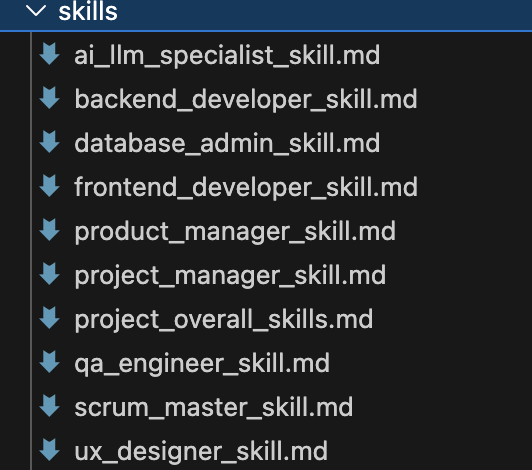
接着,就是补全技能定义(Skills)。先让 AI 去总结我们团队之前几个项目中,前端、后端、数据库都用什么技术栈,然后补全成 fe_skills.md、be_skills.md、dba_skills.md。因为我们用 Sprint 模式开发,所以再让它补上 scrum_master_skill.md 和 pjm_skill.md。最后就变成了下面这个样子:
然后,就让 AI 利用这些技能定义,帮我把项目拆解开来,给出每个 Sprint 的计划,以及每个角色的 Todo。一开始我让它给我生成每天的 Todo,后来发现……“AI 一天,人间一年”,用日期来组织文档,根本跟不上 AI “唰唰唰”出文档的速度啊……
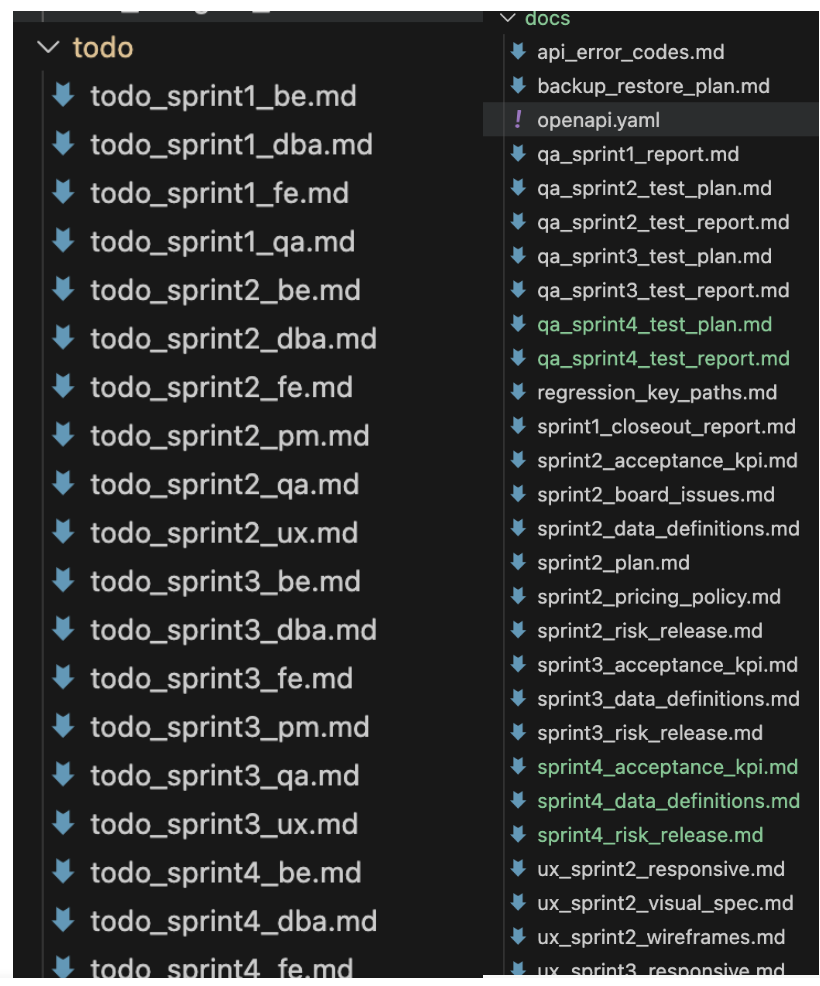
当所有这些文档都准备好之后,这时候就可以对 Codex 说:“你准备好了吗?可以开始写代码了吗?”
然后 Codex 通常会回答:“我准备好了,你希望我先做:
- xxx
- xxx
- xxx
你说开始,我就开始做。”
一开始我还会思考一下,挑一挑,决定先做这个,再做那个。
到后来……我想,我是不是傻?哪有老板这么当的?只有小孩子才做选择。所以后来我的回答统一变成了:“你都做了吧,做完再帮我检查一下。”
再后来,指令就更加“霸道”了:
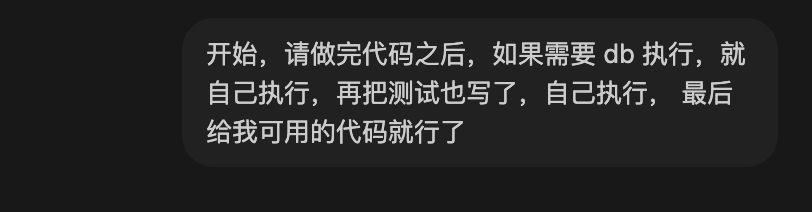
当然,这种方法比较适合从零开始的项目,而且技术选型比较直接明确。(免责声明)
另外,openapi.yaml 文件非常重要,因为它是确保前后端遵循统一规范(Spec Coding)的关键参考。你只需要让 Codex 在每次改动后,自己记得去更新维护它就行了。
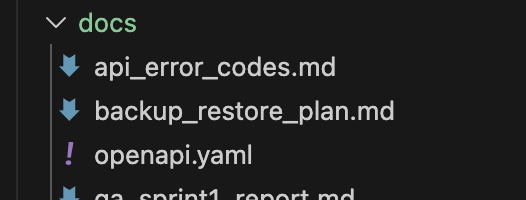
Codex 还能帮你把测试用例、种子数据、模拟用户数据一口气全都生成好。至于数据库直连、加表、加字段、加索引这些操作……别问,问就是“做”。
最后我的项目目录里,大约一半是文档,一半是代码。
其实在真实世界的工作中,一个项目也差不多是一半时间在沟通交流,一半时间在做具体交付(Deliverables)。只不过现在,你和 AI 的交流,也变成了文档而已。
流水账写完了。Vibe Coding 威武~ 人人都是 Builder。
在探索这些高效工作流的过程中,我也常在像云栈社区这样的技术论坛与同行交流心得,获取灵感。工具在变,但开发者追求效率与协作的核心始终如一。
 发表于 2026-1-26 15:46:40
|
查看: 327|
回复: 0
发表于 2026-1-26 15:46:40
|
查看: 327|
回复: 0

