最近我在测试 SpringBoot 4.0 正式版时,想看看虚拟线程在不同 Web 容器下的表现。Undertow 之前已经验证过不太理想,所以这次主要对比剩下两位“选手”:Tomcat 和 Jetty。
我原本的想法很简单:虚拟线程是 Java 层面的特性,容器只是提供运行环境,两者的性能表现应该差不多吧?
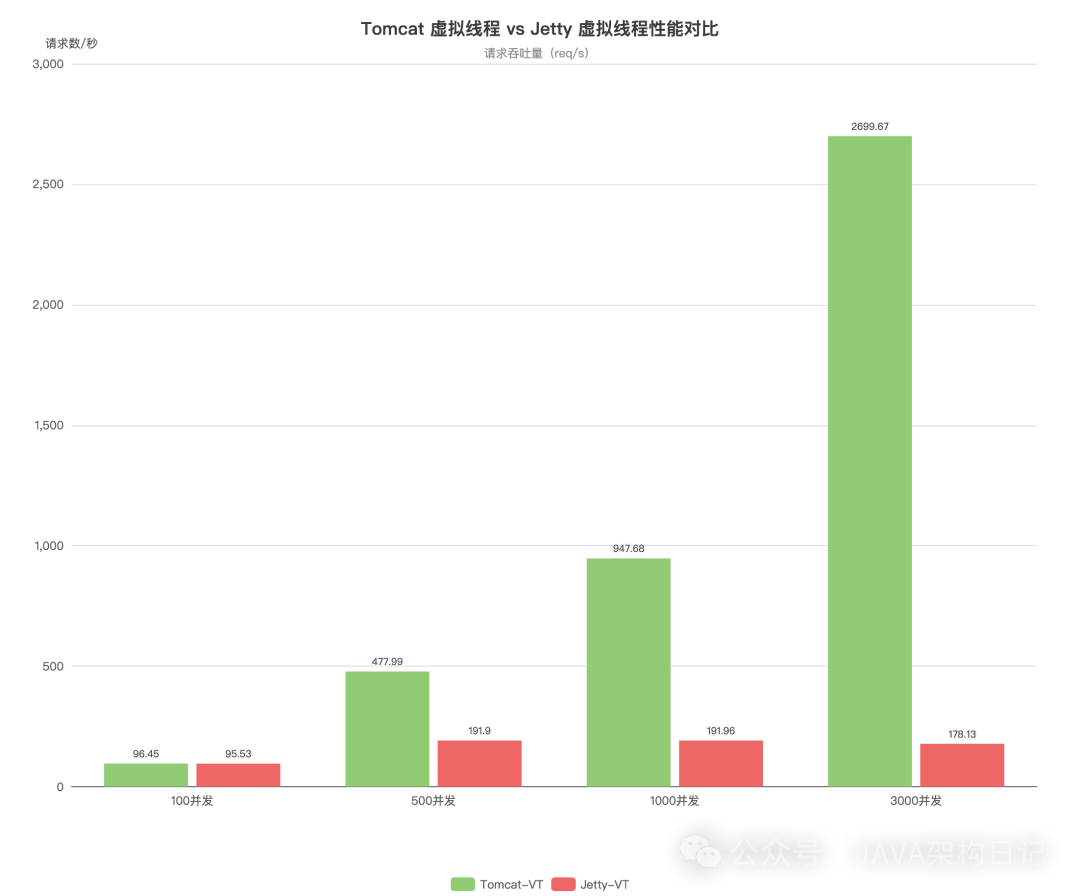
但实际的压测结果让我吃了一惊,它们的差距竟然达到了惊人的15倍。
先说结论
如果你正在或计划使用 SpringBoot 4.0 并开启虚拟线程,那么选择 Tomcat,不用犹豫。
Jetty 在虚拟线程模式下的表现,几乎和没开启时一样。
测试环境说明
为了让测试结果具备参考价值,先将测试环境交代清楚:
- SpringBoot: 4.0.1
- JDK: 25
- 测试机器: MacBook Pro M4,32GB 内存
- Docker 镜像内存限制: 1024MB
- 压测工具: wrk
- 压测时长: 30 秒
测试接口设计得很简单,模拟了一个支付场景。一个 /pay 接口,内部通过 Thread.sleep(1000) 来模拟调用支付网关等外部 IO 阻塞操作。
PayService 实现如下:
@Service
public class PayService {

    private static final String[] CHANNELS =
        new String[]{"ALIPAY", "WECHAT", "UNION", "VISA", "MASTER"};

    public String doPay(String orderId) {
        try {
            String channel = CHANNELS[ThreadLocalRandom.current()
                .nextInt(CHANNELS.length)];
            Thread.sleep(1000);  // 模拟调用支付网关
            return "Order %s paid via %s".formatted(orderId, channel);
        } catch (InterruptedException e) {
            throw new RuntimeException(e);
        }
    }
}
对应的 Controller:
@RestController
@RequestMapping("/pay")
public class PayController {

    private static final Logger log =
        LoggerFactory.getLogger(PayController.class);
    private static final AtomicInteger counter = new AtomicInteger(1);

    private final PayService payService;

    public PayController(PayService payService) {
        this.payService = payService;
    }

    @GetMapping
    public String pay(
            @RequestParam(required = false, defaultValue = "PIG2026")
            String orderId) {
        int id = counter.getAndIncrement();
        log.info("Request {} processed by {}", id, Thread.currentThread());
        String result = payService.doPay(orderId);
        log.info("Request {} resumed by {}", id, Thread.currentThread());
        return result;
    }
}
四组对照镜像
为了进行严谨的对比,我构建了四个 Docker 镜像,形成完整的对照组:
| 镜像名 |
容器 |
虚拟线程 |
| tomcat |
Tomcat |
关闭 |
| tomcat-vt |
Tomcat |
开启 |
| jetty |
Jetty |
关闭 |
| jetty-vt |
Jetty |
开启 |
开启虚拟线程的配置极其简单,只需在 application.properties 中添加一行:
spring.threads.virtual.enabled=true
使用 GraalVM Native Image 构建
本次测试全部采用 GraalVM Native Image 构建应用。SpringBoot 4.0 对 Native 支持已经相当成熟。构建命令核心是添加 -Pnative 参数。
构建 Tomcat Native 镜像:
# 不开虚拟线程
./mvnw clean -DskipTests spring-boot:build-image -Pnative \
  -Dspring-boot.build-image.imageName=pig-pay-tomcat:4.0.0-25-native

# 开启虚拟线程
echo "spring.threads.virtual.enabled=true" >> src/main/resources/application.properties
./mvnw clean -DskipTests spring-boot:build-image -Pnative \
  -Dspring-boot.build-image.imageName=pig-pay-tomcat:4.0.0-25-native-vt
构建 Jetty Native 镜像:
# 不开虚拟线程(注意多了 -Pjetty)
./mvnw clean -DskipTests spring-boot:build-image -Pjetty,native \
  -Dspring-boot.build-image.imageName=pig-pay-jetty:4.0.0-25-native

# 开启虚拟线程
echo "spring.threads.virtual.enabled=true" >> src/main/resources/application.properties
./mvnw clean -DskipTests spring-boot:build-image -Pjetty,native \
  -Dspring-boot.build-image.imageName=pig-pay-jetty:4.0.0-25-native-vt
构建完成后得到四个镜像。Native Image 的优势是启动快、内存占用小,缺点是构建过程较慢。
压测结果:数据说话
不开虚拟线程的基线对比
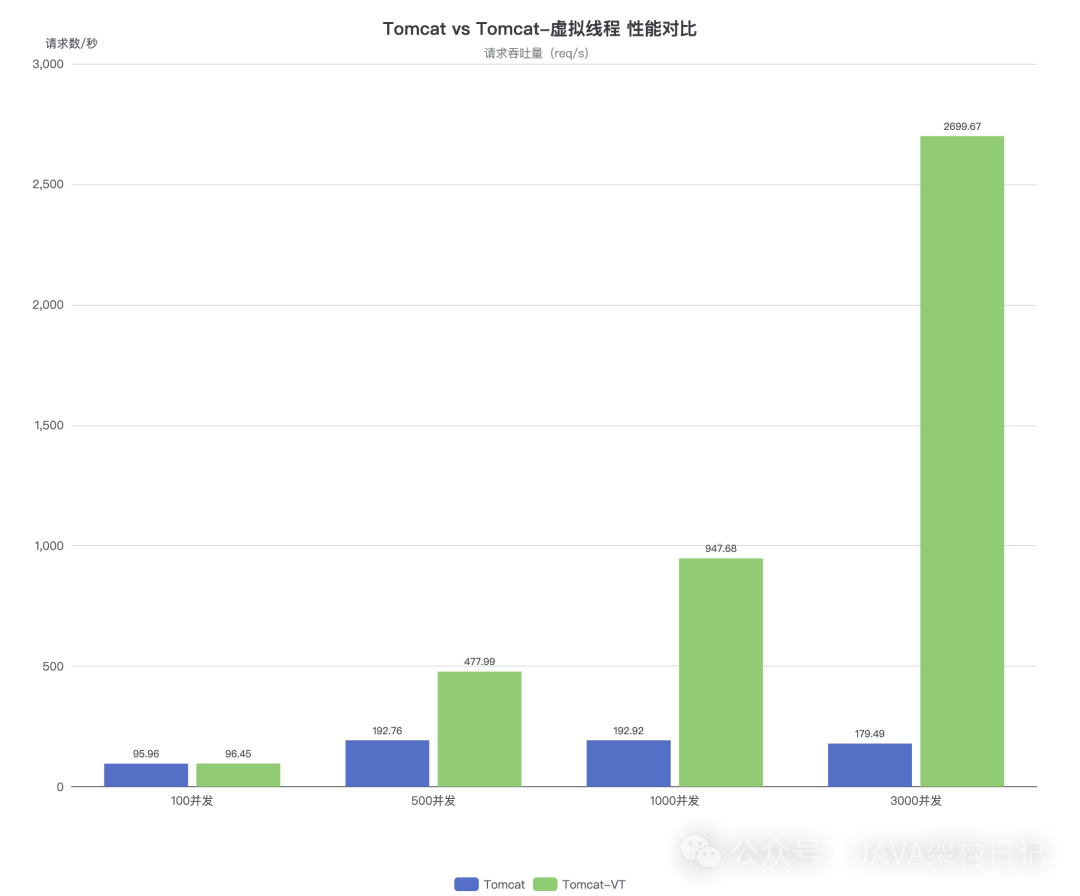
首先,在未开启虚拟线程的传统模式下,Tomcat 和 Jetty 的表现如何?
| 并发数 |
Tomcat QPS |
Jetty QPS |
差距 |
| 100 |
95.96 |
94.19 |
基本持平 |
| 500 |
192.76 |
187.08 |
Tomcat 略优 |
| 1000 |
192.92 |
187.06 |
Tomcat 略优 |
| 3000 |
179.49 |
171.11 |
Tomcat 略优 |
| 5000 |
114.23 |
98.66 |
Tomcat 略优 |
两者差距很小,性能瓶颈都被限制在200个平台线程左右,这符合我们的预期。
开启虚拟线程后的巨大分野
重点来了,开启虚拟线程后的对比数据让我一度以为测试出了错:
| 并发数 |
Tomcat-VT QPS |
Jetty-VT QPS |
差距 |
| 100 |
96.45 |
95.53 |
基本持平 |
| 500 |
477.99 |
191.90 |
Tomcat 2.5 倍 |
| 1000 |
947.68 |
191.96 |
Tomcat 5 倍 |
| 3000 |
2699.67 |
178.13 |
Tomcat 15 倍 |
| 5000 |
616.43 |
112.09 |
Tomcat 5.5 倍 |
这个数据非常直观:Tomcat 开启虚拟线程后,在3000并发下 QPS 从179飙升到近2700,提升约15倍。而 Jetty 开启虚拟线程后,性能曲线几乎原地踏步,和没开一样。
Jetty 为何“纹丝不动”?
为什么会出现如此巨大的差异?经过一番排查,原因在于线程池的管理策略。
即使为 Jetty 开启了虚拟线程,它仍然受到配置 server.jetty.threads.max=200 的严格限制。虚拟线程的“廉价”特性——可以轻松创建数万个——在 Jetty 传统的线程池管理模型下完全无法发挥。
反观 Tomcat,在检测到虚拟线程启用后,它变得更加“豁达”,直接跳过了 server.tomcat.threads.max=200 这类对平台线程的数量限制,让虚拟线程能够根据实际需求自由创建和调度,从而在 高并发场景 下彻底释放了性能潜力。
启动时间对比
既然用了 Native Image,也顺便看一下启动速度:
| 镜像 |
启动时间 |
| tomcat |
0.643s |
| tomcat-vt |
0.658s |
| jetty |
0.806s |
| jetty-vt |
0.710s |
四者的启动时间都在1秒以内,这个维度上差别不大,Native Image 的快速启动优势都很明显。
如何从 Jetty 切换回 Tomcat
如果你现有的项目使用的是 Jetty,想切换回 Tomcat 以获得虚拟线程的全部优势,操作非常简单。
原来的 Jetty 配置(需要在依赖中排除 Tomcat 并引入 Jetty):
<dependency>
    <groupId>org.springframework.boot</groupId>
    <artifactId>spring-boot-starter-web</artifactId>
    <exclusions>
        <exclusion>
            <groupId>org.springframework.boot</groupId>
            <artifactId>spring-boot-starter-tomcat</artifactId>
        </exclusion>
    </exclusions>
</dependency>
<dependency>
    <groupId>org.springframework.boot</groupId>
    <artifactId>spring-boot-starter-jetty</artifactId>
</dependency>
切换到 Tomcat:你只需要恢复使用 Spring Boot Web 的默认依赖即可,无需任何额外排除操作。
<dependency>
    <groupId>org.springframework.boot</groupId>
    <artifactId>spring-boot-starter-web</artifactId>
</dependency>
然后在配置文件中开启虚拟线程:
spring.threads.virtual.enabled=true
这样就完成了切换。
总结
回顾一下,去年技术社区可能还在讨论用 Undertow 替代 Tomcat 以获得更好性能,结果 Undertow 在 SpringBoot 4.0 的虚拟线程支持上掉了队。这次测试再次表明,在技术选型上,有时“稳健且持续演进的主流方案”比“看似激进的替代方案”更值得信赖。
Tomcat 或许不是最时髦的那个,但它始终紧跟标准,从 Servlet 1.0 到 6.1,从平台线程到虚拟线程,每一次技术演进它都没有缺席。在虚拟线程这个新时代,如果你追求极致的性能表现,“汤姆猫”依然是那个可靠的选择。欢迎在 云栈社区 分享你在使用虚拟线程或进行技术选型时的经验和见解。
 发表于 2026-1-28 03:07:08
|
查看: 396|
回复: 0
发表于 2026-1-28 03:07:08
|
查看: 396|
回复: 0

