写在前面的话
砥砺前行。
[334]-------->
【关键词】python、neo4j、全文索引、研究Partitioning
一、python+neo4j接口相关
1.建全文索引
描述:因为全文索引中的标签定义发生了变化,所以需要重新建立一下。
开工:
第一步:时间段
【2157-2220】
第二步:处理标签
需要处理的标签列表,对应的SQL创建语句如下:
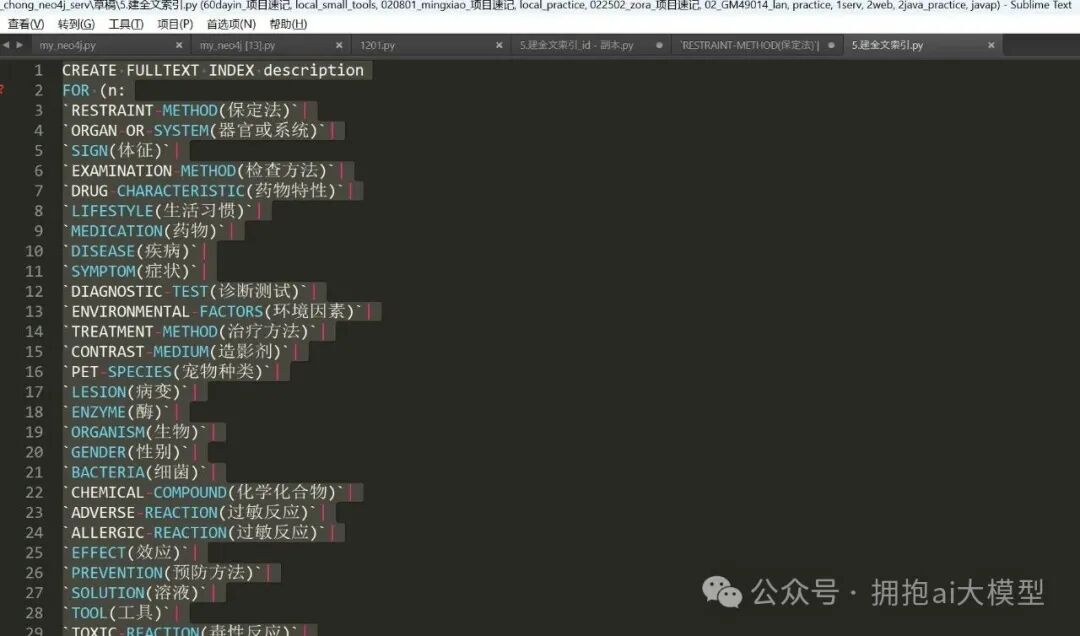
图7a-1:创建索引的Cypher语句
注:在编写SQL时,字段名需要用反引号(``)包裹起来。按这个写法创建索引没有问题,但需要注意一点:标签(Label)字段不能为空值,否则执行时会报错。
第三步:测试
创建后进行测试,确认索引功能正常。
2.neo4j嵌套查询
描述:现在有一个新需求。全文索引查询会涉及4个字段:n.id, n.entity_type, n.description, n.source_id。目前的查询只是简单地按得分score倒序返回,无法为这四个字段分别赋予不同的权重。我最初的想法是尝试使用嵌套查询来实现加权,但发现并不生效,需要寻找其他解决方案。
开工:
第一步:时间段
【2211-2220】
第二步:当前方案与问题
先来看看我最初设计的Cypher查询语句:
// Step 1: 使用index_a查询节点,并按score_a倒序取出前100个节点
CALL db.index.fulltext.queryNodes('description', '肠胃炎') YIELD node, score
WITH node, score AS score_a
ORDER BY score_a DESC
LIMIT 100
WITH node, score_a
// Step 2: 对这100个节点中的每一个,分别使用index_b和index_c获取分数
CALL db.index.fulltext.queryNodes('index_full_id', '肠胃炎') YIELD node AS node_b, score AS score_b
WITH node, score_a, collect(score_b * 0.8) AS scores_b_weighted
CALL db.index.fulltext.queryNodes('index_full_entity', '肠胃炎') YIELD node AS node_c, score AS score_c
WITH node, score_a, scores_b_weighted, collect(score_c * 0.2) AS scores_c_weighted
// Step 3: 计算总分score_all,并按总分倒序重排这100个节点
UNWIND range(0, size(scores_b_weighted) - 1) AS i
WITH node, score_a + scores_b_weighted[i] + scores_c_weighted[i] AS score_all
ORDER BY score_all DESC
RETURN node, score_all;
这个查询逻辑分为三步:
- 第一步:使用主索引
description查询节点,并按score_a倒序取出前100个节点。这一步执行后是有数据返回的。
- 第二步:对上一步得到的100个节点,分别用另外两个索引(
index_full_id和index_full_entity)再次查询,获取它们各自的分数并进行加权(分别乘以0.8和0.2)。
- 第三步:将三个加权后的分数相加得到总分
score_all,然后按总分重新倒序排列这100个节点。
问题在于,执行完第二步和第三步之后,最终返回的数据集为空。具体原因需要排查,但暂时先放一放。我还尝试了另一种写法:
第三步:尝试另一种查询语句
新的尝试语句如下:
// 第一轮查询description
CALL db.index.fulltext.queryNodes('description_index', 'search_term') YIELD node AS n1, score AS score1;
// 第二轮查询其他字段(这里假设是id)
CALL db.index.fulltext.queryNodes('id_index', 'search_term') YIELD node AS n2, score AS score2;
// 合并结果并调整权重
WITH n1, score1, n2, score2
WHERE id(n1)=id(n2)
RETURN n1, score1 * 2+ score2 AS final_score
ORDER BY final_score DESC;
注:这个思路也可以试一试。但实际测试后发现,这种跨索引关联查询的性能非常慢,几乎无法使用。因此我决定暂时放弃在数据库层面进行复杂加权查询的方案,转而在应用层处理。
最终,我选择在 Python 代码中,利用编辑距离(Edit Distance)算法为不同字段计算得分并加权求和。这个方案的反馈速度尚可接受。核心的加权计算逻辑代码如下:
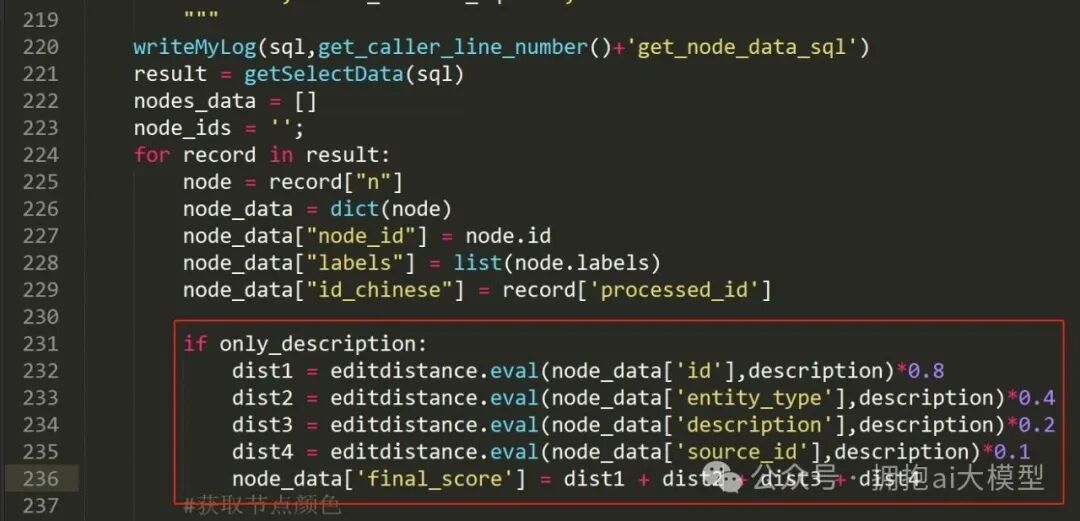
图7a-2:在Python中实现多字段加权评分的代码片段
三、数据抽取+unstructured相关
1.Partitioning
描述:在按章节读取PDF文档内容时,用到了unstructured库的partition函数。下面深入解读一下这个函数,看看能否解决中文PDF解析时的乱码问题。
开工:
第一步:时间段
【1705-1720】
第二步:研究Partitioning文档3
官方文档原文:
The following table shows the document types the unstructured library currently supports. partition will recognize each of these document types and route the document to the appropriate partitioning function. If you already know your document type, you can use the partitioning function listed in the table directly.
译文:下表显示了unstructured库当前支持的文档类型。partition函数会自动识别这些文档类型,并将文档路由到适当的分区函数。如果你已经明确知道文档类型,也可以直接使用表中列出的对应分区函数。
支持的文档类型及对应函数(部分)如下表所示:
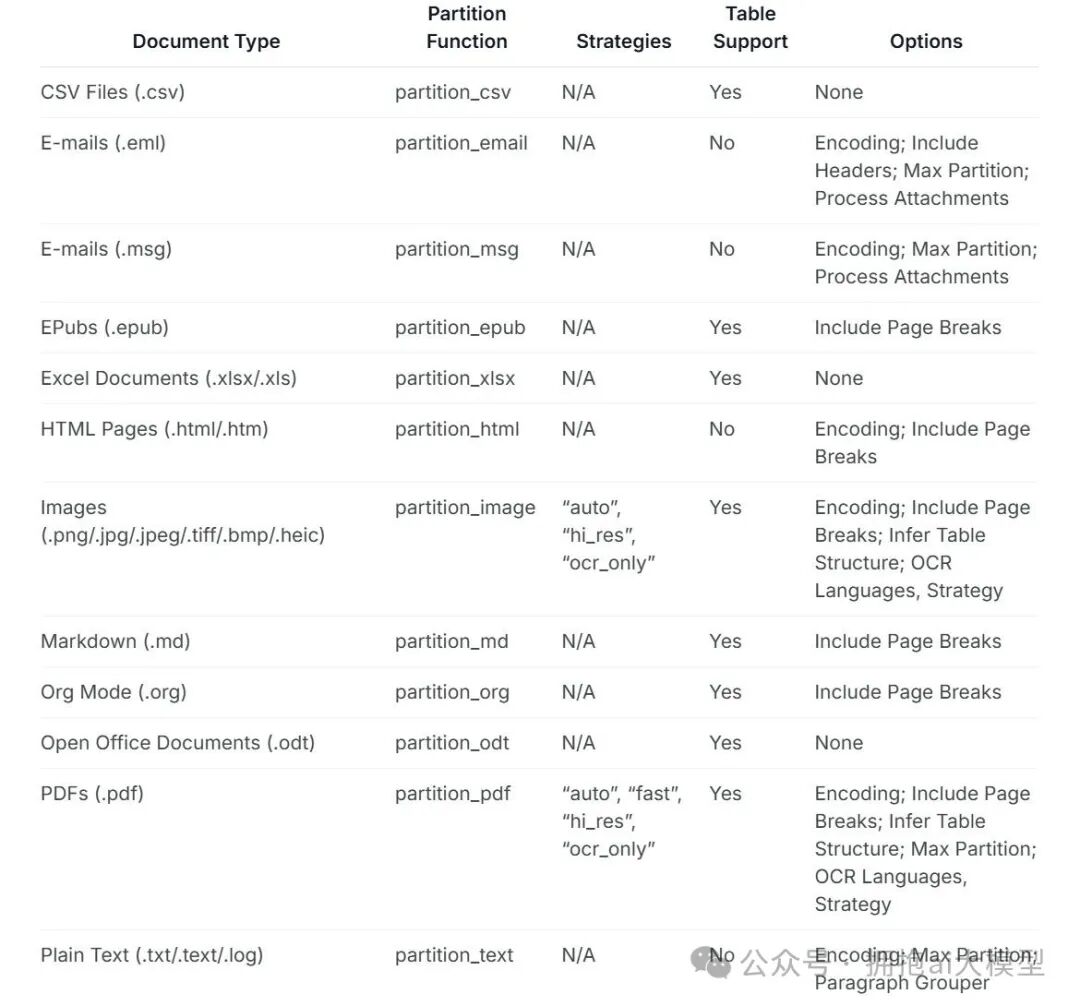
图7c-1:文档支持表格(第一部分)
注:表格还有后续部分:
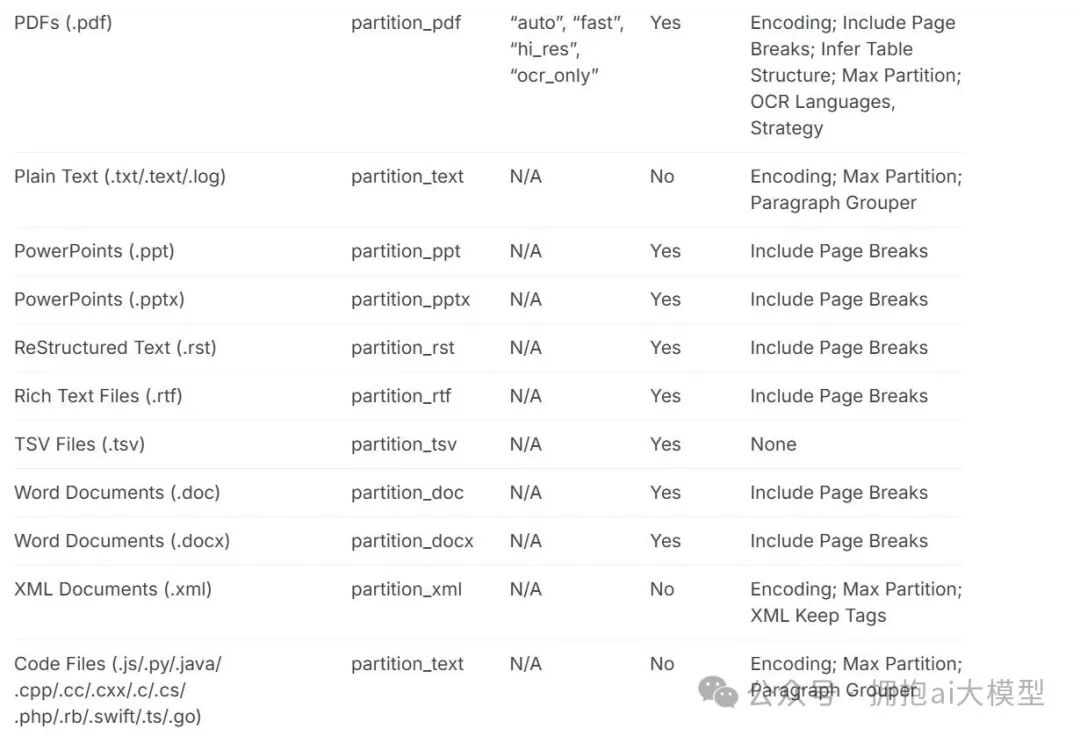
图7c-2:文档支持表格(第二部分)
小结:从表格可以看出,对于PDF文件,有专门的partition_pdf处理函数,并且该函数还支持多种策略(如auto, fast, hi_res, ocr-only)和其他参数。这为解决乱码问题提供了方向。继续往下看。
第三步:研究Partitioning文档4
官方文档原文:
As shown in the examples below, the partition function accepts both filenames and file-like objects as input. partition also has some optional kwargs. For example, if you set include_page_breaks=True, the output will include PageBreak elements if the filetype supports it. Additionally you can bypass the filetype detection logic with the optional content_type argument which may be specified with either the filename or file-like object, file. You can find a full listing of optional kwargs in the documentation below.
译文:如下面的示例所示,partition函数接受文件名和文件类对象作为输入。它还有一些可选的关键字参数(kwargs)。例如,如果你设置include_page_breaks=True,那么对于支持的文件类型,输出内容将包含“分页符”元素。此外,你可以通过可选的content_type参数来绕过文件的自动类型检测逻辑,该参数可以与文件名或文件对象一起指定。所有可选参数的完整列表可以在下面的文档中找到。
使用示例:
from unstructured.partition.auto import partition

filename = os.path.join(EXAMPLE_DOCS_DIRECTORY, "layout-parser-paper-fast.pdf")
elements = partition(filename=filename, content_type="application/pdf")
print("\n\n".join([str(el) for el in elements][:10]))
注:在这个例子中,通过content_type="application/pdf"显式指定了文件类型,从而跳过了自动检测。代码中的[:10]表示只输出列表中的前10个元素(不是10页)。EXAMPLE_DOCS_DIRECTORY是示例文档的目录路径。我用自己的文件测试了一下,效果如下:

图7c-3:使用partition函数解析PDF的输出结果
注:从结果看,英文内容能被正确抽取出来,但中文“编著”这个词没有出现,这个问题需要记录下来。
再看另一个示例:
from unstructured.partition.auto import partition

filename = os.path.join(EXAMPLE_DOCS_DIRECTORY, "layout-parser-paper-fast.pdf")
with open(filename, "rb") as f:
    elements = partition(file=f, include_page_breaks=True)
print("\n\n".join([str(el) for el in elements][5:15]))
注:这个例子使用了文件对象,并开启了包含分页符的选项。[5:15]表示输出第6到第15个元素(Python列表切片)。需要了解的一个事实是:即使代码中限制了输出元素的范围,partition函数在内部仍然会读取并解析整个文档。
第四步:研究Partitioning文档5
官方文档原文:
The unstructured library also includes partitioning functions targeted at specific document types. The partition function uses these document-specific partitioning functions under the hood. There are a few reasons you may want to use a document-specific partitioning function instead of partition.
译文:unstructured库也包含针对特定文档类型的分区函数。通用的partition函数在底层实际上调用了这些具体的函数。你可能会因为几个原因而希望直接使用针对特定文档的分区函数,而不是通用的partition。
注:接下来需要查看直接使用partition_pdf等具体函数可能带来的好处,这或许是优化解析流程和解决特定问题(如中文编码)的关键。
 发表于 2026-2-3 06:16:03
|
查看: 406|
回复: 0
发表于 2026-2-3 06:16:03
|
查看: 406|
回复: 0

