在构建复杂的 AI 应用时,让不同的大模型智能体(Agent)能够有效协作是关键。本文将以一个旅行规划助手为例,详细介绍如何在 Microsoft Agent Framework (MAF) 中快速集成 A2A (Agent-to-Agent) 协议,实现主 Agent 对多个远程专用 Agent 的自主调用与信息整合。
A2A协议简介
在之前的系列文章中我们其实已经介绍过A2A协议了,这里我们快速温习一下。
A2A 即 Agent-to-Agent,翻译过来就是“智能代理之间的协议”,我们可以理解为它就是一个大模型 Agent 们用来“聊天”的“通用语言”。
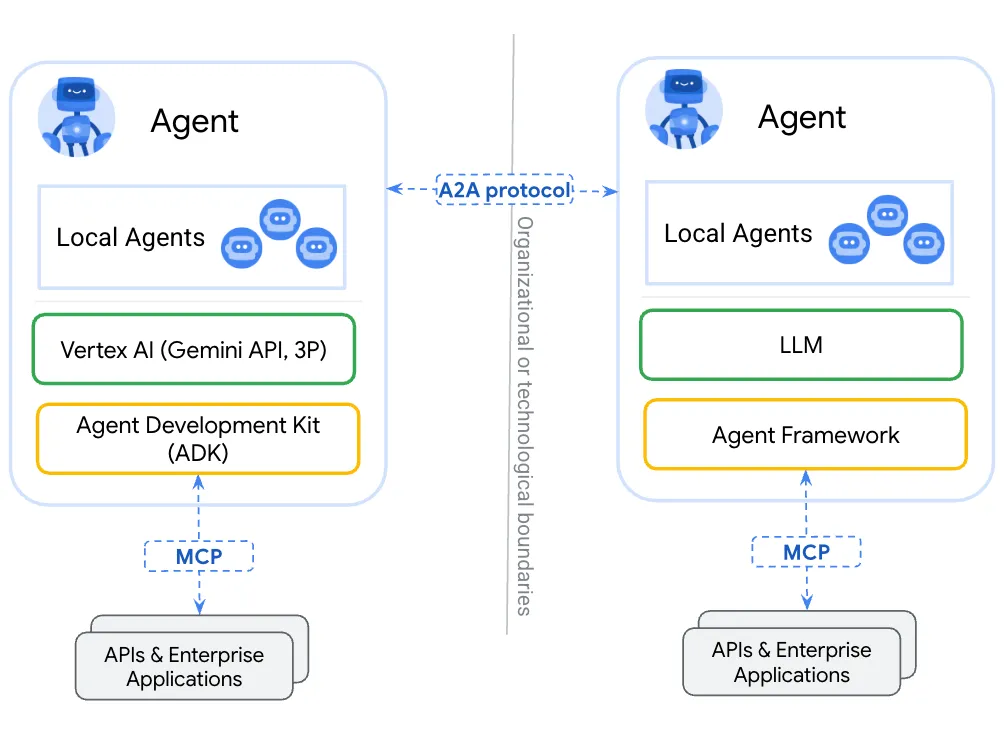
A2A定义了一套清晰、标准的沟通方式,让Agent们可以顺畅地交流,让不同平台和框架下的Agent都能够说“同一种话”,实现无障碍的信息交换和协作。
在MAF中集成A2A Agent,最主要的操作就是:将A2A Agent封装为一个Tool,这个Tool对应到MAF中就是一个 AIFunction 对象。
前面我们提到可以将MCP服务也封装为一个Tool(AIFunction)让Agent调用,这里A2A Agent也是一样的道理。
这样做的好处是:让MAF中的Agent像调用本地函数一样调用远程A2A Agent 或 MCP Server。
下面的代码展示了在MAF中将A2A Card转换为Agent,然后再将Agent转换为AIFunction:
......
var functionTools = new List<AIFunction>();
foreach (var endpoint in agentEndpoints)
{
    var resolver = new A2ACardResolver(new Uri(endpoint));
    var card = await resolver.GetAgentCardAsync();
    var agent = card.AsAIAgent(); // Convert A2A Agent to AIAgent instance

    functionTools.AddRange(AgentFunctionHelper.CreateFunctionTools(agent, card));
}
......
下面是 AgentFunctionHelper 类的代码实现,它负责具体的转换逻辑:
public class AgentFunctionHelper
{
    public static IEnumerable<AIFunction> CreateFunctionTools(AIAgent a2aAgent, AgentCard agentCard)
    {
        foreach(var skill in agentCard.Skills)
        {
            AIFunctionFactoryOptions options = new()
            {
                Name = Sanitize(skill.Id),
                Description = $$"""
                {
                    "description": "{{skill.Description}}",
                    "tags": "[{{string.Join(", ", skill.Tags ?? [])}}]",
                    "examples": "[{{string.Join(", ", skill.Examples ?? [])}}]",
                    "inputModes": "[{{string.Join(", ", skill.InputModes ?? [])}}]",
                    "outputModes": "[{{string.Join(", ", skill.OutputModes ?? [])}}]"
                }
                """,
            };

            yield return AIFunctionFactory.Create(RunAgentAsync, options);
        }

        async Task<string> RunAgentAsync(string input, CancellationToken cancellationToken)
        {
            var response = await a2aAgent.RunAsync(input, cancellationToken: cancellationToken).ConfigureAwait(false);

            return response.Text;
        }
    }

    private static readonly Regex InvalidNameCharsRegex = new Regex("[^0-9A-Za-z]+", RegexOptions.Compiled);

    public static string Sanitize(string name)
    {
        return InvalidNameCharsRegex.Replace(name, "_");
    }
}
其中的 CreateFunctionTools 方法实现了将A2A Agent的所有公开技能转换为 AIFunction 工具。
而 Sanitize 方法则实现了函数名称的规范化,因为 AIFunction 的名称必须符合一定规范(仅限字母、数字和下划线),因此需要主动对技能名称进行规范化。
完整集成示例:构建旅行规划助手
这次我们还是使用上次文章中的案例,即一个旅游助手,它可以通过A2A协议调用多个Agent的技能。
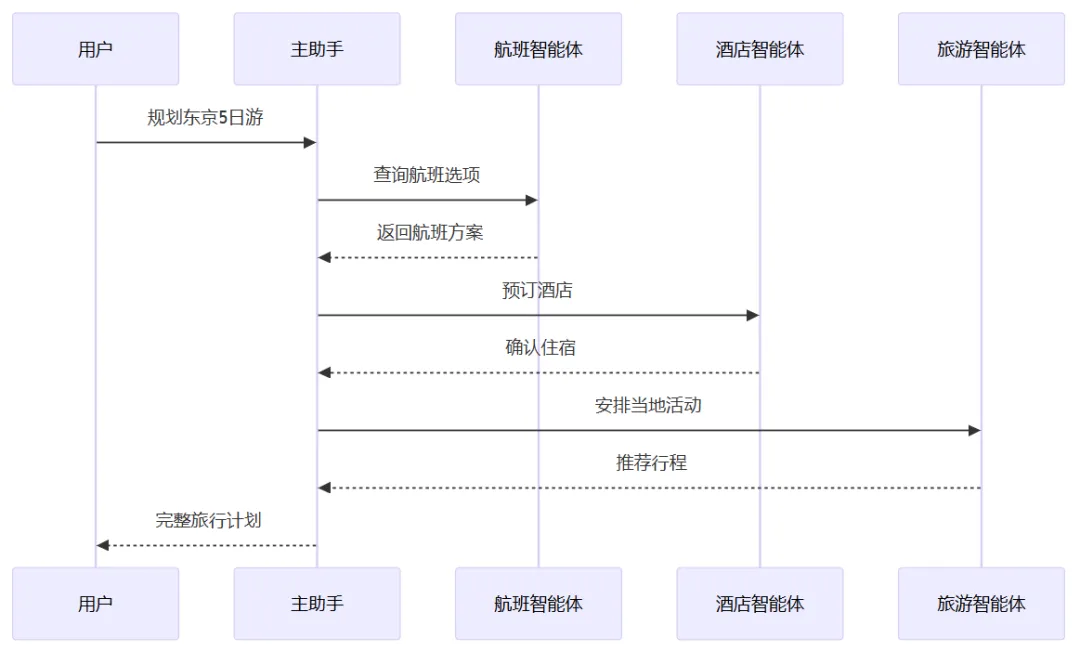
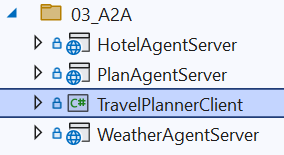
我们需要创建四个 .NET 项目,其中:
- 1个.NET控制台项目:主助手
- 3个ASP.NET Web项目:天气智能体、酒店智能体、路线智能体
在VS中的项目结构如下:
本次案例我们希望实现主助手可以回答用户关于不同主题(景点,酒店,天气)的问题,它可以根据问题自主选择需要调用一个或多个Agent去获取必要的信息后进行整合优化后再回复用户。
3.1 天气Agent的实现
首先,为该项目添加必要的NuGet包(后续其他A2A Agent项目都需要安装此包):
A2A.AspNetCore “0.3.3-preview”
创建一个 WeatherAgent 类,定义其能力 和 AgentCard,这里我们需要公开一个AgentSkill即天气查询的能力:
public class WeatherAgent
{
    public void Attach(ITaskManager taskManager)
    {
        taskManager.OnMessageReceived = QueryWeatherAsync;
        taskManager.OnAgentCardQuery = GetAgentCardAsync;
    }

    private Task<A2AResponse> QueryWeatherAsync(MessageSendParams messageSendParams, CancellationToken cancellationToken)
    {
        if (cancellationToken.IsCancellationRequested)
        {
            return Task.FromCanceled<A2AResponse>(cancellationToken);
        }

        // Process the message
        var messageText = messageSendParams.Message.Parts.OfType<TextPart>().First().Text;

        // Create and return an artifact
        var message = new AgentMessage()
        {
            Role = MessageRole.Agent,
            MessageId = Guid.NewGuid().ToString(),
            ContextId = messageSendParams.Message.ContextId,
            Parts = [new TextPart() {
                Text = $"""
                    🌤️ **天气查询结果**

                    查询时间:{DateTime.Now:yyyy-MM-dd HH:mm}

                    **北京天气**
                    - 今日:晴转多云,气温 -2°C ~ 8°C
                    - 明日:多云,气温 0°C ~ 10°C
                    - 后日:阴,气温 2°C ~ 9°C

                    **上海天气**
                    - 今日:多云,气温 5°C ~ 12°C
                    - 明日:小雨,气温 6°C ~ 10°C
                    - 后日:阴转晴,气温 4°C ~ 11°C

                    👔 穿衣建议:北京较冷,建议穿羽绒服;上海温和,建议穿夹克外套,带好雨具。
                    """
            }]
        };

        return Task.FromResult<A2AResponse>(message);
    }

    private Task<AgentCard> GetAgentCardAsync(string agentUrl, CancellationToken cancellationToken)
    {
        if (cancellationToken.IsCancellationRequested)
        {
            return Task.FromCanceled<AgentCard>(cancellationToken);
        }

        var capabilities = new AgentCapabilities()
        {
            Streaming = true,
            PushNotifications = false,
        };

        return Task.FromResult(new AgentCard()
        {
            Name = "weather agent",
            Description = "weather information agent",
            Url = agentUrl,
            Version = "1.0.0",
            DefaultInputModes = ["text"],
            DefaultOutputModes = ["text"],
            Capabilities = capabilities,
            Skills = [
                new AgentSkill
                {
                    Id = "weather-query",
                    Name = "天气查询",
                    Description = "查询指定城市的天气预报,包括温度、降水概率、穿衣建议等",
                    Tags = ["weather", "forecast", "climate"],
                    Examples = ["上海明天天气怎么样", "成都这周的天气预报", "杭州下雨吗"],
                    InputModes = ["text"],
                    OutputModes = ["text"]
                }],
        });
    }
}
说明:为了方便演示,这里直接返回了固定的天气信息。在实际应用中,这里应该接入真正的天气API或调用大模型进行处理。下面的几个Agent也是类似的情况。
然后,在 Program.cs 中进行注册,完成端口映射:
using A2A;
using A2A.AspNetCore;
using WeatherAgentServer;

var builder = WebApplication.CreateBuilder(args);
var app = builder.Build();

var taskManager = new TaskManager();
var agent = new WeatherAgent();
agent.Attach(taskManager);
// Add JSON-RPC endpoint for A2A
app.MapA2A(taskManager, "/weather");
// Add well-known agent card endpoint for A2A
app.MapWellKnownAgentCard(taskManager, "/weather");
// Add HTTP endpoint for A2A
app.MapHttpA2A(taskManager, "/weather");

app.Run();
3.2 酒店Agent的实现
创建一个 HotelAgent 类,定义其能力与 AgentCard:
public class HotelAgent
{
    public void Attach(ITaskManager taskManager)
    {
        taskManager.OnMessageReceived = QueryHotelsAsync;
        taskManager.OnAgentCardQuery = GetAgentCardAsync;
    }

    private Task<A2AResponse> QueryHotelsAsync(MessageSendParams messageSendParams, CancellationToken cancellationToken)
    {
        if (cancellationToken.IsCancellationRequested)
        {
            return Task.FromCanceled<A2AResponse>(cancellationToken);
        }

        // Process the message
        var messageText = messageSendParams.Message.Parts.OfType<TextPart>().First().Text;

        // Create and return an artifact
        var message = new AgentMessage()
        {
            Role = MessageRole.Agent,
            MessageId = Guid.NewGuid().ToString(),
            ContextId = messageSendParams.Message.ContextId,
            Parts = [new TextPart() {
                Text = $"""
                    🏨 **酒店推荐**

                    根据您的需求,为您推荐以下酒店:

                    **豪华型 ⭐⭐⭐⭐⭐**
                    1. 上海外滩华尔道夫酒店
                      - 📍 外滩核心位置,江景房
                      - 💰 ¥2,500/晚起
                      - ⭐ 评分 4.9/5.0

                    **舒适型 ⭐⭐⭐⭐**
                    2. 上海静安香格里拉大酒店
                      - 📍 静安寺商圈,交通便利
                      - 💰 ¥1,200/晚起
                      - ⭐ 评分 4.7/5.0

                    **经济型 ⭐⭐⭐**
                    3. 全季酒店(上海南京路店)
                      - 📍 南京路步行街旁
                      - 💰 ¥380/晚起
                      - ⭐ 评分 4.5/5.0

                    💡 提示:建议提前预订,周末和节假日价格可能上涨 20-50%。
                    """
            }]
        };

        return Task.FromResult<A2AResponse>(message);
    }

    private Task<AgentCard> GetAgentCardAsync(string agentUrl, CancellationToken cancellationToken)
    {
        if (cancellationToken.IsCancellationRequested)
        {
            return Task.FromCanceled<AgentCard>(cancellationToken);
        }

        var capabilities = new AgentCapabilities()
        {
            Streaming = true,
            PushNotifications = false,
        };

        return Task.FromResult(new AgentCard()
        {
            Name = "hotel-a2a-agent",
            Description = "hotel information agent",
            Url = agentUrl,
            Version = "1.0.0",
            DefaultInputModes = ["text"],
            DefaultOutputModes = ["text"],
            Capabilities = capabilities,
            Skills = [
                new AgentSkill
                {
                    Id = "hotel-recommendation",
                    Name = "酒店推荐",
                    Description = "根据目的地和预算推荐合适的酒店,包括豪华型、舒适型、经济型",
                    Tags = ["hotel", "accommodation", "booking", "travel"],
                    Examples = ["推荐上海的酒店", "上海外滩附近有什么好酒店", "预算500以内的北京酒店"],
                    InputModes = ["text"],
                    OutputModes = ["text"]
                }
                ],
        });
    }
}
同样,请参考天气Agent完成 Program.cs 中的注册。
3.3 景点Agent的实现
创建一个 PlanAgent 类,定义其能力与 AgentCard:
public class PlanAgent
{
    public void Attach(ITaskManager taskManager)
    {
        taskManager.OnMessageReceived = QueryPlansAsync;
        taskManager.OnAgentCardQuery = GetAgentCardAsync;
    }

    private Task<A2AResponse> QueryPlansAsync(MessageSendParams messageSendParams, CancellationToken cancellationToken)
    {
        if (cancellationToken.IsCancellationRequested)
        {
            return Task.FromCanceled<A2AResponse>(cancellationToken);
        }

        // Process the message
        var messageText = messageSendParams.Message.Parts.OfType<TextPart>().First().Text;

        // Create and return an artifact
        var message = new AgentMessage()
        {
            Role = MessageRole.Agent,
            MessageId = Guid.NewGuid().ToString(),
            ContextId = messageSendParams.Message.ContextId,
            Parts = [new TextPart() {
                Text = $"""
                    🎡 **景点推荐**

                    为您推荐上海必游景点:

                    **历史文化类**
                    1. 🏛️ 外滩 - 欣赏万国建筑博览群
                    2. 🏯 豫园 - 江南古典园林代表
                    3. 🕌 城隍庙 - 品尝地道上海小吃

                    **现代都市类**
                    4. 🗼 东方明珠塔 - 上海地标,俯瞰浦江两岸
                    5. 🌆 陆家嘴 - 金融中心,上海之巅
                    6. 🛍️ 南京路步行街 - 购物天堂

                    **文艺休闲类**
                    7. 🎨 田子坊 - 文艺小店聚集地
                    8. 📚 武康路 - 梧桐树下的法式风情
                    9. 🌳 世纪公园 - 城市绿肺,亲子游首选

                    📅 建议游玩时间:3-4 天可覆盖主要景点
                    """
            }]
        };

        return Task.FromResult<A2AResponse>(message);
    }

    private Task<AgentCard> GetAgentCardAsync(string agentUrl, CancellationToken cancellationToken)
    {
        if (cancellationToken.IsCancellationRequested)
        {
            return Task.FromCanceled<AgentCard>(cancellationToken);
        }

        var capabilities = new AgentCapabilities()
        {
            Streaming = true,
            PushNotifications = false,
        };

        return Task.FromResult(new AgentCard()
        {
            Name = "plan agent",
            Description = "travel plan & attraction agent",
            Url = agentUrl,
            Version = "1.0.0",
            DefaultInputModes = ["text"],
            DefaultOutputModes = ["text"],
            Capabilities = capabilities,
            Skills = [
                new AgentSkill
                {
                    Id = "attraction-recommendation",
                    Name = "景点推荐",
                    Description = "推荐目的地的热门景点和游玩路线,包括历史文化、现代都市、文艺休闲等类型",
                    Tags = ["attraction", "sightseeing", "tourism", "travel"],
                    Examples = ["上海有什么好玩的", "北京必去的景点", "杭州西湖怎么玩"],
                    InputModes = ["text"],
                    OutputModes = ["text"]
                }
                ],
        });
    }
}
同样,请参考天气Agent完成 Program.cs 中的注册。
3.4 主助手 (TravelPlannerClient) 的实现
这里是整个应用的核心,我们将把所有远程A2A Agent集成到一个主Agent中。首先,需要安装 MAF 相关的NuGet包:
Microsoft.Extensions.AI.OpenAI
Microsoft.Agents.AI.A2A
Microsoft.Agents.AI.Abstractions
Microsoft.Extensions.AI.Abstractions
第一步,创建与LLM交互的 ChatClient
var chatClient = new OpenAIClient(
        new ApiKeyCredential(openAIProvider.ApiKey),
        new OpenAIClientOptions { Endpoint = new Uri(openAIProvider.Endpoint) })
    .GetChatClient(openAIProvider.ModelId)
    .AsIChatClient();
第二步,将远程A2A Agents转换为 AIFunction Tools
var agentEndpoints = new[]
{
    "https://localhost:7021/a2a", // hotel agent
    "https://localhost:7011/a2a", // weather agent
    "https://localhost:7031/a2a" // plan agent
};

// Collecting all AI Tools
var functionTools = new List<AIFunction>();
foreach (var endpoint in agentEndpoints)
{
    var resolver = new A2ACardResolver(new Uri(endpoint));
    var card = await resolver.GetAgentCardAsync();
    var agent = card.AsAIAgent(); // Convert A2A Agent to AIAgent instance

    functionTools.AddRange(AgentFunctionHelper.CreateFunctionTools(agent, card));
}
第三步,创建可以调用A2A Agents的主 Agent
var mainAgent = new ChatClientAgent(
    chatClient: chatClient,
    instructions: """
    你是一个智能旅行规划助手。你可以利用可用的工具来帮助用户完成任务。
    当用户询问时,请使用合适的工具获取信息,然后给出建议。
    """,
    tools: [.. functionTools]
   );
第四步,进行测试
// 用户请求 - 测试不同的技能调用
var userRequests = new[]
{
    "查询一下上海的天气情况",
    "推荐一下上海的酒店",
    "帮我规划一下今日上海的一日游景点,并告诉我该如何穿衣服",
};

foreach (var userRequest in userRequests)
{
    Console.WriteLine("━━━━━━━━━━━━━━━━━━━━━━━━━━━━━━━━━━━━━━━━");
    Console.WriteLine($"👤 用户请求: {userRequest}");
    Console.WriteLine("━━━━━━━━━━━━━━━━━━━━━━━━━━━━━━━━━━━━━━━━");

    // 执行 Agent
    Console.WriteLine("⏱️ 主 Agent 处理中...");
    var response = await mainAgent.RunAsync(userRequest);
    Console.WriteLine($"💬 回答:\n{response.Text}");
    Console.WriteLine();
}
运行结果展示
Case 1:查询一下上海的天气情况(简单任务)
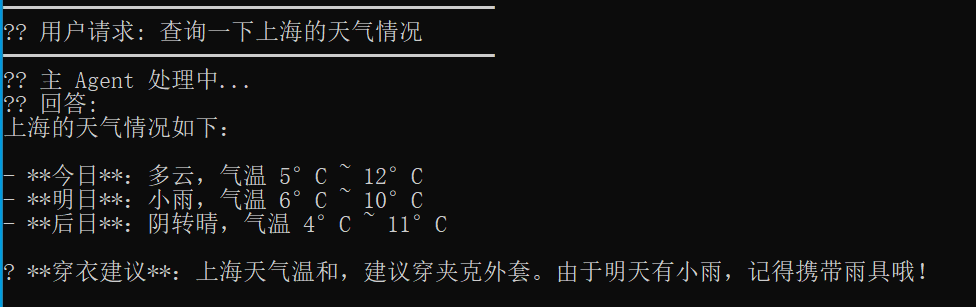
可以看到,主助手通过调用天气Agent获取天气信息完成了回答。
Case 2:推荐上海的酒店(简单任务)
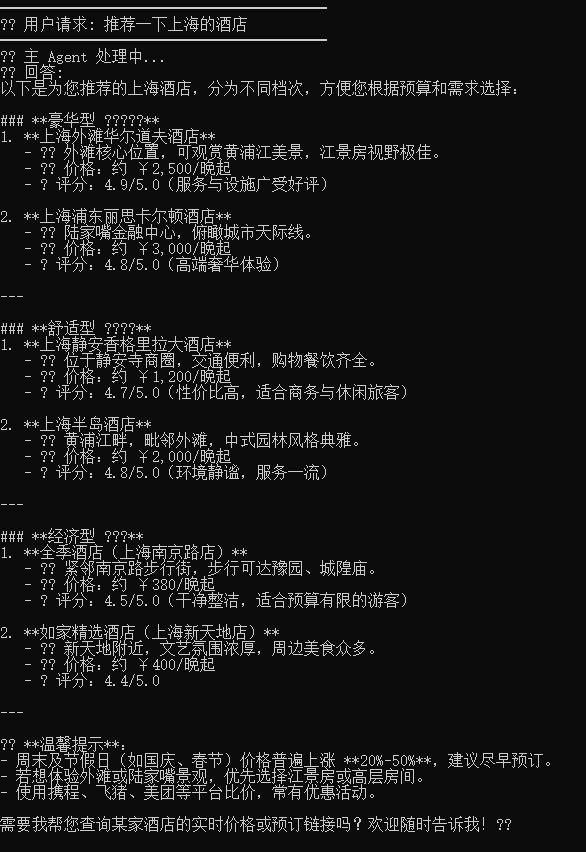
可以看到,主助手通过调用酒店Agent获取酒店信息完成了回答。
Case 3:帮我规划一下今日上海的一日游景点,并告诉我该如何穿衣服(复杂任务)
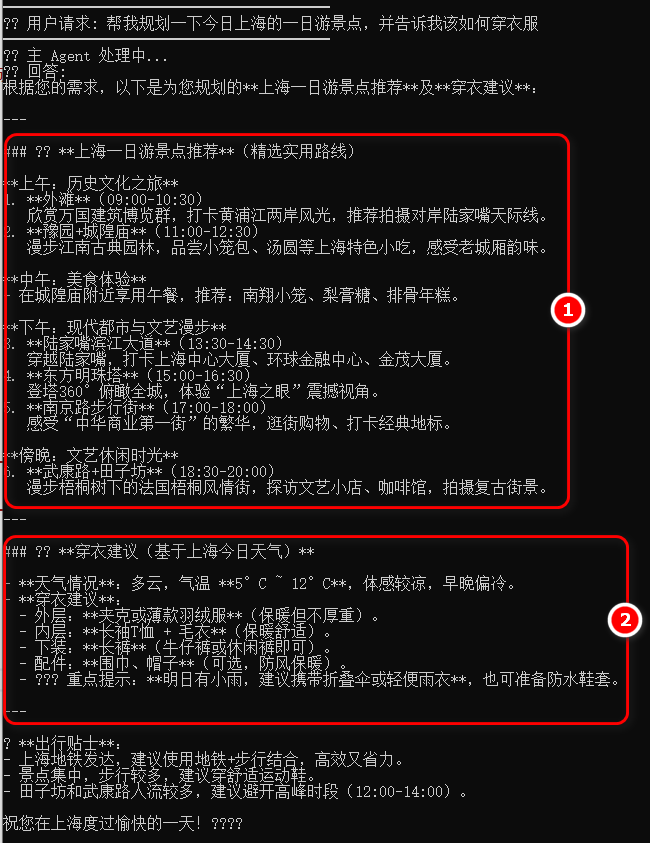
可以看到,主助手调用了多个Agent(景点Agent 和 天气Agent)获取信息,还在此之上进行了整合优化,最后输出了完善的回复。
总结
本文详细介绍了在 Microsoft Agent Framework (MAF) 中集成A2A Agent的核心操作:将远程A2A Agent的技能封装为本地可调用的 AIFunction 工具。通过一个完整的旅行助手案例,我们演示了如何让一个主 Agent 像调用本地函数一样,自主地选择并调用多个远程的、功能单一的专用 Agent(如天气、酒店、景点推荐),从而实现复杂的多步骤任务。
这种方法大大提升了Agent系统的模块化与复用性,是构建复杂、可扩展的 智能体 应用的关键模式。希望本文的实战案例能帮助你快速上手 .NET 生态下的多智能体开发。如果你想了解更多关于 .NET 与 AI 开发结合的最佳实践,欢迎到云栈社区 进行更深度的技术交流。
示例源码
Github: https://github.com/EdisonTalk/MAFD
 发表于 2026-2-7 05:22:54
|
查看: 443|
回复: 0
发表于 2026-2-7 05:22:54
|
查看: 443|
回复: 0

