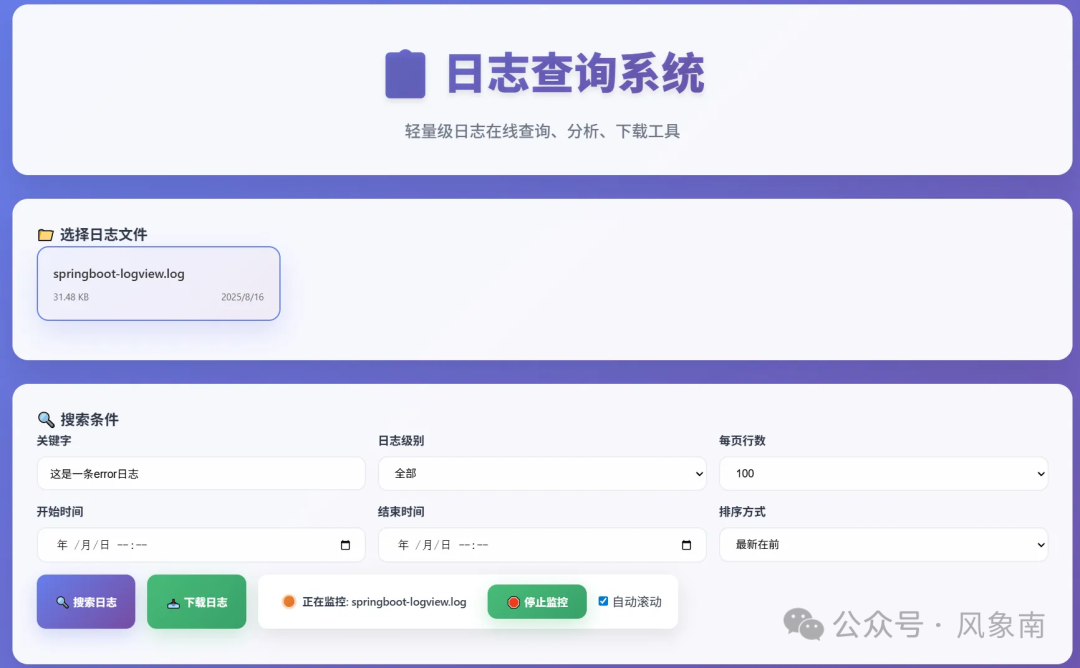
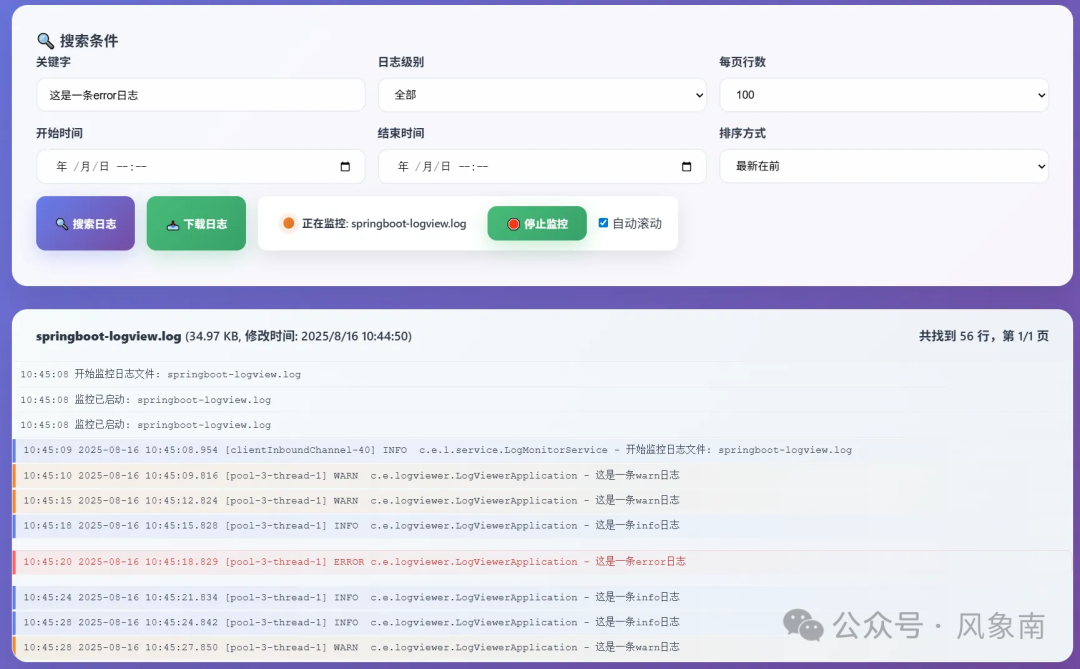
生产环境出了问题,你还在反复敲 tail -f 命令翻查日志吗?还在为下载动辄几个G的日志文件而头疼?今天,我们就来动手实现一个轻量级的Web日志查询系统,让日志排查工作变得像在网页上搜索一样简单高效。
为什么需要自建日志查询系统?
在真实项目开发与运维中,下面这些场景你一定不陌生:
- 生产环境突发故障,需要快速定位特定的错误日志。
- 日志文件体积巨大,下载耗时且占用大量网络带宽。
- 需要根据特定时间范围、关键字或日志级别(如ERROR、WARN)进行筛选。
- 团队协作时,多位开发或运维人员需要反复登录服务器查看日志。
诚然,有ELK、Splunk这类成熟的日志分析套件,但对于许多中小型项目或团队来说,它们部署成本高、资源消耗大,显得“杀鸡用牛刀”。本文将使用SpringBoot搭配纯前端技术,打造一个开箱即用、轻量且功能完备的日志管理系统,让你在几分钟内就能搭建起来。
系统架构设计
整体架构
┌─────────────────┐    ┌─────────────────┐    ┌─────────────────┐
│   前端界面      │    │   Spring Boot   │    │   日志文件      │
│  (HTML+JS)     │◄──►│     后端        │◄──►│   (logback)     │
│                │    │                 │    │                 │
│ • 日志查询      │    │ • 文件读取      │    │ • app.log       │
│ • 条件筛选      │    │ • 内容解析      │    │ • error.log     │
│ • 在线预览      │    │ • 分页处理      │    │ • access.log    │
│ • 文件下载      │    │ • 下载服务      │    │                 │
└─────────────────┘    └─────────────────┘    └─────────────────┘
核心功能模块
- 日志文件管理:扫描、列举指定目录下的日志文件。
- 内容解析:按行读取、正则匹配日志格式、分页处理。
- 条件筛选:支持时间范围、关键字、日志级别等多维度过滤。
- 在线预览:实时显示、语法高亮(不同级别不同颜色)。
- 文件下载:支持下载原始文件或筛选后的结果。
后端实现(SpringBoot)
1. 项目结构
src/main/java/com/example/logviewer/
├── LogViewerApplication.java
├── config/
│   └── LogConfig.java
├── controller/
│   └── LogController.java
├── service/
│   └── LogService.java
├── dto/
│   ├── LogQueryRequest.java
│   └── LogQueryResponse.java
└── util/
    └── LogParser.java
2. 核心依赖 (pom.xml)
<dependencies>
    <dependency>
        <groupId>org.springframework.boot</groupId>
        <artifactId>spring-boot-starter-web</artifactId>
    </dependency>
    <dependency>
        <groupId>org.springframework.boot</groupId>
        <artifactId>spring-boot-starter-validation</artifactId>
    </dependency>
    <dependency>
        <groupId>org.apache.commons</groupId>
        <artifactId>commons-lang3</artifactId>
    </dependency>
    <dependency>
        <groupId>commons-io</groupId>
        <artifactId>commons-io</artifactId>
        <version>2.11.0</version>
    </dependency>
</dependencies>
3. 配置类 (LogConfig.java)
@Configuration
@ConfigurationProperties(prefix = "log.viewer")
@Data
public class LogConfig {

    /**
     * 日志文件根目录
     */
    private String logPath = "./logs";

    /**
     * 允许访问的日志文件扩展名
     */
    private List<String> allowedExtensions = Arrays.asList(".log", ".txt");

    /**
     * 单次查询最大行数
     */
    private int maxLines = 1000;

    /**
     * 文件最大大小(MB)
     */
    private long maxFileSize = 100;

    /**
     * 是否启用安全检查
     */
    private boolean enableSecurity = true;
}
4. 数据传输对象 (DTO)
@Data
public class LogQueryRequest {

    @NotBlank(message = "文件名不能为空")
    private String fileName;

    /**
     * 页码,从1开始
     */
    @Min(value = 1, message = "页码必须大于0")
    private int page = 1;

    /**
     * 每页行数
     */
    @Min(value = 1, message = "每页行数必须大于0")
    @Max(value = 1000, message = "每页行数不能超过1000")
    private int pageSize = 100;

    /**
     * 关键字搜索
     */
    private String keyword;

    /**
     * 日志级别过滤
     */
    private String level;

    /**
     * 开始时间
     */
    @DateTimeFormat(pattern = "yyyy-MM-dd HH:mm:ss")
    private LocalDateTime startTime;

    /**
     * 结束时间
     */
    @DateTimeFormat(pattern = "yyyy-MM-dd HH:mm:ss")
    private LocalDateTime endTime;

    /**
     * 是否倒序
     */
    private boolean reverse = true;
}

@Data
public class LogQueryResponse {

    /**
     * 日志内容列表
     */
    private List<String> lines;

    /**
     * 总行数
     */
    private long totalLines;

    /**
     * 当前页码
     */
    private int currentPage;

    /**
     * 总页数
     */
    private int totalPages;

    /**
     * 文件大小(字节)
     */
    private long fileSize;

    /**
     * 最后修改时间
     */
    private LocalDateTime lastModified;
}
5. 日志解析工具类 (LogParser.java)
@Component
public class LogParser {

    private static final Pattern LOG_PATTERN = Pattern.compile(
        "(\d{4}-\d{2}-\d{2}\s+\d{2}:\d{2}:\d{2}\.\d{3})\s+(\w+)\s+(.*)")
    );

    /**
     * 解析日志行,提取时间和级别
     */
    public LogLineInfo parseLine(String line) {
        Matcher matcher = LOG_PATTERN.matcher(line);
        if (matcher.find()) {
            String timestamp = matcher.group(1);
            String level = matcher.group(2);
            String content = matcher.group(3);

            LocalDateTime dateTime = parseTimestamp(timestamp);
            return new LogLineInfo(dateTime, level, content, line);
        }

        // 如果不匹配标准格式,返回原始行
        return new LogLineInfo(null, null, line, line);
    }

    private LocalDateTime parseTimestamp(String timestamp) {
        try {
            DateTimeFormatter formatter = DateTimeFormatter.ofPattern("yyyy-MM-dd HH:mm:ss.SSS");
            return LocalDateTime.parse(timestamp, formatter);
        } catch (Exception e) {
            return null;
        }
    }

    @Data
    @AllArgsConstructor
    public static class LogLineInfo {
        private LocalDateTime timestamp;
        private String level;
        private String content;
        private String originalLine;

        public boolean matchesFilter(LogQueryRequest request) {
            // 时间范围过滤
            if (timestamp != null) {
                if (request.getStartTime() != null && timestamp.isBefore(request.getStartTime())) {
                    return false;
                }
                if (request.getEndTime() != null && timestamp.isAfter(request.getEndTime())) {
                    return false;
                }
            }

            // 日志级别过滤
            if (StringUtils.isNotBlank(request.getLevel()) &&
                !StringUtils.equalsIgnoreCase(level, request.getLevel())) {
                return false;
            }

            // 关键字过滤
            if (StringUtils.isNotBlank(request.getKeyword()) &&
                !StringUtils.containsIgnoreCase(originalLine, request.getKeyword())) {
                return false;
            }

            return true;
        }
    }
}
6. 核心服务类 (LogService.java)
@Service
@Slf4j
public class LogService {

    @Autowired
    private LogConfig logConfig;

    @Autowired
    private LogParser logParser;

    /**
     * 获取日志文件列表
     */
    public List<Map<String, Object>> getLogFiles() {
        File logDir = new File(logConfig.getLogPath());
        if (!logDir.exists() || !logDir.isDirectory()) {
            return Collections.emptyList();
        }

        return Arrays.stream(logDir.listFiles())
            .filter(this::isValidLogFile)
            .map(this::fileToMap)
            .sorted((a, b) -> ((Long)b.get("lastModified")).compareTo((Long)a.get("lastModified")))
            .collect(Collectors.toList());
    }

    /**
     * 查询日志内容
     */
    public LogQueryResponse queryLogs(LogQueryRequest request) {
        File logFile = getLogFile(request.getFileName());
        validateFile(logFile);

        try {
            List<String> allLines = FileUtils.readLines(logFile, StandardCharsets.UTF_8);

            // 过滤日志行
            List<String> filteredLines = filterLines(allLines, request);

            // 倒序处理
            if (request.isReverse()) {
                Collections.reverse(filteredLines);
            }

            // 分页处理
            int totalLines = filteredLines.size();
            int totalPages = (int) Math.ceil((double) totalLines / request.getPageSize());
            int startIndex = (request.getPage() - 1) * request.getPageSize();
            int endIndex = Math.min(startIndex + request.getPageSize(), totalLines);

            List<String> pageLines = filteredLines.subList(startIndex, endIndex);

            LogQueryResponse response = new LogQueryResponse();
            response.setLines(pageLines);
            response.setTotalLines(totalLines);
            response.setCurrentPage(request.getPage());
            response.setTotalPages(totalPages);
            response.setFileSize(logFile.length());
            response.setLastModified(
                LocalDateTime.ofInstant(
                    Instant.ofEpochMilli(logFile.lastModified()),
                    ZoneId.systemDefault()
                )
            );

            return response;

        } catch (IOException e) {
            log.error("读取日志文件失败: {}", logFile.getAbsolutePath(), e);
            throw new RuntimeException("读取日志文件失败", e);
        }
    }

    /**
     * 下载日志文件
     */
    public void downloadLog(String fileName, LogQueryRequest request, HttpServletResponse response) {
        File logFile = getLogFile(fileName);
        validateFile(logFile);

        try {
            response.setContentType("application/octet-stream");
            response.setHeader("Content-Disposition",
                "attachment; filename=" + URLEncoder.encode(fileName, "UTF-8"));

            if (hasFilter(request)) {
                // 下载过滤后的内容
                List<String> allLines = FileUtils.readLines(logFile, StandardCharsets.UTF_8);
                List<String> filteredLines = filterLines(allLines, request);

                try (PrintWriter writer = response.getWriter()) {
                    for (String line : filteredLines) {
                        writer.println(line);
                    }
                }
            } else {
                // 下载原文件
                response.setContentLengthLong(logFile.length());
                try (InputStream inputStream = new FileInputStream(logFile);
                     OutputStream outputStream = response.getOutputStream()) {
                    IOUtils.copy(inputStream, outputStream);
                }
            }

        } catch (IOException e) {
            log.error("下载日志文件失败: {}", logFile.getAbsolutePath(), e);
            throw new RuntimeException("下载日志文件失败", e);
        }
    }

    private List<String> filterLines(List<String> lines, LogQueryRequest request) {
        if (!hasFilter(request)) {
            return lines;
        }

        return lines.stream()
            .map(logParser::parseLine)
            .filter(lineInfo -> lineInfo.matchesFilter(request))
            .map(LogParser.LogLineInfo::getOriginalLine)
            .collect(Collectors.toList());
    }

    private boolean hasFilter(LogQueryRequest request) {
        return StringUtils.isNotBlank(request.getKeyword()) ||
               StringUtils.isNotBlank(request.getLevel()) ||
               request.getStartTime() != null ||
               request.getEndTime() != null;
    }

    private File getLogFile(String fileName) {
        // 安全检查:防止路径遍历攻击
        if (logConfig.isEnableSecurity()) {
            if (fileName.contains("..") || fileName.contains("/") || fileName.contains("\\")) {
                throw new IllegalArgumentException("非法的文件名");
            }
        }

        return new File(logConfig.getLogPath(), fileName);
    }

    private void validateFile(File file) {
        if (!file.exists()) {
            throw new IllegalArgumentException("文件不存在");
        }

        if (!file.isFile()) {
            throw new IllegalArgumentException("不是有效的文件");
        }

        if (!isValidLogFile(file)) {
            throw new IllegalArgumentException("不支持的文件类型");
        }

        long fileSizeMB = file.length() / (1024 * 1024);
        if (fileSizeMB > logConfig.getMaxFileSize()) {
            throw new IllegalArgumentException(
                String.format("文件过大,超过限制 %dMB", logConfig.getMaxFileSize())
            );
        }
    }

    private boolean isValidLogFile(File file) {
        String fileName = file.getName().toLowerCase();
        return logConfig.getAllowedExtensions().stream()
            .anyMatch(fileName::endsWith);
    }

    private Map<String, Object> fileToMap(File file) {
        Map<String, Object> map = new HashMap<>();
        map.put("name", file.getName());
        map.put("size", file.length());
        map.put("lastModified", file.lastModified());
        map.put("readable", file.canRead());
        return map;
    }
}
7. 日志文件实时监控服务 (LogMonitorService.java)
/**
 * 日志实时监控服务
 * 监控日志文件变化,实时推送新增日志内容
 */
@Slf4j
@Service
public class LogMonitorService implements InitializingBean, DisposableBean {

    @Autowired
    private LogConfig logConfig;

    @Autowired
    private SimpMessagingTemplate messagingTemplate;

    @Autowired
    private LogParser logParser;

    // 文件监控服务
    private WatchService watchService;

    // 线程池
    private ScheduledExecutorService executorService;

    // 存储每个文件的读取位置
    private final Map<String, Long> filePositions = new ConcurrentHashMap<>();

    // 当前监控的文件
    private volatile String currentMonitorFile;

    // 监控状态
    private volatile boolean monitoring = false;

    @Override
    public void afterPropertiesSet() {
        try {
            watchService = FileSystems.getDefault().newWatchService();
            executorService = Executors.newScheduledThreadPool(2);

            // 注册日志目录监控
            Path logPath = Paths.get(logConfig.getLogPath());
            if (Files.exists(logPath)) {
                logPath.register(watchService,
                    StandardWatchEventKinds.ENTRY_MODIFY,
                    StandardWatchEventKinds.ENTRY_CREATE);

                // 启动文件监控线程
                executorService.submit(this::watchFiles);
                log.info("日志文件监控服务已启动,监控目录: {}", logPath);
            }
        } catch (Exception e) {
            log.error("初始化日志监控服务失败", e);
        }
    }

    @Override
    public void destroy() {
        monitoring = false;
        if (watchService != null) {
            try {
                watchService.close();
            } catch (Exception e) {
                log.error("关闭文件监控服务失败", e);
            }
        }
        if (executorService != null) {
            executorService.shutdown();
        }
        log.info("日志监控服务已关闭");
    }

    /**
     * 开始监控指定文件
     * @param fileName 文件名
     */
    public void startMonitoring(String fileName) {
        if (fileName == null || fileName.trim().isEmpty()) {
            return;
        }

        currentMonitorFile = fileName;
        monitoring = true;

        // 初始化文件读取位置
        File file = new File(logConfig.getLogPath(), fileName);
        if (file.exists()) {
            filePositions.put(fileName, file.length());
        }

        log.info("开始监控日志文件: {}", fileName);

        // 发送监控开始消息
        messagingTemplate.convertAndSend("/topic/log-monitor",
            Map.of("type", "monitor_started", "fileName", fileName));
    }

    /**
     * 停止监控
     */
    public void stopMonitoring() {
        monitoring = false;
        currentMonitorFile = null;

        log.info("停止日志文件监控");

        // 发送监控停止消息
        messagingTemplate.convertAndSend("/topic/log-monitor",
            Map.of("type", "monitor_stopped"));
    }

    /**
     * 文件监控线程
     */
    private void watchFiles() {
        while (!Thread.currentThread().isInterrupted()) {
            try {
                WatchKey key = watchService.take();

                for (WatchEvent<?> event : key.pollEvents()) {
                    WatchEvent.Kind<?> kind = event.kind();

                    if (kind == StandardWatchEventKinds.OVERFLOW) {
                        continue;
                    }

                    @SuppressWarnings("unchecked")
                    WatchEvent<Path> ev = (WatchEvent<Path>) event;
                    Path fileName = ev.context();

                    if (monitoring && currentMonitorFile != null &&
                        fileName.toString().equals(currentMonitorFile)) {

                        // 延迟处理,避免文件正在写入
                        executorService.schedule(() -> processFileChange(currentMonitorFile),
                            100, TimeUnit.MILLISECONDS);
                    }
                }

                boolean valid = key.reset();
                if (!valid) {
                    break;
                }
            } catch (InterruptedException e) {
                Thread.currentThread().interrupt();
                break;
            } catch (Exception e) {
                log.error("文件监控异常", e);
            }
        }
    }

    /**
     * 处理文件变化
     * @param fileName 文件名
     */
    private void processFileChange(String fileName) {
        try {
            File file = new File(logConfig.getLogPath(), fileName);
            if (!file.exists()) {
                return;
            }

            long currentLength = file.length();
            long lastPosition = filePositions.getOrDefault(fileName, 0L);

            // 如果文件被截断(如日志轮转),重置位置
            if (currentLength < lastPosition) {
                lastPosition = 0L;
            }

            // 如果有新内容
            if (currentLength > lastPosition) {
                String newContent = readNewContent(file, lastPosition, currentLength);
                if (newContent != null && !newContent.trim().isEmpty()) {
                    // 解析新日志行
                    String[] lines = newContent.split("\n");
                    for (String line : lines) {
                        if (!line.trim().isEmpty()) {
                            sendLogLine(fileName, line);
                        }
                    }
                }

                // 更新文件位置
                filePositions.put(fileName, currentLength);
            }
        } catch (Exception e) {
            log.error("处理文件变化失败: {}", fileName, e);
        }
    }

    /**
     * 读取文件新增内容
     * @param file 文件
     * @param startPosition 开始位置
     * @param endPosition 结束位置
     * @return 新增内容
     */
    private String readNewContent(File file, long startPosition, long endPosition) {
        try (RandomAccessFile raf = new RandomAccessFile(file, "r")) {
            raf.seek(startPosition);

            long length = endPosition - startPosition;
            if (length > 1024 * 1024) { // 限制单次读取大小为1MB
                length = 1024 * 1024;
            }

            byte[] buffer = new byte[(int) length];
            int bytesRead = raf.read(buffer);

            if (bytesRead > 0) {
                return new String(buffer, 0, bytesRead, "UTF-8");
            }
        } catch (Exception e) {
            log.error("读取文件内容失败: {}", file.getName(), e);
        }
        return null;
    }

    /**
     * 发送日志行到WebSocket客户端
     * @param fileName 文件名
     * @param logLine 日志行
     */
    private void sendLogLine(String fileName, String logLine) {
        try {
            // 解析日志行
            LogParser.LogLineInfo lineInfo = logParser.parseLine(logLine);

            // 构建消息
            Map<String, Object> message = Map.of(
                "type", "new_log_line",
                "fileName", fileName,
                "content", logLine,
                "timestamp", lineInfo.getTimestamp() != null ? lineInfo.getTimestamp().toString() : "",
                "level", lineInfo.getLevel() != null ? lineInfo.getLevel() : "",
                "rawContent", lineInfo.getContent() != null ? lineInfo.getContent() : logLine
            );

            // 发送到WebSocket客户端
            messagingTemplate.convertAndSend("/topic/log-monitor", message);

        } catch (Exception e) {
            log.error("发送日志行失败", e);
        }
    }

    /**
     * 获取当前监控状态
     * @return 监控状态信息
     */
    public Map<String, Object> getMonitorStatus() {
        return Map.of(
            "monitoring", monitoring,
            "currentFile", currentMonitorFile != null ? currentMonitorFile : "",
            "monitoredFiles", filePositions.size()
        );
    }
}
8. 控制器 (LogController.java)
@RestController
@RequestMapping("/api/logs")
@Slf4j
public class LogController {

    @Autowired
    private LogService logService;

    /**
     * 获取日志文件列表
     */
    @GetMapping("/files")
    public ResponseEntity<List<Map<String, Object>>> getLogFiles() {
        try {
            List<Map<String, Object>> files = logService.getLogFiles();
            return ResponseEntity.ok(files);
        } catch (Exception e) {
            log.error("获取日志文件列表失败", e);
            return ResponseEntity.status(HttpStatus.INTERNAL_SERVER_ERROR).build();
        }
    }

    /**
     * 查询日志内容
     */
    @PostMapping("/query")
    public ResponseEntity<LogQueryResponse> queryLogs(@Valid @RequestBody LogQueryRequest request) {
        try {
            LogQueryResponse response = logService.queryLogs(request);
            return ResponseEntity.ok(response);
        } catch (IllegalArgumentException e) {
            log.warn("查询参数错误: {}", e.getMessage());
            return ResponseEntity.badRequest().build();
        } catch (Exception e) {
            log.error("查询日志失败", e);
            return ResponseEntity.status(HttpStatus.INTERNAL_SERVER_ERROR).build();
        }
    }

    /**
     * 下载日志文件
     */
    @GetMapping("/download/{fileName}")
    public void downloadLog(
            @PathVariable String fileName,
            @RequestParam(required = false) String keyword,
            @RequestParam(required = false) String level,
            @RequestParam(required = false) @DateTimeFormat(pattern = "yyyy-MM-dd HH:mm:ss") LocalDateTime startTime,
            @RequestParam(required = false) @DateTimeFormat(pattern = "yyyy-MM-dd HH:mm:ss") LocalDateTime endTime,
            HttpServletResponse response) {

        try {
            LogQueryRequest request = new LogQueryRequest();
            request.setFileName(fileName);
            request.setKeyword(keyword);
            request.setLevel(level);
            request.setStartTime(startTime);
            request.setEndTime(endTime);

            logService.downloadLog(fileName, request, response);

        } catch (IllegalArgumentException e) {
            log.warn("下载参数错误: {}", e.getMessage());
            response.setStatus(HttpStatus.BAD_REQUEST.value());
        } catch (Exception e) {
            log.error("下载日志失败", e);
            response.setStatus(HttpStatus.INTERNAL_SERVER_ERROR.value());
        }
    }
}
前端实现 (HTML + JavaScript)
前端是一个单页应用,通过Fetch API与后端交互。为了简洁,这里只展示核心的HTML结构和JavaScript逻辑。
1. HTML 结构 (static/index.html)
<!DOCTYPE html>
<html lang="zh-CN">
<head>
    <meta charset="UTF-8">
    <meta name="viewport" content="width=device-width, initial-scale=1.0">
    <title>日志查询系统</title>
    <style>
        /* 样式代码较长,此处省略以保持文章简洁。主要包含容器、表单、按钮、日志行等样式 */
        /* 详细样式可参考原文或完整示例项目 */
    </style>
</head>
<body>
    <div class="container">
        <div class="header">
            <h1>📋 日志查询系统</h1>
            <p>轻量级日志在线查询、分析、下载工具</p>
        </div>

        <div class="search-panel">
            <div class="form-row">
                <div class="form-group">
                    <label for="fileSelect">选择日志文件</label>
                    <select id="fileSelect">
                        <option value="">请选择日志文件...</option>
                    </select>
                </div>
                <div class="form-group">
                    <label for="keyword">关键字搜索</label>
                    <input type="text" id="keyword" placeholder="输入搜索关键字...">
                </div>
                <div class="form-group">
                    <label for="level">日志级别</label>
                    <select id="level">
                        <option value="">全部级别</option>
                        <option value="ERROR">ERROR</option>
                        <option value="WARN">WARN</option>
                        <option value="INFO">INFO</option>
                        <option value="DEBUG">DEBUG</option>
                    </select>
                </div>
            </div>

            <div class="form-row">
                <div class="form-group">
                    <label for="startTime">开始时间</label>
                    <input type="datetime-local" id="startTime">
                </div>
                <div class="form-group">
                    <label for="endTime">结束时间</label>
                    <input type="datetime-local" id="endTime">
                </div>
                <div class="form-group">
                    <label for="pageSize">每页行数</label>
                    <select id="pageSize">
                        <option value="50">50</option>
                        <option value="100" selected>100</option>
                        <option value="200">200</option>
                        <option value="500">500</option>
                    </select>
                </div>
            </div>

            <div class="form-row">
                <button class="btn btn-primary" onclick="searchLogs()">🔍 查询日志</button>
                <button class="btn btn-success" onclick="downloadLogs()">📥 下载日志</button>
                <label>
                    <input type="checkbox" id="reverse" checked> 倒序显示
                </label>
            </div>
        </div>

        <div class="result-panel" id="resultPanel" style="display: none;">
            <div class="result-header">
                <div class="result-info" id="resultInfo"></div>
                <div class="result-actions">
                    <button class="btn btn-primary" onclick="refreshLogs()">🔄 刷新</button>
                </div>
            </div>

            <div class="log-content" id="logContent"></div>

            <div class="pagination" id="pagination"></div>
        </div>
    </div>

    <script>
        // 全局变量
        let currentPage = 1;
        let totalPages = 1;
        let currentQuery = {};

        // 页面加载完成后初始化
        document.addEventListener('DOMContentLoaded', function() {
            loadLogFiles();

            // 绑定回车键搜索
            document.getElementById('keyword').addEventListener('keypress', function(e) {
                if (e.key === 'Enter') {
                    searchLogs();
                }
            });
        });

        // 加载日志文件列表
        async function loadLogFiles() {
            try {
                const response = await fetch('/api/logs/files');
                const files = await response.json();

                const select = document.getElementById('fileSelect');
                select.innerHTML = '<option value="">请选择日志文件...</option>';

                files.forEach(file => {
                    const option = document.createElement('option');
                    option.value = file.name;
                    option.textContent = `${file.name} (${formatFileSize(file.size)}, ${formatDate(file.lastModified)})`;
                    select.appendChild(option);
                });

            } catch (error) {
                console.error('加载文件列表失败:', error);
                showError('加载文件列表失败,请检查服务器连接');
            }
        }

        // 搜索日志
        async function searchLogs(page = 1) {
            const fileName = document.getElementById('fileSelect').value;
            if (!fileName) {
                alert('请先选择日志文件');
                return;
            }

            const query = {
                fileName: fileName,
                page: page,
                pageSize: parseInt(document.getElementById('pageSize').value),
                keyword: document.getElementById('keyword').value,
                level: document.getElementById('level').value,
                startTime: document.getElementById('startTime').value,
                endTime: document.getElementById('endTime').value,
                reverse: document.getElementById('reverse').checked
            };

            // 保存当前查询条件
            currentQuery = query;
            currentPage = page;

            try {
                showLoading();

                const response = await fetch('/api/logs/query', {
                    method: 'POST',
                    headers: {
                        'Content-Type': 'application/json'
                    },
                    body: JSON.stringify(query)
                });

                if (!response.ok) {
                    throw new Error(`HTTP ${response.status}`);
                }

                const result = await response.json();
                displayLogs(result);

            } catch (error) {
                console.error('查询日志失败:', error);
                showError('查询日志失败: ' + error.message);
            }
        }

        // 显示日志内容
        function displayLogs(result) {
            const resultPanel = document.getElementById('resultPanel');
            const resultInfo = document.getElementById('resultInfo');
            const logContent = document.getElementById('logContent');
            const pagination = document.getElementById('pagination');

            // 显示结果面板
            resultPanel.style.display = 'block';

            // 更新结果信息
            resultInfo.innerHTML = `
                📄 文件: ${currentQuery.fileName} |
                📊 总计: ${result.totalLines} 行 |
                📦 大小: ${formatFileSize(result.fileSize)} |
                🕒 修改时间: ${formatDateTime(result.lastModified)}
            `;

            // 显示日志内容
            logContent.innerHTML = '';
            if (result.lines && result.lines.length > 0) {
                result.lines.forEach((line, index) => {
                    const lineDiv = document.createElement('div');
                    lineDiv.className = 'log-line ' + getLogLevel(line);
                    lineDiv.innerHTML = highlightKeyword(escapeHtml(line), currentQuery.keyword);
                    logContent.appendChild(lineDiv);
                });
            } else {
                logContent.innerHTML = '<div class="loading">没有找到匹配的日志记录</div>';
            }

            // 更新分页信息
            totalPages = result.totalPages;
            updatePagination(result);
        }

        // 更新分页控件
        function updatePagination(result) {
            const pagination = document.getElementById('pagination');

            const paginationInfo = `第 ${result.currentPage} 页,共 ${result.totalPages} 页`;

            const prevDisabled = result.currentPage <= 1 ? 'disabled' : '';
            const nextDisabled = result.currentPage >= result.totalPages ? 'disabled' : '';

            pagination.innerHTML = `
                <div class="pagination-info">${paginationInfo}</div>
                <div class="pagination-controls">
                    <button class="btn btn-primary" onclick="searchLogs(1)" ${result.currentPage <= 1 ? 'disabled' : ''}>首页</button>
                    <button class="btn btn-primary" onclick="searchLogs(${result.currentPage - 1})" ${prevDisabled}>上一页</button>
                    <button class="btn btn-primary" onclick="searchLogs(${result.currentPage + 1})" ${nextDisabled}>下一页</button>
                    <button class="btn btn-primary" onclick="searchLogs(${result.totalPages})" ${result.currentPage >= result.totalPages ? 'disabled' : ''}>末页</button>
                </div>
            `;
        }

        // 下载日志
        function downloadLogs() {
            const fileName = document.getElementById('fileSelect').value;
            if (!fileName) {
                alert('请先选择日志文件');
                return;
            }

            const params = new URLSearchParams();

            const keyword = document.getElementById('keyword').value;
            const level = document.getElementById('level').value;
            const startTime = document.getElementById('startTime').value;
            const endTime = document.getElementById('endTime').value;

            if (keyword) params.append('keyword', keyword);
            if (level) params.append('level', level);
            if (startTime) params.append('startTime', startTime);
            if (endTime) params.append('endTime', endTime);

            const url = `/api/logs/download/${encodeURIComponent(fileName)}?${params.toString()}`;

            // 创建隐藏的下载链接
            const link = document.createElement('a');
            link.href = url;
            link.download = fileName;
            document.body.appendChild(link);
            link.click();
            document.body.removeChild(link);
        }

        // 刷新日志
        function refreshLogs() {
            if (currentQuery.fileName) {
                searchLogs(currentPage);
            }
        }

        // 显示加载状态
        function showLoading() {
            const resultPanel = document.getElementById('resultPanel');
            const logContent = document.getElementById('logContent');

            resultPanel.style.display = 'block';
            logContent.innerHTML = '<div class="loading">🔄 正在加载日志...</div>';
        }

        // 显示错误信息
        function showError(message) {
            const resultPanel = document.getElementById('resultPanel');
            const logContent = document.getElementById('logContent');

            resultPanel.style.display = 'block';
            logContent.innerHTML = `<div class="error-message">❌ ${message}</div>`;
        }

        // 获取日志级别样式
        function getLogLevel(line) {
            if (line.includes('ERROR')) return 'error';
            if (line.includes('WARN')) return 'warn';
            if (line.includes('INFO')) return 'info';
            return '';
        }

        // 高亮关键字
        function highlightKeyword(text, keyword) {
            if (!keyword) return text;

            const regex = new RegExp(`(${escapeRegex(keyword)})`, 'gi');
            return text.replace(regex, '<span class="highlight">$1</span>');
        }

        // 转义HTML
        function escapeHtml(text) {
            const div = document.createElement('div');
            div.textContent = text;
            return div.innerHTML;
        }

        // 转义正则表达式特殊字符
        function escapeRegex(string) {
            return string.replace(/[.*+?^${}()|[\]\\]/g, '\\$&');
        }

        // 格式化文件大小
        function formatFileSize(bytes) {
            if (bytes === 0) return '0 B';

            const k = 1024;
            const sizes = ['B', 'KB', 'MB', 'GB'];
            const i = Math.floor(Math.log(bytes) / Math.log(k));

            return parseFloat((bytes / Math.pow(k, i)).toFixed(2)) + ' ' + sizes[i];
        }

        // 格式化日期
        function formatDate(timestamp) {
            return new Date(timestamp).toLocaleDateString('zh-CN');
        }

        // 格式化日期时间
        function formatDateTime(dateTimeStr) {
            return new Date(dateTimeStr).toLocaleString('zh-CN');
        }
    </script>
</body>
</html>
配置文件
application.yml
server:
  port: 8080
  servlet:
    context-path: /

spring:
  application:
    name: log-viewer
  web:
    resources:
      static-locations: classpath:/static/

# 日志查看器配置
log:
  viewer:
    log-path: ./logs  # 日志文件目录
    allowed-extensions:
      - .log
      - .txt
    max-lines: 1000   # 单次查询最大行数
    max-file-size: 100  # 文件最大大小(MB)
    enable-security: true  # 启用安全检查

# 日志配置
logging:
  level:
    com.example.logviewer: DEBUG
  pattern:
    file: "%d{yyyy-MM-dd HH:mm:ss.SSS} %-5level [%thread] %logger{36} - %msg%n"
  file:
    name: ./logs/app.log
  logback:
    rollingpolicy:
      max-file-size: 10MB
      max-history: 30
部署与使用
1. 快速启动
# 克隆项目(假设项目已存在)
git clone <your-repo-url>
cd log-viewer

# 编译打包
mvn clean package -DskipTests

# 启动应用
java -jar target/log-viewer-1.0.0.jar

# 访问系统
open http://localhost:8080
2. Docker 部署
Dockerfile:
FROM openjdk:11-jre-slim

VOLUME /app/logs
COPY target/log-viewer-1.0.0.jar app.jar

EXPOSE 8080
ENTRYPOINT ["java", "-jar", "/app.jar"]
运行命令:
# 构建镜像
docker build -t log-viewer .

# 运行容器
docker run -d \
  --name log-viewer \
  -p 8080:8080 \
  -v /path/to/logs:/app/logs \
  log-viewer
3. 生产环境配置示例 (application-prod.yml)
log:
  viewer:
    log-path: /var/log/myapp
    max-file-size: 500
    enable-security: true

logging:
  level:
    root: WARN
    com.example.logviewer: INFO
功能特性与总结
已实现功能
- 📁 文件列表:自动扫描并展示日志目录下的文件。
- 🔍 多维度筛选:支持按关键字、日志级别、精确时间范围过滤。
- 📄 分页与排序:支持分页浏览,可按时间正/倒序排列。
- 💾 灵活下载:可下载原始文件或筛选后的结果。
- 🎨 友好展示:不同日志级别有颜色高亮,关键字被突出显示。
- 📱 响应式设计:适配不同屏幕尺寸的设备。
- 🔒 基础安全:包含路径遍历攻击防护等安全检查。
- 📡 实时监控:基于WebSocket的实时日志推送功能,让监控更高效,这正是现代运维工作中需要的轻量级工具。
可扩展方向
- 统计分析:对日志进行聚合分析,生成错误趋势图。
- 多文件查询:支持跨多个日志文件联合查询。
- 高级搜索:支持正则表达式搜索。
- 权限管理:集成用户认证与授权,控制文件访问权限。
- 告警功能:对特定错误模式设置告警规则。
性能优化建议
对于超大日志文件,可以考虑以下优化:
- 流式读取:使用
RandomAccessFile进行分页,避免一次性加载整个文件到内存。
- 异步处理:将耗时的查询或文件读取任务异步化,提升接口响应速度。
- 索引预构建:对频繁查询的字段(如时间、级别)建立索引文件。
总结
本文从零开始实现了一个功能完备的轻量级Web日志查询系统。它最大的优势在于轻量、易部署、功能聚焦,完美契合了中小项目、初创团队或内部工具的场景需求。通过将繁琐的日志排查工作Web化、可视化,能显著提升开发与运维人员的问题定位效率。
整个项目结构清晰,代码模块化,你可以非常方便地基于此进行二次开发,添加所需的新功能。希望这个实践能为你提供一种解决日志管理问题的新思路。如果你对实现细节有更多疑问,或想探讨其他相关的技术实践,欢迎在云栈社区与我们交流。
项目完整源码可在以下地址获取(注:此为示例链接):
https://github.com/yuboon/java-examples/tree/master/springboot-logview
 发表于 2026-2-11 09:44:44
|
查看: 334|
回复: 0
发表于 2026-2-11 09:44:44
|
查看: 334|
回复: 0

