nodeSelector
作用及说明
参考文档: https://kubernetes.io/zh-cn/docs/concepts/scheduling-eviction/assign-pod-node/
#nodeSelector 是节点选择约束的最简单推荐形式。你可以将 nodeSelector 字段添加到 Pod 的规约中设置你希望目标节点所具有的节点标签。 Kubernetes 只会将 Pod 调度到拥有你所指定的每个标签的节点上。简单来说 nodeSelector 是通过匹配节点标签,让 Pod 只能调度到指定类型节点上的最简单调度方式。
#使用说明
[root@k8s-master01 ~]# kubectl explain deploy.spec.template.spec.nodeSelector
GROUP:      apps
KIND:       Deployment
VERSION:    v1

FIELD: nodeSelector <map[string]string>

DESCRIPTION:
    NodeSelector is a selector which must be true for the pod to fit on a node.
    Selector which must match a node's labels for the pod to be scheduled on
    that node. More info:
    https://kubernetes.io/docs/concepts/configuration/assign-pod-node/
nodeselector实战案例
# 查看node节点的标签
[root@k8s-master01 ~]# kubectl get nodes --show-labels
NAME                       STATUS   ROLES           AGE    VERSION   LABELS
k8s-master01.dinginx.org   Ready    control-plane   135d   v1.35.0   beta.kubernetes.io/arch=amd64,beta.kubernetes.io/os=linux,k8s.kuboard.cn/role=etcd,kubernetes.io/arch=amd64,kubernetes.io/hostname=k8s-master01.dinginx.org,kubernetes.io/os=linux,node-role.kubernetes.io/control-plane=,node.kubernetes.io/exclude-from-external-load-balancers=
k8s-node01.dinginx.org     Ready    <none>          135d   v1.35.0   beta.kubernetes.io/arch=amd64,beta.kubernetes.io/os=linux,k8s.kuboard.cn/role=etcd,kubernetes.io/arch=amd64,kubernetes.io/hostname=k8s-node01.dinginx.org,kubernetes.io/os=linux
k8s-node02.dinginx.org     Ready    <none>          135d   v1.35.0   beta.kubernetes.io/arch=amd64,beta.kubernetes.io/os=linux,k8s.kuboard.cn/role=etcd,kubernetes.io/arch=amd64,kubernetes.io/hostname=k8s-node02.dinginx.org,kubernetes.io/os=linux

# 为node02节点添加新标签
[root@k8s-master01 ~]# kubectl label node k8s-node01.dinginx.org disktype=ssd
[root@k8s-master01 ~]# kubectl label node k8s-node02.dinginx.org disktype=ssd
[root@k8s-master01 ~]# kubectl get nodes --show-labels
NAME                       STATUS   ROLES           AGE    VERSION   LABELS
k8s-master01.dinginx.org   Ready    control-plane   135d   v1.35.0   beta.kubernetes.io/arch=amd64,beta.kubernetes.io/os=linux,k8s.kuboard.cn/role=etcd,kubernetes.io/arch=amd64,kubernetes.io/hostname=k8s-master01.dinginx.org,kubernetes.io/os=linux,node-role.kubernetes.io/control-plane=,node.kubernetes.io/exclude-from-external-load-balancers=
k8s-node01.dinginx.org     Ready    <none>          135d   v1.35.0   beta.kubernetes.io/arch=amd64,beta.kubernetes.io/os=linux,k8s.kuboard.cn/role=etcd,kubernetes.io/arch=amd64,kubernetes.io/hostname=k8s-node01.dinginx.org,kubernetes.io/os=linux
k8s-node02.dinginx.org     Ready    <none>          135d   v1.35.0   beta.kubernetes.io/arch=amd64,beta.kubernetes.io/os=linux,disktype=ssd,k8s.kuboard.cn/role=etcd,kubernetes.io/arch=amd64,kubernetes.io/hostname=k8s-node02.dinginx.org,kubernetes.io/os=linux

#***********
查看node节点是否存在污点,如存在请先删除污点或增加污点容忍
[root@k8s-master01 /data/manifests/pod-scheduler]# kubectl describe nodes |grep Taints
Taints:             app=dinginx001:NoSchedule
Taints:             <none>
Taints:             <none>
#***********

# 编写资源清单
[root@k8s-master01 /data/manifests/pod-scheduler]# cat 07-scheduler-nodeSelector.yaml
apiVersion: apps/v1
kind: Deployment
metadata:
  name: dinginx-deploy-nodeselector
spec:
  replicas: 3
  selector:
    matchLabels:
      app: dinginx-deploy-nodeselector
  template:
    metadata:
      labels:
        app: dinginx-deploy-nodeselector
    spec:
      containers:
      - image: harbor.dinginx.org/dinginx/nginx:latest
        name: nginx
        imagePullPolicy: IfNotPresent
# 创建标签选择器,表明该 Pod 将被调度到有 disktype=ssd 标签的节点。
      nodeSelector:
        disktype: ssd

`#查看资源信息`,资源被调度到k8s-node02.dinginx.org节点上
[root@k8s-master01 /data/manifests/pod-scheduler]# kubectl get pods -owide --show-labels
NAME                                                READY   STATUS    RESTARTS   AGE    IP             NODE                     NOMINATED NODE   READINESS GATES   LABELS
dinginx-deploy-nodeselector-7f5c76ff85-7bnsq   1/1     Running   0          4m9s   10.244.2.235   k8s-node02.dinginx.org   <none>           <none>            app=dinginx-deploy-nodeselector,pod-template-hash=7f5c76ff85
dinginx-deploy-nodeselector-7f5c76ff85-fvzw7   1/1     Running   0          4m9s   10.244.2.236   k8s-node02.dinginx.org   <none>           <none>            app=dinginx-deploy-nodeselector,pod-template-hash=7f5c76ff85
dinginx-deploy-nodeselector-7f5c76ff85-hcp9n   1/1     Running   0          4m9s   10.244.2.238   k8s-node02.dinginx.org   <none>           <none>            app=dinginx-deploy-nodeselector,pod-template-hash=7f5c76ff85
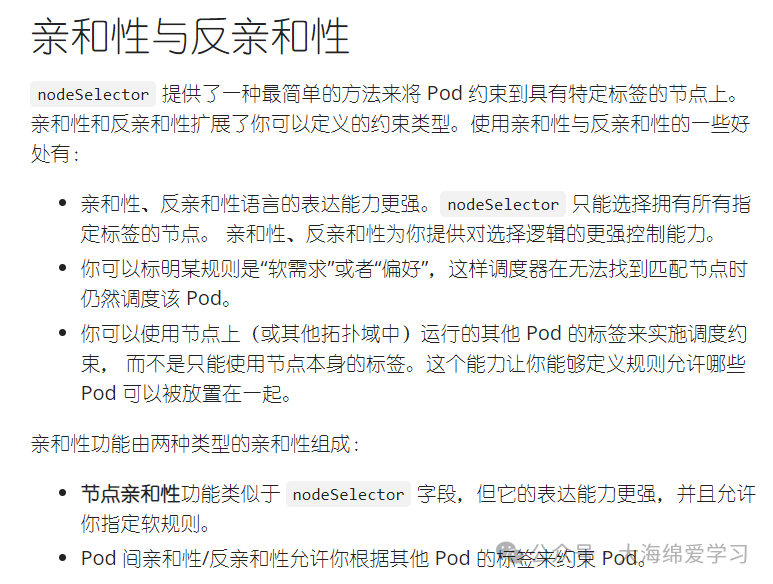
affinity(亲和性)
作用及说明
参考链接:https://kubernetes.io/zh-cn/docs/concepts/scheduling-eviction/assign-pod-node/`#affinity`-and-anti-affinity
#使用说明
[root@k8s-master01 ~]# kubectl explain po.spec.affinity
KIND:       Pod
VERSION:    v1

FIELD: affinity <Affinity>

DESCRIPTION:
    If specified, the pod's scheduling constraints
    Affinity is a group of affinity scheduling rules.

FIELDS:
  nodeAffinity <NodeAffinity>
    Describes node affinity scheduling rules for the pod.

  podAffinity <PodAffinity>
    Describes pod affinity scheduling rules (e.g. co-locate this pod in the same
    node, zone, etc. as some other pod(s)).

  podAntiAffinity <PodAntiAffinity>
    Describes pod anti-affinity scheduling rules (e.g. avoid putting this pod in
    the same node, zone, etc. as some other pod(s)).
nodeAffinity(节点亲和性)案例
作用及说明
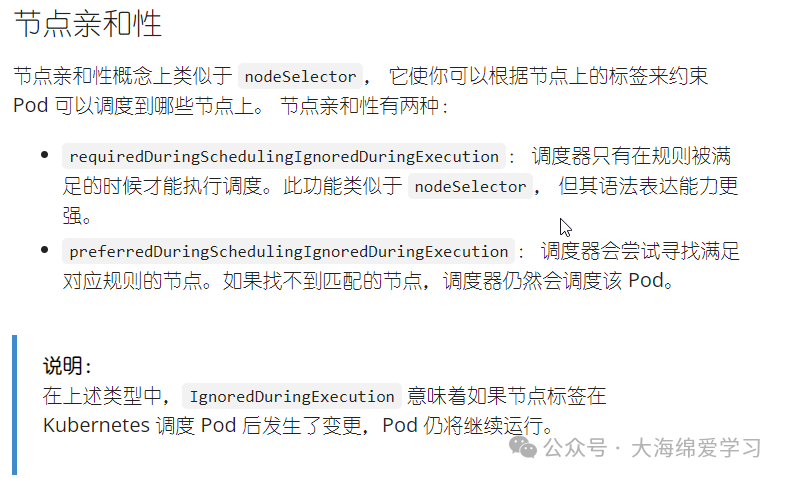
# 基于节点的标签进行调度,相比较nodeselector可实现多值匹配。
`## 使用说明`
[root@k8s-master01 ~]# kubectl explain po.spec.affinity.nodeAffinity
KIND:       Pod
VERSION:    v1
FIELD: nodeAffinity <NodeAffinity>
DESCRIPTION:
    Describes node affinity scheduling rules for the pod.
    Node affinity is a group of node affinity scheduling rules.

FIELDS:
`#软限制`
  preferredDuringSchedulingIgnoredDuringExecution <[]PreferredSchedulingTerm>
    The scheduler will prefer to schedule pods to nodes that satisfy the
    affinity expressions specified by this field, but it may choose a node that
    violates one or more of the expressions. The node that is most preferred is
    the one with the greatest sum of weights, i.e. for each node that meets all
    of the scheduling requirements (resource request, requiredDuringScheduling
    affinity expressions, etc.), compute a sum by iterating through the elements
    of this field and adding "weight" to the sum if the node matches the
    corresponding matchExpressions; the node(s) with the highest sum are the
    most preferred.

`#强制限制`,推荐使用
  requiredDuringSchedulingIgnoredDuringExecution <NodeSelector>
    If the affinity requirements specified by this field are not met at
    scheduling time, the pod will not be scheduled onto the node. If the
    affinity requirements specified by this field cease to be met at some point
    during pod execution (e.g. due to an update), the system may or may not try
    to eventually evict the pod from its node.

`#配置`
[root@k8s-master01 ~]# kubectl explain po.spec.affinity.nodeAffinity.requiredDuringSchedulingIgnoredDuringExecution.nodeSelectorTerms.matchExpressions
requiredDuringSchedulingIgnoredDuringExecution(硬限制)实战案例
`#资源清单`,实现资源调度到master及node02节点,master节点需配置容忍度
[root@k8s-master01 /data/manifests/pod-scheduler]# cat 08-scheduler-nodeAffinity.yaml
apiVersion: apps/v1
kind: Deployment
metadata:
  name: dinginx-deploy-nodeaffinity
spec:
  replicas: 3
  selector:
    matchLabels:
      app: dinginx-deploy-nodeaffinity
  template:
    metadata:
      labels:
        app: dinginx-deploy-nodeaffinity
    spec:
# 配置容忍度
      tolerations:
# 容忍master污点规则
      - key: app
        value: dinginx001
        effect: NoSchedule
      containers:
      - name: nginx
        image: harbor.dinginx.org/dinginx/nginx:latest
        imagePullPolicy: IfNotPresent
# 亲和性调度配置
      affinity:
# 节点亲和性(控制Pod调度到哪些节点)
        nodeAffinity:
# 硬性规则(必须满足)
# Pod调度时必须满足,否则不调度
          requiredDuringSchedulingIgnoredDuringExecution:
# 注意:这里必须是数组
            nodeSelectorTerms:
# 标签匹配表达式(可以写多个)
            - matchExpressions:
# 条件1
# 节点标签 key
              - key: disktype
# 操作符(In表示包含)
                operator: In
                values:
                - ssd
# 相比较nodeselector可实现多值匹配
                - dinginx

`#验证资源`,资源被成功调度到master和node02节点
[root@k8s-master01 /data/manifests/pod-scheduler]# kubectl apply -f 08-scheduler-nodeAffinity.yaml
[root@k8s-master01 /data/manifests/pod-scheduler]# kubectl get pods -owide
NAME                                                READY   STATUS    RESTARTS   AGE   IP             NODE                       NOMINATED NODE   READINESS GATES
dinginx-deploy-nodeaffinity-7668b4556d-bdlz2   1/1     Running   0          10s   10.244.0.30    k8s-master01.dinginx.org   <none>           <none>
dinginx-deploy-nodeaffinity-7668b4556d-hcl82   1/1     Running   0          7s    10.244.0.31    k8s-master01.dinginx.org   <none>           <none>
dinginx-deploy-nodeaffinity-7668b4556d-j4p6s   1/1     Running   0          8s    10.244.2.165   k8s-node02.dinginx.org     <none>           <none>

# 匹配多值后验证,这里需提前给node02打标签disktype=dinginx
[root@k8s-master01 ~]# kubectl get nodes k8s-node01.dinginx.org --show-labels |grep disktype=dinginx
k8s-node01.dinginx.org   Ready    <none>   135d   v1.35.0   beta.kubernetes.io/arch=amd64,beta.kubernetes.io/os=linux,disktype=dinginx,k8s.kuboard.cn/role=etcd,kubernetes.io/arch=amd64,kubernetes.io/hostname=k8s-node01.dinginx.org,kubernetes.io/os=linux
`#验证资源`
[root@k8s-master01 /data/manifests/pod-scheduler]# kubectl get pods -owide
NAME                                               READY   STATUS    RESTARTS   AGE   IP             NODE                       NOMINATED NODE   READINESS GATES
dinginx-deploy-nodeaffinity-d6776db5-cl7bk   1/1     Running   0          7s    10.244.0.32    k8s-master01.dinginx.org   <none>           <none>
dinginx-deploy-nodeaffinity-d6776db5-gz2mn   1/1     Running   0          6s    10.244.2.171   k8s-node02.dinginx.org     <none>           <none>
dinginx-deploy-nodeaffinity-d6776db5-qlc44   1/1     Running   0          4s    10.244.1.162   k8s-node01.dinginx.org     <none>           <none>
preferredDuringSchedulingIgnoredDuringExecution(软限制)实战案例
`#使用说明`,
[root@k8s-master01 ~]# kubectl explain po.spec.affinity.podAffinity.preferredDuringSchedulingIgnoredDuringExecution
KIND:       Pod
VERSION:    v1

FIELD: preferredDuringSchedulingIgnoredDuringExecution <[]WeightedPodAffinityTerm>

DESCRIPTION:
    The scheduler will prefer to schedule pods to nodes that satisfy the
    affinity expressions specified by this field, but it may choose a node that
    violates one or more of the expressions. The node that is most preferred is
    the one with the greatest sum of weights, i.e. for each node that meets all
    of the scheduling requirements (resource request, requiredDuringScheduling
    affinity expressions, etc.), compute a sum by iterating through the elements
    of this field and adding "weight" to the sum if the node has pods which
    matches the corresponding podAffinityTerm; the node(s) with the highest sum
    are the most preferred.
    The weights of all of the matched WeightedPodAffinityTerm fields are added
    per-node to find the most preferred node(s)

FIELDS:
  podAffinityTerm <PodAffinityTerm> -required-
    Required. A pod affinity term, associated with the corresponding weight.

  weight <integer> -required-
    weight associated with matching the corresponding podAffinityTerm, in the
    range 1-100.

# 删除所有的标签
[root@k8s-master01 ~]# kubectl label node --all disktype-

# 创建资源清单
[root@k8s-master01 /data/manifests/pod-scheduler]# cat 08-scheduler-nodeAffinity.yaml
apiVersion: apps/v1
kind: Deployment
metadata:
  name: dinginx-deploy-nodeaffinity
spec:
  replicas: 10
  selector:
    matchLabels:
      app: dinginx-deploy-nodeaffinity
  template:
    metadata:
      labels:
        app: dinginx-deploy-nodeaffinity
    spec:
      tolerations:
      - key: app
        value: dinginx001
        effect: NoSchedule
      containers:
      - name: nginx
        image: harbor.dinginx.org/dinginx/nginx:latest
        imagePullPolicy: IfNotPresent
# 亲和性调度配置
      affinity:
# 节点亲和性(控制Pod调度到哪些节点)
        nodeAffinity:
# 软限制规则(根据权重)
          preferredDuringSchedulingIgnoredDuringExecution:
# 定义优先权策略,与相应权重关联的节点选择器项。
          - preference:
              matchExpressions:
              - key: app
                values:
                - "ssd"
                - "dinginx"
                operator: In
# 设置权重,有效值为: 1-100
            weight: 50
          - preference:
              matchExpressions:
              - key: app
                values:
                - "dinginx001"
                operator: In
            weight: 80

`#打标签`
[root@k8s-master01 /data/manifests/pod-scheduler]# kubectl label nodes k8s-node01.dinginx.org app=ssd
node/k8s-node01.dinginx.org labeled
[root@k8s-master01 /data/manifests/pod-scheduler]# kubectl label nodes k8s-node02.dinginx.org app=dinginx001
node/k8s-node02.dinginx.org labeled

`#验证数据`,资源尽可能的网node02调度
[root@k8s-master01 /data/manifests/pod-scheduler]# kubectl get pods -owide |sort -t6
NAME                                                READY   STATUS    RESTARTS   AGE    IP             NODE                       NOMINATED NODE   READINESS GATES
dinginx-deploy-nodeaffinity-7b97dbdfc6-6bsxb   1/1     Running   0          2m6s   10.244.2.192   k8s-node02.dinginx.org     <none>           <none>
dinginx-deploy-nodeaffinity-7b97dbdfc6-7mvmq   1/1     Running   0          2m6s   10.244.2.195   k8s-node02.dinginx.org     <none>           <none>
dinginx-deploy-nodeaffinity-7b97dbdfc6-8dl4p   1/1     Running   0          2m6s   10.244.0.37    k8s-master01.dinginx.org   <none>           <none>
dinginx-deploy-nodeaffinity-7b97dbdfc6-8dqp4   1/1     Running   0          2m6s   10.244.1.169   k8s-node01.dinginx.org     <none>           <none>
dinginx-deploy-nodeaffinity-7b97dbdfc6-d978v   1/1     Running   0          2m6s   10.244.2.193   k8s-node02.dinginx.org     <none>           <none>
dinginx-deploy-nodeaffinity-7b97dbdfc6-kvs94   1/1     Running   0          2m6s   10.244.0.39    k8s-master01.dinginx.org   <none>           <none>
dinginx-deploy-nodeaffinity-7b97dbdfc6-s8nhd   1/1     Running   0          2m6s   10.244.0.38    k8s-master01.dinginx.org   <none>           <none>
dinginx-deploy-nodeaffinity-7b97dbdfc6-s8wmd   1/1     Running   0          2m6s   10.244.1.170   k8s-node01.dinginx.org     <none>           <none>
dinginx-deploy-nodeaffinity-7b97dbdfc6-v4rmw   1/1     Running   0          2m6s   10.244.2.194   k8s-node02.dinginx.org     <none>           <none>
dinginx-deploy-nodeaffinity-7b97dbdfc6-zt226   1/1     Running   0          2m6s   10.244.0.40    k8s-master01.dinginx.org   <none>           <none>
一句话也就是说 硬限制:不满足就绝对不调度;软限制:尽量满足,不满足也可以调度。
podAffinity(Pod的亲和性)
软限制和硬限制参考nodeAffinity的相关配置:略
# 使用说明
[root@k8s-master01 ~]# kubectl explain po.spec.affinity.podAffinity
`#...`
FIELDS:
`#软限制`
  preferredDuringSchedulingIgnoredDuringExecution <[]WeightedPodAffinityTerm>
`#硬性限制`
  requiredDuringSchedulingIgnoredDuringExecution <[]PodAffinityTerm>

`#打标签`
[root@k8s-master01 ~]# kubectl label nodes k8s-master01.dinginx.org  dc=beijing
[root@k8s-master01 ~]# kubectl label nodes k8s-node01.dinginx.org  dc=shanghai
[root@k8s-master01 ~]# kubectl label nodes k8s-node02.dinginx.org  dc=guangzhou

# 准备测试资源
[root@k8s-master01 /data/manifests/pod-scheduler]# cat test.yaml
apiVersion: v1
kind: Pod
metadata:
  labels:
    app: dinginx-deploy-podaffinity
  name: dinginx-deploy-podaffinity
spec:
  nodeName: k8s-node01.dinginx.org
  containers:
  - image: nginx
    name: dinginx-deploy-podaffinity
  dnsPolicy: ClusterFirst
`## 下面pod亲和性会调度到node01节点`
[root@k8s-master01 /data/manifests/pod-scheduler]# kubectl get  -f test.yaml -owide
NAME                          READY   STATUS    RESTARTS   AGE     IP             NODE                     NOMINATED NODE   READINESS GATES
dinginx-deploy-podaffinity   1/1     Running   0          3m31s   10.244.1.192   k8s-node01.dinginx.org   <none>           <none>

`#配置pod的亲和性`,创建资源清单
[root@k8s-master01 /data/manifests/pod-scheduler]# cat 09-scheduler-podAffinity.yaml
apiVersion: apps/v1
kind: Deployment
metadata:
  name: dinginx-deploy-podaffinity
spec:
  replicas: 5
  selector:
    matchLabels:
      app: dinginx-deploy-podaffinity
  template:
    metadata:
      labels:
        app: dinginx-deploy-podaffinity  `#和测试pod标签一致`
    spec:
      tolerations:
      - key: app
        value: dinginx001
        effect: NoSchedule
      containers:
      - name: nginx
        image: harbor.dinginx.org/dinginx/nginx:latest
        imagePullPolicy: IfNotPresent
# 亲和性调度配置
      affinity:
# 节点亲和性(控制Pod调度到哪些节点)
        podAffinity:
`#配置硬性限制`,不匹配不调度
          requiredDuringSchedulingIgnoredDuringExecution:
# 指定拓扑域
          - topologyKey: dc
# 基于pod关联
            labelSelector:
# 基于标签匹配pod
              matchLabels:
                app: dinginx-deploy-podaffinity

# 创建并验证资源,pod全部和测试pod一致调度到node01节点
[root@k8s-master01 /data/manifests/pod-scheduler]# kubectl apply -f 09-scheduler-podAffinity.yaml
[root@k8s-master01 /data/manifests/pod-scheduler]# kubectl get pods -owide
NAME                                           READY   STATUS    RESTARTS   AGE     IP             NODE                     NOMINATED NODE   READINESS GATES
dinginx-deploy-podaffinity                    1/1     Running   0          5m18s   10.244.1.192   k8s-node01.dinginx.org   <none>           <none>
dinginx-deploy-podaffinity-5db7878587-5fsjb   1/1     Running   0          4m48s   10.244.1.195   k8s-node01.dinginx.org   <none>           <none>
dinginx-deploy-podaffinity-5db7878587-jf59n   1/1     Running   0          4m47s   10.244.1.194   k8s-node01.dinginx.org   <none>           <none>
dinginx-deploy-podaffinity-5db7878587-nqdjc   1/1     Running   0          4m48s   10.244.1.196   k8s-node01.dinginx.org   <none>           <none>
dinginx-deploy-podaffinity-5db7878587-s27x8   1/1     Running   0          4m48s   10.244.1.193   k8s-node01.dinginx.org   <none>           <none>
dinginx-deploy-podaffinity-5db7878587-x24t9   1/1     Running   0          4m47s   10.244.1.197   k8s-node01.dinginx.org   <none>           <none>
podAntiAffinity(Pod的反亲和性)
软限制和硬限制参考nodeAffinity的相关配置:略
`#使用说明`
[root@k8s-master01 ~]# kubectl explain po.spec.affinity.podAntiAffinity
KIND:       Pod
VERSION:    v1

FIELD: podAntiAffinity <PodAntiAffinity>

DESCRIPTION:
    Describes pod anti-affinity scheduling rules (e.g. avoid putting this pod in
    the same node, zone, etc. as some other pod(s)).
    Pod anti affinity is a group of inter pod anti affinity scheduling rules.

FIELDS:
`#软限制`
  preferredDuringSchedulingIgnoredDuringExecution <[]WeightedPodAffinityTerm>
`#硬性限制`
  requiredDuringSchedulingIgnoredDuringExecution <[]PodAffinityTerm>

`#资源清单`
[root@k8s-master01 /data/manifests/pod-scheduler]# cat 10-scheduler-podAntiAffinity.yaml
apiVersion: apps/v1
kind: Deployment
metadata:
  name: dinginx-deploy-podantiaffinity
spec:
  replicas: 5
  selector:
    matchLabels:
      app: dinginx-deploy-podantiaffinity
  template:
    metadata:
      labels:
        app: dinginx-deploy-podantiaffinity
    spec:
      tolerations:
      - key: app
        value: dinginx001
        effect: NoSchedule
      containers:
      - name: nginx
        image: harbor.dinginx.org/dinginx/nginx:latest
        imagePullPolicy: IfNotPresent
# 亲和性调度配置
      affinity:
# 节点反亲和性(控制Pod调度到哪些节点)
        podAntiAffinity:
`#配置硬性限制`,不匹配不调度
          requiredDuringSchedulingIgnoredDuringExecution:
# 指定拓扑域
          - topologyKey: dc
# 基于pod关联
            labelSelector:
# 基于标签表达式匹配pod
              matchExpressions:
              - key: app
                values: ["dinginx-deploy-podantiaffinity"]
                operator: In

# 验证资源,发现两个pod为pending状态,是因为测试环境有三个节点,配置强制反亲和性后每个节点只能调度一个pod,所以超出部分无法调度
[root@k8s-master01 /data/manifests/pod-scheduler]# kubectl get pods -owide
NAME                                                  READY   STATUS    RESTARTS   AGE   IP             NODE                       NOMINATED NODE   READINESS GATES
dinginx-deploy-podantiaffinity-8558dcf684-4gj64   1/1     Running   0          10s   10.244.0.51    k8s-master01.dinginx.org   <none>           <none>
dinginx-deploy-podantiaffinity-8558dcf684-g76dz   1/1     Running   0          10s   10.244.1.200   k8s-node01.dinginx.org     <none>           <none>
dinginx-deploy-podantiaffinity-8558dcf684-l6mzq   0/1     Pending   0          10s   <none>         <none>                     <none>           <none>
dinginx-deploy-podantiaffinity-8558dcf684-p8gxg   1/1     Running   0          10s   10.244.2.230   k8s-node02.dinginx.org     <none>           <none>
dinginx-deploy-podantiaffinity-8558dcf684-rdr2k   0/1     Pending   0          10s   <none>         <none>                     <none>           <none>
通过以上实战案例,我们详细演示了如何从最简单的 nodeSelector 过渡到功能更强大的 Affinity 机制。在Kubernetes调度实践中,节点亲和性允许你根据节点标签进行更灵活(硬限制或软偏好)的调度控制,而Pod亲和性与反亲和性则能让你基于其他Pod的分布来安排新Pod,这对于实现高可用部署、服务隔离等场景至关重要。掌握这些机制能极大提升集群资源管理的稳定性和效率。如果你在配置过程中遇到问题,欢迎来云栈社区与大家一起交流探讨。
 发表于 2026-2-11 10:56:35
|
查看: 270|
回复: 0
发表于 2026-2-11 10:56:35
|
查看: 270|
回复: 0

