Selenium 是一款免费、开源的自动化测试工具,支持多种编程语言。无论你使用的是 Java、Python、Ruby 还是 C#,都可以利用它来完成浏览器自动化操作。本文将基于一个具体的网页监控示例,介绍如何在 C# 项目中集成 Selenium 来实现对浏览器页面的模拟操作。
实现所需知识点
除了需要基础的 HTML、JavaScript 和 CSS 知识,本例的实现还涉及以下几个关键技术点:
- log4net:一个流行的日志记录库,用于在程序运行过程中跟踪日志,方便问题排查。本例使用它来记录操作步骤和异常信息。
- Queue(队列):遵循先进先出 (FIFO) 原则的数据结构。本示例用它来暂存日志信息,之后再展示到界面上。相关操作包括
Enqueue(添加元素到队列末尾)和 Dequeue(移除并返回队列头部的元素)。
- IWebDriver:这是 Selenium 中定义浏览器驱动行为的核心接口。所有对浏览器的操作都通过这个接口进行,针对不同的浏览器有不同的实现,例如
InternetExplorerDriver 对应 IE 浏览器,ChromeDriver 对应 Chrome 浏览器。
- BackgroundWorker: .NET 中的后台工作线程组件,用于在主线程之外执行耗时操作,并通过事件来反馈执行状态。
Selenium 安装步骤
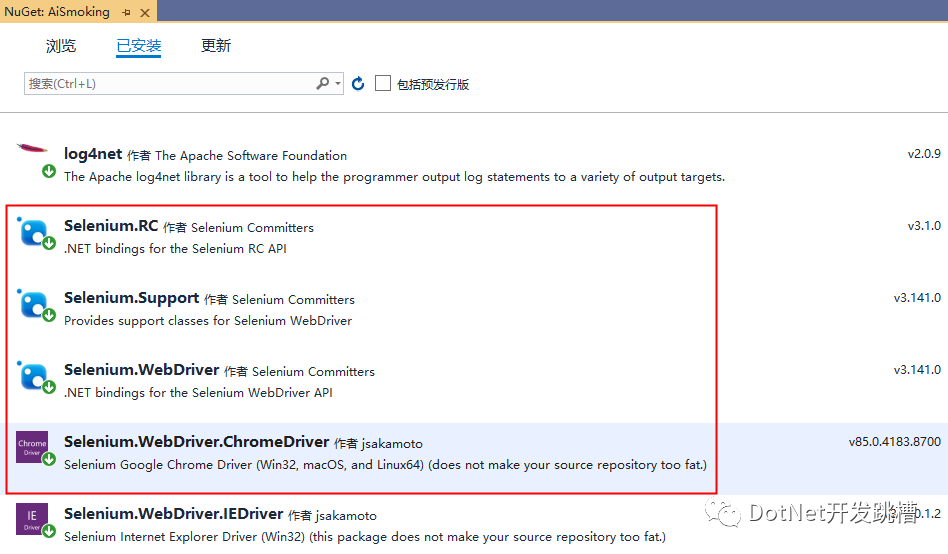
本例使用 Visual Studio 2019 作为开发环境。我们可以通过内置的 NuGet 包管理器来安装所需的 Selenium 组件。
在 VS 的 NuGet 包管理器界面中搜索并安装以下核心包:Selenium.WebDriver、Selenium.Support 以及对应浏览器(如 Chrome)的驱动程序包 Selenium.WebDriver.ChromeDriver。
示例运行效果
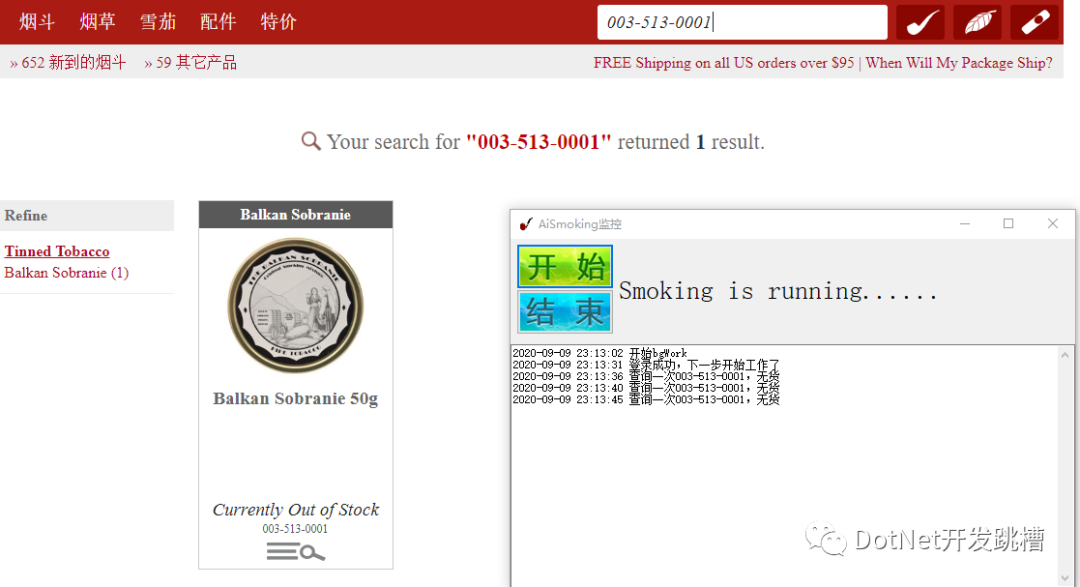
本示例程序模拟了使用 Chrome 浏览器自动登录网站,并持续监控指定商品库存状态的过程。当商品有货时,程序会自动执行加入购物车的操作。
核心代码解析
浏览器自动化的核心在于元素定位和事件触发。在 C#/.NET 中,我们通过 IWebDriver 接口的 FindElement 方法配合不同的定位器(如 By.Id, By.XPath)来实现。
1. 初始化浏览器驱动
首先,需要根据配置初始化对应的浏览器驱动。这里以 Chrome 为例:
//谷歌浏览器
ChromeOptions options = new ChromeOptions();
this.driver = new ChromeDriver(options);
2. 通过ID定位元素并操作
定位到页面元素后,可以执行填充文本或点击等操作。
this.driver.FindElement(By.Id("email")).SendKeys(username);
this.driver.FindElement(By.Id("password")).SendKeys(password);
//# 7. 点击登录按钮
this.driver.FindElement(By.Id("sign-in")).Click();
3. 通过XPath定位元素
对于复杂或没有ID的元素,XPath 是强大的定位方式。
string xpath1 = "//div[@class=\"product-list\"]/div[@class=\"product\"]/div[@class=\"price-and-detail\"]/div[@class=\"price\"]/span[@class=\"noStock\"]";
string txt = this.driver.FindElement(By.XPath(xpath1)).Text;
4. 完整的自动化类示例
下面的 Smoking 类展示了如何将上述操作整合起来,实现一个完整的登录、搜索、监控流程。
using OpenQA.Selenium;
using OpenQA.Selenium.IE;
using OpenQA.Selenium.Chrome;
using System;
using System.Collections.Generic;
using System.Linq;
using System.Text;
using System.Threading;
using System.Threading.Tasks;

namespace AiSmoking.Core
{
    public class Smoking
    {
        /// <summary>
        /// 是否正在运行
        /// </summary>
        private bool running = false;

        /// <summary>
        /// 驱动
        /// </summary>
        private IWebDriver driver = null;

        /// <summary>
        /// # 无货
        /// </summary>
        private string no_stock = "Currently Out of Stock";

        /// <summary>
        ///   # 线程等待秒数
        /// </summary>
        private int wait_sec = 2;

        private Dictionary<string, string> cfg_info;

        private string work_path = string.Empty;

        /// <summary>
        /// 构造函数
        /// </summary>
        public Smoking()
        {

        }

        /// <summary>
        /// 带参构造函数
        /// </summary>
        /// <param name="cfg_info"></param>
        /// <param name="work_path"></param>
        public Smoking(Dictionary<string, string> cfg_info,string work_path)
        {
            this.cfg_info = cfg_info;
            this.work_path = work_path;
            this.wait_sec = int.Parse(cfg_info["wait_sec"]);
            //# 如果小于2,则等于2
            this.wait_sec = (this.wait_sec < 2 ? 2 : this.wait_sec);
            this.wait_sec = this.wait_sec * 1000;
        }

        /// <summary>
        /// 开始跑
        /// </summary>
        public void startRun()
        {
            //"""运行起来"""
            try
            {
                this.running = true;
                string url = this.cfg_info["url"];
                string username = this.cfg_info["username"];
                string password = this.cfg_info["password"];
                string item_id = this.cfg_info["item_id"];
                if (string.IsNullOrEmpty(url) || string.IsNullOrEmpty(username) || string.IsNullOrEmpty(password) || string.IsNullOrEmpty(item_id))
                {
                    LogHelper.put("配置信息不全,请检查config.cfg文件是否为空,然后再重启");
                    return;
                }
                if (this.driver == null)
                {
                    string explorer = this.cfg_info["explorer"];
                    if (explorer == "Chrome")
                    {
                        //谷歌浏览器
                        ChromeOptions options = new ChromeOptions();
                        this.driver = new ChromeDriver(options);
                    }
                    else
                    {
                        //默认IE
                        var options = new InternetExplorerOptions();
                        //options.AddAdditionalCapability.('encoding=UTF-8')
                        //options.add_argument('Accept= text / css, * / *')
                        //options.add_argument('Accept - Language= zh - Hans - CN, zh - Hans;q = 0.5')
                        //options.add_argument('Accept - Encoding= gzip, deflate')
                        //options.add_argument('user-agent=Mozilla/5.0 (Windows NT 10.0; WOW64; Trident/7.0; rv:11.0) like Gecko')
                        //# 2. 定义浏览器驱动对象
                        this.driver = new InternetExplorerDriver(options);
                    }
                }
                this.run(url, username, password, item_id);
            }
            catch (Exception e)
            {
                LogHelper.put("运行过程中出错,请重新打开再试"+e.StackTrace);
            }
        }

        /// <summary>
        /// 运行
        /// </summary>
        /// <param name="url"></param>
        /// <param name="username"></param>
        /// <param name="password"></param>
        /// <param name="item_id"></param>
        private void run(string url, string username, string password, string item_id)
        {
            //"""运行起来"""
            //# 3. 访问网站
            this.driver.Navigate().GoToUrl(url);
            //# 4. 最大化窗口
            this.driver.Manage().Window.Maximize();
            if (this.checkIsExists(By.LinkText("账户登录")))
            {
                //# 判断是否登录:未登录
                this.login(username, password);
            }
            if (this.checkIsExists(By.PartialLinkText("欢迎回来")))
            {
                //# 判断是否登录:已登录
                LogHelper.put("登录成功,下一步开始工作了");
                this.working(item_id);
            }
            else
            {
                LogHelper.put("登录失败,请设置账号密码");
            }
        }

        /// <summary>
        /// 停止运行
        /// </summary>
        public void stopRun()
        {
            //"""停止"""
            try
            {
                this.running = false;
                //# 如果驱动不为空,则关闭
                //self.close_browser_nicely(self.__driver)
                if (this.driver != null)
                {
                    this.driver.Quit();
                    //# 关闭后切要为None,否则启动报错
                    this.driver = null;
                }
            }
            catch (Exception e)
            {
                //print('Stop Failure')
            }
            finally
            {
                this.driver = null;
            }
        }

        private void login(string username, string password)
        {
            //# 5. 点击链接跳转到登录页面
            this.driver.FindElement(By.LinkText("账户登录")).Click();
            //# 6. 输入账号密码
            //# 判断是否加载完成
            if (this.checkIsExists(By.Id("email")))
            {
                this.driver.FindElement(By.Id("email")).SendKeys(username);
                this.driver.FindElement(By.Id("password")).SendKeys(password);
                //# 7. 点击登录按钮
                this.driver.FindElement(By.Id("sign-in")).Click();
            }
        }

        /// <summary>
        /// 工作状态
        /// </summary>
        /// <param name="item_id"></param>
        private void working(string item_id)
        {
            while (this.running)
            {
                try
                {
                    //# 正常获取信息
                    if (this.checkIsExists(By.Id("string")))
                    {
                        this.driver.FindElement(By.Id("string")).Clear();
                        this.driver.FindElement(By.Id("string")).SendKeys(item_id);
                        this.driver.FindElement(By.Id("string")).SendKeys(Keys.Enter);
                    }
                    //# 判断是否查询到商品
                    string xpath = "//div[@class=\"specialty-header search\"]/div[@class=\"specialty-description\"]/div[@class=\"gt-450\"]/span[2] ";
                    if (this.checkIsExists(By.XPath(xpath)))
                    {
                        int count = int.Parse(this.driver.FindElement(By.XPath(xpath)).Text);
                        if (count < 1)
                        {
                            Thread.Sleep(this.wait_sec);
                            LogHelper.put("没有查询到item id =" + item_id + "对应的信息");
                            continue;
                        }
                    }
                    else
                    {
                        Thread.Sleep(this.wait_sec);
                        LogHelper.put("没有查询到item id2 =" + item_id + "对应的信息");
                        continue;
                    }
                    //# 判断当前库存是否有货

                    string xpath1 = "//div[@class=\"product-list\"]/div[@class=\"product\"]/div[@class=\"price-and-detail\"]/div[@class=\"price\"]/span[@class=\"noStock\"]";
                    if (this.checkIsExists(By.XPath(xpath1)))
                    {
                        string txt = this.driver.FindElement(By.XPath(xpath1)).Text;
                        if (txt == this.no_stock)
                        {
                            //# 当前无货
                            Thread.Sleep(this.wait_sec);
                            LogHelper.put("查询一次" + item_id + ",无货");
                            continue;
                        }
                    }
                    //# 链接path1
                    string xpath2 = "//div[@class=\"product-list\"]/div[@class=\"product\"]/div[@class=\"imgDiv\"]/a";
                    //# 判断是否加载完毕
                    //# this.waiting((By.CLASS_NAME, "imgDiv"))
                    if (this.checkIsExists(By.XPath(xpath2)))
                    {
                        this.driver.FindElement(By.XPath(xpath2)).Click();
                        Thread.Sleep(this.wait_sec);
                        //# 加入购物车
                        if (this.checkIsExists(By.ClassName("add-to-cart")))
                        {
                            this.driver.FindElement(By.ClassName("add-to-cart")).Click();
                            LogHelper.put("加入购物车成功,商品item-id:" + item_id);
                            break;
                        }
                        else
                        {
                            LogHelper.put("未找到加入购物车按钮");
                        }
                    }
                    else
                    {
                        LogHelper.put("没有查询到,可能是商品编码不对,或者已下架");
                    }
                    Thread.Sleep(this.wait_sec);
                }
                catch (Exception e)
                {
                    Thread.Sleep(this.wait_sec);
                    LogHelper.put(e);
                }
            }
        }

        /// <summary>
        /// 判断是否存在
        /// </summary>
        /// <param name="by"></param>
        /// <returns></returns>
        private bool checkIsExists(By by)
        {
            try
            {
                int i = 0;
                while (this.running && i < 3)
                {
                    if (this.driver.FindElements(by).Count > 0)
                    {
                        break;
                    }
                    else
                    {
                        Thread.Sleep(this.wait_sec);
                        i = i + 1;
                    }
                }
                return this.driver.FindElements(by).Count > 0;
            }
            catch (Exception e)
            {
                LogHelper.put(e);
                return false;
            }
        }

    }
}
5. 日志辅助类
为了记录程序运行状态,我们还需要一个简单的日志帮助类 LogHelper。它内部使用了 log4net 进行持久化日志记录,并同时维护一个内存队列用于实时显示。
using System;
using System.Collections.Generic;
using System.Linq;
using System.Text;
using System.Threading.Tasks;
using log4net;

[assembly: log4net.Config.XmlConfigurator(Watch = true)]
namespace AiSmoking.Core
{
    /// <summary>
    /// 日志帮助类
    /// </summary>
    public static class LogHelper
    {
        /// <summary>
        /// 日志实例
        /// </summary>
        private static ILog logInstance = LogManager.GetLogger("smoking");

        private static Queue<string> queue = new Queue<string>(2000);

        public static void put(string msg)
        {
            queue.Enqueue(msg);
            WriteLog(msg, LogLevel.Info);
        }

        public static void put(Exception ex)
        {
            WriteLog(ex.StackTrace, LogLevel.Error);
        }

        public static string get()
        {
            if (queue.Count > 0)
            {
                return queue.Dequeue();
            }
            else
            {
                return string.Empty;
            }
        }

        public static void WriteLog(string message, LogLevel level)
        {
            switch (level)
            {
                case LogLevel.Debug:
                    logInstance.Debug(message);
                    break;
                case LogLevel.Error:
                    logInstance.Error(message);
                    break;
                case LogLevel.Fatal:
                    logInstance.Fatal(message);
                    break;
                case LogLevel.Info:
                    logInstance.Info(message);
                    break;
                case LogLevel.Warn:
                    logInstance.Warn(message);
                    break;
                default:
                    logInstance.Info(message);
                    break;
            }
        }

    }

    public enum LogLevel
    {
        Debug = 0,
        Error = 1,
        Fatal = 2,
        Info = 3,
        Warn = 4
    }
}
总结
通过上述步骤,我们展示了如何在 C# 项目中利用 Selenium 完成一次完整的浏览器自动化操作。从环境配置、元素定位、事件触发到状态监控和日志记录,这是一个典型的 Web 自动化测试 和 RPA(机器人流程自动化)应用场景。当然,实际应用中还需要考虑更完善的异常处理、动态页面等待机制以及反爬策略等。希望这个例子能为你上手 Selenium 提供清晰的路径。如果你对 C# 自动化开发有更多兴趣,欢迎到 云栈社区 的.NET板块交流探讨。
 发表于 2026-2-22 06:07:59
|
查看: 417|
回复: 0
发表于 2026-2-22 06:07:59
|
查看: 417|
回复: 0

