B站(哔哩哔哩)作为国内领先的视频社区,其评论区蕴藏着海量有价值的用户反馈与观点。然而,平台日益严格的反爬机制,尤其是 WBI签名 和 登录态验证,让自动化获取评论数据变得颇具挑战。本文将深入解析一套完整的解决方案,涵盖 WBI签名算法逆向、使用 Playwright 实现自动化扫码登录、以及高效异步爬取与数据存储,并提供可直接运行的 Python 代码。
一、项目背景与需求分析
对于内容创作者、市场分析师或研究者而言,B站的评论数据是分析用户情感、热点趋势的宝贵资源。手动收集不现实,而直接调用API又面临两大障碍:
- 登录限制:获取完整评论(尤其是二级回复)需要有效的登录状态(Cookie)。
- 签名验证:核心API接口请求必须携带动态生成的WBI签名,算法相对复杂。
本方案旨在解决这两个核心问题,实现一个安全、灵活、高效的评论爬虫。
二、方案核心特点
本代码实现了一个完整的B站评论爬取流程,其主要亮点包括:
- 安全扫码登录:每次运行均通过 Playwright 启动全新浏览器上下文,要求用户手动扫码登录,避免长期保存 Cookie 带来的安全风险。
- 自动WBI签名:内置完整的 WBI 签名算法,自动从页面或接口获取并计算签名参数,无需手动干预。
- 全面评论覆盖:支持递归获取视频下的所有一级评论,并可选择性地抓取每条评论下的全部二级回复。
- 异步高效爬取:基于
asyncio 和 httpx 实现异步HTTP请求,合理控制请求间隔,在效率与友好度间取得平衡。
- 灵活回调机制:每获取一页数据,可通过回调函数进行自定义处理(如实时打印、入库、分析),实现业务逻辑解耦。
- 结构化数据输出:从复杂的API响应中提取关键字段(评论ID、用户ID、内容、时间、点赞数等),并保存为结构化的JSON文件。
三、代码模块深度解析
让我们逐一拆解核心模块,理解其设计原理与实现细节。
1. 依赖导入与基础定义
首先导入必要的库,并定义自定义异常和排序枚举。
import asyncio
import json
import os
import time
import urllib.parse
from hashlib import md5
from enum import Enum
from typing import Dict, List, Optional, Callable, Tuple, Any
import httpx
from playwright.async_api import Page, async_playwright

class DataFetchError(Exception):
    """数据获取错误"""
    pass

class CommentOrderType(Enum):
    """评论排序方式"""
    DEFAULT = 0      # 仅按热度
    MIXED = 1        # 热度+时间
    TIME = 2         # 仅按时间
2. WBI签名核心类 (BilibiliSign)
这是破解B站反爬的关键。WBI签名机制要求客户端使用两个动态密钥(img_key, sub_key),通过固定的置换表混合后取前32位作为盐值,再将排序、过滤后的请求参数与盐值拼接,计算MD5得到w_rid。
class BilibiliSign:
    """B站WBI签名实现"""
    def __init__(self, img_key: str, sub_key: str):
        self.img_key = img_key
        self.sub_key = sub_key
        self.map_table = [
            46, 47, 18, 2, 53, 8, 23, 32, 15, 50, 10, 31, 58, 3, 45, 35, 27, 43, 5, 49,
            33, 9, 42, 19, 29, 28, 14, 39, 12, 38, 41, 13, 37, 48, 7, 16, 24, 55, 40,
            61, 26, 17, 0, 1, 60, 51, 30, 4, 22, 25, 54, 21, 56, 59, 6, 63, 57, 62, 11,
            36, 20, 34, 44, 52
        ]

    def get_salt(self) -> str:
        """获取混合密钥的前32位"""
        mixin_key = self.img_key + self.sub_key
        return ''.join(mixin_key[mt] for mt in self.map_table)[:32]

    def sign(self, req_data: Dict) -> Dict:
        """对请求参数进行WBI签名,添加wts和w_rid字段"""
        current_ts = int(time.time())
        req_data.update({"wts": current_ts})
        # 按键排序
        req_data = dict(sorted(req_data.items()))
        # 过滤值中的特殊字符 "!'()*"
        req_data = {
            k: ''.join(filter(lambda ch: ch not in "!'()*", str(v)))
            for k, v in req_data.items()
        }
        query = urllib.parse.urlencode(req_data)
        salt = self.get_salt()
        w_rid = md5((query + salt).encode()).hexdigest()
        req_data['w_rid'] = w_rid
        return req_data
3. API客户端类 (BilibiliClient)
这个类是核心交互层,封装了所有与B站API的通信、签名处理和评论获取逻辑。
初始化与请求基础
class BilibiliClient:
    def __init__(self, headers: Dict[str, str], playwright_page: Page, proxy: Optional[str] = None, timeout: int = 30):
        self.headers = headers
        self.playwright_page = playwright_page
        self.proxy = proxy
        self.timeout = timeout
        self._host = "https://api.bilibili.com"

    async def _request(self, method: str, url: str, **kwargs) -> Dict:
        """发送HTTP请求,自动处理JSON响应和错误码"""
        async with httpx.AsyncClient(proxy=self.proxy) as client:
            resp = await client.request(method, url, timeout=self.timeout, **kwargs)
        try:
            data = resp.json()
        except json.JSONDecodeError:
            raise DataFetchError(f"JSON解析失败: {resp.text[:200]}")
        if data.get("code") != 0:
            raise DataFetchError(f"API错误: {data.get('message')} (code={data.get('code')})")
        return data.get("data", {})
动态获取WBI密钥
密钥可能存储在浏览器localStorage中,也可能需要通过导航接口获取。这里优先从 Playwright 控制的页面上下文中读取。
    async def get_wbi_keys(self) -> Tuple[str, str]:
        """从localStorage或接口获取最新的WBI密钥对"""
        # 尝试从localStorage获取
        local_storage = await self.playwright_page.evaluate("() => window.localStorage")
        wbi_img_urls = local_storage.get("wbi_img_urls", "")
        if not wbi_img_urls:
            img_url = local_storage.get("wbi_img_url")
            sub_url = local_storage.get("wbi_sub_url")
            if img_url and sub_url:
                wbi_img_urls = f"{img_url}-{sub_url}"
        if wbi_img_urls and "-" in wbi_img_urls:
            img_url, sub_url = wbi_img_urls.split("-")
        else:
            # 回退到接口获取
            resp = await self._request("GET", self._host + "/x/web-interface/nav")
            img_url = resp['wbi_img']['img_url']
            sub_url = resp['wbi_img']['sub_url']
        img_key = img_url.rsplit('/', 1)[1].split('.')[0]
        sub_key = sub_url.rsplit('/', 1)[1].split('.')[0]
        return img_key, sub_key
评论获取接口
这是业务逻辑的核心,包括获取单页评论、递归获取所有评论以及获取二级评论。
    async def get_video_comments(self, video_id: str, order_mode: CommentOrderType = CommentOrderType.DEFAULT, next: int = 0) -> Dict:
        """获取视频的一页主评论(新接口 /x/v2/reply/wbi/main)"""
        uri = "/x/v2/reply/wbi/main"
        params = {
            "oid": video_id,
            "mode": order_mode.value,
            "type": 1,
            "ps": 20,         # 每页数量,固定20
            "next": next
        }
        return await self.get(uri, params, sign=True)

    async def get_video_all_comments(self, video_id: str, max_count: int = 1000, crawl_interval: float = 1.0, fetch_sub_comments: bool = False, comment_callback: Optional[Callable] = None, sub_comment_callback: Optional[Callable] = None) -> List[Dict]:
        """递归获取视频的所有主评论(可包含子评论)"""
        all_comments = []
        next_page = 0
        is_end = False
        while not is_end and len(all_comments) < max_count:
            try:
                data = await self.get_video_comments(video_id, next=next_page)
            except DataFetchError as e:
                print(f"获取评论失败: {e}")
                break
            cursor = data.get("cursor", {})
            is_end = cursor.get("is_end", True)
            next_page = cursor.get("next", 0)
            replies = data.get("replies", [])
            if not replies:
                break
            # 限制数量
            if len(all_comments) + len(replies) > max_count:
                replies = replies[:max_count - len(all_comments)]
            # 回调处理(主评论)
            if comment_callback:
                await comment_callback(video_id, replies)
            # 如果需要子评论,为每个一级评论获取子评论
            if fetch_sub_comments:
                for comment in replies:
                    if comment.get("rcount", 0) > 0:
                        await self.get_video_all_level_two_comments(
                            video_id=video_id,
                            root_comment_id=comment["rpid"],
                            order_mode=CommentOrderType.DEFAULT,
                            crawl_interval=crawl_interval,
                            callback=sub_comment_callback
                        )
            all_comments.extend(replies)
            await asyncio.sleep(crawl_interval)
        return all_comments
关于 Python 的异步编程模式在此类高IO密集型任务中能显著提升效率,其核心思想是避免在等待网络响应时阻塞线程。
4. 登录状态检测函数 (wait_for_login)
通过 Playwright 启动浏览器后,此函数循环检查上下文 Cookie 中是否出现了关键的 SESSDATA 字段(非空),以此作为用户扫码登录成功的标志。
async def wait_for_login(page: Page, timeout: int = 120) -> bool:
    """等待用户在页面上完成扫码登录"""
    print("请在打开的浏览器中扫码登录 Bilibili ...")
    start_time = time.time()
    while time.time() - start_time < timeout:
        # 检查 Cookie 中是否存在登录标志 SESSDATA
        cookies = await page.context.cookies()
        for cookie in cookies:
            if cookie['name'] == 'SESSDATA' and cookie['value']:
                print("检测到登录成功!")
                return True
        await asyncio.sleep(2)  # 每2秒检查一次
    print("登录超时,请重试。")
    return False
5. 数据提取与主流程
数据清洗函数
API返回的评论数据非常庞杂,此函数用于提取我们关心的核心字段。
def extract_comment_info(comment: Dict[str, Any]) -> Dict[str, Any]:
    """从评论原始数据中提取主要信息"""
    return {
        "rpid": comment.get("rpid"),
        "oid": comment.get("oid"),
        "mid": comment.get("mid"),
        "parent": comment.get("parent", 0),
        "root": comment.get("root", 0),
        "ctime": comment.get("ctime"),
        "like": comment.get("like"),
        "message": comment.get("content", {}).get("message", ""),
        "replies_count": comment.get("rcount", 0)
    }
主函数 (main)
这是整个脚本的入口,串联了所有模块:
- 启动 Playwright 浏览器并打开B站首页。
- 调用
wait_for_login 等待用户扫码。
- 登录成功后,从浏览器上下文获取 Cookie 并构建请求头。
- 实例化
BilibiliClient。
- 定义数据回调函数,用于处理每批获取到的评论。
- 调用
client.get_video_all_comments 开始爬取,并指定是否抓取二级评论。
- 将所有清洗后的数据保存为 JSON 文件。
async def main():
    COMMENTS_FILE = "bilibili_comments.json"  # 保存爬取的评论数据
    async with async_playwright() as p:
        browser = await p.chromium.launch(headless=False, channel="chrome")
        # 每次运行都创建全新的上下文,不加载任何存储的登录状态
        context = await browser.new_context()
        page = await context.new_page()
        await page.goto("https://www.bilibili.com")

        # 强制扫码登录
        if not await wait_for_login(page):
            print("登录失败,程序退出。")
            await browser.close()
            return

        # 获取当前 cookies 并构建请求头
        cookies = await context.cookies()
        cookie_str = "; ".join([f"{c['name']}={c['value']}" for c in cookies])
        headers = {
            "User-Agent": "Mozilla/5.0 (Windows NT 10.0; Win64; x64) AppleWebKit/537.36 (KHTML, like Gecko) Chrome/120.0.0.0 Safari/537.36",
            "Cookie": cookie_str,
            "Referer": "https://www.bilibili.com",
            "Origin": "https://www.bilibili.com"
        }

        # 创建 API 客户端
        client = BilibiliClient(headers=headers, playwright_page=page)

        # 目标视频 AV 号(请替换为实际 AV 号)
        video_aid = "116091825160447"

        # 用于收集所有评论的列表
        all_comments_data = []

        # 定义回调函数
        async def on_comments(video_id, comments):
            print(f"视频 {video_id} 获取到 {len(comments)} 条评论")
            for c in comments:
                info = extract_comment_info(c)
                all_comments_data.append(info)
                # 简单打印内容(可选)
                print(f"  - {info['message'][:30]}..." if len(info['message']) > 30 else f"  - {info['message']}")

        # 开始爬取(包含二级评论)
        print(f"开始爬取视频 {video_aid} 的评论...")
        comments = await client.get_video_all_comments(
            video_id=video_aid,
            max_count=500,
            fetch_sub_comments=True,
            comment_callback=on_comments,
            sub_comment_callback=on_comments
        )
        print(f"爬取完成,共获取到 {len(comments)} 条主评论,{len(all_comments_data)} 条总评论(含子评论)")

        # 保存数据
        with open(COMMENTS_FILE, "w", encoding="utf-8") as f:
            json.dump(all_comments_data, f, ensure_ascii=False, indent=2)
        print(f"评论数据已保存至 {COMMENTS_FILE}")
        await browser.close()

if __name__ == "__main__":
    asyncio.run(main())
四、关键实现细节与注意事项
- 游标翻页 vs 页码翻页:B站主评论接口使用
next 游标翻页,而二级评论接口使用传统的 pn 页码翻页。代码中分别做了对应处理。
- 递归抓取控制:获取二级评论时,会先检查一级评论的
rcount 字段,大于0时才发起请求,避免无意义的调用。
- 请求间隔:通过
crawl_interval 参数控制请求频率(默认为1秒),这是尊重目标网站、防止IP被限的重要措施。
- 密钥更新:WBI密钥 (
img_key, sub_key) 是动态的,代码逻辑确保了每次运行都能获取到最新的密钥。
- 数据清洗:
extract_comment_info 函数仅提取了基础字段。如需用户昵称、IP属地、粉丝牌等更多信息,可在此函数中扩展。
- 关于
Python 的异步并发,虽然这里没有显式创建大量并发任务,但 asyncio 框架使得在等待单个网络响应时能够处理其他协程,对于需要依次翻页的爬虫而言,这种模式依然比同步请求高效。
五、运行效果与结果
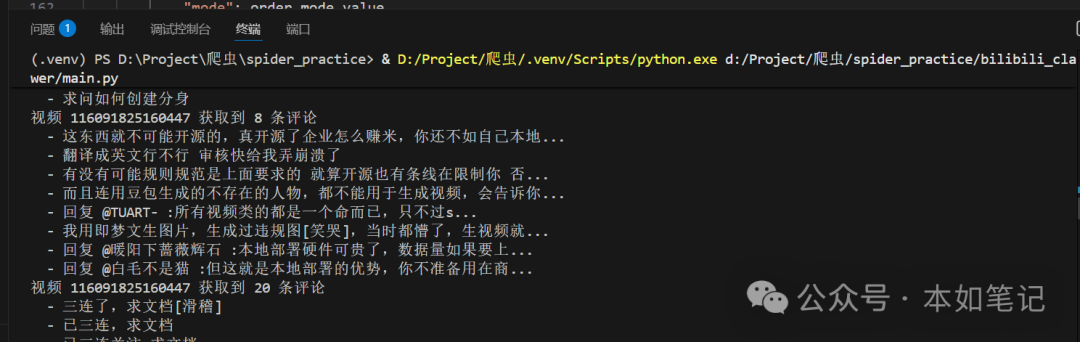
执行上述脚本后,会弹出一个 Chrome 浏览器窗口,请扫码登录你的B站账号。登录成功后,脚本会自动开始爬取指定视频的评论,并在控制台实时输出进度。最终,所有评论数据会被清洗并保存到 bilibili_comments.json 文件中。
六、完整代码与结语
上述解析的所有代码片段组成了一个完整的、可运行的B站评论爬虫。这个项目综合运用了浏览器自动化、API逆向、异步编程等多种技术,提供了一个相对健壮的解决方案。无论是用于学习Playwright和反爬技术,还是作为实际数据采集项目的起点,都具有较高的参考价值。
请注意,爬虫技术应始终用于合法合规的目的,尊重网站的 robots.txt 协议,控制请求频率,避免对目标服务器造成不必要的压力。技术的进步伴随着责任,合理使用才能创造价值。如果你想探讨更多关于 Python 自动化或网络爬虫的实战技巧,欢迎在技术社区进行交流。
 发表于 2026-2-24 09:01:21
|
查看: 841|
回复: 0
发表于 2026-2-24 09:01:21
|
查看: 841|
回复: 0

