在调试电力监测系统的数据可视化模块时,我遇到了一个极具代表性的问题:尽管底层测量精度高达0.001A,但图表坐标轴上显示的数值却是1.2000000476837158这样冗长且无意义的浮点数。更为尴尬的是,Y轴标签仅标注了“电流”,却未明确单位是安培还是毫安,导致用户困惑不已。
这种现象在工业测量软件开发中屡见不鲜。开发团队往往在数据采集、实时通信和算法优化上投入巨大精力,最终却卡在“如何让图表显示得更专业”这一看似简单的环节。虽然 ScottPlot 5 具备强悍的渲染性能,但其默认配置并未针对工业场景进行优化——温度需要保留几位小数?压力单位该用 MPa 还是 kPa?时间轴如何匹配设备运行班次?这些问题若处理不当,将直接影响数据的可读性与决策的准确性。
本文将深入探讨工业场景下坐标轴配置的痛点,并提供从入门到生产级的三种解决方案,帮助你跨越工业软件开发的“最后一公里”。
问题深度剖析
为什么默认配置“不好用”?
工业场景对数据可视化的要求远高于普通科学计算或商业报表,主要体现在以下三大核心痛点:
痛点一:浮点数精度灾难
工业传感器采集的数据多为 float 或 double 类型,经过网络传输和单位换算后,原始数据(如 23.5℃)极易变为 23.500000381。ScottPlot 默认的 ToString() 方法会完整显示所有小数位,导致坐标轴标签密密麻麻全是无效数字。在某钢铁厂的温度监控项目中,操作工曾因看到此类显示而质疑软件故障。测试表明,当数据点超过5000个时,这种显示问题会严重削弱用户对数据可信度的信任,进而影响生产决策。
痛点二:单位缺失引发的业务风险
曾有一起事故报告显示,维护人员误将压力表读数“0.8”理解为 0.8MPa,而实际单位应为 0.8bar,这 0.02MPa 的误差直接导致设备参数设置错误。若图表坐标轴能清晰标注单位,此类低级错误本可完全避免。在工业现场,单位的明确性是安全运行的基石。
痛点三:刻度分布不合理
默认的自动刻度算法侧重于数学上的美观性,却忽视了工业习惯:
- 电流表通常偏好 0.5A、1.0A、1.5A 等整刻度;
- 百分比需显示 0%、25%、50%、75%、100%;
- 时间轴需对应具体班次(如 8:00、16:00、24:00)。
缺乏对这些行业习惯的支持,会导致图表难以被一线人员快速理解。
核心要点解析
在深入解决方案之前,需理清 ScottPlot 5 坐标轴配置的底层逻辑。
坐标轴渲染机制
ScottPlot 5 通过 IAxis 接口管理坐标轴,其核心包含三个层次:
- Tick 生成器(TickGenerator):决定刻度的位置分布。
- 标签格式化器(LabelFormatter):控制刻度文本的显示格式。
- 轴标题配置(AxisLabel):管理单位说明和轴名称。
这种设计巧妙地将“位置计算”与“文本显示”解耦。然而,默认的 StandardTickGenerator 仅考虑数值美观,完全未顾及工业单位的特殊习惯。
精度控制的三种思路对比
| 方案 |
适用场景 |
复杂度 |
性能影响 |
| 字符串格式化 |
固定精度需求 |
⭐ |
几乎无 |
| 自定义 Formatter |
动态精度 + 单位 |
⭐⭐⭐ |
<5% 开销 |
| 继承 TickGenerator |
完全自定义刻度 |
⭐⭐⭐⭐⭐ |
需优化 |
解决方案设计
方案一:快速上手——格式化字符串大法
这是最常用且高效的入门方案,适用于80%的常规需求。核心是利用 Label.Format 属性或 LabelFormatter 配置数值格式。
using ScottPlot;
using ScottPlot.WPF;
using System.Windows;

namespace AppScottPlot3
{
    public partial class MainWindow : Window
    {
        public MainWindow()
        {
            InitializeComponent();
            ConfigureBasicPrecision();
        }

        private void ConfigureBasicPrecision()
        {
            myPlot1.Plot.Font.Set("Microsoft YaHei");
            myPlot1.Plot.Axes.Bottom.Label.FontName = "Microsoft YaHei";
            myPlot1.Plot.Axes.Left.Label.FontName = "Microsoft YaHei";

            // 模拟温度传感器数据(带浮点误差)
            double[] time = Generate.Consecutive(100);
            double[] temperature = Generate.RandomWalk(100, offset: 23.5);

            // 添加散点图
            var scatter = myPlot1.Plot.Add.Scatter(time, temperature);
            scatter.LineWidth = 2;
            scatter.Color = Colors.Red;

            // Y 轴配置(温度轴)
            myPlot1.Plot.Axes.Left.Label.Text = "温度 (℃)";
            myPlot1.Plot.Axes.Left.Label.FontSize = 16;

            // 设置 Y 轴刻度格式的正确方法
            var leftAxis = myPlot1.Plot.Axes.Left;
            leftAxis.TickGenerator = new ScottPlot.TickGenerators.NumericAutomatic()
            {
                LabelFormatter = (value) => value.ToString("F2") // 保留 2 位小数
            };

            // X 轴配置(时间轴)
            myPlot1.Plot.Axes.Bottom.Label.Text = "时间 (秒)";
            myPlot1.Plot.Axes.Bottom.Label.FontSize = 16;

            // 设置 X 轴刻度格式
            var bottomAxis = myPlot1.Plot.Axes.Bottom;
            bottomAxis.TickGenerator = new ScottPlot.TickGenerators.NumericAutomatic()
            {
                LabelFormatter = (value) => value.ToString("F0") // 整数显示
            };

            // 刻度标签字体大小优化(适用于触摸屏)
            leftAxis.TickLabelStyle.FontSize = 14;
            bottomAxis.TickLabelStyle.FontSize = 14;

            // 网格线配置
            myPlot1.Plot.Grid.MajorLineColor = Colors.Gray.WithAlpha(0.3);
            myPlot1.Plot.Grid.MajorLineWidth = 1;
            myPlot1.Plot.Grid.MinorLineColor = Colors.Gray.WithAlpha(0.1);
            myPlot1.Plot.Grid.MinorLineWidth = 0.5f;

            myPlot1.Plot.Title("实时温度监控", size: 20);

            // 背景颜色
            myPlot1.Plot.FigureBackground.Color = Colors.White;
            myPlot1.Plot.DataBackground.Color = Colors.White;

            // 自动缩放以适应数据
            myPlot1.Plot.Axes.AutoScale();

            // 设置坐标轴范围的边距
            myPlot1.Plot.Axes.Margins(left: 0.1, right: 0.1, bottom: 0.1, top: 0.1);

            // 刷新显示
            myPlot1.Refresh();
        }
    }
}
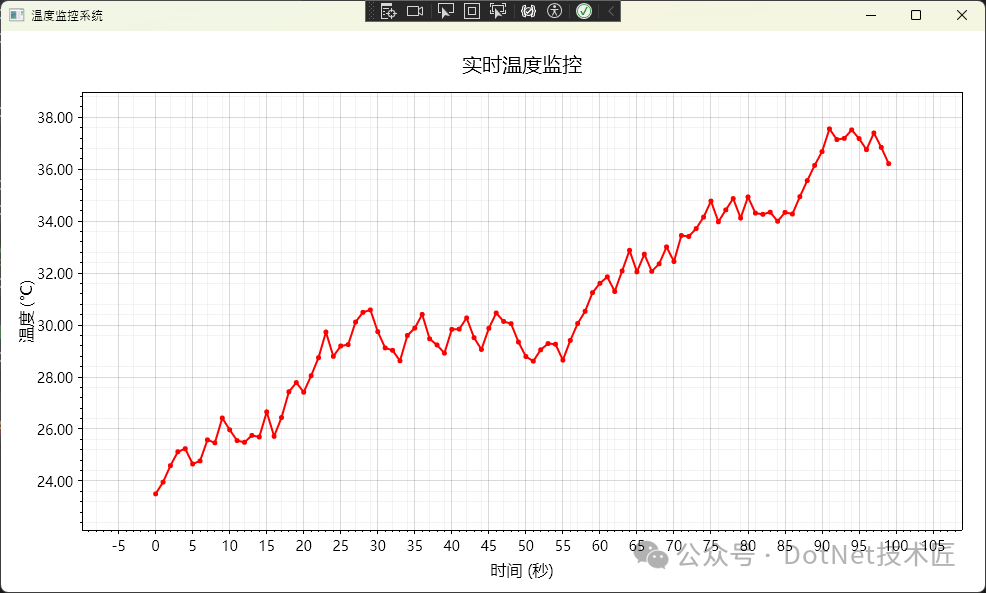
注意事项:
Format 属性使用标准.NET 格式字符串,"F2"表示固定2位小数,"E3"表示科学计数法3位有效数字。避免使用"0.00"等非规范写法。- 单位符号需注意转义,例如百分号在部分编辑器中可能需要特殊处理,建议写作
"压力 (%)"。
方案二:进阶技巧——自定义标签格式化器
当需要动态调整精度(如数值小于1时显示3位小数,大于100时显示1位小数)或添加复杂单位(如"15.3 kW·h")时,需使用自定义 Formatter。
public class IndustrialAxisConfigurator
{
    /// <summary>
    /// 配置带单位的坐标轴(适配动态精度)
    /// </summary>
    public static void ConfigureDynamicPrecisionAxis(IAxis axis, string unit,
        Func<double, int> precisionSelector)
    {
        axis.Label.Text = $"测量值 ({unit})";
        // ScottPlot 5 中正确的格式化方法
        var numericGenerator = new ScottPlot.TickGenerators.NumericAutomatic();
        numericGenerator.LabelFormatter = (value) =>
        {
            int precision = precisionSelector(value);
            string formatted = value.ToString($"F{precision}");
            return $"{formatted}{unit}";  // 直接在刻度标签上加单位
        };
        axis.TickGenerator = numericGenerator;
    }

    /// <summary>
    /// 工程化的精度选择策略
    /// </summary>
    public static int GetIndustrialPrecision(double value)
    {
        double absValue = Math.Abs(value);
        if (absValue < 1) return 3;     // 小数:0.001 A
        if (absValue < 10) return 2;    // 个位数:9.99 A
        if (absValue < 100) return 1;   // 十位数:99.9 A
        return 0;                       // 百位以上:999 A
    }

    /// <summary>
    /// 温度精度策略
    /// </summary>
    public static int GetTemperaturePrecision(double value)
    {
        return 1; // 温度通常保留 1 位小数
    }

    /// <summary>
    /// 电流精度策略
    /// </summary>
    public static int GetCurrentPrecision(double value)
    {
        double absValue = Math.Abs(value);
        if (absValue < 0.1) return 3;   // mA 级别
        if (absValue < 1) return 2;     // 0.1A 级别
        return 1;                       // A 级别
    }
}
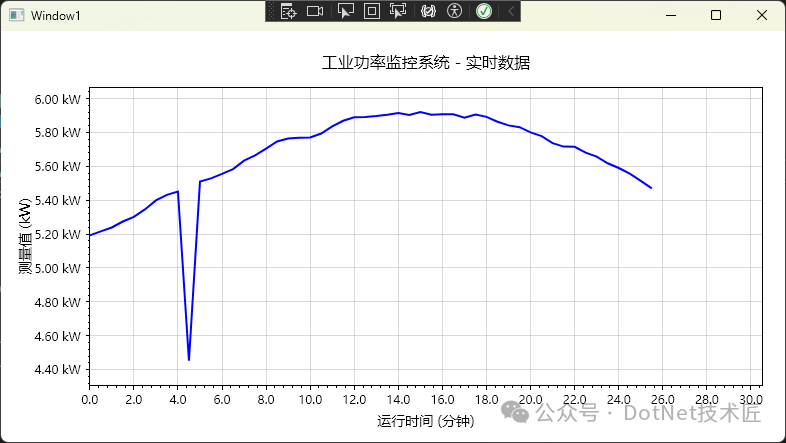
注意事项:
- 切勿在 Formatter 中执行复杂计算。曾有案例在 Formatter 中调用数据库查询单位换算关系,导致拖拽图表时界面卡死。Formatter 会被频繁调用(缩放时每帧数十次),必须保证 O(1) 时间复杂度。
- 单位符号的位置需遵循项目规范。欧美习惯
"15.3 kW"(空格分隔),而部分国标要求 "15.3kW"(无空格)。项目启动前务必与甲方确认。
方案三:工业级方案——完全自定义刻度生成器
针对极端定制化需求(如电流轴必须按 0.5A 间隔、时间轴对齐采样周期、高亮安全区间等),需继承 ITickGenerator 自行实现。
using ScottPlot;
using System;
using System.Collections.Generic;
using System.Linq;
namespace AppScottPlot3
{
/// <summary>
/// 工业固定间隔刻度生成器
/// </summary>
public class IndustrialFixedIntervalTicks : ITickGenerator
{
public double Interval { get; set; } // 刻度间隔
public string Unit { get; set; } // 单位
public int Precision { get; set; } // 精度
public IndustrialFixedIntervalTicks(double interval, string unit, int precision = 1)
{
Interval = interval;
Unit = unit;
Precision = precision;
MaxTickCount = 50;
}
public Tick[] Ticks { get; set; } = Array.Empty<Tick>();
public int MaxTickCount { get; set; }
// 实现带有所有参数的 Regenerate 方法
public void Regenerate(CoordinateRange range, Edge edge, PixelLength size, Paint paint, LabelStyle labelStyle)
{
if (Interval <= 0 || range.Span <= 0)
{
Ticks = Array.Empty<Tick>();
return;
}
try
{
// 计算刻度范围
double minTick = Math.Ceiling(range.Min / Interval) * Interval;
double maxTick = Math.Floor(range.Max / Interval) * Interval;
// 生成主刻度列表
List<Tick> majorTicks = new List<Tick>();
for (double value = minTick; value <= maxTick && majorTicks.Count < MaxTickCount; value += Interval)
{
if (value >= range.Min && value <= range.Max)
{
string label = FormatTickLabel(value);
majorTicks.Add(new Tick(value, label, isMajor: true));
}
}
// 生成次刻度(如果有足够的空间)
List<Tick> minorTicks = new List<Tick>();
if (majorTicks.Count > 0 && majorTicks.Count < MaxTickCount - 10)
{
double minorInterval = Interval / 5.0;
double minorStart = Math.Ceiling(range.Min / minorInterval) * minorInterval;
for (double value = minorStart;
value <= range.Max && (majorTicks.Count + minorTicks.Count) < MaxTickCount;
value += minorInterval)
{
// 检查是否与主刻度重叠
bool isNearMajorTick = majorTicks.Any(t => Math.Abs(t.Position - value) < minorInterval * 0.1);
if (!isNearMajorTick && value >= range.Min && value <= range.Max)
{
minorTicks.Add(new Tick(value, string.Empty, isMajor: false));
}
}
}
// 合并并排序所有刻度
Ticks = majorTicks.Concat(minorTicks).OrderBy(t => t.Position).ToArray();
}
catch (Exception ex)
{
Console.WriteLine($"生成刻度时出错:{ex.Message}");
Ticks = Array.Empty<Tick>();
}
}
/// <summary>
/// 格式化刻度标签
/// </summary>
private string FormatTickLabel(double value)
{
// 处理接近零的值,避免显示 -0.00
if (Math.Abs(value) < Math.Pow(10, -Precision))
{
value = 0;
}
string formatted = value.ToString($"F{Precision}");
// 如果有单位,添加单位
if (!string.IsNullOrEmpty(Unit))
{
return $"{formatted}{Unit}";
}
return formatted;
}
}
/// <summary>
/// 安全区域温度轴配置器
/// </summary>
public class SafetyZoneTemperatureAxis
{
public static void Configure(Plot plot, double safeMin, double safeMax)
{
var tempAxis = plot.Axes.Left;
// 使用自定义刻度生成器
var tickGenerator = new IndustrialFixedIntervalTicks(10, "℃", 1);
tempAxis.TickGenerator = tickGenerator;
tempAxis.Label.Text = "炉温";
tempAxis.Label.FontSize = 14;
}
/// <summary>
/// 在数据添加后更新安全区域
/// </summary>
public static void UpdateSafetyZone(Plot plot, double safeMin, double safeMax)
{
try
{
// 移除现有的安全区域矩形
var existingRectangles = plot.GetPlottables<ScottPlot.Plottables.Rectangle>().ToList();
foreach (var rect in existingRectangles)
{
if (IsSafetyZoneRectangle(rect))
{
plot.Remove(rect);
}
}
// 获取当前 X 轴范围
var xRange = plot.Axes.Bottom.Range;
if (xRange.Span > 0)
{
// 添加新的安全区域
var safeZone = plot.Add.Rectangle(xRange.Min, safeMin, xRange.Span, safeMax - safeMin);
safeZone.FillStyle.Color = Colors.Green.WithAlpha(0.15);
safeZone.LineStyle.Width = 0;
// 将安全区域移到背景
plot.MoveToBack(safeZone);
}
}
catch (Exception ex)
{
Console.WriteLine($"更新安全区域时出错:{ex.Message}");
}
}
private static bool IsSafetyZoneRectangle(ScottPlot.Plottables.Rectangle rect)
{
try
{
var color = rect.FillStyle.Color;
return color.R == Colors.Green.R &&
color.G == Colors.Green.G &&
color.B == Colors.Green.B &&
color.A < 100;
}
catch
{
return false;
}
}
/// <summary>
/// 添加温度警告线和标签
/// </summary>
public static void AddWarningLines(Plot plot, double warningLow, double warningHigh, double alarmLow, double alarmHigh)
{
try
{
// 获取 X 轴位置用于标签
var xRange = plot.Axes.Bottom.Range;
var xPos = xRange.Min + xRange.Span * 0.02;
// 警告线(橙色虚线)
if (warningLow > 0)
{
var warningLineLow = plot.Add.HorizontalLine(warningLow);
warningLineLow.LineStyle.Color = Colors.Orange;
warningLineLow.LineStyle.Width = 2;
warningLineLow.LineStyle.Pattern = LinePattern.Dashed;
// 添加标签
var labelLow = plot.Add.Text($"警告 {warningLow}℃", xPos, warningLow);
labelLow.LabelAlignment = Alignment.MiddleLeft;
labelLow.LabelFontColor = Colors.Orange;
labelLow.LabelFontSize = 9;
labelLow.LabelBackgroundColor = Colors.White.WithAlpha(0.8);
}
if (warningHigh > 0)
{
var warningLineHigh = plot.Add.HorizontalLine(warningHigh);
warningLineHigh.LineStyle.Color = Colors.Orange;
warningLineHigh.LineStyle.Width = 2;
warningLineHigh.LineStyle.Pattern = LinePattern.Dashed;
// 添加标签
var labelHigh = plot.Add.Text($"警告 {warningHigh}℃", xPos, warningHigh);
labelHigh.LabelAlignment = Alignment.MiddleLeft;
labelHigh.LabelFontColor = Colors.Orange;
labelHigh.LabelFontSize = 9;
labelHigh.LabelBackgroundColor = Colors.White.WithAlpha(0.8);
}
// 报警线(红色实线)
if (alarmLow > 0)
{
var alarmLineLow = plot.Add.HorizontalLine(alarmLow);
alarmLineLow.LineStyle.Color = Colors.Red;
alarmLineLow.LineStyle.Width = 3;
// 添加标签
var labelLow = plot.Add.Text($"报警 {alarmLow}℃", xPos, alarmLow);
labelLow.LabelAlignment = Alignment.MiddleLeft;
labelLow.LabelFontColor = Colors.Red;
labelLow.LabelFontSize = 9;
labelLow.LabelBold = true;
labelLow.LabelBackgroundColor = Colors.White.WithAlpha(0.9);
}
if (alarmHigh > 0)
{
var alarmLineHigh = plot.Add.HorizontalLine(alarmHigh);
alarmLineHigh.LineStyle.Color = Colors.Red;
alarmLineHigh.LineStyle.Width = 3;
// 添加标签
var labelHigh = plot.Add.Text($"报警 {alarmHigh}℃", xPos, alarmHigh);
labelHigh.LabelAlignment = Alignment.MiddleLeft;
labelHigh.LabelFontColor = Colors.Red;
labelHigh.LabelFontSize = 9;
labelHigh.LabelBold = true;
labelHigh.LabelBackgroundColor = Colors.White.WithAlpha(0.9);
}
}
catch (Exception ex)
{
Console.WriteLine($"添加警告线时出错:{ex.Message}");
}
}
/// <summary>
/// 添加实时温度状态指示器(修正版)
/// </summary>
public static void AddTemperatureStatus(Plot plot, double currentTemp, double safeMin, double safeMax)
{
try
{
string status;
Color statusColor;
if (currentTemp >= safeMin && currentTemp <= safeMax)
{
status = "正常";
statusColor = Colors.Green;
}
else if (currentTemp < safeMin - 10 || currentTemp > safeMax + 10)
{
status = "报警";
statusColor = Colors.Red;
}
else
{
status = "警告";
statusColor = Colors.Orange;
}
var statusText = $"当前温度:{currentTemp:F1}℃ [{status}]";
// 方法 1:使用坐标轴范围计算位置
var xRange = plot.Axes.Bottom.Range;
var yRange = plot.Axes.Left.Range;
double xPos = xRange.Min + xRange.Span * 0.02; // 左边 2% 位置
double yPos = yRange.Max - yRange.Span * 0.05; // 顶部 5% 位置
var statusLabel = plot.Add.Text(statusText, xPos, yPos);
statusLabel.LabelAlignment = Alignment.UpperLeft;
statusLabel.LabelFontColor = statusColor;
statusLabel.LabelFontSize = 12;
statusLabel.LabelBold = true;
statusLabel.LabelBackgroundColor = Colors.White.WithAlpha(0.9);
statusLabel.LabelBorderColor = statusColor;
statusLabel.LabelBorderWidth = 2;
statusLabel.LabelPadding = 8;
}
catch (Exception ex)
{
Console.WriteLine($"添加温度状态时出错:{ex.Message}");
}
}
/// <summary>
/// 添加温度统计信息面板
/// </summary>
public static void AddTemperatureStatsPanel(Plot plot, double[] temperatures)
{
if (temperatures == null || temperatures.Length == 0) return;
try
{
double avg = temperatures.Average();
double max = temperatures.Max();
double min = temperatures.Min();
double std = CalculateStandardDeviation(temperatures);
string statsText = $"温度统计信息:\n" +
$"• 平均值:{avg:F1}℃\n" +
$"• 最高值:{max:F1}℃\n" +
$"• 最低值:{min:F1}℃\n" +
$"• 标准差:{std:F2}℃\n" +
$"• 数据点:{temperatures.Length}";
// 计算右上角位置
var xRange = plot.Axes.Bottom.Range;
var yRange = plot.Axes.Left.Range;
double xPos = xRange.Max - xRange.Span * 0.02; // 右边 2% 位置
double yPos = yRange.Max - yRange.Span * 0.05; // 顶部 5% 位置
var statsLabel = plot.Add.Text(statsText, xPos, yPos);
statsLabel.LabelAlignment = Alignment.UpperRight;
statsLabel.LabelFontColor = Colors.Black;
statsLabel.LabelFontSize = 10;
statsLabel.LabelBackgroundColor = Colors.LightBlue.WithAlpha(0.9);
statsLabel.LabelBorderColor = Colors.Gray;
statsLabel.LabelBorderWidth = 1;
statsLabel.LabelPadding = 10;
}
catch (Exception ex)
{
Console.WriteLine($"添加统计面板时出错:{ex.Message}");
}
}
/// <summary>
/// 添加温度趋势指示器
/// </summary>
public static void AddTemperatureTrend(Plot plot, double[] temperatures)
{
if (temperatures == null || temperatures.Length < 10) return;
try
{
// 计算最近 10 个点的趋势
var recentTemps = temperatures.TakeLast(10).ToArray();
double trend = CalculateTrend(recentTemps);
string trendText;
Color trendColor;
if (Math.Abs(trend) < 0.1)
{
trendText = "→ 稳定";
trendColor = Colors.Gray;
}
else if (trend > 0)
{
trendText = $"↗ 上升 (+{trend:F2}℃/点)";
trendColor = Colors.Red;
}
else
{
trendText = $"↘ 下降 ({trend:F2}℃/点)";
trendColor = Colors.Blue;
}
// 计算中上方位置
var xRange = plot.Axes.Bottom.Range;
var yRange = plot.Axes.Left.Range;
double xPos = xRange.Min + xRange.Span * 0.5; // 中间位置
double yPos = yRange.Max - yRange.Span * 0.05; // 顶部 5% 位置
var trendLabel = plot.Add.Text(trendText, xPos, yPos);
trendLabel.LabelAlignment = Alignment.UpperCenter;
trendLabel.LabelFontColor = trendColor;
trendLabel.LabelFontSize = 11;
trendLabel.LabelBold = true;
trendLabel.LabelBackgroundColor = Colors.White.WithAlpha(0.9);
trendLabel.LabelBorderColor = trendColor;
trendLabel.LabelBorderWidth = 1;
trendLabel.LabelPadding = 6;
}
catch (Exception ex)
{
Console.WriteLine($"添加趋势指示器时出错:{ex.Message}");
}
}
private static double CalculateStandardDeviation(double[] values)
{
double mean = values.Average();
double sumOfSquares = values.Sum(v => Math.Pow(v - mean, 2));
return Math.Sqrt(sumOfSquares / values.Length);
}
private static double CalculateTrend(double[] values)
{
if (values.Length < 2) return 0;
// 简单线性回归计算斜率
double n = values.Length;
double sumX = 0, sumY = 0, sumXY = 0, sumXX = 0;
for (int i = 0; i < n; i++)
{
sumX += i;
sumY += values[i];
sumXY += i * values[i];
sumXX += i * i;
}
return (n * sumXY - sumX * sumY) / (n * sumXX - sumX * sumX);
}
}
}
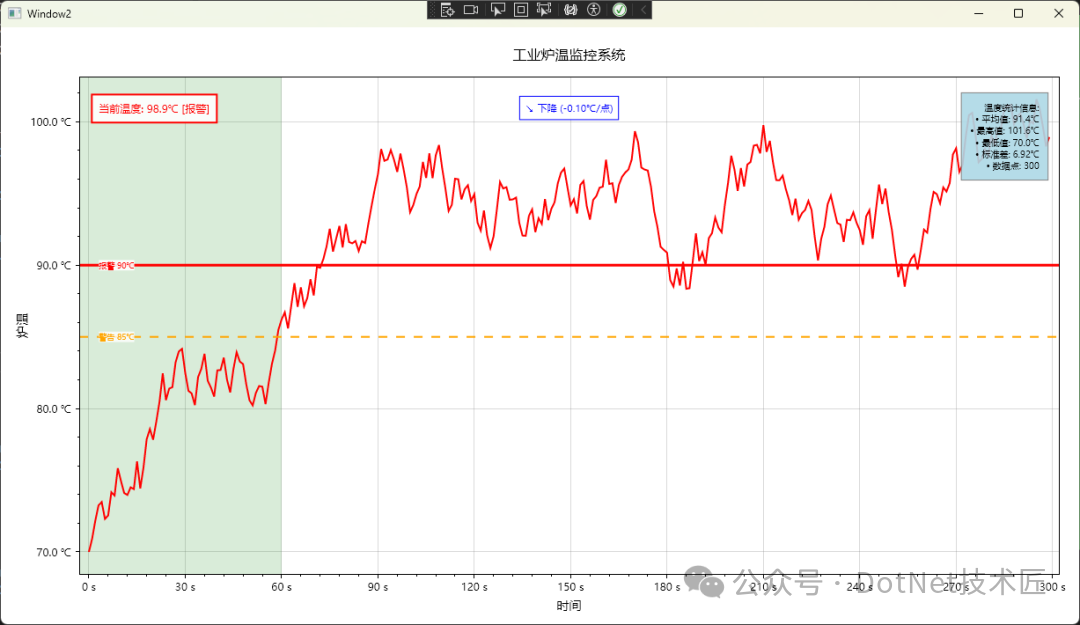
注意事项:
Regenerate 方法会被频繁调用。用户每次缩放、平移都会触发该方法。此前曾在其中使用复杂的 LINQ 查询,导致拖动图表时 CPU 占用率飙升至80%。改为简单的 for 循环后问题得以解决。- 主次刻度的区分需通过
Tick 的 IsMajor 属性控制。ScottPlot 5 在此部分的文档尚不完善,需参考源码。切记次刻度的 label 应传入空字符串。
- 单位换算需提前完成。避免在生成器中进行临时换算(如 mA 转 A),以免引发精度问题和性能损耗。
总结
通过上述三种方案的实践,我们可以得出以下核心结论:
-
精度控制策略分层:简单场景直接使用 Format 属性,耗时仅需2分钟;复杂动态需求采用 LabelFormatter,约需半小时;极致定制化则需继承 ITickGenerator,开发周期约为1-2天。原则是优先选用简单方案,避免过度设计。
-
单位标注的工程化原则:轴标题应写明全称加单位(如“反应釜温度 (℃)”),刻度标签可简化为纯数字。除非客户明确要求,否则不建议在每个刻度上都叠加单位,以免造成视觉拥挤。
-
性能优化的黄金法则:在 Formatter 和 Generator 中严禁执行复杂计算。应采用空间换时间的策略(如预计算单位换算表)。实测表明,保持渲染耗时低于20ms即可确保流畅的用户体验。
工业软件的开发不仅在于功能的实现,更在于细节的打磨。坐标轴的配置虽属“最后一公里”,却直接关系到系统的专业度与可用性。在 C#/.Net 开发中,妥善处理可视化细节,能让你的工业监控项目脱颖而出。希望这些来自实战的配置经验,能为你的下一个项目提供有价值的参考。
 发表于 2026-3-10 13:52:02
|
查看: 189|
回复: 0
发表于 2026-3-10 13:52:02
|
查看: 189|
回复: 0

