在构建需要实时数据交互的应用时,有三种主流技术方案:
Ajax轮训
原理:客户端定时向服务器发送请求,检查是否有新数据。
优势:实现简单,兼容性极佳,几乎所有浏览器都支持,服务器逻辑直观。
劣势:产生大量无效请求浪费资源,实时性受轮询间隔限制,延迟明显,高并发时可能造成服务器压力。
Long pull(长轮询)
原理:客户端发送请求后,服务器保持连接不立即响应,直到有新数据或超时才返回,客户端收到后立即发起新请求。
优势:减少无效请求,实时性较轮询有所提升,兼容性良好。
劣势:服务器需维持大量连接,高并发场景资源消耗大,仍有一定延迟。
WebSocket
原理:建立单一TCP连接后提供持久双向通信通道,双方可随时发送数据。
优势:真正的实时双向通信,延迟低,协议开销小,适合频繁数据交换,资源消耗相对较低。
劣势:实现复杂度较高,部分老旧浏览器不支持,某些网络环境可能受限。
在我们要构建的即时通讯服务中,WebSocket无疑是最佳选择,它能最好地满足我们对实时性的要求。值得一提的是,Netty提供了对WebSocket的原生支持和优化实现,这让我们能够轻松构建可扩展且高效的实时通讯系统,省去了处理底层通信细节的繁琐工作,更专注于业务逻辑的实现。
代码实现
本节将围绕前后端关键实现展开,展示如何基于Netty开发即时通讯服务。
前端
本文侧重于后端服务的构建,因此前端只展示核心通信代码。以下代码实现了与Netty服务器建立WebSocket连接、消息收发及状态管理的关键功能。
// 1. WebSocket连接全局配置
globalData: {
    // WebSocket服务器连接地址
    chatServerUrl: "ws://127.0.0.1:875/ws",
    // 全局WebSocket连接对象
    CHAT: null,
    // 标记WebSocket连接状态
    chatSocketOpen: false,
},

// 2. 应用启动时初始化WebSocket连接
onLaunch: function() {
    // 程序启动时连接聊天服务器
    this.doConnect(false);
},

// 3. 核心方法:建立WebSocket连接
doConnect(isFirst) {
    // 重连时显示提示
    if (isFirst) {
        uni.showToast({
            icon: "loading",
            title: "断线重连中...",
            duration: 2000
        });
    }
    var me = this;
    // 仅当用户已登录时才连接WebSocket
    if (me.getUserInfoSession() != null && me.getUserInfoSession() != "" && me.getUserInfoSession() != undefined) {
        // 创建WebSocket连接
        me.globalData.CHAT = uni.connectSocket({
            url: me.globalData.chatServerUrl,
            complete: ()=> {}
        });
        // 4. 连接成功事件处理
        me.globalData.CHAT.onOpen(function(){
            // 更新连接状态标记
            me.globalData.chatSocketOpen = true;
            console.log("ws连接已打开,socketOpen = " + me.globalData.chatSocketOpen);
            // 构建初始化消息(消息类型0表示连接初始化)
            var chatMsg = {
                senderId: me.getUserInfoSession().id,
                msgType: 0
            }
            var dataContent = {
                chatMsg: chatMsg
            }
            var msgPending = JSON.stringify(dataContent);
            // 发送初始化消息,通知服务器用户身份
            me.globalData.CHAT.send({
                data: msgPending
            });
        });
        // 5. 连接关闭事件处理
        me.globalData.CHAT.onClose(function(){
            me.globalData.chatSocketOpen = false;
            console.log("ws连接已关闭,socketOpen = " + me.globalData.chatSocketOpen);
        });
        // 6. 接收消息事件处理
        me.globalData.CHAT.onMessage(function(res){
            console.log('App.vue 收到服务器内容:' + res.data);
            // 处理接收到的消息
            me.dealReceiveLastestMsg(JSON.parse(res.data));
        });
        // 7. 连接错误事件处理
        me.globalData.CHAT.onError(function(){
            me.globalData.chatSocketOpen = false;
            console.log('WebSocket连接打开失败,请检查!');
        });
    }
},

// 8. 发送WebSocket消息的通用方法
sendSocketMessage(msg) {
    // 检查连接状态,只有在连接开启时才发送
    if (this.globalData.chatSocketOpen) {
        uni.sendSocketMessage({
            data: msg
        });
    } else {
        uni.showToast({
            icon: "none",
            title: "您已断开聊天服务器的连接"
        })
    }
},

// 9. 处理接收到的消息
dealReceiveLastestMsg(msgJSON) {
    console.log(msgJSON);
    var chatMsg = msgJSON.chatMsg;
    var chatTime = msgJSON.chatTime;
    var senderId = chatMsg.senderId;
    var receiverType = chatMsg.receiverType;
    console.log('chatMsg.receiverType = ' + receiverType);
    var me = this;
    // 获取发送者的用户信息
    var userId = me.getUserInfoSession().id;
    var userToken = me.getUserSessionToken();
    var serverUrl = me.globalData.serverUrl;
    // 请求发送者详细信息
    uni.request({
        method: "POST",
        header: {
            headerUserId: userId,
            headerUserToken: userToken
        },
        url: serverUrl + "/userinfo/get?userId=" + senderId,
        success(result) {
            if (result.data.status == 200) {
                var currentSourceUserInfo = result.data.data;
                me.currentSourceUserInfo = currentSourceUserInfo;
                // 根据消息类型设置显示内容
                var msgShow = chatMsg.msg;
                if (chatMsg.msgType == 2) {
                    msgShow = "[图片]"
                } else if (chatMsg.msgType == 4) {
                    msgShow = "[视频]"
                } else if (chatMsg.msgType == 3) {
                    msgShow = "[语音]"
                }
                // 保存最新消息到本地存储
                me.saveLastestMsgToLocal(senderId, currentSourceUserInfo, msgShow, chatTime, msgJSON);
            }
        }
    })
},

// 10. 将最新消息保存到本地存储
saveLastestMsgToLocal(sourceUserId, sourceUser, msgContent, chatTime, msgJSON) {
    // 构造最新消息对象
    var lastMsg = {
        sourceUserId: sourceUserId,     // 源头用户,聊天对象
        name: sourceUser.nickname,
        face: sourceUser.face,
        msgContent: msgContent,
        chatTime: chatTime,
        unReadCounts: 0,
        communicationType: 1,   // 1:单聊,2:群聊
    }
    // 获取本地存储的聊天列表
    var lastestUserChatList = uni.getStorageSync("lastestUserChatList");
    if (lastestUserChatList == null || lastestUserChatList == undefined || lastestUserChatList == "") {
        lastestUserChatList = [];
    }
    // 更新或新增消息记录
    var dealMsg = false;
    for (var i = 0; i < lastestUserChatList.length; i++) {
        var tmp = lastestUserChatList[i];
        if (tmp.sourceUserId == lastMsg.sourceUserId) {
            // 已存在聊天记录,更新最新消息
            lastestUserChatList.splice(i, 1, lastMsg);
            dealMsg = true;
            break;
        }
    }
    if (!dealMsg) {
        // 新的聊天对象,添加到列表开头
        lastestUserChatList.unshift(lastMsg);
    }
    // 保存更新后的聊天列表
    uni.setStorageSync("lastestUserChatList", lastestUserChatList);
    // 通知UI更新
    uni.$emit('reRenderReceiveMsgInMsgVue', "domeafavor");
    uni.$emit('receiveMsgInMsgListVue', msgJSON);
},

// 11. 关闭WebSocket连接
closeWSConnect() {
    this.globalData.CHAT.close();
}
后端
首先导入依赖,建议从Maven仓库获取最新版本。
<dependency>
    <groupId>io.netty</groupId>
    <artifactId>netty-all</artifactId>
    <version>4.2.0.Final</version>
</dependency>
1. 服务器启动类
创建服务器启动类,这是整个Netty服务器的入口点,负责配置和启动WebSocket服务器。
import com.pitayafruits.netty.websocket.WSServerInitializer;
import io.netty.bootstrap.ServerBootstrap;
import io.netty.channel.ChannelFuture;
import io.netty.channel.EventLoopGroup;
import io.netty.channel.nio.NioEventLoopGroup;
import io.netty.channel.socket.nio.NioServerSocketChannel;

/**
 * netty 服务启动类
 */
public class ChatServer {
    public static void main(String[] args) throws InterruptedException {
        EventLoopGroup bossGroup = new NioEventLoopGroup();
        EventLoopGroup workerGroup = new NioEventLoopGroup();
        try {
            ServerBootstrap server = new ServerBootstrap();
            server.group(bossGroup, workerGroup)
                    .channel(NioServerSocketChannel.class)
                    .childHandler(new WSServerInitializer());
            ChannelFuture channelFuture = server.bind(875).sync();
            channelFuture.channel().closeFuture().sync();
        } finally {
            bossGroup.shutdownGracefully();
            workerGroup.shutdownGracefully();
        }
    }
}
关键点:
- 采用Reactor模式,使用两个线程池:bossGroup和workerGroup
- bossGroup负责接受客户端连接
- workerGroup负责处理IO操作
- 服务器绑定在875端口
2. 通道初始化器
创建通道初始化器,负责配置每个新建立的连接的通道,设置处理器链(Pipeline)。
import io.netty.channel.ChannelInitializer;
import io.netty.channel.ChannelPipeline;
import io.netty.channel.socket.SocketChannel;
import io.netty.handler.codec.http.HttpObjectAggregator;
import io.netty.handler.codec.http.HttpServerCodec;
import io.netty.handler.codec.http.websocketx.WebSocketServerProtocolHandler;
import io.netty.handler.stream.ChunkedWriteHandler;

/**
 * 初始化器,channel注册后,会执行里面相应的初始化方法
 */
public class WSServerInitializer extends ChannelInitializer<SocketChannel> {
    @Override
    protected void initChannel(SocketChannel socketChannel) throws Exception {
        ChannelPipeline pipeline = socketChannel.pipeline();
        pipeline.addLast(new HttpServerCodec());
        pipeline.addLast(new ChunkedWriteHandler());
        pipeline.addLast(new HttpObjectAggregator(1024 * 64));
        pipeline.addLast(new WebSocketServerProtocolHandler("/ws"));
        pipeline.addLast(new ChatHandler());
    }
}
关键点:
- 处理HTTP协议:HttpServerCodec、ChunkedWriteHandler、HttpObjectAggregator
- 处理WebSocket协议:WebSocketServerProtocolHandler("/ws"),指定WebSocket的路由为"/ws"
- 添加自定义业务处理器:ChatHandler,处理具体的消息交互逻辑
3. 会话管理器
创建会话管理器,管理用户ID与通道(Channel)之间的映射关系,支持同一用户多端登录。若业务不需要支持多端登录,则无需此组件。
import io.netty.channel.Channel;
import java.util.ArrayList;
import java.util.HashMap;
import java.util.List;
import java.util.Map;

/**
 * 会话管理
 */
public class UserChannelSession {
    private static Map<String, List<Channel>> multiSession = new HashMap<>();
    private static Map<String, String> userChannelIdRelation = new HashMap<>();

    public static void putUserChannelIdRelation(String userId, String channelId) {
        userChannelIdRelation.put(channelId, userId);
    }

    public static String getUserIdByChannelId(String channelId) {
        return userChannelIdRelation.get(channelId);
    }

    public static void putMultiChannels(String userId, Channel channel) {
        List<Channel> channels = getMultiChannels(userId);
        if (channels == null || channels.size() == 0) {
            channels = new ArrayList<>();
        }
        channels.add(channel);
        multiSession.put(userId, channels);
    }

    public static void removeUserChannels(String userId, String channelId) {
        List<Channel> channels = getMultiChannels(userId);
        if (channels == null || channels.size() == 0) {
            return;
        }
        for (Channel channel : channels) {
            if (channel.id().asLongText().equals(channelId)) {
                channels.remove(channel);
            }
        }
        multiSession.put(userId, channels);
    }

    public static List<Channel> getMultiChannels(String userId) {
        return multiSession.get(userId);
    }
}
4. 消息处理器
创建核心业务逻辑处理器,负责处理客户端发送的WebSocket消息。以下实现主要处理文字消息,为其他消息类型预留了扩展接口。
import com.pitayafruits.enums.MsgTypeEnum;
import com.pitayafruits.pojo.netty.ChatMsg;
import com.pitayafruits.utils.JsonUtils;
import com.pitayafruits.pojo.netty.DataContent;
import com.pitayafruits.utils.LocalDateUtils;
import io.netty.channel.Channel;
import io.netty.channel.ChannelHandlerContext;
import io.netty.channel.SimpleChannelInboundHandler;
import io.netty.channel.group.ChannelGroup;
import io.netty.channel.group.DefaultChannelGroup;
import io.netty.handler.codec.http.websocketx.TextWebSocketFrame;
import io.netty.util.concurrent.GlobalEventExecutor;
import java.time.LocalDateTime;
import java.util.List;

/**
 *  自定义助手类
 */
public class ChatHandler extends SimpleChannelInboundHandler<TextWebSocketFrame> {
    public static ChannelGroup clients = new DefaultChannelGroup(GlobalEventExecutor.INSTANCE);

    @Override
    protected void channelRead0(ChannelHandlerContext channelHandlerContext,
                                TextWebSocketFrame textWebSocketFrame) throws Exception {
        String content = textWebSocketFrame.text();
        DataContent dataContent = JsonUtils.jsonToPojo(content, DataContent.class);
        ChatMsg chatMsg = dataContent.getChatMsg();
        String msgText = chatMsg.getMsg();
        String receiverId = chatMsg.getReceiverId();
        String senderId = chatMsg.getSenderId();
        chatMsg.setChatTime(LocalDateTime.now());
        Integer msgType = chatMsg.getMsgType();
        Channel currentChannel = channelHandlerContext.channel();
        String currentChannelId = currentChannel.id().asLongText();

        if (msgType == MsgTypeEnum.CONNECT_INIT.type) {
            UserChannelSession.putMultiChannels(senderId, currentChannel);
            UserChannelSession.putUserChannelIdRelation(currentChannelId, senderId);
        } else if (msgType == MsgTypeEnum.WORDS.type) {
            List<Channel> receiverChannels = UserChannelSession.getMultiChannels(receiverId);
            if (receiverChannels == null || receiverChannels.size() == 0 || receiverChannels.isEmpty()) {
                chatMsg.setIsReceiverOnLine(false);
            } else {
                chatMsg.setIsReceiverOnLine(true);
                for (Channel receiverChannel : receiverChannels) {
                    Channel findChannel = clients.find(receiverChannel.id());
                    if (findChannel != null) {
                        dataContent.setChatMsg(chatMsg);
                        String chatTimeFormat =
                                LocalDateUtils.format(chatMsg.getChatTime(), LocalDateUtils.DATETIME_PATTERN_2);
                        dataContent.setChatTime(chatTimeFormat);
                        findChannel.writeAndFlush(new TextWebSocketFrame(
                                JsonUtils.objectToJson(dataContent)));
                    }
                }
            }
        }
        currentChannel.writeAndFlush(new TextWebSocketFrame(currentChannelId));
    }

    @Override
    public void handlerAdded(ChannelHandlerContext ctx) throws Exception {
        Channel currentChannel = ctx.channel();
        clients.add(currentChannel);
    }

    @Override
    public void handlerRemoved(ChannelHandlerContext ctx) throws Exception {
        Channel currentChannel = ctx.channel();
        String userId = UserChannelSession.getUserIdByChannelId(currentChannel.id().asLongText());
        UserChannelSession.removeUserChannels(userId, currentChannel.id().asLongText());
        clients.remove(currentChannel);
    }

    @Override
    public void exceptionCaught(ChannelHandlerContext ctx, Throwable cause) throws Exception {
        Channel channel = ctx.channel();
        channel.close();
        clients.remove(channel);
        String userId = UserChannelSession.getUserIdByChannelId(channel.id().asLongText());
        UserChannelSession.removeUserChannels(userId, channel.id().asLongText());
    }
}
完整流程梳理
- 服务器启动:
ChatServer创建并配置Netty服务器,设置线程模型和端口。
- 通道初始化:当有新连接时,
WSServerInitializer设置处理器链Pipeline。
- 连接建立:
ChatHandler.handlerAdded()将连接添加到ChannelGroup。
- 消息处理:
- 客户端先发送初始化消息,建立用户ID与Channel的映射关系。
- 客户端后续发送聊天消息,服务器查找接收者的Channel并转发消息。
- 连接断开:
ChatHandler.handlerRemoved()清理资源,移除映射关系。
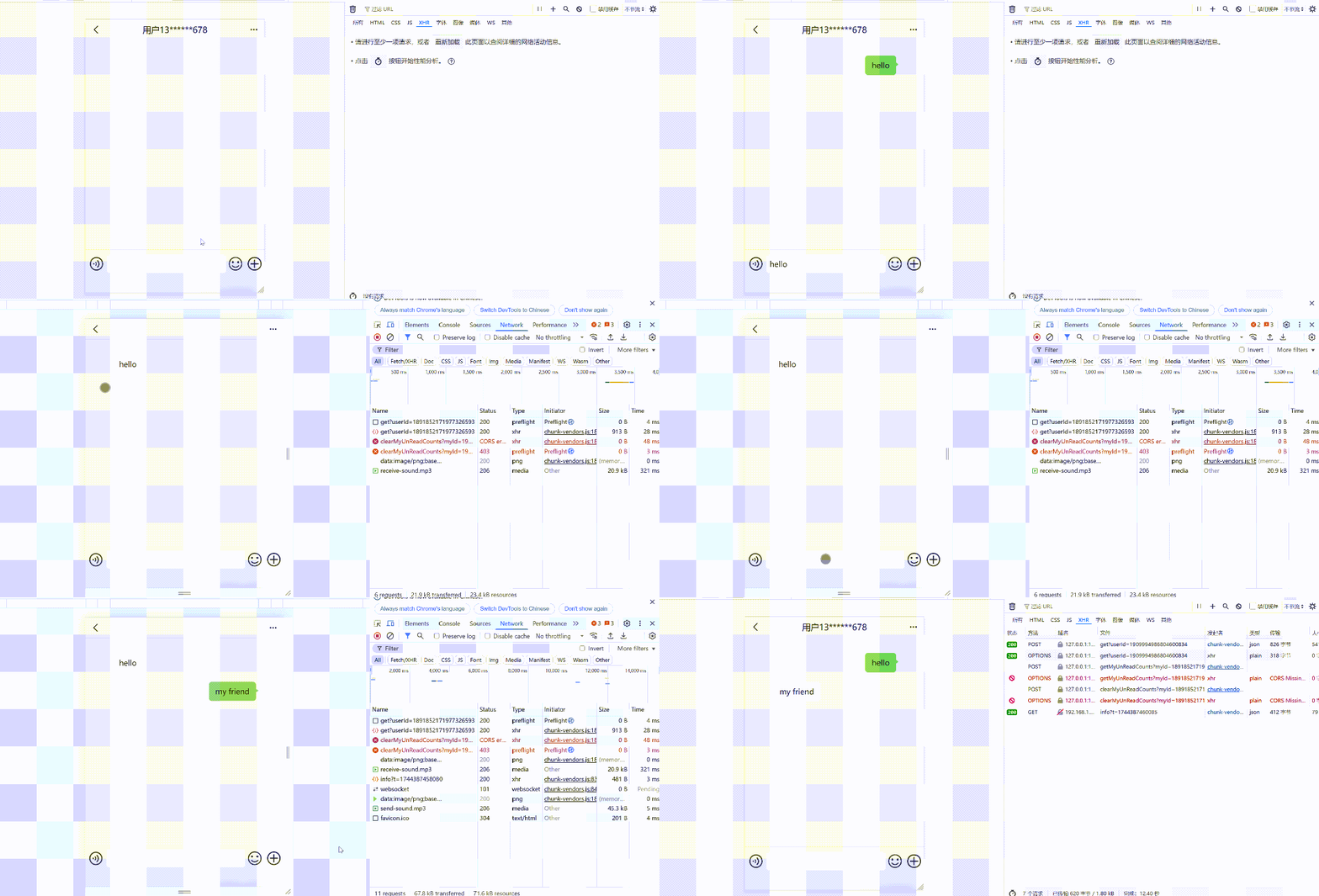
效果演示
小结
至此,我们已成功构建了一个基于Netty的即时通讯服务。虽然当前实现仍有一些局限,如缺少离线消息存储机制、消息类型较为单一、未实现消息持久化等,但本文与代码示例展示了基于Netty构建聊天服务的核心架构与完整流程。
基于现有示例,可以轻松地扩展更多功能,如添加消息队列实现离线消息推送、集成数据库实现消息持久化、增加群聊和多媒体消息支持等。希望本文能提供有价值的实现思路,鼓励大家在此基础进行实践,打造更完善的即时通讯服务。
 发表于 2025-12-10 00:55:41
|
查看: 388|
回复: 0
发表于 2025-12-10 00:55:41
|
查看: 388|
回复: 0

