作为Pytest从零到实战落地系列的最后一章,本文将基于Allure的最佳实践,全面讲解如何优化测试报告的可读性与结构化。掌握这些技巧后,你将足以在企业级项目中应用,并熟练使用该框架编写和管理测试用例。
报告优化概述
在上一篇文章中,我们已经能够生成Allure报告,但其可读性仍有提升空间。优化的核心在于为测试用例添加丰富的描述信息,这可以通过Allure提供的装饰器或代码动态添加的方式实现。
官方示例地址:https://github.com/allure-examples/allure-examples
常用装饰器说明
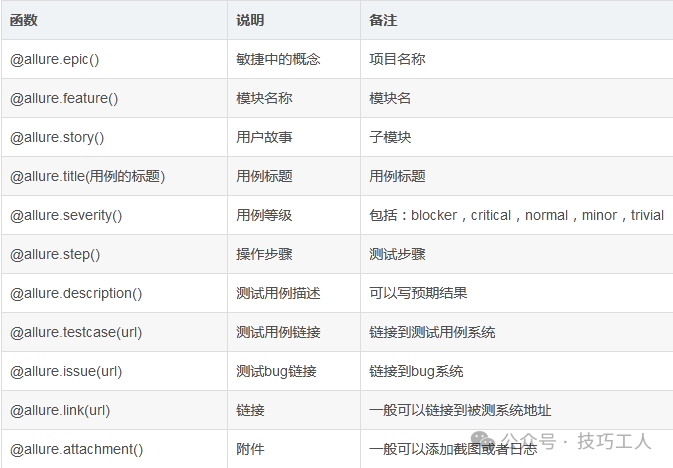
关键点说明:
@allure.feature 和 @allure.story 类似于父子关系,用于在报告的“Behaviors”下对测试用例进行分类显示。- 如果不添加这些装饰器,用例将不会按模块分类。
- 如果没有添加
@allure.title(),测试用例的标题将默认为函数名。
添加方式及常用格式
方式一:装饰器法
此方法将装饰器直接放在测试方法(函数)上。
@allure.epic("项目")
@allure.feature("模块")
@allure.story("子模块")
@allure.title("标题")
@allure.severity(allure.severity_level.CRITICAL)
@allure.description("描述")
优点: 可以灵活地指定feature、story、severity来筛选运行用例。
pytest --allure-features="xxx" --allure-stories="xxx","yyy" --allure-severities blocker,critical,normal
可以通过 pytest --help | grep allure 查看相关命令选项。
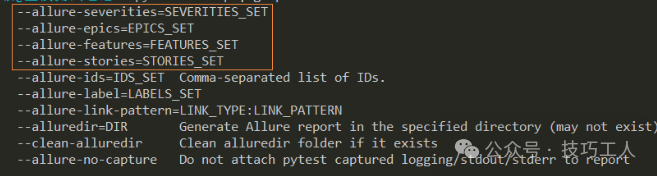
不足: 当用例数量较多时,为每个用例分别添加装饰器比较繁琐。
补充: severity_level 是一个枚举类,定义了优先级。
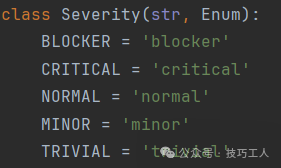
方式二:代码动态添加法(推荐)
此方法在测试方法内部,通过代码动态设置描述信息。
allure.dynamic.epic("项目")
allure.dynamic.feature("模块")
allure.dynamic.story("子模块")
allure.dynamic.title("标题")
allure.dynamic.severity("优先级")
allure.dynamic.description("描述")
优点: 描述信息可以实现参数化,非常适合从外部数据源(如JSON、YAML)读取测试数据并动态生成报告内容。
不足: 使用动态方法添加的feature、story、severity无法通过命令行参数(如--allure-features)来筛选运行。
在实际的Python自动化测试工作中,如果使用了参数化,可以将描述信息放到参数化数据中,然后通过方式二读取并动态生成,这使得测试数据与报告内容高度统一。
实战示例:为报告添加分类与描述
1. 添加优先级 (Severity) - 装饰器方式
此功能常用于根据用例优先级来选择性执行测试集。
示例代码:
import allure

# 没有指定severity,默认是normal
@allure.feature("模块1")
@allure.story("m1子模块1")
def test_no_severity():
    pass

@allure.feature("模块2")
@allure.story("m2子模块1")
@allure.severity(allure.severity_level.TRIVIAL)
def test_trivial_severity():
    pass

@allure.feature("模块3")
@allure.story("m3子模块1")
@allure.severity(allure.severity_level.NORMAL)
def test_normal_severity():
    pass

@allure.feature("模块4")
@allure.story("m4子模块1")
@allure.severity(allure.severity_level.NORMAL)
class TestCase:
    def test_inclass_normal_severity(self):
        pass
    # 优先级就近原则,类上的装饰器不会覆盖方法上的
    @allure.severity(allure.severity_level.CRITICAL)
    def test_inclass_critical_severity(self):
        pass
执行命令示例:
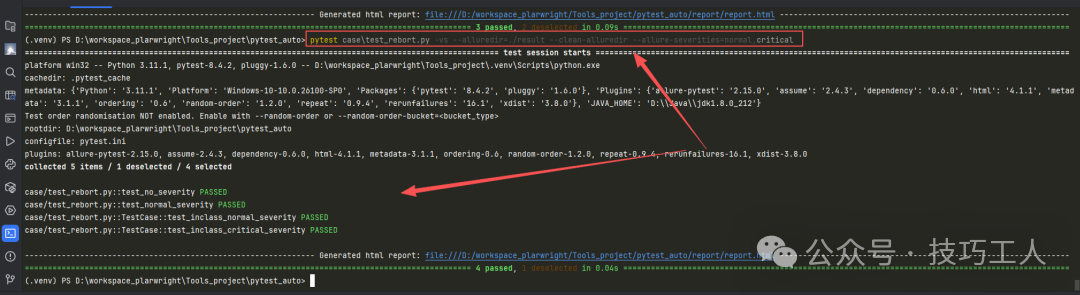
- 指定单个优先级执行:
pytest case\test_report.py -vs --alluredir=./result --clean-alluredir --allure-severities=normal
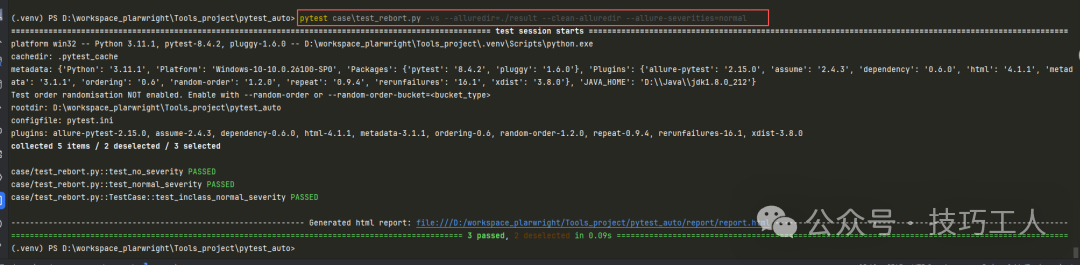
- 指定多个优先级执行:
--allure-severities=normal,critical
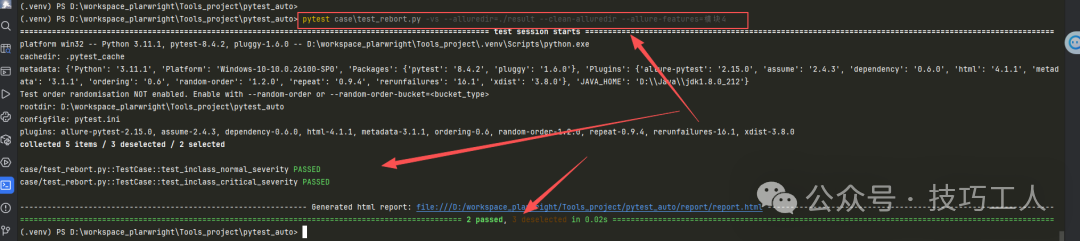
- 指定单个模块执行:
--allure-features=模块4
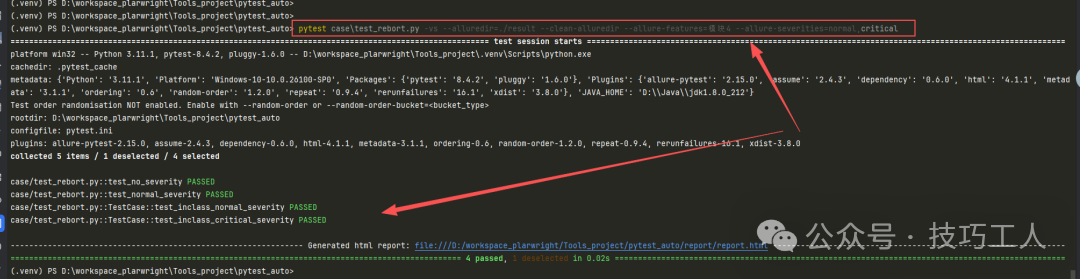
- 指定模块和优先级执行(结果为并集):
--allure-features=模块4 --allure-severities=critical
2. 动态添加Epic, Feature等(代码方式)
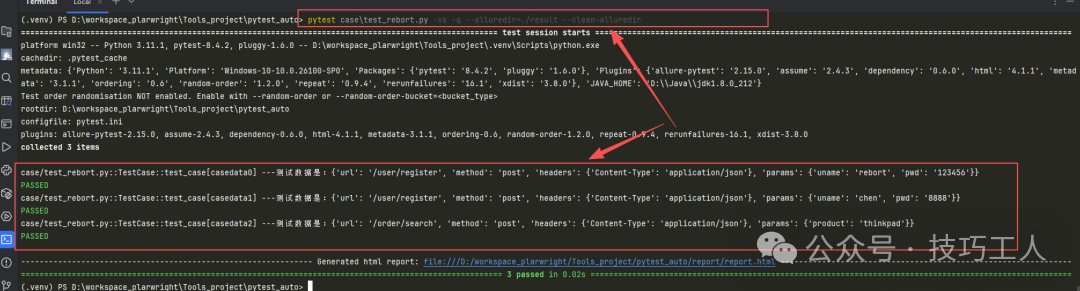
此方法常用于参数化测试,使报告结构清晰,并在用例详情中展示完整信息。
示例代码(模拟接口自动化测试数据):
import allure
import pytest

data = [
    {
        "epic": "全栈pytest教程",
        "feature": "用户模块",
        "story": "用户注册",
        "title": "用户注册成功",
        "description": "desc - 用户注册成功",
        "severity": "critical",
        "request": {
            "url": "/user/register",
            "method": "post",
            "headers": {'Content-Type': 'application/json'},
            "params": {"uname": "rebort", "pwd": "123456"}
        }
    },
    # ... 更多测试数据
]

@pytest.mark.parametrize('casedata', data)
class TestCase:
    def test_case(self, casedata):
        allure.dynamic.epic(casedata["epic"])
        allure.dynamic.feature(casedata["feature"])
        allure.dynamic.story(casedata["story"])
        allure.dynamic.title(casedata["title"])
        allure.dynamic.severity(casedata["severity"])
        allure.dynamic.description(casedata["description"])
        print(f"---测试数据是:{casedata['request']}")
        assert 1 == 1
运行后查看报告,在“Behaviors”下会按Epic -> Feature -> Story层级清晰展示用例分类。

3. 添加测试步骤 (Step)
在UI自动化测试中,常用于描述测试过程中的每一个操作步骤。
示例代码:
import allure

@allure.epic("全栈pytest教程")
@allure.feature("用户模块")
@allure.story("注册")
class TestRegister:
    @allure.title("注册成功")
    @allure.severity("critical")
    def test_reg_success(self):
        with allure.step("步骤1:打开注册页面"):
            print("打开注册页面")
        with allure.step("步骤2:输入注册信息"):
            print("输入注册信息")
        with allure.step("步骤3:提交注册,注册成功"):
            print("提交注册,注册成功")
            assert 1 == 1
在生成的报告中,测试步骤会清晰罗列在用例详情中。如果某个步骤失败,其后的步骤将不会执行。

4. 添加链接 (Link, Issue, TestCase)
此功能用于将Allure报告与外部系统(如Bug管理系统、用例管理平台)集成,实现快速跳转。
本质: @allure.issue 和 @allure.testcase 都是 @allure.link 的特例。
import allure

TEST_CASE_LINK = 'https://example.com/testcase/123'

@allure.link("https://example.com") # 普通链接
def test_link():
    pass

@allure.issue("https://bugtracker.com/issue/456", "BUG-456") # 问题链接
def test_issue_link():
    pass

@allure.testcase(TEST_CASE_LINK, "测试用例TC_001") # 用例链接
def test_testcase_link():
    pass
为了在报告中将链接模板化(例如将issue编号替换为实际URL),可以在 pytest.ini 配置文件中进行全局设置:
[pytest]
addopts = -s -q
alluredir = ./result
clean_alluredir = true
allure_link_pattern = issue:https://bugtracker.com/issue/{}
配置后,报告中@allure.issue(“456”)的链接将自动渲染为https://bugtracker.com/issue/456。
5. 添加附件 (Attach)
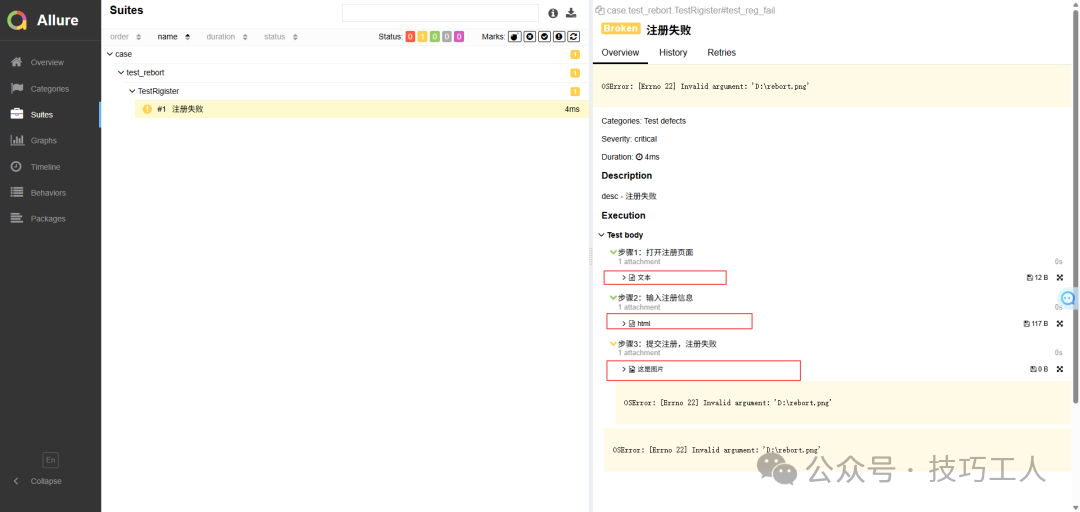
在测试报告中附加详细的上下文信息,如图片、日志、网页片段等,对于软件测试的故障排查至关重要。
主要方法:
allure.attach(body, name, attachment_type, extension): 附加文本内容。allure.attach.file(source, name, attachment_type, extension): 附加文件。
示例代码:
import allure

def test_with_attachments():
    with allure.step("步骤1:记录文本日志"):
        allure.attach("这是一个重要的调试信息", name="日志文本", attachment_type=allure.attachment_type.TEXT)

    with allure.step("步骤2:附加HTML片段"):
        allure.attach('<h3>这是一个HTML标题</h3>', name="HTML片段", attachment_type=allure.attachment_type.HTML)

    with allure.step("步骤3:附加截图"):
        allure.attach.file(r"D:\screenshot.png",
                           name="失败截图",
                           attachment_type=allure.attachment_type.PNG)
执行后,在报告的测试步骤中可以直接查看或下载附加的文本、HTML和图片。
总结与思考
通过装饰器和动态方法,我们可以全方位美化Allure报告,使其成为团队沟通和问题定位的得力工具。需要注意的是,动态添加的feature、story等信息无法通过--allure-features等命令行参数过滤。在实际项目中,可以根据需求灵活混合使用两种方式:对需要分类筛选的固定模块使用装饰器,对参数化驱动的测试数据使用动态方法,从而达到效率与灵活性的最佳平衡。
 发表于 2025-12-14 13:04:27
|
查看: 435|
回复: 0
发表于 2025-12-14 13:04:27
|
查看: 435|
回复: 0

