实际工作中经常遇到这样的场景:业务功能需要把数据生成 Excel 文件交给用户,用户按模板录入数据后,程序读取 Excel 内容并写入数据库。对 Java 开发者来说,POI 是最主流的 Excel 处理组件。它不仅能处理 Excel,Word、PPT 等 Office 格式也能应付。
本篇只聚焦 POI 处理 Excel 的常用方法,文末附 demo 源码。
一、导入 jar 包
先搭一个 Maven 工程,引入 poi-ooxml 依赖。具体的 jar 包版本可以在 https://mvnrepository.com 上查到。
<!--poi-ooxml 包提供对后缀名 .xlsx 的 Excel 文件的支持-->
<dependency>
    <groupId>org.apache.poi</groupId>
    <artifactId>poi-ooxml</artifactId>
    <version>5.2.1</version>
</dependency>

<!--导入 junit 的 jar 包-->
<dependency>
    <groupId>junit</groupId>
    <artifactId>junit</artifactId>
    <version>4.12</version>
    <scope>test</scope>
</dependency>
现在的 Excel 基本都是 Excel 2007 及之后版本创建的(后缀名 .xlsx),所以只需要导入 poi-ooxml 一个包就够了。再顺手引入 JUnit,方便写独立测试方法。最后打开右侧 Maven 面板刷新,让依赖自动下载。
项目整体目录结构如下:
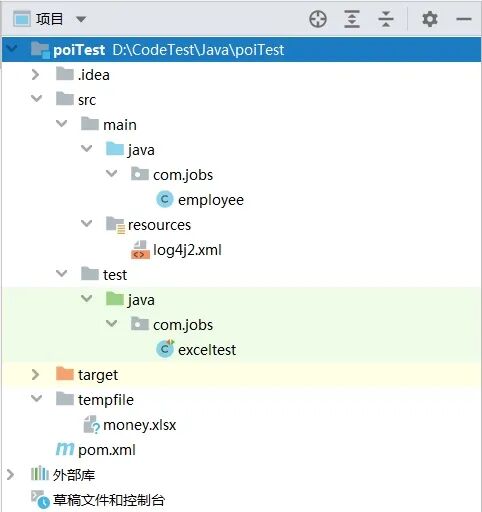
工程结构很简单:
com.jobs.employee:Java Bean 实体类test 目录下的 com.jobs.exceltest:操作 Excel 的测试类src 目录下的 tempfile:存放生成的 Excel 文件
二、核心代码演示
com.jobs.employee 是承载数据的实体类:
package com.jobs;

import java.util.Date;

public class employee {
    //姓名
    private String empName;
    //每日薪水
    private Integer dayMoney;
    //出勤天数
    private Integer workDays;
    //领取薪水的时间
    private Date payTime;

    public employee() {
    }

    public employee(String empName, Integer dayMoney, Integer workDays, Date payTime) {
        this.empName = empName;
        this.dayMoney = dayMoney;
        this.workDays = workDays;
        this.payTime = payTime;
    }

    //相关字段的 Get 和 Set 方法,省略...
}
至于 测试生成 Excel 和读取 Excel,com.jobs.exceltest 中分别对应两个方法,完整代码如下:
package com.jobs;

import org.apache.poi.ss.usermodel.*;
import org.apache.poi.xssf.usermodel.*;
import org.junit.Test;

import java.io.*;
import java.util.*;
import java.text.SimpleDateFormat;

public class exceltest {

    @Test
    public void WriteExcel() throws Exception {

        //创建一个文件对象,作为 excel 文件内容的输出文件
        //本 demo 将 excel 文件生成到工程项目下的 tempfile 目录中
        File f = new File("tempfile/money.xlsx");
        try (Workbook wb = new XSSFWorkbook();
             FileOutputStream os = new FileOutputStream(f)) {
            //.xls 的 excel 文件使用 HSSFWorkbook(现在基本上很少用到了)
            //.xlsx 的 excel 文件使用 XSSFWorkbook

            Sheet st = wb.createSheet("员工薪水");

            //在这里统一设置单元格样式,后续给相关单元格设置该样式
            //对于 excel 第一行的标题,设置样式为字体加粗,居中显示
            CellStyle cstitle = wb.createCellStyle();
            cstitle.setAlignment(HorizontalAlignment.CENTER);
            Font font = wb.createFont();
            font.setBold(true);
            cstitle.setFont(font);

            //对于 excel 从第二行开始的数据行,设置
            CellStyle csfield = wb.createCellStyle();
            csfield.setAlignment(HorizontalAlignment.CENTER);

            //对于日期型的数据,设置其显示样式
            CellStyle csdate = wb.createCellStyle();
            csdate.setAlignment(HorizontalAlignment.CENTER);
            csdate.setDataFormat(wb.createDataFormat().getFormat("yyyy-MM-dd HH:mm:ss"));
            //将第 5 列(日期所在的列)的列宽设置的大一些
            //参数为:列的索引,列宽 * 256 的计算值(这个是设置列宽的固定写法)
            st.setColumnWidth(5, 5000);

            //从数据库获取数据,这里造一些假数据
            List<employee> emplist = new ArrayList<>();
            Calendar calendar = Calendar.getInstance();
            //Calendar 的月份是从 0 开始的,因此下面的时间是 2022-04-05 10:11:20
            calendar.set(2022, 3, 5, 10, 11, 20);
            emplist.add(new employee("候胖胖", 200, 21, calendar.getTime()));
            calendar.add(Calendar.MINUTE, 12);
            emplist.add(new employee("任肥肥", 180, 22, calendar.getTime()));
            calendar.add(Calendar.MINUTE, 15);
            emplist.add(new employee("李敦敦", 150, 25, calendar.getTime()));

            //第一行标题
            String[] titles = {"序号", "姓名", "每日薪水", "出勤天数", "薪水统计", "领取时间"};
            Row rowtitle = st.createRow(0);
            for (int i = 0; i < titles.length; i++) {
                Cell celltitle = rowtitle.createCell(i);
                celltitle.setCellValue(titles[i]);
                celltitle.setCellStyle(cstitle);
            }

            //从第二行开始写数据
            int rowindex = 1;
            for (employee emp : emplist) {
                Row rowtemp = st.createRow(rowindex);

                //序号
                Cell Cell0 = rowtemp.createCell(0);
                Cell0.setCellValue(rowindex);
                Cell0.setCellStyle(csfield);

                //姓名
                Cell Cell1 = rowtemp.createCell(1);
                Cell1.setCellValue(emp.getEmpName());
                Cell1.setCellStyle(csfield);

                //每日薪水
                Cell Cell2 = rowtemp.createCell(2);
                Cell2.setCellValue(emp.getDayMoney());
                Cell2.setCellStyle(csfield);

                //出勤天数
                Cell Cell3 = rowtemp.createCell(3);
                Cell3.setCellValue(emp.getWorkDays());
                Cell3.setCellStyle(csfield);

                //薪水统计(使用 excel 的计算公式)
                //注意:excel 的行号和列号是从 1 开始的
                int formulaRowIndex = rowindex + 1;
                Cell Cell4 = rowtemp.createCell(4);
                Cell4.setCellFormula("C" + formulaRowIndex + "*D" + formulaRowIndex);
                Cell4.setCellStyle(csfield);

                //薪水领取时间
                Cell Cell5 = rowtemp.createCell(5);
                Cell5.setCellValue(emp.getPayTime());
                Cell5.setCellStyle(csdate);

                rowindex = rowindex + 1;
            }

            //将内存中的 workbook 数据写入到流中
            wb.write(os);
        }
    }

    @Test
    public void ReadExcel() throws Exception {

        try (XSSFWorkbook wb = new XSSFWorkbook("tempfile/money.xlsx")) {
            Sheet st = wb.getSheet("员工薪水");

            XSSFFormulaEvaluator formulaEvaluator = new XSSFFormulaEvaluator(wb);
            SimpleDateFormat sdf = new SimpleDateFormat("yyyy-MM-dd HH:mm:ss");

            int rowSeq = 0;

            //获取 sheet 中有多少行数据,注意:该 demo 中第一行是标题
            Iterator<Row> iterator = st.iterator();
            while (iterator.hasNext()) {
                Row row = iterator.next();
                List<String> list = new ArrayList<>();
                if (rowSeq == 0) {
                    //读取第一行标题,全是字符串数据
                    //一般情况下,你是能够提前知道列数,该 demo 中有 6 列

                    for (int i = 0; i < 6; i++) {
                        list.add(row.getCell(i).getStringCellValue());
                    }
                } else {
                    //从第二行开始,就是数据了
                    //需要注意:必须根据单元格的内容数据类型,使用相应的数据类型读取方法

                    //获取序号
                    list.add(String.valueOf((int)row.getCell(0).getNumericCellValue()));
                    //获取姓名
                    list.add(row.getCell(1).getStringCellValue());
                    //获取每日薪水
                    list.add(String.valueOf((int)row.getCell(2).getNumericCellValue()));
                    //获取出勤天数
                    list.add(String.valueOf((int)row.getCell(3).getNumericCellValue()));
                    //获取薪水统计(注意薪水统计,是由公式计算而来的,也就是要获取公式的值)
                    XSSFCell xssfCell = formulaEvaluator.evaluateInCell(row.getCell(4));
                    list.add(String.valueOf((int)xssfCell.getNumericCellValue()));
                    //获取薪水领取时间
                    Date date = row.getCell(5).getDateCellValue();
                    list.add(sdf.format(date));
                }

                //以中文逗号分隔,打印出一行的数据内容
                System.out.println(String.join(",", list));
                rowSeq = rowSeq + 1;
            }
        }
    }
}
上面代码覆盖了 Excel 操作中最常见的几个点:生成文件时定义不同的单元格样式、用公式计算结果填充单元格,以及读取时提取公式计算后的值。有一点必须提醒:读取单元格内容时,得用与单元格数据类型匹配的方法去读,否则直接抛异常。
生成的 money.xlsx 存放在项目 tempfile 目录下,打开后的效果:
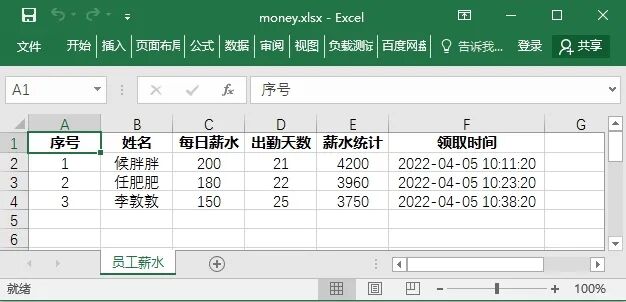
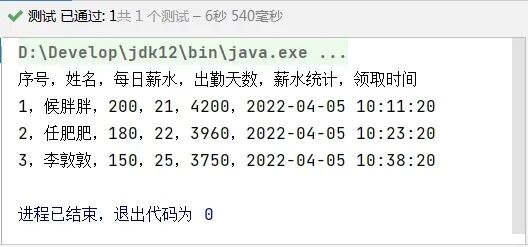
读取同一份文件后,控制台输出如下:
三、解决控制台 log4j2 报错
运行上面两个测试方法时,控制台总会刷出这样一条错误:
ERROR StatusLogger Log4j2 could not find a logging implementation. Please add log4j-core to the classpath. Using SimpleLogger to log to the console...
解决分两步。
(1)引入 log4j-core 依赖
<dependency>
    <groupId>org.apache.logging.log4j</groupId>
    <artifactId>log4j-core</artifactId>
    <version>2.17.2</version>
</dependency>
(2)在 resources 目录放一份 log4j2.xml 日志配置
<Configuration status="warn">
    <Appenders>
        <Console name="Console" target="SYSTEM_OUT">
            <PatternLayout pattern="[%-5p] %d %c - %m%n"/>
        </Console>

        <!--日志文件的保存路径,以及日志记录格式-->
        <!--
        <File name="File" fileName="dist/my.log">
            <PatternLayout pattern="%m%n"/>
        </File>
        -->
    </Appenders>
    <Loggers>
        <Root level="INFO">
            <AppenderRef ref="Console"/>
        </Root>

        <!--日志文件记录日志的级别设置-->
        <!--
        <Logger name="mh.sample2.Log4jTest2" level="INFO">
            <AppenderRef ref="File"/>
        </Logger>
        -->
    </Loggers>
</Configuration>
两步弄完,刷新一下 Maven 依赖,再跑测试方法就不会报这个日志错误了。
 发表于 1 小时前
|
查看: 8|
回复: 0
发表于 1 小时前
|
查看: 8|
回复: 0

