1 FastThreadLocal 的引入背景和原理简介
既然 JDK 已经有 ThreadLocal,为何 Netty 还要自己造一个 FastThreadLocal?FastThreadLocal 到底快在哪里?
这需要从 JDK ThreadLocal 的本身说起。如下图:
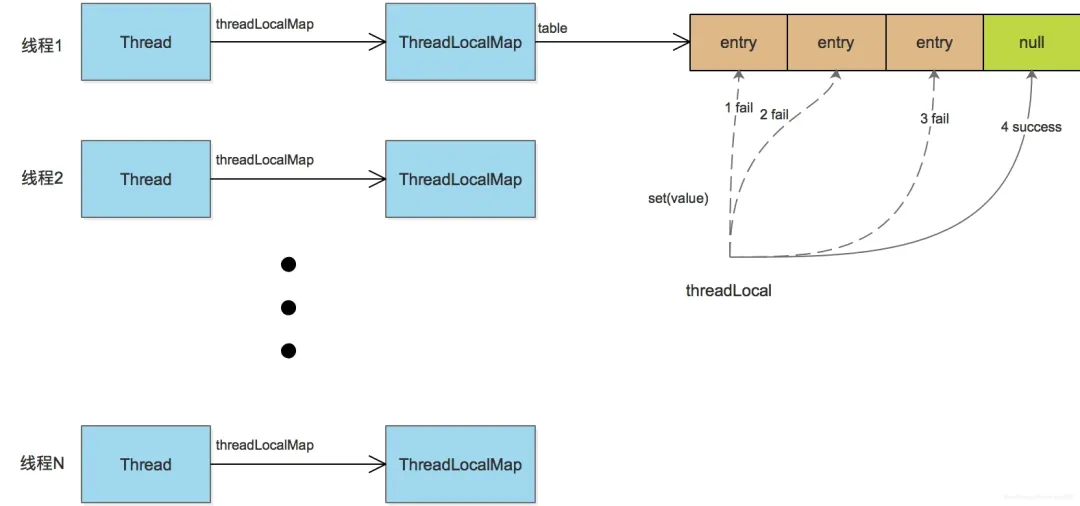
在 Java 线程中,每个线程都有一个 ThreadLocalMap 实例变量(如果不使用 ThreadLocal,不会创建这个 Map,一个线程第一次访问某个 ThreadLocal 变量时,才会创建)。
该 Map 采用线性探测的方式解决 hash 冲突:如果没有找到空闲的 slot,就不断往后尝试,直到找到一个空闲的位置插入 entry。这种机制在频繁遇到 hash 冲突时,会明显拖慢效率。
FastThreadLocal(下文简称 ftl)直接使用数组避免了 hash 冲突的发生。具体做法是:每个 FastThreadLocal 实例创建时分配一个下标 index;index 的分配使用 AtomicInteger 实现,每个 FastThreadLocal 都能获取到一个不重复的下标。
当调用 ftl.get() 方法获取值时,直接从数组获取返回,如 return array[index],如下图:
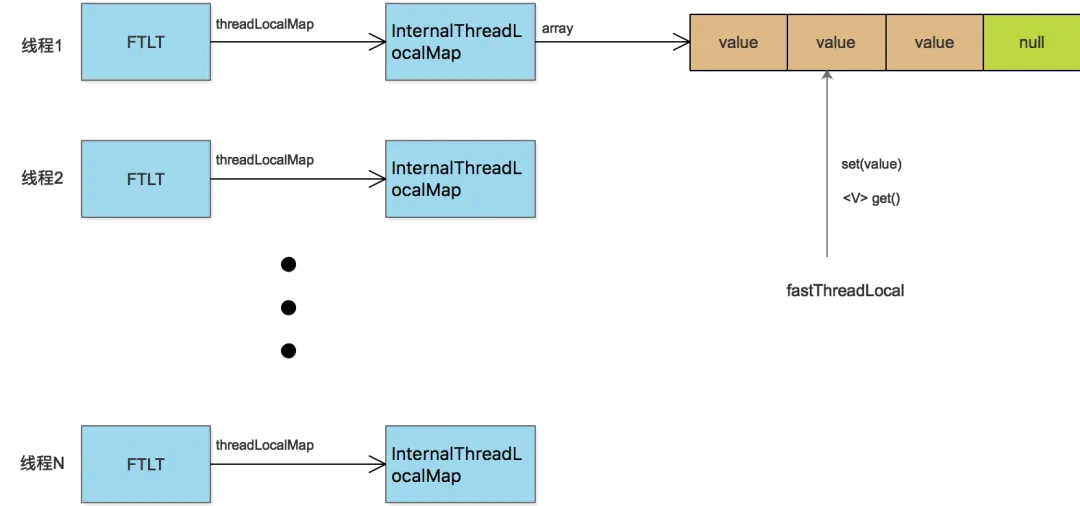
2 实现源码分析
根据上文图示可知,ftl 的实现涉及 InternalThreadLocalMap、FastThreadLocalThread 和 FastThreadLocal 几个类。自底向上,我们先从 InternalThreadLocalMap 开始分析。
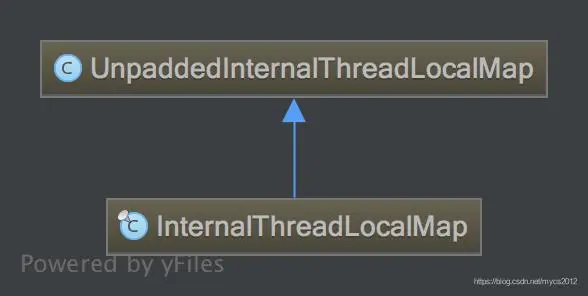
InternalThreadLocalMap 类的继承关系图如下:
2.1 UnpaddedInternalThreadLocalMap 的主要属性
static final ThreadLocal<InternalThreadLocalMap> slowThreadLocalMap = new ThreadLocal<InternalThreadLocalMap>();
static final AtomicInteger nextIndex = new AtomicInteger();
Object[] indexedVariables;
数组 indexedVariables 就是用来存储 ftl 的 value 的,使用下标方式直接访问。nextIndex 在 ftl 实例创建时用来给每个 ftl 实例分配一个下标,slowThreadLocalMap 在线程不是 ftlt 时使用到。
2.2 InternalThreadLocalMap 分析
InternalThreadLocalMap 的主要属性:
// 用于标识数组的槽位还未使用
public static final Object UNSET = new Object();
/**
 * 用于标识ftl变量是否注册了cleaner
 * BitSet简要原理:
 * BitSet默认底层数据结构是一个long[]数组,开始时长度为1,即只有long[0],而一个long有64bit。
 * 当BitSet.set(1)的时候,表示将long[0]的第二位设置为true,即0000 0000 ... 0010(64bit),则long[0]==2
 * 当BitSet.get(1)的时候,第二位为1,则表示true;如果是0,则表示false
 * 当BitSet.set(64)的时候,表示设置第65位,此时long[0]已经不够用了,扩容出long[1]来,进行存储
 *
 * 存储类似 {index:boolean} 键值对,用于防止一个FastThreadLocal多次启动清理线程
 * 将index位置的bit设为true,表示该InternalThreadLocalMap中对该FastThreadLocal已经启动了清理线程
 */
private BitSet cleanerFlags;

private InternalThreadLocalMap()
{
    super(newIndexedVariableTable());
}

private static Object[] newIndexedVariableTable() {
    Object[] array = new Object[32];
    Arrays.fill(array, UNSET);
    return array;
}
这部分逻辑比较直接。newIndexedVariableTable() 方法创建长度为 32 的数组,然后初始化为 UNSET,传给父类。之后 ftl 的值就保存到这个数组里面。
注意,这里保存的直接是变量值,不是 entry,这是和 JDK ThreadLocal 不同的。InternalThreadLocalMap 就先分析到这,其他方法在后面分析 ftl 时再具体说。
2.3 ftlt 的实现分析
要发挥 ftl 的性能优势,必须和 ftlt(FastThreadLocalThread)结合使用,否则就会退化到 JDK 的 ThreadLocal。ftlt 的代码比较简单,关键实现如下:
public class FastThreadLocalThread extends Thread
{
    // This will be set to true if we have a chance to wrap the Runnable.
    private final boolean cleanupFastThreadLocals;

    private InternalThreadLocalMap threadLocalMap;

    public final InternalThreadLocalMap threadLocalMap()
    {
        return threadLocalMap;
    }

    public final void setThreadLocalMap(InternalThreadLocalMap threadLocalMap)
    {
        this.threadLocalMap = threadLocalMap;
    }
}
ftlt 的诀窍就在 threadLocalMap 属性:它继承 java Thread,然后聚合了自己的 InternalThreadLocalMap。后面访问 ftl 变量时,对于 ftlt 线程,都直接从 InternalThreadLocalMap 获取变量值。
2.4 ftl 实现分析
ftl 实现分析基于 netty-4.1.34 版本。特别声明版本,是因为在清除的地方,该版本的源码已经注释掉了 ObjectCleaner 的调用,和之前的版本有所不同。
2.4.1 ftl 的属性和实例化
private final int index;

public FastThreadLocal()
{
    index = InternalThreadLocalMap.nextVariableIndex();
}
非常简单,就是给属性 index 赋值。赋值的静态方法在 InternalThreadLocalMap 中:
public static int nextVariableIndex()
{
    int index = nextIndex.getAndIncrement();
    if (index < 0) {
        nextIndex.decrementAndGet();
        throw new IllegalStateException("too many thread-local indexed variables");
    }
    return index;
}
可见,每个 ftl 实例以步长为 1 的递增序列获取 index 值,这保证了 InternalThreadLocalMap 中数组的长度不会突增。
2.4.2 get() 方法实现分析
public final V get()
{
    InternalThreadLocalMap threadLocalMap = InternalThreadLocalMap.get(); // 1
    Object v = threadLocalMap.indexedVariable(index); // 2
    if (v != InternalThreadLocalMap.UNSET) {
        return (V) v;
    }

    V value = initialize(threadLocalMap); // 3
    registerCleaner(threadLocalMap);  // 4
    return value;
}
1. 先来看看 InternalThreadLocalMap.get() 方法如何获取 threadLocalMap:
=======================InternalThreadLocalMap=======================
public static InternalThreadLocalMap get()
{
    Thread thread = Thread.currentThread();
    if (thread instanceof FastThreadLocalThread) {
        return fastGet((FastThreadLocalThread) thread);
    } else {
        return slowGet();
    }
}

private static InternalThreadLocalMap fastGet(FastThreadLocalThread thread)
{
    InternalThreadLocalMap threadLocalMap = thread.threadLocalMap();
    if (threadLocalMap == null) {
        thread.setThreadLocalMap(threadLocalMap = new InternalThreadLocalMap());
    }
    return threadLocalMap;
}
因为结合 FastThreadLocalThread 使用才能发挥 FastThreadLocal 的性能优势,所以主要看 fastGet 方法。该方法直接从 ftlt 线程获取 threadLocalMap,如果还没有则创建一个 InternalThreadLocalMap 实例并设置进去,然后返回。
2. threadLocalMap.indexedVariable(index) 就简单了,直接从数组获取值,然后返回:
public Object indexedVariable(int index)
{
    Object[] lookup = indexedVariables;
    return index < lookup.length ? lookup[index] : UNSET;
}
3. 如果获取到的值不是 UNSET,说明是有效值,直接返回。如果是 UNSET,则进行初始化。
initialize(threadLocalMap) 方法:
private V initialize(InternalThreadLocalMap threadLocalMap)
{
    V v = null;
    try {
        v = initialValue();
    } catch (Exception e) {
        PlatformDependent.throwException(e);
    }

    threadLocalMap.setIndexedVariable(index, v); // 3-1
    addToVariablesToRemove(threadLocalMap, this); // 3-2
    return v;
}
3.1. 获取 ftl 的初始值,保存到 ftl 内部的数组;如果数组长度不够则先扩充数组长度,再保存。这里不展开。
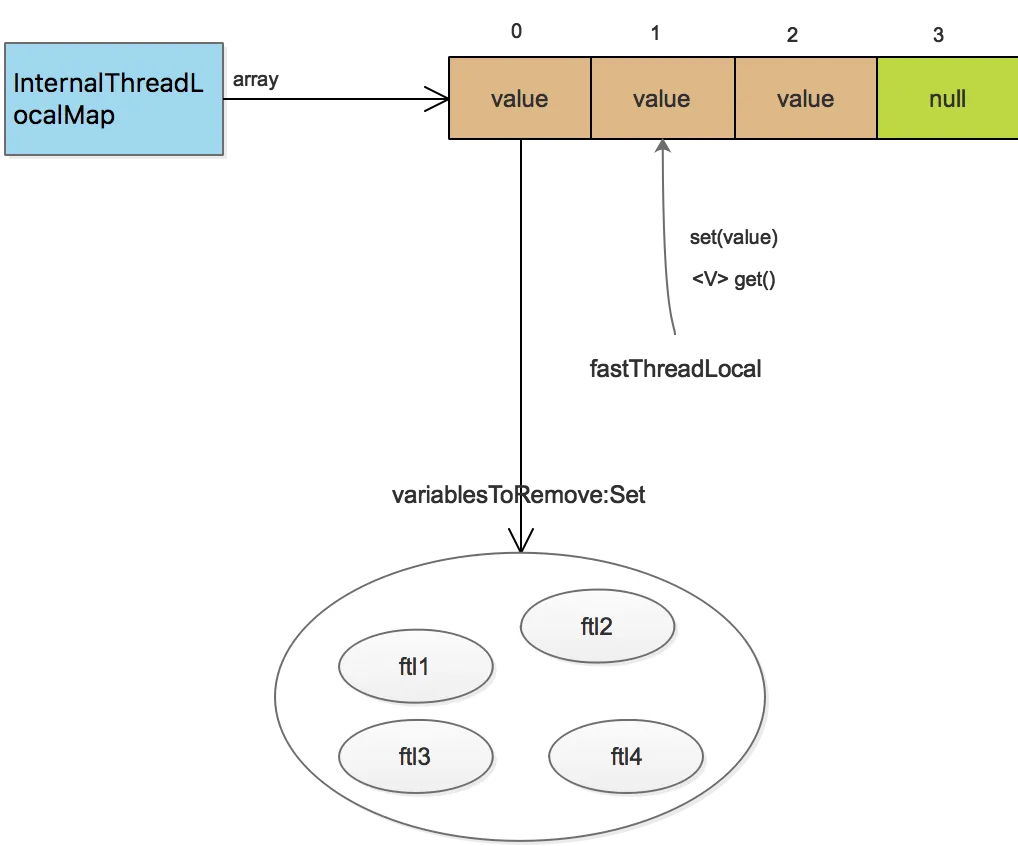
3.2. addToVariablesToRemove(threadLocalMap, this) 的实现,是将 ftl 实例保存在 threadLocalMap 内部数组第 0 个元素的 Set 集合中。
此处不贴代码,用图示如下:
4. registerCleaner(threadLocalMap) 的实现,netty-4.1.34 版本中的源码:
private void registerCleaner(final InternalThreadLocalMap threadLocalMap)
{
    Thread current = Thread.currentThread();
    if (FastThreadLocalThread.willCleanupFastThreadLocals(current) || threadLocalMap.isCleanerFlagSet(index)) {
        return;
    }

    threadLocalMap.setCleanerFlag(index);

    // TODO: We need to find a better way to handle this.
    /*
    // We will need to ensure we will trigger remove(InternalThreadLocalMap) so everything will be released
    // and FastThreadLocal.onRemoval(...) will be called.
    ObjectCleaner.register(current, new Runnable() {
        @Override
        public void run() {
            remove(threadLocalMap);

            // It's fine to not call InternalThreadLocalMap.remove() here as this will only be triggered once
            // the Thread is collected by GC. In this case the ThreadLocal will be gone away already.
        }
    });
    */
}
由于 ObjectCleaner.register 这段代码在该版本已经注释掉,余下逻辑比较简单,因此不再做分析。
2.5 普通线程使用 ftl 的性能退化
随着 get() 方法分析完毕,set(value) 方法的原理也呼之欲出,限于篇幅,不再单独分析。
前文说过,ftl 要结合 ftlt 才能最大地发挥其性能。如果是其他普通线程,就会退化到 JDK ThreadLocal 的情况——因为普通线程没有包含 InternalThreadLocalMap 这样的数据结构。接下来看如何退化。
从 InternalThreadLocalMap 的 get() 方法看起:
=======================InternalThreadLocalMap=======================
public static InternalThreadLocalMap get()
{
    Thread thread = Thread.currentThread();
    if (thread instanceof FastThreadLocalThread) {
        return fastGet((FastThreadLocalThread) thread);
    } else {
        return slowGet();
    }
}

private static InternalThreadLocalMap slowGet()
{
    // 父类的类型为JDK ThreadLocal的静态属性,从该threadLocal获取InternalThreadLocalMap
    ThreadLocal<InternalThreadLocalMap> slowThreadLocalMap = UnpaddedInternalThreadLocalMap.slowThreadLocalMap;
    InternalThreadLocalMap ret = slowThreadLocalMap.get();
    if (ret == null) {
        ret = new InternalThreadLocalMap();
        slowThreadLocalMap.set(ret);
    }
    return ret;
}
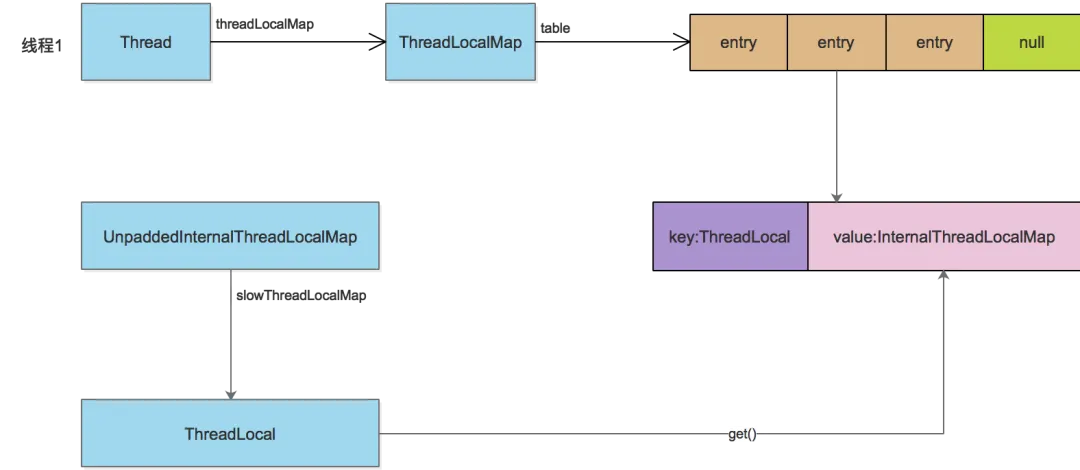
从 ftl 的角度来看,退化操作的整个流程是:从 JDK 的 ThreadLocal 变量中获取 InternalThreadLocalMap,然后再从 InternalThreadLocalMap 获取指定数组下标的值。对象关系示意如下:
3 ftl 的资源回收机制
在 Netty 中,针对 ftl 提供了三种回收机制:
自动: 使用 ftlt 执行一个被 FastThreadLocalRunnable wrap 的 Runnable 任务,在任务执行完毕后会自动进行 ftl 的清理。
手动: ftl 和 InternalThreadLocalMap 都提供了 remove 方法。在合适的时候用户可以(有时也是必须,例如普通线程的线程池使用 ftl)手动调用,进行显式删除。
自动: 为当前线程的每一个 ftl 注册一个 Cleaner,当线程对象不强可达时,该 Cleaner 线程会将当前线程的当前 ftl 进行回收。(Netty 推荐如果可以用其他两种方式,就不要用这种方式,因为需要另起线程、耗费资源,而且多线程会造成资源竞争。在 netty-4.1.34 版本中,已经注释掉了调用 ObjectCleaner 的代码。)
4 ftl 在 Netty 中的使用
ftl 在 Netty 中最重要的使用,就是分配 ByteBuf。基本做法是:每个线程都分配一块内存(PoolArena),需要分配 ByteBuf 时,线程先从自己持有的 PoolArena 分配;如果自己无法分配,再采用全局分配。
但由于内存资源有限,所以还是会有多个线程持有同一块 PoolArena 的情况。不过这种方式已经最大限度地减轻了多线程的资源竞争,提高了程序效率。
具体的代码在 PoolByteBufAllocator 的内部类 PoolThreadLocalCache 中:
final class PoolThreadLocalCache extends FastThreadLocal<PoolThreadCache>
{

    @Override
    protected synchronized PoolThreadCache initialValue()
    {
        final PoolArena<byte[]> heapArena = leastUsedArena(heapArenas);
        final PoolArena<ByteBuffer> directArena = leastUsedArena(directArenas);

        Thread current = Thread.currentThread();
        if (useCacheForAllThreads || current instanceof FastThreadLocalThread) {
            // PoolThreadCache即为各个线程持有的内存块的封装
            return new PoolThreadCache(
                        heapArena, directArena, tinyCacheSize, smallCacheSize, normalCacheSize,
                        DEFAULT_MAX_CACHED_BUFFER_CAPACITY, DEFAULT_CACHE_TRIM_INTERVAL);
        }
        // No caching so just use 0 as sizes.
        return new PoolThreadCache(heapArena, directArena, 0, 0, 0, 0, 0);
    }
}
 发表于 1 小时前
|
查看: 5|
回复: 0
发表于 1 小时前
|
查看: 5|
回复: 0

