在网上搜索 Ubuntu 更换国内镜像源的教程时,常会遇到版本对应混乱、随意更换导致后续更新出错等问题。
核心要点在于,镜像源必须与系统版本的代号(Codename)严格对应,而非简单地随意替换一个国内地址,否则会引发依赖错误和更新失败。 国内可选的镜像源较多,例如阿里云、网易以及清华大学、中国科学技术大学等教育网源。本文将主要以阿里云镜像为例,并附上清华源的配置作为备选。
第一步:查询系统版本代号(Codename)
更换镜像源前,首先需要确认自己 Ubuntu 系统的精确版本和其代号。这是标准的 Linux 运维操作,至关重要。
打开终端,执行以下命令:
lsb_release -a
命令输出示例如下:
ma@cw:~$ lsb_release -a
No LSB modules are available.
Distributor ID: Ubuntu
Description:    Ubuntu 20.04.6 LTS
Release:        20.04
Codename:       focal
ma@cw:~$
从输出可知,该系统版本为 Ubuntu 20.04.6 LTS,其 Codename(代号)为 focal。Ubuntu 每个发行版都有一个固定的代号,后续配置的镜像源地址必须使用此代号。
第二步:配置阿里云镜像源
1. 获取对应版本的镜像地址
阿里云为不同代号的 Ubuntu 版本提供了对应的镜像地址。你可以通过 阿里云Ubuntu镜像页面 查找并确认与你系统代号匹配的源。
对于 Codename 为 focal 的 Ubuntu 20.04 系统,可用的镜像配置如下:
2. Ubuntu 20.04 (focal) 镜像配置
将以下内容配置为你的软件源。
deb https://mirrors.aliyun.com/ubuntu/ focal main restricted universe multiverse
deb-src https://mirrors.aliyun.com/ubuntu/ focal main restricted universe multiverse

deb https://mirrors.aliyun.com/ubuntu/ focal-security main restricted universe multiverse
deb-src https://mirrors.aliyun.com/ubuntu/ focal-security main restricted universe multiverse

deb https://mirrors.aliyun.com/ubuntu/ focal-updates main restricted universe multiverse
deb-src https://mirrors.aliyun.com/ubuntu/ focal-updates main restricted universe multiverse

# deb https://mirrors.aliyun.com/ubuntu/ focal-proposed main restricted universe multiverse
# deb-src https://mirrors.aliyun.com/ubuntu/ focal-proposed main restricted universe multiverse

deb https://mirrors.aliyun.com/ubuntu/ focal-backports main restricted universe multiverse
deb-src https://mirrors.aliyun.com/ubuntu/ focal-backports main restricted universe multiverse
3. 具体更换步骤
(1)备份原有源列表
在进行任何修改前,请务必先备份。
sudo cp /etc/apt/sources.list /etc/apt/sources.list.backup
(2)编辑源列表文件
使用文本编辑器(如 vim)打开 /etc/apt/sources.list 文件。
sudo vim /etc/apt/sources.list
将文件中原有的所有以 deb 或 deb-src 开头的行全部注释(在行首添加 #)或删除。然后将上方提供的阿里云 focal 版本镜像配置完整地复制、粘贴到文件中,保存并退出编辑器。
(3)更新软件包列表
配置完成后,执行更新命令使新源生效。
sudo apt update
sudo apt upgrade
apt update 和 apt upgrade 是日常系统维护和软件管理的基础命令。
第三步:其他镜像选择(清华大学镜像源)
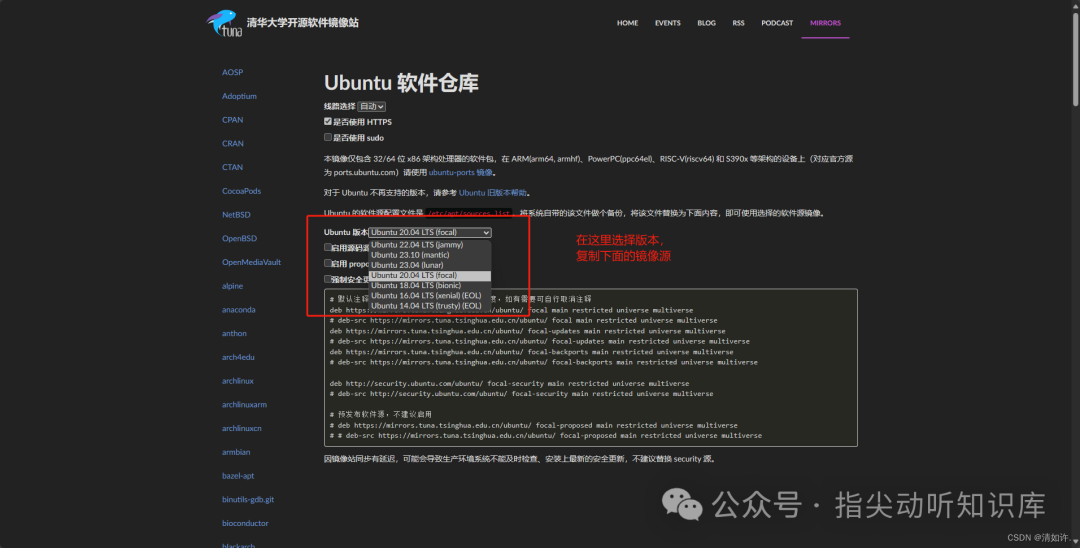
除阿里云外,清华大学开源软件镜像站也是国内极佳的选择。其配置界面清晰,同样支持按代号筛选。
针对 Ubuntu 20.04 (focal),清华源的基础配置如下(可根据需要自行启用源码源):
# 默认注释了源码镜像以提高 apt update 速度,如有需要可自行取消注释
deb https://mirrors.tuna.tsinghua.edu.cn/ubuntu/ focal main restricted universe multiverse
# deb-src https://mirrors.tuna.tsinghua.edu.cn/ubuntu/ focal main restricted universe multiverse

deb https://mirrors.tuna.tsinghua.edu.cn/ubuntu/ focal-updates main restricted universe multiverse
# deb-src https://mirrors.tuna.tsinghua.edu.cn/ubuntu/ focal-updates main restricted universe multiverse

deb https://mirrors.tuna.tsinghua.edu.cn/ubuntu/ focal-backports main restricted universe multiverse
# deb-src https://mirrors.tuna.tsinghua.edu.cn/ubuntu/ focal-backports main restricted universe multiverse

deb http://security.ubuntu.com/ubuntu/ focal-security main restricted universe multiverse
# deb-src http://security.ubuntu.com/ubuntu/ focal-security main restricted universe multiverse

# 预发布软件源,不建议启用
# deb https://mirrors.tuna.tsinghua.edu.cn/ubuntu/ focal-proposed main restricted universe multiverse
# # deb-src https://mirrors.tuna.tsinghua.edu.cn/ubuntu/ focal-proposed main restricted universe multiverse
使用方法与前述阿里云源相同:备份原文件,清空或注释旧源,粘贴新配置,最后执行 sudo apt update。
总结:更换国内镜像源能显著提升软件包下载与系统更新速度。关键在于精准匹配系统 Codename,并选择稳定可靠的镜像服务。操作后,务必运行 apt update 测试源是否有效。如果你在使用 Ubuntu 搭建 Python 开发环境 或运行其他服务,一个高速稳定的软件源将大大提升效率。
 发表于 2025-12-20 07:34:52
|
查看: 479|
回复: 0
发表于 2025-12-20 07:34:52
|
查看: 479|
回复: 0