在上一章《Nginx | 核心知识150讲,百万并发下性能优化之前端静态缓存、后端动态缓存实践笔记》中,我们介绍了Nginx在HTTP反向代理中与缓存相关的指令,并通过缓存机制实践优化了网站的访问速度,以及如何在上游服务器异常时避免网络波动带来的影响。
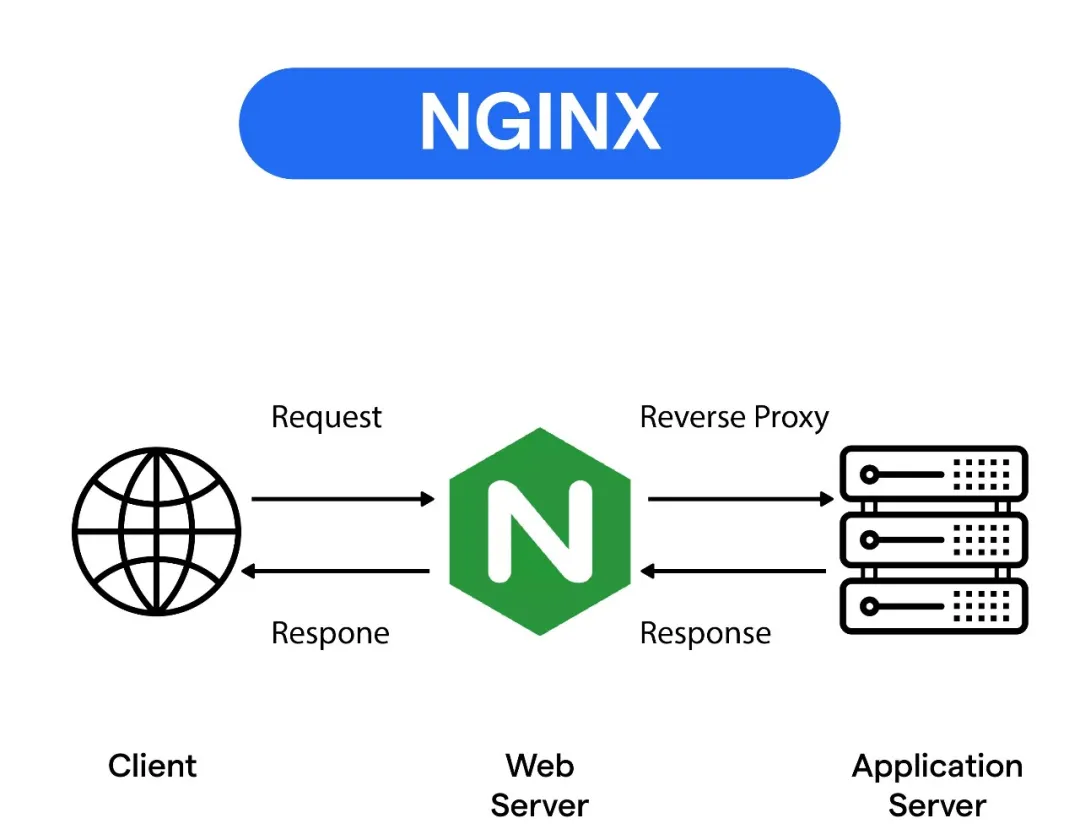
本章将继续介绍Nginx在其它反向代理场景下的指令,例如针对uwsgi、fastcgi、scgi以及MEMCACHED等协议的反向代理。我们将分别实践在Memcached反向代理场景下,如何通过Nginx转发请求到Memcached服务;在Websocket反向代理场景下,如何通过Nginx实现Websocket协议的转发;以及在gRPC反向代理场景下,如何通过Nginx实现gRPC协议的转发。
反向代理指令功能对照表
本小节将主要提供HTTP反向代理与uwsgi、fastcgi、scgi反向代理的相关指令功能对照表,方便运维开发人员快速查阅Nginx在不同场景下的反向代理指令,从而有效提升工作效率。
下述内容将按照指令功能进行分类、归纳,并以表格的形式呈现Nginx反向代理指令的功能对照表。
1.构造请求内容
| 功能\类别 |
http |
uwsgi |
fastcgi |
scgi |
| 指定上游服务 |
proxy_pass |
uwsgi_pass |
fastcgi_pass |
scgi_pass |
| 是否传递请求头部 |
proxy_pass_request_headers |
uwsgi_pass_request_headers |
fastcgi_pass_request_headers |
scgi_pass_request_headers |
| 是否传递请求包体 |
proxy_pass_request_body |
uwsgi_pass_request_body |
fastcgi_pass_request_body |
scgi_pass_request_body |
| 指定请求方法 |
proxy_method |
- |
- |
- |
| 指定请求协议 |
proxy_http_version |
- |
- |
- |
| 增改请求头部 |
proxy_set_header |
- |
- |
- |
| 更改请求包体 |
proxy_set_body |
- |
- |
- |
| 是否缓存请求包体 |
proxy_request_buffering |
uwsgi_request_buffering |
fastcgi_request_buffering |
scgi_request_buffering |
2.建立连接与请求发送
| 功能\类别 |
http |
uwsgi |
fastcgi |
scgi |
| 连接绑定地址 |
proxy_bind |
uwsgi_bind |
fastcgi_bind |
scgi_bind |
| 连接超时时间 |
proxy_connect_timeout |
uwsgi_connect_timeout |
fastcgi_connect_timeout |
scgi_connect_timeout |
| 是否使用TCP会话保持 |
proxy_socket_keepalive |
uwsgi_socket_keepalive |
fastcgi_socket_keepalive |
scgi_socket_keepalive |
| 忽略客户端中断连接 |
proxy_ignore_client_abort |
uwsgi_ignore_client_abort |
fastcgi_ignore_client_abort |
scgi_ignore_client_abort |
| 设置HTTP头部哈希表桶大小 |
proxy_headers_hash_bucket_size |
- |
- |
- |
| 设置HTTP头部哈希表最大大小 |
proxy_headers_hash_max_size |
- |
- |
- |
| 发送请求超时时间 |
proxy_send_timeout |
uwsgi_send_timeout |
fastcgi_send_timeout |
scgi_send_timeout |
3.接收处理上游响应
| 功能\类别 |
http |
uwsgi |
fastcgi |
scgi |
| 是否缓存上游响应包体 |
proxy_buffering |
uwsgi_buffering |
fastcgi_buffering |
scgi_buffering |
| 存放上游响应的临时目录 |
proxy_temp_path |
uwsgi_temp_path |
fastcgi_temp_path |
scgi_temp_path |
| 临时文件写缓存大小 |
proxy_temp_file_write_size |
uwsgi_temp_file_write_size |
fastcgi_temp_file_write_size |
scgi_temp_file_write_size |
| 临时文件最大大小 |
proxy_max_temp_file_size |
uwsgi_max_temp_file_size |
fastcgi_max_temp_file_size |
scgi_max_temp_file_size |
| 接收响应头部缓存大小 |
proxy_buffer_size |
uwsgi_buffer_size |
fastcgi_buffer_size |
scgi_buffer_size |
| 接收响应包体缓存大小 |
proxy_buffers |
uwsgi_buffers |
fastcgi_buffers |
scgi_buffers |
| 缓存完成前转发包体 |
proxy_busy_buffers_size |
uwsgi_busy_buffers_size |
fastcgi_busy_buffers_size |
scgi_busy_buffers_size |
| 是否持久化包体文件 |
proxy_store |
uwsgi_store |
fastcgi_store |
scgi_store |
| 设置持久化包体文件权限 |
proxy_store_access |
uwsgi_store_access |
fastcgi_store_access |
scgi_store_access |
| 读取响应超时时间 |
proxy_read_timeout |
uwsgi_read_timeout |
fastcgi_read_timeout |
scgi_read_timeout |
| 读取响应速率限制 |
proxy_limit_rate |
uwsgi_limit_rate |
fastcgi_limit_rate |
scgi_limit_rate |
4.转发处理上游响应
| 功能\类别 |
http |
uwsgi |
fastcgi |
scgi |
| 是否隐藏上游响应头部 |
proxy_hide_header |
uwsig_hide_header |
fastcgi_hide_header |
scgi_hide_header |
| 是否忽略指定上游响应头部 |
proxy_ignore_headers |
uwsig_ignore_headers |
fastcgi_ignore_headers |
scgi_ignore_headers |
| 替换Set-Cookie头部域名 |
proxy_cookie_domain |
- |
- |
- |
| 替换Set-Cookie头部路径 |
proxy_cookie_path |
- |
- |
- |
| 指定重定向响应头部 |
proxy_redirect |
- |
- |
- |
| 传递指定上游响应头部 |
proxy_pass_header |
uwsig_pass_header |
fastcgi_pass_header |
scgi_pass_header |
| 上游错误时自动切换上游 |
proxy_next_upstream |
uwsgi_next_upstream |
fastcgi_next_upstream |
scgi_next_upstream |
| 自动切换上游超时时间 |
proxy_next_upstream_timeout |
uwsgi_next_upstream_timeout |
fastcgi_next_upstream_timeout |
scgi_next_upstream_timeout |
| 自动切换上游尝试次数 |
proxy_next_upstream_tries |
uwsgi_next_upstream_tries |
fastcgi_next_upstream_tries |
scgi_next_upstream_tries |
| 拦截上游错误响应 |
proxy_intercept_errors |
uwsgi_intercept_errors |
fastcgi_intercept_errors |
scgi_intercept_errors |
5.处理缓存类指令
| 功能\类别 |
http |
uwsgi |
fastcgi |
scgi |
| 是否启用缓存 |
proxy_cache |
uwsgi_cache |
fastcgi_cache |
scgi_cache |
| 缓存存储路径 |
proxy_cache_path |
uwsgi_cache_path |
fastcgi_cache_path |
scgi_cache_path |
| 哪些请求不使用缓存 |
proxy_cache_bypass |
uwsgi_cache_bypass |
fastcgi_cache_bypass |
scgi_cache_bypass |
| 开启子请求更新陈旧缓存 |
proxy_cache_background_update |
uwsgi_cache_background_update |
fastcgi_cache_background_update |
scgi_cache_background_update |
| 缓存关键字自定义 |
proxy_cache_key |
uwsgi_cache_key |
fastcgi_cache_key |
scgi_cache_key |
| 使用 range 协议偏移 |
proxy_cache_max_range_offset |
uwsgi_cache_max_range_offset |
fastcgi_cache_max_range_offset |
scgi_cache_max_range_offset |
| 指定缓存的请求方法 |
proxy_cache_methods |
uwsgi_cache_methods |
fastcgi_cache_methods |
scgi_cache_methods |
| 指定请求多少次后请求 |
proxy_cache_min_uses |
uwsgi_cache_min_uses |
fastcgi_cache_min_uses |
scgi_cache_min_uses |
| 缓存那些响应及时长 |
proxy_cache_valid |
uwsgi_cache_valid |
fastcgi_cache_valid |
scgi_cache_valid |
| 强制使用 range 协议 |
proxy_force_ranges |
uwsgi_force_ranges |
fastcgi_force_ranges |
scgi_force_ranges |
| 启用缓存期内返回304响应 |
proxy_cache_revalidate |
uwsgi_cache_revalidate |
fastcgi_cache_revalidate |
scgi_cache_revalidate |
| 返回陈旧缓存内容 |
proxy_cache_use_stale |
uwsgi_cache_use_stale |
fastcgi_cache_use_stale |
scgi_cache_use_stale |
| 指定那些响应不写缓存 |
proxy_no_cache |
uwsgi_no_cache |
fastcgi_no_cache |
scgi_no_cache |
| 将HEAD请求转为GET |
proxy_cache_convert_head |
- |
- |
- |
| 缓存失效时合并回源请求 |
proxy_cache_lock |
uwsgi_cache_lock |
fasctgi_cache_lock |
scgi_cache_lock |
| 控制单个请求生成缓存的时间 |
proxy_cache_lock_age |
uwsgi_cache_lock_age |
fastcgi_cache_lock_age |
scgi_cache_lock_age |
| 控制全部请求生成缓存超时时间 |
proxy_cache_lock_timeout |
uwsgi_cache_lock_timeout |
fastcgi_cache_lock_timeout |
scgi_cache_lock_timeout |
6.反向代理 SSL 证书相关指令
| 功能\类别 |
http |
uwsgi |
fastcgi |
scgi |
| 指定用于上游通讯的证书 |
proxy_ssl_certificate |
uwsgi_ssl_certificate |
- |
- |
| 指定用于上游通讯的私钥 |
proxy_ssl_certificate_key |
uwsgi_ssl_certificate_key |
- |
- |
| 指定于上游通讯的私钥密码文件 |
proxy_ssl_password_file |
uwsgi_ssl_password_file |
- |
- |
| 指定SSL协议版本 |
proxy_ssl_protocols |
uwsgi_ssl_protocols |
- |
- |
| 指定安全加密套件 |
proxy_ssl_ciphers |
uwsgi_ssl_ciphers |
- |
- |
| 指定吊销证书链文件验证上游证书 |
proxy_ssl_crl |
uwsgi_ssl_crl |
- |
- |
| 指定域名验证上游证书域名 |
proxy_ssl_name |
uwsgi_ssl_name |
- |
- |
| 指定传递SNI信息到上游 |
proxy_ssl_server_name |
uwsgi_ssl_server_name |
- |
- |
| 指定是否重用 SSL 连接 |
proxy_ssl_session_reuse |
uwsgi_ssl_session_reuse |
- |
- |
| 指定用于验证上游证书的CA文件 |
proxy_ssl_trusted_certificate |
uwsgi_ssl_trusted_certificate |
- |
- |
| 指定验证上游服务的证书 |
proxy_ssl_verify |
uwsgi_ssl_verify |
- |
- |
| 指定验证证书链的深度 |
proxy_ssl_verify_depth |
uwsgi_ssl_verify_depth |
- |
- |
7.独有配置指令
| 功能\类别 |
http |
uwsgi |
fastcgi |
scgi |
| 设置数据包头中modifier1字段的值 |
- |
uwsgi_modifier1 |
- |
- |
| 设置数据包头中modifier2字段的值 |
- |
uwsgi_modifier2 |
- |
- |
| 设置应传递给上游服务器的参数 |
- |
uwsgi_param |
fastcgi_param |
scgi_param |
| 设置首页索引路径 |
- |
- |
fastcgi_index |
- |
| 捕捉后端相应错误流 |
- |
- |
fastcgi_catch_stderr |
- |
Nginx 反向代理 Memcached 指令浅析与实践
上一章,我们对照HTTP七层反向代理指令,介绍了其它三个功能完善的反向代理模块的指令。相信大家通过前面HTTP反向代理相关指令的学习,举一反三后也可以轻松掌握其它三个模块的指令。这一小节,我们将介绍一个功能相对简单的应用层反向代理模块:memcached反向代理。
ngx_http_memcached_module 模块提供了对Memcached协议的反向代理支持,该模块默认已编译在Nginx中。目前,它仅支持Memcached协议中的GET请求。其工作原理是将客户端发来的HTTP GET请求,根据参数转换为Memcached协议命令,获取对应key的值并返回给用户。
协议格式
# get 命令格式, 可跟多个K, 以 \r\n 结尾
get <K>

# set 命令格式:温馨提示由于 set 命令反向代理不支持,这里介绍其主要是为了在 memcached 命令行中演示使用,同样是以 \r\n 结尾
set <key> <flags> <exptime> <bytes>

- key: 存储的键值。
- flags: 标志位,通常设置为0,表示key所属标签或类别。
- exptime: 过期时间,单位为秒,其中 0 表示永久不过期。
- bytes: 存储数据的字节数。
工作原理
- 使用变量
$memcached_key 捕获客户端请求中的相关值,作为查询关键字。
- 将构造后的Memcached命令发送至上游Memcached服务。
- 接收上游Memcached服务返回的数据,并将其作为HTTP响应体传递给客户端。
指令参数
-
memcached_pass:指定上游Memcached服务器地址,可以是 IP:PORT 或者 socket 路径。
Syntax: memcached_pass address;
Default: —
Context: location, if in location
-
memcached_bind:绑定本地连接地址。
Syntax: memcached_bind address [transparent ] | off;
Default:—
Context:  http, server, location

# 参数说明:
transparent: 启用透明代理模式,即客户端IP地址将被传递给上游服务器。
-
memcached_buffer_size:设置用于读取从memcached服务器接收响应缓冲区大小,与 proxy_buffer_size 指令类似一致。
Syntax: memcached_buffer_size size;
Default: memcached_buffer_size 4k|8k;
Context: http, server, location
-
memcached_connect_timeout:设置连接上游Memcached服务器超时时间。
Syntax: memcached_connect_timeout time;
Default:
memcached_connect_timeout 60s;
Context: http, server, location
-
memcached_socket_keepalive:设置是否开启与上游Memcached服务器间开启TCP keepalive模式。
Syntax: memcached_socket_keepalive on | off;
Default: memcached_socket_keepalive off;
Context: http, server, location
-
memcached_gzip_flag:启用memcached服务器响应中压缩标志。如果设置了标志,则将“Content-Encoding”响应头字段设置为“gzip”。
Syntax: memcached_gzip_flag flag;
Default: —
Context: http, server, location
-
memcached_next_upstream:定义在何种情况下将请求转发至下一台上游服务器,与 proxy_next_upstream 指令类似。
-
memcached_next_upstream_timeout:定义限制请求可以传递到下一个服务器的时间,其中 0 值表示关闭此限制,与 proxy_next_upstream_timeout 指令类似。
-
memcached_next_upstream_tries:定义请求可以传递到下一个服务器的最大次数,其中 0 值表示关闭此限制。
Syntax: memcached_next_upstream error | timeout | denied | invalid_response | not_found | off ...;
Default: memcached_next_upstream error timeout;
Context: http, server, location

# 参数说明:
error: 如果上游服务器返回错误,则自动切换到下一个可用上游(若只有一个后端上游则无法自动切换)。
timeout: 如果上游服务器响应超时,则转发请求。
denied: 如果上游服务器返回403,则转发请求。
invalid_response: 如果上游服务器返回无效响应,则转发请求。
not_found: 如果上游服务器返回404,则转发请求。
off: 禁用自动转发请求。

Syntax: memcached_next_upstream_timeout time;
Default: memcached_next_upstream_timeout 0;
Context: http, server, location

Syntax: memcached_next_upstream_tries number;
Default: memcached_next_upstream_tries 0;
Context: http, server, location
-
memcached_read_timeout:定义从memcached服务器读取响应的超时时间。
-
memcached_send_timeout:设置向memcached服务器发送请求的超时时间。
Syntax: memcached_read_timeout time;
Default: memcached_read_timeout 60s;
Context: http, server, location

Syntax: memcached_send_timeout time;
Default: memcached_send_timeout 60s;
Context: http, server, location
-
memcached_allow_upstream:定义是否允许转发请求的上游服务器地址,其中非空字符串以及非 0 值表示允许。
Syntax: memcached_allow_upstream string ...;
Default: —
Context: http, server, location

# 使用示例
geo $upstream_last_addr $allow {
 volatile;
 10.10.0.0/24        1;
}

server {
    listen 127.0.0.1:8080;

    location / {
        set $memcached_key "$uri?$args";
      memcached_pass           host:11211;
      memcached_allow_upstream $allow;
      ...
    }
}
此外,该模块使用内置变量 $memcached_key 来定义从Memcached服务器中获取数据的键名。
示例演示
为了演示Nginx的memcached反向代理功能,我们首先需要搭建一个Memcached服务。以下演示环境为国产操作系统 OpenEuler 24.03 LTS,采用软件源方式安装。
步骤 01. 更新软件源并安装相关软件包
yum update
yum install memcached python3-memcached
步骤 02. 配置 Memcached 服务
根据实际需求进行配置,注意将 OPTIONS 参数配置为允许外部访问。例如,此处添加了允许访问的IP地址 10.20.172.214。
$ vim /etc/sysconfig/memcached
PORT="11211" # 监听端口
USER="memcached" # 运行用户
MAXCONN="1024" # 最大连接数
CACHESIZE="128" # 缓存大小(MB为单位)
OPTIONS="-l 127.0.0.1,::1,10.20.172.214" # 其它参数:-l 允许外部访问的 IP 地址列表,使用逗号分隔
步骤 03. 设置开机自启并启动服务
systemctl enable memcached.service
systemctl start memcached.service
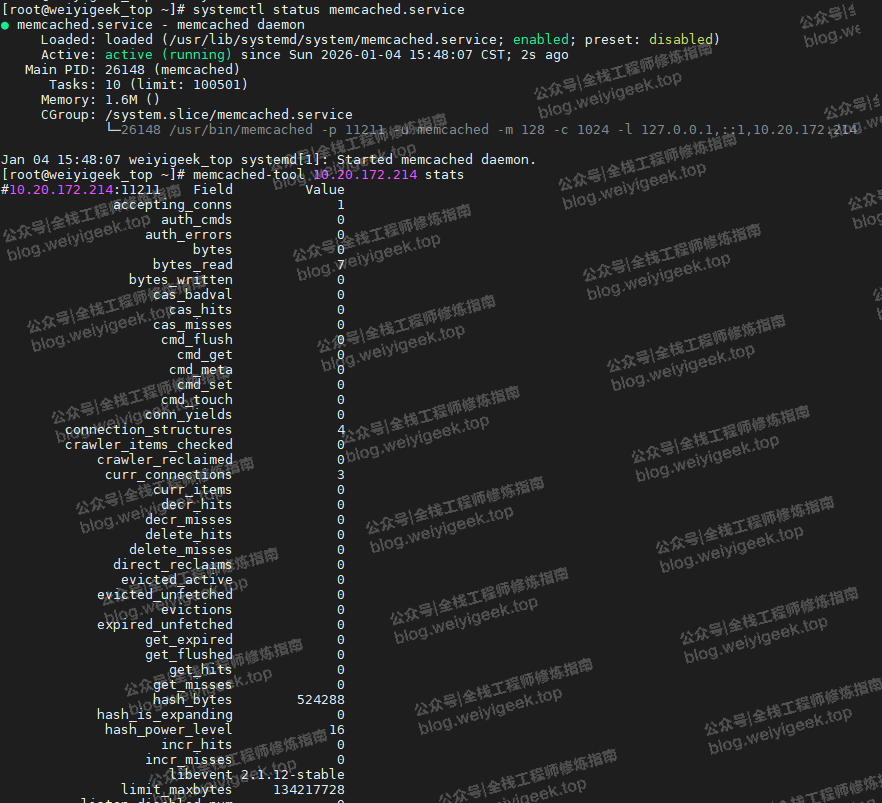
步骤 04. 查看 Memcached 服务状态
# 查看 Memcached 服务状态
systemctl status memcached.service

# 使用其命令行工具查看 Memcached 状态信息,缺省断开 11211
memcached-tool 10.20.172.214 stats

# 显示 Memcached slabs 信息
memcached-tool 10.20.172.214:11211
#  Item_Size  Max_age   Pages   Count   Full?  Evicted Evict_Time OOM
1      96B      2111s       1       2      no        0        0    0
步骤 05. 使用 telnet 连接并设置测试数据
连接Memcached服务,为后续Nginx反向代理测试添加所需的Key。
$ telnet 127.0.0.1 11211
Trying 127.0.0.1...
Connected to 127.0.0.1.
Escape character is '^]'.

# 添加 Key
> set name 0 0 9
weiyigeek
STORED

# 获取 Key
> get name
VALUE name 0 9
weiyigeek
END

# 添加一个压缩 key (通过flags标识)
> set url 2 0 13
weiyigeek.top
STORED

# 获取压缩 key
> get url
VALUE url 2 13
weiyigeek.top
END
请注意:在Memcached中,数据压缩通常由客户端在发送数据时自动完成(需要客户端支持并配置),且常对超过特定大小的值生效。服务器通过flags字段(如上面的2)来存储关于该值的元数据,客户端可用它来标记数据类型或是否压缩等。
> set url 2 0 13
# 命令解释:
set : 命令,表示存储键值对,如果键已存在则覆盖。
url : 键名。
2 : 标志位(flags)。这是一个16位的无符号整数,由客户端自由定义,用于存储关于该值的一些元数据。
0 : 过期时间(expiration time),单位为秒。0 表示永不过期。
13 : 数据块的长度(字节数)。这告诉服务器后面将接收13个字节的数据。
步骤 06. 配置 Nginx,启用 memcached 反向代理
编辑Nginx配置文件,添加以下server块配置。
# 虚拟主机配置,反向代理到上游服务器组
server {
  listen 80;
  server_name test.weiyigeek.top;
  charset utf-8;
  default_type text/plain;

  # 启用 HTTP/2 支持
  http2 on;

  # 日志文件
  access_log /var/log/nginx/test.log main;
  error_log /var/log/nginx/test.err.log debug;

  # 获取常规键
  location /get {
    set $memcached_key "$arg_key";
    memcached_bind 10.20.172.214;
    memcached_socket_keepalive on;
    memcached_read_timeout 60s;
    memcached_send_timeout 60s;
    memcached_pass 127.0.0.1:11211;
  }

  # 获取压缩键
  location /getgzip {
    set $memcached_key "$arg_key";
    memcached_gzip_flag 2;
    memcached_bind 10.20.172.214;
    memcached_pass 10.20.172.214:11211;
  }
}
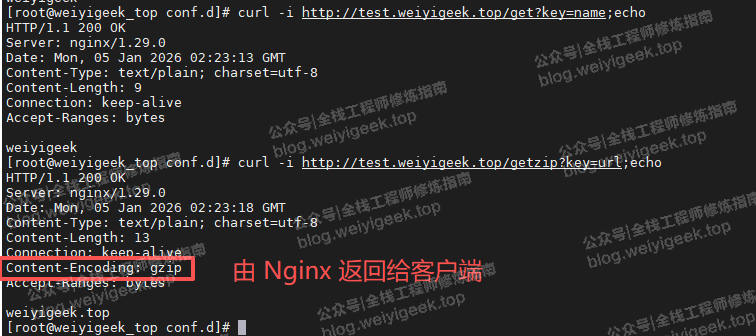
步骤 07. 验证配置并测试
配置完成后,验证Nginx配置并重载服务,然后使用curl命令测试反向代理是否正常工作。
# 验证并重启
nginx -t && nginx -s reload

# 获取在 Memcached 中存储的非压缩键 name
curl -i http://test.weiyigeek.top/get?key=name;echo

# 获取在 Memcached 中存储的压缩键 url
curl -i http://test.weiyigeek.top/getzip?key=url;echo
至此,我们就完成了Nginx反向代理Memcached的配置与测试。这个过程展示了如何将HTTP请求无缝转换为Memcached协议命令,是构建高并发缓存架构的一个实用技巧。关于WebSocket和gRPC反向代理的配置实践,我们将在后续的文章中继续探讨。如果你对这类Nginx深度配置和性能优化内容感兴趣,欢迎在云栈社区继续交流学习。
 发表于 2026-1-10 18:51:41
|
查看: 357|
回复: 0
发表于 2026-1-10 18:51:41
|
查看: 357|
回复: 0

