在物联网(IoT)和消息通信领域,MQTT协议因其轻量级和高效性而被广泛应用。为了简化测试流程,我们开发了一款基于 Python 和 Tkinter 的图形界面(GUI)工具,专门用于 MQTT/MQTTS 协议的业务接口自动化 测试。该工具旨在提供一个直观的操作环境,帮助开发者、测试工程师高效完成测试用例管理、自动化测试执行与结果分析。如果你在寻找更多自动化测试的实践,不妨到 云栈社区 逛逛。
功能特性
- 支持 MQTT/MQTTS 协议:可灵活选择明文或加密(TLS/SSL)连接方式。
- 图形化测试用例管理:支持测试用例的增、删、改操作,消息内容不强制为 JSON 格式。
- 订阅主题支持:每个测试用例可独立配置订阅主题,用于接收并验证响应消息。
- 可配置测试控制:自定义测试执行间隔与周期循环次数。
- 完整的测试生命周期控制:提供启动、暂停、停止等控制按钮。
- 实时日志与结果导出:查看详细的测试执行日志,并支持导出为文件。
环境要求
- Python 3.6+
- paho-mqtt 库
- tkinter 库(通常为 Python 标准库,无需额外安装)
安装与运行
- 安装依赖库:
pip install paho-mqtt
- 运行工具:
python mqtt_automation_test_tool.py
使用指南
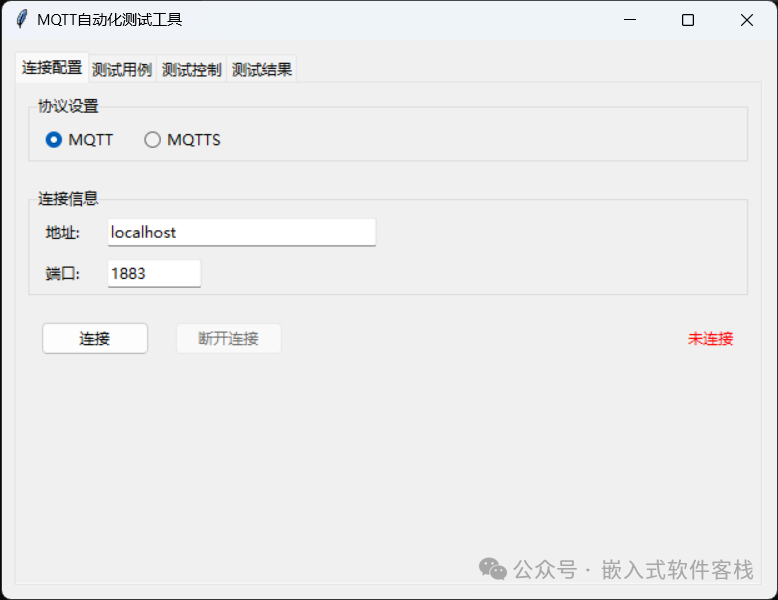
1. 连接配置
这是开始测试的第一步,需要建立与 MQTT Broker 的连接。
- 协议选择:在“连接配置”标签页中,根据你的 Broker 配置选择 “MQTT” 或 “MQTTS” 协议。
- 连接信息:输入 MQTT Broker 的地址(如
localhost)和端口号(默认 1883)。
- 连接操作:点击“连接”按钮。成功建立连接后,右侧的状态会从“未连接”变为“已连接”。
2. 测试用例管理
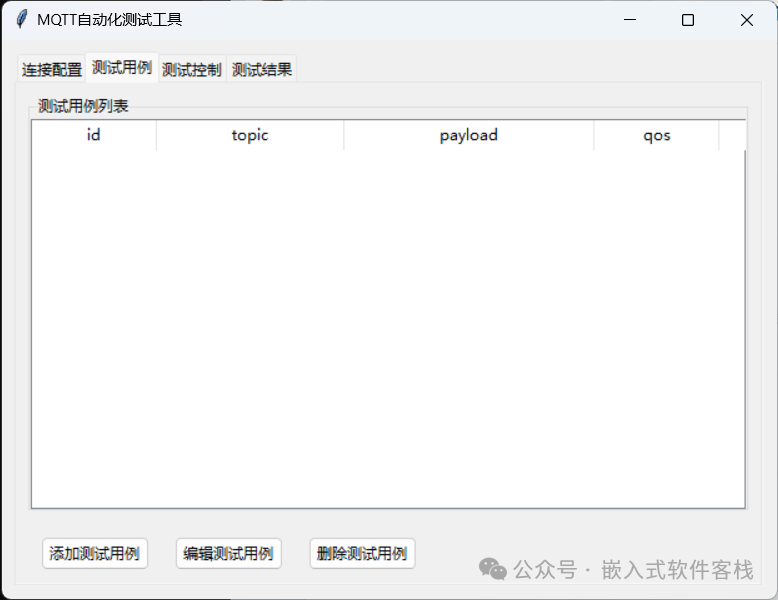
连接成功后,你可以在“测试用例”标签页中管理你的测试场景。
- 添加测试用例:点击“添加测试用例”按钮,在弹出的对话框中填写:
- 主题:要发布消息的目标主题。
- 订阅主题(可选):用于监听响应的主题。
- 消息内容:支持任意格式,不限于 JSON。
- QoS:消息服务质量等级,可选 0、1、2。
- 编辑测试用例:从列表中选择一个用例,点击“编辑测试用例”修改其内容。
- 删除测试用例:选择用例后,点击“删除测试用例”将其移除。
3. 测试控制
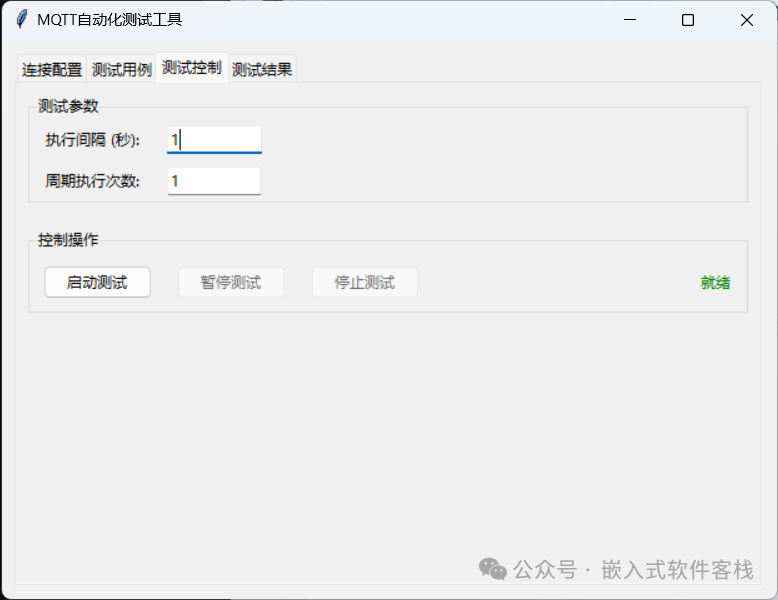
在“测试控制”标签页中配置并执行自动化测试。
- 设置测试参数:
- 执行间隔(秒):设置每个测试用例执行后的等待时间。
- 周期执行次数:设置整个测试用例集循环执行的次数。
- 执行控制操作:
- 启动测试:开始按序执行测试用例。
- 暂停测试:暂停当前执行,可随时恢复。
- 停止测试:终止当前测试。
4. 查看测试结果
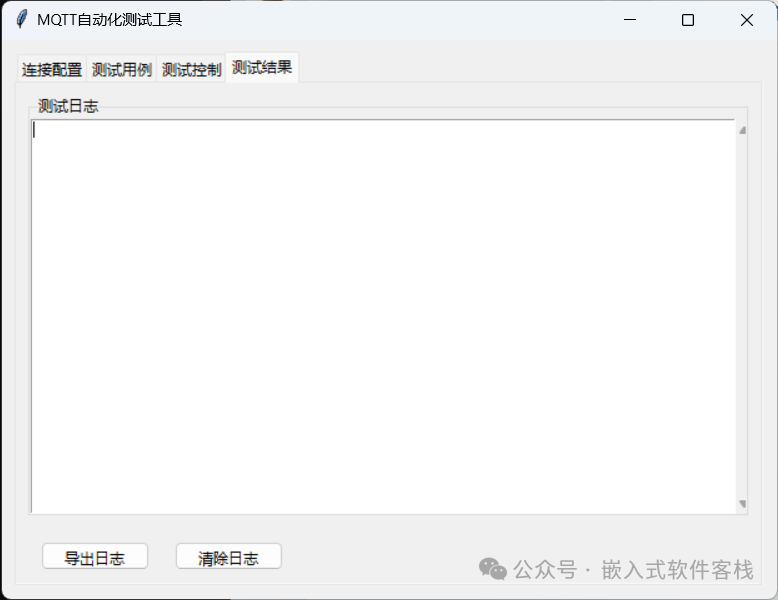
所有的测试过程记录都可在“测试结果”标签页中查看。
- 查看实时日志:执行过程中,日志区域会实时更新连接、发布、订阅等详细信息。
- 导出日志:点击“导出日志”按钮,可将完整的测试日志保存为本地文本文件。
- 清除日志:点击“清除日志”按钮清空当前日志显示区域。
完整源代码
以下是 mqtt_automation_test_tool.py 的完整实现,你可以直接复制使用,并根据需要进行定制。
import tkinter as tk
from tkinter import ttk, messagebox, simpledialog
import paho.mqtt.client as mqtt
import json
import time
import threading
import queue
class MQTTTestTool:
def __init__(self, root):
self.root = root
self.root.title("MQTT自动化测试工具")
self.root.geometry("800x600")
# 全局变量
self.mqtt_client = None
self.test_cases = []
self.test_thread = None
self.test_queue = queue.Queue()
self.is_testing = False
self.is_paused = False
self.current_cycle = 0
# 创建主界面
self.create_main_frame()
def create_main_frame(self):
# 创建笔记本(标签页)
self.notebook = ttk.Notebook(self.root)
self.notebook.pack(fill=tk.BOTH, expand=True, padx=10, pady=10)
# 连接配置标签页
self.create_connection_tab()
# 测试用例标签页
self.create_test_cases_tab()
# 测试控制标签页
self.create_test_control_tab()
# 测试结果标签页
self.create_test_results_tab()
def create_connection_tab(self):
conn_frame = ttk.Frame(self.notebook)
self.notebook.add(conn_frame, text="连接配置")
# 协议选择
protocol_frame = ttk.LabelFrame(conn_frame, text="协议设置")
protocol_frame.pack(fill=tk.X, padx=10, pady=10)
self.protocol_var = tk.StringVar(value="mqtt")
ttk.Radiobutton(protocol_frame, text="MQTT", value="mqtt", variable=self.protocol_var).grid(row=0, column=0, padx=10, pady=5)
ttk.Radiobutton(protocol_frame, text="MQTTS", value="mqtts", variable=self.protocol_var).grid(row=0, column=1, padx=10, pady=5)
# 连接信息
conn_info_frame = ttk.LabelFrame(conn_frame, text="连接信息")
conn_info_frame.pack(fill=tk.X, padx=10, pady=10)
ttk.Label(conn_info_frame, text="地址:").grid(row=0, column=0, padx=10, pady=5, sticky=tk.W)
self.broker_var = tk.StringVar(value="localhost")
ttk.Entry(conn_info_frame, textvariable=self.broker_var, width=30).grid(row=0, column=1, padx=10, pady=5)
ttk.Label(conn_info_frame, text="端口:").grid(row=1, column=0, padx=10, pady=5, sticky=tk.W)
self.port_var = tk.StringVar(value="1883")
ttk.Entry(conn_info_frame, textvariable=self.port_var, width=10).grid(row=1, column=1, padx=10, pady=5, sticky=tk.W)
# 连接按钮
button_frame = ttk.Frame(conn_frame)
button_frame.pack(fill=tk.X, padx=10, pady=10)
self.connect_button = ttk.Button(button_frame, text="连接", command=self.connect_mqtt)
self.connect_button.pack(side=tk.LEFT, padx=10)
self.disconnect_button = ttk.Button(button_frame, text="断开连接", command=self.disconnect_mqtt, state=tk.DISABLED)
self.disconnect_button.pack(side=tk.LEFT, padx=10)
# 连接状态
self.status_var = tk.StringVar(value="未连接")
ttk.Label(button_frame, textvariable=self.status_var, foreground="red").pack(side=tk.RIGHT, padx=10)
def create_test_cases_tab(self):
test_frame = ttk.Frame(self.notebook)
self.notebook.add(test_frame, text="测试用例")
# 测试用例列表
list_frame = ttk.LabelFrame(test_frame, text="测试用例列表")
list_frame.pack(fill=tk.BOTH, expand=True, padx=10, pady=10)
columns = ("id", "topic", "payload", "qos", "subscribe")
self.test_case_tree = ttk.Treeview(list_frame, columns=columns, show="headings")
for col in columns:
self.test_case_tree.heading(col, text=col)
self.test_case_tree.column(col, width=100)
self.test_case_tree.column("topic", width=150)
self.test_case_tree.column("payload", width=200)
self.test_case_tree.column("subscribe", width=150)
self.test_case_tree.pack(fill=tk.BOTH, expand=True, side=tk.LEFT)
scrollbar = ttk.Scrollbar(list_frame, orient=tk.VERTICAL, command=self.test_case_tree.yview)
scrollbar.pack(side=tk.RIGHT, fill=tk.Y)
self.test_case_tree.config(yscrollcommand=scrollbar.set)
# 按钮框架
button_frame = ttk.Frame(test_frame)
button_frame.pack(fill=tk.X, padx=10, pady=10)
ttk.Button(button_frame, text="添加测试用例", command=self.add_test_case).pack(side=tk.LEFT, padx=10)
ttk.Button(button_frame, text="编辑测试用例", command=self.edit_test_case).pack(side=tk.LEFT, padx=10)
ttk.Button(button_frame, text="删除测试用例", command=self.delete_test_case).pack(side=tk.LEFT, padx=10)
def create_test_control_tab(self):
control_frame = ttk.Frame(self.notebook)
self.notebook.add(control_frame, text="测试控制")
# 测试参数设置
param_frame = ttk.LabelFrame(control_frame, text="测试参数")
param_frame.pack(fill=tk.X, padx=10, pady=10)
ttk.Label(param_frame, text="执行间隔 (秒):").grid(row=0, column=0, padx=10, pady=5, sticky=tk.W)
self.interval_var = tk.DoubleVar(value=1.0)
ttk.Entry(param_frame, textvariable=self.interval_var, width=10).grid(row=0, column=1, padx=10, pady=5, sticky=tk.W)
ttk.Label(param_frame, text="周期执行次数:").grid(row=1, column=0, padx=10, pady=5, sticky=tk.W)
self.cycle_var = tk.IntVar(value=1)
ttk.Entry(param_frame, textvariable=self.cycle_var, width=10).grid(row=1, column=1, padx=10, pady=5, sticky=tk.W)
# 控制按钮
button_frame = ttk.LabelFrame(control_frame, text="控制操作")
button_frame.pack(fill=tk.X, padx=10, pady=10)
self.start_button = ttk.Button(button_frame, text="启动测试", command=self.start_test)
self.start_button.pack(side=tk.LEFT, padx=10, pady=10)
self.pause_button = ttk.Button(button_frame, text="暂停测试", command=self.pause_test, state=tk.DISABLED)
self.pause_button.pack(side=tk.LEFT, padx=10, pady=10)
self.stop_button = ttk.Button(button_frame, text="停止测试", command=self.stop_test, state=tk.DISABLED)
self.stop_button.pack(side=tk.LEFT, padx=10, pady=10)
# 测试状态
self.test_status_var = tk.StringVar(value="就绪")
ttk.Label(button_frame, textvariable=self.test_status_var, foreground="green").pack(side=tk.RIGHT, padx=10, pady=10)
def create_test_results_tab(self):
result_frame = ttk.Frame(self.notebook)
self.notebook.add(result_frame, text="测试结果")
# 日志文本框
log_frame = ttk.LabelFrame(result_frame, text="测试日志")
log_frame.pack(fill=tk.BOTH, expand=True, padx=10, pady=10)
self.log_text = tk.Text(log_frame, wrap=tk.WORD)
self.log_text.pack(fill=tk.BOTH, expand=True, side=tk.LEFT)
scrollbar = ttk.Scrollbar(log_frame, orient=tk.VERTICAL, command=self.log_text.yview)
scrollbar.pack(side=tk.RIGHT, fill=tk.Y)
self.log_text.config(yscrollcommand=scrollbar.set)
# 日志操作按钮
button_frame = ttk.Frame(result_frame)
button_frame.pack(fill=tk.X, padx=10, pady=10)
ttk.Button(button_frame, text="导出日志", command=self.export_log).pack(side=tk.LEFT, padx=10)
ttk.Button(button_frame, text="清除日志", command=self.clear_log).pack(side=tk.LEFT, padx=10)
def connect_mqtt(self):
"""连接到MQTT服务器,参考mqtt_test_runner.py的实现"""
# 确保之前的连接已经被清理
if self.mqtt_client:
try:
self.mqtt_client.loop_stop()
self.mqtt_client.disconnect()
except Exception as e:
self.log_message(f"清理旧连接时出错: {str(e)}")
self.mqtt_client = None
try:
# 从用户界面获取连接参数
broker = self.broker_var.get()
port = int(self.port_var.get())
protocol = self.protocol_var.get()
use_tls = (protocol == "mqtts")
tls_insecure = True # 用于测试环境,跳过证书验证
# 显示连接参数
self.log_message(f"🔌 尝试连接到MQTT Broker: {broker}:{port}")
self.log_message(f"📅 测试时间: {time.strftime('%Y-%m-%d %H:%M:%S')}")
self.log_message(f"🔒 使用MQTTS (TLS/SSL) 加密连接: {use_tls}")
if use_tls:
self.log_message(f"⚠️ 跳过TLS证书验证(仅用于测试环境): {tls_insecure}")
# 创建MQTT客户端,参考mqtt_test_runner.py
client_id = f"test_client_{int(time.time())}"
self.log_message(f"🆔 使用客户端ID: {client_id}")
# 尝试使用不同的方式创建客户端
try:
# 先将mqtt_client设置为None
self.mqtt_client = None
# 尝试使用VERSION2 API创建客户端
self.log_message("正在创建MQTT客户端...")
self.mqtt_client = mqtt.Client(callback_api_version=mqtt.CallbackAPIVersion.VERSION2, client_id=client_id)
self.log_message("✅ 使用VERSION2 API创建MQTT客户端成功")
except Exception as e:
# 如果失败,尝试使用VERSION1 API
try:
self.log_message(f"❌ VERSION2 API创建失败,尝试VERSION1 API: {str(e)}")
self.mqtt_client = mqtt.Client(callback_api_version=mqtt.CallbackAPIVersion.VERSION1, client_id=client_id)
self.log_message("✅ 使用VERSION1 API创建MQTT客户端成功")
except Exception as e2:
# 如果仍然失败,尝试不指定API版本
try:
self.log_message(f"❌ VERSION1 API创建失败,尝试默认API: {str(e2)}")
self.mqtt_client = mqtt.Client(client_id=client_id)
self.log_message("✅ 使用默认API创建MQTT客户端成功")
except Exception as e3:
error_msg = f"❌ 创建MQTT客户端失败: {str(e3)}"
messagebox.showerror("错误", error_msg)
self.log_message(error_msg)
self.mqtt_client = None
return
# 确保客户端对象已经成功创建
if not self.mqtt_client:
error_msg = "❌ 创建MQTT客户端失败: 客户端对象为None"
messagebox.showerror("错误", error_msg)
self.log_message(error_msg)
return
# 启用TLS/SSL支持(如果配置为使用),参考mqtt_test_runner.py
if use_tls:
self.log_message("🔒 正在设置TLS配置...")
import ssl
# 创建SSL上下文
context = ssl.SSLContext(ssl.PROTOCOL_TLS_CLIENT)
if tls_insecure:
self.log_message("⚠️ 跳过TLS证书验证(仅用于测试环境)")
context.check_hostname = False
context.verify_mode = ssl.CERT_NONE
else:
context.check_hostname = True
context.verify_mode = ssl.CERT_REQUIRED
context.load_default_certs()
# 设置TLS配置
self.mqtt_client.tls_set_context(context)
self.log_message("✅ TLS设置成功")
else:
self.log_message("⚠️ 使用未加密的MQTT连接")
# 连接回调,参考mqtt_test_runner.py
def on_connect(client, userdata, flags, reason_code, properties):
"""MQTT连接回调 (API v2)"""
self.log_message(f"📡 收到连接回调,reason_code={reason_code}")
self.log_message(f"🚩 flags={flags}")
if reason_code == 0:
self.status_var.set("已连接")
self.connect_button.config(state=tk.DISABLED)
self.disconnect_button.config(state=tk.NORMAL)
self.log_message(f"✅ 成功连接到MQTT broker: {broker}:{port}")
else:
self.status_var.set(f"连接失败: {reason_code}")
self.log_message(f"❌ 连接到MQTT broker失败,错误码: {reason_code}")
# 清理连接
if self.mqtt_client:
try:
self.mqtt_client.loop_stop()
self.mqtt_client.disconnect()
except Exception as e:
self.log_message(f"清理连接时出错: {str(e)}")
self.mqtt_client = None
# 消息回调,参考mqtt_test_runner.py
def on_message(client, userdata, msg):
"""MQTT消息回调"""
try:
# 尝试解码消息内容
payload_str = msg.payload.decode('utf-8')
# 尝试解析为JSON
try:
payload = json.loads(payload_str)
self.log_message(f"📩 收到响应: {msg.topic} -> {json.dumps(payload, ensure_ascii=False)}")
except json.JSONDecodeError:
# 非JSON格式,直接显示原始内容
self.log_message(f"📩 收到响应: {msg.topic} -> {payload_str}")
except Exception as e:
# 解码失败,显示原始字节
self.log_message(f"📩 收到响应: {msg.topic} -> {msg.payload}")
# 设置回调函数,参考mqtt_test_runner.py
self.log_message("正在设置回调函数...")
self.mqtt_client.on_connect = on_connect
self.mqtt_client.on_message = on_message
self.log_message("✅ 回调函数设置成功")
# 连接到MQTT服务器,参考mqtt_test_runner.py
try:
# 连接到Broker
self.log_message("正在连接到MQTT服务器...")
self.mqtt_client.connect(broker, port, keepalive=60)
self.log_message("✅ 发送连接请求成功")
# 启动网络循环
self.mqtt_client.loop_start()
self.log_message("✅ 网络循环启动成功")
# 等待连接建立,最多等待5秒,参考mqtt_test_runner.py
max_wait_time = 5
start_time = time.time()
connected = False
self.log_message(f"⏳ 等待连接建立,最多等待{max_wait_time}秒...")
while time.time() - start_time < max_wait_time:
time.sleep(0.5)
# 检查连接状态
if self.mqtt_client.is_connected():
connected = True
self.log_message("✅ 连接状态检查: 已连接")
break
else:
self.log_message("⏳ 连接状态检查: 未连接,继续等待...")
if not connected:
error_msg = f"❌ 连接超时,{max_wait_time}秒内未建立连接"
self.log_message(error_msg)
# 清理连接
try:
self.mqtt_client.loop_stop()
self.mqtt_client.disconnect()
except Exception as e:
self.log_message(f"清理连接时出错: {str(e)}")
self.mqtt_client = None
messagebox.showerror("错误", error_msg)
return
else:
self.log_message("🎉 连接成功建立!")
except Exception as e:
error_msg = f"❌ 连接失败: {str(e)}"
messagebox.showerror("错误", error_msg)
self.log_message(error_msg)
# 清理连接
if self.mqtt_client:
try:
self.mqtt_client.loop_stop()
self.mqtt_client.disconnect()
except Exception as e:
self.log_message(f"清理连接时出错: {str(e)}")
self.mqtt_client = None
return
except Exception as e:
error_msg = f"❌ 连接失败: {str(e)}"
messagebox.showerror("错误", error_msg)
self.log_message(error_msg)
# 清理连接
if self.mqtt_client:
try:
self.mqtt_client.loop_stop()
self.mqtt_client.disconnect()
except Exception as e:
self.log_message(f"清理连接时出错: {str(e)}")
self.mqtt_client = None
def disconnect_mqtt(self):
if self.mqtt_client:
self.mqtt_client.loop_stop()
self.mqtt_client.disconnect()
self.mqtt_client = None
self.status_var.set("未连接")
self.connect_button.config(state=tk.NORMAL)
self.disconnect_button.config(state=tk.DISABLED)
self.log_message("已断开MQTT连接")
def add_test_case(self):
# 创建添加测试用例的对话框
dialog = tk.Toplevel(self.root)
dialog.title("添加测试用例")
dialog.geometry("400x300")
dialog.transient(self.root)
dialog.grab_set()
# 主题输入
ttk.Label(dialog, text="主题:").grid(row=0, column=0, padx=10, pady=10, sticky=tk.W)
topic_var = tk.StringVar()
ttk.Entry(dialog, textvariable=topic_var, width=30).grid(row=0, column=1, padx=10, pady=10)
# 订阅主题输入
ttk.Label(dialog, text="订阅主题:").grid(row=1, column=0, padx=10, pady=10, sticky=tk.W)
subscribe_var = tk.StringVar()
ttk.Entry(dialog, textvariable=subscribe_var, width=30).grid(row=1, column=1, padx=10, pady=10)
# 消息内容输入
ttk.Label(dialog, text="消息内容:").grid(row=2, column=0, padx=10, pady=10, sticky=tk.NW)
payload_text = tk.Text(dialog, height=5, width=30)
payload_text.insert(tk.END, "{}")
payload_text.grid(row=2, column=1, padx=10, pady=10)
# QoS选择
ttk.Label(dialog, text="QoS:").grid(row=3, column=0, padx=10, pady=10, sticky=tk.W)
qos_var = tk.IntVar(value=0)
ttk.Combobox(dialog, textvariable=qos_var, values=[0, 1, 2], width=10).grid(row=3, column=1, padx=10, pady=10, sticky=tk.W)
# 按钮
def save_test_case():
topic = topic_var.get()
payload = payload_text.get(1.0, tk.END).strip()
qos = qos_var.get()
if not topic:
messagebox.showerror("错误", "主题不能为空")
return
# 不再强制要求JSON格式,允许任意格式的消息内容
# 但如果是JSON格式,确保其有效性
try:
if payload:
# 尝试解析JSON,仅记录警告,不阻止添加
json.loads(payload)
except json.JSONDecodeError:
# 非JSON格式,仅记录警告
self.log_message(f"警告: 消息内容不是有效的JSON格式,但仍将添加测试用例")
# 添加测试用例
test_case = {
"id": len(self.test_cases) + 1,
"topic": topic,
"payload": payload,
"qos": qos,
"subscribe_topic": subscribe_var.get() # 保存订阅主题
}
self.test_cases.append(test_case)
self.update_test_case_tree()
dialog.destroy()
self.log_message(f"添加测试用例: {topic}")
button_frame = ttk.Frame(dialog)
button_frame.grid(row=3, column=0, columnspan=2, padx=10, pady=10)
ttk.Button(button_frame, text="保存", command=save_test_case).pack(side=tk.LEFT, padx=10)
ttk.Button(button_frame, text="取消", command=dialog.destroy).pack(side=tk.LEFT, padx=10)
def edit_test_case(self):
selected_item = self.test_case_tree.selection()
if not selected_item:
messagebox.showinfo("提示", "请选择要编辑的测试用例")
return
item_id = int(self.test_case_tree.item(selected_item[0], "values")[0])
test_case = next((tc for tc in self.test_cases if tc["id"] == item_id), None)
if not test_case:
return
# 创建编辑对话框
dialog = tk.Toplevel(self.root)
dialog.title("编辑测试用例")
dialog.geometry("400x300")
dialog.transient(self.root)
dialog.grab_set()
# 主题输入
ttk.Label(dialog, text="主题:").grid(row=0, column=0, padx=10, pady=10, sticky=tk.W)
topic_var = tk.StringVar(value=test_case["topic"])
ttk.Entry(dialog, textvariable=topic_var, width=30).grid(row=0, column=1, padx=10, pady=10)
# 消息内容输入
ttk.Label(dialog, text="消息内容:").grid(row=1, column=0, padx=10, pady=10, sticky=tk.NW)
payload_text = tk.Text(dialog, height=5, width=30)
payload_text.insert(tk.END, test_case["payload"])
payload_text.grid(row=1, column=1, padx=10, pady=10)
# QoS选择
ttk.Label(dialog, text="QoS:").grid(row=2, column=0, padx=10, pady=10, sticky=tk.W)
qos_var = tk.IntVar(value=test_case["qos"])
ttk.Combobox(dialog, textvariable=qos_var, values=[0, 1, 2], width=10).grid(row=2, column=1, padx=10, pady=10, sticky=tk.W)
# 按钮
def save_changes():
topic = topic_var.get()
payload = payload_text.get(1.0, tk.END).strip()
qos = qos_var.get()
if not topic:
messagebox.showerror("错误", "主题不能为空")
return
# 不再强制要求JSON格式,允许任意格式的消息内容
# 但如果是JSON格式,确保其有效性
try:
if payload:
# 尝试解析JSON,仅记录警告,不阻止添加
json.loads(payload)
except json.JSONDecodeError:
# 非JSON格式,仅记录警告
self.log_message(f"警告: 消息内容不是有效的JSON格式,但仍将更新测试用例")
# 更新测试用例
test_case["topic"] = topic
test_case["payload"] = payload
test_case["qos"] = qos
# 确保测试用例有订阅主题字段
if "subscribe_topic" not in test_case:
test_case["subscribe_topic"] = ""
self.update_test_case_tree()
dialog.destroy()
self.log_message(f"更新测试用例: {topic}")
button_frame = ttk.Frame(dialog)
button_frame.grid(row=3, column=0, columnspan=2, padx=10, pady=10)
ttk.Button(button_frame, text="保存", command=save_changes).pack(side=tk.LEFT, padx=10)
ttk.Button(button_frame, text="取消", command=dialog.destroy).pack(side=tk.LEFT, padx=10)
def delete_test_case(self):
selected_item = self.test_case_tree.selection()
if not selected_item:
messagebox.showinfo("提示", "请选择要删除的测试用例")
return
item_id = int(self.test_case_tree.item(selected_item[0], "values")[0])
test_case = next((tc for tc in self.test_cases if tc["id"] == item_id), None)
if not test_case:
return
if messagebox.askyesno("确认", f"确定要删除测试用例 '{test_case['topic']}' 吗?"):
self.test_cases.remove(test_case)
# 更新ID
for i, tc in enumerate(self.test_cases):
tc["id"] = i + 1
self.update_test_case_tree()
self.log_message(f"删除测试用例: {test_case['topic']}")
def update_test_case_tree(self):
# 清空现有数据
for item in self.test_case_tree.get_children():
self.test_case_tree.delete(item)
# 添加测试用例
for tc in self.test_cases:
# 确保测试用例有订阅主题字段
subscribe_topic = tc.get("subscribe_topic", "")
# 限制payload长度,避免显示过长
payload = tc["payload"]
if len(payload) > 50:
payload = payload[:47] + "..."
self.test_case_tree.insert("", tk.END, values=(tc["id"], tc["topic"], payload, tc["qos"], subscribe_topic))
def start_test(self):
if not self.mqtt_client:
messagebox.showinfo("提示", "请先连接MQTT broker")
return
if not self.test_cases:
messagebox.showinfo("提示", "请先添加测试用例")
return
# 检查测试是否已经在运行
if self.is_testing and not self.is_paused:
messagebox.showinfo("提示", "测试已经在运行中")
return
# 如果测试处于暂停状态,恢复测试
if self.is_testing and self.is_paused:
self.is_paused = False
self.start_button.config(state=tk.DISABLED)
self.pause_button.config(state=tk.NORMAL)
self.stop_button.config(state=tk.NORMAL)
self.test_status_var.set("运行中")
self.log_message("测试已恢复运行")
return
# 设置测试参数
interval = self.interval_var.get()
cycles = self.cycle_var.get()
if interval <= 0:
messagebox.showerror("错误", "执行间隔必须大于0")
return
if cycles <= 0:
messagebox.showerror("错误", "周期执行次数必须大于0")
return
# 更新UI状态
self.is_testing = True
self.is_paused = False
self.current_cycle = 0
self.start_button.config(state=tk.DISABLED)
self.pause_button.config(state=tk.NORMAL)
self.stop_button.config(state=tk.NORMAL)
self.test_status_var.set("运行中")
# 启动测试线程
self.test_thread = threading.Thread(target=self.run_tests, args=(interval, cycles))
self.test_thread.daemon = True
self.test_thread.start()
self.log_message(f"开始测试,执行间隔: {interval}秒,周期次数: {cycles}")
def pause_test(self):
if not self.is_testing:
return
self.is_paused = not self.is_paused
if self.is_paused:
self.test_status_var.set("暂停中")
self.log_message("测试已暂停")
# 暂停时,暂停按钮置灰,启动按钮可用,停止按钮保持可用
self.start_button.config(state=tk.NORMAL)
self.pause_button.config(state=tk.DISABLED)
self.stop_button.config(state=tk.NORMAL)
else:
self.test_status_var.set("运行中")
self.log_message("测试已恢复")
# 恢复运行时,暂停按钮可用,启动按钮置灰,停止按钮保持可用
self.start_button.config(state=tk.DISABLED)
self.pause_button.config(state=tk.NORMAL)
self.stop_button.config(state=tk.NORMAL)
def stop_test(self):
if not self.is_testing:
return
self.is_testing = False
self.is_paused = False
self.start_button.config(state=tk.NORMAL)
self.pause_button.config(state=tk.DISABLED)
self.stop_button.config(state=tk.DISABLED)
self.test_status_var.set("已停止")
self.log_message("测试已停止")
def run_tests(self, interval, cycles):
while self.is_testing and self.current_cycle < cycles:
# 检查是否暂停
while self.is_paused and self.is_testing:
time.sleep(0.1)
if not self.is_testing:
break
# 执行测试用例
self.current_cycle += 1
self.log_message(f"执行第 {self.current_cycle} 轮测试")
for i, test_case in enumerate(self.test_cases):
if not self.is_testing:
break
try:
topic = test_case["topic"]
payload = test_case["payload"]
qos = test_case["qos"]
subscribe_topic = test_case.get("subscribe_topic", "")
# 如果有订阅主题,先订阅
if subscribe_topic:
self.mqtt_client.subscribe(subscribe_topic, qos)
self.log_message(f"订阅主题: {subscribe_topic}, QoS: {qos}")
# 发布消息
result = self.mqtt_client.publish(topic, payload, qos)
result.wait_for_publish()
self.log_message(f"发布消息 - 主题: {topic}, QoS: {qos}")
self.log_message(f"消息内容: {payload}")
# 等待一段时间,以便接收可能的响应
if subscribe_topic:
self.log_message(f"等待2秒以接收订阅主题的响应...")
time.sleep(2)
except Exception as e:
self.log_message(f"执行测试用例失败: {str(e)}")
# 在每条测试用例之间添加间隔,最后一条测试用例后不添加
if i < len(self.test_cases) - 1 and self.is_testing:
self.log_message(f"等待 {interval} 秒后执行下一条测试用例")
time.sleep(interval)
# 等待下一轮测试
if self.current_cycle < cycles and self.is_testing:
self.log_message(f"等待 {interval} 秒后执行下一轮测试")
time.sleep(interval)
# 测试完成
if self.is_testing:
self.is_testing = False
self.root.after(0, self.test_completed)
def test_completed(self):
self.start_button.config(state=tk.NORMAL)
self.pause_button.config(state=tk.DISABLED)
self.stop_button.config(state=tk.DISABLED)
self.test_status_var.set("已完成")
self.log_message(f"测试完成,共执行 {self.current_cycle} 轮")
def log_message(self, message):
timestamp = time.strftime("%Y-%m-%d %H:%M:%S")
log_entry = f"[{timestamp}] {message}\n"
self.log_text.insert(tk.END, log_entry)
self.log_text.see(tk.END)
def export_log(self):
"""导出测试日志到文件"""
try:
# 获取日志内容
log_content = self.log_text.get(1.0, tk.END)
if not log_content.strip():
messagebox.showinfo("提示", "日志为空,无需导出")
return
# 生成文件名
import tkinter.filedialog as filedialog
filename = filedialog.asksaveasfilename(
defaultextension=".txt",
filetypes=[("文本文件", "*.txt"), ("所有文件", "*.*")],
title="导出日志文件",
initialfile=f"mqtt_test_log_{time.strftime('%Y%m%d_%H%M%S')}.txt"
)
if filename:
# 写入文件
with open(filename, 'w', encoding='utf-8') as f:
f.write(log_content)
self.log_message(f"日志已导出到: {filename}")
messagebox.showinfo("成功", f"日志已成功导出到: {filename}")
except Exception as e:
self.log_message(f"导出日志失败: {str(e)}")
messagebox.showerror("错误", f"导出日志失败: {str(e)}")
def clear_log(self):
"""清除测试日志"""
if messagebox.askyesno("确认", "确定要清除所有测试日志吗?"):
self.log_text.delete(1.0, tk.END)
self.log_message("测试日志已清除")
if __name__ == "__main__":
root = tk.Tk()
app = MQTTTestTool(root)
root.mainloop()
总结
这款使用 Python 和 Tkinter 开发的 MQTT 自动化测试工具,通过图形界面极大简化了测试流程。它尤其适用于:
- MQTT协议业务接口的回归与自动化测试
- IoT设备的消息通信功能与稳定性验证
- MQTT Broker(如 EMQX、Mosquitto)的集成测试
- 开发过程中的快速联调与问题排查
工具提供了从连接到执行、再到结果分析的全流程支持,你可以基于这份完整的源代码进行二次开发,以适应更复杂的测试场景。
 发表于 2026-2-11 17:09:48
|
查看: 333|
回复: 0
发表于 2026-2-11 17:09:48
|
查看: 333|
回复: 0

