在实际开发中,处理文件IO操作总是相当繁琐。如果开发仅限于单一平台,情况或许稍好,只需面对该平台特定的接口即可。
但更常见的问题是,几乎所有涉及文件或目录的操作接口和数据结构都异常复杂。这固然可以理解为兼容底层内核库时必要的细节暴露,但对大多数应用层开发者而言,许多细节并无必要。例如,Linux中的struct statvfs结构体就常让开发者望而生畏。
二、std::filesystem
随着技术演进,跨平台需求日益增长,C++标准库也在持续迭代。C++17标准引入的<filesystem>库,恰恰解决了传统接口不统一、跨平台兼容性差以及数据结构复杂这些痛点。它通过模块化设计,将不同功能分解,让上层开发者无需过度关心底层细节。同时,它还原生支持Unicode、软硬链接和权限管理等操作,为有特定需求的开发者提供了更便捷的工具。
如果你有Boost库的使用经验,可能会立刻联想到Boost.Filesystem。没错,Boost库常被视为标准库的“试验田”,其优秀设计被吸纳进标准也就不足为奇了。
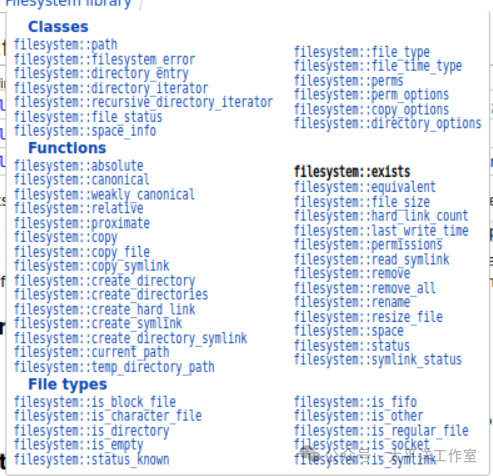
如上图所示,std::filesystem涵盖的内容相当丰富。不过对普通开发者来说,最大的福音莫过于它彻底解决了文件路径操作的麻烦,从此无需再手动拼接或解析路径字符串。
三、核心功能与应用示例
下面我们通过代码来逐一解析filesystem的主要用法。
1. 文件路径操作
filesystem::path类的引入堪称开发者的福音,它提供了路径字符串的拆分、组合与解析功能。最常见的就是从全路径中提取文件名、扩展名等。
#include <filesystem>
#include <iostream>
namespace fs = std::filesystem;

int main()
{
    std::cout << fs::path("/foo/bar.txt").filename() << '\n';
    std::cout << fs::path("/foo").replace_filename("bar") << '\n';
    fs::path p;
    std::cout << std::boolalpha << (p = "foo/bar").remove_filename() << '\t'
              << p.has_filename() << '\n';
    std::cout << fs::path("/foo/bar.txt").extension() << '\n';
    for (const fs::path p : {"/foo/bar.txt", "/foo/.bar", "foo.bar.baz.tar"})
        std::cout << "path: " << p << ", stem: " << p.stem() << '\n';
    std::cout << '\n';
    for (fs::path p = "foo.bar.baz.tar"; !p.extension().empty(); p = p.stem())
        std::cout << "path: " << p << ", extension: " << p.extension() << '\n';
}
2. 文件与目录操作
常见的目录操作无非是创建、拷贝、重命名、删除以及遍历。std::filesystem让这些操作变得异常简洁。
#include <cassert>
#include <cstdlib>
#include <filesystem>

int main()
{
    std::filesystem::current_path(std::filesystem::temp_directory_path());
    // 基础使用:创建目录
    std::filesystem::create_directories("sandbox/1/2/a");
    std::filesystem::create_directory("sandbox/1/2/b");
    // 目录已存在时返回false,不会报错
    assert(!std::filesystem::create_directory("sandbox/1/2/b"));

    std::cout << "directory_iterator:\n";
    // 使用范围for循环遍历目录
    for (auto const& dir_entry : std::filesystem::directory_iterator{"sandbox"})
        std::cout << dir_entry.path() << '\n';

    std::cout << "\ndirectory_iterator as a range:\n";
    // 其他范围操作方式
    std::ranges::for_each(
        std::filesystem::directory_iterator{"sandbox"},
        [](const auto& dir_entry) { std::cout << dir_entry << '\n'; });

    std::cout << "\nrecursive_directory_iterator:\n";
    // 递归遍历目录
    for (auto const& dir_entry : std::filesystem::recursive_directory_iterator{"sandbox"})
        std::cout << dir_entry << '\n';

    // 创建更多文件和目录用于演示拷贝
    fs::create_directories("sandbox/dir/subdir");
    std::ofstream("sandbox/file1.txt").put('a');
    fs::copy("sandbox/file1.txt", "sandbox/file2.txt"); // 拷贝文件
    fs::copy("sandbox/dir", "sandbox/dir2"); // 拷贝目录(非递归)

    const auto copyOptions = fs::copy_options::update_existing
                            | fs::copy_options::recursive
                            | fs::copy_options::directories_only;
    fs::copy("sandbox", "sandbox_copy", copyOptions); // 按选项拷贝

    // 权限操作示例
    std::filesystem::permissions(
        "sandbox/1/2/b",
        std::filesystem::perms::others_all,
        std::filesystem::perm_options::remove
    );
    // 参照已有目录的权限创建新目录
    std::filesystem::create_directory("sandbox/1/2/c", "sandbox/1/2/b");

    // 清理
    std::filesystem::remove_all("sandbox");
}
通过上述操作,开发者可以轻松实现文件的过滤、批量修改和目录树处理等功能。
3. 文件属性查询
查询文件属性也是常见需求,包括文件类型、大小、最后修改时间、磁盘空间等。
namespace fs = std::filesystem;

void demo_status(const fs::path& p, fs::file_status s)
{
    std::cout << p;
    switch (s.type())
    {
    case fs::file_type::none:
        std::cout << " has not-evaluated-yet type";
        break;
    case fs::file_type::not_found:
        std::cout << " does not exist";
        break;
    case fs::file_type::regular:
        std::cout << " is a regular file";
        break;
    case fs::file_type::directory:
        std::cout << " is a directory";
        break;
    case fs::file_type::symlink:
        std::cout << " is a symlink";
        break;
    default:
        std::cout << " has implementation-defined type";
        break;
    }
    std::cout << '\n';
}

void demo_exists(const fs::path& p, fs::file_status s = fs::file_status{})
{
    std::cout << p;
    if (fs::status_known(s) ? fs::exists(s) : fs::exists(p))
        std::cout << " exists\n";
    else
        std::cout << " does not exist\n";
}

int main()
{
    // 创建不同类型的文件用于演示
    fs::create_directory("sandbox");
    fs::create_directory("sandbox/dir");
    std::ofstream{"sandbox/file"}; // 创建普通文件
    fs::create_symlink("file", "sandbox/symlink"); // 创建符号链接

    // 演示不同的状态访问器
    for (auto it{fs::directory_iterator("sandbox")}; it != fs::directory_iterator(); ++it)
        demo_status(*it, it->symlink_status()); // 使用目录条目中缓存的状态

    demo_status("/dev/null", fs::status("/dev/null")); // 直接调用status
    demo_status("/dev/sda", fs::status("/dev/sda"));
    demo_status("sandbox/no", fs::status("/sandbox/no"));

    demo_exists("sandbox");

    // 清理
    fs::remove_all("sandbox");
}
更多属性操作请参考 cppreference 上的详细文档。
4. 符号链接与硬链接操作
处理链接是文件系统操作中一个比较突出的问题,在Linux环境下尤为常见。
namespace fs = std::filesystem;
int main()
{
    fs::create_directories("sandbox/subdir");
    fs::create_symlink("target", "sandbox/sym1"); // 创建文件符号链接
    fs::create_directory_symlink("subdir", "sandbox/sym2"); // 创建目录符号链接

    // 遍历并识别符号链接
    for (auto it = fs::directory_iterator("sandbox"); it != fs::directory_iterator(); ++it)
        if (is_symlink(it->symlink_status()))
            std::cout << *it << "->" << read_symlink(*it) << '\n';

    assert(std::filesystem::equivalent("sandbox/sym2", "sandbox/subdir"));

    // 硬链接操作
    std::ofstream("sandbox/a").put('a'); // 创建普通文件
    fs::create_hard_link("sandbox/a", "sandbox/b"); // 创建硬链接
    fs::remove("sandbox/a");
    // 通过幸存的原文件硬链接读取内容
    char c = std::ifstream("sandbox/b").get();
    std::cout << c << '\n';

    fs::remove_all("sandbox");

    // 检查系统路径是否为符号链接
    for (fs::path p : {"/usr/bin/gcc", "/bin/cat", "/bin/mouse"})
    {
        std::cout << p;
        fs::exists(p) ?
            fs::is_symlink(p) ?
                std::cout << " -> " << fs::read_symlink(p) << '\n' :
                std::cout << " exists but it is not a symlink\n" :
            std::cout << " does not exist\n";
    }
}
5. 错误处理
filesystem 提供了完善的错误处理机制,既支持异常也支持错误码。
#include <filesystem>
#include <iostream>
#include <system_error>

int main()
{
    const std::filesystem::path from{"/none1/a"}, to{"/none2/b"};
    try
    {
        std::filesystem::copy_file(from, to); // 抛出异常:文件不存在
    }
    catch (std::filesystem::filesystem_error const& ex)
    {
        std::cout << "what():  " << ex.what() << '\n'
                  << "path1(): " << ex.path1() << '\n'
                  << "path2(): " << ex.path2() << '\n'
                  << "code().value():    " << ex.code().value() << '\n'
                  << "code().message():  " << ex.code().message() << '\n'
                  << "code().category(): " << ex.code().category().name() << '\n';
    }

    // 所有函数都有不抛异常的版本
    std::error_code ec;
    std::filesystem::copy_file(from, to, ec); // 不抛出异常,设置错误码
    std::cout << "\nNon-throwing form sets error_code: " << ec.message() << '\n';
}
6. 辅助功能
此外,库还提供了许多实用的辅助功能,例如获取绝对路径、规范路径、临时目录路径以及计算路径相对关系等。
namespace fs = std::filesystem;
void show(std::filesystem::path x, std::filesystem::path y)
{
    std::cout << "x:\t\t " << x << "\ny:\t\t " << y << '\n'
              << "relative(x, y):  "
              << std::filesystem::relative(x, y) << '\n'
              << "proximate(x, y): "
              << std::filesystem::proximate(x, y) << "\n\n";
}

int main()
{
    std::filesystem::path p = "foo.c";
    std::cout << "Current path is " << std::filesystem::current_path() << '\n';
    std::cout << "Absolute path for " << p << " is " << fs::absolute(p) << '\n';

    show("/a/b/c", "/a/b");
    show("/a/c", "/a/b");
    show("c", "/a/b");
    show("/a/b", "c");
}
说明:以上示例代码均整理自 cppreference。
四、使用中的常见问题与注意事项
虽然 std::filesystem 带来了巨大便利,但在应用时仍需注意一些平台差异和边界情况。
-
权限处理
filesystem 提供的 perms 枚举用于权限处理,但在Linux上进行复杂的权限操作(如设置 setuid 位)可能仍显简陋,需要回退到底层系统调用。同时,操作前务必确认进程拥有足够的文件权限,否则会导致操作失败。
-
跨平台路径格式
不同平台的路径分隔符不同(Windows 使用 \, Linux/macOS 使用 /),路径长度限制、分区格式也存在差异。一般建议始终使用正斜杠 / 作为分隔符,让 fs::path 在内部进行平台适配,这是学习现代C++标准库时提升跨平台能力的关键一步。
-
符号链接的陷阱
操作符号链接时需明确意图:你是想操作链接本身,还是它指向的目标?此外,还需处理悬空链接(目标不存在)、硬链接创建限制(如不能创建目录的硬链接)以及潜在的循环链接问题。特别注意 read_symlink 与 canonical 的区别:前者只读取链接直接指向的路径,后者会递归解析到最终的实体文件。
-
文件名大小写敏感性问题
这一点需要高度警惕。Windows 文件系统默认不区分大小写,而 Linux 则严格区分。在跨平台开发或部署时,由于大小写不一致导致的“文件找不到”错误非常常见,对于 O 和 0、I 和 l 等形似字符更要小心。
-
性能考量
在实际应用中,递归遍历一个包含海量文件的目录,或者拷贝一个巨大的文件夹,都可能导致性能瓶颈或延迟。开发者需要根据场景评估,必要时可考虑使用异步操作或进度反馈机制。
更多具体的细节和边界条件,建议在使用每个接口时仔细查阅官方文档说明。
五、总结
总的来说,std::filesystem 的引入极大地简化了C++中的文件系统操作,特别是其强大的路径处理能力,让开发者从繁琐的字符串拼接中解放出来。它统一了跨平台的接口,提升了代码的可移植性和可读性。
正如老话所说,路不平自有人铲。标准库不提供的功能,社区会补充。从当前AI辅助编程的发展趋势看,未来或许不仅仅是标准库向更自然的接口演进,甚至可能出现由AI直接生成自然语言接口,实现真正的口语化编程。在此之前,掌握像 std::filesystem 这样强大的现代库,无疑是提升开发效率的关键。如果你想了解更多类似的C++现代特性和编程技巧,欢迎到云栈社区的C/C++板块与其他开发者交流探讨。
 发表于 2026-3-17 05:28:34
|
查看: 284|
回复: 0
发表于 2026-3-17 05:28:34
|
查看: 284|
回复: 0

