如何快速全面地掌握Windows Server的运行状态呢?手动检查各项指标不仅耗时,还容易遗漏关键问题。本文将分享一个高效的解决方案——一个开箱即用的Windows系统全面巡检PowerShell脚本,它能够一键生成详细的健康报告,涵盖从硬件信息到安全状态的十几个关键维度。
该脚本支持 Windows 10 及 Windows Server 2012/2016/2019/2022/2025 等多个版本,并针对服务器环境进行了特别优化,是运维自动化的得力助手。
巡检报告内容概览
运行脚本后,它会自动检查并生成一份包含以下12个模块的详细文本报告,并在控制台以彩色高亮形式输出关键信息。
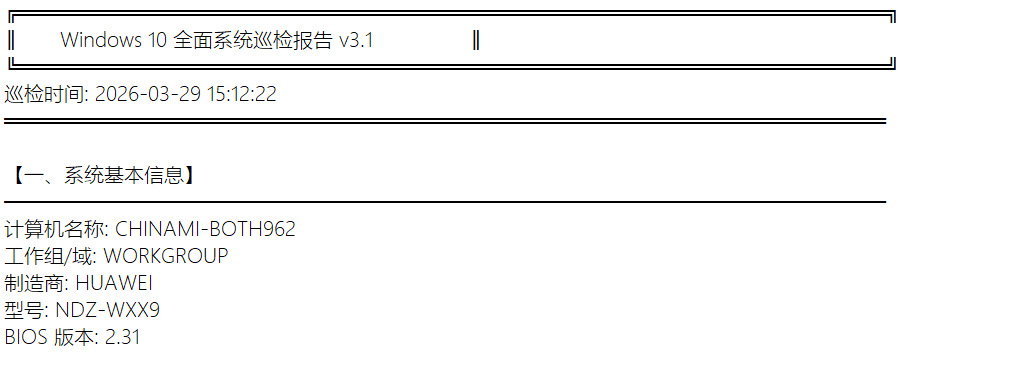
一、系统基本信息
获取计算机名称、所属域/工作组、制造商、型号以及BIOS版本等基础身份信息。对于服务器,还会额外判断其运行环境是物理机还是虚拟机。
二、系统运行时间
统计服务器的持续运行时间,这对于评估系统稳定性和计划重启窗口非常重要。

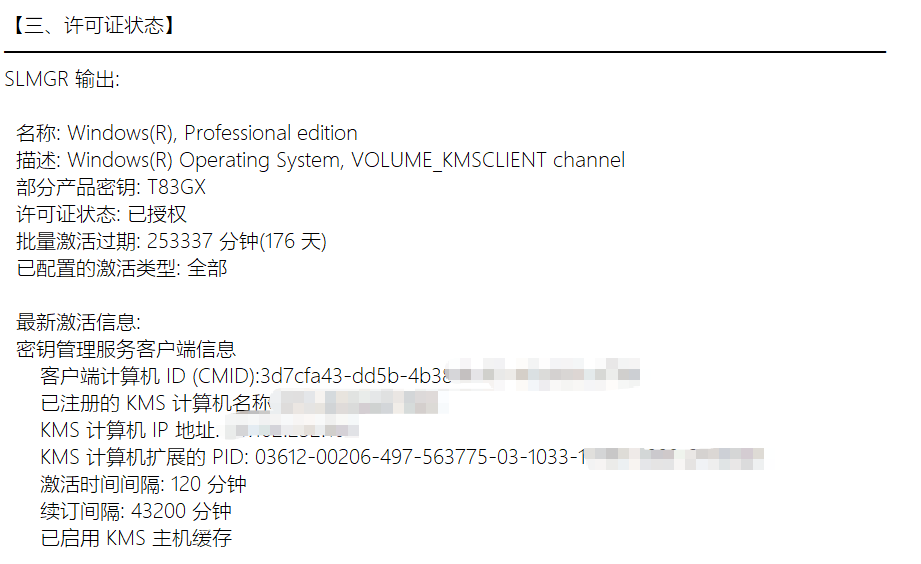
三、许可证与激活状态
检查Windows操作系统的许可证状态,并针对未激活的服务器环境给出明确警告。
四、处理器信息
列出CPU型号、核心与线程数、基准频率,并计算当前的平均使用率。

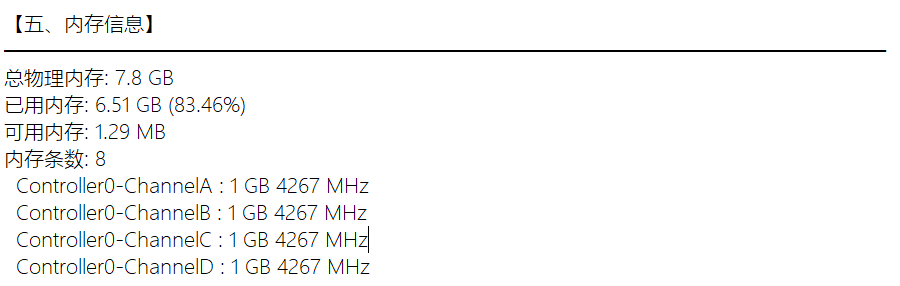
五、内存信息
展示总物理内存、已用/可用内存及使用率,并列出前几条内存的容量与频率。
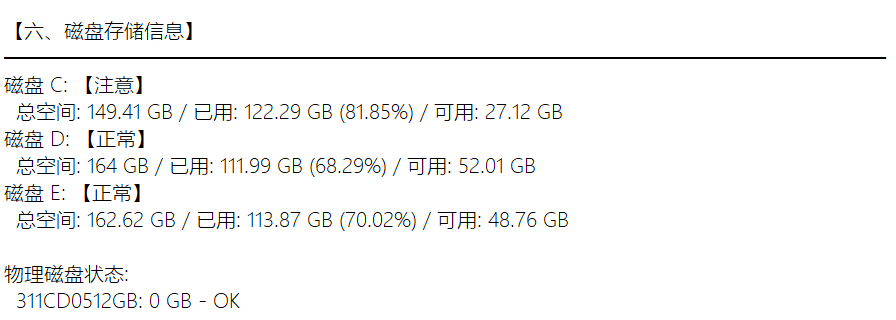
六、磁盘存储信息
检查所有逻辑磁盘(C盘、D盘等)的空间使用情况,当使用率超过80%或90%时会标记“注意”或“警告”。同时简要列出物理磁盘状态。
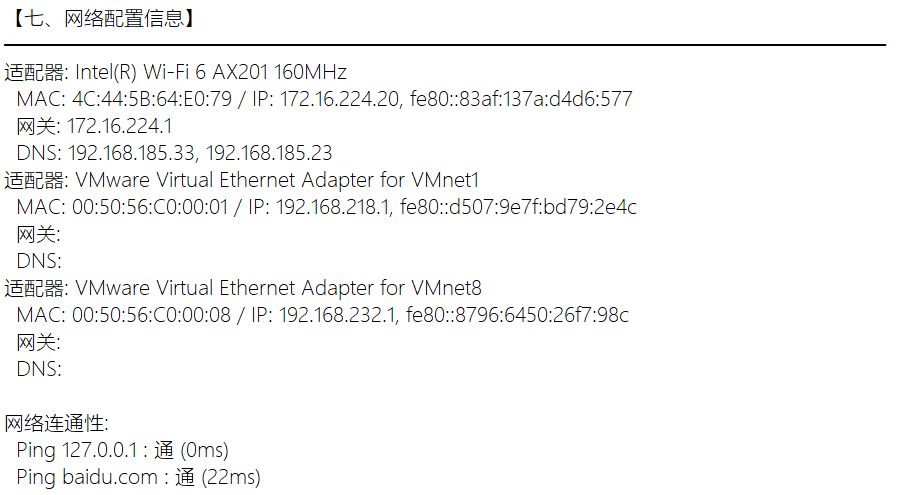
七、网络配置信息
列出所有已启用、已分配IP的网络适配器详细信息,包括描述、MAC地址、IP地址、网关和DNS。并执行快速的网络连通性测试(如ping通环回地址和外部地址)。
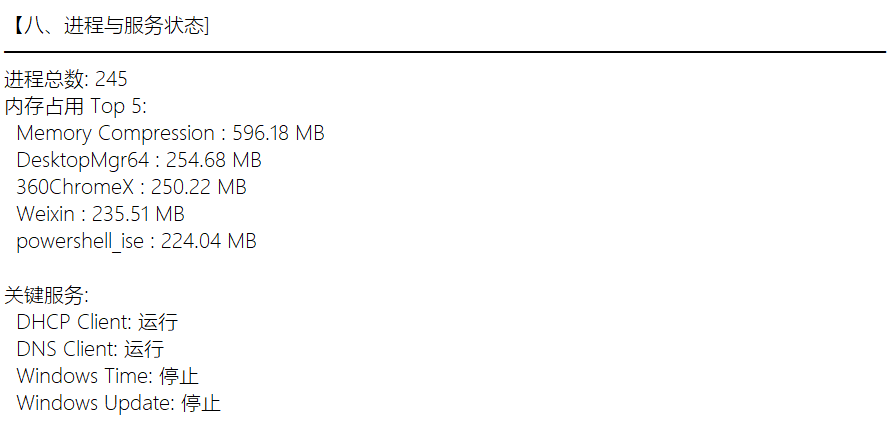
八、进程与服务状态
统计总进程数,列出内存占用最高的前5个进程。检查DHCP Client、DNS Client等关键服务的运行状态,对于服务器还会检查远程桌面服务是否启用。
九、安全与更新
快速检查Windows Defender实时保护状态和病毒库版本、防火墙各配置文件的启用情况,并提示手动检查Windows更新。

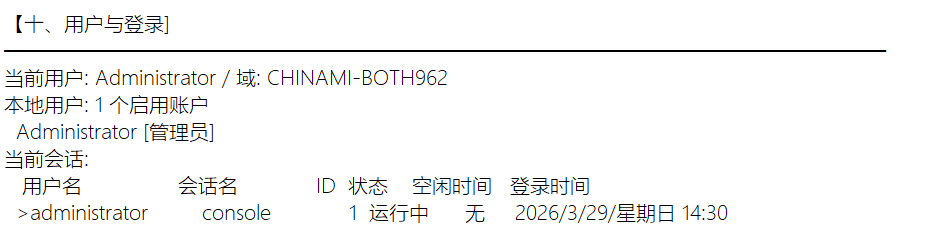
十、用户与登录
显示当前登录用户,列出所有已启用的本地用户账户(标记管理员账户),并查询当前的登录会话信息。
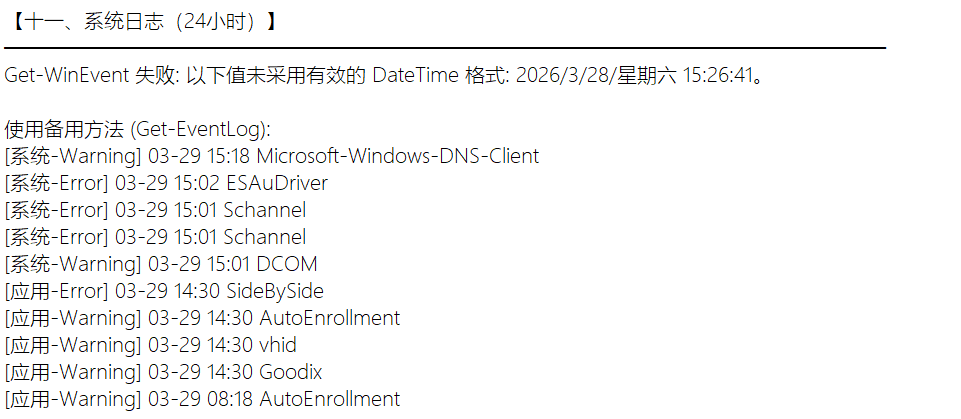
十一、系统日志(最近24小时)
查询过去24小时内系统和应用程序日志中的错误(Error)和警告(Warning)事件,提供快速的问题排查线索。
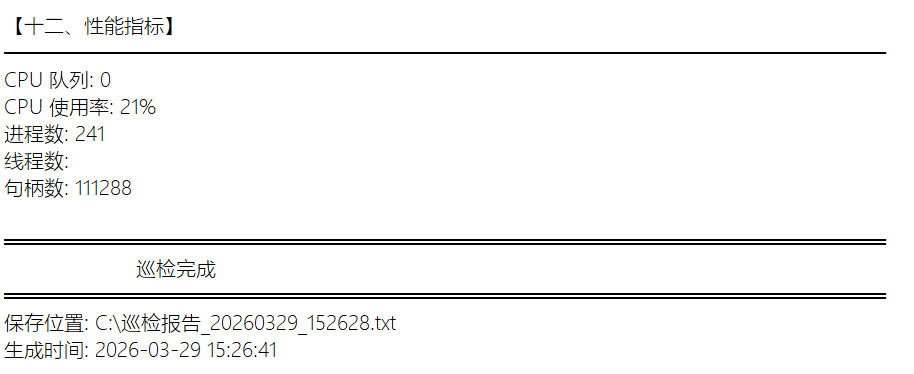
十二、性能指标
获取关键的实时性能计数器,如CPU队列长度等,为性能瓶颈分析提供参考。
脚本使用方法
使用此脚本非常简单,无需复杂配置:
- 新建一个文本文档。
- 将其后缀名改为
.ps1,例如 Windows_巡检.ps1。
- 右键该文件,选择“使用PowerShell编辑”或使用记事本等文本编辑器打开。
- 将下方完整的脚本代码复制粘贴进去,保存。
- 右键该ps1文件,选择“使用PowerShell运行”。请注意:首次运行可能需要修改执行策略。你可以以管理员身份打开PowerShell,执行
Set-ExecutionPolicy RemoteSigned -Scope CurrentUser 命令来允许运行本地脚本。
完整巡检脚本代码
以下就是这款“Windows系统全面巡检脚本 v3.1 (Server优化版)”的完整代码。脚本已包含详细的注释和错误处理,你可以直接使用或根据需要进行二次开发。
# Windows 系统全面巡检脚本 v3.1 (Server 优化版)
# 支持: Windows 10, Windows Server 2012/2016/2019/2022/2025

#Requires -Version 3.0

# 设置错误处理和超时
$ErrorActionPreference = "SilentlyContinue"
$ProgressPreference = "SilentlyContinue"

# 获取当前日期和时间
$timestamp = Get-Date -Format "yyyyMMdd_HHmmss"
$reportTime = Get-Date -Format "yyyy-MM-dd HH:mm:ss"
$outputFilePath = "C:\巡检报告_$timestamp.txt"

# 检测操作系统
$osInfo = Get-CimInstance Win32_OperatingSystem -OperationTimeoutSec 5
$osCaption = $osInfo.Caption
$isServer = $osCaption -match "Server"

$systemType = if ($isServer) {
if ($osCaption -match "2025") { "Windows Server 2025" }
elseif ($osCaption -match "2022") { "Windows Server 2022" }
elseif ($osCaption -match "2019") { "Windows Server 2019" }
elseif ($osCaption -match "2016") { "Windows Server 2016" }
elseif ($osCaption -match "2012") { "Windows Server 2012/R2" }
else { "Windows Server" }
} else { "Windows 10" }

# 初始化报告
$report = @()
$report += "╔══════════════════════════════════════════════════════════════╗"
$report += "║       $systemType 全面系统巡检报告 v3.1                ║"
$report += "╚══════════════════════════════════════════════════════════════╝"
$report += "巡检时间: $reportTime"
$report += "═══════════════════════════════════════════════════════════════"
$report += ""

# ==================== 1. 系统基本信息 ====================
$report += "【一、系统基本信息】"
$report += "───────────────────────────────────────────────────────────────"

$csInfo = Get-CimInstance Win32_ComputerSystem -OperationTimeoutSec 5
$biosInfo = Get-CimInstance Win32_BIOS -OperationTimeoutSec 5

$report += "计算机名称: $($csInfo.Name)"
$report += "工作组/域: $($csInfo.Domain)"
$report += "制造商: $($csInfo.Manufacturer)"
$report += "型号: $($csInfo.Model)"
$report += "BIOS 版本: $($biosInfo.SMBIOSBIOSVersion)"

if ($isServer) {
$report += ""
$report += "【虚拟化信息】"
$computerSystem = Get-CimInstance Win32_ComputerSystem -OperationTimeoutSec 5
if ($computerSystem.HypervisorPresent) {
$report += "运行环境: 虚拟机 ($($computerSystem.Model))"
    } else {
$report += "运行环境: 物理机"
    }
}
$report += ""

# ==================== 2. 系统运行时间 ====================
$report += "【二、系统运行时间】"
$report += "───────────────────────────────────────────────────────────────"

$uptime = (Get-Date) - $osInfo.LastBootUpTime
$report += "启动时间: $($osInfo.LastBootUpTime)"
$report += "运行时长: $($uptime.Days) 天 $($uptime.Hours) 小时 $($uptime.Minutes) 分钟"
$report += ""

# ==================== 3. 许可证信息 ====================
$report += "【三、许可证与激活状态】"
$report += "───────────────────────────────────────────────────────────────"

try {
$licenseStatus = Get-CimInstance SoftwareLicensingProduct -Filter "Name like 'Windows%'" -OperationTimeoutSec 5 |
Where-Object { $_.PartialProductKey } |
Select-Object -First 1

if ($licenseStatus) {
$statusMap = @{ 0 = "未激活"; 1 = "已激活"; 2 = "OOB 宽限期"; 3 = "OOT 宽限期"; 4 = "非正版"; 5 = "通知"; 6 = "扩展宽限期" }
$licStatus = $statusMap[$licenseStatus.LicenseStatus]
$report += "激活状态: $licStatus"
if ($licenseStatus.LicenseStatus -ne 1 -and $isServer) {
$report += "【警告】服务器未激活!"
        }
    }
} catch {
$report += "无法获取许可证信息"
}
$report += ""

# ==================== 4. CPU 信息 ====================
$report += "【四、处理器信息】"
$report += "───────────────────────────────────────────────────────────────"

$cpuInfo = Get-CimInstance Win32_Processor -OperationTimeoutSec 5
$cpuLoad = (Get-CimInstance Win32_Processor -OperationTimeoutSec 5 | Measure-Object -Property LoadPercentage -Average).Average

foreach ($cpu in $cpuInfo) {
$report += "处理器: $($cpu.Name)"
$report += "  核心数: $($cpu.NumberOfCores) / 线程数: $($cpu.NumberOfLogicalProcessors)"
$report += "  基准速度: $([math]::Round($cpu.MaxClockSpeed / 1000, 2)) GHz"
}
$report += "当前 CPU 平均使用率: $([math]::Round($cpuLoad, 2))%"
$report += ""

# ==================== 5. 内存信息 ====================
$report += "【五、内存信息】"
$report += "───────────────────────────────────────────────────────────────"

$memoryInfo = Get-CimInstance Win32_ComputerSystem -OperationTimeoutSec 5
$physicalMemory = Get-CimInstance Win32_PhysicalMemory -OperationTimeoutSec 5
$osMemory = Get-CimInstance Win32_OperatingSystem -OperationTimeoutSec 5

$totalMemory = [math]::Round($memoryInfo.TotalPhysicalMemory / 1GB, 2)
$availableMemory = [math]::Round($osMemory.FreePhysicalMemory / 1MB, 2)
$usedMemory = [math]::Round(($memoryInfo.TotalPhysicalMemory - ($osMemory.FreePhysicalMemory * 1KB)) / 1GB, 2)
$memoryUsagePercent = [math]::Round(($usedMemory / $totalMemory) * 100, 2)

$report += "总物理内存: ${totalMemory} GB"
$report += "已用内存: ${usedMemory} GB (${memoryUsagePercent}%)"
$report += "可用内存: ${availableMemory} MB"

if ($physicalMemory) {
$report += "内存条数: $($physicalMemory.Count)"
foreach ($mem in $physicalMemory | Select-Object -First 4) {  # 限制输出数量
$memCapacityGB = [math]::Round($mem.Capacity / 1GB, 2)
$speed = if ($mem.Speed) { "$($mem.Speed) MHz" } else { "未知" }
$report += "  $($mem.DeviceLocator) : ${memCapacityGB} GB $speed"
    }
}
$report += ""

# ==================== 6. 磁盘信息 ====================
$report += "【六、磁盘存储信息】"
$report += "───────────────────────────────────────────────────────────────"

$logicalDisks = Get-CimInstance Win32_LogicalDisk -Filter "DriveType=3" -OperationTimeoutSec 5

foreach ($disk in $logicalDisks) {
$freeSpace = [math]::Round($disk.FreeSpace / 1GB, 2)
$totalSpace = [math]::Round($disk.Size / 1GB, 2)
$usedSpace = [math]::Round(($disk.Size - $disk.FreeSpace) / 1GB, 2)
$usagePercent = [math]::Round((($disk.Size - $disk.FreeSpace) / $disk.Size) * 100, 2)

$status = if ($usagePercent -gt 90) { "【警告】" } elseif ($usagePercent -gt 80) { "【注意】" } else { "【正常】" }

$report += "磁盘 $($disk.DeviceID) $status"
$report += "  总空间: ${totalSpace} GB / 已用: ${usedSpace} GB (${usagePercent}%) / 可用: ${freeSpace} GB"
}

# 物理磁盘状态(简化版,避免超时)
$report += ""
$report += "物理磁盘状态:"
$diskDrives = Get-CimInstance Win32_DiskDrive -OperationTimeoutSec 5
foreach ($disk in $diskDrives | Select-Object -First 4) {
$size = [math]::Round($_.Size / 1GB, 2)
$report += "  $($disk.Model): ${size} GB - $($disk.Status)"
}
$report += ""

# ==================== 7. 网络配置 ====================
$report += "【七、网络配置信息】"
$report += "───────────────────────────────────────────────────────────────"

$networkConfigs = Get-CimInstance Win32_NetworkAdapterConfiguration -Filter "IPEnabled=True" -OperationTimeoutSec 5

foreach ($config in $networkConfigs) {
$report += "适配器: $($config.Description)"
$report += "  MAC: $($config.MACAddress) / IP: $($config.IPAddress -join ', ')"
$report += "  网关: $($config.DefaultIPGateway -join ', ')"
$report += "  DNS: $($config.DNSServerSearchOrder -join ', ')"
}

# 快速网络测试(减少超时)
$report += ""
$report += "网络连通性:"
$testHosts = @("127.0.0.1")
if (-not $isServer) { $testHosts += "baidu.com" }
foreach ($testHost in $testHosts) {
try {
$ping = Test-Connection -ComputerName $testHost -Count 1 -ErrorAction Stop
$report += "  Ping $testHost : 通 ($($ping.ResponseTime)ms)"
    } catch {
$report += "  Ping $testHost : 不通"
    }
}
$report += ""

# ==================== 8. 服务器角色(Server 专用)====================
if ($isServer) {
$report += "【八、服务器角色和功能】"
$report += "───────────────────────────────────────────────────────────────"

try {
$features = Get-WindowsFeature | Where-Object { $_.Installed -eq $true }
$report += "已安装角色/功能: $($features.Count) 个"

$criticalRoles = $features | Where-Object { $_.FeatureType -eq 'Role' } | Select-Object -First 10
if ($criticalRoles) {
$report += "关键角色:"
foreach ($role in $criticalRoles) {
$report += "  - $($role.DisplayName)"
            }
        }
    } catch {
$report += "无法获取角色信息"
    }
$report += ""
}

# ==================== 9. 进程和服务 ====================
$report += "$(if($isServer){'【九'}else{'【八'})、进程与服务状态]"
$report += "───────────────────────────────────────────────────────────────"

# 快速进程统计(限制数量避免卡顿)
$processes = Get-Process | Sort-Object WorkingSet -Descending | Select-Object -First 20
$report += "进程总数: $(@(Get-Process).Count)"
$report += "内存占用 Top 5:"
$processes | Select-Object -First 5 | ForEach-Object {
$memMB = [math]::Round($_.WorkingSet / 1MB, 2)
$report += "  $($_.ProcessName) : ${memMB} MB"
}
$report += ""

# 关键服务状态(精简列表)
$report += "关键服务:"
$services = @("DHCP Client", "DNS Client", "Windows Time", "RPC")
if ($isServer) {
$services += @("Server", "Remote Desktop Services")
} else {
$services += @("Windows Update")
}

foreach ($svcName in $services) {
$svc = Get-Service -Name $svcName -ErrorAction SilentlyContinue
if ($svc) {
$status = if ($svc.Status -eq 'Running') { "运行" } else { "停止" }
$report += "  $($svc.DisplayName): $status"
    }
}

if ($isServer) {
$rdpConfig = Get-ItemProperty -Path 'HKLM:\System\CurrentControlSet\Control\Terminal Server' -Name "fDenyTSConnections" -ErrorAction SilentlyContinue
$rdpEnabled = if ($rdpConfig.fDenyTSConnections -eq 0) { "启用" } else { "禁用" }
$report += "远程桌面: $rdpEnabled"
}
$report += ""

# ==================== 10. 安全与更新 ====================
$report += "$(if($isServer){'【十'}else{'【九'})、安全与更新]"
$report += "───────────────────────────────────────────────────────────────"

# Defender 状态(快速检查)
try {
$defender = Get-MpComputerStatus -ErrorAction Stop
$report += "Defender 实时保护: $(if($defender.RealTimeProtectionEnabled){"启用"}else{"禁用"})"
$report += "病毒库版本: $($defender.AntivirusSignatureVersion)"
} catch {
$report += "Defender: 无法获取"
}

# 防火墙状态
$firewallProfiles = Get-NetFirewallProfile -ErrorAction SilentlyContinue
$report += "防火墙状态: $(($firewallProfiles | Where-Object { $_.Enabled } | Measure-Object).Count)/$($firewallProfiles.Count) 启用"

# 更新状态(简化版,避免 COM 对象卡顿)
$report += "Windows 更新: 请手动检查"
$report += ""

# ==================== 11. 用户与登录 ====================
$report += "$(if($isServer){'【十一'}else{'【十'})、用户与登录]"
$report += "───────────────────────────────────────────────────────────────"

$report += "当前用户: $($env:USERNAME) / 域: $($env:USERDOMAIN)"

# 本地用户(限制数量)
$localUsers = Get-LocalUser -ErrorAction SilentlyContinue | Where-Object { $_.Enabled } | Select-Object -First 10
$report += "本地用户: $($localUsers.Count) 个启用账户"
foreach ($user in $localUsers) {
$isAdmin = if ($user.SID -match "-500$") { " [管理员]" } else { "" }
$report += "  $($user.Name)$isAdmin"
}

# 登录会话
$sessions = query user 2>$null
if ($sessions) {
$report += "当前会话:"
$sessions | ForEach-Object { if ($_.Trim()) { $report += "  $_" } }
}
$report += ""

# ==================== 12. 日志检查(优化版)====================
$report += "$(if($isServer){'【十二'}else{'【十一'})、系统日志(最近24小时)]"
$report += "───────────────────────────────────────────────────────────────"

$startTime = (Get-Date).AddHours(-24)
try {
# 限制查询时间和数量,避免卡顿
$errorLogs = Get-WinEvent -FilterHashtable @{
        LogName='System','Application'
        Level=1,2,3
        StartTime=$startTime
    } -MaxEvents 10 -ErrorAction Stop

if ($errorLogs) {
foreach ($log in $errorLogs) {
$level = switch ($log.Level) { 1 { "严重" } 2 { "错误" } 3 { "警告" } }
$report += "[$level] $($log.TimeCreated.ToString("HH:mm")) $($log.ProviderName)"
        }
    } else {
$report += "无严重错误或警告"
    }
} catch {
$report += "无法读取事件日志"
}
$report += ""

# ==================== 13. 性能指标 ====================
$report += "$(if($isServer){'【十三'}else{'【十二'})、性能指标]"
$report += "───────────────────────────────────────────────────────────────"

try {
$cpuQueue = (Get-Counter '\Processor(_Total)\Processor Queue Length' -SampleInterval 1 -MaxSamples 1 -ErrorAction Stop).CounterSamples.CookedValue
$report += "CPU 队列: $([math]::Round($cpuQueue, 2))"
} catch {
$report += "CPU 队列: 无法获取"
}

if ($isServer) {
$report += "句柄数: $((Get-Process | Measure-Object -Property Handles -Sum).Sum)"
}
$report += ""

# ==================== 报告结尾 ====================
$report += "═══════════════════════════════════════════════════════════════"
$report += "                      巡检完成"
$report += "═══════════════════════════════════════════════════════════════"
$report += "报告保存位置: $outputFilePath"

# 写入文件
$report | Out-File -FilePath $outputFilePath -Encoding UTF8

# 控制台输出
Write-Host "═══════════════════════════════════════════════════════════════" -ForegroundColor Cyan
Write-Host "      $systemType 全面系统巡检报告 v3.1" -ForegroundColor Cyan
Write-Host "═══════════════════════════════════════════════════════════════" -ForegroundColor Cyan

$report | ForEach-Object {
if ($_ -match "【") {
Write-Host $_ -ForegroundColor Yellow
    } elseif ($_ -match "警告|异常|未激活") {
Write-Host $_ -ForegroundColor Red
    } elseif ($_ -match "正常|启用|健康|通") {
Write-Host $_ -ForegroundColor Green
    } else {
Write-Host $_
    }
}

Write-Host "`n巡检报告已保存至: $outputFilePath" -ForegroundColor Green
脚本特点与注意事项
- 自动化与全面性:一个命令完成十多项检查,显著提升巡检效率。
- 双环境适配:自动识别Windows 10与Server,并调整部分检查项(如服务器角色、网络测试目标)。
- 性能优化:脚本中设置了查询超时和结果数量限制,避免在负载高的系统上执行时卡死。
- 结果直观:既生成可存档的文本报告,又在控制台用颜色区分正常、警告信息,一目了然。
- 安全提醒:对于磁盘空间不足、服务器未激活等情况会给出明确警告。
请注意,脚本执行需要一定的权限(尤其是查询某些系统信息时),建议在管理员权限下运行以获得最准确的结果。定期运行此脚本,可以帮助你建立服务器的健康基线,快速发现异常,是网络/系统管理员日常维护的实用工具。希望这个脚本能帮助你更好地管理Windows服务器环境。如果你有更好的想法或改进建议,欢迎在云栈社区与我们交流。
 发表于 2026-3-31 04:15:17
|
查看: 276|
回复: 0
发表于 2026-3-31 04:15:17
|
查看: 276|
回复: 0

