
项目缘起
近期,字节跳动的TRAE中国版正式上线了SOLO模式。在收到官方短信通知后,我决定立即体验一下,验证其“全流程打通”的宣传是否属实。当时恰好正在听周杰伦的《爱在西元前》,一个想法油然而生:何不用Trae SOLO快速搭建一个简易的音乐播放器页面?
一、生成完整HTML结构
首先,我构思了播放器的大致布局框架,规划了头部、主体播放区域和底部控制栏。随后,我将这个简单的div结构草图交给SOLO,让它帮我完善成完整的HTML代码。
<body>
    <div class="music">
        <div class="head">
            <div class="back">
                <i class="iconfont icon-zuojiantou"></i>
            </div>
            <div class="title">
                <div class="name">爱在西元前</div>
                <div class="author">周杰伦</div>
            </div>
            <div class="more">
                <i class="iconfont icon-sandian"></i>
            </div>
        </div>
        <div class="main">
            <div class="logo">
                <img src="https://img2.baidu.com/it/u=1469800619,2890014870&fm=253&fmt=auto&app=138&f=JPEG?w=500&h=500" alt="">
            </div>
            <div class="songs">
                <div class="song-info">
                    <div class="song-name">爱在西元前</div>
                    <div class="song-author">周杰伦 - 范特西</div>
                    <div class="lyric">我给你的爱写在西元前</div>
                </div>
                <div class="progress">
                    <div class="time current">1:17</div>
                    <div class="progress-bar">
                        <div class="progress-inner"></div>
                        <div class="progress-dot"></div>
                    </div>
                    <div class="time total">3:54</div>
                </div>
            </div>
            <div class="control">
                <div class="prev">
                    <i class="iconfont icon-shangyishou"></i>
                </div>
                <div class="play">
                    <i class="iconfont icon-bofang"></i>
                </div>
                <div class="next">
                    <i class="iconfont icon-xiayishou"></i>
                </div>
            </div>
        </div>
        <div class="foot">
            <div class="foot-left">
                <div class="foot-logo">
                    <img src="https://img2.baidu.com/it/u=1469800619,2890014870&fm=253&fmt=auto&app=138&f=JPEG?w=500&h=500" alt="">
                </div>
                <div class="foot-info">
                    <div class="foot-song-name">爱在西元前</div>
                    <div class="foot-song-author">周杰伦</div>
                </div>
            </div>
            <div class="foot-right">
                <div class="foot-heart">
                    <i class="iconfont icon-aixin_shixin"></i>
                </div>
                <div class="foot-menu">
                    <i class="iconfont icon-caidan"></i>
                </div>
            </div>
        </div>
    </div>
</body>
其中,图标来自iconfont项目。SOLO在十秒左右就生成了符合我设想的完整结构代码,并自动填充了所有内容,初步展现了其强大的前端框架/工程化代码生成能力。
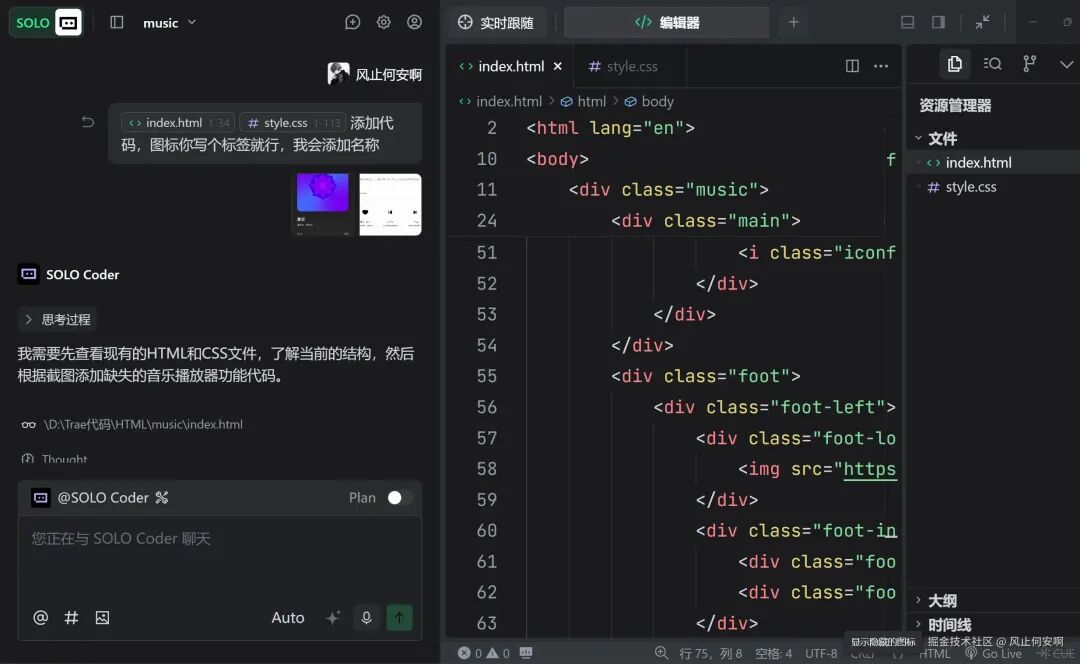
二、填充CSS样式文件
在这一步,体验更加流畅。我仅编写了最基础的重置样式和容器样式,其余复杂的布局与细节样式全部交由SOLO补全。
*{
    padding: 0;
    margin: 0;
}
body, html{
    height: 100%;
}
.music{
    background-color: #2A2A2A;
    height: 100%;
    display: flex;
    flex-direction: column;
}
.head{
    height: 76px;
    background-color: #161616;
    color: white;
    position: relative;
    display: flex;
    justify-content: space-between;
    align-items: center;
    padding: 0 16px;
}
/* 以下为SOLO自动生成的大量CSS代码,涵盖所有元素的精细样式 */
.back, .more{
    width: 40px;
    height: 40px;
    background: rgba(255,255,255,0.05);
    border-radius: 50%;
    display: flex;
    justify-content: center;
    align-items: center;
}
.title {
    text-align: center;
    flex: 1;
}
.name {
    font-family: Roboto, Roboto;
    font-weight: 500;
    font-size: 18px;
    color: #FFFFFF;
    line-height: 28px;
}
.author {
    font-family: Roboto, Roboto;
    font-weight: 400;
    font-size: 14px;
    color: rgba(255, 255, 255, 0.8);
    line-height: 20px;
}
.main{
    padding: 10px 32px;
    display: flex;
    flex-direction: column;
    align-items: center;
    justify-content: center;
    flex: 1;
    overflow: hidden;
}
.logo{
    width: 240px;
    height: 240px;
    background-color: #fff;
    border-radius: 24px;
    overflow: hidden;
    display: flex;
    align-items: center;
    justify-content: center;
}
.logo img{
    width: 100%;
}
.songs {
    margin-top: 20px;
    color: white;
    width: 100%;
    max-width: 400px;
}
.song-info {
    text-align: center;
    margin-bottom: 20px;
}
.song-name {
    font-size: 20px;
    font-weight: 500;
    margin-bottom: 8px;
    color: #FFFFFF;
}
.song-author {
    font-size: 14px;
    color: rgba(255, 255, 255, 0.6);
    margin-bottom: 12px;
}
.lyric {
    font-size: 16px;
    color: rgba(255, 255, 255, 0.8);
    font-style: italic;
}
.progress {
    display: flex;
    align-items: center;
    justify-content: space-between;
    margin-bottom: 20px;
}
.time {
    font-size: 12px;
    color: rgba(255, 255, 255, 0.6);
    width: 40px;
    text-align: center;
}
.progress-bar {
    flex: 1;
    height: 4px;
    background-color: rgba(255, 255, 255, 0.2);
    border-radius: 2px;
    margin: 0 12px;
    position: relative;
    cursor: pointer;
}
.progress-inner {
    height: 100%;
    background-color: white;
    border-radius: 2px;
    width: 50%;
}
.progress-dot {
    width: 12px;
    height: 12px;
    background-color: white;
    border-radius: 50%;
    position: absolute;
    top: 50%;
    left: 50%;
    transform: translate(-50%, -50%);
    cursor: pointer;
}
.control {
    display: flex;
    align-items: center;
    justify-content: center;
    gap: 40px;
    margin-top: 30px;
}
.prev, .next {
    width: 48px;
    height: 48px;
    display: flex;
    justify-content: center;
    align-items: center;
    color: white;
    font-size: 24px;
}
.play {
    width: 56px;
    height: 56px;
    background-color: white;
    border-radius: 50%;
    display: flex;
    justify-content: center;
    align-items: center;
    color: #161616;
    font-size: 24px;
}
.iconfont {
    font-size: inherit;
}
.foot {
    height: 80px;
    background-color: #161616;
    display: flex;
    align-items: center;
    justify-content: space-between;
    padding: 0 20px;
    border-top: 1px solid rgba(255, 255, 255, 0.1);
}
.foot-left {
    display: flex;
    align-items: center;
    gap: 12px;
}
.foot-logo {
    width: 56px;
    height: 56px;
    border-radius: 8px;
    overflow: hidden;
}
.foot-logo img {
    width: 100%;
    height: 100%;
    object-fit: cover;
}
.foot-info {
    color: white;
}
.foot-song-name {
    font-size: 14px;
    font-weight: 500;
    color: #FFFFFF;
    margin-bottom: 4px;
}
.foot-song-author {
    font-size: 12px;
    color: rgba(255, 255, 255, 0.6);
}
.foot-right {
    display: flex;
    align-items: center;
    gap: 24px;
    color: white;
    font-size: 20px;
}
.foot-heart, .foot-menu {
    width: 40px;
    height: 40px;
    display: flex;
    justify-content: center;
    align-items: center;
}
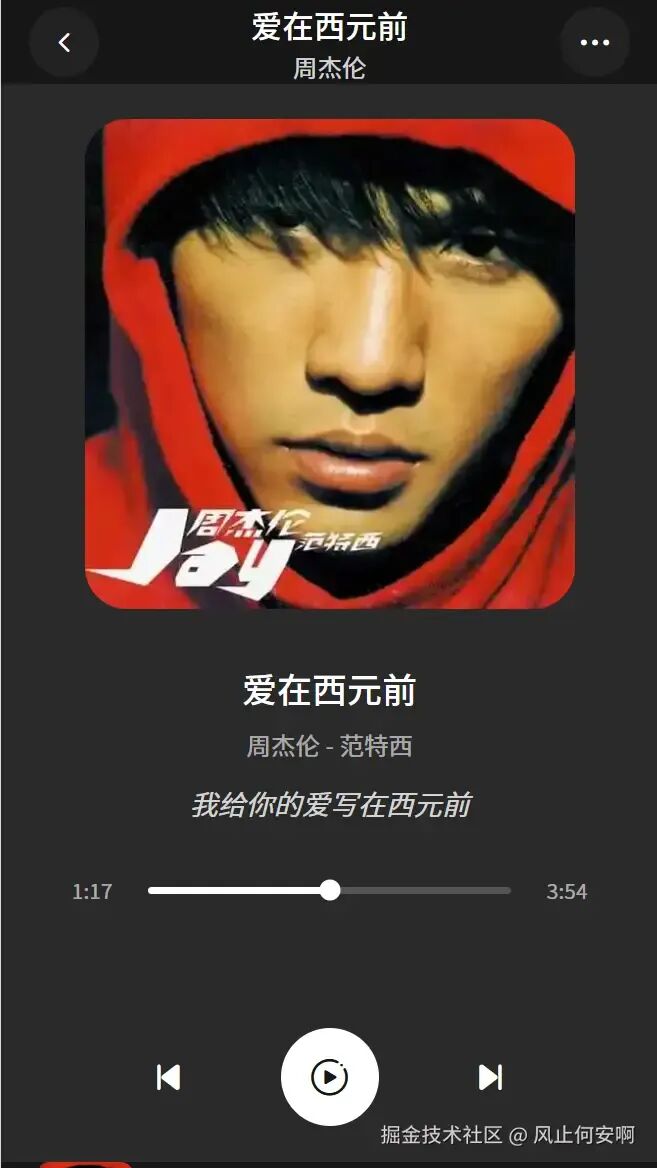
完成此步后,播放器的视觉效果已基本成型:
三、调试与布局修复
在实际预览时,我发现底部控制栏因为内容过长被挤到了可视区域之外。
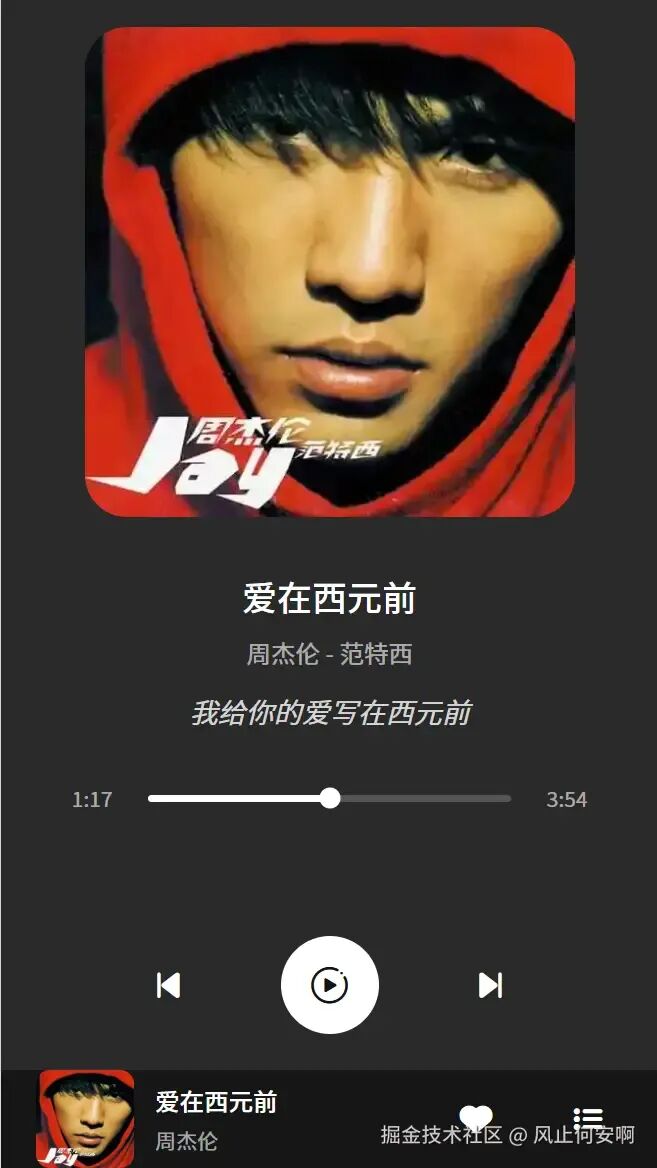
我直接将问题描述抛给SOLO,它不仅理解了问题所在,还自动为 .main 区域添加了 overflow: hidden 属性,并优化了内部元素的间距,完美解决了布局错乱的问题。
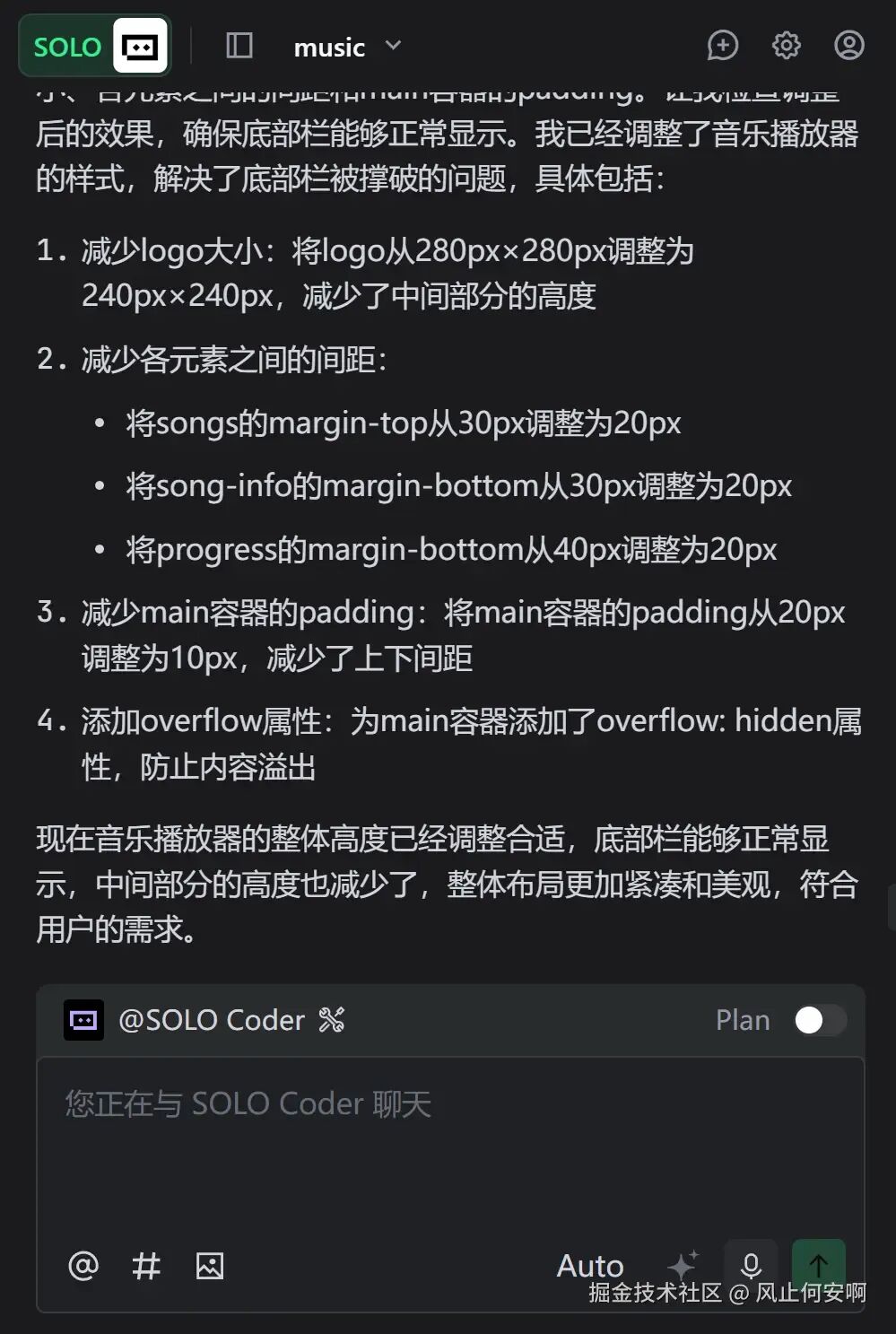
最终在iPhone6尺寸视图下的效果如下,布局紧凑而合理:
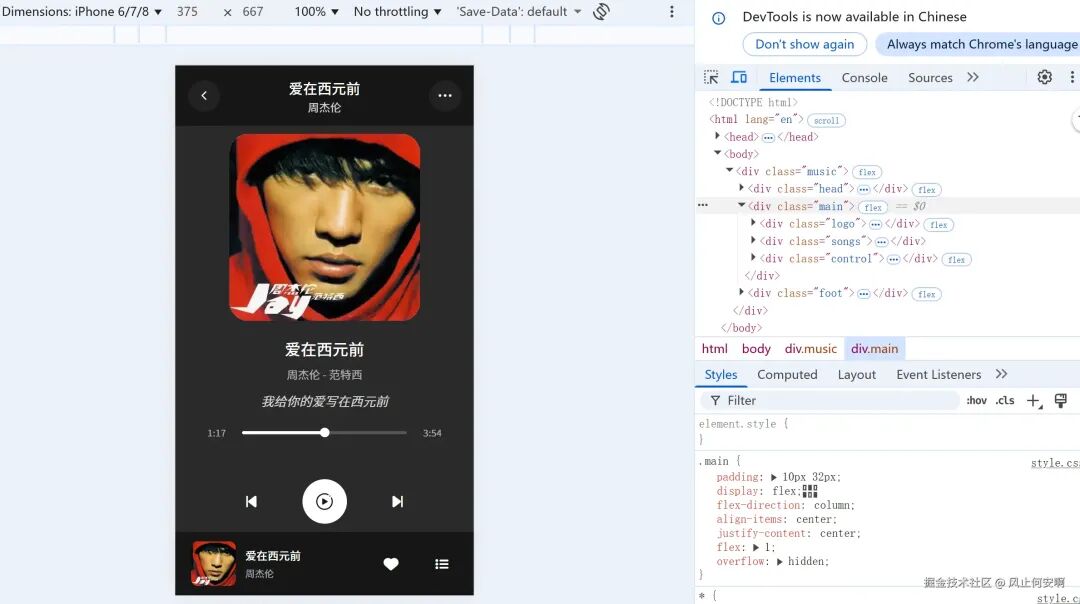
通过这个简单的项目,我深刻感受到了AI辅助编程的高效。整个过程,我主要提供了创意、基础框架和问题反馈,而繁复的HTML/CSS/JS代码编写和细节调试工作均由SOLO承担。这并非意味着程序员会被取代,而是标志着一种以人工智能为强力助手的新开发模式正在成为现实。
体验总结
在不到一节课的时间内完成这个音乐播放器Demo,让我真切体会到了Trae SOLO的“省心”之处。它覆盖了从代码生成、问题调试到样式优化的前端开发关键环节,大幅降低了实现想法的门槛。如果你想体验AI编程,建议从类似“小工具+明确流程”的场景入手,能更直接地感受到其提升开发效率的能力。
 发表于 2025-12-10 06:22:00
|
查看: 337|
回复: 0
发表于 2025-12-10 06:22:00
|
查看: 337|
回复: 0

