单个智能体的专业化程度有上限,真正复杂的工作往往需要团队协作。想象一下一个订单的处理过程:一个角色接收订单,一个检查库存,一个安排生产,一个验证质量。Google ADK(Agent Development Kit)提供的编排模式——SequentialAgent、ParallelAgent和LoopAgent——正是为了解决这个问题而生。它们可以将多个智能体组合成自动化的工作流,流程只需定义一次,状态在智能体之间自动传递,故障也由系统托管。本文将深入解析这三种模式的适用场景、核心的状态流转机制,并通过一个完整的订单处理流水线示例,展示如何在不编写繁琐编排逻辑的前提下,搭建从订单到交付的全流程。
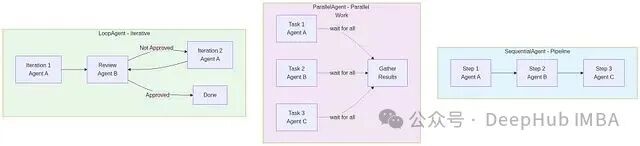
三种核心模式:顺序、并行与循环
ADK 提供了三种核心模式来组合智能体,每种都对应着一类真实的业务流程。理解它们的特点,是构建高效Agent工作流的第一步。
模式一:SequentialAgent——流水线式协作
当一系列步骤必须严格按照先后顺序执行时,SequentialAgent(流水线代理)就是你的最佳选择。
Receive Order → Check Inventory → Schedule Production → Verify Quality → Ship
前一个步骤完成后,下一个才能启动,数据像流水线上的工件一样依次传递。
from google.adk.agents import LlmAgent, SequentialAgent

# 定义每个智能体
order_receiver = LlmAgent(
    name="order_receiver",
    model="gemini-3-flash-preview",
    instruction="Extract order details from the customer request.",
    output_key="order_details"  # 命名输出,供下一个智能体使用
)

availability_checker = LlmAgent(
    name="availability_checker",
    model="gemini-3-flash-preview",
    instruction="""Check if items are available based on inventory.
Input: {order_details}

Respond with availability assessment.""",
    output_key="availability_status"
)

production_scheduler = LlmAgent(
    name="production_scheduler",
    model="gemini-3-flash-preview",
    instruction="""Schedule production given order and availability.
Order: {order_details}
Availability: {availability_status}

Create a production schedule.""",
    output_key="production_schedule"
)

quality_checker = LlmAgent(
    name="quality_checker",
    model="gemini-3-flash-preview",
    instruction="""Verify production schedule meets quality standards.
Schedule: {production_schedule}

Approve or flag for revision.""",
    output_key="quality_approval"
)

# 组合成流水线
order_pipeline = SequentialAgent(
    name="order_pipeline",
    sub_agents=[
        order_receiver,
        availability_checker,
        production_scheduler,
        quality_checker
    ]
)

# 运行
runner = Runner(
    agent=order_pipeline,
    session_service=InMemorySessionService()
)

result = runner.send_message(
    session_id="order-001",
    message="Customer wants 50 units of Widget A, needs delivery by March 28"
)

print(result)
# 输出会追踪经过所有四个智能体的过程
其中,output_key 参数是关键。它为每个智能体的输出命名,后续智能体在指令中通过 {placeholder} 语法引用该名称,ADK 便会自动完成状态传递。
典型应用场景:
- 订单处理:客户下单 → 账务处理付款 → 物流安排取件。
- 软件交付流水线:代码审查 → 集成测试 → 部署到预发布环境 → 部署到生产环境。
- 数据处理管道:接收文档 → 提取关键字段 → 存入数据库 → 发送通知。
模式二:ParallelAgent——并行式部门协作
当存在多个彼此独立、可以同时推进的任务时,ParallelAgent(并行代理)能显著提升效率。
Customer Request
    ├─ Check Pricing (independent)
    ├─ Check Inventory (independent)
    ├─ Check Certifications (independent)
    └─ [Gather results]
        → Make decision
各步骤之间没有数据依赖,并行执行可以最大程度利用资源。
from google.adk.agents import LlmAgent, ParallelAgent

pricing_checker = LlmAgent(
    name="pricing_checker",
    model="gemini-3-flash-preview",
    instruction="""Determine the best pricing for the requested item.
Item: {order_details}

Return pricing options.""",
    output_key="pricing"
)

inventory_checker = LlmAgent(
    name="inventory_checker",
    model="gemini-3-flash-preview",
    instruction="""Check warehouse inventory for availability.
Item: {order_details}

Return availability by location.""",
    output_key="inventory"
)

compliance_checker = LlmAgent(
    name="compliance_checker",
    model="gemini-3-flash-preview",
    instruction="""Verify compliance requirements.
Item: {order_details}

Return compliance status.""",
    output_key="compliance"
)

# 三个智能体同时运行
evaluation = ParallelAgent(
    name="order_evaluation",
    sub_agents=[
        pricing_checker,
        inventory_checker,
        compliance_checker
    ]
)

# 然后一个决策智能体消费所有三个输出
decision_maker = LlmAgent(
    name="decision_maker",
    model="gemini-3-flash-preview",
    instruction="""Make a decision on the order.
Pricing: {pricing}
Inventory: {inventory}
Compliance: {compliance}

Decide: proceed or reject. Explain reasoning.""",
    output_key="decision"
)

# 组合:先并行评估,再顺序决策
full_flow = SequentialAgent(
    name="order_flow",
    sub_agents=[
        evaluation,
        decision_maker
    ]
)
ParallelAgent 会并发启动所有子智能体,等待全部返回结果后再继续后续流程。对于彼此无依赖的任务,整体耗时取决于最慢的那个智能体,远快于串行执行。
典型应用场景:
- 多维度数据验证:同时校验格式、范围、业务逻辑等多条规则。
- 综合风险评估:并行分析欺诈风险、合规风险、安全风险。
- 询价与报告生成:同时向多个供应商询价,或从多数据源并行采集数据生成报告。
需要注意的是,并行执行也意味着更高的资源开销。当大量智能体同时调用LLM API时,务必考虑API的速率限制和总体Token消耗成本。
模式三:LoopAgent——迭代式质量控制循环
当某个流程需要反复迭代,直到满足特定条件(如质量达标、通过审核)时,LoopAgent(循环代理)便派上用场。
Produce Draft → Review → Approve?
    ├─ No → Revise → Review → Approve?
    └─ Yes → Complete
from google.adk.agents import LlmAgent, LoopAgent

content_producer = LlmAgent(
    name="content_producer",
    model="gemini-3-flash-preview",
    instruction="""Generate content based on requirements.
Topic: {topic}
Iteration: {iteration}

Produce high-quality content.""",
    output_key="content"
)

quality_reviewer = LlmAgent(
    name="quality_reviewer",
    model="gemini-3-flash-preview",
    instruction="""Review the content and decide if it's good enough.
Content: {content}

Respond with: APPROVED or NEEDS_REVISION with specific feedback.""",
    output_key="review"
)

# LoopAgent 持续运行流程直到满足停止条件
content_loop = LoopAgent(
    name="content_review_loop",
    sub_agents=[
        content_producer,
        quality_reviewer
    ],
    max_iterations=3,  # 防止无限循环
    stop_condition=lambda output: "APPROVED" in output.get("review", "")
)
LoopAgent 非常强大,但必须谨慎使用——务必通过 max_iterations 参数设置迭代次数上限,防止陷入无限循环。stop_condition 是一个返回布尔值的函数,当其返回 True 时循环终止。
典型应用场景:
- 迭代式内容优化:AI写作、设计稿生成、代码生成的多次修订。
- 自动化质量保证:生产 → 测试 → 根据通过/失败结果决定是完成还是修复。
- 协商或共识构建:提出方案 → 多方评估 → 根据批准/修改意见进行下一轮迭代。
状态管理:数据在智能体之间的自动流转
这是ADK编排机制的核心魅力所在。它通过 output_key 和占位符语法 {placeholder},几乎隐式地完成了状态传递。
agent_a = LlmAgent(
    name="agent_a",
    instruction="Extract customer name from request.",
    output_key="customer_name"
)

agent_b = LlmAgent(
    name="agent_b",
    instruction="Create a welcome message for {customer_name}.",
    # 注意 {customer_name} 占位符——引用 agent_a 的 output_key
)
用以上两个智能体构建一个 SequentialAgent 后,ADK 的执行步骤如下:
- 运行
agent_a 并捕获其输出。
- 将输出存储在名为
"customer_name" 的上下文键下。
- 对
agent_b 的 instruction 进行字符串替换——{customer_name} 被替换为 agent_a 输出的实际值。
- 将替换后的指令交给
agent_b 执行。
嵌套工作流的机制完全相同:
inner_workflow = SequentialAgent(
    name="inner",
    sub_agents=[agent_a, agent_b],
    output_key="welcome_message"  # 整个内部工作流的输出
)

outer_workflow = SequentialAgent(
    name="outer",
    sub_agents=[
        some_initial_agent,
        inner_workflow,
        final_agent  # 这里可以引用 {welcome_message}
    ]
)
为 output_key 命名时,建议遵循以下原则:使用 snake_case,名称应当具有自解释性,并在项目文档中记录每个键的含义。
# 好的做法
inventory_status = LlmAgent(..., output_key="inventory_status")

# 不好的做法
checker = LlmAgent(..., output_key="result")  # 过于模糊,是什么的result?
完整示例:构建从订单到交付的自动化流水线
让我们通过一个综合示例,将以上所有概念串联起来。假设客户提交了一个订单,系统需要自动化完成以下步骤:
- 接收并解析订单。
- 并行检查库存和计算定价。
- 基于并行检查结果做出履行决策。
- 若批准,则安排生产。
- 对生产计划进行质量检查。
- 若质量通过,则安排发货。
- 向客户发送确认信息。
from google.adk.agents import LlmAgent, SequentialAgent, ParallelAgent, Agent, FunctionTool
from google.adk.runners import Runner
from google.adk.sessions import InMemorySessionService

# 阶段 1:接收订单
order_receiver = LlmAgent(
    name="order_receiver",
    model="gemini-3-flash-preview",
    instruction="""Parse the customer order and extract:
- Item SKU
- Quantity
- Requested delivery date
- Customer contact info

Output as structured data.""",
    output_key="parsed_order"
)

# 阶段 2:并行检查(库存与定价)
def check_inventory_tool(sku: str, quantity: int) -> dict:
    """检查是否有库存。"""
    # 模拟数据
    stock = {"SKU-001": 500, "SKU-002": 45}
    available = stock.get(sku, 0)
    return {
        "sku": sku,
        "requested": quantity,
        "available": available,
        "can_fulfill": available >= quantity
    }

def get_pricing_tool(sku: str, quantity: int) -> dict:
    """获取当前定价。"""
    unit_prices = {"SKU-001": 12.50, "SKU-002": 25.00}
    price_per_unit = unit_prices.get(sku, 0)
    total = price_per_unit * quantity
    return {
        "sku": sku,
        "unit_price": price_per_unit,
        "quantity": quantity,
        "total_price": total
    }

inventory_checker = LlmAgent(
    name="inventory_checker",
    model="gemini-3-flash-preview",
    instruction="""Check inventory for the requested item.
Order: {parsed_order}

Use the check_inventory_tool to verify stock.""",
    tools=[FunctionTool(check_inventory_tool)],
    output_key="inventory_check"
)

pricing_agent = LlmAgent(
    name="pricing_agent",
    model="gemini-3-flash-preview",
    instruction="""Determine pricing for the order.
Order: {parsed_order}

Use the get_pricing_tool to calculate the total.""",
    tools=[FunctionTool(get_pricing_tool)],
    output_key="pricing_info"
)

# 并行评估
evaluation = ParallelAgent(
    name="evaluation",
    sub_agents=[inventory_checker, pricing_agent]
)

# 阶段 3:决策
approval_agent = LlmAgent(
    name="approval_agent",
    model="gemini-3-flash-preview",
    instruction="""Decide if we can fulfill the order.
Order: {parsed_order}
Inventory: {inventory_check}
Pricing: {pricing_info}

Respond with: APPROVED or REJECTED with reasoning.""",
    output_key="approval"
)

# 阶段 4:生产(仅在批准后)
production_scheduler = LlmAgent(
    name="production_scheduler",
    model="gemini-3-flash-preview",
    instruction="""Schedule production for the approved order.
Order: {parsed_order}
Approval: {approval}

Create a production schedule with delivery date.""",
    output_key="production_schedule"
)

# 阶段 5:质量检查
quality_checker = LlmAgent(
    name="quality_checker",
    model="gemini-3-flash-preview",
    instruction="""Verify production schedule meets quality standards.
Schedule: {production_schedule}

Approve if acceptable, flag issues otherwise.""",
    output_key="quality_status"
)

# 阶段 6:发货(取决于质量审批)
shipping_agent = LlmAgent(
    name="shipping_agent",
    model="gemini-3-flash-preview",
    instruction="""Schedule shipping for the approved order.
Order: {parsed_order}
Production: {production_schedule}
Quality: {quality_status}

Create a shipping manifest.""",
    output_key="shipping_manifest"
)

# 阶段 7:确认
confirmation_agent = LlmAgent(
    name="confirmation_agent",
    model="gemini-3-flash-preview",
    instruction="""Generate a confirmation message for the customer.
Order: {parsed_order}
Pricing: {pricing_info}
Shipping: {shipping_manifest}

Write a professional confirmation email.""",
    output_key="confirmation"
)

# 构建完整的流水线
order_to_delivery = SequentialAgent(
    name="order_to_delivery_pipeline",
    sub_agents=[
        order_receiver,
        evaluation,
        approval_agent,
        production_scheduler,
        quality_checker,
        shipping_agent,
        confirmation_agent
    ]
)

# 运行流水线
runner = Runner(
    agent=order_to_delivery,
    session_service=InMemorySessionService()
)

customer_request = """
I'd like to order 100 units of SKU-001.
I need delivery by March 28.
Contact me at alice@acme.com.
"""

result = runner.send_message(
    session_id="order-2026-0847",
    message=customer_request
)

print(result)
# 输出完整的确认信息,并追踪经过所有7个阶段的过程
在这个流水线中,状态通过 {parsed_order}、{inventory_check}、{pricing_info} 等占位符在各阶段间自动传递。ParallelAgent 让库存检查和定价查询同时进行,提升了效率。每个智能体职责单一,整个复杂流程通过简单的组合声明完成,无需编写命令式的胶水代码。
CustomAgent:应对预定义模式之外的复杂场景
Sequential、Parallel、Loop三种模式覆盖了大部分场景,但当业务逻辑涉及条件分支、动态路由或复杂的异常恢复时,我们就需要 CustomAgent。它允许你完全自定义执行逻辑。
from google.adk.agents import CustomAgent, LlmAgent

class SmartRouter(CustomAgent):
    """根据复杂度将订单路由到不同的履行路径。"""

    def __init__(self):
        self.simple_path = SequentialAgent(
            name="simple_fulfillment",
            sub_agents=[...simple agents...]
        )
        self.complex_path = SequentialAgent(
            name="complex_fulfillment",
            sub_agents=[...complex agents...]
        )
        self.router = LlmAgent(
            name="order_router",
            instruction="""Analyze the order and decide: SIMPLE or COMPLEX.
Order: {order}

Simple orders: standard items, normal quantities, no customization.
Complex orders: custom requests, bulk, integration required."""
        )

    async def execute(self, session, context):
        """自定义执行逻辑。"""
        # 1. 运行路由器智能体
        router_output = await self.router.execute(session, context)

        # 2. 根据决策进行分支
        if "SIMPLE" in router_output:
            result = await self.simple_path.execute(session, context)
        else:
            result = await self.complex_path.execute(session, context)

        return result
上面的 SmartRouter 首先使用一个LLM智能体分析订单复杂度,然后根据判断结果将订单分发到两条不同的履行路径。类似的条件分支、错误重试、动态子团队创建等高级需求,都可以在 execute() 方法中自由实现。
总结
通过 SequentialAgent、ParallelAgent 和 LoopAgent,我们构建了一家“数字化公司”的骨干流程——七个智能体各司其职,通过结构化的状态传递协同工作,没有胶水代码,也没有复杂的命令式编排逻辑。
然而,目前的体系仍然是静态的,组织架构在定义时就已经固定。未来的方向是动态编排——智能体能够根据任务需求,按需创建团队、动态分配角色、并依据系统负载实时调整协作拓扑。这无疑是Transformer等大模型驱动下的智能体技术更有趣的演进方向。基础已经搭好,下一步的探索将更加激动人心。
 发表于 2026-4-6 04:10:19
|
查看: 330|
回复: 0
发表于 2026-4-6 04:10:19
|
查看: 330|
回复: 0

