一套 Gateway,两种玩法。本文将深入解析 OpenClaw 的角色型多 Agent 与任务型多 Agent 两种架构模式。从核心概念、配置详解到混合实战,帮你打造既专业分工又高效并行的 AI 助手系统。
适用读者:
- 正在使用 OpenClaw 并希望优化架构的开发者
- 需要在多用户共享场景中实现数据隔离的技术人员
- 对 AI 助手多Agent系统协作架构感兴趣的研究者
版本说明:本文基于 OpenClaw v2026.3.13+ 版本编写,已标注 v2026.4.x 的新特性。
一、为什么需要两种多 Agent 模式?
1.1 核心问题:单一架构无法满足所有场景
场景 A:多用户共享 Gateway
公司团队 10 人共享一个 OpenClaw Gateway
├── 问题:所有人共享同一个会话和记忆?
├── 风险:隐私泄露、上下文混乱
└── 需求:每个成员独立的 AI 助手
场景 B:复杂任务并行处理
一次性采集 20 个竞品网站信息
├── 问题:串行执行需要 600 秒(10 分钟)?
├── 风险:超时断开、用户体验差
└── 需求:并行处理,30 秒完成
答案:OpenClaw 提供了两种模式,分别解决不同的问题。
1.2 两种模式的核心差异
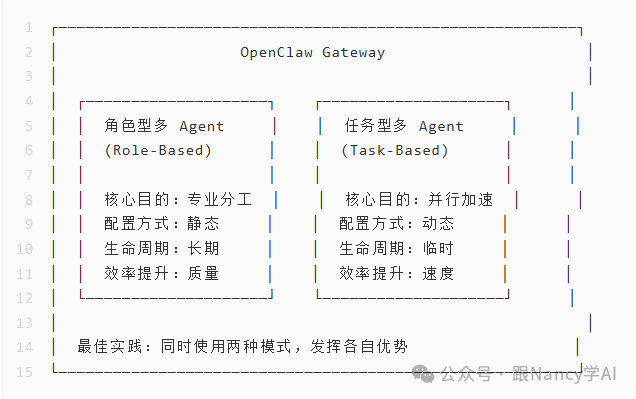
| 维度 |
角色型多 Agent |
任务型多 Agent |
| 核心目的 |
专业分工、多用户隔离 |
并行加速、效率提升 |
| Agent 数量 |
少(2-5 个静态配置) |
多(动态创建,无上限) |
| 生命周期 |
长期存在(持久化) |
临时创建,用完即删 |
| 工作空间 |
独立(~/.openclaw/workspace-<id>) |
继承主 Agent |
| 会话存储 |
独立(~/.openclaw/agents/<id>/sessions/) |
临时(session:<uuid>) |
| 认证配置 |
独立(auth-profiles.json) |
继承主 Agent |
| 路由方式 |
Bindings 匹配(渠道/账号/peer) |
sessions_spawn 动态创建 |
| 配置复杂度 |
高(独立配置) |
低(自动继承) |
| 效率提升 |
质量提升(专业分工) |
速度提升 3-5 倍 |
| 适用场景 |
多用户共享、多角色协作 |
批量处理、多源采集 |
二、角色型多 Agent:专业分工与多用户隔离
2.1 架构定义
角色型多 Agent:在单个 Gateway 内配置多个独立 Agent,每个 Agent 拥有独立的人格、工作空间和会话存储,通过 Bindings 实现消息路由和并行处理。
2.2 核心特性
(1)独立的工作空间
每个角色 Agent 拥有完全独立的文件系统:
~/.openclaw/
├── workspace-pm/           # 产品经理工作空间
│   ├── AGENTS.md           # 行为准则(产品经理专用)
│   ├── SOUL.md             # 人格定义(专业、用户体验导向)
│   ├── USER.md             # 用户信息
│   ├── TOOLS.md            # 工具笔记
│   └── memory/             # 独立记忆系统
│       ├── MEMORY.md
│       └── YYYY-MM-DD.md
│
├── workspace-dev/          # 开发经理工作空间
│   ├── AGENTS.md           # 行为准则(开发经理专用)
│   ├── SOUL.md             # 人格定义(技术导向)
│   └── ...
│
└── workspace-qa/           # 测试经理工作空间
    └── ...
优势:
- ✅ 每个角色有专属的行为准则和人格设定
- ✅ 记忆系统完全隔离,避免交叉污染
- ✅ 文件、技能、笔记独立管理
(2)独立的会话存储
每个角色 Agent 的会话完全隔离:
~/.openclaw/agents/
├── pm/                     # 产品经理 Agent
│   ├── agent/
│   │   └── auth-profiles.json  # 独立认证配置
│   └── sessions/
│       ├── sessions.json       # 会话索引
│       └── <sessionId>.jsonl   # 会话转录
│
├── dev/                    # 开发经理 Agent
│   ├── agent/
│   │   └── auth-profiles.json
│   └── sessions/
│       └── ...
│
└── qa/                     # 测试经理 Agent
    └── ...
优势:
- ✅ 会话历史完全隔离
- ✅ 认证配置独立(不同 API 密钥)
- ✅ 模型配置独立(不同角色用不同模型)
(3)使用 Bindings 实现多角色并行
Bindings 作用:将不同渠道/账号/用户的消息路由到对应的角色 Agent。
路由优先级(从具体到通用):
1. peer 匹配(精确的 DM/群/频道 ID)← 最具体
2. parentPeer 匹配(线程继承)
3. guildId + roles 匹配(Discord 角色路由)
4. guildId 匹配(Discord 服务器)
5. teamId 匹配(Slack 团队)
6. accountId 匹配(渠道账号)
7. channel 匹配(渠道级别)
8. 默认 Agent(agents.list[].default 或第一个)← 最通用
2.3 完整配置示例
场景 1:不同渠道不同角色
// 配置文件:~/.openclaw/openclaw.json
{
  // 1. 定义多个角色型 Agent
  agents: {
    list: [
      {
        id: "product-manager",
        name: "产品经理",
        workspace: "~/.openclaw/workspace-pm",
        agentDir: "~/.openclaw/agents/pm/agent",
        model: "anthropic/claude-opus-4-6", // 高质量模型
      },
      {
        id: "dev-manager",
        name: "开发经理",
        workspace: "~/.openclaw/workspace-dev",
        agentDir: "~/.openclaw/agents/dev/agent",
        model: "anthropic/claude-opus-4-6",
      },
      {
        id: "qa-manager",
        name: "测试经理",
        workspace: "~/.openclaw/workspace-qa",
        agentDir: "~/.openclaw/agents/qa/agent",
        model: "anthropic/claude-sonnet-4-6", // 性价比模型
      },
    ],
  },

  // 2. 配置 Bindings 路由规则
  bindings: [
    // 产品经理:绑定到 Telegram 渠道
    {
      type: "acp",
      agentId: "product-manager",
      match: {
        channel: "telegram",
        accountId: "pm-bot",
      },
    },

    // 开发经理:绑定到 Discord 渠道
    {
      type: "acp",
      agentId: "dev-manager",
      match: {
        channel: "discord",
        accountId: "dev-bot",
      },
    },

    // 测试经理:绑定到 Slack 渠道
    {
      type: "acp",
      agentId: "qa-manager",
      match: {
        channel: "slack",
        accountId: "qa-bot",
      },
    },
  ],

  // 3. 配置多渠道账号
  channels: {
    telegram: {
      accounts: {
        pm-bot: {
          botToken: "123456:ABC...",
          dmPolicy: "pairing",
        },
      },
    },
    discord: {
      accounts: {
        dev-bot: {
          token: "DISCORD_BOT_TOKEN_DEV",
          guilds: {
            "123456789012345678": {
              channels: {
                "222222222222222222": { allow: true },
              },
            },
          },
        },
      },
    },
    slack: {
      accounts: {
        qa-bot: {
          botToken: "xoxb-...",
          appToken: "xapp-...",
        },
      },
    },
  },
}
效果:
Telegram 消息 → 产品经理角色 (同时并行)
Discord 消息  → 开发经理角色 (同时并行)
Slack 消息    → 测试经理角色 (同时并行)
场景 2:同渠道不同联系人(飞书企业实战)
场景描述:
某互联网公司产品技术团队使用飞书作为主要协作平台,需要配置三个独立角色:
- 产品经理 Alex:负责需求分析、用户调研、竞品分析
- 研发经理 Mia:负责技术方案、代码审查、架构设计
- 测试经理 Nico:负责测试计划、Bug 分析、质量报告
需求:
- 三人工作相对独立(独立工作空间、独立记忆)
- 可以分工协作(跨角色任务协调)
- 同一飞书账号,不同联系人路由到不同角色
- 支持群聊协作场景
完整配置方案:
// 配置文件:~/.openclaw/openclaw.json
{
  // ========== 1. 定义三个角色型 Agent ==========
  agents: {
    list: [
      {
        id: "alex-pm",
        name: "产品经理 Alex",
        workspace: "~/.openclaw/workspace-alex-pm",
        agentDir: "~/.openclaw/agents/alex-pm/agent",
        model: "anthropic/claude-opus-4-6",
        groupChat: {
          mentionPatterns: ["@Alex", "@产品经理", "@PM"],
        },
      },
      {
        id: "mia-dev",
        name: "研发经理 Mia",
        workspace: "~/.openclaw/workspace-mia-dev",
        agentDir: "~/.openclaw/agents/mia-dev/agent",
        model: "anthropic/claude-opus-4-6",
        groupChat: {
          mentionPatterns: ["@Mia", "@开发", "@技术"],
        },
      },
      {
        id: "nico-qa",
        name: "测试经理 Nico",
        workspace: "~/.openclaw/workspace-nico-qa",
        agentDir: "~/.openclaw/agents/nico-qa/agent",
        model: "anthropic/claude-sonnet-4-6",
        groupChat: {
          mentionPatterns: ["@Nico", "@测试", "@QA"],
        },
      },
    ],
  },

  // ========== 2. 配置飞书渠道 ==========
  channels: {
    feishu: {
      enabled: true,
      domain: "feishu",
      defaultAccount: "main",
      accounts: {
        main: {
          appId: "cli_a1b2c3d4e5f6g7h8",
          appSecret: "your-app-secret-here",
          name: "公司协作机器人",
        },
      },
      dmPolicy: "allowlist",
      allowFrom: [
        "ou_product_owner",
        "ou_cto",
        "ou_qa_lead",
        "ou_alex_user",
      ],
      groupPolicy: "allowlist",
      groupAllowFrom: [
        "oc_product_team",
        "oc_dev_team",
        "oc_qa_team",
        "oc_all_hands",
      ],
      requireMention: true,
      groups: {
        oc_product_team: {
          requireMention: false,
          enabled: true,
        },
        oc_dev_team: {
          requireMention: true,
          enabled: true,
        },
        oc_qa_team: {
          requireMention: true,
          enabled: true,
        },
      },
    },
  },

  // ========== 3. 配置 Bindings 路由规则 ==========
  bindings: [
    // 产品经理 Alex 路由
    {
      agentId: "alex-pm",
      match: {
        channel: "feishu",
        peer: { kind: "direct", id: "ou_product_owner" },
      },
    },
    {
      agentId: "alex-pm",
      match: {
        channel: "feishu",
        peer: { kind: "group", id: "oc_product_team" },
      },
    },

    // 研发经理 Mia 路由
    {
      agentId: "mia-dev",
      match: {
        channel: "feishu",
        peer: { kind: "direct", id: "ou_cto" },
      },
    },
    {
      agentId: "mia-dev",
      match: {
        channel: "feishu",
        peer: { kind: "group", id: "oc_dev_team" },
      },
    },

    // 测试经理 Nico 路由
    {
      agentId: "nico-qa",
      match: {
        channel: "feishu",
        peer: { kind: "direct", id: "ou_qa_lead" },
      },
    },
    {
      agentId: "nico-qa",
      match: {
        channel: "feishu",
        peer: { kind: "group", id: "oc_qa_team" },
      },
    },

    // 全员群:根据@关键词路由
    {
      agentId: "alex-pm",
      match: {
        channel: "feishu",
        peer: { kind: "group", id: "oc_all_hands" },
      },
    },
  ],

  // ========== 4. 配置子 Agent 并行(所有角色共享) ==========
  agents: {
    defaults: {
      subagents: {
        maxSpawnDepth: 2,
        maxConcurrent: 8,
        model: "anthropic/claude-sonnet-4-6",
        archiveAfterMinutes: 60,
      },
    },
  },
}
效果:
飞书企业账号:公司协作机器人
│
├── DM 场景
│   ├── 产品负责人 → Alex
│   ├── CTO → Mia
│   └── QA 负责人 → Nico
│
├── 群聊场景
│   ├── 产品团队群 → Alex
│   ├── 研发团队群 → Mia
│   └── 测试团队群 → Nico
│
└── 全员群
    └── 根据@关键词路由(@Alex/@Mia/@Nico)
获取飞书 ID 的方法:
# 1. 获取群组 ID(chat_id,格式:oc_xxx)
# 打开飞书群 → 右上角菜单 → 设置 → 查看群 ID

# 2. 获取用户 ID(open_id,格式:ou_xxx)
openclaw logs --follow | grep "open_id"

# 3. 查看待配对的请求
openclaw pairing list feishu

# 4. 批准配对请求
openclaw pairing approve feishu <CODE>
2.4 管理命令
# 创建新角色 Agent
openclaw agents add coding

# 查看角色列表及 Bindings
openclaw agents list --bindings

# 切换到指定角色(CLI 模式)
openclaw agent use product-manager

# 查看角色会话状态
openclaw sessions --agent product-manager

# 检查路由配置
openclaw security audit
三、任务型多 Agent:并行加速与效率提升
3.1 架构定义
任务型多 Agent:主 Agent 根据需要动态派生多个临时子 Agent,每个子 Agent 拥有独立上下文空间,并行执行不同任务,完成后汇总结果。
3.2 核心特性
(1)动态创建,按需分配
// 主 Agent 根据需要动态创建子 Agent
const result = await sessions_spawn({
  task: "竞品分析",
  runtime: "subagent",
  mode: "run",
  timeoutSeconds: 60,
  cleanup: "delete",
});
特点:
- ✅ 无需预配置,运行时按需创建
- ✅ 自动继承主 Agent 的工作空间和认证配置
- ✅ 任务完成后自动清理(可配置保留)
- ✅ 支持嵌套派生(v2026.4 支持 maxSpawnDepth: 2)
与角色型对比:
角色型:Gateway 启动时创建 → 长期存在 → 手动管理
任务型:运行时动态创建 → 临时存在 → 自动清理
(2)独立上下文空间
主 Agent 会话
├── sessionKey: agent:default:main
├── 上下文:用户偏好、长期记忆、完整历史
├── 工具策略:完整权限
└── 记忆系统:MEMORY.md + memory/*.md

子 Agent 1 会话
├── sessionKey: session:task-uuid-001
├── 上下文:仅任务相关信息(精简)
├── 工具策略:受限权限(仅需要的工具)
└── 记忆系统:共享主 Agent 记忆

子 Agent 2 会话
├── sessionKey: session:task-uuid-002
├── 上下文:仅任务相关信息(精简)
└── ...
优势:
- ✅ 避免上下文污染(子任务信息不混入主会话)
- ✅ 减少 Token 消耗(精简上下文)
- ✅ 提升任务专注度(单一任务目标)
- ✅ 支持并发执行(maxConcurrent: 8)
(3)并行执行,效率倍增
主 Agent
  ├─→ 子 Agent 1 (任务 A:30 秒)
  ├─→ 子 Agent 2 (任务 B:25 秒)
  ├─→ 子 Agent 3 (任务 C:35 秒)
  └─→ 子 Agent 4 (任务 D:28 秒)

  ↓ 汇总结果

总耗时:max(30, 25, 35, 28) = 35 秒
串行耗时:30 + 25 + 35 + 28 = 118 秒
效率提升:3.4 倍
并发控制:
{
  agents: {
    defaults: {
      subagents: {
        maxConcurrent: 8,
      },
    },
  },
}
(4)结果汇总与通知
// 子 Agent 完成后自动通知主 Agent
{
  status: "completed",
  result: "...",
  sessionKey: "session:xxx",
  sessionId: "uuid-xxx",
  runtime: "5m12s",
  tokens: {
    input: 1200,
    output: 800,
    total: 2000,
  },
  cost: "$0.012",
}
通知方式:
- ✅ 自动推送(完成后立即通知)
- ✅ 静默模式(
NO_REPLY 标记,不通知)
- ✅ 手动查询(
/subagents info <id>)
3.3 完整配置示例
配置 1:基础并行任务
{
  agents: {
    defaults: {
      subagents: {
        maxSpawnDepth: 1,
        maxChildrenPerAgent: 5,
        maxConcurrent: 8,
        runTimeoutSeconds: 900,
        model: "anthropic/claude-sonnet-4-6",
        archiveAfterMinutes: 60,
      },
    },
  },
}
使用示例:
// 并行采集 5 个网站
const websites = [
  "https://site-a.com",
  "https://site-b.com",
  "https://site-c.com",
  "https://site-d.com",
  "https://site-e.com",
];

const results = await Promise.all(
  websites.map(url => sessions_spawn({
    task: `分析 ${url} 的产品信息和定价策略`,
    runtime: "subagent",
    mode: "run",
    timeoutSeconds: 60,
  }))
);
配置 2:Orchestrator 模式(v2026.4)
{
  agents: {
    defaults: {
      subagents: {
        maxSpawnDepth: 2,
        maxChildrenPerAgent: 5,
        maxConcurrent: 8,
      },
    },
  },
}
使用示例:
// 主 Agent → Orchestrator → Worker

// 1. 创建 Orchestrator(协调员)
const orchestrator = await sessions_spawn({
  task: "协调多个竞品分析任务并汇总报告",
  runtime: "subagent",
  mode: "session",
  label: "competitor-analysis-orchestrator",
});

// 2. Orchestrator 内部创建 Worker
const workers = await Promise.all([
  sessions_spawn({ task: "分析竞品 A" }),
  sessions_spawn({ task: "分析竞品 B" }),
  sessions_spawn({ task: "分析竞品 C" }),
]);
效果:
主 Agent
  └─→ Orchestrator 子 Agent
      ├─→ Worker 1:竞品 A 分析
      ├─→ Worker 2:竞品 B 分析
      └─→ Worker 3:竞品 C 分析
配置 3:Discord 线程绑定(v2026.4)
{
  channels: {
    discord: {
      threadBindings: {
        enabled: true,
        idleHours: 24,
        maxAgeHours: 0,
        spawnSubagentSessions: true,
      },
    },
  },
}
使用示例:
const threadAgent = await sessions_spawn({
  task: "长期项目协作:产品架构 redesign",
  runtime: "subagent",
  mode: "session",
  thread: true,
  label: "project-arch-redesign",
});
效果:
Discord 频道:#product-design
  └─→ 线程:架构 redesign 讨论
      └─→ 绑定子 Agent:project-arch-redesign
3.4 管理命令
# 查看当前会话的子 Agent 列表
/subagents list

# 查看子 Agent 详细信息
/subagents info <id|#>

# 查看子 Agent 日志
/subagents log <id|#> [limit] [tools]

# 发送消息给子 Agent
/subagents send <id|#> <message>

# 终止子 Agent
/subagents kill <id|#|all>

# 手动创建子 Agent
/subagents spawn <agentId> <task> [--model <model>]

# Discord 线程绑定控制
/focus <subagent-label>
/unfocus
/agents
/session idle <duration|off>
/session max-age <duration|off>
3.5 适用场景与效率对比
| 场景 |
配置方式 |
串行耗时 |
并行耗时 |
效率提升 |
| 多源信息采集(5 网站) |
sessions_spawn × 5 |
300 秒 |
60 秒 |
5 倍 |
| 批量数据清洗(10000 条) |
分块 + 并行 × 4 |
400 秒 |
100 秒 |
4 倍 |
| 分布式服务探测(50 服务) |
分组 + 并行 × 5 |
500 秒 |
100 秒 |
5 倍 |
| 复杂报告生成(多章节) |
任务分解 + 并行 × 3 |
180 秒 |
60 秒 |
3 倍 |
| 竞品分析(3 竞品) |
Orchestrator 模式 |
150 秒 |
50 秒 |
3 倍 |
3.6 最佳实践
(1)合理设置并发数
// 2 核 CPU, 4GB 内存:maxConcurrent: 2-3
// 4 核 CPU, 8GB 内存:maxConcurrent: 4-6
// 8 核+ CPU, 16GB+ 内存:maxConcurrent: 8-12
(2)子任务使用性价比模型
{
  agents: {
    list: [{ id: "main", model: "claude-opus-4-6" }],
    defaults: {
      subagents: { model: "claude-sonnet-4-6" },
    },
  },
}
// 成本节省:80%
(3)设置合理的超时时间
// 简单任务:60-120 秒
// 复杂任务:300-900 秒
(4)启用自动归档
{
  agents: {
    defaults: {
      subagents: {
        archiveAfterMinutes: 60,
      },
    },
  },
}
(5)任务分解原则
✅ 好:原子任务(30 秒内完成)
   - "提取这个网页的标题和正文"
   - "分析这段文本的情感倾向"

❌ 差:复杂任务(超过 5 分钟)
   - "分析整个行业的发展趋势"
   应分解为多个原子任务
四、两种模式对比与选择
4.1 综合对比表
| 维度 |
角色型多 Agent |
任务型多 Agent |
| 核心目的 |
专业分工、多用户隔离 |
并行加速、效率提升 |
| 配置方式 |
静态(agents.list[]) |
动态(sessions_spawn) |
| 创建时机 |
Gateway 启动时 |
运行时按需创建 |
| 生命周期 |
长期(持久化) |
临时(用完即删) |
| 工作空间 |
独立 |
继承主 Agent |
| 会话存储 |
独立目录 |
独立 sessionKey |
| 记忆系统 |
独立 MEMORY.md |
共享主 Agent 记忆 |
| 认证配置 |
独立 auth-profiles |
继承主 Agent |
| 模型配置 |
独立配置 |
可覆盖(subagents.model) |
| 启动时间 |
慢(Gateway 启动时) |
快(<1 秒) |
| 并发能力 |
中(受 Gateway 限制) |
高(maxConcurrent: 8) |
| 资源占用 |
高(多工作空间) |
低(共享资源) |
| 扩展性 |
需重启 Gateway |
无需重启 |
| 运维成本 |
高(多配置管理) |
低(自动继承) |
| 效率提升 |
质量提升 |
速度提升 3-5 倍 |
4.2 场景选择决策树
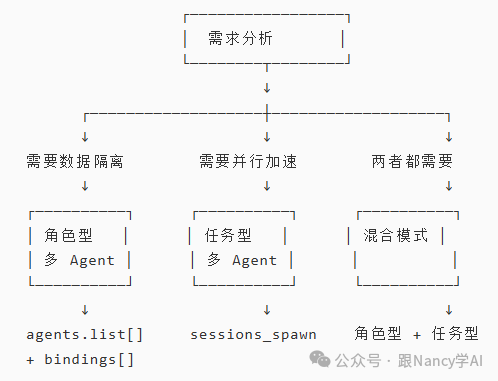
4.3 推荐场景
| 场景 |
推荐模式 |
配置方式 |
原因 |
| 多用户共享 Gateway |
角色型 |
agents.list[] + bindings[].peer |
数据隔离、隐私保护 |
| 不同渠道不同角色 |
角色型 |
bindings[].channel |
专业响应、渠道隔离 |
| 独立人格需求 |
角色型 |
独立工作空间 |
不同 SOUL.md/AGENTS.md |
| 批量数据处理 |
任务型 |
sessions_spawn + maxConcurrent |
并行提升效率 |
| 多源信息采集 |
任务型 |
动态创建子 Agent |
独立上下文避免混淆 |
| 临时性任务 |
任务型 |
cleanup: "delete" |
用完即删,节省资源 |
| 产品开发流程 |
混合模式 |
角色型 + 任务型子 Agent |
角色分工 + 任务并行 |
| 多用户 + 复杂任务 |
混合模式 |
角色型 Gateway + 任务型内部 |
隔离 + 效率 |
五、混合模式实战:飞书三角色协作
5.1 场景回顾
基于第一章的飞书企业团队配置,三个角色已独立运行:
- 产品经理 Alex:绑定产品团队群、产品负责人 DM
- 研发经理 Mia:绑定研发团队群、CTO DM
- 测试经理 Nico:绑定测试团队群、QA 负责人 DM
现在,为每个角色启用任务型子 Agent,实现角色分工 + 任务并行的双重优势。
5.2 完整配置
{
  // ========== 1. 三个角色型 Agent ==========
  agents: {
    list: [
      {
        id: "alex-pm",
        name: "产品经理 Alex",
        workspace: "~/.openclaw/workspace-alex-pm",
        model: "anthropic/claude-opus-4-6", // 高质量
        groupChat: {
          mentionPatterns: ["@Alex", "@产品经理", "@PM"],
        },
      },
      {
        id: "mia-dev",
        name: "研发经理 Mia",
        workspace: "~/.openclaw/workspace-mia-dev",
        model: "anthropic/claude-opus-4-6",
        groupChat: {
          mentionPatterns: ["@Mia", "@开发", "@技术"],
        },
      },
      {
        id: "nico-qa",
        name: "测试经理 Nico",
        workspace: "~/.openclaw/workspace-nico-qa",
        model: "anthropic/claude-sonnet-4-6",
        groupChat: {
          mentionPatterns: ["@Nico", "@测试", "@QA"],
        },
      },
    ],
  },

  // ========== 2. 飞书渠道配置 ==========
  channels: {
    feishu: {
      enabled: true,
      domain: "feishu",
      dmPolicy: "allowlist",
      groupPolicy: "allowlist",
      requireMention: true,
    },
  },

  // ========== 3. Bindings 路由 ==========
  bindings: [
    { agentId: "alex-pm", match: { channel: "feishu", peer: { kind: "group", id: "oc_product_team" } } },
    { agentId: "mia-dev", match: { channel: "feishu", peer: { kind: "group", id: "oc_dev_team" } } },
    { agentId: "nico-qa", match: { channel: "feishu", peer: { kind: "group", id: "oc_qa_team" } } },
  ],

  // ========== 4. 子 Agent 并行配置(所有角色共享) ==========
  agents: {
    defaults: {
      subagents: {
        maxSpawnDepth: 2,        // 支持 Orchestrator 模式
        maxChildrenPerAgent: 5,  // 每个角色最多 5 个子任务
        maxConcurrent: 8,        // 全局并发 8 个
        runTimeoutSeconds: 900,  // 15 分钟超时
        model: "anthropic/claude-sonnet-4-6", // 子任务用性价比模型
        archiveAfterMinutes: 60, // 60 分钟后归档
      },
    },
  },
}
5.3 工作流示例
场景:新产品功能开发协作
步骤 1:产品负责人询问 Alex(产品经理)
飞书 DM:产品负责人 → Alex
"请分析竞品 X 的最新功能"

↓

Alex 角色 → 派生 3 个子 Agent 并行:
├─→ 子 Agent 1: 竞品功能截图分析(60 秒)
├─→ 子 Agent 2: 用户评论情感分析(45 秒)
└─→ 子 Agent 3: 功能对比报告生成(55 秒)

↓ 汇总(60 秒)

Alex 回复产品负责人:完整竞品分析报告
效率对比:
- 串行:60 + 45 + 55 = 160 秒
- 并行:max(60, 45, 55) = 60 秒
- 提升:2.7 倍
步骤 2:CTO 在研发群中@Mia(研发经理)
飞书群:研发团队群 → @Mia
"这个功能的技术方案怎么设计?"

↓

Mia 角色 → 派生 3 个子 Agent 并行:
├─→ 子 Agent 1: 架构设计草图(90 秒)
├─→ 子 Agent 2: 技术栈选型建议(75 秒)
└─→ 子 Agent 3: 工作量评估(60 秒)

↓ 汇总(90 秒)

Mia 回复研发团队:完整技术方案
效率对比:
- 串行:90 + 75 + 60 = 225 秒
- 并行:max(90, 75, 60) = 90 秒
- 提升:2.5 倍
步骤 3:QA 负责人在测试群中@Nico(测试经理)
飞书群:测试团队群 → @Nico
"请制定测试计划"

↓

Nico 角色 → 派生 3 个子 Agent 并行:
├─→ 子 Agent 1: 测试用例生成(70 秒)
├─→ 子 Agent 2: 自动化测试脚本(85 秒)
└─→ 子 Agent 3: 风险评估报告(50 秒)

↓ 汇总(85 秒)

Nico 回复测试团队:完整测试计划
效率对比:
- 串行:70 + 85 + 50 = 205 秒
- 并行:max(70, 85, 50) = 85 秒
- 提升:2.4 倍
步骤 4:全员群协作
飞书群:全员群 → @Alex @Mia @Nico
"请一起评估这个需求的可行性"

↓

三个角色各自派生子 Agent 并行处理:

Alex(产品经理):
├─→ 子 Agent 1: 市场需求分析
└─→ 子 Agent 2: 用户价值评估

Mia(研发经理):
├─→ 子 Agent 1: 技术可行性分析
└─→ 子 Agent 2: 开发成本评估

Nico(测试经理):
├─→ 子 Agent 1: 测试复杂度评估
└─→ 子 Agent 2: 质量风险识别

↓

三个角色各自回复专业意见,实现分工协作
5.4 收益分析
| 维度 |
仅角色型 |
仅任务型 |
混合模式 |
| 专业分工 |
✅ 高 |
❌ 无 |
✅ 高 |
| 数据隔离 |
✅ 完全 |
❌ 共享 |
✅ 完全 |
| 执行效率 |
⚠️ 串行 |
✅ 3-5 倍 |
✅ 3-5 倍 |
| 资源成本 |
⚠️ 高 |
✅ 低 |
⚠️ 中 |
| 模型成本 |
⚠️ 全部高质量 |
✅ 子任务便宜 |
✅ 子任务便宜 |
| 适用场景 |
多用户隔离 |
单用户批量 |
企业级协作 |
混合模式优势:
- ✅ 角色型:保证专业性和质量(不同角色独立人格)
- ✅ 任务型:提升执行效率(每个角色内部并行 2.5-3 倍)
- ✅ 成本优化:子任务使用性价比模型,降低 80% Token 成本
- ✅ 灵活扩展:可随时添加新角色或调整子任务并发数
本文基于 OpenClaw v2026.3.13+ 版本编写,已标注 v2026.4.x 的新特性。配置选项可能随版本更新而变化,请以官方技术文档和 openclaw config schema 输出为准。更多系统架构和AI实战内容,欢迎在云栈社区交流探讨。
参考资料:
 发表于 2026-4-17 01:04:24
|
查看: 387|
回复: 0
发表于 2026-4-17 01:04:24
|
查看: 387|
回复: 0

