作为对32位x86汇编学习的收尾与综合实践,我们将通过实现一个完整的学生管理系统来串联所学知识。这个案例将涵盖数据结构的定义、输入输出、字符串处理、循环与分支逻辑等核心内容。完成本案例后,我们将能更扎实地掌握汇编编程思维,并为后续学习x64汇编打下坚实基础。
一、项目核心:CRUD操作
CRUD(创建、查询、更新、删除)是数据处理的基础,也是任何管理系统的核心逻辑。在高级语言中,我们通常使用类、列表或数据库来实现。而在汇编层面,我们需要手动管理内存、定义数据结构(如结构体),并通过数组或链表来组织数据,这能让我们深刻理解计算机基础中数据存储与访问的本质。
本案例将使用一个结构体数组来存储最多50条学生记录,并实现与之对应的增删改查功能。
二、案例详解与代码实现
1. 环境配置与基础设置
本项目使用MASM32,并在Visual Studio中配置。主要设置包括包含路径、库路径以及指定自定义生成工具。以下为汇编源文件的基础框架和数据结构定义:
; 基础指令集与内存模型
.586
.MODEL flat,stdcall
option casemap:none

; 链接必要的Windows库
include windows.inc
include user32.inc
include kernel32.inc
include msvcrt.inc
includelib user32.lib
includelib kernel32.lib
includelib msvcrt.lib

.data
; 清屏命令
clsCmd db 'cls', 0

; 定义学生信息结构体
StudentInfo struct
    Id         dd  ?        ; 学生ID,4字节
    StuName    db 64 dup(?) ; 学生姓名,64字节缓冲区
    Age        dd  ?        ; 学生年龄,4字节
    ClassID    db 64 dup(?) ; 班级名称,64字节缓冲区
StudentInfo ends

; 定义常量及学生数组
STUDENT_COUNT EQU 50
Students   StudentInfo STUDENT_COUNT dup(<>)  ; 50个学生的数组
stuCount   dd 0                               ; 当前学生数量
stuId      dd 0                               ; 临时存储查询ID

; 格式字符串定义
szFormat      db "%d", 0
szFormatStr   db "%s", 0
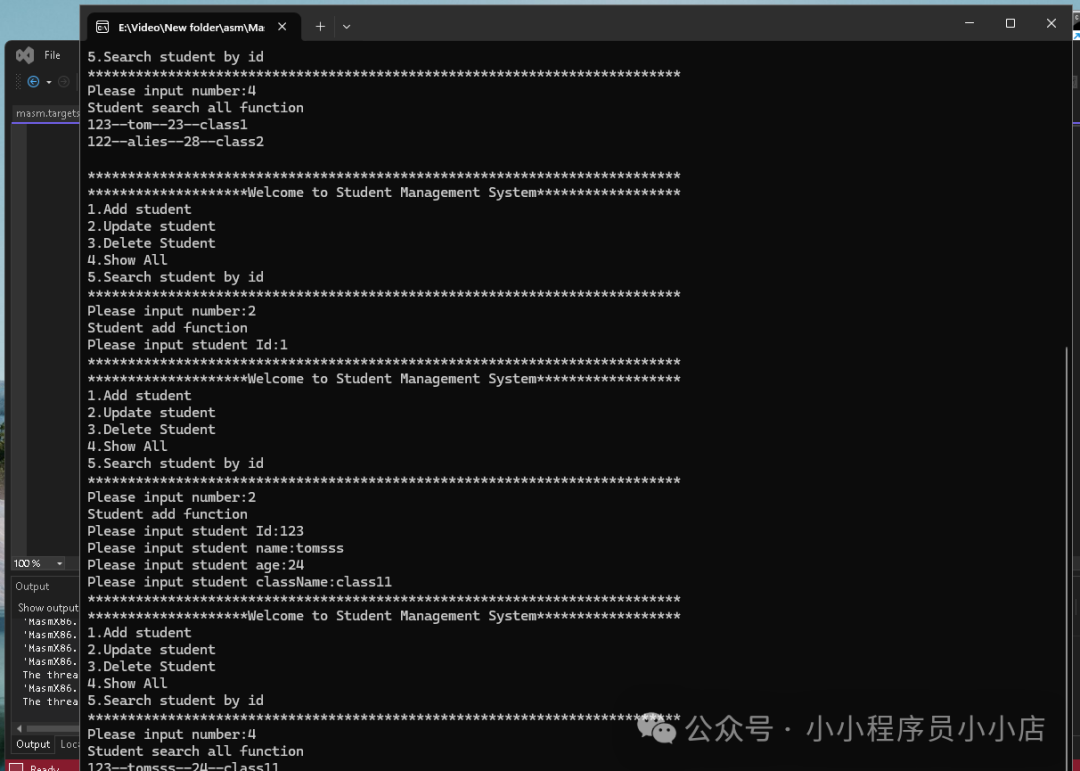
szFormatResult db "%d--%s--%d--%s", 0
strNewLine    db " ", 0Ah, 0

; 登录相关字符串
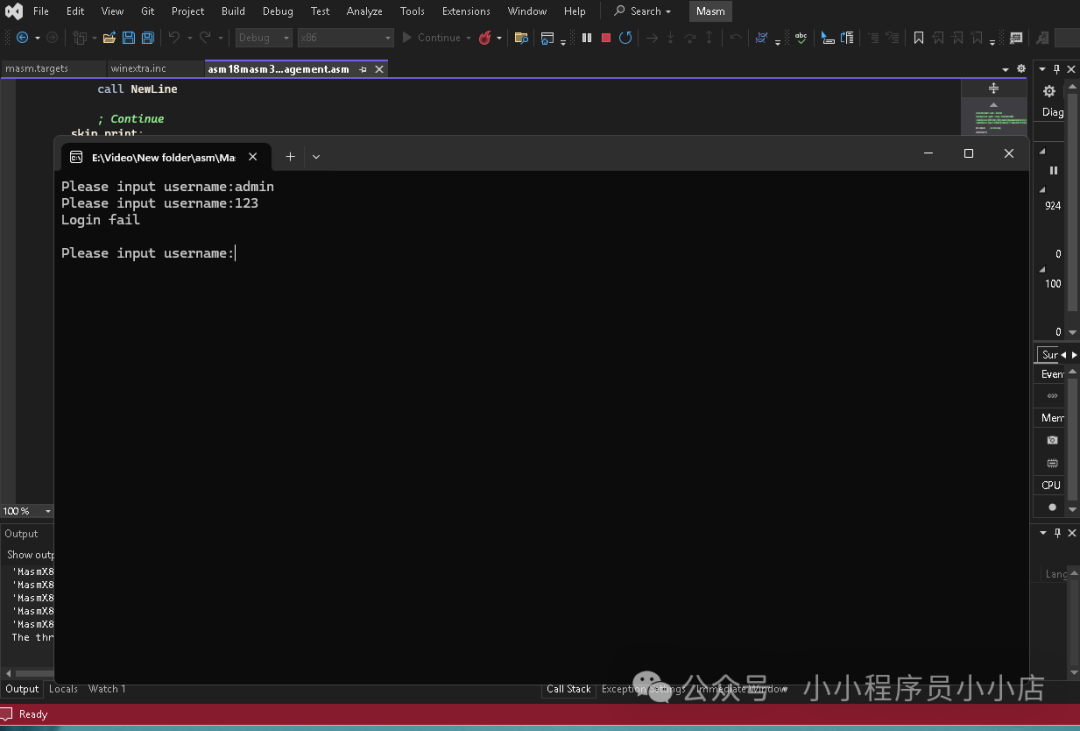
szLoginStr  db "Please input username:", 0
szLoginStr1 db "Please input pwd:", 0
szLoginStr2 db "Login fail", 0
szCurrectUserName db "admin", 0
szCurrectPWD      db "123456", 0
szUserInputUserName db 64 dup(0)
szUserInputPWD      db 64 dup(0)

; 主菜单字符串
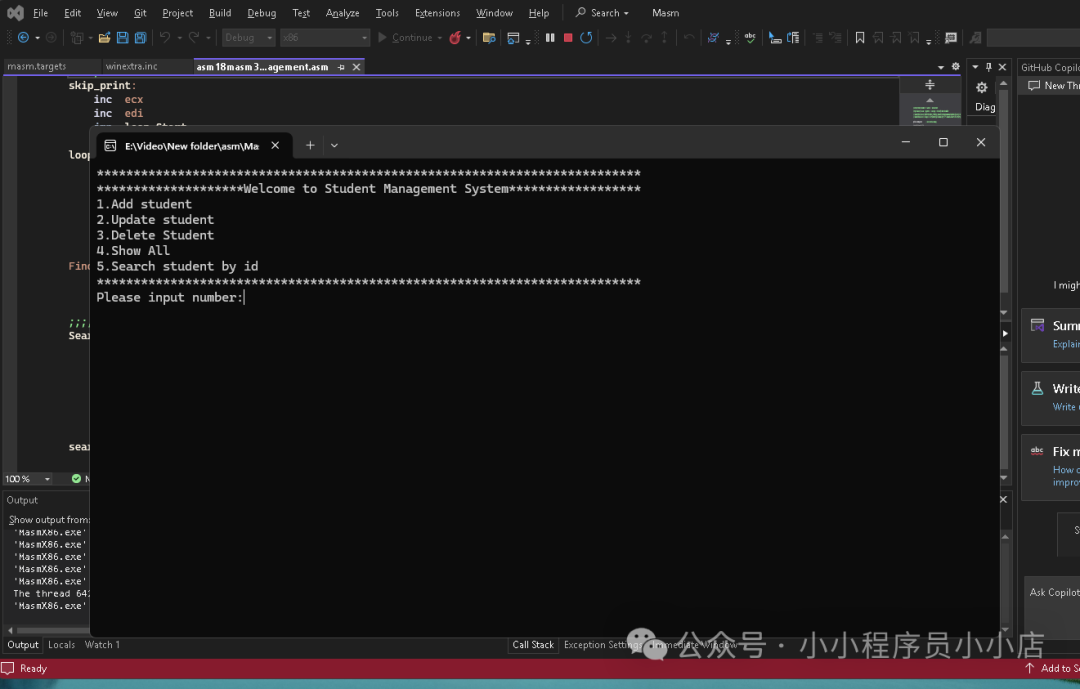
szMainStr db "**************************************************************************", 0Ah
          db "********************Welcome to Student Management System******************", 0Ah
          db "1.Add student", 0Ah
          db "2.Update student", 0Ah
          db "3.Delete Student", 0Ah
          db "4.Show All", 0Ah
          db "5.Search student by id", 0Ah
          db "**************************************************************************", 0Ah,0
szMainSelectNumberStr db "Please input number:", 0
szUserInputSelect   dd  ?

; 学生信息输入提示
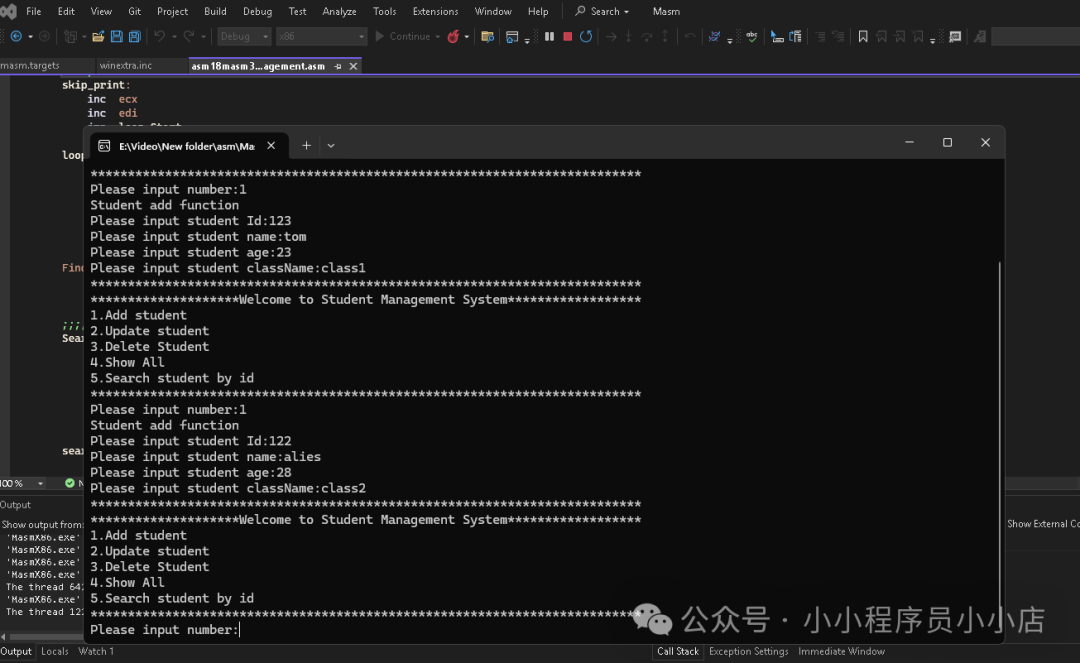
szStudentStr  db "Please input student Id:", 0
szStudentStr1 db "Please input student name:", 0
szStudentStr2 db "Please input student age:", 0
szStudentStr3 db "Please input student className:", 0

; 功能提示字符串
szStudentAddStr      db "Student add function", 0Ah,0
szStudentEditStr1    db "Student edit function", 0Ah,0
szStudentDeleteStr2  db "Student delete function", 0Ah,0
szStudentQueryStr    db "Student search all function", 0Ah,0
szStudentSearchStr4  db "Student search by id function", 0Ah,0
2. 工具函数与宏定义
在实现核心功能前,我们需要一些辅助函数,例如清屏、换行、清理输入缓冲区以及字符串比较。
.code

; 清屏过程
ClsScreen proc
    invoke  crt_system, addr clsCmd
    ret
ClsScreen endp

; 输出换行
NewLine PROC
    push offset strNewLine
    call crt_printf
    add esp, 4
    ret
NewLine ENDP

; 清理输入缓冲区(处理scanf留下的换行符)
ClearInputBuffer PROC
    push ebx
clear_loop:
    call crt_getchar
    cmp eax, 0Ah          ; 检查是否为换行符
    je clear_end
    cmp eax, -1           ; 检查EOF
    je clear_end
    jmp clear_loop
clear_end:
    pop ebx
    ret
ClearInputBuffer ENDP

; 字符串比较函数 (str1 in esi, str2 in edi, result in eax: 0相等, -1小于, 1大于)
StrCompare PROC
    push esi
    push edi
    push ebx
    cld
compare_loop:
    mov al, [esi]           ; AL = str1字节
    mov bl, [edi]           ; BL = str2字节
    cmp al, 0
    jz compare_end
    cmp bl, 0
    jz compare_end
    cmp al, bl
    jl compare_less
    jg compare_greater
    inc esi
    inc edi
    jmp compare_loop
compare_end:
    cmp al, bl
    jl compare_less
    jg compare_greater
    mov eax, 0              ; 相等
    jmp compare_exit
compare_less:
    mov eax, -1             ; str1 < str2
    jmp compare_exit
compare_greater:
    mov eax, 1              ; str1 > str2
compare_exit:
    pop ebx
    pop edi
    pop esi
    ret
StrCompare ENDP

; 宏:打印整数
PRINT_INT MACRO num
    push num
    push offset szFormat
    call crt_printf
    add esp, 8
ENDM

; 宏:打印字符串
PRINT_STRING MACRO msg
    push offset msg
    push offset szFormatStr
    call crt_printf
    add esp, 8
ENDM
3. 登录验证模块
系统首先要求用户登录,验证用户名和密码。
LoginCheck PROC
    push ebx
    xor ecx,ecx
    mov ecx,5               ; 最多尝试5次
login_Check:
    PRINT_STRING szLoginStr
    push offset szUserInputUserName
    push offset szFormatStr
    call crt_scanf
    add esp, 8
    call ClearInputBuffer   ; 清理缓冲区

    PRINT_STRING szLoginStr1
    push offset szUserInputPWD
    push offset szFormatStr
    call crt_scanf
    add esp, 8
    call ClearInputBuffer   ; 清理缓冲区

    ; 比较用户名
    mov esi, offset szCurrectUserName
    mov edi, offset szUserInputUserName
    call StrCompare
    cmp eax, 0
    je  pwd_check
    jmp login_error

pwd_check:
    ; 比较密码
    mov esi, offset szCurrectPWD
    mov edi, offset szUserInputPWD
    call StrCompare
    cmp eax, 0
    je exit_Login_Check     ; 登录成功

login_error:
    PRINT_STRING szLoginStr2
    call NewLine
    loop login_Check        ; ECX递减并循环

exit_Login_Check:
    pop ebx
    ret
LoginCheck ENDP
4. 核心CRUD功能实现
(1) 添加学生 (Create)
AddStudent PROC
    push ebp
    mov  ebp, esp
    push ebx
    push esi
    push edi
    PRINT_STRING szStudentAddStr

    ; 检查是否已满(50人)
    cmp  stuCount, STUDENT_COUNT
    jge  add_full

    ; 计算新学生在数组中的地址:基址 + 索引 * 结构体大小
    mov  ebx, stuCount
    mov  esi, offset Students
    imul ebx, ebx, SIZEOF StudentInfo ; 偏移量 = 索引 * (4+64+4+64)
    add  esi, ebx                     ; ESI = 当前学生结构体指针

    ; 输入学生ID
    PRINT_STRING szStudentStr
    lea  eax, [esi].StudentInfo.Id
    push eax
    push offset szFormat
    call crt_scanf
    add  esp, 8

    ; 输入学生姓名
    PRINT_STRING szStudentStr1
    lea  eax, [esi].StudentInfo.StuName
    push eax
    push offset szFormatStr
    call crt_scanf
    add  esp, 8

    ; 输入学生年龄
    PRINT_STRING szStudentStr2
    lea  eax, [esi].StudentInfo.Age
    push eax
    push offset szFormat
    call crt_scanf
    add  esp, 8

    ; 输入班级
    PRINT_STRING szStudentStr3
    lea  eax, [esi].StudentInfo.ClassID
    push eax
    push offset szFormatStr
    call crt_scanf
    add  esp, 8

    ; 学生计数加一
    inc  stuCount

add_full:
    pop  edi
    pop  esi
    pop  ebx
    mov  esp, ebp
    pop  ebp
    ret
AddStudent ENDP
(2) 更新学生信息 (Update)
EditStudent PROC
    push ebp
    mov  ebp, esp
    push ebx
    push esi
    push edi
    PRINT_STRING szStudentAddStr

edit_start:
    ; 输入要更新的学生ID
    PRINT_STRING szStudentStr
    lea  eax, stuId
    push eax
    push offset szFormat
    call crt_scanf
    add  esp, 8

    xor  ecx, ecx          ; 用ECX作为数组索引
    mov  edi,0
loop_start:
    cmp  edi, stuCount     ; 是否遍历完所有学生
    jge  loop_end

    ; 计算当前遍历到的学生地址
    mov  esi, offset Students
    imul ebx, ecx, SIZEOF StudentInfo
    add  esi, ebx

    mov  ebx, [esi].StudentInfo.Id
    cmp  ebx, stuId        ; 比较ID
    je   found             ; 找到则跳转

    inc  edi
    inc  ecx
    jmp  loop_start

found:
    ; 找到学生,更新其信息(流程同AddStudent)
    PRINT_STRING szStudentStr1
    lea  eax, [esi].StudentInfo.StuName
    push eax
    push offset szFormatStr
    call crt_scanf
    add  esp, 8

    PRINT_STRING szStudentStr2
    lea  eax, [esi].StudentInfo.Age
    push eax
    push offset szFormat
    call crt_scanf
    add  esp, 8

    PRINT_STRING szStudentStr3
    lea  eax, [esi].StudentInfo.ClassID
    push eax
    push offset szFormatStr
    call crt_scanf
    add  esp, 8

loop_end:
    pop  edi
    pop  esi
    pop  ebx
    mov  esp, ebp
    pop  ebp
    ret
EditStudent ENDP
(3) 删除学生 (Delete)
DeleteStudent PROC
    push ebp
    mov  ebp, esp
    push ebx
    push esi
    push edi
    PRINT_STRING szStudentAddStr

delete_start:
    ; 输入要删除的学生ID
    PRINT_STRING szStudentStr
    lea  eax, stuId
    push eax
    push offset szFormat
    call crt_scanf
    add  esp, 8

    xor  ecx, ecx
    mov  edi,0
loop_start:
    cmp  edi, stuCount
    jge  loop_end

    ; 计算学生地址
    mov  esi, offset Students
    imul ebx, ecx, SIZEOF StudentInfo
    add  esi, ebx

    mov  ebx, [esi].StudentInfo.Id
    cmp  ebx, stuId
    je   found

    inc  edi
    inc  ecx
    jmp  loop_start

found:
    ; 找到学生,将其数据清零(模拟删除)
    mov [esi].StudentInfo.Id, 0

    ; 清空姓名(用0填充缓冲区)
    lea edi, [esi].StudentInfo.StuName
    mov ecx, 64
    xor al, al
    rep stosb

    mov [esi].StudentInfo.Age, 0

    ; 清空班级
    lea edi, [esi].StudentInfo.ClassID
    mov ecx, 64
    xor al, al
    rep stosb

    ; 学生总数减一,并重置临时ID
    dec stuCount
    mov stuId,0

loop_end:
    pop  edi
    pop  esi
    pop  ebx
    mov  esp, ebp
    pop  ebp
    ret
DeleteStudent ENDP
(4) 查询所有学生 (Read - All)
FindStudentAll PROC
    push ebp
    mov  ebp, esp
    push ebx
    push esi
    push edi
    push ecx

    push offset szStudentQueryStr
    call crt_printf
    add  esp, 4

    mov  edi,0                ; 数组索引
loop_Start:
    cmp  edi, stuCount
    jge  loop_End

    ; 计算学生地址
    mov  esi, offset Students
    imul ebx, edi, SIZEOF StudentInfo
    add  esi, ebx

    ; 跳过已删除的学生(ID为0)
    cmp  [esi].StudentInfo.Id, 0
    je   skip_print

    ; 按照格式打印学生信息:ID--姓名--年龄--班级
    lea  eax, [esi].StudentInfo.ClassID
    push eax
    mov  eax, [esi].StudentInfo.Age
    push eax
    lea  eax, [esi].StudentInfo.StuName
    push eax
    mov  ebx, [esi].StudentInfo.Id
    push ebx
    push offset szFormatResult
    call crt_printf
    add  esp, 20
    call NewLine

skip_print:
    inc  edi
    jmp  loop_Start

loop_End:
    pop  ecx
    pop  edi
    pop  esi
    pop  ebx
    mov  esp, ebp
    pop  ebp
    ret
FindStudentAll ENDP
(5) 按ID查询学生 (Read - By ID)
SearchStudentById PROC
    push ebp
    mov  ebp, esp
    push ebx
    push esi
    push edi
    PRINT_STRING szStudentAddStr

search_start:
    ; 输入要查询的学生ID
    PRINT_STRING szStudentStr
    lea  eax, stuId
    push eax
    push offset szFormat
    call crt_scanf
    add  esp, 8

    xor  ecx, ecx
    mov  edi,0
loop_start:
    cmp  edi, stuCount
    jge  loop_end

    ; 计算学生地址
    mov  esi, offset Students
    imul ebx, ecx, SIZEOF StudentInfo
    add  esi, ebx

    mov  ebx, [esi].StudentInfo.Id
    cmp  ebx, stuId
    je   found

    inc  edi
    inc  ecx
    jmp  loop_start

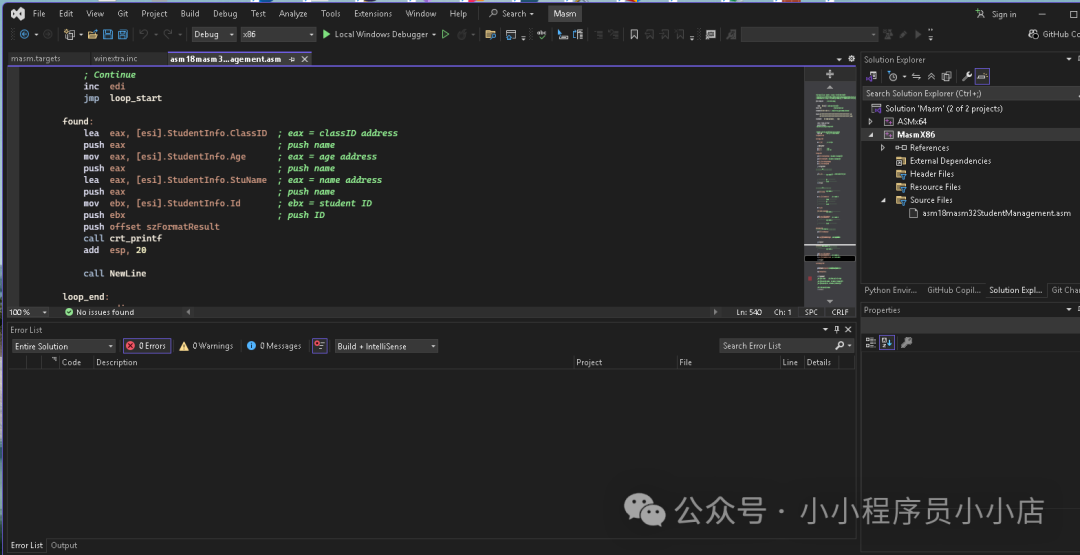
found:
    ; 找到学生,打印其信息
    lea  eax, [esi].StudentInfo.ClassID
    push eax
    mov  eax, [esi].StudentInfo.Age
    push eax
    lea  eax, [esi].StudentInfo.StuName
    push eax
    mov  ebx, [esi].StudentInfo.Id
    push ebx
    push offset szFormatResult
    call crt_printf
    add  esp, 20
    call NewLine

loop_end:
    pop  edi
    pop  esi
    pop  ebx
    mov  esp, ebp
    pop  ebp
    ret
SearchStudentById ENDP
5. 主程序入口与菜单循环
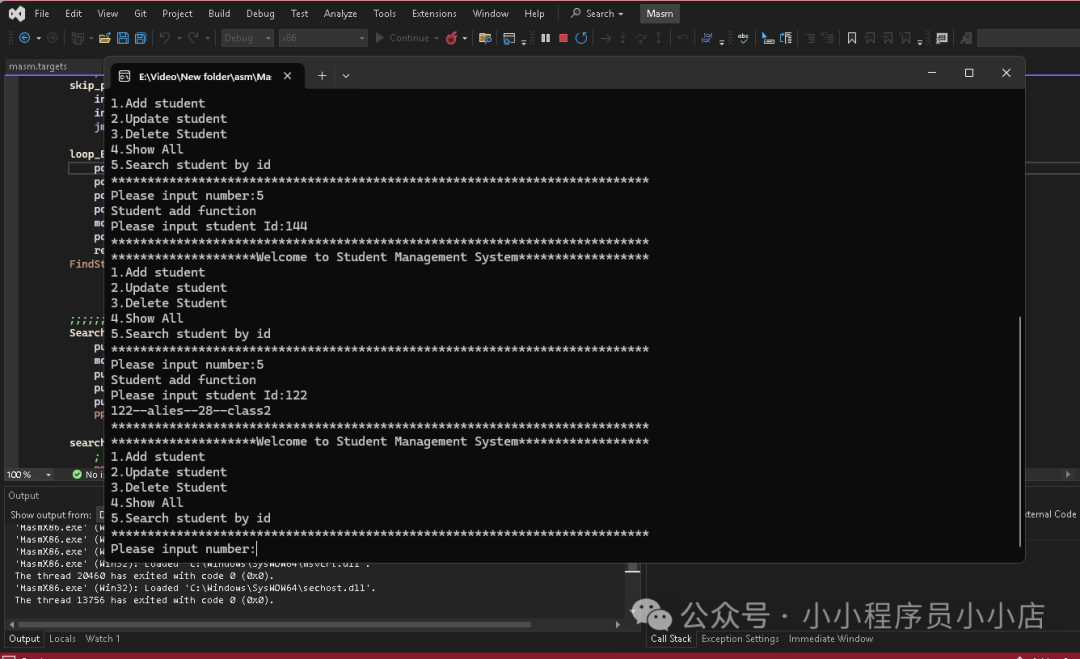
所有功能模块准备就绪后,主程序负责调用登录验证,并呈现一个循环菜单,根据用户输入调用相应的功能。
_mainCRTStartup PROC
    ; 1. 登录验证
    call LoginCheck
    call ClsScreen    ; 登录成功后清屏

main_student:
    ; 2. 显示主菜单
    PRINT_STRING szMainStr
    PRINT_STRING szMainSelectNumberStr

    ; 3. 获取用户选择(1-5)
    push offset szUserInputSelect
    push offset szFormat
    call crt_scanf
    add esp, 8

    ; 4. 根据选择跳转到对应功能
    cmp szUserInputSelect,1
    je  option1
    cmp szUserInputSelect,2
    je  option2
    cmp szUserInputSelect,3
    je  option3
    cmp szUserInputSelect,4
    je  option4
    cmp szUserInputSelect,5
    je  option5
    ; 这里可以添加默认处理或错误提示

option1:
    call AddStudent
    jmp  main_student  ; 返回主菜单
option2:
    call EditStudent
    jmp  main_student
option3:
    call DeleteStudent
    jmp  main_student
option4:
    call FindStudentAll
    jmp  main_student
option5:
    call SearchStudentById
    jmp  main_student

ExitProgram:
    push 0
    call ExitProcess   ; 退出程序(本例中菜单循环未提供退出选项,可自行添加)

_mainCRTStartup ENDP
END _mainCRTStartup
三、总结与展望
通过这个完整的x86汇编学生管理系统项目,我们实践了从数据结构定义、内存操作、流程控制到模块化编程的全过程。这不仅巩固了汇编语法,更重要的是培养了底层编程的思维方式——如何在没有高级语言抽象的情况下,亲自管理每一个字节和寄存器。
你可以在此基础上进行扩展,例如:
- 将静态数组改为动态链表,实现更灵活的内存管理。
- 增加文件I/O操作,将学生数据持久化保存到磁盘。
- 优化用户界面,提供更友好的交互提示。
- 为删除功能实现逻辑删除与物理删除的选项。
希望这个案例能帮助你更好地理解汇编语言的威力与美感。编程的乐趣在于创造,即使是在最接近硬件的层面。欢迎在云栈社区分享你的实现改进或提出遇到的问题。
 发表于 2026-4-23 02:03:34
|
查看: 361|
回复: 0
发表于 2026-4-23 02:03:34
|
查看: 361|
回复: 0

