LangGraph 拥有一个内置的持久化层,是通过 checkpointer 实现的。当使用 checkpointer 编译 Graph 时,checkpointer 会为 thread 在每个 Super-step 后保存一个类型为 StateSnapshot 的 checkpoint,记录线程级别图的状态。这使得开发者可以利用 checkpoint 执行图的重放或更新状态,这一机制在构建复杂的 人工智能 Agent 时尤为重要。
线程 Thread
线程必须有唯一标识符,该标识符由 checkpointer 保存到 checkpoint 检查点中,用以标识检查点属于哪一个线程。线程信息存放在 RunnableConfig 对象中,必须指定 thread_id 属性,并在 graph 执行时使用。
config: RunnableConfig = {"configurable": {"thread_id": "1"}}
graph.invoke({"foo": "", "bar":[]}, config)
检查点 Checkpoints
检查点是线程级别的,类型为 StateSnapshot,在每个 Super-step 后由 checkpointer 保存。 它会被持久化,可以用来在以后恢复线程的状态,是实现状态可追溯和管理的基础功能。
通过 get_state 函数可以获取线程的检查点。
# 获取线程最后一个检查点
config = {"configurable": {"thread_id": "1"}}
graph.get_state(config)

# 获取线程某一个检查点,需要指定checkpoint_id
config = {"configurable": {"thread_id": "1", "checkpoint_id": "1ef663ba-28fe-6528-8002-5a559208592c"}}
graph.get_state(config)
通过 get_state_history 可以获取历史检查点列表,便于进行审计或回滚分析。
config = {"configurable": {"thread_id": "1"}}
list(graph.get_state_history(config))
我们可以重放(重新执行)某一检查点之后的所有步骤,而检查点之前的步骤则不会执行。这在调试和修复特定步骤的问题时非常有用。
config = {"configurable”: {“thread_id”: “1”, “checkpoint_id”: “0c62ca34-ac19-445d-bbb0-5b4984975b2a”}}
graph.invoke(None, config=config)
通过 update_state 函数可以编辑状态。它接受 3 个参数,分别是 config、values 和 as_node。
config:必须包含 thread_id 属性。如果只有 thread_id 属性,编辑的是当前(最终)的状态;如果包含 checkpoint_id 属性,编辑的是对应检查点的状态。values:用于更新状态的数据。这里需要注意状态属性的更新逻辑:如果状态中要更新的属性定义了 reducer 函数,值将会传递给 reducer 函数;没有设置 reducer 函数的属性,则会被直接覆盖。
from typing import Annotated
from typing_extensions import TypedDict
from operator import add

class State(TypedDict):
    foo: int
    bar: Annotated[list[str], add] # 定义了 reducer 函数

# 假设当前(最终)状态 {"foo": 1, "bar": ["a"]}

# 更新最终状态
graph.update_state(config, {"foo": 2, "bar": ["b"]})
# 结果为 {"foo": 2, “bar”: ["a", “b"]} ,foo 属性被直接覆盖,bar属性由 reducer 函数 add 处理
as_node:这个参数提供了强大的模拟能力。如果指定了 as_node,可以模拟特定节点的输出,并根据模拟节点的输出边决定图的下一个执行节点。
# 假设当前图停留在 'human_review' 节点之后
# 我们想要更新状态,并让图认为这是从 'agent' 节点发出的更新
config = {"configurable”: {“thread_id”: “1”, “checkpoint_id”: “…”}}

graph.update_state(
    config,
    {“messages”: [HumanMessage(content=“Looks good!”)]},
    as_node=“agent”  # 模拟 agent 节点更新了状态
)

# 此时调用 graph.invoke(None, config)
# 图会根据 ‘agent’ 节点的输出边(edges)来决定下一步去哪里
掌握这些状态操作方法,你就能更灵活地控制 LangGraph 的运行流程,这些高级特性在构建 技术文档 中描述的复杂编排逻辑时尤其关键。
内存存储 Memory Store
检查点是线程级别的,这意味着它无法在多个线程中共享数据。设想一个场景:同一个用户开启了两个独立的会话线程,如果希望在这两个线程间共享某些数据(如用户偏好、历史信息),就需要使用 Store 来存储数据。
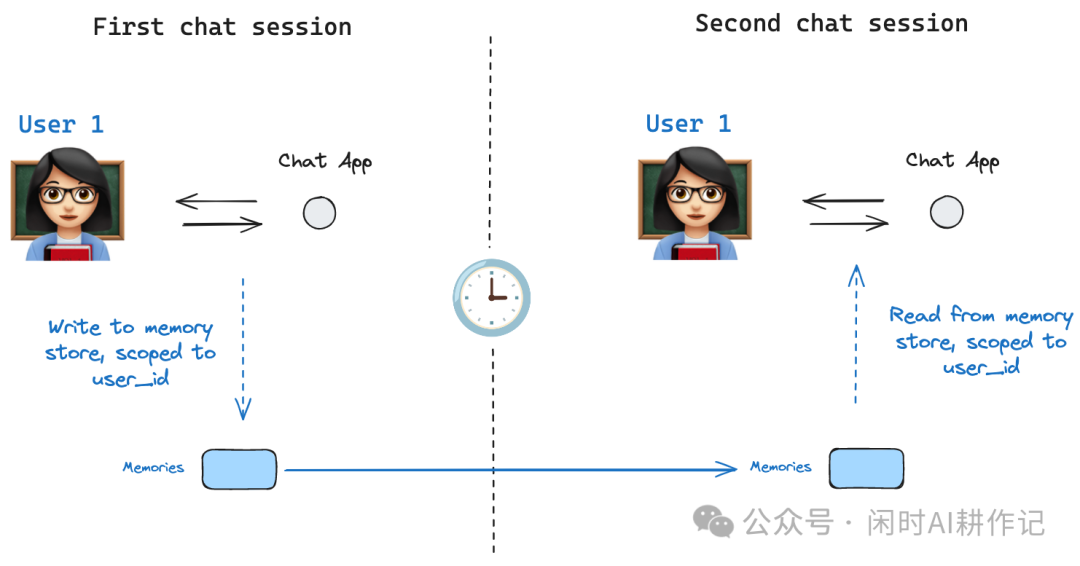
基础用法
from langgraph.store.memory import InMemoryStore
import uuid

# 创建store
in_memory_store = InMemoryStore()

# 创建用户的 命名空间
user_id = “1”
namespace_for_memory = (user_id, “memories”)

# 存储数据
memory_id = str(uuid.uuid4())
memory = {“food_preference” : “I like pizza”}
in_memory_store.put(namespace_for_memory, memory_id, memory)

# 取出数据
memories = in_memory_store.search(namespace_for_memory)
# 拿到最后一条
memories[-1].dict()
#{'value': {'food_preference': 'I like pizza'},
#'key': '07e0caf4-1631-47b7-b15f-65515d4c1843',
#'namespace': ['1', 'memories'],
#'created_at': '2026-01-16T13:22:31.590602+08:00',
#'updated_at': '2026-01-16T13:22:31.590605+08:00'}
语义搜索
若需进行语义搜索,则需使用 Embedding 模型。在创建 store 时通过 index 属性进行配置。
from langchain.embeddings import init_embeddings

# 创建 store
store = InMemoryStore(
    index={
        “embed”: init_embeddings(“openai:text-embedding-3-small”),  # Embedding 模型
        “dims”: 1024,                                               # Embedding 维度
        “fields”: [“food_preference”, “$”]                          # 需要向量化的字段
    }
)

# 保存数据
store.put(
    namespace_for_memory,
    str(uuid.uuid4()),
    {
        “food_preference”: “I love Italian cuisine”,
        “context”: “Discussing dinner plans”
    },
    index=[“food_preference”]  # 只向量化 food_preference 字段
)

# 搜索
memories = store.search(
    namespace_for_memory,
    query=“What does the user like to eat?”,
    limit=3  # Return top 3 matches
)
在 LangGraph 中使用 Store
在 LangGraph 中启用 store,需要在编译图时传入 store 参数,并在执行配置 config 中增加 user_id 属性。在节点函数中,则需要添加 store: BaseStore 参数以访问存储。
from langgraph.store.memory import InMemoryStore
from langgraph.checkpoint.memory import InMemorySaver
from langgraph.store.base import BaseStore

checkpointer = InMemorySaver()
in_memory_store = InMemoryStore()

graph = graph.compile(checkpointer=checkpointer, store=in_memory_store)

# 增加 user_id 属性
user_id = “1”
config = {“configurable”: {“thread_id”: “1”, “user_id”: user_id}}

# 节点中使用
def call_model(state: MessagesState, config: RunnableConfig, *, store: BaseStore):
    # 1. 从 config 中获取 user_id
    user_id = config[“configurable”][“user_id”]

    # 2. 组装 namespace
    namespace = (user_id, “memories”)

    # 3. 搜索数据(例如,用于RAG应用)
    memories = store.search(
        namespace,
        query=state[“messages”][-1].content,
        limit=3
    )
    info = “\n”.join([d.value[“memory”] for d in memories])
    # ... 后续处理逻辑
通过结合 Checkpointer 和 Store,LangGraph 提供了灵活而强大的状态持久化与跨线程数据共享方案,是构建有记忆、可恢复、支持多会话的智能 Agent 应用的核心。想了解更多此类实战技巧,欢迎在 云栈社区 与更多开发者交流探讨。
 发表于 2026-1-17 00:26:00
|
查看: 309|
回复: 0
发表于 2026-1-17 00:26:00
|
查看: 309|
回复: 0

