最近,网上有一个利用AI模型将户型图秒变3D实景的玩法非常流行。只需将平面设计图上传,AI就能在严格遵守原始户型、尺寸和设计的前提下,快速生成精装修效果图。对于行业从业者而言,这可以作为一种高效的生产级方案;对于普通用户,也能轻松体验一把室内设计师的感觉。今天,我们就基于LiblibAI平台,完整复现并测试这套“一站式”工作流。

核心工具:LiblibAI 全能图片模型V2-Flash
我们这次实操的核心是LiblibAI平台的“全能图片模型 V2-Flash”。这个平台的优势在于无需复杂配置,打开网页就能使用,并且整合了从图片生成到视频特效的多种AIGC创作功能。
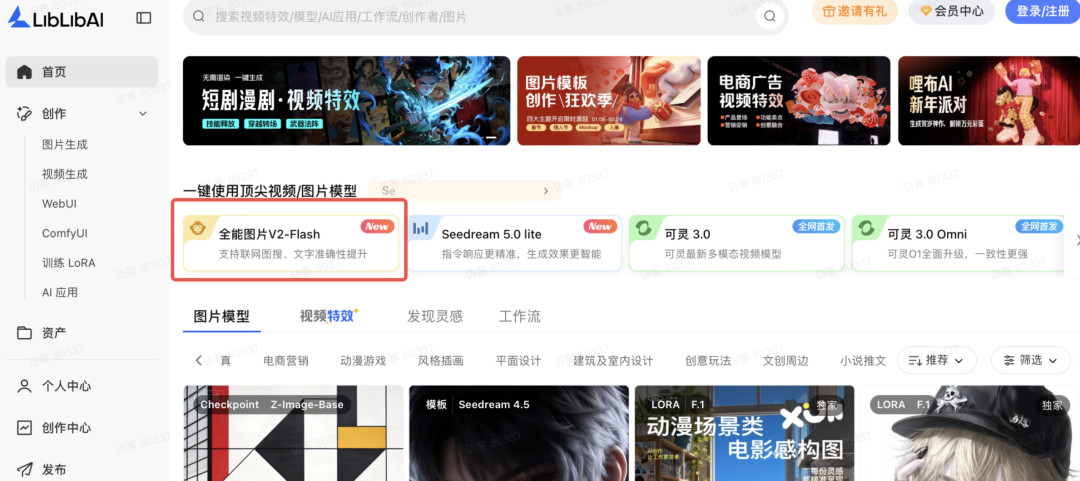
操作的核心思路非常简单:上传一张平面设计图纸,通过精准的提示词引导,生成完全遵循原图尺寸、比例、墙体及门窗位置的现代风格实景渲染图。
案例实操:户型图秒变精装房
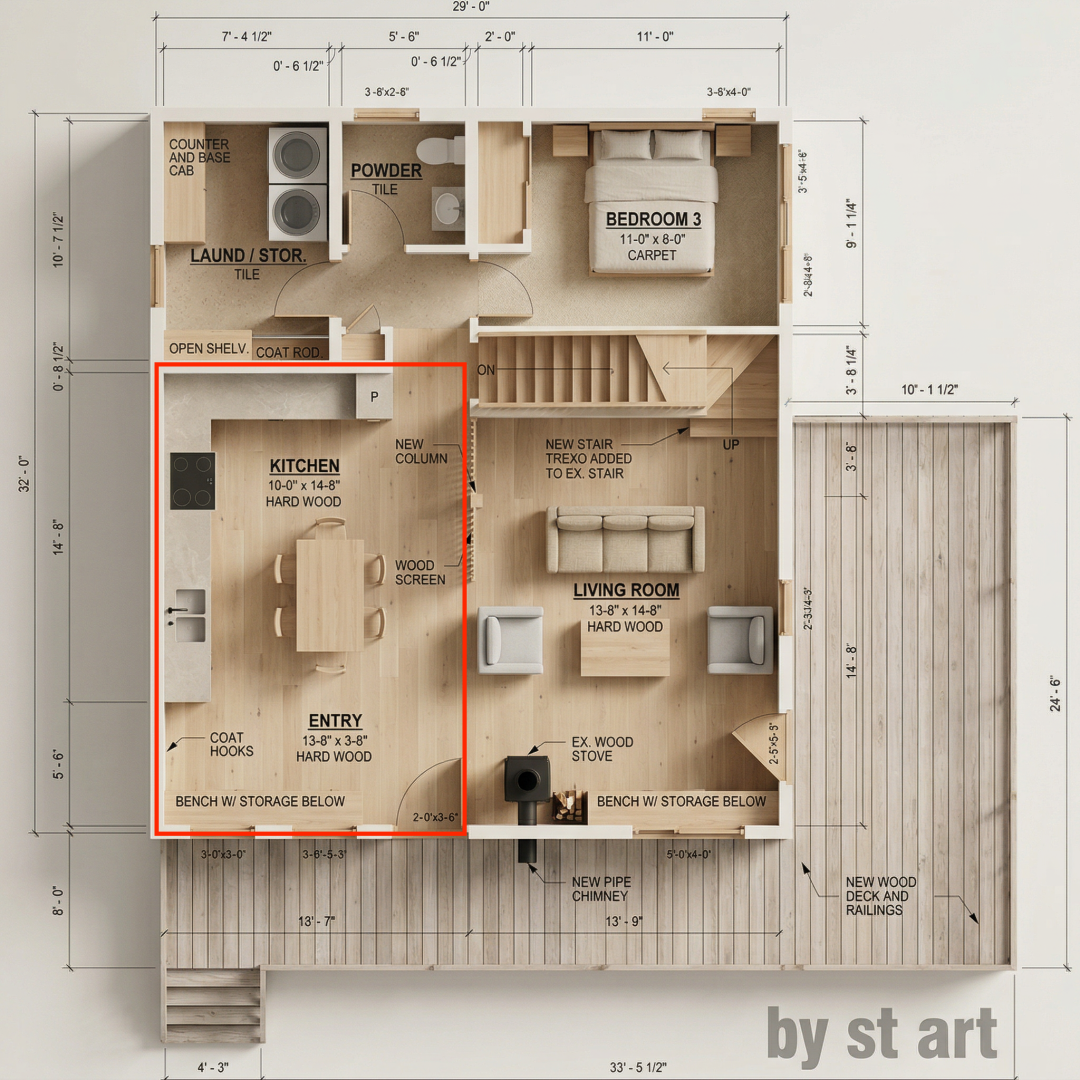
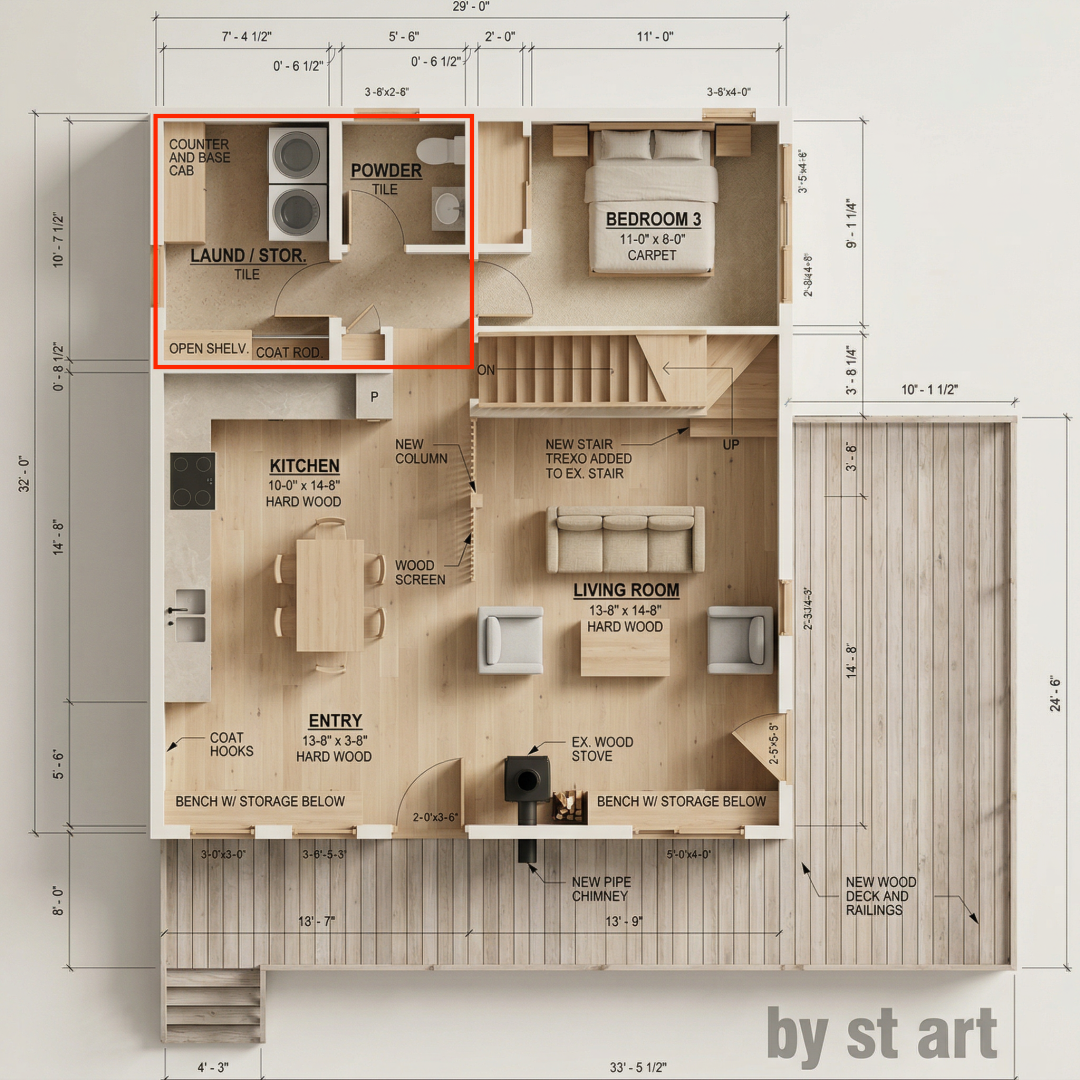
首先,我们准备一张详细的房屋平面设计图作为输入。
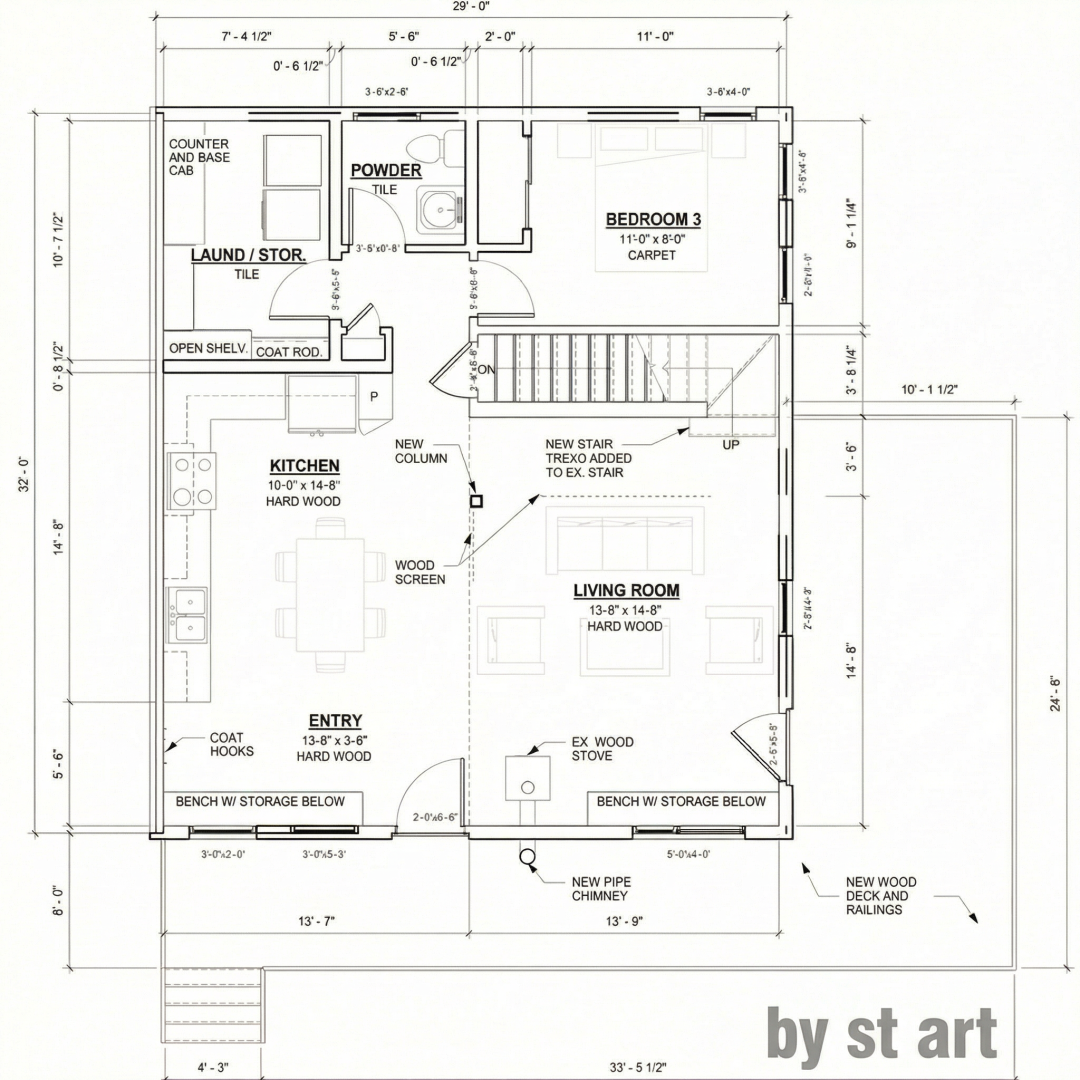
基础操作步骤:
- 打开 LiblibAI 首页,进入图片生成功能。
- 上传你的户型设计图。
- 在模型选择中,找到并选择“全能图片模型 V2-Flash”。
- 在提示词输入框中,输入详细的生成指令。经过测试,使用英文提示词通常能获得更精准的指令遵循效果。
案例一:生成全局90°正交俯视图
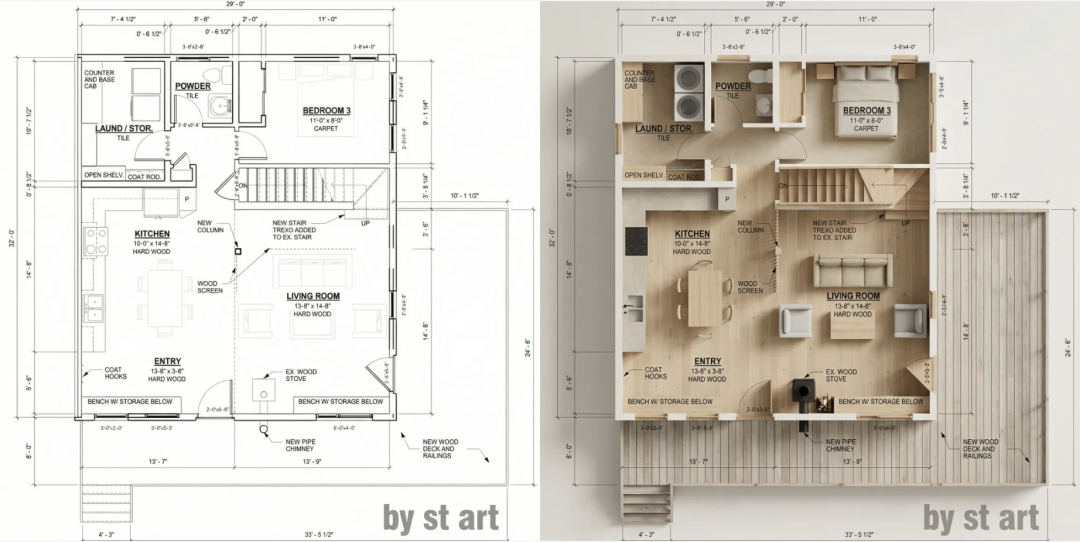
这个步骤的目标是获得一张鸟瞰整个公寓布局的渲染图,要求透视为零,严格正交。
提示词概要(中文): 分析提供的户型图,生成整个公寓的逼真俯视(90度正交)渲染图,保持与图示完全相同的尺寸、比例、墙壁、门、窗户和家具布置。不要改变布局、比例或方向。风格:现代日式(Japandi)。浅色天然木材,温暖的中性色调,极简家具,干净线条。建筑可视化风格,超写实材质。
【英文提示词】
Analyze the provided floor plan and generate a photorealistic top-down (true 90° orthographic) rendering of the entire apartment, keeping the exact same dimensions, proportions, walls, doors, windows, and furniture placement as shown. Do not change layout, scale, or orientation. Style: Modern Japanese (Japandi) light natural wood, warm neutral tones (beige, off-white, soft gray), minimalist furniture, clean lines, built-in cabinetry, stone or microcement surfaces, matte black accents, soft natural daylight. Architectural visualization style, ultra-realistic materials, no perspective distortion, no added or removed elements.
生成效果:
模型成功输出了与平面图布局完全一致的俯视渲染图,将黑白线条图纸转换为了具有材质和光影的立体空间。
案例二:指定房间的精细化渲染
在获得全局图后,我们可以针对特定房间进行精细化渲染。这里的关键是:上传上一步生成的图像,并在图中用红色框明确标出你想要渲染的区域。这样,V2-Flash 模型就能准确理解你的意图,其出色的空间一致性能力可以保证渲染结果与全局图完美衔接。你甚至可以指定具体的光影氛围,例如“温暖的日落时分”。
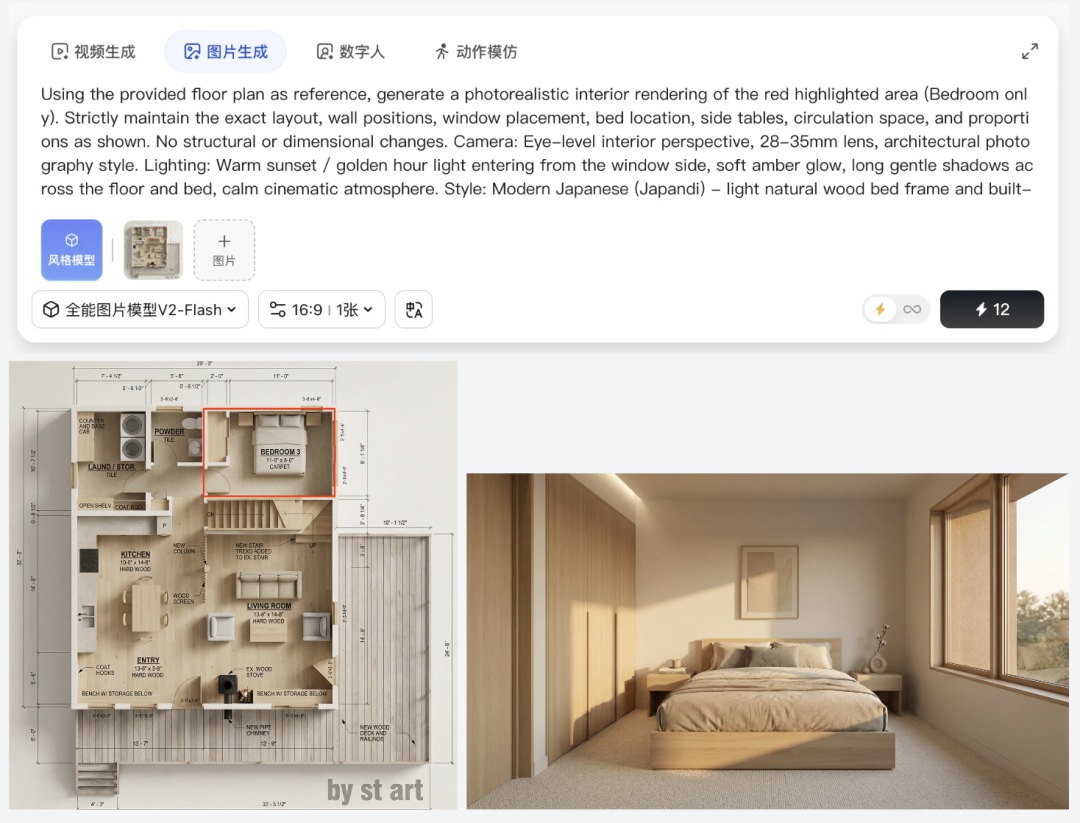
1. 卧室渲染
首先,在全局图中用红框标出卧室区域。
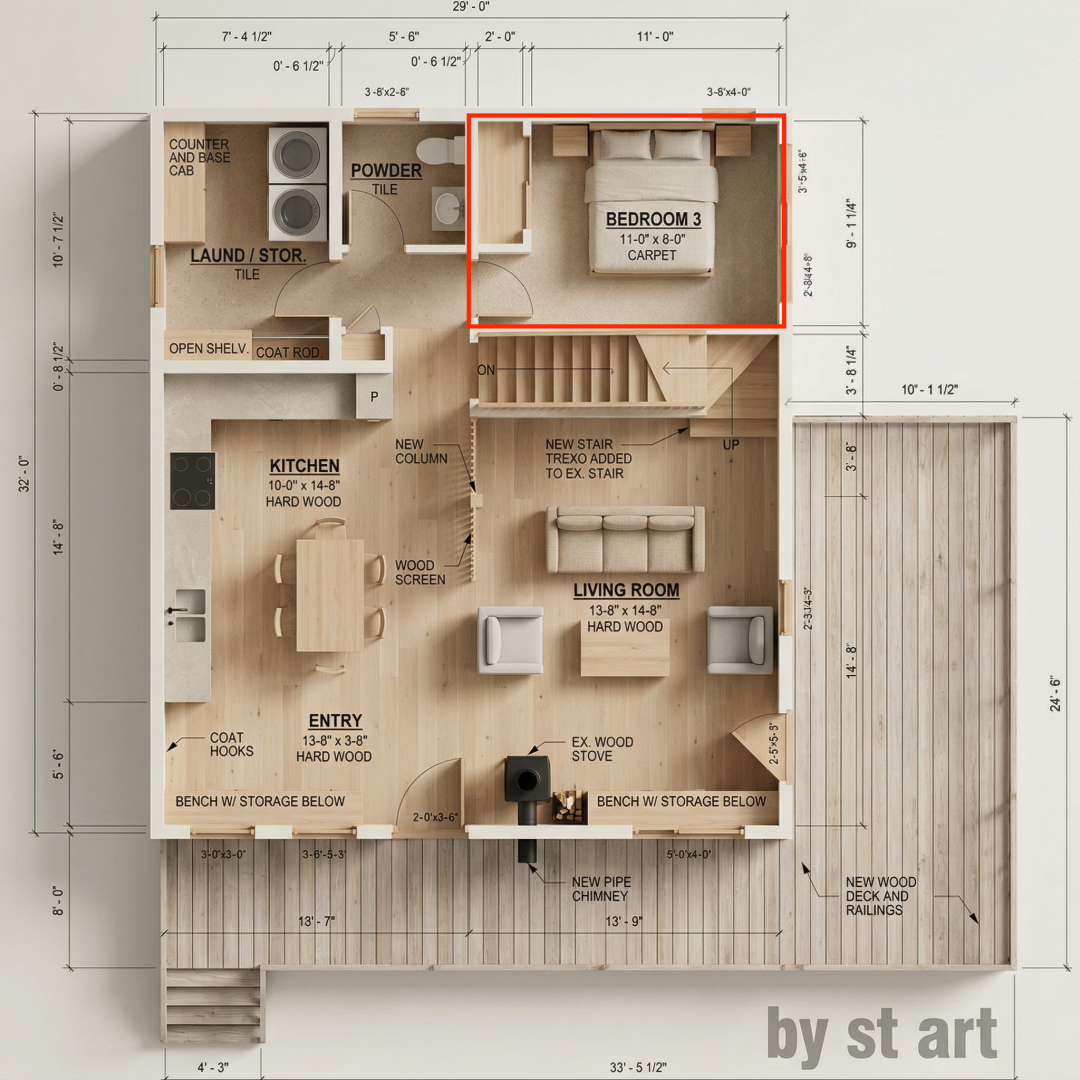
提示词概要(中文): 以提供的户型图为参考,生成红色高亮区域(仅限卧室)的逼真室内渲染图。严格保持与图示完全相同的布局、墙体位置、窗户位置、床和边桌位置。视角:人眼高度的室内透视,28-35mm镜头,建筑摄影风格。光照:温暖的日落光线从窗户进入,柔和的琥珀色光辉,在地板和床上投下长而柔和的阴影。风格:现代日式(Japandi)——浅色天然木材床架和内置家具,温暖中性色调的床品。
【英文提示词】
Using the provided floor plan as reference, generate a photorealistic interior rendering of the red highlighted area (Bedroom only). Strictly maintain the exact layout, wall positions, window placement, bed location, side tables, circulation space, and proportions as shown. No structural or dimensional changes. Camera: Eye-level interior perspective, 28-35mm lens, architectural photography style. Lighting: Warm sunset / golden hour light entering from the window side, soft amber glow, long gentle shadows across the floor and bed, calm cinematic atmosphere. Style: Modern Japanese (Japandi) - light natural wood bed frame and built-ins, warm neutral bedding (beige, cream, soft gray), minimalist decor, low-profile furniture, natural textures (linen, wood grain), soft indirect lighting. Ultra-realistic materials, soft global illumination, accurate shadows, no distortion, no added elements.
生成效果:
模型生成了一张充满宁静电影感的卧室效果图,光影和材质细节都非常出色。
2. 厨房与玄关渲染
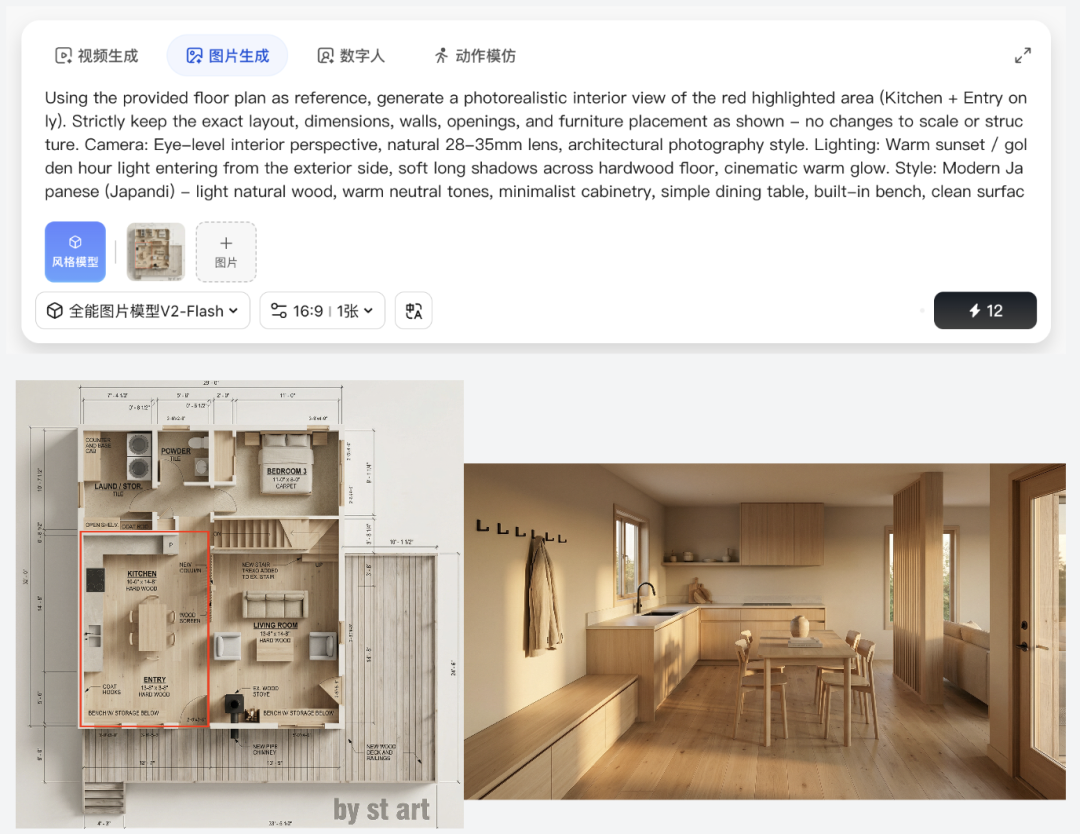
同样的方法,标出厨房和入口区域。
提示词概要(中文): 以提供的户型图为参考,生成红色高亮区域(仅限厨房和玄关)的逼真室内渲染图。严格保持完全相同的布局、尺寸和家具位置。视角:人眼高度的室内透视。光照:温暖的日落光线从外部进入,在硬木地板上投下长长的柔和阴影,带有电影感的温暖光晕。风格:现代日式(Japandi)——浅色天然木材,温暖中性色调,极简橱柜。
【英文提示词】
Using the provided floor plan as reference, generate a photorealistic interior view of the red highlighted area (Kitchen + Entry only). Strictly keep the exact layout, dimensions, walls, openings, and furniture placement as shown - no changes to scale or structure. Camera: Eye-level interior perspective, natural 28-35mm lens, architectural photography style. Lighting: Warm sunset / golden hour light entering from the exterior side, soft long shadows across hardwood floor, cinematic warm glow. Style: Modern Japanese (Japandi) - light natural wood, warm neutral tones, minimalist cabinetry, simple dining table, built-in bench, clean surfaces, matte black accents. Ultra-realistic materials, soft global illumination, no distortion, no added elements.
生成效果:
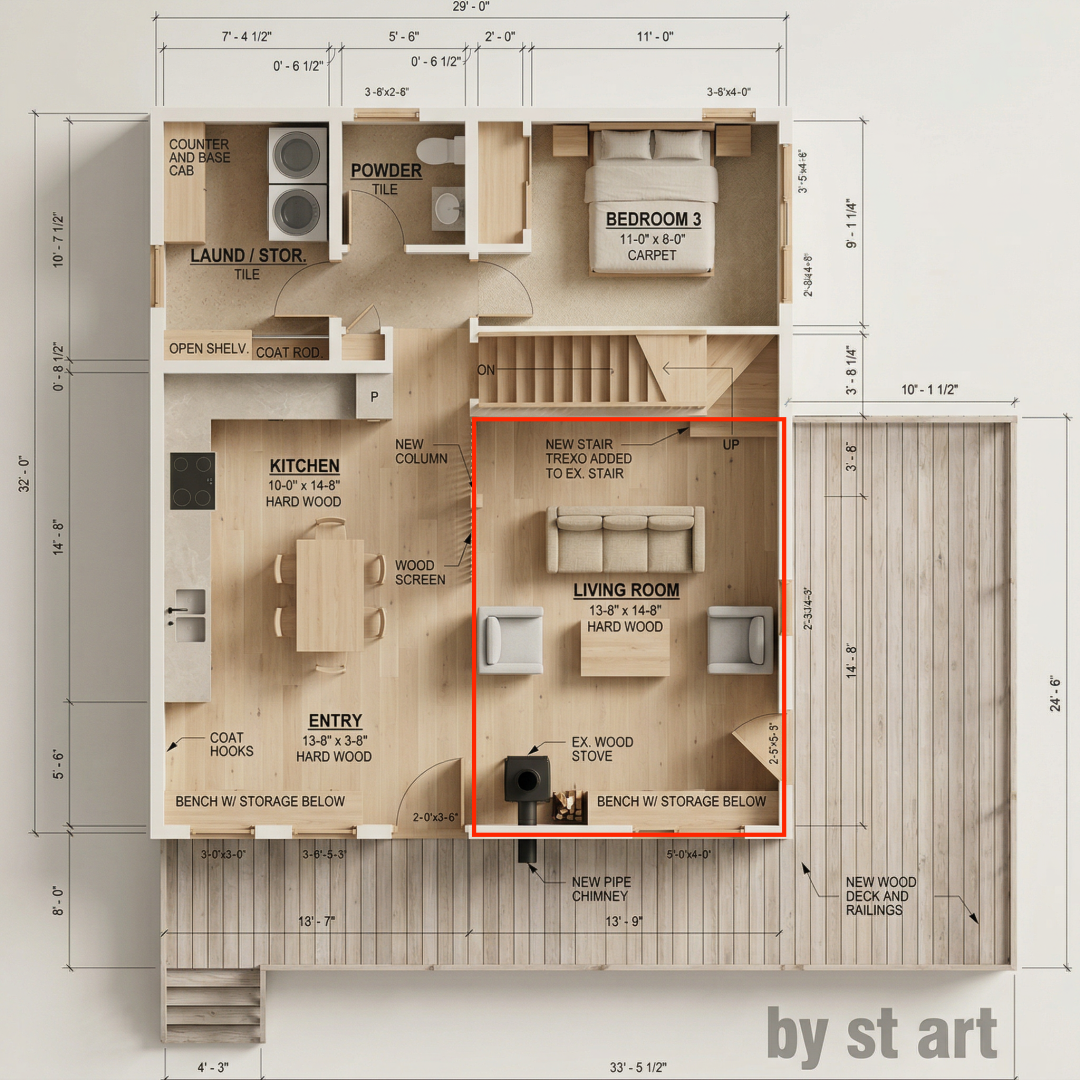
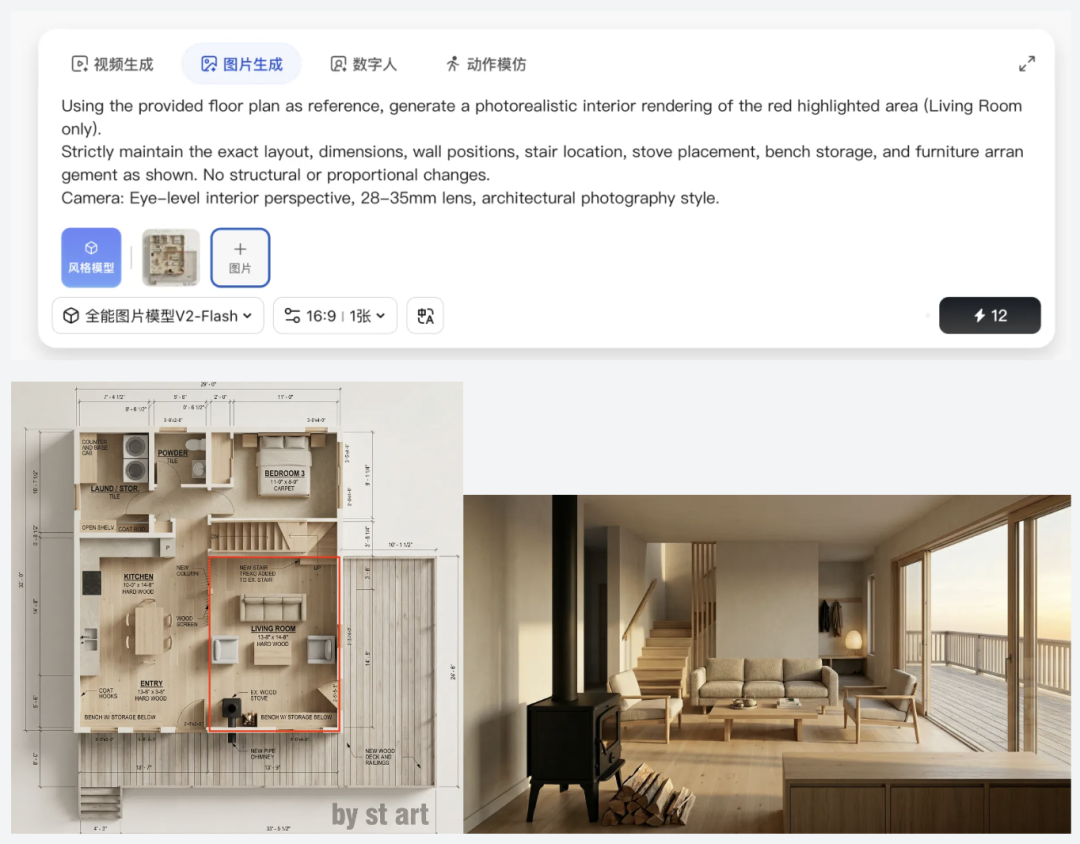
3. 客厅渲染
标出客厅区域。
提示词:
Using the provided floor plan as reference, generate a photorealistic interior rendering of the red highlighted area (Living Room only).
Strictly maintain the exact layout, dimensions, wall positions, stair location, stove placement, bench storage, and furniture arrangement as shown. No structural or proportional changes.
Camera: Eye-level interior perspective, 28-35mm lens, architectural photography style.
Lighting: Warm sunset / golden hour light entering from the deck side, casting long soft shadows across the hardwood floor, cozy cinematic glow.
Style: Modern Japanese (Japandi) - light natural wood tones, neutral beige palette, minimalist sofa and chairs, low coffee table, clean lines, matte black accents, soft natural textures.
Ultra-realistic materials, soft global illumination, accurate shadows, no distortion, no added elements.
生成效果:
4. 洗漱区渲染
最后,处理卫生间和储物区。
提示词:
Using the provided floor plan as reference, generate a photorealistic interior rendering of the red highlighted area (Powder room + closet/open shelf area only).
Strictly maintain the exact layout, wall positions, door swing, shelving placement, toilet and sink position, and dimensions as shown. No structural or proportional changes.
Camera: Eye-level interior perspective, 28-35mm lens, realistic architectural photography.
Lighting: Warm sunset light softly entering from adjacent spaces, subtle golden glow with gentle shadows, calm and cozy atmosphere.
Style: Modern Japanese (Japandi) - light natural wood shelving, minimalist vanity, neutral stone or microcement surfaces, warm beige and soft gray palette, matte black or brushed metal fixtures, clean and uncluttered design.
Ultra-realistic materials, soft global illumination, accurate shadows, no distortion, no added or removed elements.
生成效果:
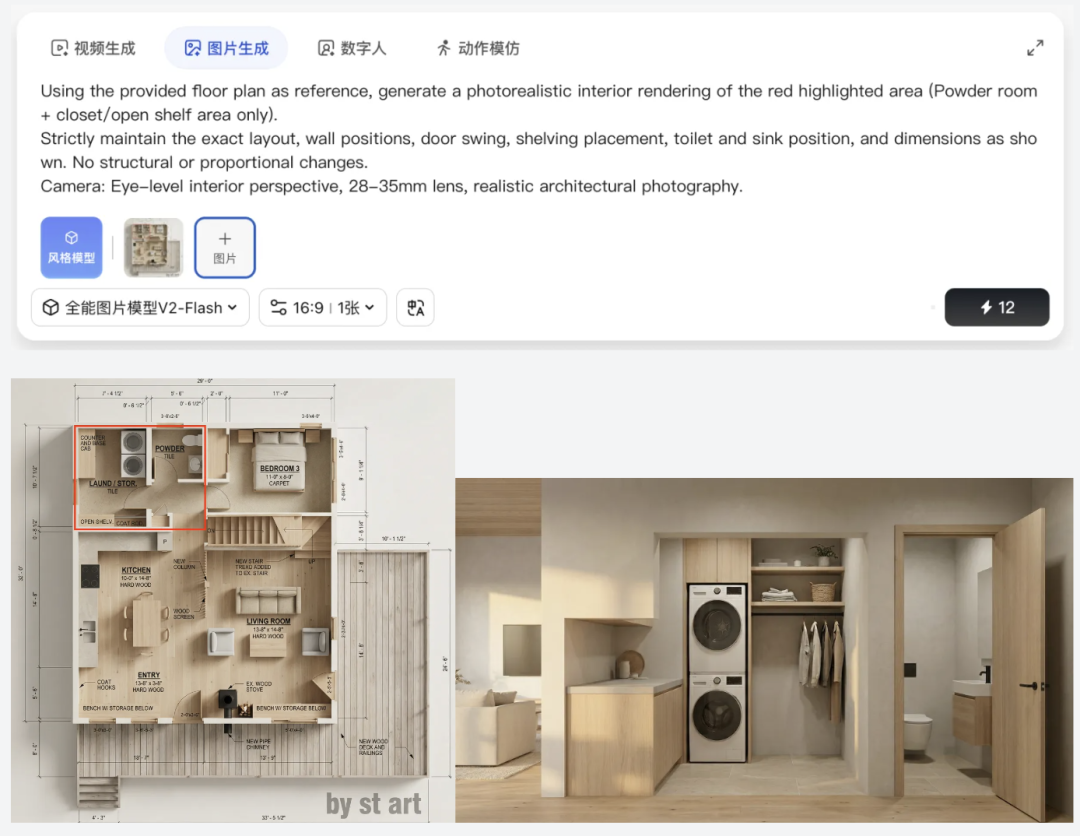
按照以上步骤,可以快速渲染出所有局部细节。得益于V2-Flash模型强大的空间一致性和提示词遵循能力,通常都能达到不错的效果。当然,有时为了获得最佳效果,可能需要进行多次生成(“抽卡”)。在实际操作中,可以选择一次性生成多张图,从中挑选最满意的一张。
案例三:局部修改与多图合成
V2-Flash 的功能不止于此。假设客户想更换客厅沙发的颜色。
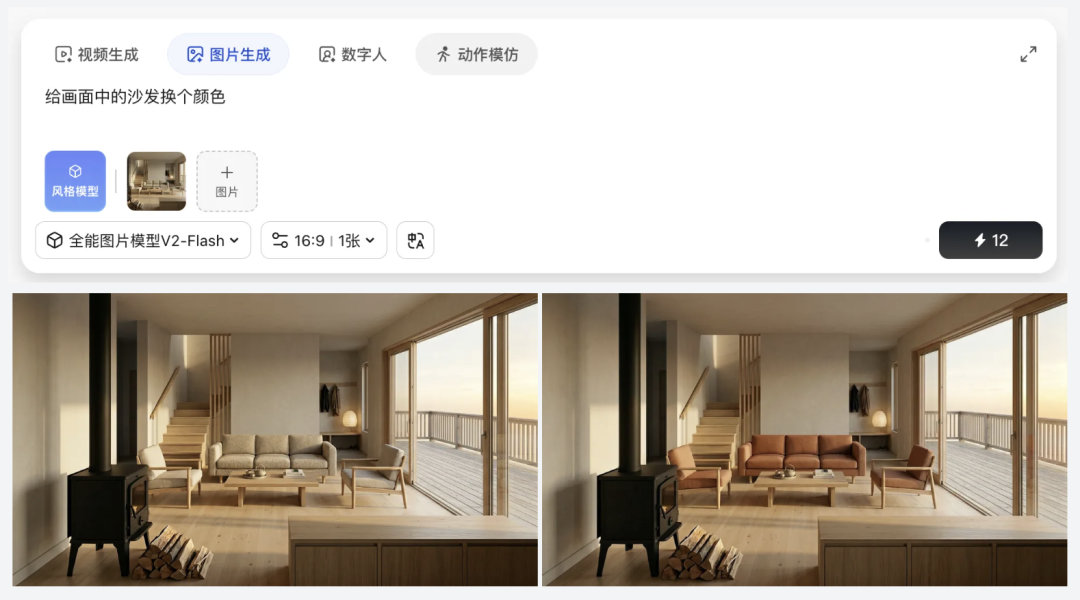
更进一步,如果你有某款心仪沙发的照片,甚至可以将它精准地“放入”之前生成的客厅场景中,模型会自动匹配透视和光影。你还可以尝试在场景中添加人物。
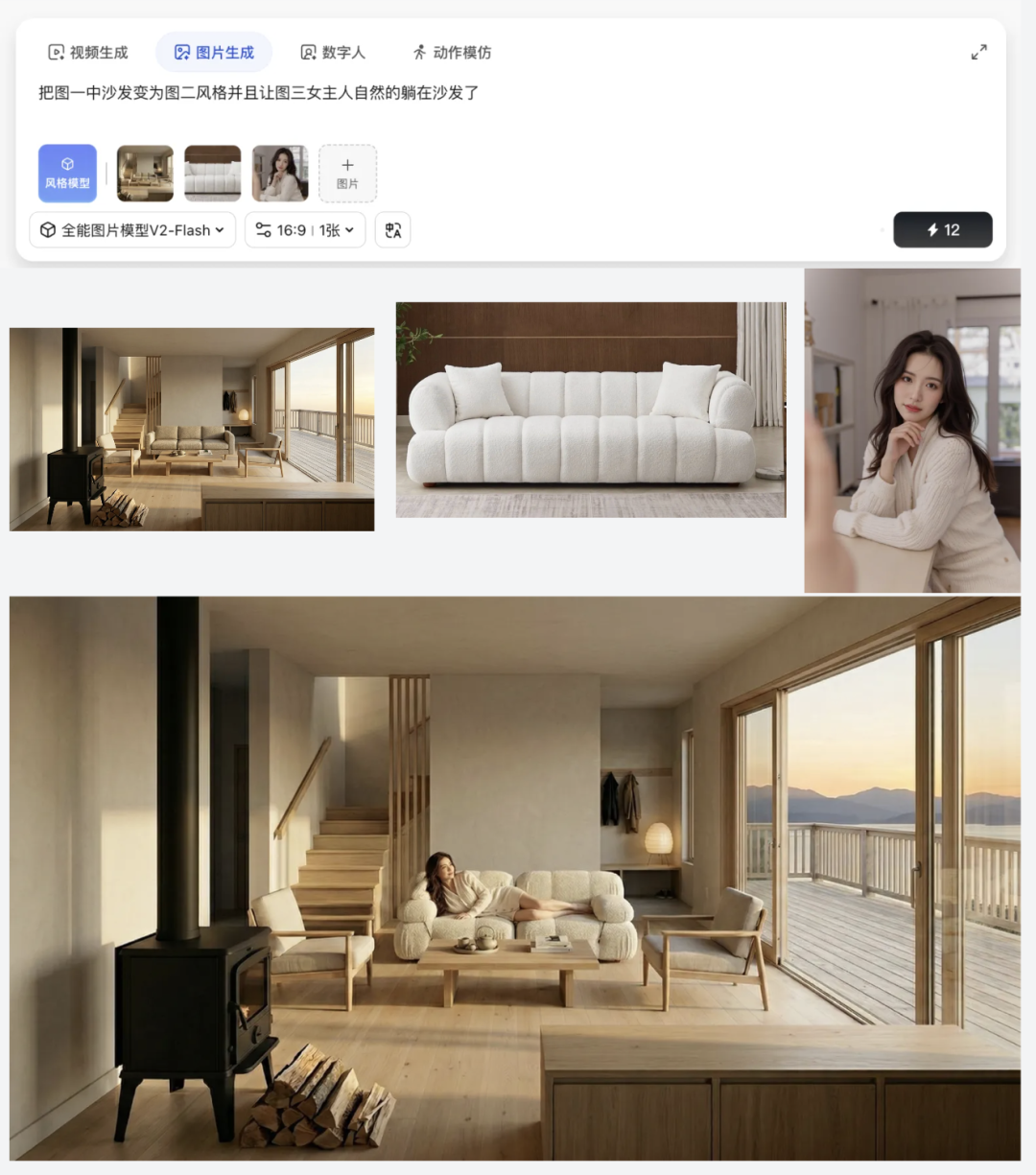
案例四:从静帧到动态视频
LiblibAI 之所以能被称为“一站式平台”,是因为它不仅能处理图片。当你生成高清效果图后,将鼠标悬停在图片上,通常会出现「视频生成」按钮,可以一键将静态效果图转化为动态视频。你可以输入新的提示词来引导视频内容,也可以让系统自动反推提示词。
案例五:添加专业级视频特效
为了让最终呈现给客户的视频更具质感,可以为其添加特效。LiblibAI 集成了海量的视频特效功能,目前支持可灵2.5、Vidu、通义万相等多种具备视频特效能力的模型。
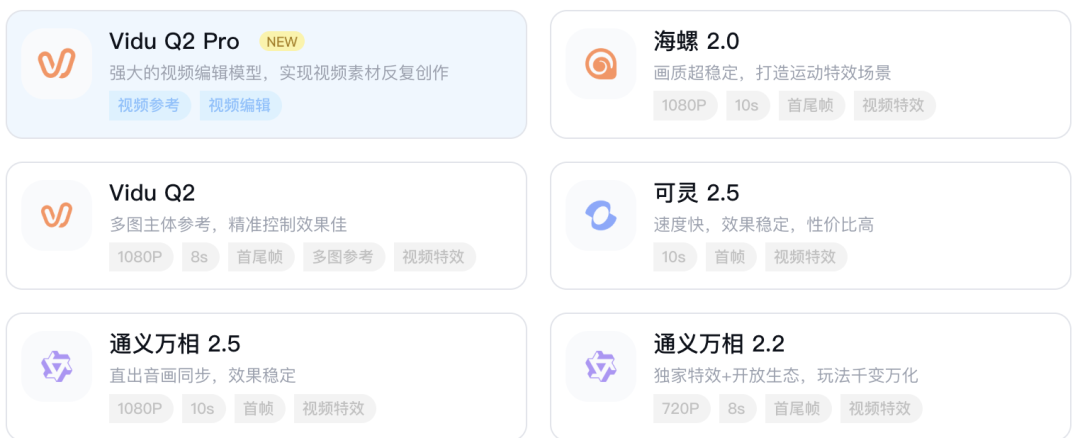
操作流程: 选择“视频生成”功能 -> 上传参考图片 -> 选择喜欢的视频特效(如“镜头推进运镜”、“视角进入室内”等)。
通过组合不同的特效,你可以轻松实现从一张平面设计图,到3D装修效果展示,再到富有动感的炫酷视频的完整创作流程。这种图片、视频、特效全在同一个网页内无缝衔接的体验,极大地提升了创作效率。
总结与体验
回顾整个流程:户型图解析 -> 全局3D渲染 -> 局部精细化渲染 -> 家具替换/合成 -> 图生视频 -> 视频特效加持。在以往,这可能需要切换多个专业软件或在线平台,处理复杂的文件格式和兼容性问题。
而在 LiblibAI 上,这些环节被有效地整合到一个连贯的工作流中。其丰富的模型矩阵(如全能V2、Seedream、可灵系列等)覆盖了从图像到视频的多种Stable Diffusion类创作需求。对于设计师、创意工作者或电商从业者来说,这无疑是一个强大的效率工具。
当然,任何AI工具的输出都具有一定的随机性,追求极致效果时可能仍需多次尝试。但随着模型能力的持续迭代和平台体验的优化,这种一站式的AI创作玩法正变得越来越成熟和可靠。如果你对AI辅助设计感兴趣,不妨亲自上手体验一下这套工作流。也欢迎到云栈社区分享你的创作成果和经验。
 发表于 2026-3-7 07:45:58
|
查看: 2864|
回复: 0
发表于 2026-3-7 07:45:58
|
查看: 2864|
回复: 0

