免责声明:本文仅供学习和研究目的,介绍 ptrace 在 Linux 系统编程中的技术细节。ptrace 是 Linux 提供的标准系统调用,广泛用于调试器(如 gdb)开发。使用 ptrace 需要 root 权限,且应遵守相关法律法规。请勿将本文技术用于非法目的。
之前学习过 ARM64(aarch64) 的 ptrace 注入,最近尝试在 x86-64 上使用时发现两者的实现有不少区别。在 ARM64 上能成功注入的代码,按照 x86-64 调用约定修改后却一直失败——dlopen 返回一个很小的值(比如 0x8e),正常情况下应该返回一个堆地址。本文记录两个平台之间 ptrace 注入代码的关键差异,并补充了 MIPS64 的注入经验(更新于 2026.4.20)。
Ptrace
ptrace 是 Linux 提供的系统调用,允许一个进程(tracer)观察和控制另一个进程(tracee)的执行。它是调试器(如 gdb)和 ptrace 注入 技术的基础。若要操作其他进程,需要 root 权限。
ptrace 的核心能力包括:
- 读写目标进程内存:通过
PTRACE_PEEKDATA / PTRACE_POKEDATA 读写目标进程的内存内容。
- 读写目标进程寄存器:通过
PTRACE_GETREGS / PTRACE_SETREGS 获取和修改目标进程的寄存器状态。
- 控制目标进程执行:通过
PTRACE_CONT、PTRACE_SINGLESTEP 等控制目标进程继续执行或单步执行。
- 附加/分离目标进程:通过
PTRACE_ATTACH / PTRACE_DETACH 附加到目标进程或从目标进程分离。
基本的函数原型:
long ptrace(enum __ptrace_request request, pid_t pid, void *addr, void *data);
注入流程
ptrace 注入的核心思路是:附加到目标进程,让目标进程调用 dlopen 加载我们指定的 so 库,从而在目标进程内执行我们的代码。
通用注入流程如下:
附加目标进程:调用 ptrace(PTRACE_ATTACH, pid, ...) 附加到目标进程,目标进程会收到 SIGSTOP 信号暂停执行。
保存寄存器现场:调用 ptrace(PTRACE_GETREGS, pid, ...) 保存目标进程当前的寄存器状态,以便注入完成后恢复。
获取目标进程中的关键函数地址:在目标进程的内存空间里找到 dlopen、dlsym、dlclose 等函数的地址。由于 ASLR 的存在,同一个库在不同进程中的加载地址不同,但同一个库内部函数的偏移是固定的。因此可以通过以下公式计算:
远程函数地址 = 本进程函数地址 - 本进程模块基址 + 目标进程模块基址
具体步骤(前提是注入工具和目标进程加载了同一版本的库,在同一台机器上通常成立):
- 在注入工具(本进程)中,通过
dlsym 获取 dlopen 的地址,记为 local_dlopen_addr
- 解析
/proc/self/maps,找到 dlopen 所在模块(如 libc.so)的基地址,记为 local_base
- 解析
/proc/<pid>/maps,找到目标进程中同一模块的基地址,记为 remote_base
- 计算偏移:
offset = local_dlopen_addr - local_base
- 得到目标进程中的地址:
remote_dlopen_addr = remote_base + offset
向目标进程内存写入参数:将 so 库路径字符串等参数写入目标进程的内存(通常写入栈上或通过 mmap 分配的内存区域)。
设置寄存器,调用 dlopen:按照目标平台的调用约定设置寄存器和栈,使目标进程执行 dlopen。
触发执行并等待返回:让目标进程继续执行,等待调用完成。
获取返回值:读取寄存器获取 dlopen 的返回值(so 库的句柄/基址)。
恢复寄存器现场并分离:将之前保存的寄存器状态恢复,调用 ptrace(PTRACE_DETACH, pid, ...) 分离目标进程,目标进程继续正常执行。
虽然整体流程在三个平台上一致,但第 5 步和第 6 步的具体实现因平台差异而有所不同,这也是本文的重点。
ARM64下的注入
寄存器与调用约定
ARM64 调用约定:
- 参数传递:前 8 个参数通过
x0-x7 寄存器传递。
- 返回值:通过
x0 寄存器返回。
- 程序计数器:
pc 寄存器,指向将要执行的指令。
- 栈顶指针:
sp 寄存器。
- 链接寄存器:
lr(即 x30),保存函数返回地址。
寄存器结构体
ARM64 使用 struct user_pt_regs 或通过 iovec 配合 PTRACE_GETREGSET 来获取寄存器:
struct user_pt_regs {
    __u64 regs[31];  // x0 - x30
    __u64 sp;
    __u64 pc;
    __u64 pstate;
};

// 获取寄存器
struct iovec iov;
struct user_pt_regs regs;
iov.iov_base = ®s;
iov.iov_len = sizeof(regs);
ptrace(PTRACE_GETREGSET, pid, (void*)NT_PRSTATUS, &iov);
调用 dlopen
在 ARM64 上调用 dlopen 的设置比较直观:
// 设置参数
regs.regs[0] = so_path_addr;   // x0 = 第一个参数:so库路径地址
regs.regs[1] = RTLD_NOW;       // x1 = 第二个参数:dlopen flags
regs.pc = dlopen_addr;         // pc = dlopen 函数地址
regs.regs[30] = 0;             // lr = 0,使 dlopen 返回后触发 SIGSEGV

ptrace(PTRACE_SETREGSET, pid, (void*)NT_PRSTATUS, &iov);
ptrace(PTRACE_CONT, pid, NULL, NULL);
// 等待目标进程触发 SIGSEGV(因为 lr = 0,dlopen 返回后会跳转到地址 0)
waitpid(pid, &status, 0);
ARM64 的关键点:
- 将
lr(x30)设置为 0。当 dlopen 执行完毕后,会尝试返回到 lr 指向的地址(即地址 0),这会触发 SIGSEGV 信号。
- 通过
waitpid 捕获这个 SIGSEGV 信号,就知道 dlopen 已经执行完毕。
- 此时读取
x0 寄存器即可获得 dlopen 的返回值。
注入工具
下面是完整的 ARM64 (Android) 上的 ptrace 注入代码(如果要注入 Android APP,需将 so 放在 app 对应的 lib 目录下,因为有 SELinux 的限制)。
// injector_arm64.c - ARM64 ptrace 注入工具
// 用法: ./injector_arm64 <pid> <so_absolute_path>
// 需要 root 权限

#define _GNU_SOURCE
#include <stdio.h>
#include <stdlib.h>
#include <string.h>
#include <errno.h>
#include <unistd.h>
#include <sys/ptrace.h>
#include <sys/types.h>
#include <sys/wait.h>
#include <sys/uio.h>
#include <sys/mman.h>
#include <linux/elf.h>
#include <dlfcn.h>
#include <asm/ptrace.h>

// 获取寄存器(ARM64 使用 PTRACE_GETREGSET + iovec)
static int get_regs(pid_t pid, struct user_pt_regs *regs) {
    struct iovec iov;
    iov.iov_base = regs;
    iov.iov_len = sizeof(*regs);
    if (ptrace(PTRACE_GETREGSET, pid, (void *)NT_PRSTATUS, &iov) < 0) {
        perror("PTRACE_GETREGSET");
        return -1;
    }
    return 0;
}

// 设置寄存器
static int set_regs(pid_t pid, struct user_pt_regs *regs) {
    struct iovec iov;
    iov.iov_base = regs;
    iov.iov_len = sizeof(*regs);
    if (ptrace(PTRACE_SETREGSET, pid, (void *)NT_PRSTATUS, &iov) < 0) {
        perror("PTRACE_SETREGSET");
        return -1;
    }
    return 0;
}

// 从 /proc/pid/maps 中查找指定库的基地址
static long get_module_base(pid_t pid, const char *module_name) {
    char path[256];
    char line[512];
    long base = 0;

    if (pid == 0)
        snprintf(path, sizeof(path), "/proc/self/maps");
    else
        snprintf(path, sizeof(path), "/proc/%d/maps", pid);

    FILE *fp = fopen(path, "r");
    if (!fp) { perror("fopen maps"); return 0; }

    while (fgets(line, sizeof(line), fp)) {
        if (strstr(line, module_name)) {
            base = strtol(line, NULL, 16);
            break;
        }
    }
    fclose(fp);
    return base;
}

// 通过地址查找其所在的模块名和模块基址
static int find_module_by_addr(void *addr, char *module_name, size_t name_len, long *base) {
    char line[512];
    FILE *fp = fopen("/proc/self/maps", "r");
    if (!fp) return -1;

    unsigned long target = (unsigned long)addr;
    char found_module[256] = {0};

    while (fgets(line, sizeof(line), fp)) {
        unsigned long start, end;
        if (sscanf(line, "%lx-%lx", &start, &end) != 2) continue;
        if (target >= start && target < end) {
            char *path = strrchr(line, '/');
            if (path) {
                char *nl = strchr(path, '\n');
                if (nl) *nl = '\0';
                strncpy(found_module, path, sizeof(found_module) - 1);
            }
            break;
        }
    }
    fclose(fp);
    if (found_module[0] == '\0') return -1;

    *base = get_module_base(0, found_module);
    strncpy(module_name, found_module, name_len - 1);
    module_name[name_len - 1] = '\0';
    return 0;
}

// 计算目标进程中某函数的地址(自动检测所在模块)
static long get_remote_func_addr(pid_t pid, void *local_func) {
    char module_name[256];
    long local_base;

    if (find_module_by_addr(local_func, module_name, sizeof(module_name), &local_base) < 0) {
        fprintf(stderr, "Failed to find module for addr %p\n", local_func);
        return 0;
    }

    long remote_base = get_module_base(pid, module_name);
    if (!local_base || !remote_base) {
        fprintf(stderr, "Failed to get module base for %s\n", module_name);
        return 0;
    }

    return remote_base + ((long)local_func - local_base);
}

// 在远程进程中调用一个函数,最多支持 6 个参数
// 原理: 设置 x0-x5 为参数, pc 为函数地址, lr = 0
//       PTRACE_CONT 后等待 SIGSEGV (因为 lr=0, ret 跳转到地址 0)
//       读取 x0 获取返回值
static long call_remote_func(pid_t pid, struct user_pt_regs *orig_regs,
                              long func_addr,
                              long arg0, long arg1, long arg2,
                              long arg3, long arg4, long arg5) {
    // 基于原始寄存器来设置,保证 sp 等关键寄存器正确
    struct user_pt_regs regs;
    memcpy(®s, orig_regs, sizeof(regs));

    regs.regs[0] = arg0;       // x0 - x5: 参数
    regs.regs[1] = arg1;
    regs.regs[2] = arg2;
    regs.regs[3] = arg3;
    regs.regs[4] = arg4;
    regs.regs[5] = arg5;
    regs.pc = func_addr;       // pc = 目标函数地址
    regs.regs[30] = 0;         // lr = 0,函数返回时触发 SIGSEGV

    if (set_regs(pid, ®s) < 0) return -1;

    if (ptrace(PTRACE_CONT, pid, NULL, NULL) < 0) {
        perror("PTRACE_CONT");
        return -1;
    }

    int status;
    waitpid(pid, &status, WUNTRACED);

    // 读取返回值 (ARM64 返回值在 x0)
    if (get_regs(pid, ®s) < 0) return -1;
    return (long)regs.regs[0];
}

// 向目标进程写入数据(以 long 为单位,按需补齐)
static int ptrace_write_data(pid_t pid, unsigned long addr, const void *data, size_t len) {
    const unsigned char *src = (const unsigned char *)data;
    size_t i = 0;

    for (i = 0; i + sizeof(long) <= len; i += sizeof(long)) {
        long val;
        memcpy(&val, src + i, sizeof(long));
        if (ptrace(PTRACE_POKEDATA, pid, (void *)(addr + i), (void *)val) < 0) {
            perror("PTRACE_POKEDATA");
            return -1;
        }
    }
    if (i < len) {
        long val = ptrace(PTRACE_PEEKDATA, pid, (void *)(addr + i), NULL);
        memcpy(&val, src + i, len - i);
        if (ptrace(PTRACE_POKEDATA, pid, (void *)(addr + i), (void *)val) < 0) {
            perror("PTRACE_POKEDATA tail");
            return -1;
        }
    }
    return 0;
}

int main(int argc, char *argv[]) {
    if (argc != 3) {
        fprintf(stderr, "用法: %s <pid> <so_absolute_path>\n", argv[0]);
        return 1;
    }

    pid_t pid = atoi(argv[1]);
    const char *so_path = argv[2];
    int status;

    // 1. 附加目标进程
    if (ptrace(PTRACE_ATTACH, pid, NULL, NULL) < 0) {
        perror("PTRACE_ATTACH");
        return 1;
    }
    waitpid(pid, &status, WUNTRACED);

    // 2. 保存原始寄存器
    struct user_pt_regs orig_regs;
    if (get_regs(pid, &orig_regs) < 0) {
        ptrace(PTRACE_DETACH, pid, NULL, NULL);
        return 1;
    }

    // 3. 在远程进程中调用 mmap 分配内存
    long remote_mmap = get_remote_func_addr(pid, (void *)mmap);
    long mmap_result = call_remote_func(pid, &orig_regs, remote_mmap,
                                        0, 0x1000, PROT_READ | PROT_WRITE,
                                        MAP_PRIVATE | MAP_ANONYMOUS, -1, 0);

    if (mmap_result == -1 || mmap_result == 0) {
        fprintf(stderr, "[-] 远程 mmap 失败\n");
        set_regs(pid, &orig_regs);
        ptrace(PTRACE_DETACH, pid, NULL, NULL);
        return 1;
    }
    printf("[+] 远程 mmap 成功, 地址: 0x%lx\n", mmap_result);

    // 4. 将 so 路径写入 mmap 分配的内存
    ptrace_write_data(pid, (unsigned long)mmap_result, so_path, strlen(so_path) + 1);

    // 5. 获取远程 dlopen 地址并调用
    void *local_dlopen = dlsym(RTLD_DEFAULT, "dlopen");
    long remote_dlopen = get_remote_func_addr(pid, local_dlopen);
    long dlopen_ret = call_remote_func(pid, &orig_regs, remote_dlopen,
                                       mmap_result, RTLD_NOW, 0, 0, 0, 0);

    printf("[+] dlopen 返回值: 0x%lx\n", dlopen_ret);
    if (dlopen_ret == 0)
        printf("[-] dlopen 失败!\n");
    else
        printf("[+] 注入成功!handle = 0x%lx\n", dlopen_ret);

    // 6. 恢复寄存器现场并分离
    set_regs(pid, &orig_regs);
    ptrace(PTRACE_DETACH, pid, NULL, NULL);
    return 0;
}
ARM64 (Android) 注入踩坑:SO 路径不能直接写到栈上
上面的调用约定和寄存器设置看起来很简单,但在 Android 手机上实际测试时发现,不能直接把 SO 路径写入目标进程的栈空间。
最初的错误做法:
// ❌ 错误做法:直接写到栈上
unsigned long path_addr = (regs.sp - path_len) & ~0xF;
regs.sp = path_addr - 128;
ptrace_write_data(pid, path_addr, so_path, path_len);

regs.regs[0] = path_addr;   // x0 = so 路径
regs.regs[1] = RTLD_NOW;    // x1 = flags
regs.pc = dlopen_addr;
regs.regs[30] = 0;          // lr = 0
运行结果:dlopen 的返回值恰好等于我们传入的 path_addr,说明 x0 根本没有被修改——dlopen 没有真正执行。
原因:在 Android 上,dlopen 内部的 linker 实现对内存区域有要求。直接写在栈上的路径字符串,可能因为 linker 内部的内存访问检查等原因导致执行异常。
解决方法:先在目标进程中调用 mmap 分配一块独立的内存,再将 SO 路径写入这块内存:
// ✅ 正确做法:先 mmap 分配内存,再写入路径
// 1. 远程调用 mmap
long mmap_result = call_remote_func(pid, &orig_regs, remote_mmap,
                                    0, 0x1000, PROT_READ | PROT_WRITE,
                                    MAP_PRIVATE | MAP_ANONYMOUS, -1, 0);

// 2. 将路径写入 mmap 分配的内存
ptrace_write_data(pid, mmap_result, so_path, path_len);

// 3. 用 mmap 的地址作为 dlopen 的参数
long dlopen_ret = call_remote_func(pid, &orig_regs, remote_dlopen,
                                   mmap_result, RTLD_NOW, 0, 0, 0, 0);
x86-64下的注入
x86-64 的 ptrace 注入流程和 ARM64 基本一致,但在调用约定和返回地址处理上有重要差异。下面按照相同的结构介绍,并说明两个平台的关键区别。
寄存器与调用约定
x86-64 调用约定:
- 参数传递:前 6 个整数参数依次通过
rdi、rsi、rdx、rcx、r8、r9 传递。
- 返回值:通过
rax 寄存器返回。
- 程序计数器:
rip 寄存器。
- 栈指针:
rsp 寄存器。
- 没有链接寄存器:x86-64 使用栈来保存返回地址,
call 指令自动压栈,ret 指令自动弹栈。
寄存器结构体
x86-64 使用 struct user_regs_struct,通过 PTRACE_GETREGS 获取:
struct user_regs_struct regs;
ptrace(PTRACE_GETREGS, pid, NULL, ®s);
调用 dlopen(错误的方式)
按照 ARM64 的思路,直接设置寄存器调用 dlopen:
// 设置参数
regs.rdi = path_addr;       // rdi = so 路径
regs.rsi = RTLD_NOW;        // rsi = flags
regs.rip = dlopen_addr;     // rip = dlopen 函数地址

// 模拟 call 指令:将返回地址压栈
regs.rsp -= 8;
ptrace(PTRACE_POKEDATA, pid, (void *)regs.rsp, (void *)0);  // 返回地址设为 0

ptrace(PTRACE_SETREGS, pid, NULL, ®s);
ptrace(PTRACE_CONT, pid, NULL, NULL);
// 等待 SIGSEGV(因为返回地址为 0)
waitpid(pid, &status, 0);
完整代码如下:
// x86-64 ptrace 注入工具
// 用法: ./injector_x86_64 <pid> <so_absolute_path>
// 需要 root 权限
// 参考 ARM64 实现:先 mmap 分配内存,再写入 SO 路径,最后调用 dlopen

#define _GNU_SOURCE
#include <stdio.h>
#include <stdlib.h>
#include <string.h>
#include <errno.h>
#include <unistd.h>
#include <sys/ptrace.h>
#include <sys/types.h>
#include <sys/wait.h>
#include <sys/user.h>
#include <sys/mman.h>
#include <dlfcn.h>

// 获取寄存器
static int get_regs(pid_t pid, struct user_regs_struct *regs) {
    if (ptrace(PTRACE_GETREGS, pid, NULL, regs) < 0) {
        perror("PTRACE_GETREGS");
        return -1;
    }
    return 0;
}

// 设置寄存器
static int set_regs(pid_t pid, struct user_regs_struct *regs) {
    if (ptrace(PTRACE_SETREGS, pid, NULL, regs) < 0) {
        perror("PTRACE_SETREGS");
        return -1;
    }
    return 0;
}

// 从 /proc/pid/maps 中查找指定库的基地址
static long get_module_base(pid_t pid, const char *module_name) {
    char path[256];
    char line[512];
    long base = 0;

    if (pid == 0)
        snprintf(path, sizeof(path), "/proc/self/maps");
    else
        snprintf(path, sizeof(path), "/proc/%d/maps", pid);

    FILE *fp = fopen(path, "r");
    if (!fp) { perror("fopen maps"); return 0; }

    while (fgets(line, sizeof(line), fp)) {
        if (strstr(line, module_name)) {
            base = strtol(line, NULL, 16);
            break;
        }
    }
    fclose(fp);
    return base;
}

// 通过地址查找其所在的模块名和模块基址
static int find_module_by_addr(void *addr, char *module_name, size_t name_len, long *base) {
    char line[512];
    FILE *fp = fopen("/proc/self/maps", "r");
    if (!fp) return -1;

    unsigned long target = (unsigned long)addr;
    char found_module[256] = {0};

    while (fgets(line, sizeof(line), fp)) {
        unsigned long start, end;
        if (sscanf(line, "%lx-%lx", &start, &end) != 2) continue;
        if (target >= start && target < end) {
            char *path = strrchr(line, '/');
            if (path) {
                char *nl = strchr(path, '\n');
                if (nl) *nl = '\0';
                strncpy(found_module, path, sizeof(found_module) - 1);
            }
            break;
        }
    }
    fclose(fp);
    if (found_module[0] == '\0') return -1;

    *base = get_module_base(0, found_module);
    strncpy(module_name, found_module, name_len - 1);
    module_name[name_len - 1] = '\0';
    return 0;
}

// 计算目标进程中某函数的地址(自动检测所在模块)
static long get_remote_func_addr(pid_t pid, void *local_func) {
    char module_name[256];
    long local_base;

    if (find_module_by_addr(local_func, module_name, sizeof(module_name), &local_base) < 0) {
        fprintf(stderr, "Failed to find module for addr %p\n", local_func);
        return 0;
    }

    long remote_base = get_module_base(pid, module_name);
    if (!local_base || !remote_base) {
        fprintf(stderr, "Failed to get module base for %s\n", module_name);
        return 0;
    }

    printf(" %s: local_base=0x%lx, remote_base=0x%lx\n",
           module_name, local_base, remote_base);
    return remote_base + ((long)local_func - local_base);
}

// 在远程进程中调用一个函数,最多支持 6 个参数
// 原理: 设置 rdi/rsi/rdx/rcx/r8/r9 为参数, rip 为函数地址
//       手动将返回地址 0 压栈 (模拟 call 指令)
//       PTRACE_CONT 后等待 SIGSEGV
//       读取 rax 获取返回值
static long call_remote_func(pid_t pid, struct user_regs_struct *orig_regs,
                              long func_addr,
                              long arg0, long arg1, long arg2,
                              long arg3, long arg4, long arg5) {
    // 基于原始寄存器来设置,保证 rsp 等关键寄存器正确
    struct user_regs_struct regs;
    memcpy(®s, orig_regs, sizeof(regs));

    // x86-64 调用约定: 前6个整数参数依次通过 rdi, rsi, rdx, rcx, r8, r9 传递
    regs.rdi = arg0;
    regs.rsi = arg1;
    regs.rdx = arg2;
    regs.rcx = arg3;
    regs.r8  = arg4;
    regs.r9  = arg5;

    // 设置 rip 为目标函数地址
    regs.rip = func_addr;

    // ★ x86-64 关键步骤: 模拟 call 指令,将返回地址压栈
    // x86-64 没有链接寄存器,返回地址保存在栈上
    // call 指令等价于: push 返回地址; jmp 函数地址
    regs.rsp -= 8;
    if (ptrace(PTRACE_POKEDATA, pid, (void *)regs.rsp, (void *)0) < 0) {
        perror("PTRACE_POKEDATA (push return addr)");
        return -1;
    }

    if (set_regs(pid, ®s) < 0) return -1;

    if (ptrace(PTRACE_CONT, pid, NULL, NULL) < 0) {
        perror("PTRACE_CONT");
        return -1;
    }

    int status;
    waitpid(pid, &status, WUNTRACED);

    if (WIFSTOPPED(status) && WSTOPSIG(status) == SIGSEGV) {
        // 预期的 SIGSEGV,函数已执行完毕
    } else if (WIFSTOPPED(status)) {
        printf("[!] 收到非预期信号: %d\n", WSTOPSIG(status));
    }

    // 读取返回值 (x86-64 返回值在 rax)
    if (get_regs(pid, ®s) < 0) return -1;
    return (long)regs.rax;
}

// 向目标进程写入数据(以 long 为单位,按需补齐)
static int ptrace_write_data(pid_t pid, unsigned long addr, const void *data, size_t len) {
    const unsigned char *src = (const unsigned char *)data;
    size_t i = 0;

    for (i = 0; i + sizeof(long) <= len; i += sizeof(long)) {
        long val;
        memcpy(&val, src + i, sizeof(long));
        if (ptrace(PTRACE_POKEDATA, pid, (void *)(addr + i), (void *)val) < 0) {
            perror("PTRACE_POKEDATA");
            return -1;
        }
    }
    if (i < len) {
        long val = ptrace(PTRACE_PEEKDATA, pid, (void *)(addr + i), NULL);
        memcpy(&val, src + i, len - i);
        if (ptrace(PTRACE_POKEDATA, pid, (void *)(addr + i), (void *)val) < 0) {
            perror("PTRACE_POKEDATA tail");
            return -1;
        }
    }
    return 0;
}

int main(int argc, char *argv[]) {
    if (argc != 3) {
        fprintf(stderr, "用法: %s <pid> <so_absolute_path>\n", argv[0]);
        return 1;
    }

    pid_t pid = atoi(argv[1]);
    const char *so_path = argv[2];
    int status;

    printf(" 目标进程: %d\n", pid);
    printf(" 注入 so: %s\n", so_path);

    // 1. 附加目标进程
    if (ptrace(PTRACE_ATTACH, pid, NULL, NULL) < 0) {
        perror("PTRACE_ATTACH");
        return 1;
    }
    waitpid(pid, &status, WUNTRACED);
    printf("[+] 已附加到目标进程\n");

    // 2. 保存原始寄存器
    struct user_regs_struct orig_regs;
    if (get_regs(pid, &orig_regs) < 0) {
        ptrace(PTRACE_DETACH, pid, NULL, NULL);
        return 1;
    }
    printf("[+] 已保存寄存器现场\n");

    // 3. 在远程进程中调用 mmap 分配内存
    long remote_mmap = get_remote_func_addr(pid, (void *)mmap);
    if (!remote_mmap) {
        fprintf(stderr, "[-] 获取远程 mmap 地址失败\n");
        set_regs(pid, &orig_regs);
        ptrace(PTRACE_DETACH, pid, NULL, NULL);
        return 1;
    }
    printf("[+] 远程 mmap 地址: 0x%lx\n", remote_mmap);

    long mmap_result = call_remote_func(pid, &orig_regs, remote_mmap,
                                        0,                              // addr = NULL
                                        0x1000,                         // length = 4096
                                        PROT_READ | PROT_WRITE,         // prot
                                        MAP_PRIVATE | MAP_ANONYMOUS,    // flags
                                        -1,                             // fd
                                        0);                             // offset

    if (mmap_result == -1 || mmap_result == 0) {
        fprintf(stderr, "[-] 远程 mmap 失败, 返回: 0x%lx\n", mmap_result);
        set_regs(pid, &orig_regs);
        ptrace(PTRACE_DETACH, pid, NULL, NULL);
        return 1;
    }
    printf("[+] 远程 mmap 成功, 地址: 0x%lx\n", mmap_result);

    // 4. 将 so 路径写入 mmap 分配的内存
    size_t path_len = strlen(so_path) + 1;
    if (ptrace_write_data(pid, (unsigned long)mmap_result, so_path, path_len) < 0) {
        fprintf(stderr, "[-] 写入 so 路径失败\n");
        set_regs(pid, &orig_regs);
        ptrace(PTRACE_DETACH, pid, NULL, NULL);
        return 1;
    }
    printf("[+] so 路径已写入远程内存 @ 0x%lx\n", mmap_result);

    // 5. 获取远程 dlopen 地址并调用
    void *local_dlopen = dlsym(RTLD_DEFAULT, "dlopen");
    if (!local_dlopen) {
        fprintf(stderr, "[-] 无法获取 dlopen 地址\n");
        set_regs(pid, &orig_regs);
        ptrace(PTRACE_DETACH, pid, NULL, NULL);
        return 1;
    }
    printf(" 本地 dlopen 地址: %p\n", local_dlopen);

    long remote_dlopen = get_remote_func_addr(pid, local_dlopen);
    if (!remote_dlopen) {
        fprintf(stderr, "[-] 获取远程 dlopen 地址失败\n");
        set_regs(pid, &orig_regs);
        ptrace(PTRACE_DETACH, pid, NULL, NULL);
        return 1;
    }
    printf("[+] 远程 dlopen 地址: 0x%lx\n", remote_dlopen);

    long dlopen_ret = call_remote_func(pid, &orig_regs, remote_dlopen,
                                       (long)mmap_result,    // rdi = so 路径地址 (mmap 分配的)
                                       RTLD_NOW,             // rsi = flags
                                       0, 0, 0, 0);

    printf("[+] dlopen 返回值: 0x%lx\n", dlopen_ret);

    if (dlopen_ret == 0) {
        printf("[-] dlopen 失败!\n");
    } else {
        printf("[+] 注入成功!handle = 0x%lx\n", dlopen_ret);
    }

    // 6. 恢复寄存器现场并分离
    if (set_regs(pid, &orig_regs) < 0) {
        perror("set_regs restore");
    }
    ptrace(PTRACE_DETACH, pid, NULL, NULL);
    printf("[+] 已恢复现场并分离目标进程\n");

    return 0;
}
失败的输出
使用上述代码调用 dlopen,会返回异常值:
 目标进程: 1114
 注入 so: /path/to/inject.so
[+] 已附加到目标进程
[+] 已保存寄存器现场
 /libc.so.6: local_base=0x7bb2c7800000, remote_base=0x75a5dc400000
[+] 远程 mmap 地址: 0x75a5dc51ea90
[+] 远程 mmap 成功, 地址: 0x75a5dc7a5000
[+] so 路径已写入远程内存 @ 0x75a5dc7a5000
 本地 dlopen 地址: 0x7bb2c7890680
 /libc.so.6: local_base=0x7bb2c7800000, remote_base=0x75a5dc400000
[+] 远程 dlopen 地址: 0x75a5dc490680
[+] dlopen 返回值: 0xdb
[+] 注入成功!handle = 0xdb
[+] 已恢复现场并分离目标进程
handle = 0xdb 明显错误——正常情况下 dlopen 应该返回一个较大的堆地址。直接设置寄存器的方式在 x86-64 上失败了。
为什么 mmap 可以成功,dlopen 不行?
这个问题研究了很久也没有找到确切原因,下面的分析来自 AI,若有了解细节的大佬欢迎指点。
在 ARM64 实现中,我们通过设置 lr = 0 让函数返回时触发 SIGSEGV。x86-64 没有 lr 寄存器,但可以通过手动压栈来设置返回地址:
// 手动设置返回地址为 0
regs.rsp -= 8;
ptrace(PTRACE_POKEDATA, pid, (void *)regs.rsp, (void *)0);
这种方式对 mmap 有效,但对 dlopen 失败了。原因在于两者的复杂度不同:
| 对比项 |
mmap |
dlopen |
| 实现复杂度 |
简单,直接 syscall |
复杂,涉及动态链接器 |
| 内部调用链 |
几乎无 |
多层(_dl_open → 锁操作 → malloc → 构造函数) |
| 栈对齐要求 |
宽松 |
严格(16字节对齐) |
| 栈状态依赖 |
低 |
高 |
mmap 是内核直接实现的系统调用,内部逻辑简单,即使栈状态不完美也能正常工作。
dlopen 则完全不同:
- 它内部会调用
_dl_open,涉及动态链接器的锁和状态检查
- 可能调用
malloc 分配内存
- 执行 SO 的构造函数,可能有多层函数调用
这些操作都要求严格的栈 16 字节对齐,而手动操作 rsp 很难保证这一点。即使对齐正确,dlopen 内部调用的其他函数也可能因为栈状态异常而崩溃,导致返回错误值(如 0xdb)。
失败原因总结:
- 栈对齐问题:glibc 函数要求栈 16 字节对齐,手动操作
rsp 很难保证
- 栈状态依赖:dlopen 内部多层调用依赖正确的栈状态,直接设置寄存器无法满足
正确的实现:使用 Trampoline
解决方案:在目标进程内存中写入 trampoline 代码,让目标进程通过 trampoline 调用 dlopen。
// 使用 trampoline 调用dlopen(成功)

// 1. mmap 分配 RWX 内存
// 2. 前半部分存 SO 路径
// 3. 后半部分存 trampoline: call rax; int3

// trampoline 只有 3 字节:
unsigned char trampoline[3] = {
    0xFF, 0xD0,   // call rax  (调用 dlopen,自动压栈返回地址)
    0xCC          // int3      (dlopen 返回后触发 SIGTRAP)
};

// 执行流程:
// 1. call rax 自动将返回地址(即 int3 的地址)压入栈,跳转到 dlopen
// 2. dlopen 执行完毕 ret,弹出返回地址,回到 int3
// 3. int3 触发 SIGTRAP,注入器读取返回值
优势:
call 自动处理栈对齐和返回地址压栈- 代码在目标进程内存中执行,接近正常函数调用
- 避免手动操作寄存器的各种坑
完整代码如下:
// x86-64 ptrace 注入工具 (v2)
// 用法: ./injector_x86_64_v2 <pid> <so_absolute_path>
// 需要 root 权限
// 思路:
//   1. mmap 分配一块 RWX 内存
//      - 前半部分存 SO 路径字符串
//      - 后半部分存 trampoline: call dlopen; int3
//   2. 设置 regs.rdi=路径, regs.rsi=flags, regs.rax=dlopen, regs.rip=trampoline
//   3. 跳转到 trampoline 执行,dlopen 返回后执行 int3 触发 SIGTRAP

#define _GNU_SOURCE
#include <stdio.h>
#include <stdlib.h>
#include <string.h>
#include <errno.h>
#include <unistd.h>
#include <sys/ptrace.h>
#include <sys/types.h>
#include <sys/wait.h>
#include <sys/user.h>
#include <sys/mman.h>
#include <dlfcn.h>

// 获取寄存器
static int get_regs(pid_t pid, struct user_regs_struct *regs) {
    if (ptrace(PTRACE_GETREGS, pid, NULL, regs) < 0) {
        perror("PTRACE_GETREGS");
        return -1;
    }
    return 0;
}

// 设置寄存器
static int set_regs(pid_t pid, struct user_regs_struct *regs) {
    if (ptrace(PTRACE_SETREGS, pid, NULL, regs) < 0) {
        perror("PTRACE_SETREGS");
        return -1;
    }
    return 0;
}

// 从 /proc/pid/maps 中查找指定库的基地址
static long get_module_base(pid_t pid, const char *module_name) {
    char path[256];
    char line[512];
    long base = 0;

    if (pid == 0) {
        snprintf(path, sizeof(path), "/proc/self/maps");
    } else {
        snprintf(path, sizeof(path), "/proc/%d/maps", pid);
    }

    FILE *fp = fopen(path, "r");
    if (!fp) {
        perror("fopen maps");
        return 0;
    }

    while (fgets(line, sizeof(line), fp)) {
        if (strstr(line, module_name)) {
            base = strtol(line, NULL, 16);
            break;
        }
    }
    fclose(fp);
    return base;
}

// 通过地址查找其所在的模块名和模块基址
// 扫描 /proc/self/maps,找到包含 addr 的映射区间,提取模块路径
static int find_module_by_addr(void *addr, char *module_name, size_t name_len, long *base) {
    char line[512];
    FILE *fp = fopen("/proc/self/maps", "r");
    if (!fp) return -1;

    unsigned long target = (unsigned long)addr;
    char found_module[256] = {0};

    while (fgets(line, sizeof(line), fp)) {
        unsigned long start, end;
        if (sscanf(line, "%lx-%lx", &start, &end) != 2) continue;

        if (target >= start && target < end) {
            // 提取模块路径 (maps 格式: addr-addr perms offset dev inode pathname)
            char *path = strrchr(line, '/');
            if (path) {
                // 去掉换行
                char *nl = strchr(path, '\n');
                if (nl) *nl = '\0';
                strncpy(found_module, path, sizeof(found_module) - 1);
            }
            break;
        }
    }
    fclose(fp);

    if (found_module[0] == '\0') return -1;

    // 找到模块后,获取该模块的基地址(第一个映射的起始地址)
    *base = get_module_base(0, found_module);
    strncpy(module_name, found_module, name_len - 1);
    module_name[name_len - 1] = '\0';
    return 0;
}

// 计算目标进程中某函数的地址
// 自动检测函数所在模块,避免模块名猜错导致地址计算错误
static long get_remote_func_addr(pid_t pid, void *local_func, const char **out_module) {
    char module_name[256];
    long local_base;

    if (find_module_by_addr(local_func, module_name, sizeof(module_name), &local_base) < 0) {
        fprintf(stderr, "Failed to find module for addr %p\n", local_func);
        return 0;
    }

    long remote_base = get_module_base(pid, module_name);

    if (!local_base || !remote_base) {
        fprintf(stderr, "Failed to get module base for %s (local: 0x%lx, remote: 0x%lx)\n",
                module_name, local_base, remote_base);
        return 0;
    }

    if (out_module) *out_module = strdup(module_name);

    long offset = (long)local_func - local_base;
    printf(" %s: local_base=0x%lx, remote_base=0x%lx, offset=0x%lx\n",
           module_name, local_base, remote_base, offset);
    return remote_base + offset;
}

// 向目标进程写入数据(以 long 为单位,按需补齐)
static int ptrace_write_data(pid_t pid, unsigned long addr, const void *data, size_t len) {
    const unsigned char *src = (const unsigned char *)data;
    size_t i = 0;

    for (i = 0; i + sizeof(long) <= len; i += sizeof(long)) {
        long val;
        memcpy(&val, src + i, sizeof(long));
        if (ptrace(PTRACE_POKEDATA, pid, (void *)(addr + i), (void *)val) < 0) {
            perror("PTRACE_POKEDATA");
            return -1;
        }
    }

    if (i < len) {
        long val = ptrace(PTRACE_PEEKDATA, pid, (void *)(addr + i), NULL);
        memcpy(&val, src + i, len - i);
        if (ptrace(PTRACE_POKEDATA, pid, (void *)(addr + i), (void *)val) < 0) {
            perror("PTRACE_POKEDATA tail");
            return -1;
        }
    }

    return 0;
}

// 在远程进程中调用 mmap(addr=NULL, size, prot, flags, fd=-1, offset=0)
// 原理: 设置 rdi, rsi, rdx, rcx, r8, r9 为参数, rip 为函数地址, rsp 指向的返回地址设为 0
//       PTRACE_CONT 后等待 SIGSEGV (因为 ret 跳转到地址 0)
//       读取 rax 获取返回值
static long remote_mmap(pid_t pid, struct user_regs_struct *orig_regs, long size, int prot, int flags) {
    // 获取远程 mmap 地址
    long remote_mmap_addr = get_remote_func_addr(pid, (void *)mmap, NULL);
    if (!remote_mmap_addr) return -1;

    // 基于原始寄存器来设置,保证 rsp 等关键寄存器正确
    struct user_regs_struct regs;
    memcpy(®s, orig_regs, sizeof(regs));

    // 设置参数 (x86-64 System V ABI: rdi, rsi, rdx, rcx, r8, r9 传参)
    // mmap(NULL, size, prot, flags, fd=-1, offset=0)
    regs.rdi = 0;           // addr = NULL
    regs.rsi = size;        // length
    regs.rdx = prot;        // prot
    regs.rcx = flags;       // flags
    regs.r8  = -1;          // fd
    regs.r9  = 0;           // offset

    // 设置 rip 为 mmap 地址
    regs.rip = remote_mmap_addr;

    // 关键步骤: 分配一个栈空间,将返回地址设为 0
    // 函数执行完 ret 后会跳转到地址 0,触发 SIGSEGV
    regs.rsp = ((orig_regs->rsp - 256) & ~0xF) - 8;
    // 在栈顶写入 0 作为返回地址
    long ret_addr = 0;
    if (ptrace(PTRACE_POKEDATA, pid, (void *)regs.rsp, (void *)ret_addr) < 0) {
        perror("PTRACE_POKEDATA (ret_addr)");
        return -1;
    }

    if (set_regs(pid, ®s) < 0) return -1;

    // 继续执行
    if (ptrace(PTRACE_CONT, pid, NULL, NULL) < 0) {
        perror("PTRACE_CONT");
        return -1;
    }

    int status;
    waitpid(pid, &status, WUNTRACED);

    if (WIFSTOPPED(status) && WSTOPSIG(status) == SIGSEGV) {
        // 预期的 SIGSEGV,函数已执行完毕
    } else if (WIFSTOPPED(status)) {
        printf("[!] mmap: 收到非预期信号: %d\n", WSTOPSIG(status));
    }

    // 读取返回值 (x86-64 返回值在 rax)
    if (get_regs(pid, ®s) < 0) return -1;

    return regs.rax;
}

int main(int argc, char *argv[]) {
    if (argc != 3) {
        fprintf(stderr, "用法: %s <pid> <so_absolute_path>\n", argv[0]);
        return 1;
    }

    pid_t pid = atoi(argv[1]);
    const char *so_path = argv[2];
    int status;

    printf(" 目标进程: %d\n", pid);
    printf(" 注入 so: %s\n", so_path);

    // 1. 附加目标进程
    if (ptrace(PTRACE_ATTACH, pid, NULL, NULL) < 0) {
        perror("PTRACE_ATTACH");
        return 1;
    }
    waitpid(pid, &status, WUNTRACED);
    printf("[+] 已附加到目标进程\n");

    // 2. 保存原始寄存器
    struct user_regs_struct orig_regs;
    if (get_regs(pid, &orig_regs) < 0) {
        ptrace(PTRACE_DETACH, pid, NULL, NULL);
        return 1;
    }
    printf("[+] 已保存寄存器现场\n");

    // 3. 在远程进程中调用 mmap 分配内存
    //    mmap(NULL, 0x2000, PROT_READ|PROT_WRITE|PROT_EXEC, MAP_PRIVATE|MAP_ANONYMOUS, -1, 0)
    //    分配 8KB: 前半部分存路径,后半部分存 trampoline
    long mmap_result = remote_mmap(pid, &orig_regs,
                                   0x2000,                         // length = 8192
                                   PROT_READ | PROT_WRITE | PROT_EXEC, // prot = RWX
                                   MAP_PRIVATE | MAP_ANONYMOUS);   // flags
    if (mmap_result == -1 || mmap_result == 0) {
        fprintf(stderr, "[-] 远程 mmap 失败, 返回: 0x%lx\n", mmap_result);
        set_regs(pid, &orig_regs);
        ptrace(PTRACE_DETACH, pid, NULL, NULL);
        return 1;
    }
    printf("[+] 远程 mmap 成功, 地址: 0x%lx\n", mmap_result);

    long path_addr  = mmap_result;       // [0x0000] 路径
    long tramp_addr = mmap_result + 0x1000; // [0x1000] trampoline

    // 5. 将 so 路径写入 mmap 分配的内存
    size_t path_len = strlen(so_path) + 1;
    if (ptrace_write_data(pid, (unsigned long)path_addr, so_path, path_len) < 0) {
        fprintf(stderr, "[-] 写入 so 路径失败\n");
        set_regs(pid, &orig_regs);
        ptrace(PTRACE_DETACH, pid, NULL, NULL);
        return 1;
    }
    printf("[+] so 路径已写入远程内存 @ 0x%lx\n", path_addr);

    // 6. 写入 trampoline: call rax; int3
    //    call rax (0xFF 0xD0) 会调用 rax 指向的函数
    //    int3 (0xCC) 触发 SIGTRAP
    unsigned char trampoline[3] = {
        0xFF, 0xD0,   // call rax
        0xCC          // int3 (触发 SIGTRAP)
    };
    if (ptrace_write_data(pid, (unsigned long)tramp_addr, trampoline, sizeof(trampoline)) < 0) {
        fprintf(stderr, "[-] 写入 trampoline 失败\n");
        set_regs(pid, &orig_regs);
        ptrace(PTRACE_DETACH, pid, NULL, NULL);
        return 1;
    }
    printf("[+] trampoline 已写入 @ 0x%lx (call rax; int3)\n", tramp_addr);

    // 7. 获取远程 dlopen 地址 (自动检测所在模块)
    void *local_dlopen = dlsym(RTLD_DEFAULT, "dlopen");
    if (!local_dlopen) {
        fprintf(stderr, "[-] 无法获取 dlopen 地址\n");
        set_regs(pid, &orig_regs);
        ptrace(PTRACE_DETACH, pid, NULL, NULL);
        return 1;
    }
    printf(" 本地 dlopen 地址: %p\n", local_dlopen);

    const char *dlopen_module = NULL;
    long remote_dlopen = get_remote_func_addr(pid, local_dlopen, &dlopen_module);
    if (!remote_dlopen) {
        fprintf(stderr, "[-] 获取远程 dlopen 地址失败\n");
        set_regs(pid, &orig_regs);
        ptrace(PTRACE_DETACH, pid, NULL, NULL);
        return 1;
    }
    printf("[+] 远程 dlopen 地址: 0x%lx (模块: %s)\n", remote_dlopen,
           dlopen_module ? dlopen_module : "unknown");

    // 8. 使用 trampoline 方式调用 dlopen
    //    设置 rax = dlopen 地址 (call rax 用)
    //    设置 rdi = so 路径地址
    //    设置 rsi = RTLD_NOW
    //    设置 rip = trampoline 地址
    struct user_regs_struct regs;
    memcpy(®s, &orig_regs, sizeof(regs));
    regs.rax = remote_dlopen;   // rax = dlopen 地址 (call rax 用)
    regs.rdi = path_addr;       // rdi = so 路径
    regs.rsi = RTLD_NOW;        // rsi = flags
    regs.rip = tramp_addr;      // rip = trampoline

    if (set_regs(pid, ®s) < 0) {
        fprintf(stderr, "[-] 设置寄存器失败\n");
        set_regs(pid, &orig_regs);
        ptrace(PTRACE_DETACH, pid, NULL, NULL);
        return 1;
    }

    if (ptrace(PTRACE_CONT, pid, NULL, NULL) < 0) {
        perror("PTRACE_CONT");
        set_regs(pid, &orig_regs);
        ptrace(PTRACE_DETACH, pid, NULL, NULL);
        return 1;
    }

    waitpid(pid, &status, WUNTRACED);

    if (WIFSTOPPED(status)) {
        int sig = WSTOPSIG(status);
        printf(" 收到信号: %d (%s)\n", sig,
               sig == SIGTRAP ? "SIGTRAP" :
               sig == SIGSEGV ? "SIGSEGV" : "other");
    }

    // 9. 读取 dlopen 返回值
    if (get_regs(pid, ®s) < 0) {
        fprintf(stderr, "[-] 读取寄存器失败\n");
        set_regs(pid, &orig_regs);
        ptrace(PTRACE_DETACH, pid, NULL, NULL);
        return 1;
    }

    long dlopen_ret = regs.rax;
    printf("[+] dlopen 返回值: 0x%lx\n", dlopen_ret);

    if (dlopen_ret == 0) {
        printf("[-] dlopen 失败!\n");
    } else {
        printf("[+] 注入成功!handle = 0x%lx\n", dlopen_ret);
    }

    // 10. 恢复寄存器现场并分离
    if (set_regs(pid, &orig_regs) < 0) {
        perror("set_regs restore");
    }
    ptrace(PTRACE_DETACH, pid, NULL, NULL);
    printf("[+] 已恢复现场并分离目标进程\n");

    return 0;
}
MIPS64 下的注入经验与踩坑总结
之前尝试了 x86-64 和 ARM64 下的注入,这里补充一下 MIPS64 下的注入。
Buildroot + QEMU 环境搭建
这次测试环境不是实体 MIPS64 机器,而是用 Buildroot + QEMU system mode 搭出来的。其中,Buildroot 用来编译出 MIPS64 的内核以及文件系统,QEMU 用来模拟 MIPS64 的指令。
1. 下载并配置 Buildroot
我使用的是:
wget https://buildroot.org/downloads/buildroot-2024.02.1.tar.gz
tar xzf buildroot-2024.02.1.tar.gz
cd buildroot-2024.02.1
直接使用 Buildroot 自带的 QEMU MIPS64 默认配置:
make qemu_mips64_malta_defconfig
这里选的是 MIPS64 big-endian 的 malta 板级模型。执行完成后会生成 .config。
2. 开启 SSH(用于文件传输)
Buildroot 默认的 SSH 服务需要在配置文件中手动开启:
# 开启 openssh
cat >> .config << 'EOF'
BR2_PACKAGE_OPENSSH=y
BR2_PACKAGE_OPENSSH_SERVER=y
BR2_PACKAGE_OPENSSH_CLIENT=y
EOF

# 同步配置,会弹出一些选项让你选一路回车保持默认即可
make oldconfig
3. 编译 Buildroot
如果宿主机环境变量有问题,先清理 PATH:
export PATH=/usr/local/sbin:/usr/local/bin:/usr/sbin:/usr/bin:/sbin:/bin
然后编译:
make -j$(nproc)
编译完成后,产物在:
output/images/
我这边最终得到的核心文件是:
output/images/vmlinux          //内核
output/images/rootfs.ext2      //文件系统
output/images/start-qemu.sh    //qemu模拟脚本
4. 启动 QEMU
网络情况
QEMU 在 user-mode networking 下,通过 ifconfig 查看的网段一般是:
eth0 inet addr:10.0.2.15
这个 10.0.2.x 网段是 QEMU 自带的虚拟 NAT 网段,宿主机物理网卡上不会看到这个网段,因此需要将虚拟机的端口通过命令转发出来。
进入系统
Buildroot 已经生成了启动脚本,但是没有添加网络配置,不通过脚本启动而是直接使用下面的命令运行(这里将宿主机的 2222 端口映射到 QEMU 虚拟机中的 22 端口,用于 SSH 服务):
cd output/images
qemu-system-mips64 -M malta -kernel vmlinux  -drive file=rootfs.ext2,format=raw -append "rootwait root=/dev/sda" -netdev user,id=net0,hostfwd=tcp::2222-:22 -device pcnet,netdev=net0 -nographic
启动后进入串口终端,登录提示类似:
buildroot login: root
#
Buildroot 默认 root 无密码,可以直接登录。
5. 配置 SSH
SSH 登录需要设置密码,并修改 SSH 配置文件允许以 root 用户登录。
# 设置 root 密码
passwd
# 输入新密码,如 123456

# 允许 root 登录 SSH
sed -i 's/#PermitRootLogin.*/PermitRootLogin yes/' /etc/ssh/sshd_config

# 重新启动 sshd
killall sshd && /usr/sbin/sshd
配置完成之后,在宿主机上使用 ssh -p2222 root@localhost 即可通过 SSH 访问 QEMU 虚拟机。
使用 scp -P2222 file root@localhost:/root/ 即可拷贝文件到 QEMU 虚拟机。
6. 交叉编译工具链
一开始我用宿主机系统自带的 mips64-linux-gnuabi64-gcc,结果编出来的程序在 Buildroot 系统里运行时报:
error while loading shared libraries: libc.so.6: cannot open shared object file
原因是:交叉编译器的运行时库和 Buildroot 根文件系统不一致。
最终改成直接使用 Buildroot 产出的交叉工具链:output/host/bin/mips64-buildroot-linux-gnu-gcc,这样编出来的程序才能和目标系统的 libc、动态链接器保持一致。
Mips64下的注入
寄存器与调用约定
MIPS64 使用 N64 ABI,调用约定:
- 参数传递:前 8 个整数参数通过
$a0-$a7 寄存器传递(对应 regs[4]-regs[11])。注意这里和 MIPS32 O32 ABI 不一样,O32 只用 $a0-$a3 四个参数寄存器,其余走栈。
- 返回值:通过
$v0 寄存器返回(regs[2])。$v1(regs[3])用于返回 64 位结构的高位,一般单独返回值只用 $v0。
- 程序计数器:
cp0_epc 字段(用户态实际执行位置)。
- 栈顶指针:
$sp(regs[29])。
- 返回地址寄存器:
$ra(regs[31]),类似 ARM64 的 lr,jal/jalr 会自动把返回地址写入这里。
- PIC 调用寄存器:
$t9(regs[25]),MIPS 特有。调用位置无关代码(PIC)中的函数时,必须让 $t9 等于目标函数地址,函数序言会用 $t9 去重建 $gp 并访问 GOT,缺了它几乎必定跑飞。
- syscall 返回约定:
$v0 存返回值,$a3 存成功/失败标志——$a3 == 0 表示成功,$a3 != 0 表示出错,此时 $v0 是 errno。这点和 x86-64 / ARM64 都不同(那两个平台通常用返回值的正负来判断)。
寄存器结构体
MIPS64 使用 struct pt_regs(定义在 <asm/ptrace.h> 中),通过 PTRACE_GETREGS / PTRACE_SETREGS 直接读写,不需要像 ARM64 那样走 iovec + REGSET:
struct pt_regs {
    unsigned long regs[32];   // $0 - $31
    unsigned long cp0_status;
    unsigned long lo;
    unsigned long hi;
    unsigned long cp0_badvaddr;
    unsigned long cp0_cause;
    unsigned long cp0_epc;    // 用户态 PC
    /* ... */
};

struct pt_regs regs;
ptrace(PTRACE_GETREGS, pid, NULL, ®s);
调用远程函数
在 MIPS64 上发起远程调用的关键设置:
regs.regs[4]  = arg0;           // $a0
regs.regs[5]  = arg1;           // $a1
/* ... a2~a7 同理 ... */
regs.regs[25] = func_addr;      // $t9 = 目标函数地址(PIC 必须)
regs.cp0_epc  = func_addr;      // pc = 目标函数地址
regs.regs[31] = 0;              // $ra = 0,函数返回后跳到地址 0 触发 SIGSEGV
MIPS64 上的关键点:
- 同时设置
cp0_epc 和 $t9。仅改 pc 进入函数后会因 $gp 计算错误而立刻崩溃。
- 把
$ra 设为 0,作用和 ARM64 的 lr = 0 一样,函数返回时跳到 0 即可触发 SIGSEGV 作为“调用完成”的信号。
- 读取
$v0(regs[2])获取返回值;如果是 syscall 路径,还要结合 $a3 判断是否成功。
先说最终可用方案
这次在 MIPS64(buildroot + qemu)环境下做 ptrace 注入,最终结论是:远程调用框架本身可以跑通,但 mmap 不能直接照搬其它架构的 libc 调用方式,最稳妥的方案是“直接 syscall mmap + 远程 dlopen”。
MIPS64 上最终跑通的流程是:
PTRACE_ATTACHPTRACE_GETREGS / PTRACE_SETREGS- 直接发起
mmap 系统调用分配远程内存
- 把 so 路径写入远程内存
- 远程调用
dlopen
- 恢复寄存器并
PTRACE_DETACH
也就是说:
- 内存分配:不要再走远程 libc
mmap() wrapper,改成 syscall
- 动态加载:
dlopen 仍然可以直接远程调用
踩坑 1:MIPS PIC 调用必须设置 $t9
在 MIPS 上远程调用 libc 函数时,仅设置 cp0_epc 不够,还需要:
regs.regs[REG_T9] = func_addr;
regs.cp0_epc = func_addr;
原因是 MIPS 的 PIC(位置无关代码)通常依赖 $t9 来访问 GOT / 做函数内跳转。
代码示例:
af0:    67bdffe0        daddiu  sp,sp,-32
af4:    ffbf0018        sd      ra,24(sp)
af8:    ffbe0010        sd      s8,16(sp)
afc:    ffbc0008        sd      gp,8(sp)
b00:    03a0f025        move    s8,sp
b04:    3c1c0002        lui     gp,0x2
b08:    0399e02d        daddu   gp,gp,t9
b0c:    679c7520        daddiu  gp,gp,29984
b10:    24050001        li      a1,1
b14:    24041388        li      a0,5000
b18:    df828070        ld      v0,-32656(gp)
b1c:    0040c825        move    t9,v0
b20:    0320f809        jalr    t9
b24:    00000000        nop
函数被调用时 t9 寄存器保存着该函数的运行时地址(通过 jalr t9 调用约定)。GP(用于定位 GOT 表的位置,通常为 GOT 表加上一定偏移的位置 GOT + 0x7ff0)的计算依赖链接器提供的一个固定偏移量 _gp_disp:
 GP = t9 + _gp_disp

 其中 _gp_disp = _gp符号值 - 函数起始地址,这个值在链接时已经确定。

 b04:   lui     gp, 0x2          ; gp = 0x0002_0000 = 0x20000  (高16位)
 b08:   daddu   gp, gp, t9       ; gp = 0x20000 + t9
 b0c:   daddiu  gp, gp, 29984    ; gp = 0x20000 + t9 + 0x7520

 三步合并后:

 GP = t9 + 0x20000 + 0x7520
 GP = t9 + 0x27520

 偏移量的拆分

 _gp_disp = 0x27520,被拆分为两部分:

 ┌───────────────────────┬─────────────────────────────────┬────────────────────────┐
 │         指令          │              作用              │           值           │
 ├───────────────────────┼─────────────────────────────────┼────────────────────────┤
 │ lui gp, 0x2           │ 加载高 16 位 (_gp_disp 的 hi16)│ 0x0002 << 16 = 0x20000 │
 ├───────────────────────┼─────────────────────────────────┼────────────────────────┤
 │ daddiu gp, gp, 0x7520 │ 加载低 16 位 (_gp_disp 的 lo16)│ 0x7520 = 29984         │
 └───────────────────────┴─────────────────────────────────┴────────────────────────
为什么需要这样做:
- 位置无关:代码加载到任意地址时,t9 会反映真实的运行时地址,而函数到 GP 的偏移是固定的,因此 GP 总能被正确计算
- GOT 访问:GP 计算完成后,后续通过 GP 的偏移来访问 GOT 表项,例如代码中的:
b30:   ld  v0, -32656(gp)    ; 从 GOT 加载函数指针
b34:   move t9, v0
b38:   jalr t9               ; 调用目标函数
如果只改 pc,不改 $t9,很容易出现:
踩坑 2:libc mmap() wrapper 在远程调用场景下会失败
在目标进程里直接本地调用 mmap 是成功的:
mmap(NULL, 0x1000, PROT_READ | PROT_WRITE,
     MAP_PRIVATE | MAP_ANONYMOUS, -1, 0)
但是通过 ptrace 远程调用 libc 的 mmap() 时,虽然:
pc/t9/a0-a5/sp/ra 全部设置正确 - 调用能正常进入并返回
pc 最后也成功回到 dummy return address
返回值却始终是:
MAP_FAILED == -1
继续读取远程 errno 后发现:
errno = 9 (EBADF / Bad file descriptor)
这说明:
- 远程 libc
mmap() 确实被调用了
- 但它包装完再进入内核时,
fd 参数在这个场景下出了问题
最终解决方案:直接 syscall mmap
既然远程 libc mmap() wrapper 不可靠,最终改成了:
- 不再调用远程 libc
mmap
- 改成 直接执行 MIPS64 syscall
MIPS64 Linux 上 mmap 的 syscall 号是:
#define __NR_MMAP_MIPS64 5009
做法是:
- 保存目标进程当前
pc 处的原始指令
- 临时把这一条指令改成
syscall 指令(0x0000000c)
- 设置:
v0 = syscall number a0-a5 = mmap 参数
- 用
PTRACE_SYSCALL 跑进/跑出 syscall
- 读取返回寄存器:
a3 == 0 表示成功 a3 != 0 表示失败,v0 为 errno
- 恢复原始指令
切到 syscall 之后,mmap 立即成功,后续:
- 写入 so 路径成功
- 远程
dlopen 成功
- 注入完成
结论
这次 MIPS64 ptrace 注入的几个关键经验可以总结为:
- 远程调用 PIC 函数(动态库中的函数)必须设置
$t9
- 远程 libc
mmap() wrapper 不可靠,直接 syscall 更稳
最终可工作的组合是:
mmap → syscall dlopen → 远程 libc 调用
这套组合在当前的 buildroot qemu mips64 环境下已经验证可用,完整代码如下:
// injector_mips64.c - MIPS64 ptrace 注入工具
// 用法: ./injector_mips64 <pid> <so_absolute_path>
// 需要 root 权限

#define _GNU_SOURCE
#include <stdio.h>
#include <stdlib.h>
#include <string.h>
#include <errno.h>
#include <unistd.h>
#include <sys/ptrace.h>
#include <sys/types.h>
#include <sys/wait.h>
#include <sys/mman.h>
#include <dlfcn.h>
#include <asm/ptrace.h>

#define mips64_regs pt_regs

// 寄存器别名定义
#define REG_V0  2   // 返回值
#define REG_A0  4   // 参数0
#define REG_A1  5   // 参数1
#define REG_A2  6   // 参数2
#define REG_A3  7   // 参数3
#define REG_A4  8   // 参数4 (MIPS64 N64 ABI)
#define REG_A5  9   // 参数5 (MIPS64 N64 ABI)
#define REG_SP  29  // 栈指针
#define REG_RA  31  // 返回地址
#define REG_T9  25  // 跳转目标 (PIC 代码需要)
#define DUMMY_RETURN_ADDRESS 0x0

static void dump_regs(const char *tag, const struct mips64_regs *regs) {
    printf(" %s pc=0x%lx sp=0x%lx ra=0x%lx t9=0x%lx v0=0x%lx\n",
           tag,
           (unsigned long long) regs->cp0_epc,
           (unsigned long long) regs->regs[REG_SP],
           (unsigned long long) regs->regs[REG_RA],
           (unsigned long long) regs->regs[REG_T9],
           (unsigned long long) regs->regs[REG_V0]);
    printf(" %s a0=0x%llx a1=0x%llx a2=0x%llx a3=0x%llx a4=0x%llx a5=0x%llx\n",
           tag,
           (unsigned long long) regs->regs[REG_A0],
           (unsigned long long) regs->regs[REG_A1],
           (unsigned long long) regs->regs[REG_A2],
           (unsigned long long) regs->regs[REG_A3],
           (unsigned long long) regs->regs[REG_A4],
           (unsigned long long) regs->regs[REG_A5]);
}

// 获取寄存器
static int get_regs(pid_t pid, struct mips64_regs *regs) {
    if (ptrace(PTRACE_GETREGS, pid, NULL, regs) < 0) {
        perror("PTRACE_GETREGS");
        return -1;
    }
    return 0;
}

// 设置寄存器
static int set_regs(pid_t pid, struct mips64_regs *regs) {
    if (ptrace(PTRACE_SETREGS, pid, NULL, regs) < 0) {
        perror("PTRACE_SETREGS");
        return -1;
    }
    return 0;
}

static long get_module_base(pid_t pid, const char *module_name) {
    char path[256];
    char line[512];
    long base = 0;

    if (pid == 0) {
        snprintf(path, sizeof(path), "/proc/self/maps");
    } else {
        snprintf(path, sizeof(path), "/proc/%d/maps", pid);
    }

    FILE *fp = fopen(path, "r");
    if (!fp) {
        perror("fopen maps");
        return 0;
    }

    while (fgets(line, sizeof(line), fp)) {
        // 查找行中的路径部分(空格后的部分)
        char *path_start = strchr(line, '/');
        if (path_start) {
            // 检查是否以 module_name 结尾
            size_t path_len = strlen(path_start);
            size_t name_len = strlen(module_name);
            // 移除换行符
            if (path_start[path_len-1] == '\n') {
                path_start[path_len-1] = '\0';
                path_len--;
            }
            // 精确匹配:路径以 module_name 结尾
            if (path_len >= name_len && strcmp(path_start + path_len - name_len, module_name) == 0) {
                base = strtol(line, NULL, 16);
                printf(" Found module %s at base 0x%lx (pid=%d)\n", module_name, base, pid);
                break;
            }
        }
    }
    fclose(fp);
    return base;
}

// 通过地址查找其所在的模块名和模块基址
static int find_module_by_addr(void *addr, char *module_name, size_t name_len, long *base) {
    char line[512];
    FILE *fp = fopen("/proc/self/maps", "r");
    if (!fp) return -1;

    unsigned long target = (unsigned long)addr;
    char found_module[256] = {0};

    while (fgets(line, sizeof(line), fp)) {
        unsigned long start, end;
        if (sscanf(line, "%lx-%lx", &start, &end) != 2) continue;

        if (target >= start && target < end) {
            char *path = strrchr(line, '/');
            if (path) {
                char *nl = strchr(path, '\n');
                if (nl) *nl = '\0';
                strncpy(found_module, path, sizeof(found_module) - 1);
            }
            break;
        }
    }
    fclose(fp);

    if (found_module[0] == '\0') return -1;

    *base = get_module_base(0, found_module);
    strncpy(module_name, found_module, name_len - 1);
    module_name[name_len - 1] = '\0';
    return 0;
}

// 计算目标进程中某函数的地址(自动检测所在模块)
static long get_remote_func_addr(pid_t pid, void *local_func, const char **out_module) {
    char module_name[256];
    long local_base;

    if (find_module_by_addr(local_func, module_name, sizeof(module_name), &local_base) < 0) {
        fprintf(stderr, "Failed to find module for addr %p\n", local_func);
        return 0;
    }

    long remote_base = get_module_base(pid, module_name);

    if (!local_base || !remote_base) {
        fprintf(stderr, "Failed to get module base for %s (local: 0x%lx, remote: 0x%lx)\n",
                module_name, local_base, remote_base);
        return 0;
    }

    if (out_module) *out_module = strdup(module_name);

    long offset = (long)local_func - local_base;
    long remote_addr = remote_base + offset;

    printf(" %s: local_func=%p, local_base=0x%lx, remote_base=0x%lx, offset=0x%lx\n",
           module_name, local_func, local_base, remote_base, offset);
    printf(" 计算出的远程地址: 0x%lx\n", remote_addr);

    return remote_addr;
}

// 向目标进程写入数据(以 long 为单位,按需补齐)
static int ptrace_write_data(pid_t pid, unsigned long addr, const void *data, size_t len) {
    const unsigned char *src = (const unsigned char *)data;
    size_t i = 0;

    for (i = 0; i + sizeof(long long) <= len; i += sizeof(long long)) {
        long long val;
        memcpy(&val, src + i, sizeof(long long));
        if (ptrace(PTRACE_POKEDATA, pid, (void *)(addr + i), (void *)val) < 0) {
            perror("PTRACE_POKEDATA");
            return -1;
        }
    }

    if (i < len) {
        long long val = ptrace(PTRACE_PEEKDATA, pid, (void *)(addr + i), NULL);
        memcpy(&val, src + i, len - i);
        if (ptrace(PTRACE_POKEDATA, pid, (void *)(addr + i), (void *)val) < 0) {
            perror("PTRACE_POKEDATA tail");
            return -1;
        }
    }

    return 0;
}

// 在远程进程中调用一个函数(支持6个参数,用于mmap)
// MIPS64 N64 ABI: 前8个整数参数通过 $a0-$a7 (gpr[4]-gpr[11]) 传递
// 关键: MIPS PIC 代码需要设置 $t9 寄存器为目标地址 (gpr[25])
// 返回值在 $v0 (gpr[2])
static long call_remote_func(pid_t pid, struct mips64_regs *orig_regs,
                              long func_addr,
                              long arg0, long arg1, long arg2, long arg3,
                              long arg4, long arg5) {
    struct mips64_regs regs;
    memcpy(®s, orig_regs, sizeof(regs));

    // MIPS64 N64 ABI: 前8个参数都通过寄存器传递
    regs.regs[REG_A0] = arg0;   // $a0
    regs.regs[REG_A1] = arg1;   // $a1
    regs.regs[REG_A2] = arg2;   // $a2
    regs.regs[REG_A3] = arg3;   // $a3
    regs.regs[REG_A4] = arg4;   // $a4 (第5个参数)
    regs.regs[REG_A5] = arg5;   // $a5 (第6个参数)

    // ★ 关键: 设置 $t9 为目标地址 (MIPS PIC 代码需要)
    // MIPS 的位置无关代码(PIC)使用 $t9 来访问全局偏移表(GOT)
    regs.regs[REG_T9] = func_addr;

    // 设置 pc 为目标函数地址
    regs.cp0_epc = func_addr;

    regs.regs[REG_RA] = DUMMY_RETURN_ADDRESS;

    // 关键:保存原始 ra 和 pc,用于后续判断
    unsigned long orig_ra = orig_regs->regs[31];
    unsigned long orig_pc = orig_regs->cp0_epc;

    printf(" call6: pc=0x%lx, t9=0x%lx, sp=0x%lx, ra=0x%lx\n",
           regs.cp0_epc, regs.regs[REG_T9], regs.regs[REG_SP], regs.regs[REG_RA]);
    printf(" args: a0=0x%lx, a1=0x%lx, a2=0x%lx, a3=0x%lx, a4=0x%lx, a5=0x%lx\n",
           arg0, arg1, arg2, arg3, arg4, arg5);
    printf(" orig: pc=0x%lx, ra=0x%lx\n", orig_pc, orig_ra);
    dump_regs("before-set", ®s);

    if (set_regs(pid, ®s) < 0) {
        perror("set_regs");
        return -1;
    }

    struct mips64_regs verify_regs;
    if (get_regs(pid, &verify_regs) < 0) {
        perror("get_regs after set");
        return -1;
    }
    dump_regs("after-set", &verify_regs);

    printf(" 调用 PTRACE_CONT...\n");

    if (ptrace(PTRACE_CONT, pid, NULL, NULL) < 0) {
        perror("PTRACE_CONT");
        return -1;
    }

    // 读取当前寄存器
    if (get_regs(pid, ®s) < 0) return -1;
    printf(" current: pc=0x%lx, ra=0x%lx, v0=0x%lx\n",
           regs.cp0_epc, regs.regs[REG_RA], regs.regs[REG_V0]);

    // 正常返回时 pc == DUMMY_RETURN_ADDRESS
    if (regs.cp0_epc == DUMMY_RETURN_ADDRESS) {
        printf("[+] 函数正常返回(pc=0x%lx)\n", regs.cp0_epc);
        printf(" return value v0=0x%lx\n", regs.regs[REG_V0]);
        return (long) regs.regs[REG_V0];
    }

    printf("[!] 远程调用未正常返回,按失败处理\n");
    return -1;
}

// 在远程进程中直接执行 MIPS64 syscall (最多6个参数)
static long call_remote_syscall(pid_t pid, struct mips64_regs *orig_regs,
                                long syscall_no,
                                long arg0, long arg1, long arg2,
                                long arg3, long arg4, long arg5) {
    struct mips64_regs regs;
    memcpy(®s, orig_regs, sizeof(regs));

    regs.regs[REG_V0] = syscall_no;
    regs.regs[REG_A0] = arg0;
    regs.regs[REG_A1] = arg1;
    regs.regs[REG_A2] = arg2;
    regs.regs[REG_A3] = arg3;
    regs.regs[REG_A4] = arg4;
    regs.regs[REG_A5] = arg5;

    unsigned long long saved_word = ptrace(PTRACE_PEEKDATA, pid, (void *)orig_regs->cp0_epc, NULL);
    unsigned long long patched_word = (saved_word & 0xffffffff00000000ULL) | 0x0000000cULL;

    if (ptrace(PTRACE_POKEDATA, pid, (void *)orig_regs->cp0_epc, (void *)patched_word) < 0) {
        perror("PTRACE_POKEDATA syscall");
        return -1;
    }

    regs.cp0_epc = orig_regs->cp0_epc;
    regs.regs[REG_RA] = DUMMY_RETURN_ADDRESS;
    dump_regs("before-syscall", ®s);

    if (set_regs(pid, ®s) < 0) {
        ptrace(PTRACE_POKEDATA, pid, (void *)orig_regs->cp0_epc, (void *)saved_word);
        return -1;
    }

    if (ptrace(PTRACE_SYSCALL, pid, NULL, NULL) < 0) {
        perror("PTRACE_SYSCALL enter");
        ptrace(PTRACE_POKEDATA, pid, (void *)orig_regs->cp0_epc, (void *)saved_word);
        return -1;
    }

    int status;
    if (waitpid(pid, &status, WUNTRACED) < 0) {
        perror("waitpid syscall enter");
        ptrace(PTRACE_POKEDATA, pid, (void *)orig_regs->cp0_epc, (void *)saved_word);
        return -1;
    }

    if (ptrace(PTRACE_SYSCALL, pid, NULL, NULL) < 0) {
        perror("PTRACE_SYSCALL exit");
        ptrace(PTRACE_POKEDATA, pid, (void *)orig_regs->cp0_epc, (void *)saved_word);
        return -1;
    }

    if (waitpid(pid, &status, WUNTRACED) < 0) {
        perror("waitpid syscall exit");
        ptrace(PTRACE_POKEDATA, pid, (void *)orig_regs->cp0_epc, (void *)saved_word);
        return -1;
    }

    struct mips64_regs result_regs;
    if (get_regs(pid, &result_regs) < 0) {
        ptrace(PTRACE_POKEDATA, pid, (void *)orig_regs->cp0_epc, (void *)saved_word);
        return -1;
    }

    if (ptrace(PTRACE_POKEDATA, pid, (void *)orig_regs->cp0_epc, (void *)saved_word) < 0) {
        perror("PTRACE_POKEDATA restore");
    }

    dump_regs("after-syscall", &result_regs);

    if (result_regs.regs[REG_A3] != 0) {
        printf("[!] 远程 syscall 失败: errno=%ld (%s)\n",
               (long) result_regs.regs[REG_V0],
               strerror((int) result_regs.regs[REG_V0]));
        return -1;
    }

    return (long) result_regs.regs[REG_V0];
}

// MIPS64 Linux syscall number for mmap
#define __NR_MMAP_MIPS64 5009

int main(int argc, char *argv[]) {
    if (argc != 3) {
        fprintf(stderr, "用法: %s <pid> <so_absolute_path>\n", argv[0]);
        return 1;
    }

    pid_t pid = atoi(argv[1]);
    const char *so_path = argv[2];
    int status;

    printf(" 目标进程: %d\n", pid);
    printf(" 注入 so: %s\n", so_path);

    // 1. 附加目标进程
    if (ptrace(PTRACE_ATTACH, pid, NULL, NULL) < 0) {
        perror("PTRACE_ATTACH");
        return 1;
    }
    waitpid(pid, &status, WUNTRACED);
    printf("[+] 已附加到目标进程\n");

    // 2. 保存原始寄存器
    struct mips64_regs orig_regs;
    if (get_regs(pid, &orig_regs) < 0) {
        ptrace(PTRACE_DETACH, pid, NULL, NULL);
        return 1;
    }
    printf("[+] 已保存寄存器现场\n");
    printf(" 原始寄存器: pc=0x%lx, ra=0x%lx, sp=0x%lx\n",
           orig_regs.cp0_epc, orig_regs.regs[REG_RA], orig_regs.regs[REG_SP]);

    // 检查 PC 是否有效
    if (orig_regs.cp0_epc == 0 || orig_regs.cp0_epc > 0xfffffffffffff000) {
        fprintf(stderr, "[-] 警告: 目标进程 PC 无效 (0x%lx),进程可能已崩溃\n", orig_regs.cp0_epc);
        ptrace(PTRACE_DETACH, pid, NULL, NULL);
        return 1;
    }

    // 3. 获取远程 mmap 地址 (自动检测所在模块)
    // 尝试使用 __mmap(内部实现)而不是 mmap(可能是包装函数)
    long remote_mmap = get_remote_func_addr(pid, (void *)mmap, NULL);
    if (!remote_mmap) {
        fprintf(stderr, "[-] 获取远程 mmap 地址失败\n");
        ptrace(PTRACE_DETACH, pid, NULL, NULL);
        return 1;
    }
    printf(" 远程 mmap 地址: 0x%lx\n", remote_mmap);

    // 4. 优先直接使用 MIPS64 mmap syscall,绕过 libc wrapper
    long mmap_result = call_remote_syscall(pid, &orig_regs,
                                           __NR_MMAP_MIPS64,
                                           0,                              // addr = NULL
                                           0x1000,                         // length = 4096
                                           PROT_READ | PROT_WRITE,         // prot
                                           MAP_PRIVATE | MAP_ANONYMOUS,    // flags
                                           (unsigned long)-1,              // fd = -1
                                           0);                             // offset
    // mmap 失败时返回 0 / MAP_FAILED / 异常高地址
    if (mmap_result == 0 || mmap_result == -1 || (unsigned long)mmap_result > 0xfffffffffffff000) {
        fprintf(stderr, "[-] 远程 mmap 失败, 返回: 0x%lx\n", mmap_result);
        set_regs(pid, &orig_regs);
        ptrace(PTRACE_DETACH, pid, NULL, NULL);
        return 1;
    }
    printf("[+] 远程 mmap 成功, 地址: 0x%lx\n", mmap_result);

    // 5. 将 so 路径写入 mmap 分配的内存
    size_t path_len = strlen(so_path) + 1;
    if (ptrace_write_data(pid, (unsigned long)mmap_result, so_path, path_len) < 0) {
        fprintf(stderr, "[-] 写入 so 路径失败\n");
        set_regs(pid, &orig_regs);
        ptrace(PTRACE_DETACH, pid, NULL, NULL);
        return 1;
    }
    printf("[+] so 路径已写入远程内存 @ 0x%lx\n", mmap_result);

    // 6. 获取远程 dlopen 地址 (自动检测所在模块)
    void *local_dlopen = dlsym(RTLD_DEFAULT, "dlopen");
    if (!local_dlopen) {
        fprintf(stderr, "[-] 无法获取 dlopen 地址\n");
        set_regs(pid, &orig_regs);
        ptrace(PTRACE_DETACH, pid, NULL, NULL);
        return 1;
    }
    printf(" 本地 dlopen 地址: %p\n", local_dlopen);

    const char *dlopen_module = NULL;
    long remote_dlopen = get_remote_func_addr(pid, local_dlopen, &dlopen_module);
    if (!remote_dlopen) {
        fprintf(stderr, "[-] 获取远程 dlopen 地址失败\n");
        set_regs(pid, &orig_regs);
        ptrace(PTRACE_DETACH, pid, NULL, NULL);
        return 1;
    }
    printf("[+] 远程 dlopen 地址: 0x%lx (模块: %s)\n", remote_dlopen,
           dlopen_module ? dlopen_module : "unknown");

    // 7. 在远程进程中调用 dlopen(so_path, RTLD_NOW)
    long dlopen_ret = call_remote_func(pid, &orig_regs, remote_dlopen,
                                       mmap_result,    // $a0 = so 路径地址 (mmap 分配的)
                                       RTLD_NOW,       // $a1 = flags
                                       0, 0,           // $a2, $a3
                                       0, 0);          // padding

    printf("[+] dlopen 返回值: 0x%lx\n", dlopen_ret);

    if (dlopen_ret == 0) {
        printf("[-] dlopen 失败!\n");
    } else {
        printf("[+] 注入成功!handle = 0x%lx\n", dlopen_ret);
    }

    // 8. 恢复寄存器现场并分离
    if (set_regs(pid, &orig_regs) < 0) {
        perror("set_regs restore");
    }
    ptrace(PTRACE_DETACH, pid, NULL, NULL);
    printf("[+] 已恢复现场并分离目标进程\n");

    return 0;
}
ARM64、x86-64、MIPS64 对比
总结三个平台在 ptrace 注入上的关键区别:
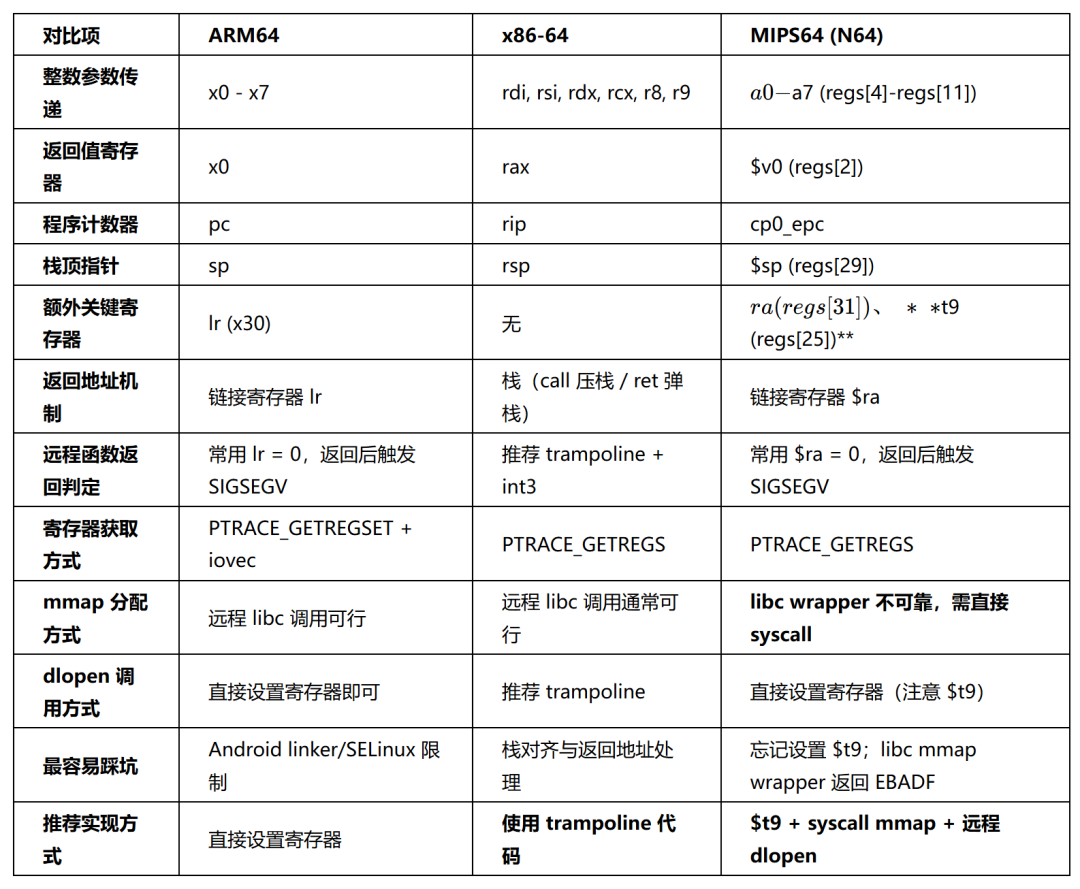
核心区别主要体现在四点:
1. 返回地址机制不同
- ARM64:有独立的链接寄存器
lr,直接设置 lr = 0,函数返回时跳到 0 触发 SIGSEGV,实现最直接。
- x86-64:没有链接寄存器,返回地址保存在栈上。手动伪造返回地址很容易破坏栈状态,因此更推荐写入 trampoline,让
call 指令自己完成压栈。
- MIPS64:类似 ARM64,有独立的
$ra 寄存器,可以直接把 $ra = 0 触发 SIGSEGV 来检测返回,不需要 trampoline。
2. 调用现场要求不同
- ARM64:远程函数调用模型最直观:设置
x0-x7、pc、lr,通常就能工作。
- x86-64:对栈对齐和调用现场非常敏感,尤其是
dlopen 这种复杂函数,手动改 rsp 很容易出错。
- MIPS64:必须同时设置
cp0_epc 和 $t9——这是 MIPS PIC 代码的硬性要求,$t9 参与函数序言的 $gp 计算,缺了它函数无法正常取到 GOT,几乎必然跑飞。
3. mmap 的调用方式差异最大
- ARM64:远程 libc
mmap() 通常可直接调用。
- x86-64:远程
mmap() 一般也能正常工作。
- MIPS64:远程 libc
mmap() wrapper 在这个环境下不可靠,会返回 EBADF。最终只能绕过 libc,直接 patch 一条 syscall 指令,走 __NR_mmap = 5009 的系统调用路径才稳定。
4. 结果判定约定不同
- ARM64 / x86-64:通过返回值本身的数值判断(比如
MAP_FAILED == -1)。
- MIPS64:syscall 用
$a3 作为成功/失败标志位,$a3 == 0 表示成功、$v0 是返回值;$a3 != 0 表示失败、$v0 是 errno。判 syscall 结果时不能光看 $v0。
可以记成一句话:
- ARM64:直接改寄存器,最省心
- x86-64:返回地址在栈上,最好上 trampoline
- MIPS64:别忘了 $t9,mmap 直接走 syscall
小结
ptrace 注入的核心流程在不同架构上是一致的,但真正决定是否稳定成功的,是各自 ABI、返回地址机制和运行时实现细节:
- ARM64:可以直接设置寄存器调用远程函数,利用
lr = 0 触发 SIGSEGV 检测返回
- x86-64:推荐使用 trampoline,在目标进程内执行
call,用 int3 检测返回
- MIPS64:除常规寄存器外必须设置
$t9,mmap 绕过 libc wrapper 直接走 syscall,dlopen 仍可远程调用

 发表于 2026-4-29 06:43:40
|
查看: 312|
回复: 0
发表于 2026-4-29 06:43:40
|
查看: 312|
回复: 0

