
Kimi-K2.6 是 Moonshot AI 在 4 月 20 日正式发布并开源的旗舰大语言模型,具备强大的长上下文推理、多模态理解和工具调用能力。本文将详细介绍如何使用 vLLM 部署 Kimi-K2.6 模型,并附上性能基准测试。
1. 模型速览
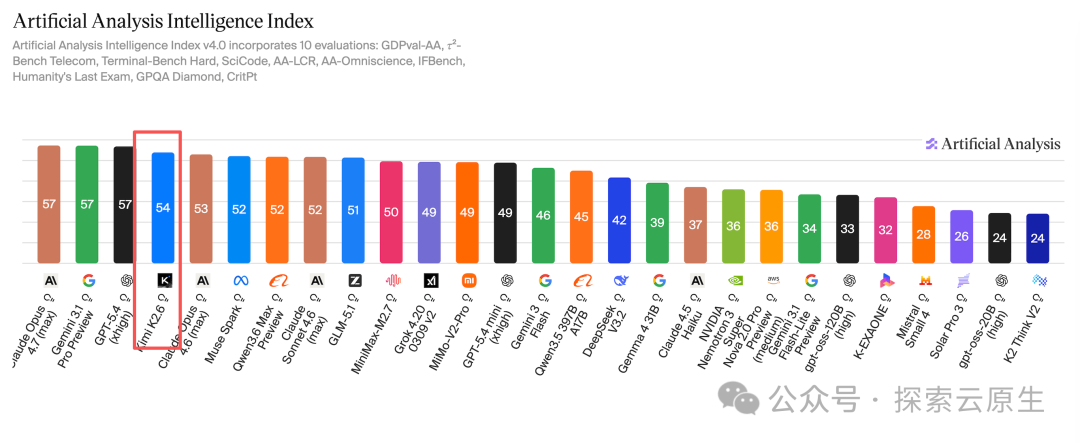
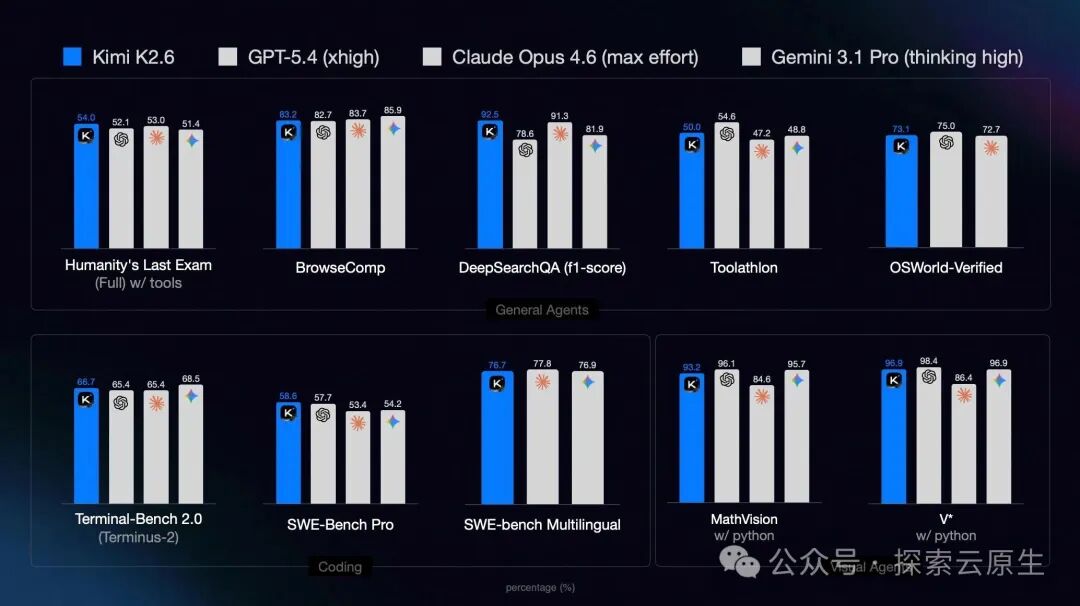
根据各大榜单排名以及实测表现,Kimi-K2.6 在多项评测中表现出色,是当前开源模型中的佼佼者。
在 Artificial Analysis Intelligence Index 中得分如下:
详细专项能力测评:
Arena AI Code Arena-WebDev 得分如下:
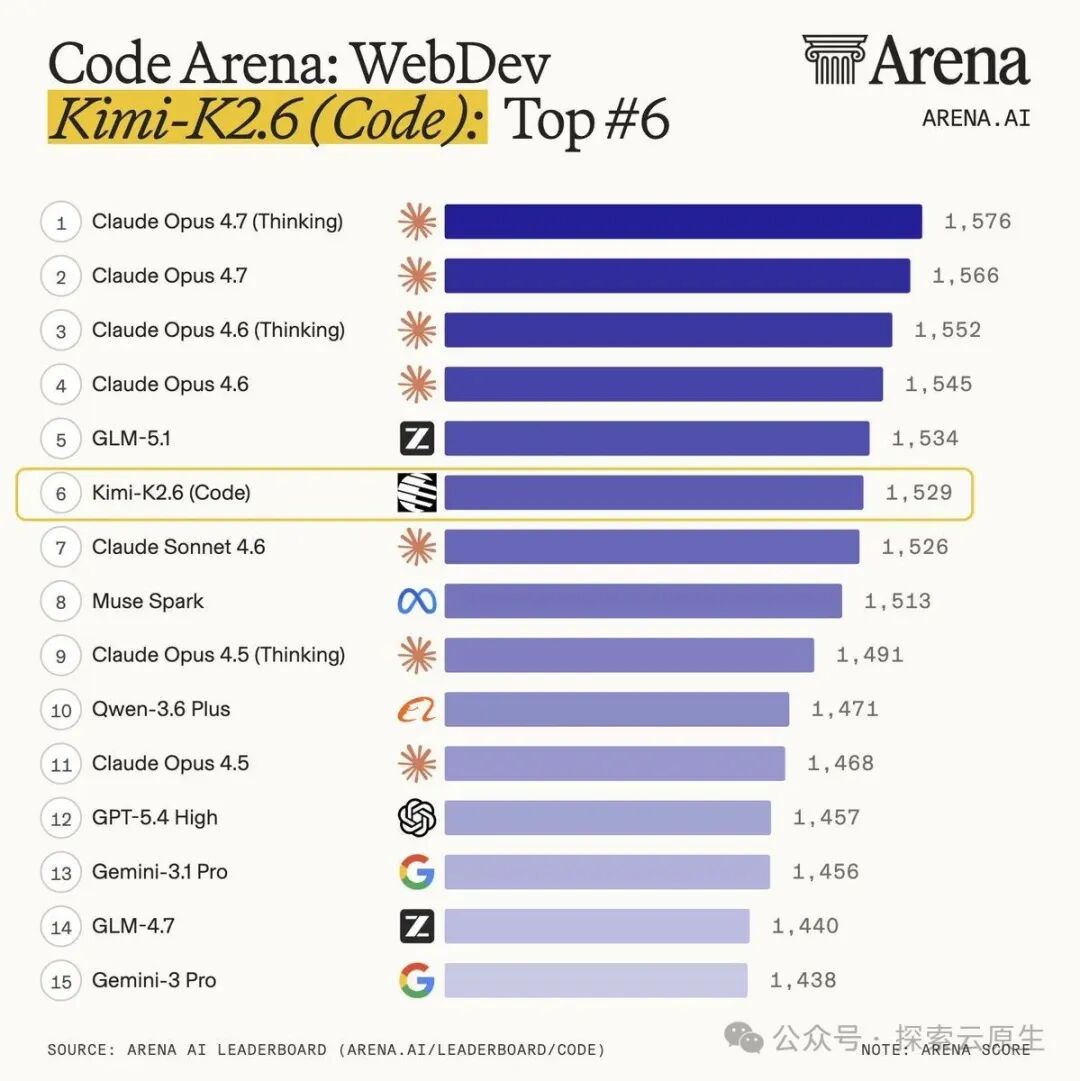
从榜单数据来看,Kimi-K2.6 和 GLM-5.1 各有千秋,二者也都基本达到了 Claude Opus 4.6 的水平。
2. 测试环境
本文所有测试均在以下环境完成:
+-----------------------------------------------------------------------------------------+
| GPU  Name                 Persistence-M | Bus-Id          Disp.A | Volatile Uncorr. ECC |
| Fan  Temp   Perf          Pwr:Usage/Cap |           Memory-Usage | GPU-Util  Compute M. |
|=========================================+========================+======================|
|   0  NVIDIA GB200                   On  |   00000008:01:00.0 Off |                    0 |
| N/A   42C    P0            395W / 1200W |   175750MiB / 189471MiB |    0%      Default |
+-----------------------------------------+------------------------+----------------------+
|   1  NVIDIA GB200                   On  |   00000009:01:00.0 Off |                    0 |
| N/A   42C    P0            369W / 1200W |   175366MiB / 189471MiB |    0%      Default |
+-----------------------------------------+------------------------+----------------------+
|   2  NVIDIA GB200                   On  |   00000018:01:00.0 Off |                    0 |
| N/A   41C    P0            354W / 1200W |   175366MiB / 189471MiB |    0%      Default |
+-----------------------------------------+------------------------+----------------------+
|   3  NVIDIA GB200                   On  |   00000019:01:00.0 Off |                    0 |
| N/A   42C    P0            375W / 1200W |   179133MiB / 189471MiB |    0%      Default |
+-----------------------------------------+------------------------+----------------------+
3. 模型下载
3.1 安装 HuggingFace CLI
首先安装 HuggingFace CLI 工具用于下载模型:
curl -LsSf https://hf.co/cli/install.sh | bash
3.2 下载模型
Kimi-K2.6 原生提供 Int4 精度版本,模型权重约需 595 GB 显存,加上推理时的 KV Cache,官方推荐最低显存为 714 GB。
H100 80G × 8 也能跑起来,但由于总显存只有 640 GB,余量较紧,上下文长度会受到一定限制。
# --local-dir 指定下载目录
hf download moonshotai/Kimi-K2.6 --local-dir /raid/lixd/models/kimi-k2.6

# 下载 EAGLE-3 投机解码模型
hf download lightseekorg/kimi-k2.6-eagle3 --local-dir /raid/lixd/models/kimi-k2.6-eagle3
4. vLLM 部署
4.1 Kubernetes 部署
由于单机多卡即可运行,因此在 Kubernetes 中可以直接使用 Deployment 进行部署:
使用 vllm/vllm-openai:v0.19.1-cu130 镜像即可
apiVersion: resource.k8s.io/v1
kind: ResourceClaimTemplate
metadata:
  name: kimi-k26-gpu-claim
  namespace: default
spec:
  spec:
    devices:
      requests:
      - name: gpu
        exactly:
          deviceClassName: gpu.nvidia.com # 匹配前面的 DeviceClass
          allocationMode: ExactCount
          count: 4 # 数量
---
apiVersion: apps/v1
kind: Deployment
metadata:
  name: kimi-k26
  namespace: default
spec:
  replicas: 1
  selector:
    matchLabels:
      app: kimi-k26
  template:
    metadata:
      labels:
        app: kimi-k26
    spec:
      containers:
      - name: vllm-server
        image: vllm/vllm-openai:v0.19.1-cu130
        command: ["/bin/bash"]
        args:
          - "-c"
          - |
            vllm serve /app/model \
              --tensor-parallel-size 4 \
              --tool-call-parser kimi_k2 \
              --reasoning-parser kimi_k2 \
              --enable-auto-tool-choice \
              --served-model-name Kimi-K2.6 \
              --trust-remote-code \
              --gpu-memory-utilization 0.90 \
              --attention-config.use_trtllm_ragged_deepseek_prefill=True \
              --host 0.0.0.0 \
              --port 8000
        resources:
          claims:
          - name: gpu
          limits:
            memory: "200Gi"
            cpu: "16"
          requests:
            memory: "100Gi"
            cpu: "8"
        ports:
        - containerPort: 8000
          name: http
        volumeMounts:
        - name: model-storage
          mountPath: /app/model
          readOnly: true
        - name: eagle-model-storage
          mountPath: /app/eagle-model
          readOnly: true
      resourceClaims:
      - name: gpu
        resourceClaimTemplateName: kimi-k26-gpu-claim
      volumes:
      - name: model-storage
        hostPath:
          path: /raid/lixd/models/kimi-k2.6
          type: Directory
      - name: eagle-model-storage
        hostPath:
          path: /raid/lixd/models/kimi-k2.6-eagle3
          type: Directory
---
apiVersion: v1
kind: Service
metadata:
  name: kimi-k26
  namespace: default
spec:
  selector:
    app: kimi-k26
  ports:
  - port: 8000
    targetPort: 8000
    nodePort: 30180
  type: NodePort
部署要点:
- 使用
ResourceClaimTemplate 声明 4 块 GPU,由 DRA 调度器自动分配
- 主模型和 EAGLE-3 投机解码模型分别通过
hostPath 挂载到 /app/model 和 /app/eagle-model
- Service 使用 NodePort 暴露,外部可通过节点 IP + 30180 访问
4.2 关键参数说明
| 参数 |
说明 |
--tensor-parallel-size |
张量并行数,通常等于 GPU 数量 |
--attention-config.use_trtllm_ragged_deepseek_prefill |
启用 TRT-LLM 优化的不规则 prefill,加速长上下文处理 |
--tool-call-parser kimi_k2 |
使用 Kimi-K2.6 工具调用解析器 |
--reasoning-parser kimi_k2 |
启用 Kimi-K2.6 推理能力解析 |
--enable-auto-tool-choice |
启用自动工具选择 |
--trust-remote-code |
信任模型中的远程代码 |
--gpu-memory-utilization |
GPU 显存利用率,建议 0.85–0.95 |
--speculative-config |
启用 EAGLE-3 投机解码(测试显示当前版本效果不佳,接受率仅 1.28%) |
5. 服务验证
5.1 基础验证
部署完成后,验证服务是否正常运行:
# 查看可用模型列表
curl http://10.108.198.155:8000/v1/models

# 基础对话测试
curl http://10.108.198.155:8000/v1/chat/completions \
  -H "Content-Type: application/json" \
  -d '{
    "model": "Kimi-K2.6",
    "messages": [
      {"role": "user", "content": "你好,请介绍一下你自己"}
    ],
    "max_tokens": 100,
    "temperature": 0.7
  }'
5.2 思考模式控制
Kimi-K2.6 支持开启/关闭思考模式,通过 chat_template_kwargs 参数控制。
"chat_template_kwargs": {"thinking": false}
开启思考模式(默认):
curl http://10.108.198.155:8000/v1/chat/completions \
  -H "Content-Type: application/json" \
  -d '{
    "model": "Kimi-K2.6",
    "messages": [
      {"role": "system", "content": "You are a helpful assistant."},
      {"role": "user", "content": "Summarize Kimi-K2.6 in one sentence."}
    ],
    "temperature": 1,
    "max_tokens": 4096
  }'
关闭思考模式:
curl http://10.108.198.155:8000/v1/chat/completions \
  -H "Content-Type: application/json" \
  -d '{
    "model": "Kimi-K2.6",
    "messages": [
      {"role": "system", "content": "You are a helpful assistant."},
      {"role": "user", "content": "Summarize Kimi-K2.6 in one sentence."}
    ],
    "temperature": 1,
    "max_tokens": 4096,
    "chat_template_kwargs": {"thinking": false}
  }'
5.3 多模态推理
Kimi-K2.6 支持视觉-语言多模态输入:
curl http://10.108.198.155:8000/v1/chat/completions \
  -H "Content-Type: application/json" \
  -d ' {
    "model": "Kimi-K2.6",
    "messages": [
      {"role": "system", "content": "You are a helpful assistant."},
      {"role": "user", "content": [
        {"type": "text", "text": "请描述这张图片的内容,并提取其中的关键信息。"},
        {"type": "image_url", "image_url": {"url": "https://ofasys-multimodal-wlcb-3-toshanghai.oss-accelerate.aliyuncs.com/wpf272043/keepme/image/receipt.png"}}
      ]}
    ],
    "temperature": 1,
    "max_tokens": 4096
  } '
6. 性能基准测试
6.1 测试方法
使用 vLLM 内置的 benchmark 工具进行测试:
# Prompt-heavy benchmark (8k input / 1k output)
vllm bench serve \
  --model /app/model \
  --served_model_name Kimi-K2.6 \
  --dataset-name random \
  --random-input 8000 \
  --random-output 1024 \
  --request-rate 10 \
  --num-prompts 32 \
  --trust-remote-code \
  --ignore-eos
6.2 测试结果
tip: install termplotlib and gnuplot to plot the metrics
============ Serving Benchmark Result ============
Successful requests:                     32
Failed requests:                         0
Request rate configured (RPS):           10.00
Benchmark duration (s):                  27.73
Total input tokens:                      256000
Total generated tokens:                  32768
Request throughput (req/s):              1.15
Output token throughput (tok/s):         1181.84
Peak output token throughput (tok/s):    1376.00
Peak concurrent requests:                32.00
Total token throughput (tok/s):          10414.96
---------------Time to First Token----------------
Mean TTFT (ms):                          162.09
Median TTFT (ms):                        142.44
P99 TTFT (ms):                           296.55
-----Time per Output Token (excl. 1st token)------
Mean TPOT (ms):                          24.35
Median TPOT (ms):                        24.46
P99 TPOT (ms):                           24.62
---------------Inter-token Latency----------------
Mean ITL (ms):                           24.35
Median ITL (ms):                         24.33
P99 ITL (ms):                            50.53
==================================================
关键指标解读:
| 指标 |
含义 |
测试结果 |
| TTFT |
Time To First Token,首 token 延迟 |
平均 162 ms |
| TPOT |
Time Per Output Token,每个 token 的生成时间 |
平均 24.4 ms |
| 吞吐量 |
Output token throughput |
1182 tok/s |
6.3 开启推测解码的测试
在 vLLM 启动参数中添加 --speculative-config 启用 EAGLE-3 投机解码:
vllm serve /app/model \
  --tensor-parallel-size 4 \
  --tool-call-parser kimi_k2 \
  --reasoning-parser kimi_k2 \
  --enable-auto-tool-choice \
  --served-model-name Kimi-K2.6 \
  --trust-remote-code \
  --gpu-memory-utilization 0.90 \
  --attention-config.use_trtllm_ragged_deepseek_prefill=True \
  --speculative-config '{"model":"/app/eagle-model","method":"eagle3","num_speculative_tokens":3}' \
  --host 0.0.0.0 \
  --port 8000
在此配置下再次运行基准测试,结果如下:
============ Serving Benchmark Result ============
Successful requests:                     32
Failed requests:                         0
Request throughput (req/s):              0.62
Output token throughput (tok/s):         631.18
Peak output token throughput (tok/s):    672.00
---------------Time to First Token----------------
Mean TTFT (ms):                          206.96
Median TTFT (ms):                        197.77
P99 TTFT (ms):                           315.71
-----Time per Output Token (excl. 1st token)------
Mean TPOT (ms):                          46.52
Median TPOT (ms):                        48.22
P99 TPOT (ms):                           48.52
---------------Speculative Decoding---------------
Acceptance rate (%):                     1.28
Acceptance length:                       1.04
Drafts:                                  31529
Draft tokens:                            94587
Accepted tokens:                         1212
==================================================
结果分析:
开启推测解码后,性能反而下降约 46%(吞吐量从 1182 tok/s 降至 631 tok/s)。根本原因是 EAGLE-3 投机模型的接受率仅 1.28%,远低于有效阈值(通常需要 60%+ 才有正收益)。
过低的接受率直接导致:
- 无效验证开销过大:94K+ 的 draft tokens 中只有 1.2K 被接受,大量 rejected drafts 的验证计算成为纯开销
- TPOT 翻倍:平均 TPOT 从 24.4 ms 增至 46.5 ms,每个 token 的生成时间被验证过程拉长
ps:本次测试开启推测解码后产生负收益,推测是当前 EAGLE-3 模型与 Kimi-K2.6 的适配参数或配置方式存在问题(1.28% 的接受率明显异常)。在官方给出更明确的配置指引前,不建议开启 推测解码功能。
7. 小结
Kimi-K2.6 是一个综合能力非常强的开源模型,长上下文、多模态、工具调用、推理能力都具备,部署起来也不算复杂,单机多卡就能跑。
对于编码任务来说,模型选择也比较简单:
- 对于纯代码生成任务,Claude 仍表现最佳;
- 若工作流需要频繁处理截图或 UI 视觉信息,Kimi-K2.6 的原生多模态能力是更自然的选择;
- 而 GLM-5.1 在后端复杂逻辑推理上稍有优势。
从 Artificial Analysis 等独立评测机构的榜单数据来看,Kimi-K2.6 和 GLM-5.1 各有千秋,二者也都基本达到了 Claude Opus 4.6 的水平。当然,各家发布时都喜欢标榜「超越 Claude」,但真落到实际使用上,Claude 的体感依旧是目前最稳的——不过最近网上关于 Claude "降智" 的吐槽也不少。
最后再扯一句题外话。从 GLM-5 到 GLM-5.1 再到这次的 Kimi-K2.6,国产大模型的迭代速度确实肉眼可见。虽然跟 OpenAI、Anthropic、Google 这"御三家"比,整体差距还在,但也算是"能够干活"了。
哦对,DeepSeek V4 什么时候发?(手动狗头)
 发表于 2026-4-25 06:38:20
|
查看: 1449|
回复: 0
发表于 2026-4-25 06:38:20
|
查看: 1449|
回复: 0

